
aemc
AEM Compose (Core & CLI)
- 53
- Apache-2.0
- 4 wk ago
Repo wttech/aemc, read from GitHub 1 min ago. wttech has not joined Take My Repo.
In short
wttech/aemc is a public repo on GitHub by wttech. AEM Compose (Core & CLI). It declares the Apache-2.0 license on GitHub. It is written mainly in Go, has 53 stars and last changed on 2026-10-23. Nobody has reviewed it on Take My Repo yet, which says nothing about its quality. Read from GitHub on 2026-11-23.

Manage AEM instances with ease.
CLI Tool · CRX Packages · OSGi Configs · JCR Nodes
Proudly sponsored by:

AEM Compose
AEMC is a versatile tool for managing Adobe Experience Manager (AEM) instances. With a comprehensive set of commands, it simplifies tasks such as working CRX packages, OSGi configurations, JCR repository nodes, and more. Its seamless integration with Terraform, Pulumi, and Ansible enhances automation capabilities.
- Reusable core designed to handle advanced dev-ops operations needed to manage AEM instances
- Various distributions based on core for context-specific use cases:
- CLI - for developer workstations, shell scripting
- AEM Project Quickstart - add development environment automation to the existing AEM projects
- Docker Example - for experiments only
- Terraform AEM Provider - set up with ease higher environments (VMs and AEM instances) in the cloud (AWS, Azure, GCP, etc.)
- Pulumi AEM Provider - working the same as Terraform AEM Provider but with Pulumi
- Ansible Collection/Modules - for managing higher AEM environments
- Packer Example - starting point for baking AWS EC2 image using Ansible
- Local Example - development & testing sandbox for AEM Compose project
- CLI - for developer workstations, shell scripting
- Fast & lightweight
- Usable on all operating systems and architectures without pre-installing any dependencies
References
- Blog Posts
- Talk at AdaptTo 2024 Conference - First-ever IaC Providers for AEM by Krystian Panek
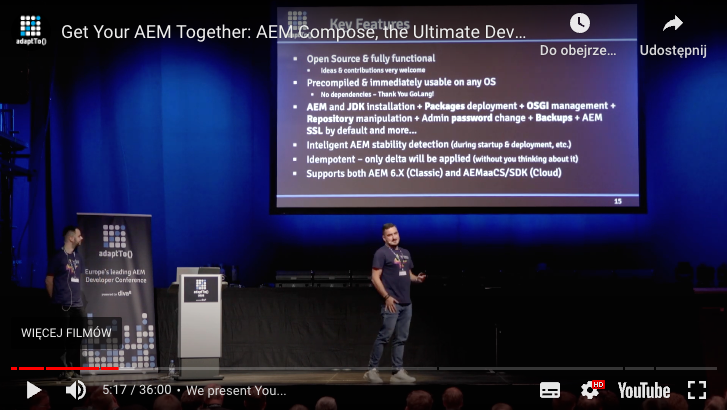
- Talk at AdaptTo 2023 Conference - Get Your AEM Together: AEM Compose, the Ultimate DevEx Tool by Tomasz Sobczyk & Krystian Panek
Table of Contents
- References
- Table of Contents
- Distributions
- Dependencies
- Configuration
- Concepts
- Examples
- Troubleshooting
- Contributing
- Authors
- License
Distributions
CLI - Overview
Provides complete set of commands to comfortably work with CRX packages, OSGi configurations, repository nodes and more.
Key assumptions:
- Idempotent and fast
- Rich configuration options
- Self-describing, both machine & human-readable
- Multiple input & output formats (text/yaml/json)
Main features:
- easy & declarative setup of:
- JDK (isolated, version tied to project)
- AEM instances (run modes, JVM & start opts, env & secret vars, Sling props, custom admin password)
- OSGi (configurations, bundles, components)
- Crypto Support, Trust Store, SSL by Default
- replication agents
- any repository nodes
- deploying AEM packages with:
- efficiently upload with optimized memory usage (constant and independent of package size)
- automatic workflow toggling - avoiding DAM asset renditions regeneration
- advanced snapshot handling - avoiding redeploying the same package by checksum verification
- customizable instance health checking
- building AEM packages with:
- source code change detection - avoiding rebuilding application when it is not needed (handled by Taskfile)
- making AEM instance backups (with restoring)
- advanced archive format to speed up performance and storage efficiency (ZSTD used by default)
- instance state aware - stopping, archiving then starting again AEM instances automatically (if needed)
- content synchronization between running instance and local file system
Worth knowing:
- On Windows use it with Git Bash (CMD and PowerShell are not supported nor tested)
CLI - Screenshots
Help command:

Instance commands:

Package commands:

Setup task:
- AEM instances are provisioned only when the configuration is changed
- AEM dispatcher set up using container engine, redeployed only when there are configuration changes as well
- Health checks executed to confirm the stability of the environment as a whole

CLI - AEM Project Quickstart
Supported project types:
-
with structure based on Adobe AEM Project Archetype, compatibility:
AEM Compose AEM Project Archetype >= 1.2.0 41, 42, 43, 47, 48, 51 -
with any type of structure, however afterwards only a little customizations in Taskfile.yml need to be done to reflect configuration related to built AEM application artifact path and AEM dispatcher files location,
-
empty folder; the project kind will be needed to be specified explicitly during scaffolding.
Run command below to install the AEM Compose tool in your project:
curl https://raw.githubusercontent.com/wttech/aemc/main/project-install.sh | shAfter successful installation, remember to always use the tool via wrapper script in the following way:
sh aemw [command]
Next scaffold the AEM Compose files in the project:
sh aemw project scaffold
Project scaffolding:
- sets up ready-to-use tasks powered by Task tool, which aggregate one or many AEM Compose CLI commands into useful procedures.
- provides configuration for provisioning AEM instances (installing service pack, setting replication agents, etc.).
- provides configuration for running AEM Dispatcher on Podman (by default) or Docker (remember to install one of these tools before running the setup task).
To list all available tasks, run:
sh taskw --list
Usually, the first steps to take are:
sh taskw init
sh taskw setup
IaaC Providers
The tool is designed to be used in Infrastructure as a Code (IaaC) solutions such as Terraform or Pulumi.
See separate projects based on AEM Compose:
- Terraform Provider: https://github.com/wttech/terraform-provider-aem
- Pulumi Provider: https://github.com/wttech/pulumi-aem
Ansible Collection
The tool is designed to be used in Ansible playbooks and roles.
See a separate project based on AEM Compose: https://github.com/wttech/aemc-ansible
Go Scripting
Consider implementing any application on top of AEM Compose API like using snippet below:
File: aem.go
package main

import "fmt"
import "os"
import aemc "github.com/wttech/aemc/pkg"

func main() {
    aem := aemc.DefaultAEM()
    instance, _ := aem.InstanceManager().NewByIDAndURL("remote_author", "http://admin:admin@192.168.1.2:4502")
    changed, err := instance.PackageManager().DeployWithChanged("/tmp/my-package.zip")
    if err != nil {
        fmt.Printf("cannot deploy package: %s\n", err)
        os.Exit(1)
    }
    if changed {
      if err := aem.InstanceManager().AwaitStartedOne(*instance); err != nil {
		  fmt.Printf("instance not stable after deploying package: %s\n", err)
		  os.Exit(1)
      }
    }
    fmt.Println("package deployed properly")
    os.Exit(0)
}
Then to run application use command:
go run aem.go
Dependencies
This tool is written in Go. Go applications are very often self-sufficient which means that they are not relying on platform-specific libraries/dependencies. The only requirement is to use proper tool binary distribution for each operating system and architecture. Check out releases page to review available binary distributions.
Configuration
Defaults
The tool tries to make configuration as much explicit as it could be to allow customization in an easy way.
Below are listed all available configuration options (source):
# AEM instances to work with
instance:

  # Full details of local or remote instances
  config:
    local_author:
      active: [[.Env.AEM_AUTHOR_ACTIVE | default true ]]
      http_url: [[.Env.AEM_AUTHOR_HTTP_URL | default "http://127.0.0.1:4502" ]]
      user: [[.Env.AEM_AUTHOR_USER | default "admin" ]]
      password: [[.Env.AEM_AUTHOR_PASSWORD | default "admin" ]]
      run_modes: [ local ]
      jvm_opts:
        - -server
        - -Djava.awt.headless=true
        - -Djava.io.tmpdir=[[canonicalPath .Path "aem/home/tmp"]]
        - -agentlib:jdwp=transport=dt_socket,server=y,suspend=n,address=[[.Env.AEM_AUTHOR_DEBUG_ADDR | default "0.0.0.0:14502" ]]
        - -Duser.language=en
        - -Duser.country=US
        - -Duser.timezone=UTC
      start_opts: []
      secret_vars:
        - ACME_SECRET=value
      env_vars:
        - ACME_VAR=value
      sling_props: []
    local_publish:
      active: [[.Env.AEM_PUBLISH_ACTIVE | default true ]]
      http_url: [[.Env.AEM_PUBLISH_HTTP_URL | default "http://127.0.0.1:4503" ]]
      user: [[.Env.AEM_PUBLISH_USER | default "admin" ]]
      password: [[.Env.AEM_PUBLISH_PASSWORD | default "admin" ]]
      run_modes: [ local ]
      jvm_opts:
        - -server
        - -Djava.awt.headless=true
        - -Djava.io.tmpdir=[[canonicalPath .Path "aem/home/tmp"]]
        - -agentlib:jdwp=transport=dt_socket,server=y,suspend=n,address=[[.Env.AEM_PUBLISH_DEBUG_ADDR | default "0.0.0.0:14503" ]]
        - -Duser.language=en
        - -Duser.country=US
        - -Duser.timezone=UTC
      start_opts: []
      secret_vars:
        - ACME_SECRET=value
      env_vars:
        - ACME_VAR=value
      sling_props: []

  # Tuning performance & reliability
  # 'auto'     - for more than 1 local instances - 'serial', otherwise 'parallel'
  # 'parallel' - for working with remote instances
  # 'serial'   - for working with local instances
  processing_mode: auto

  # HTTP client settings
  http:
    timeout: 10m
    debug: false
    disable_warn: true

  # State checking
  check:
    # Time to wait before first state checking (to avoid false-positives)
    warmup: 1s
    # Time to wait for next state checking
    interval: 6s
    # Number of successful check attempts that indicates end of checking
    done_threshold: 4
    # Max time to wait for the instance to be healthy after executing the start script or e.g deploying a package
    await_started:
      timeout: 30m
    # Max time to wait for the instance to be stopped after executing the stop script
    await_stopped:
      timeout: 10m
    # Max time in which socket connection to instance should be established
    reachable:
      timeout: 3s
    # Bundle state tracking
    bundle_stable:
      symbolic_names_ignored: []
    # OSGi events tracking
    event_stable:
      # Topics indicating that instance is not stable
      topics_unstable:
        - "org/osgi/framework/ServiceEvent/*"
        - "org/osgi/framework/FrameworkEvent/*"
        - "org/osgi/framework/BundleEvent/*"
      # Ignored service names to handle known issues
      details_ignored:
        - "*.*MBean"
        - "org.osgi.service.component.runtime.ServiceComponentRuntime"
        - "java.util.ResourceBundle"
      received_max_age: 5s
    # OSGi components state tracking
    component_stable:
      skip: false
      pids:
        include: ['com.day.crx.packaging.*', 'org.apache.sling.installer.*']
        exclude: ['org.apache.sling.installer.hc.*', 'org.apache.sling.installer.core.impl.console.*']
        match:
          "disabled": []
          "no config": []
          "unsatisfied (reference)": []
          "satisfied": []
    # Sling Installer tracking
    installer:
      # JMX state checking
      state: true
      # Pause Installation nodes checking
      pause: true

  # Managed locally (set up automatically)
  local:
    # Wait only for those instances whose state has been changed internally (unaware of external changes)
    await_strict: true

    # Current runtime dir (Sling launchpad, JCR repository)
    unpack_dir: "aem/home/var/instance"
    # Archived runtime dir (AEM backup files '*.aemb.zst')
    backup_dir: "aem/home/var/backup"

  # Status discovery (timezone, AEM version, etc)
  status:
    timeout: 500ms

  # JCR Repository
  repo:
    property_change_ignored:
      # AEM assigns them automatically
      - "jcr:created"
      - "cq:lastModified"
      # AEM encrypts it right after changing by replication agent setup command
      - "transportPassword"

  # CRX Package Manager
  package:
    # Force re-uploading/installing of snapshot AEM packages (just built / unreleased)
    snapshot_patterns: [ "**/*-SNAPSHOT.zip" ]
    # Use checksums to avoid re-deployments when snapshot AEM packages are unchanged
    snapshot_deploy_skipping: true
    # Disable following workflow launchers for a package deployment time only
    toggled_workflows: [/libs/settings/workflow/launcher/config/asset_processing_on_sdk_*,/libs/settings/workflow/launcher/config/update_asset_*,/libs/settings/workflow/launcher/config/dam_*]
    # Also sub-packages
    install_recursive: true
    # Use slower HTML endpoint for deployments but with better troubleshooting
    install_html:
      enabled: false
      # Print HTML directly to console instead of writing to file
      console: false
      # Fail on case 'installed with errors'
      strict: true
    # Number of changes after which the commit to the repository is performed
    install_save_threshold: 1024
    # Allows to relax dependency handling if needed
    install_dependency_handling: required
    # Controls how 'rep:policy' nodes are handled during import
    install_ac_handling: ''

  # OSGi Framework
  osgi:
    bundle:
      install:
        start: true
        start_level: 20
        refresh_packages: true

  # Crypto Support
  crypto:
    key_bundle_symbolic_name: com.adobe.granite.crypto.file

  # Workflow Manager
  workflow:
    launcher:
      lib_root: /libs/settings/workflow/launcher
      config_root: /conf/global/settings/workflow/launcher
      toggle_retry:
        timeout: 10m
        delay: 10s

java:
  # Require following versions before e.g running AEM instances
  version_constraints: [">= 1.8, < 1.9", ">= 11, < 12", ">= 17, < 18", ">= 21, < 22"]

  # Pre-installed local JDK dir
  # a) keep it empty to download open source Java automatically for current OS and architecture
  # b) set it to absolute path or to env var '[[.Env.JAVA_HOME]]' to indicate where closed source Java like Oracle is installed
  home_dir: ""

  # Auto-installed JDK options
  download:
    # Source URL with template vars support
    url: "https://github.com/adoptium/temurin11-binaries/releases/download/jdk-11.0.25%2B9/OpenJDK11U-jdk_[[.Arch]]_[[.Os]]_hotspot_11.0.25_9.[[.ArchiveExt]]"
    # Map source URL template vars to be compatible with Adoptium Java
    replacements:
      # Var 'Os' (GOOS)
      "darwin": "mac"
      # Var 'Arch' (GOARCH)
      "x86_64": "x64"
      "amd64": "x64"
      "386": "x86-32"
      # enforce non-ARM Java as some AEM features are not working on ARM (e.g Scene7)
      "arm64": "x64"
      "aarch64": "x64"

base:
  # Location of temporary files (downloaded AEM packages, etc)
  tmp_dir: aem/home/tmp
  # Location of supportive tools (downloaded Java, OakRun, unpacked AEM SDK)
  tool_dir: aem/home/opt

log:
  level: info
  timestamp_format: "2006-01-02 15:04:05"
  full_timestamp: true

input:
  format: yml
  file: STDIN

output:
  format: text
  log:
    # File path of logs written especially when output format is different than 'text'
    file: aem/home/var/log/aem.log
    # Controls where outputs and logs should be written to when format is 'text' (console|file|both)
    mode: console

vendor:
  # AEM instance source files
  quickstart:
    # AEM SDK ZIP or JAR
    dist_file: 'aem/home/lib/{aem-sdk,cq-quickstart}-*.{zip,jar}'
    # AEM License properties file
    license_file: "aem/home/lib/license.properties"

  # JDK used to: run AEM instances, build OSGi bundles, assemble AEM packages
  java:
    # Require following versions before e.g running AEM instances
    version_constraints: [">= 1.8, < 1.9", ">= 11, < 12", ">= 17, < 18", ">= 21, < 22"]

    # Pre-installed local JDK dir
    # a) keep it empty to download open source Java automatically for current OS and architecture
    # b) set it to absolute path or to env var '[[.Env.JAVA_HOME]]' to indicate where closed source Java like Oracle is installed
    home_dir: ""

    # Auto-installed JDK options
    download:
      # Source URL with template vars support
      url: "https://github.com/adoptium/temurin11-binaries/releases/download/jdk-11.0.25%2B9/OpenJDK11U-jdk_[[.Arch]]_[[.Os]]_hotspot_11.0.25_9.[[.ArchiveExt]]"
      # Map source URL template vars to be compatible with Adoptium Java
      replacements:
        # Var 'Os' (GOOS)
        "darwin": "mac"
        # Var 'Arch' (GOARCH)
        "x86_64": "x64"
        "amd64": "x64"
        "386": "x86-32"
        # enforce non-ARM Java as some AEM features are not working on ARM (e.g Scene7)
        "arm64": "x64"
        "aarch64": "x64"

  # Oak Run tool options (offline instance management)
  oak_run:
    download_url: "https://repo1.maven.org/maven2/org/apache/jackrabbit/oak-run/1.72.0/oak-run-1.72.0.jar"
    store_path: "crx-quickstart/repository/segmentstore"

# Source files
quickstart:
  # AEM SDK ZIP or JAR
  dist_file: "aem/home/lib/{aem-sdk,cq-quickstart}-*.{zip,jar}"
  # AEM License properties file
  license_file: "aem/home/lib/license.properties"

# Content clean options
content:
  clean:
    # File patterns to be deleted
    files_deleted:
      - patterns:
          - "**/.vlt"
          - "**/.vlt*.tmp"
          - "**/install/*.jar"
    # File patterns to be flattened
    files_flattened:
      - "**/_cq_design_dialog/.content.xml"
      - "**/_cq_dialog/.content.xml"
      - "**/_cq_htmlTag/.content.xml"
      - "**/_cq_template/.content.xml"
    # Property patterns to be skipped, removed from cleaned file
    properties_skipped:
      - patterns: "jcr:uuid"
        excluded_paths: [ "**/home/users/*", "**/home/groups/*" ]
      - patterns: "cq:lastModified*"
        excluded_paths: [ "**/content/experience-fragments/*" ]
      - patterns: [ "dam:sha1", "dam:size" ]
        included_paths: [ "**/content/dam/*.svg/*" ]
      - patterns:
          - "jcr:lastModified*"
          - "jcr:created*"
          - "jcr:isCheckedOut"
          - "cq:lastReplicat*"
          - "cq:lastRolledout*"
          - "dam:extracted"
          - "dam:assetState"
          - "dc:modified"
          - "*_x0040_*"
          - "cq:name"
          - "cq:parentPath"
          - "dam:copiedAt"
          - "dam:parentAssetID"
          - "dam:relativePath"
    # Mixin type patterns to be skipped, removed from cleaned file
    mixin_types_skipped:
      - patterns:
          - "cq:ReplicationStatus"
          - "mix:versionable"
    # Unused namespaces to be skipped, removed from cleaned file
    namespaces_skipped: true
Note that environment variables may be injected in any part of config file. Environment variables could be defined in one or many dotenv files.
Overriding default configuration
By default, the VCS-tracked file is loaded (aem/default/etc). However, occasionally developers might want to override the default config file and load a VCS-ignored file instead (aem/home/etc/aem.yml).
To do so, run the command:
sh aemw config init
Configuration precedence
All configuration options specified in file aem.yml could be overridden by environment variables.
Simply add prefix AEM_ then each level of nested YAML object join with _ and lowercase the name of each object.
For example: instance.local.quickstart.dist_file could be overridden by environment variable AEM_INSTANCE_LOCAL_QUICKSTART_DIST_FILE
Also note that some configuration options may be ultimately overridden by CLI flags, like --output-format.
Context-specific customization
By default, fail-safe options are in use. However, consider using the configuration options listed below to achieve a more desired tool experience.
Improving performance
export AEM_INSTANCE_PROCESSING_MODE=parallelThis setting will significantly reduce command execution time. Although be aware that when deploying heavy AEM packages like Service Packs on the same machine in parallel, a heavy load could be observed, which could lead to unpredicted AEM CMS and AEM Compose tool behavior.
Increasing verbosity
export AEM_OUTPUT_VALUE=ALLSetting this environment variable will instruct the tool to request from the AEM instance descriptive information about the recently executed command subject.
For example, if a recently executed command was sh aemw package deploy my-package.zip -A the AEM Compose tool after doing the actual package deployment will request from CRX Package Manager the exact information about just deployed package.
This feature is beneficial for clarity and debugging purposes.
Installing content packages
To install larger AEM packages that may include content pages, assets, and more, you can adjust the HTTP timeout setting.
By default, the timeout is set to 10m, but you have the option to increase it (e.g., to 3h) or disable it completely (by using 0).
To set the timeout for a single AEMC command, use the following syntax:
AEM_INSTANCE_HTTP_TIMEOUT=0 sh aemw package deploy --file my-package.zip
It's important to be aware that AEMaaCS also has its own timeout for requests made to the Package Manager UI. For detailed information, please refer to the documentation.
To skip the instance health check after running a command that would normally trigger it, AEM_INSTANCE_CHECK_SKIP environment variable can be used. This can save a lot of time when deploying a lot of packages sequentially.
To skip the instance health check for a single AEMC command, use the following syntax:
AEM_INSTANCE_CHECK_SKIP=true sh aemw package deploy --file my-package.zip
Installing packages with troubleshooting
Starting from version 1.4.0 (see #177), AEMC now supports AEM package installations using an HTML report serving endpoint, similar to CRX Package Manager's. While this method may result in slightly extended installation times, it provides a comprehensive HTML report detailing the package installation process.
This new feature offers two distinct modes for leveraging its benefits:
-
Saving HTML report to file:
AEM_INSTANCE_PACKAGE_INSTALL_HTML_ENABLED=true sh aemw package deploy --file my-package.zip
-
Direct console output of HTML report:
AEM_INSTANCE_PACKAGE_INSTALL_HTML_ENABLED=true AEM_INSTANCE_PACKAGE_INSTALL_HTML_CONSOLE=true sh aemw package deploy --file my-package.zip
Concepts
Local vs Remote Instances
AEMC distinguishes between local and remote AEM instances:
| Type | Description | Operations |
|---|---|---|
| Local | Instances running on developer's machine, fully managed by AEMC | Create, Start, Stop, Delete, Backup, filesystem access, JVM options, run modes |
| Remote | Any AEM instance accessible via HTTP (cloud, VMs, etc.) | HTTP-based operations only: packages, OSGi, repository, replication |
Commands like instance create, start, stop, delete, backup operate only on local instances. Commands like package deploy, osgi config, repo node work with any instance.
Instance ID Naming Convention
Each instance has a unique ID following the pattern: {location}_{role}[_{classifier}]
| Component | Required | Values | Description |
|---|---|---|---|
| location | Yes | local, int, stg, prod, or custom |
Environment where instance runs |
| role | Yes | author, publish |
AEM instance role |
| classifier | No | 1, 2, preview, or custom |
Distinguishes multiple instances with same location and role |
⚠️ Important: The
locallocation prefix is required for local instance management commands (aem instance create,start,stop,launch,delete,backup, etc.).Instances with any other location (e.g.,
int_,stg_,prod_) are treated as remote and will be skipped by these commands, even if theirhttp_urlpoints to localhost.
Example Instance IDs
| ID | Description |
|---|---|
local_author |
Local author instance (developer machine) |
local_publish |
Local publish instance (developer machine) |
int_author |
Integration environment author |
int_publish |
Integration environment publish |
int_publish_preview |
Integration publish preview instance |
stg_author |
Staging environment author |
prod_publish_1 |
Production publish instance #1 |
prod_publish_2 |
Production publish instance #2 |
prod_author_us |
Production author for US region |
Using Instance IDs
Instance IDs can be used in multiple places:
1. CLI flags:
# Target specific instance by ID
sh aemw package deploy --file my-package.zip --instance-id local_author

# Target by URL (ad-hoc)
sh aemw package deploy --file my-package.zip --instance-url http://localhost:4502

# Filter by role
sh aemw instance status --instance-author   # Only author instances
sh aemw instance status --instance-publish  # Only publish instances
2. Configuration in aem.yml:
instance:
  config:
    local_author:
      http_url: http://127.0.0.1:4502
      user: admin
      password: admin
      run_modes: [ local ]
    local_publish:
      http_url: http://127.0.0.1:4503
      user: admin
      password: admin
    int_author:
      http_url: https://author.int.example.com
      user: admin
      password: ${AEM_INT_PASSWORD}
    int_publish:
      http_url: https://publish.int.example.com
      user: admin
      password: ${AEM_INT_PASSWORD}
3. Environment variables (override config):
# Activate/deactivate specific instances
export AEM_INSTANCE_CONFIG_LOCAL_AUTHOR_ACTIVE=true
export AEM_INSTANCE_CONFIG_LOCAL_PUBLISH_ACTIVE=false
export AEM_INSTANCE_CONFIG_INT_AUTHOR_ACTIVE=true
Examples
Managing Local Instances
# Create and start local AEM instances
sh aemw instance create
sh aemw instance start

# Or do both in one command
sh aemw instance launch

# Check instance status
sh aemw instance status

# Stop instances
sh aemw instance stop

# Delete instances (removes all data)
sh aemw instance delete
Deploying Packages
# Deploy a single package
sh aemw package deploy --file my-package.zip

# Deploy to specific instance
sh aemw package deploy --file my-package.zip --instance-id local_author

# Deploy multiple packages
sh aemw package deploy --file pkg1.zip --file pkg2.zip

# Deploy from URL
sh aemw package deploy --url https://example.com/my-package.zip
OSGi Configuration
# List all bundles
sh aemw osgi bundle list

# Check specific bundle status
sh aemw osgi bundle read --symbolic-name com.example.core

# Set OSGi configuration
sh aemw osgi config save --pid com.example.MyService --input-string "enabled: true"
Repository Operations
# Read node properties
sh aemw repo node read --path /content/my-site

# Copy content between instances
sh aemw content copy --filter-roots /content/my-site --instance-target-id local_publish
Content Synchronization
Commands under sh aemw content (alias cnt) keep JCR content on a running instance and in the local file system (FileVault serialization under a jcr_root directory) in sync.
They are the replacement for the legacy vlt checkout / vlt update / vlt commit workflow, and unlike VLT they need no .vlt metadata, checkout step or working copy.
| Command | Alias | Description |
|---|---|---|
content pull |
pl, sync |
Download content from an instance and unpack it under jcr_root (like vlt checkout/update) |
content push |
ps |
Upload content from jcr_root (directory or single file) to instance(s) (like vlt commit) |
content clean |
cln |
Normalize local content (remove volatile properties, .vlt files, etc.) |
content download |
dl |
Download content from an instance as a package ZIP file |
content copy |
cp |
Copy content from one instance to other instance(s) |
The local path passed with --dir / --file / --path must contain jcr_root (typically ui.content/src/main/content/jcr_root/...).
The Vault filter root is derived automatically from that path, e.g. .../jcr_root/content/my-site becomes /content/my-site.
# Pull a directory (a "checkout"/"update"); --path accepts a directory or a file
sh aemw content pull --dir ui.content/src/main/content/jcr_root/content/my-site

# Pull and normalize the content (see 'content.clean' in the configuration)
sh aemw content pull --dir ui.content/src/main/content/jcr_root/content/my-site --clean

# Pull and remove local content that no longer exists on the instance
sh aemw content pull --dir ui.content/src/main/content/jcr_root/content/my-site --clean --replace

# Pull a single file from a specific instance
sh aemw content pull --file ui.content/src/main/content/jcr_root/content/my-site/.content.xml --instance-id local_author

# Pull using explicit Vault filter roots instead of deriving them from the path
sh aemw content pull --dir ui.content/src/main/content/jcr_root/content --filter-roots /content/my-site

# Push a directory (a "commit") to all instances
sh aemw content push --dir ui.content/src/main/content/jcr_root/content/my-site

# Push a single file to a specific instance, normalizing it first
sh aemw content push --file ui.content/src/main/content/jcr_root/content/my-site/.content.xml --clean --instance-id local_author

# Push overriding Vault filter mode (replace, merge or update)
sh aemw content push --dir ui.content/src/main/content/jcr_root/content/my-site --filter-mode merge

# Clean content already present on the file system
sh aemw content clean --dir ui.content/src/main/content/jcr_root/content/my-site

# Download content as a package ZIP
sh aemw content download --filter-roots /content/my-site --target-file my-site.zip

# Copy content to another instance (by ID or ad-hoc URL)
sh aemw content copy --filter-roots /content/my-site --instance-target-id local_publish
sh aemw content copy --filter-roots /content/my-site --instance-target-url http://localhost:4503
Notes:
pull,downloadandcopyoperate on one instance (selected with--instance-id,--instance-url,--instance-author,--instance-publish);pushtargets all selected instances.--dir,--fileand--pathare mutually exclusive; one of them is required forpull,pushandclean.--filter-rootsand--filter-fileare mutually exclusive;downloadandcopyrequire one of them.- Content is only normalized when
--cleanis given; rules are configured in thecontent.cleansection.
Instance Backups
Backups allow you to save and restore the complete state of local AEM instances.
Format: Backups use Zstandard (zstd) compression - optimized for excellent compression ratio with very fast decompression speed. Files are stored in aem/home/var/backup directory with .aemb.tar.zst extension.
Automatic instance handling: All backup commands automatically stop running instances before operation and restart them afterwards. No manual stop/start is required.
Basic Commands
# List all available backups
sh aemw instance backup list

# Create backup of a single instance
sh aemw instance backup make --instance-id local_author

# Create backup with custom file path
sh aemw instance backup make --instance-id local_author --file my-backup.aemb.tar.zst

# Restore instance from backup (instance must not exist)
sh aemw instance backup use --instance-id local_author

# Restore from specific backup file
sh aemw instance backup use --instance-id local_author --file my-backup.aemb.tar.zst

# Restore and delete existing instance first
sh aemw instance backup use --instance-id local_author --delete-created
Backup & Restore Cycle
Backups enable safe experimentation - break your instance, restore in 10-15 minutes:
# 1. Save current state before experimenting
sh aemw instance backup perform

# 2. Experiment freely (install packages, change configs, break things...)
# ...

# 3. Something went wrong? Delete and restore from backup
sh aemw instance delete --kill
sh aemw instance backup restore
Use cases:
- Safe experimentation with risky configurations or packages
- Quick recovery from broken instances without full reinstall
- Testing different AEM versions or configurations
- Sharing pre-configured instances via cloud storage (S3, GCS, Azure Blob)
Backup file naming: {role}[-{classifier}]-{aem_version}-{timestamp}.aemb.tar.zst
Example: author-6.5.21-20260209-143022.aemb.tar.zst
Replication agents
-
Configuring publish agent on AEM author:
sh aemw repl agent setup -A --location "author" --name "publish" --input-string "
enabled: true
transportUri: http://localhost:4503/bin/receive?sling:authRequestLogin=1
transportUser: admin
transportPassword: admin
userId: admin
"
-
Configuring flush agent on AEM publish:
sh aemw repl agent setup -P --location "publish" --name "flush" --input-string "
enabled: true
transportUri: http://localhost/dispatcher/invalidate.cache
protocolHTTPHeaders:
- 'CQ-Action: {action}'
- 'CQ-Handle: {path}'
- 'CQ-Path: {path}'
- 'Host: flush'
"
If needed, update
localhostto the value on which AEM dispatcher is available, e.g.localhost:8080.
Crypto Support
AEM Compose supports managing Crypto Support for encrypting/decrypting sensitive values.
Setup keys
To set up Crypto keys (required for encryption/decryption to work consistently across environments):
sh aemw crypto setup --hmac-file aem/home/lib/crypto/data/hmac --master-file aem/home/lib/crypto/data/master
Protect (encrypt) a value
sh aemw crypto protect --value "secret"Unprotect (decrypt) a value
Note: Unprotect is only available on AEM 6.5 LTS and AEM Cloud SDK.
sh aemw crypto unprotect --value "{encrypted_value}"SSL by Default
AEM Compose supports SSL by Default feature of AEM.
This feature requires:
- certificate file in PEM format
- private key file in DER or PEM format
- password for keystore (has to be the same for each invocation of the tool)
- password for truststore (can be different for each invocation of the tool)
- hostname for HTTPS connector (used by AEM to check if the setup was successful; has to be reachable by AEM)
- port for HTTPS connector
To set up SSL by Default, run:
sh aemw ssl setup \
   --instance-author
   --keystore-password password \
   --truststore-password password1 \
   --certificate-file localhost.crt \
   --private-key-file localhostprivate.key \
   --https-hostname localhost \
   --https-port 8443

sh aemw ssl setup \
   --instance-publish
   --keystore-password password \
   --truststore-password password1 \
   --certificate-file localhost.crt \
   --private-key-file localhostprivate.key \
   --https-hostname localhost \
   --https-port 9443
Above example uses the self-signed certificate created as per the AEM docs.
See the reference documentation: AEM 6.5 > Administering Guide > SSL by Default
For local environment remember to set different port numbers for author and publish instances.
Global Trust Store
AEM Compose supports managing the trust store of AEM instances.
This feature supports:
-
creation of the general trust store if it does not exist
sh aemw gts create --password PASSWORD_HERE -A
-
getting the general trust store status
sh aemw gts status -A
-
adding a certificate to the general trust store
sh aemw gts certificate add --path <path> -A
This command will add a certificate to the general trust store only if not exists in trust store and will return the alias of the certificate.
Command certificate add supports certificates in PEM and DER formats.
-
reading a certificate from the general trust store (by alias)
sh aemw gts certificate read --alias <alias> -A
-
removing a certificate from the general trust store (by alias)
sh aemw gts certificate remove --alias <alias> -A
Troubleshooting
Migration from Gradle plugins
If you're migrating from Gradle AEM Plugin you may run into issue with setting up dispatcher. In case of error when running task dispatcher:start or dispatcher:setup:
2024-01-22 16:37:23 dispatcher  | 2024/01/22 15:37:23 Dispatcher configuration validation failed:
2024-01-22 16:37:23 dispatcher  | 2024/01/22 15:37:23   /mnt/dev/src/conf.d/variables/default.vars: lstat /etc/httpd.extra: no such file or directory
2024-01-22 16:37:23 dispatcher  |
2024-01-22 16:37:23 dispatcher  | ERROR Mon Jan 22 15:37:23 UTC 2024 Configuration invalid, please fix and retry,
2024-01-22 16:37:23 dispatcher  |               Line numbers reported are correct for your configuration files.
Check if there is a broken symlink/file in dispatcher/src/variables/default.vars. If the file exists, delete it and
run the task again.
Exception while unpacking dispatcher on Linux
If you're setting up your instance for the first time on a Linux OS (i.e. Ubuntu with Gnome Shell), you may stumble upon the following error:
INFO[2025-02-27 13:17:09] preparing new SDK 'aem/home/lib/aem-sdk-2025.2.19687.20250225T164325Z-250100.zip'
INFO[2025-02-27 13:17:09] unpacking SDK ZIP 'aem/home/lib/aem-sdk-2025.2.19687.20250225T164325Z-250100.zip' to dir 'aem/home/opt/sdk'
INFO[2025-02-27 13:17:09] unpacked SDK ZIP 'aem/home/lib/aem-sdk-2025.2.19687.20250225T164325Z-250100.zip' to dir 'aem/home/opt/sdk'
INFO[2025-02-27 13:17:09] unpacking SDK dispatcher tools using script 'aem/home/opt/sdk/aem-sdk-dispatcher-tools-2.0.235-unix.sh' to dir 'aem/home/opt/sdk/dispatcher'
# Failed to parse arguments: Unknown option -title
ERRO[2025-02-27 13:17:10] cannot run SDK dispatcher tools unpacking script 'aem/home/opt/sdk/aem-sdk-dispatcher-tools-2.0.235-unix.sh': exit status 1
getting started
  AEM Compose project is not yet ready to use!

  Be sure to provide AEM files (SDK ZIP or Quickstart JAR + License + Service Packs) to directory 'aem/home/lib'.
task: Failed to run task "init": exit status 1
Important line is Unknown option -title.
To fix this, make sure that xterm is installed and available on your system, and re-run the task.
Contributing
Issues reported or pull requests created will be very appreciated.
- Fork plugin source code using a dedicated GitHub button.
- See development guide
- Do code changes on a feature branch created from main branch.
- Create a pull request with a base of main branch.
Authors
- Creator, owner, and maintainer: Krystian Panek
- Consultancy: Tomasz Sobczyk, Maciej Majchrzak
- Contributors: <see all>
License
AEM Compose is licensed under the Apache License, Version 2.0 (the "License")
Questions
What is aemc?
wttech/aemc is a public repo on GitHub by wttech. AEM Compose (Core & CLI).
Is aemc open source?
It declares the Apache-2.0 license on GitHub.
Does aemc run on macOS, Windows or Linux?
Its maker tagged it for macOS, Windows and Linux, or as Docker or cross-platform. That is declared by the maker; Take My Repo has not tested it.
How do I install aemc?
Open "Take it" on its page: Take My Repo writes an install plan for your machine and hands it to your AI agent (Claude Code, Codex or Cursor), which asks you before each step. Take My Repo has not tested it on any machine.
Is aemc still maintained?
Its last change on GitHub was on 2026-10-23. GitHub counts 52 open issues and pull requests. Take My Repo does not judge from that whether it is maintained.
What do people who ran aemc say?
Nobody has reviewed it on Take My Repo yet, which says nothing about its quality.