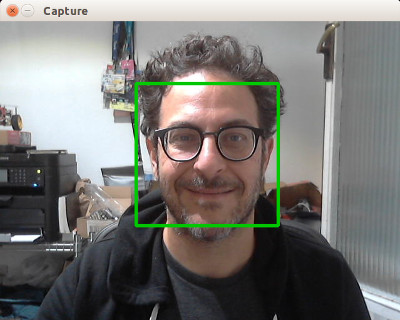
CameraCapture

CameraCapture
ccap `(C)amera(CAP)ture` is a simple and easy-to-use C/C++ camera capture library designed to provide you with simple and efficient camera data access. It currently supports Windows macOS and Linux.
- 191
- MIT
- 3 d ago
Repo wysaid/CameraCapture, read from GitHub 3 h ago. wysaid has not joined Take My Repo.
In short
wysaid/CameraCapture is a public repo on GitHub by wysaid. ccap `(C)amera(CAP)ture` is a simple and easy-to-use C/C++ camera capture library designed to provide you with simple and efficient camera data access. It currently supports Windows macOS and Linux. It declares the MIT license on GitHub. It is written mainly in C++, has 191 stars and last changed on 2026-11-19. Nobody has reviewed it on Take My Repo yet, which says nothing about its quality. Read from GitHub on 2026-11-22.
In the maintainer's words. Shown from GitHub; Take My Repo does not keep a copy.
ccap (CameraCapture)
A high-performance, lightweight cross-platform camera capture library with hardware-accelerated pixel format conversion, supporting both camera capture and video file playback (Windows/macOS). On Windows, ccap now fully supports both DirectShow and Media Foundation, with DirectShow remaining the default for strong virtual-camera compatibility. Provides complete C++ and pure C interfaces, plus Rust bindings.
🌐 Official Website: ccap.work
Table of Contents
- Features
- Quick Start
- System Requirements
- Examples
- API Reference
- Testing
- Build and Install
- Contributors
- License
Features
- High Performance: Hardware-accelerated pixel format conversion with up to 10x speedup (AVX2, Apple Accelerate, NEON)
- Lightweight: No third-party dependencies - uses only system frameworks
- Cross Platform: Windows (dual backends: DirectShow by default, Media Foundation fully supported), macOS/iOS (AVFoundation), Linux (V4L2)
- Windows Dual Backends: DirectShow stays the default on Windows for compatibility with OBS Virtual Camera and other virtual devices, while Media Foundation is also fully supported through
auto, environment overrides, and explicit backend selection - Multiple Formats: RGB, BGR, YUV (NV12/I420) with automatic conversion
- Dual Language APIs: ✨ Complete Pure C Interface - Both modern C++ API and traditional C99 interface for various project integration and language bindings
- Video File Playback: 🎬 Play video files (MP4, AVI, MOV, etc.) using the same API as camera capture - supports Windows and macOS
- Video Writing / Recording: 🎥 Write MP4/MOV files from camera frames via
ccap::VideoWriter,ccap_video_writer_*, or CLI--record(Windows/macOS,CCAP_ENABLE_VIDEO_WRITER=ON) - CLI Tool: Ready-to-use command-line tool for quick camera operations and video processing - list devices, capture images, real-time preview, video playback (Documentation)
- Production Ready: Comprehensive test suite with 95%+ accuracy validation
- Virtual Camera Support: Compatible with OBS Virtual Camera and similar tools through the default DirectShow path on Windows
Quick Start
Agent Skill
This repository also includes a standalone agent skill for ccap, which can be used as a standard skill entry for installation, device inspection, capture, and video inspection workflows.
- Skill folder: skills/ccap
- Skill definition: skills/ccap/SKILL.md
Use this skill when you want an agent to work through the practical ccap flows instead of reading the source tree first, for example:
- install
ccapon the current machine - list available camera devices
- inspect device capabilities
- capture frames or preview video with the CLI
- inspect video metadata with structured output when available
The skill guides agents to choose among an existing installation, Homebrew on macOS, source builds, and release-binary fallback, then prefer the ccap CLI with --json where supported.
Installation
Build and install from source (on Windows, use git-bash):
git clone https://github.com/wysaid/CameraCapture.git
cd CameraCapture
./scripts/build_and_install.sh
Integrate directly using CMake FetchContent:
Add the following to your
CMakeLists.txt:include(FetchContent) FetchContent_Declare( ccap GIT_REPOSITORY https://github.com/wysaid/CameraCapture.git GIT_TAG main ) FetchContent_MakeAvailable(ccap) target_link_libraries(your_app PRIVATE ccap::ccap)You can then use ccap headers and features directly in your project.
Install and use via Homebrew on macOS:
First, install the binary with Homebrew:
brew tap wysaid/ccap
brew install ccap
Then, use it in CMake:
find_package(ccap REQUIRED)
target_link_libraries(your_app ccap::ccap)
Basic Usage
ccap provides both complete C++ and pure C language interfaces to meet different project and development requirements:
- C++ Interface: Modern C++ API with smart pointers, lambda callbacks, and other advanced features
- Pure C Interface: Fully compatible with C99 standard, supporting language bindings and traditional C project integration
C++ Interface
#include <ccap.h>

int main() {
    ccap::Provider provider;

    // List available cameras
    auto devices = provider.findDeviceNames();
    for (size_t i = 0; i < devices.size(); ++i) {
        printf("[%zu] %s\n", i, devices[i].c_str());
    }

    // Open and start camera
    if (provider.open("", true)) {  // Empty string = default camera
        auto frame = provider.grab(3000);  // 3 second timeout
        if (frame) {
            printf("Captured: %dx%d, %s format\n",
                   frame->width, frame->height,
                   ccap::pixelFormatToString(frame->pixelFormat).data());
        }
    }
    return 0;
}
Error Handling in C++
Starting from v1.2.0, ccap uses a global error callback system for simplified error handling across all camera operations:
#include <ccap.h>
#include <iostream>

int main() {
    // Set error callback to receive detailed error information
    ccap::setErrorCallback([](ccap::ErrorCode errorCode, const std::string& description) {
        std::cerr << "Camera Error - Code: " << static_cast<int>(errorCode)
                  << ", Description: " << description << std::endl;
    });

    ccap::Provider provider;

    // Camera operations - errors will trigger the global callback
    if (!provider.open("", true)) {
        std::cerr << "Failed to open camera" << std::endl;
    }

    return 0;
}
Available error codes include:
ErrorCode::NoDeviceFound- No camera device foundErrorCode::InvalidDevice- Invalid device name or indexErrorCode::DeviceOpenFailed- Camera open failedErrorCode::DeviceStartFailed- Camera start failedErrorCode::UnsupportedResolution- Unsupported resolutionErrorCode::UnsupportedPixelFormat- Unsupported pixel formatErrorCode::FrameCaptureTimeout- Frame capture timeoutErrorCode::FrameCaptureFailed- Frame capture failed
Pure C Interface
#include <ccap_c.h>
#include <ccap_utils_c.h>

int main() {
    // Create provider
    CcapProvider* provider = ccap_provider_create();
    if (!provider) return -1;

    // Find available devices
    CcapDeviceNamesList deviceList;
    if (ccap_provider_find_device_names_list(provider, &deviceList)) {
        printf("Found %zu camera device(s):\n", deviceList.deviceCount);
        for (size_t i = 0; i < deviceList.deviceCount; i++) {
            printf("  %zu: %s\n", i, deviceList.deviceNames[i]);
        }
    }

    // Open default camera
    if (ccap_provider_open(provider, NULL, false)) {
        // Set output format
        ccap_provider_set_property(provider, CCAP_PROPERTY_PIXEL_FORMAT_OUTPUT,
                                   CCAP_PIXEL_FORMAT_BGR24);

        // Start capture
        if (ccap_provider_start(provider)) {
            // Grab a frame
            CcapVideoFrame* frame = ccap_provider_grab(provider, 3000);
            if (frame) {
                CcapVideoFrameInfo frameInfo;
                if (ccap_video_frame_get_info(frame, &frameInfo)) {
                    // Get pixel format string
                    char formatStr[64];
                    ccap_pixel_format_to_string(frameInfo.pixelFormat, formatStr, sizeof(formatStr));

                    printf("Captured: %dx%d, format=%s\n",
                           frameInfo.width, frameInfo.height, formatStr);
                }
                ccap_video_frame_release(frame);
            }
        }

        ccap_provider_stop(provider);
        ccap_provider_close(provider);
    }

    ccap_provider_destroy(provider);
    return 0;
}
Windows Backend Selection
On Windows, camera capture now uses DirectShow by default. This keeps OBS Virtual Camera and other virtual cameras working reliably after upgrades, while Media Foundation remains available when you explicitly request it. In auto mode, camera enumeration merges results from both Windows backends and Provider::open() routes the selected device to a compatible backend automatically: DirectShow-only devices stay on DirectShow, Media Foundation-only devices go straight to Media Foundation, and devices visible in both backends prefer DirectShow with Media Foundation as the secondary fallback.
For most Windows applications, staying in auto mode is recommended. ccap normalizes the public capture API, frame orientation handling, and output pixel-format conversion across both backends so callers usually do not need backend-specific code.
For video writing, backend selection is a separate axis: on Windows, VideoWriter uses Media Foundation's writer stack regardless of camera capture backend (auto / dshow / msmf).
- Pass
extraInfoas"auto","msmf","dshow", or"backend=<value>"in the C++/C constructors that accept it. - Set the environment variable
CCAP_WINDOWS_BACKEND=auto|msmf|dshowto affect the whole process, including the CLI and Rust bindings.
# PowerShell: opt into Media Foundation for the current process
$env:CCAP_WINDOWS_BACKEND = "msmf"
.\ccap --list-devices
// Force Media Foundation explicitly on Windows
ccap::Provider msmfProvider("", "msmf");

// Force DirectShow explicitly on Windows
ccap::Provider dshowProvider("", "dshow");
Rust Bindings
Rust bindings are available as a crate on crates.io:
- Crate: ccap-rs on crates.io
- Docs: docs.rs/ccap-rs
- Source:
bindings/rust/
Quick install:
cargo add ccap-rs
Or, if you want the crate name in code to be ccap:
[dependencies]
ccap = { package = "ccap-rs", version = "<latest>" }
CLI Tool
ccap includes a powerful command-line tool for quick camera operations and video processing without writing code:
# Build with CLI tool enabled
mkdir build && cd build
cmake .. -DCCAP_BUILD_CLI=ON
cmake --build .

# List available cameras
./ccap --list-devices

# Capture 5 images from default camera
./ccap -c 5 -o ./captures

# Real-time preview (requires GLFW)
./ccap --preview

# Play video file and extract frames
./ccap -i video.mp4 -c 30 -o ./frames

# Video preview with playback controls
./ccap -i video.mp4 --preview --speed 1.0

# Record camera stream to MP4 (Windows/macOS)
./ccap -d 0 --record ./camera_capture.mp4 --timeout 5
Key Features:
- 📷 List and select camera devices
- 🎯 Capture single or multiple images
- 👁️ Real-time preview window (with GLFW)
- 🎬 Video file playback and frame extraction
- 🎥 Record camera stream to MP4/MOV (
--record) - ⚙️ Configure resolution, format, and frame rate
- 💾 Save images in various formats (JPEG, PNG, BMP, etc.)
- ⏱️ Duration-based or count-based capture modes
- 🔁 Video looping and playback speed control
For complete CLI documentation, see CLI Tool Guide.
System Requirements
| Platform | Compiler | System Requirements |
|---|---|---|
| Windows | MSVC 2019+ (including 2026) / MinGW-w64 | DirectShow (default) + Media Foundation support |
| macOS | Xcode 11+ | macOS 10.13+ |
| iOS | Xcode 11+ | iOS 13.0+ |
| Linux | GCC 7+ / Clang 6+ | V4L2 (Linux 2.6+) |
Build Requirements: CMake 3.14+ (3.31+ recommended for MSVC 2026), C++17 (C++ interface), C99 (C interface)
Supported Linux Distributions
- Ubuntu/Debian - All versions with Linux 2.6+ kernel
- CentOS/RHEL/Fedora - All versions with Linux 2.6+ kernel
- SUSE/openSUSE - All versions with Linux 2.6+ kernel
- Arch Linux - All versions
- Alpine Linux - All versions
- Embedded Linux - Any distribution with V4L2 support
Examples
| Example | Description | Language | Platform |
|---|---|---|---|
| 0-print_camera / 0-print_camera_c | List available cameras | C++ / C | Desktop |
| 1-minimal_example / 1-minimal_example_c | Basic frame capture | C++ / C | Desktop |
| 2-capture_grab / 2-capture_grab_c | Continuous capture | C++ / C | Desktop |
| 3-capture_callback / 3-capture_callback_c | Callback-based capture | C++ / C | Desktop |
| 4-example_with_glfw / 4-example_with_glfw_c | OpenGL rendering | C++ / C | Desktop |
| 5-play_video / 5-play_video_c | Video file playback | C++ / C | Windows/macOS |
| 6-record_video | Video recording with VideoWriter |
C++ | Windows/macOS |
| iOS Demo | iOS application | Objective-C++ | iOS |
Build and Run Examples
mkdir build && cd build
cmake .. -DCCAP_BUILD_EXAMPLES=ON
cmake --build .

# Run examples
./0-print_camera
./1-minimal_example

# Run the pure C variants (if you built C examples)
./0-print_camera_c
./1-minimal_example_c
Note: Each desktop example is available in both C++ (.cpp) and pure C (.c) variants. Use the filenames with a trailing
_c(e.g.1-minimal_example_c.c) for the C versions.
API Reference
ccap provides both complete C++ and pure C interfaces to meet different project requirements.
Core Classes
ccap::Provider
class Provider {
public:
    // Constructors
    Provider();
    Provider(std::string_view deviceName, std::string_view extraInfo = "");
    Provider(int deviceIndex, std::string_view extraInfo = "");

    // Device discovery
    std::vector<std::string> findDeviceNames();

    // Camera lifecycle
    bool open(std::string_view deviceName = "", bool autoStart = true);
    bool open(int deviceIndex, bool autoStart = true);
    bool isOpened() const;
    void close();

    // Capture control
    bool start();
    void stop();
    bool isStarted() const;

    // Frame capture
    std::shared_ptr<VideoFrame> grab(uint32_t timeoutInMs = 0xffffffff);
    void setNewFrameCallback(std::function<bool(const std::shared_ptr<VideoFrame>&)> callback);

    // Property configuration
    bool set(PropertyName prop, double value);
    template<class T> bool set(PropertyName prop, T value);
    double get(PropertyName prop);

    // Device info and advanced configuration
    std::optional<DeviceInfo> getDeviceInfo() const;
    bool isFileMode() const;  // Check if playing video file vs camera
    void setFrameAllocator(std::function<std::shared_ptr<Allocator>()> allocatorFactory);
    void setMaxAvailableFrameSize(uint32_t size);
    void setMaxCacheFrameSize(uint32_t size);
};
ccap::VideoFrame
struct VideoFrame {

    // Frame data
    uint8_t* data[3] = {};                  // Raw pixel data planes
    uint32_t stride[3] = {};                // Stride for each plane

    // Frame properties
    PixelFormat pixelFormat = PixelFormat::Unknown;  // Pixel format
    uint32_t width = 0;                     // Frame width in pixels
    uint32_t height = 0;                    // Frame height in pixels
    uint32_t sizeInBytes = 0;               // Total frame data size
    uint64_t timestamp = 0;                 // Frame timestamp in nanoseconds
    uint64_t frameIndex = 0;                // Unique incremental frame index
    FrameOrientation orientation = FrameOrientation::Default;  // Frame orientation

    // Memory management and platform features
    std::shared_ptr<Allocator> allocator;   // Memory allocator
    void* nativeHandle = nullptr;           // Platform-specific handle
};
Configuration
enum class PropertyName {
    Width, Height, FrameRate,
    PixelFormatInternal,        // Camera's internal format
    PixelFormatOutput,          // Output format (with conversion)
    FrameOrientation,

    // Video file playback properties (file mode only)
    Duration,                   // Video duration in seconds (read-only)
    CurrentTime,                // Current playback time in seconds
    FrameCount,                 // Total frame count (read-only)
    PlaybackSpeed               // Playback speed multiplier (1.0 = normal speed)
};

enum class PixelFormat : uint32_t {
    Unknown = 0,
    NV12, NV12f,               // YUV 4:2:0 semi-planar
    I420, I420f,               // YUV 4:2:0 planar
    RGB24, BGR24,              // 24-bit RGB/BGR
    RGBA32, BGRA32             // 32-bit RGBA/BGRA
};
Video Writing (Windows/macOS)
Video writing is available on Windows and macOS when CCAP_ENABLE_VIDEO_WRITER=ON.
#include <ccap.h>
#include <ccap_writer.h>

ccap::Provider provider;
ccap::VideoWriter writer;

if (provider.open("", true)) {
    ccap::WriterConfig cfg;
    cfg.width = 1280;
    cfg.height = 720;
    cfg.frameRate = 30.0;
    cfg.codec = ccap::VideoCodec::H264;
    cfg.container = ccap::VideoFormat::MP4;

    if (writer.open("camera_record.mp4", cfg)) {
        while (auto frame = provider.grab(3000)) {
            // timestampNs == 0 means auto timestamp generation from frameRate.
            writer.writeFrame(*frame, 0);
        }
        writer.close();
    }
}
Notes:
- Writer input supports
NV12,I420,BGR24, andBGRA32. VideoFrame::orientationis honored by the writer path (includingBottomToTopframes common on Windows RGB capture).CCAP_ENABLE_VIDEO_WRITERis independent fromCCAP_ENABLE_FILE_PLAYBACK.
Utility Functions
namespace ccap {
    // Hardware capabilities
    bool hasAVX2();
    bool hasAppleAccelerate();
    bool hasNEON();

    // Backend management
    ConvertBackend getConvertBackend();
    bool setConvertBackend(ConvertBackend backend);

    // Format utilities
    std::string_view pixelFormatToString(PixelFormat format);

    // File operations
    std::string dumpFrameToFile(VideoFrame* frame, std::string_view filename);

    // Logging
    enum class LogLevel { None, Error, Warning, Info, Verbose };
    void setLogLevel(LogLevel level);
}
Video File Playback
ccap supports playing video files using the same API as camera capture (Windows and macOS only):
#include <ccap.h>

ccap::Provider provider;

// Open video file - same API as camera
if (provider.open("/path/to/video.mp4", true)) {
    // Check if in file mode
    if (provider.isFileMode()) {
        // Get video properties
        double duration = provider.get(ccap::PropertyName::Duration);
        double frameCount = provider.get(ccap::PropertyName::FrameCount);
        double frameRate = provider.get(ccap::PropertyName::FrameRate);

        // Set playback speed (1.0 = normal speed)
        provider.set(ccap::PropertyName::PlaybackSpeed, 1.0);

        // Seek to specific time
        provider.set(ccap::PropertyName::CurrentTime, 10.0);  // Seek to 10 seconds
    }

    // Grab frames - same API as camera
    while (auto frame = provider.grab(3000)) {
        // Process frame...
    }
}
Supported video formats: MP4, AVI, MOV, MKV, and other formats supported by the platform's media framework.
Note: Video playback is currently not supported on Linux. This feature is available on Windows and macOS only.
OpenCV Integration
#include <ccap_opencv.h>

auto frame = provider.grab();
cv::Mat mat = ccap::convertRgbFrameToMat(*frame);
Fine-tuned Configuration
// Set specific resolution
provider.set(ccap::PropertyName::Width, 1920);
provider.set(ccap::PropertyName::Height, 1080);

// Set camera's internal format (helps clarify behavior and optimize performance)
provider.set(ccap::PropertyName::PixelFormatInternal,
             static_cast<double>(ccap::PixelFormat::NV12));

// Set camera's output format
provider.set(ccap::PropertyName::PixelFormatOutput,
             static_cast<double>(ccap::PixelFormat::BGR24));
C Language Interface
ccap provides a complete pure C language interface for C projects or scenarios requiring language bindings.
Core API
Provider Lifecycle
// Create and destroy Provider
CcapProvider* ccap_provider_create(void);
void ccap_provider_destroy(CcapProvider* provider);

// Device discovery
bool ccap_provider_find_device_names_list(CcapProvider* provider,
                                          CcapDeviceNamesList* deviceList);

// Device management
bool ccap_provider_open(CcapProvider* provider, const char* deviceName, bool autoStart);
bool ccap_provider_open_by_index(CcapProvider* provider, int deviceIndex, bool autoStart);
void ccap_provider_close(CcapProvider* provider);
bool ccap_provider_is_opened(CcapProvider* provider);

// Capture control
bool ccap_provider_start(CcapProvider* provider);
void ccap_provider_stop(CcapProvider* provider);
bool ccap_provider_is_started(CcapProvider* provider);
Video Writer API (C)
CcapVideoWriter* ccap_video_writer_create(void);
void ccap_video_writer_destroy(CcapVideoWriter* writer);
bool ccap_video_writer_open(CcapVideoWriter* writer, const char* filePath, const CcapWriterConfig* config);
bool ccap_video_writer_write_frame(CcapVideoWriter* writer, const CcapVideoFrameInfo* frameInfo, uint64_t timestampNs);
void ccap_video_writer_close(CcapVideoWriter* writer);
bool ccap_video_writer_is_opened(const CcapVideoWriter* writer);
CcapVideoCodec ccap_video_writer_actual_codec(const CcapVideoWriter* writer);
timestampNs == 0 is treated as an auto-timestamp sentinel (derived from configured frame rate), not a literal timeline timestamp.
Frame Capture and Processing
// Synchronous frame capture
CcapVideoFrame* ccap_provider_grab(CcapProvider* provider, uint32_t timeoutMs);
void ccap_video_frame_release(CcapVideoFrame* frame);

// Asynchronous callback
typedef bool (*CcapNewFrameCallback)(const CcapVideoFrame* frame, void* userData);
void ccap_provider_set_new_frame_callback(CcapProvider* provider,
                                          CcapNewFrameCallback callback, void* userData);

// Frame information
typedef struct {
    uint8_t* data[3];           // Pixel data planes
    uint32_t stride[3];         // Stride for each plane
    uint32_t width;             // Width
    uint32_t height;            // Height
    uint32_t sizeInBytes;       // Total bytes
    uint64_t timestamp;         // Timestamp
    uint64_t frameIndex;        // Frame index
    CcapPixelFormat pixelFormat; // Pixel format
    CcapFrameOrientation orientation; // Orientation
} CcapVideoFrameInfo;

// Device names list
typedef struct {
    char deviceNames[CCAP_MAX_DEVICES][CCAP_MAX_DEVICE_NAME_LENGTH];
    size_t deviceCount;
} CcapDeviceNamesList;

bool ccap_video_frame_get_info(const CcapVideoFrame* frame, CcapVideoFrameInfo* info);
Property Configuration
// Property setting and getting
bool ccap_provider_set_property(CcapProvider* provider, CcapPropertyName prop, double value);
double ccap_provider_get_property(CcapProvider* provider, CcapPropertyName prop);

// Main properties
typedef enum {
    CCAP_PROPERTY_WIDTH = 0x10001,
    CCAP_PROPERTY_HEIGHT = 0x10002,
    CCAP_PROPERTY_FRAME_RATE = 0x20000,
    CCAP_PROPERTY_PIXEL_FORMAT_OUTPUT = 0x30002,
    CCAP_PROPERTY_FRAME_ORIENTATION = 0x40000
} CcapPropertyName;

// Pixel formats
typedef enum {
    CCAP_PIXEL_FORMAT_UNKNOWN = 0,
    CCAP_PIXEL_FORMAT_NV12 = 1 | (1 << 16),
    CCAP_PIXEL_FORMAT_NV12F = CCAP_PIXEL_FORMAT_NV12 | (1 << 17),
    CCAP_PIXEL_FORMAT_RGB24 = (1 << 3) | (1 << 18),
    CCAP_PIXEL_FORMAT_BGR24 = (1 << 4) | (1 << 18),
    CCAP_PIXEL_FORMAT_RGBA32 = CCAP_PIXEL_FORMAT_RGB24 | (1 << 19),
    CCAP_PIXEL_FORMAT_BGRA32 = CCAP_PIXEL_FORMAT_BGR24 | (1 << 19)
} CcapPixelFormat;
Error Handling
Starting from v1.2.0, ccap uses a global error callback system for simplified error handling:
// Error codes
typedef enum {
    CCAP_ERROR_NONE = 0,
    CCAP_ERROR_NO_DEVICE_FOUND = 0x1001,       // No camera device found
    CCAP_ERROR_INVALID_DEVICE = 0x1002,        // Invalid device name or index
    CCAP_ERROR_DEVICE_OPEN_FAILED = 0x1003,    // Camera open failed
    CCAP_ERROR_DEVICE_START_FAILED = 0x1004,   // Camera start failed
    CCAP_ERROR_UNSUPPORTED_RESOLUTION = 0x2001, // Unsupported resolution
    CCAP_ERROR_UNSUPPORTED_PIXEL_FORMAT = 0x2002, // Unsupported pixel format
    CCAP_ERROR_FRAME_CAPTURE_TIMEOUT = 0x3001, // Frame capture timeout
    CCAP_ERROR_FRAME_CAPTURE_FAILED = 0x3002,  // Frame capture failed
    // More error codes...
} CcapErrorCode;

// Error callback function
typedef void (*CcapErrorCallback)(CcapErrorCode errorCode, const char* errorDescription, void* userData);

// Set error callback
bool ccap_set_error_callback(CcapErrorCallback callback, void* userData);

// Get error description
const char* ccap_error_code_to_string(CcapErrorCode errorCode);

// Usage example
void error_callback(CcapErrorCode errorCode, const char* errorDescription, void* userData) {
    printf("Camera Error - Code: %d, Description: %s\n", (int)errorCode, errorDescription);
}

int main() {
    // Set error callback to receive error notifications
    ccap_set_error_callback(error_callback, NULL);

    CcapProvider* provider = ccap_provider_create();

    if (!ccap_provider_open_by_index(provider, 0, true)) {
        printf("Failed to open camera\n"); // Error callback will also be called
    }

    ccap_provider_destroy(provider);
    return 0;
}
Compilation and Linking
macOS
gcc -std=c99 your_code.c -o your_app \
    -I/path/to/ccap/include \
    -L/path/to/ccap/lib -lccap \
    -framework Foundation -framework AVFoundation \
    -framework CoreMedia -framework CoreVideo
Windows (MSVC)
cl your_code.c /I"path\to\ccap\include" \
   /link "path\to\ccap\lib\ccap.lib" ole32.lib oleaut32.lib uuid.lib
Linux
gcc -std=c99 your_code.c -o your_app \
    -I/path/to/ccap/include \
    -L/path/to/ccap/lib -lccap \
    -lpthread
Complete Documentation
For detailed usage instructions and examples of the C interface, see: C Interface Documentation
Additional C Utilities: For pixel format string conversion and file I/O functions, also include:
#include <ccap_utils_c.h>- providesccap_pixel_format_to_string(),ccap_dump_frame_to_file()#include <ccap_convert_c.h>- provides pixel format conversion functions
Testing
Comprehensive test suite with 50+ test cases covering all functionality:
- Multi-backend testing (CPU, AVX2, Apple Accelerate, NEON)
- Performance benchmarks and accuracy validation
- 95%+ precision for pixel format conversions
- Video writer regression tests (
ccap_video_writer_test) covering C++ and C APIs, codec fallback, MOV container,BottomToToporientation, and transcode duration checks
./scripts/run_tests.sh
Build and Install
See BUILD_AND_INSTALL.md for complete instructions.
git clone https://github.com/wysaid/CameraCapture.git
cd CameraCapture
./scripts/build_and_install.sh
Contributors
This project is built with help from the open-source community. Contributions of code, documentation, tests, bug reports, and reviews are all welcome.
License
MIT License. See LICENSE for details.
Questions
What is CameraCapture?
wysaid/CameraCapture is a public repo on GitHub by wysaid. ccap `(C)amera(CAP)ture` is a simple and easy-to-use C/C++ camera capture library designed to provide you with simple and efficient camera data access. It currently supports Windows macOS and Linux.
Is CameraCapture open source?
It declares the MIT license on GitHub.
Does CameraCapture run on macOS, Windows or Linux?
Its maker tagged it for macOS, Windows and Linux, or as Docker or cross-platform. That is declared by the maker; Take My Repo has not tested it.
How do I install CameraCapture?
Open "Take it" on its page: Take My Repo writes an install plan for your machine and hands it to your AI agent (Claude Code, Codex or Cursor), which asks you before each step. Take My Repo has not tested it on any machine.
Is CameraCapture still maintained?
Its last change on GitHub was on 2026-11-19. Take My Repo does not judge from that whether it is maintained.