

lvgl
LVGL is a free, full-featured embedded UI library for devices from small MCUs to 3D-capable MPUs, enhanced by LVGL Pro, a professional editor and tooling.
- 25k
- C
- MIT
- 5 h ago
CircuitPython LoRa EBYTE E220 LLCC68 device library complete and tested with Arduino, esp8266, esp32, STM32 and Raspberry Pi Pico (rp2040 boards).
Repo xreef/EByte_LoRa_E220_circuitpython_library, read from GitHub 19 h ago. xreef has not joined Take My Repo.
xreef/EByte_LoRa_E220_circuitpython_library is a public repo on GitHub by xreef. CircuitPython LoRa EBYTE E220 LLCC68 device library complete and tested with Arduino, esp8266, esp32, STM32 and Raspberry Pi Pico (rp2040 boards). It declares no license on GitHub. Public does not mean open source: without a license, nobody is granted the right to reuse it. It is written mainly in Python, has 4 stars and last changed on 2024-07-16. Nobody has reviewed it on Take My Repo yet, which says nothing about its quality. Read from GitHub on 2026-11-23.
LVGL is a free, full-featured embedded UI library for devices from small MCUs to 3D-capable MPUs, enhanced by LVGL Pro, a professional editor and tooling.


To install the library execute the following command:
pip install ebyte-lora-e220-circuitpython
Here an example of constructor, you must pass the UART interface and (if you want, but It's reccomended) the AUX pin, M0 and M1.
from lora_e220 import LoRaE220
import busio
import board

uart2 = busio.UART(board.TX2, board.RX2, baudrate=9600)
lora = LoRaE220('400T22D', uart2, aux_pin=board.D15, m0_pin=board.D21, m1_pin=board.D19)
code = lora.begin()
print("Initialization: {}", ResponseStatusCode.get_description(code))
from lora_e220 import LoRaE220, print_configuration
from lora_e220_operation_constant import ResponseStatusCode

code, configuration = lora.get_configuration()

print("Retrieve configuration: {}", ResponseStatusCode.get_description(code))

print_configuration(configuration)
The result
----------------------------------------
Initialization: {} Success
Retrieve configuration: {} Success
----------------------------------------
HEAD :  0xc1   0x0   0x8
AddH :  0x0
AddL :  0x0
Chan :  23  ->  433
SpeedParityBit :  0b0  ->  8N1 (Default)
SpeedUARTDatte :  0b11  ->  9600bps (default)
SpeedAirDataRate :  0b10  ->  2.4kbps (default)
OptionSubPacketSett:  0b0  ->  200bytes (default)
OptionTranPower :  0b0  ->  22dBm (Default)
OptionRSSIAmbientNo:  0b0  ->  Disabled (default)
TransModeWORPeriod :  0b11  ->  2000ms (default)
TransModeEnableLBT :  0b0  ->  Disabled (default)
TransModeEnableRSSI:  0b0  ->  Disabled (default)
TransModeFixedTrans:  0b0  ->  Transparent transmission (default)
----------------------------------------
You can set only the desidered parameter, the other will be set to default value.
configuration_to_set = Configuration('400T22D')
configuration_to_set.ADDL = 0x02
configuration_to_set.ADDH = 0x01
configuration_to_set.CHAN = 23

configuration_to_set.SPED.airDataRate = AirDataRate.AIR_DATA_RATE_100_96
configuration_to_set.SPED.uartParity = UARTParity.MODE_00_8N1
configuration_to_set.SPED.uartBaudRate = UARTBaudRate.BPS_9600

configuration_to_set.OPTION.transmissionPower = TransmissionPower('400T22D').\
                                                    get_transmission_power().POWER_10
# or
# configuration_to_set.OPTION.transmissionPower = TransmissionPower22.POWER_10

configuration_to_set.OPTION.RSSIAmbientNoise = RssiAmbientNoiseEnable.RSSI_AMBIENT_NOISE_ENABLED
configuration_to_set.OPTION.subPacketSetting = SubPacketSetting.SPS_064_10

configuration_to_set.TRANSMISSION_MODE.fixedTransmission = FixedTransmission.FIXED_TRANSMISSION
configuration_to_set.TRANSMISSION_MODE.WORPeriod = WorPeriod.WOR_1500_010
configuration_to_set.TRANSMISSION_MODE.enableLBT = LbtEnableByte.LBT_DISABLED
configuration_to_set.TRANSMISSION_MODE.enableRSSI = RssiEnableByte.RSSI_ENABLED

configuration_to_set.CRYPT.CRYPT_H = 1
configuration_to_set.CRYPT.CRYPT_L = 1


# Set the new configuration on the LoRa module and print the updated configuration to the console
code, confSetted = lora.set_configuration(configuration_to_set)
I create a CONSTANTS class for each parameter, here a list: AirDataRate, UARTBaudRate, UARTParity, TransmissionPower, ForwardErrorCorrectionSwitch, WirelessWakeUpTime, IODriveMode, FixedTransmission
Here an example of send data, you can pass a string
lora.send_transparent_message('pippo')
lora.send_fixed_message(0, 2, 23, 'pippo')
Here the receiver code
while True:
    if lora.available() > 0:
        code, value = lora.receive_message()
        print(ResponseStatusCode.get_description(code))

        print(value)
        time.sleep(2)
If you want receive RSSI also you must enable it in the configuration
configuration_to_set.TRANSMISSION_MODE.enableRSSI = RssiEnableByte.RSSI_ENABLED
and set the flag to True in the receive_message method
code, value, rssi = lora.receive_message(True)
Result
Success!
pippo
Here an example of send data, you can pass a dictionary
lora.send_transparent_dict({'pippo': 'fixed', 'pippo2': 'fixed2'})
lora.send_fixed_dict(0, 0x01, 23, {'pippo': 'fixed', 'pippo2': 'fixed2'})
Here the receiver code
while True:
    if lora.available() > 0:
        code, value = lora.receive_dict()
        print(ResponseStatusCode.get_description(code))
        print(value)
        print(value['pippo'])
        time.sleep(2)
if you want receive RSSI also you must enable it in the configuration
configuration_to_set.TRANSMISSION_MODE.enableRSSI = RssiEnableByte.RSSI_ENABLED
and set the flag to True in the receive_dict method
code, value, rssi = lora.receive_dict(True)
Result
Success!
{'pippo': 'fixed', 'pippo2': 'fixed2'}
fixed
LoRa Smart Home (LLCC68) is a sub-GHz LoRa® RF Transceiver for medium-range indoor and indoor to outdoor wireless applications. SPI interface. Pin-to-pin is compatible with SX1262. SX1261, SX1262, SX1268, and LLCC68 are designed for long battery life with just 4.2 mA of active receive current consumption. The SX1261 can transmit up to +15 dBm, and the SX1262, SX1268, and LLCC68 can transmit up to +22 dBm with highly efficient integrated power amplifiers.

These devices support LoRa modulation for LPWAN use cases and (G)FSK modulation for legacy use cases. The devices are highly configurable to meet different application requirements for consumer use. The device provides LoRa modulation compatible with Semtech transceivers used by the LoRaWAN® specification released by the LoRa Alliance®. The radio is suitable for systems targeting compliance with radio regulations, including but not limited to ETSI EN 300 220, FCC CFR 47 Part 15, China regulatory requirements, and the Japanese ARIB T-108. Continuous frequency coverage from 150MHz to 960MHz allows the support of all major sub-GHz ISM bands around the world.
| LLCC68 | SX1278-SX1276 | |
|---|---|---|
| Distance | > 11Km | 8Km |
| Rate (LoRa) | 1.76Kbps – 62.5Kbps | 0.3Kbps – 19.2Kbps |
| Sleep power consumption | 2µA | 5µA |
Library for Ebyte LoRa E220 LLCC68 device for Arduino, esp32 or esp8266.

| Pin No. | Pin item | Pin direction | Pin application |
|---|---|---|---|
| 1 | M0 | Input(weak pull-up) | Work with M1 & decide the four operating modes. Floating is not allowed; it can be ground. |
| 2 | M1 | Input(weak pull-up) | Work with M0 & decide the four operating modes. Floating is not allowed; it can be ground. |
| 3 | RXD | Input | TTL UART inputs connect to external (MCU, PC) TXD output pin. It can be configured as open-drain or pull-up input. |
| 4 | TXD | Output | TTL UART outputs connect to external RXD (MCU, PC) input pin. Can be configured as open-drain or push-pull output |
5 | AUX | Output | To indicate the module’s working status & wake up the external MCU. During the procedure of self-check initialization, the pin outputs a low level. It can be configured as open-drain or push-pull output (floating is allowed). |
| 6 | VCC | Power supply 3V~5.5V DC | |
| 7 | GND | Ground |
As you can see, you can set various modes via M0 and M1 pins.
| Mode | M1 | M0 | Explanation |
|---|---|---|---|
| Normal | 0 | 0 | UART and wireless channels are open, and transparent transmission is on |
| WOR Transmitter | 0 | 1 | WOR Transmitter |
| WOR Receiver | 1 | 0 | WOR Receiver (Supports wake up over air) |
| Deep sleep mode | 1 | 1 | The module goes to sleep (automatically wake up when configuring parameters) |
Some pins can be used statically, but If you connect them to the microcontroller and configure them in the library, you gain in performance and can control all modes via software. Still, we are going to explain better next.
As I already said, It’s not essential to connect all pins to the microcontroller’s output; you can put M0 and M1 pins to HIGH or LOW to get the desired configuration. If you don’t connect AUX, the library set a reasonable delay to ensure that the operation is complete (If you have trouble with the device freezing, you must put a pull-up 4.7k resistor or better connect to the device. ).
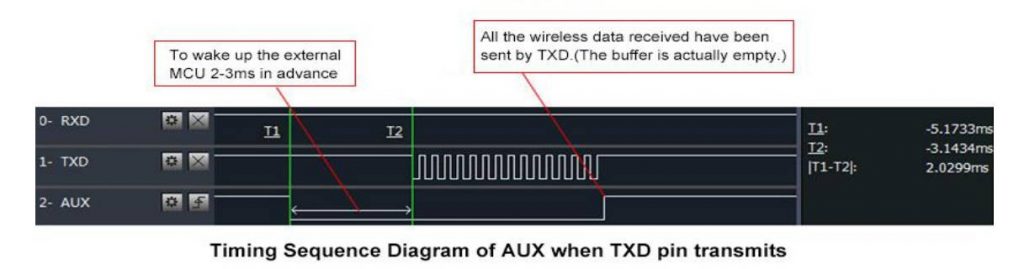
When transmitting data can be used to wake up external MCU and return HIGH on data transfer finish.
When receiving, AUX goes LOW and returns HIGH when the buffer is empty.

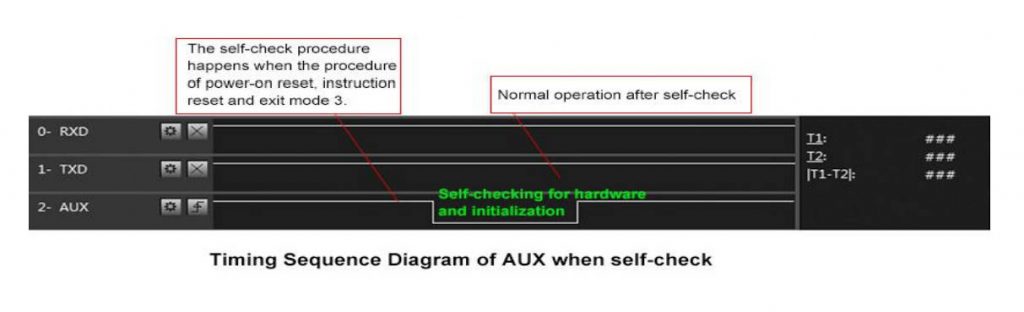
It’s also used for self-checking to restore regular operation (on power-on and sleep/program mode).
esp8266 connection schema is more straightforward because it works at the same voltage of logical communications (3.3v).
xreef/EByte_LoRa_E220_circuitpython_library is a public repo on GitHub by xreef. CircuitPython LoRa EBYTE E220 LLCC68 device library complete and tested with Arduino, esp8266, esp32, STM32 and Raspberry Pi Pico (rp2040 boards).
It declares no license on GitHub. Public does not mean open source: without a license, nobody is granted the right to reuse it.
A bundle of useful CircuitPython libraries ready to use from the filesystem.
:house_with_garden: Open source home automation that puts local control and privacy first.
π RuView turns commodity WiFi signals into real-time spatial intelligence, vital sign monitoring, and presence detection — all without a single pixel of video.
Its maker has not tagged a system, so it is unknown here. Its README says what it needs.
Open "Take it" on its page: Take My Repo writes an install plan for your machine and hands it to your AI agent (Claude Code, Codex or Cursor), which asks you before each step. Take My Repo has not tested it on any machine.
Its last change on GitHub was on 2024-07-16. Take My Repo does not judge from that whether it is maintained.
Nobody has reviewed it on Take My Repo yet, which says nothing about its quality.
Take My Repo cannot say: it does not audit code and has not run EByte_LoRa_E220_circuitpython_library. What is known comes from GitHub. It declares no license on GitHub. Public does not mean open source: without a license, nobody is granted the right to reuse it. Its last change was on 2024-07-16. It has 4 stars, which measure popularity, not safety. Nobody has reviewed it on Take My Repo yet, which says nothing about its quality. Read the source before you run it. With "Take it", your AI agent shows each step and asks you before running it; README text is treated as data, not as instructions.


