AndroidUtilCode
:fire: Android developers should collect the following utils(updating).
- 34k
- Java
- Apache-2.0
- 2 y ago
整理java技术要点,让java更简单,更容易上手。
Repo xuanbo/easy-java, read from GitHub 2 d ago. xuanbo has not joined Take My Repo.
xuanbo/easy-java is a public repo on GitHub by xuanbo. 整理java技术要点,让java更简单,更容易上手。. It declares no license on GitHub. Public does not mean open source: without a license, nobody is granted the right to reuse it. It is written mainly in Java, has 29 stars and last changed on 2022-06-21. Nobody has reviewed it on Take My Repo yet, which says nothing about its quality. Read from GitHub on 2026-11-22.
:fire: Android developers should collect the following utils(updating).
整理java技术要点,让java更简单,更容易上手。
spring-boot集成默认是2.xMySQL数据库默认编码为utf8mb4对于maven项目,推荐使用java8、项目编码为utf8。对于国内的开发者而言,为了下载包更快,推荐使用aliyun仓库。
<?xml version="1.0" encoding="UTF-8"?>
<project xmlns="http://maven.apache.org/POM/4.0.0"
         xmlns:xsi="http://www.w3.org/2001/XMLSchema-instance"
         xsi:schemaLocation="http://maven.apache.org/POM/4.0.0 http://maven.apache.org/xsd/maven-4.0.0.xsd">
    <modelVersion>4.0.0</modelVersion>

    <groupId>tk.fishfish</groupId>
    <artifactId>easy-java</artifactId>
    <version>1.0.0</version>

    <properties>
        <maven.compiler.source>1.8</maven.compiler.source>
        <maven.compiler.target>1.8</maven.compiler.target>
        <project.build.sourceEncoding>utf-8</project.build.sourceEncoding>
    </properties>

    <repositories>
        <repository>
            <id>aliyunmaven</id>
            <name>aliyun maven</name>
            <url>http://maven.aliyun.com/nexus/content/groups/public/</url>
        </repository>
    </repositories>

    <build>
        <plugins>
            <plugin>
                <groupId>org.apache.maven.plugins</groupId>
                <artifactId>maven-compiler-plugin</artifactId>
                <version>3.8.0</version>
                <configuration>
                    <source>1.8</source>
                    <target>1.8</target>
                </configuration>
            </plugin>
        </plugins>
    </build>

</project>
对于多模块依赖项目,请看示例工程
在打包的时候,为了跳过测试,可以使用命令:
> mvn clean package -DskipTests
其中:
-DskipTests参数用于跳过测试。IO在工作中会经常遇到,比如文件复制、读写、WEB文件上传/下载等。
建议:工作中尽量使用工具类,能不写new BufferedInputStream(new FileInputStream("file"))就不写。
对于文件复制,这里不介绍各种FileUtils、FileCopyUtils等。
介绍JDK7中优雅的工具类Paths、Files使用:
package tk.fishfish.easyjava.io;

import org.junit.Test;
import org.slf4j.Logger;
import org.slf4j.LoggerFactory;

import java.io.IOException;
import java.nio.file.Files;
import java.nio.file.Path;
import java.nio.file.Paths;

/**
 * 文件复制
 *
 * @author 奔波儿灞
 * @since 1.0
 */
public class FileCopyTest {

    private static final Logger LOG = LoggerFactory.getLogger(FileCopyTest.class);

    @Test
    public void copy() {
        Path source = Paths.get("./readme.md");
        Path target = Paths.get("./readme.md.copy");
        try {
            Files.copy(source, target);
        } catch (IOException e) {
            LOG.error("copy error", e);
        }
    }

}
Paths用于构造本地文件路径Files用于操作文件所以,下次碰到文件复制相关的需求,试试JDK7标准库呗。
还是优先推荐JDK7标准库Files:
Files.readAllBytesFiles.readAllLinesFiles.listFiles.walkFiles.writeFiles.copy如果一些搞不定的操作,再去使用各种工具类吧。
推荐使用apache commons相关包、spring工具类、guava等广泛使用的库。
这里主要介绍spring mvc中如何使用。
在spring mvc中通过MultipartFile去接收单个文件:
package tk.fishfish.easyjava.controller;

import org.slf4j.Logger;
import org.slf4j.LoggerFactory;
import org.springframework.http.ResponseEntity;
import org.springframework.web.bind.annotation.GetMapping;
import org.springframework.web.bind.annotation.PostMapping;
import org.springframework.web.bind.annotation.RequestPart;
import org.springframework.web.bind.annotation.RestController;
import org.springframework.web.multipart.MultipartFile;

import java.io.IOException;
import java.io.InputStream;
import java.nio.file.Files;
import java.nio.file.Path;
import java.nio.file.Paths;

/**
 * demo Controller
 *
 * @author 奔波儿灞
 * @since 1.0
 */
@RestController
public class DemoController {

    private static final Logger LOG = LoggerFactory.getLogger(DemoController.class);

    @PostMapping("/upload")
    public ResponseEntity<String> upload(@RequestPart("file") MultipartFile file) {
        // 文件信息
        LOG.info("file name: {}", file.getOriginalFilename());
        LOG.info("file size: {}", file.getSize());
        // 下面是保存在本地
        InputStream in = null;
        try {
            Path target = Paths.get("./" + file.getOriginalFilename());
            in = file.getInputStream();
            Files.copy(in, target);
        } catch (IOException e) {
            LOG.error("save file error", e);
            return ResponseEntity.ok("false");
        } finally {
            if (in != null) {
                try {
                    in.close();
                } catch (IOException e) {
                    LOG.warn("close inputStream error", e);
                }
            }
        }
        return ResponseEntity.ok("ok");
    }

}
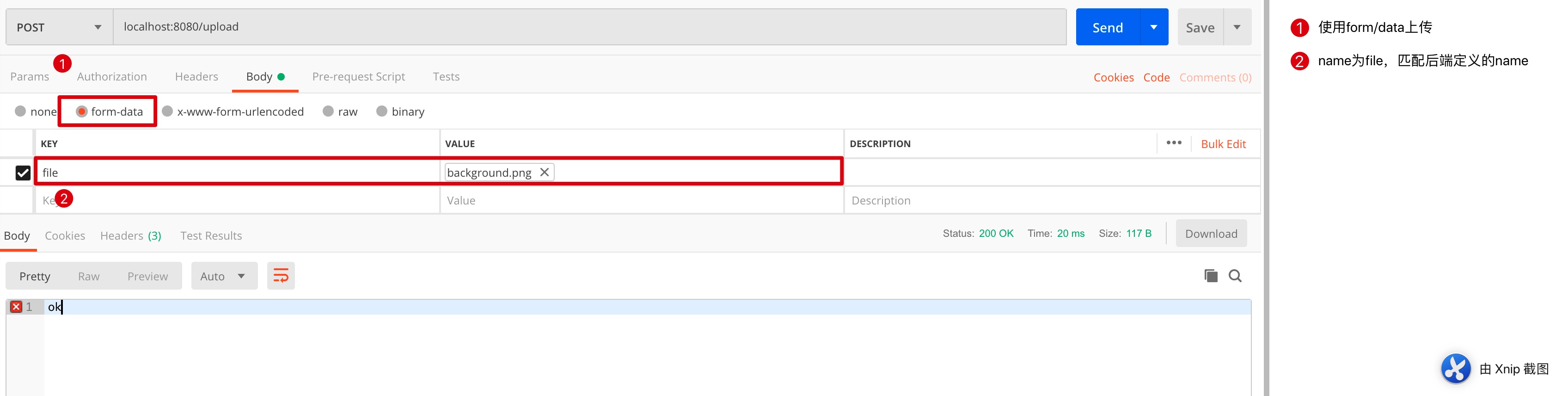
主要是通过MultipartFile拿到文件的输入流,之后再balabala。
如果是多文件上传呢?其实将MultipartFile替换称MultipartFile[]即可。
主要是将文件字节写入HTTP的响应流,然后设置响应头信息。
但是这里不介绍常规的将文件字节写入HttpServletResponse的方式,而是通过ResponseEntity<byte[]>:
package tk.fishfish.easyjava.controller;

import org.slf4j.Logger;
import org.slf4j.LoggerFactory;
import org.springframework.http.HttpHeaders;
import org.springframework.http.HttpStatus;
import org.springframework.http.ResponseEntity;
import org.springframework.web.bind.annotation.GetMapping;
import org.springframework.web.bind.annotation.PostMapping;
import org.springframework.web.bind.annotation.RequestPart;
import org.springframework.web.bind.annotation.RestController;
import org.springframework.web.multipart.MultipartFile;

import java.io.IOException;
import java.io.InputStream;
import java.nio.file.Files;
import java.nio.file.Path;
import java.nio.file.Paths;

/**
 * demo Controller
 *
 * @author 奔波儿灞
 * @since 1.0
 */
@RestController
public class DemoController {

    private static final Logger LOG = LoggerFactory.getLogger(DemoController.class);

    @GetMapping("/download")
    public ResponseEntity<?> download() {
        Path source = Paths.get("./readme.md");
        try {
            String name = source.toFile().getName();
            byte[] bytes = Files.readAllBytes(source);
            HttpHeaders headers = new HttpHeaders();
            headers.add("Content-Disposition", "attachment;filename=" + name);
            return new ResponseEntity<>(bytes, headers, HttpStatus.OK);
        } catch (IOException e) {
            LOG.error("read file error", e);
            return ResponseEntity.ok("false");
        }
    }

}
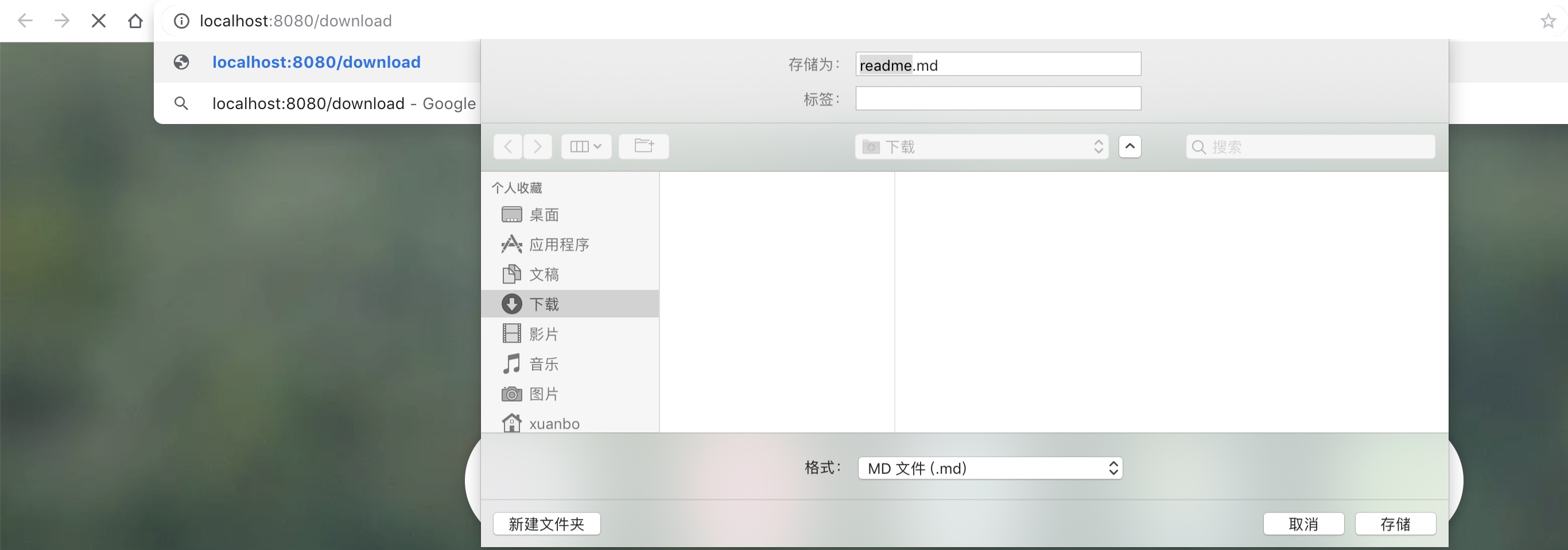
原理是一样的,也是设置响应头Content-Disposition告知浏览器下载。返回ResponseEntity<byte[]>时,底层还是将文件字节写入HttpServletResponse的。
这种方式呢,写起来没有直接面向原生的servlet,完全使用spring mvc的东西。
建议:在下载较大的文件时,还是推荐使用常规的HttpServletResponse方式操作。
经常会遇到读取classpath下的某个文件,这时推荐使用spring工具类ClassPathResource:
package tk.fishfish.easyjava.io;

import org.junit.Test;
import org.slf4j.Logger;
import org.slf4j.LoggerFactory;
import org.springframework.core.io.ClassPathResource;

import java.io.IOException;

/**
 * classpath
 *
 * @author 奔波儿灞
 * @since 1.0
 */
public class ClassPathTest {

    private static final Logger LOG = LoggerFactory.getLogger(ClassPathTest.class);

    @Test
    public void run() throws IOException {
        // maven项目src/main/java、src/test/java、src/main/resources
        ClassPathResource classPathResource = new ClassPathResource("tk/fishfish/easyjava/io/ClassPathTest.class");
        String path = classPathResource.getFile().getPath();
        LOG.info("path: {}", path);
    }

}
对于maven项目,如果是运行test cases,那么如下路径为classpath:
src/test/javasrc/test/resources如果是运行程序:
src/main/javasrc/main/resources我们经常会碰到判断文件类型的情况,比如,验证用户上传的文件是否为XML或者其他格式。然后,比较挫的实现方式是判断文件后缀。
哈哈,但是,如果用户故意修改后缀名。那么,是否有办法识别呢?
当时是有的!一般的,几乎所有的可执行文件格式最开始的几个字节都是魔数。为什么呢?你要处理的一段数据,最初进行一个粗略判断。主要是怕处理了半天,原来输入是段垃圾,浪费自己时间,甚至把自己程序搞奔溃。
你可以认为,魔数(magic number)读到是对的,你有就有99%的信心,这个数据应该不是垃圾,值得分析。
比如,JPEG的文件头为FFD8FF 、PNG文件头为89504E47 。
这里定义了一个枚举,列举了常见的文件类型,以及魔数。
package tk.fishfish.easyjava.util;

/**
 * 根据文件魔数判断文件实际类型,防止修改后缀误判
 *
 * @author 奔波儿灞
 * @since 1.0
 */
public enum FileType {

    /**
     * jpg、jpeg
     */
    JPEG("JPEG", "FFD8FF"),

    /**
     * png
     */
    PNG("PNG", "89504E47"),

    /**
     * xml
     */
    XML("XML", "3C3F786D6C"),

    /**
     * html
     */
    HTML("HTML", "68746D6C3E"),

    /**
     * pdf
     */
    PDF("PDF", "255044462D312E"),

    /**
     * zip、jar
     */
    ZIP("ZIP", "504B0304"),

    /**
     * rar
     */
    RAR("RAR", "52617221"),

    ;

    /**
     * 文件类型
     */
    private String type;

    /**
     * 文件魔数
     */
    private String value;

    FileType(String type, String value) {
        this.type = type;
        this.value = value;
    }

    public String getType() {
        return type;
    }

    public String getValue() {
        return value;
    }

}
当然,列举不全,有兴趣自己网上搜索相关资料。
如下是一个工具类,用来根据文件的头来判断文件类型:
package tk.fishfish.easyjava.util;

import java.io.BufferedInputStream;
import java.io.IOException;
import java.util.Objects;

/**
 * 文件类型工具
 *
 * @author 奔波儿灞
 * @since 1.0
 */
public final class FileTypeUtils {

    private static final int LEN = 28;

    private FileTypeUtils() {
        throw new IllegalStateException("Utils");
    }

    public static boolean isType(BufferedInputStream is, FileType fileType) throws IOException {
        Objects.requireNonNull(fileType);

        String header = getFileHeader(is);
        return header.startsWith(fileType.getValue());
    }

    private static String getFileHeader(BufferedInputStream is) throws IOException {
        Objects.requireNonNull(is);

        // 标识
        is.mark(LEN + 1);

        byte[] b = new byte[LEN];
        try {
            int num = is.read(b, 0, LEN);
            if (num < LEN) {
                throw new RuntimeException("can not read file head");
            }
        } finally {
            // 重置,否则无法重复读取流
            is.reset();
        }
        return bytes2hex(b);
    }

    private static String bytes2hex(byte[] bytes) {
        StringBuilder builder = new StringBuilder();
        for (byte b : bytes) {
            int v = b & 0xFF;
            String hv = Integer.toHexString(v);
            if (hv.length() < 2) {
                builder.append(0);
            }
            builder.append(hv.toUpperCase());
        }
        return builder.toString();
    }

}
测试如下:
package tk.fishfish.easyjava.util;

import org.junit.Test;
import org.slf4j.Logger;
import org.slf4j.LoggerFactory;
import org.springframework.core.io.ClassPathResource;

import java.io.BufferedInputStream;
import java.io.IOException;

/**
 * 文件类型工具测试
 *
 * @author 奔波儿灞
 * @since 1.0
 */
public class FileTypeUtilsTest {

    private static final Logger LOG = LoggerFactory.getLogger(FileTypeUtilsTest.class);

    @Test
    public void isXml() throws IOException {
        ClassPathResource resource = new ClassPathResource("logback-spring.xml");
        BufferedInputStream bis = new BufferedInputStream(resource.getInputStream());
      	// 判断是否为XML格式
        boolean isXml = FileTypeUtils.isType(bis, FileType.XML);
        LOG.info("isXml: {}", isXml);
    }

}
根据阿里p3c规范,推荐通过线程池来创建线程。
而且是手动管理,因为通过Executors创建的线程池,存在一些缺陷:
FixedThreadPool和SingleThreadPool:允许的请求队列长度为Integer.MAX_VALUE,可能会堆积大量的请求,从而导致OOM。CachedThreadPool和ScheduledThreadPool:允许的创建线程数量为Integer.MAX_VALUE,可能会创建大量的线程,从而导致OOM。下面是ThreadPoolExecutor的构造方法:
public ThreadPoolExecutor(int corePoolSize,
                          int maximumPoolSize,
                          long keepAliveTime,
                          TimeUnit unit,
                          BlockingQueue<Runnable> workQueue,
                          ThreadFactory threadFactory,
                          RejectedExecutionHandler handler) {
    if (corePoolSize < 0 ||
        maximumPoolSize <= 0 ||
        maximumPoolSize < corePoolSize ||
        keepAliveTime < 0)
        throw new IllegalArgumentException();
    if (workQueue == null || threadFactory == null || handler == null)
        throw new NullPointerException();
    this.acc = System.getSecurityManager() == null ?
            null :
            AccessController.getContext();
    this.corePoolSize = corePoolSize;
    this.maximumPoolSize = maximumPoolSize;
    this.workQueue = workQueue;
    this.keepAliveTime = unit.toNanos(keepAliveTime);
    this.threadFactory = threadFactory;
    this.handler = handler;
}
下面是参数介绍:
| 参数名 | 说明 |
|---|---|
| corePoolSize | 核心线程池大小 |
| maximumPoolSize | 最大线程池大小 |
| keepAliveTime | 线程最大空闲时间 |
| unit | 时间单位 |
| workQueue | 任务等待队列 |
| threadFactory | 线程创建工厂 |
xuanbo/easy-java is a public repo on GitHub by xuanbo. 整理java技术要点,让java更简单,更容易上手。.
It declares no license on GitHub. Public does not mean open source: without a license, nobody is granted the right to reuse it.
Its maker has not tagged a system, so it is unknown here. Its README says what it needs.
Open "Take it" on its page: Take My Repo writes an install plan for your machine and hands it to your AI agent (Claude Code, Codex or Cursor), which asks you before each step. Take My Repo has not tested it on any machine.
Fast C++ logging library.
The Postgres development platform. Supabase gives you a dedicated Postgres database to build your web, mobile, and AI applications.
Stop renting your intelligence. Own it with AnythingLLM. Everything you need for a powerful local-first agent experience
Its last change on GitHub was on 2022-06-21. Take My Repo does not judge from that whether it is maintained.
Nobody has reviewed it on Take My Repo yet, which says nothing about its quality.
Take My Repo cannot say: it does not audit code and has not run easy-java. What is known comes from GitHub. It declares no license on GitHub. Public does not mean open source: without a license, nobody is granted the right to reuse it. Its last change was on 2022-06-21. It has 29 stars, which measure popularity, not safety. Nobody has reviewed it on Take My Repo yet, which says nothing about its quality. Read the source before you run it. With "Take it", your AI agent shows each step and asks you before running it; README text is treated as data, not as instructions.