
rea
Reverse engineer anything with agents, from app behavior down to native binaries.
- 477k
- TypeScript
- MIT
- 57 min ago
The super-simple chroot-based application container engine.
Repo yuuki/droot, read from GitHub 13 min ago. yuuki has not joined Take My Repo.
yuuki/droot is a public repo on GitHub by yuuki. The super-simple chroot-based application container engine. It declares the MIT license on GitHub. It is written mainly in Go, has 214 stars and last changed on 2026-11-19. Nobody has reviewed it on Take My Repo yet, which says nothing about its quality. Read from GitHub on 2026-11-25.
Reverse engineer anything with agents, from app behavior down to native binaries.
English | 日本語
Droot is a simple chroot-based application container engine: build with
docker build, ship a plain tar archive, and run it with chroot(2) instead of
docker run. Droot aims to simply escape dependency hell.
Docker has a powerful concept about an application
deployment process: Build, Ship, Run. But there are many cases where the Docker
runtime is too complicated and beyond our current capabilities, especially in
production. Droot provides a simpler container runtime without complicated
stacks such as Linux namespaces and union file systems. It relies on simple
Linux features — chroot(2), Linux capabilities(7) and bind mounts — to run
a container image built by docker, and on plain tar archives to ship it.
docker build (or any tool building OCI images) and turn it into a tar archive with droot export, from a Docker daemon, a registry, a docker save archive or an OCI layout.droot run = chroot(2) + dropped capabilities + bind mounts.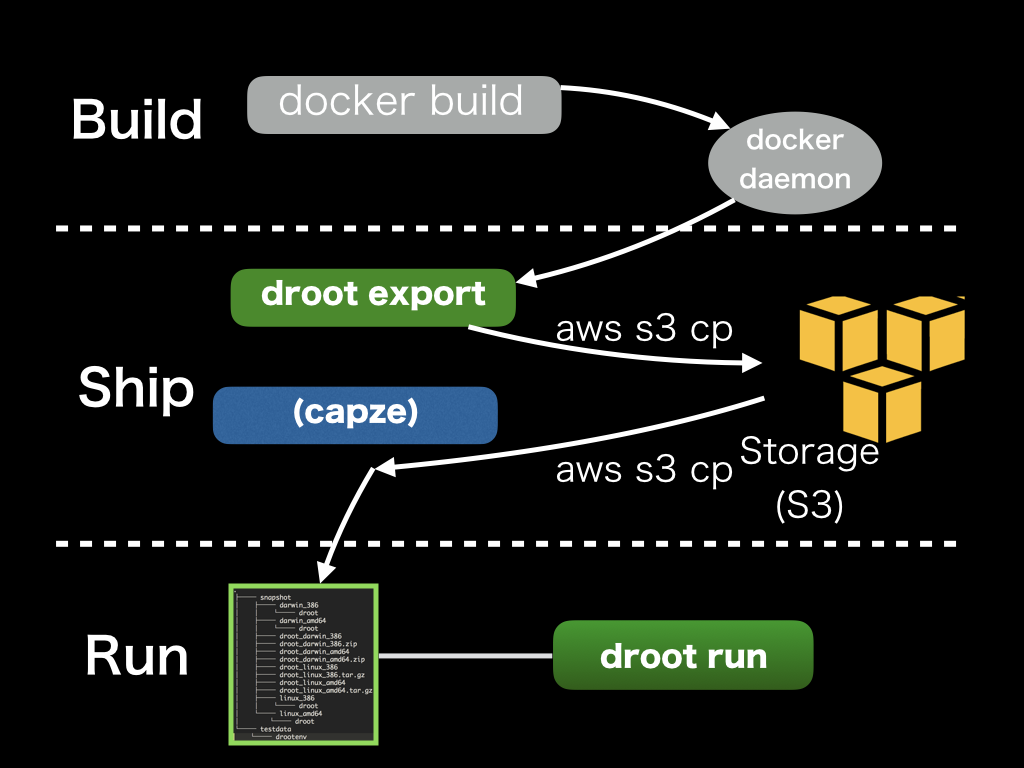
Droot deliberately does not isolate processes, networks, users or resources the way Docker does: a droot container shares the host's PID, network, IPC and UTS namespaces and cgroups. Read Security considerations before running untrusted images.
| Command | Requirements |
|---|---|
droot export |
Linux or macOS. For the images of a daemon, a daemon speaking the Docker Engine API: Docker Engine, Docker Desktop, Colima, OrbStack, Podman (podman system service), ... Images of registries, docker save archives and OCI layouts need no daemon. |
droot run |
Linux. As root, or as any user with user namespaces (rootless). |
droot umount |
Linux, root privileges |
Building from source requires Go 1.26 or later.
Static binaries for Linux (amd64, arm64 and 32-bit ARMv7, e.g. a Raspberry
Pi with a 32-bit OS) and macOS (amd64 and arm64) are attached to every
GitHub release, both as archives
(droot_linux_amd64.tar.gz, droot_linux_armv7.tar.gz,
droot_darwin_arm64.zip, ...) and as bare binaries:
$ curl -fsSL -o droot https://github.com/yuuki/droot/releases/latest/download/droot_linux_amd64
$ chmod +x droot && sudo mv droot /usr/local/bin/
Every release also has Linux packages for amd64, arm64 and 32-bit ARM
(armhf/armv7hl). They install /usr/bin/droot, the man page and the
bash, zsh and fish completions, and depend on nothing (the binary is static),
so they suit every distribution. On Debian, Ubuntu and their derivatives:
$ VERSION=0.8.0
$ curl -fsSLO https://github.com/yuuki/droot/releases/download/v$VERSION/droot_$VERSION-1_$(dpkg --print-architecture).deb
$ sudo apt install ./droot_$VERSION-1_$(dpkg --print-architecture).deb
On RHEL, Fedora, Amazon Linux and other RPM-based distributions (on 32-bit
ARM, the package is droot-$VERSION-1.armv7hl.rpm):
$ VERSION=0.8.0
$ sudo dnf install https://github.com/yuuki/droot/releases/download/v$VERSION/droot-$VERSION-1.$(uname -m).rpm
Upgrade by installing the package of a newer release the same way.
droot runs as root, so check what you install. Every asset has a signed
build provenance attestation, and every archive an SPDX SBOM (*.sbom.json).
To check that a download was built by the release workflow of this repository
from a release tag, use the GitHub CLI:
$ gh attestation verify droot --repo yuuki/droot --signer-workflow yuuki/droot/.github/workflows/release.yml
The binaries are reproducible; see Releasing for how they are built, verified and rebuilt.
$ go install github.com/yuuki/droot/cmd/droot@latest
$ brew tap yuuki/droot
$ brew install droot
[!WARNING] Until the formula of the tap is updated, it installs droot 0.7.7, whose
droot exportdoes not work with current Docker releases (it pins the Docker API version 1.29). Prefer the prebuilt binaries orgo install.
$ git clone https://github.com/yuuki/droot && cd droot
$ make build      # produces ./droot, statically linked
Build an image and export its file system:
$ docker build -t dockerfiles/app .
$ droot export --compress gzip --checksum -o app.tar.gz dockerfiles/app
$ aws s3 cp app.tar.gz s3://drootexamples/app.tar.gz
$ aws s3 cp app.tar.gz.sha256 s3://drootexamples/app.tar.gz.sha256
Deploy and run it on a server (extract as root so that file ownership and setuid bits are preserved):
$ aws s3 cp s3://drootexamples/app.tar.gz . && aws s3 cp s3://drootexamples/app.tar.gz.sha256 .
$ sha256sum -c app.tar.gz.sha256
$ sudo install -d -m 700 /var/containers
$ sudo mkdir -m 755 /var/containers/app
$ sudo tar -xpzf app.tar.gz -C /var/containers/app
$ sudo droot run --cp --user appuser --group appgroup --bind /var/log/app --root /var/containers/app -- command
Only root can access /var/containers: the setuid and setgid programs of
the image, extracted with their owner, would otherwise let the users of the
host run them as root or with a group such as shadow (see
Security considerations). Without --unshare,
a user of the host with the UID of command can still reach them while it
runs. /var/containers/app itself has mode 0755 (-m 755, whatever the
umask), which the users of the container need.
droot run leaves its mounts in place after the command exits (unless
--unshare is given). Remove them before deleting or replacing the directory,
for instance to deploy a new version — deleting it with mounts below would
delete files of the host through the bind mounts:
$ sudo droot umount --root /var/containers/app
To deploy new versions, extract each one into a new directory and switch between them, e.g. with capze (below).
See Deploying an application for a complete walkthrough, including systemd units.
capze deploys archives in a Capistrano-like
directory layout and keeps the last releases. It moves the directory it is
given into releases/ as it is, and never copies it: extract the archive
into a new directory of the directory of the releases itself
(mktemp -d -p), which is on the same file system, and keep the releases in
/var/containers, which only root can access, as above:
$ sudo mkdir -p /var/containers/app
$ tmp=$(sudo mktemp -d -p /var/containers/app)
$ sudo mkdir -m 755 "$tmp/app" && sudo tar -xpzf app.tar.gz -C "$tmp/app"   # after verifying the checksum as above
$ sudo capze deploy --keep 5 "$tmp/app" /var/containers/app && sudo rmdir "$tmp"
capze rollback /var/containers/app points current back to the release
before. capze never deletes through a mount point: it leaves an old release
that still has mounts below it, and reports it. Without --unshare, unmount
the old releases first:
$ sudo capze prune --keep 5 --dry-run /var/containers/app | sudo xargs -r -n 1 droot umount --root
$ sudo capze prune --keep 5 /var/containers/app
These are the commands of the capze that follows 0.2, which had other ones.
dewy lets the servers pull the releases: it
polls a registry (GitHub Releases, S3, GCS, ...), extracts each new version
into releases/, switches a current symlink and restarts the server without
dropping connections, holding its listening socket like server-starter. dewy
cannot extract a root file system itself (it refuses symbolic links and drops
the owners), so the artifact carries the droot archive, extracted by the hook
examples/dewy/droot-extract-release:
$ mkdir -p build
$ droot export --compress gzip --checksum -o build/rootfs.tar.gz app:1.2.3
$ tar -czf app_linux_amd64.tar.gz -C build rootfs.tar.gz rootfs.tar.gz.sha256
$ sha256sum app_linux_amd64.tar.gz > app_linux_amd64.tar.gz.sha256
$ gh release create v1.2.3 app_linux_amd64.tar.gz app_linux_amd64.tar.gz.sha256
and on the servers, as root, with the hook installed as
/usr/local/bin/droot-extract-release and GITHUB_TOKEN set, in
/var/containers/app:
# dewy server --registry ghr://example/app --port 8080 --health-path /health \
    --after-deploy-hook /usr/local/bin/droot-extract-release --log-level info \
    -- droot run --unshare --env SERVER_STARTER_PORT --env SERVER_STARTER_GENERATION \
         --root /var/containers/app/current/rootfs
--unshare is required: dewy deletes old releases, which would otherwise
delete files of the host through the bind mounts of droot run. The
application takes the listening socket of dewy from SERVER_STARTER_PORT. See
Deploying with dewy for a
systemd unit and the details.
stretcher deploys on each server the
release that a manifest describes, when a Consul or Serf event gives it the
manifest's URL: it downloads the archive, verifies its checksum, extracts it
with tar (as root, the owners and setuid bits are kept) and runs the
commands of the manifest. Have it extract each release into a new directory
(sync_strategy: mv, with TMPDIR on the same file system) and switch
current in its post commands. An excerpt of the template
examples/stretcher/deploy.yml, which also
deploys each version only once, checks the new release and deletes old ones:
src: s3://example-releases/app/app-1.2.3.tar.gz
checksum: "3f0c…"   # from app-1.2.3.tar.gz.sha256
dest: /var/containers/app/releases/1.2.3
sync_strategy: mv
commands:
  post:
    - ln -sfn releases/1.2.3 /var/containers/app/current.new && mv -T /var/containers/app/current.new /var/containers/app/current
    - systemctl restart app
Never let the default rsync -a --delete of stretcher update a root that
droot run uses: rsync deletes what droot creates in the root (the files of
/dev, the mount points) and, through the bind mounts of a run without
--unshare, files of the host. See
Deploying with stretcher
for the setup of the servers and the details.
Run droot COMMAND --help for the full list of options.
droot exportdroot export [-o FILE] [--platform PLATFORM] IMAGE
Exports the file system of a container image as a tar archive, to STDOUT or
to FILE. The image's configuration — ENV, WORKDIR, USER,
ENTRYPOINT, CMD and STOPSIGNAL — is saved as /.droot/config.json in
the archive, and its environment variables also as /.drootenv (read by older
droot versions), so that droot run can use them. Images without a shell,
such as distroless or FROM scratch images, are supported.
IMAGE is an image of a Docker daemon (NAME[:TAG], an ID, ...): droot
creates a temporary container from it without starting it, streams its
file system and removes the container. Or it is one of these images, read
without daemon:
IMAGE |
|
|---|---|
docker://[REGISTRY/]NAME[:TAG|@DIGEST] |
An image of a registry: Docker Hub (docker://alpine:3.22), ghcr.io, ... |
docker-archive:FILE[:NAME:TAG] |
An archive written by docker save or podman save. |
oci:DIR[:NAME] |
An OCI image layout, as written by skopeo, buildah, docker buildx build --output type=oci,tar=false, ... |
oci-archive:FILE[:NAME] |
A tar archive of an OCI image layout (docker save of Docker 25 and later, podman save --format oci-archive, ...). |
An image of a daemon whose name starts like one of these (oci:latest)
needs its full name: docker.io/library/oci:latest.
| Option | Description |
|---|
yuuki/droot is a public repo on GitHub by yuuki. The super-simple chroot-based application container engine.
It declares the MIT license on GitHub.
Its maker tagged it for macOS, Windows and Linux, or as Docker or cross-platform. That is declared by the maker; Take My Repo has not tested it.
Open "Take it" on its page: Take My Repo writes an install plan for your machine and hands it to your AI agent (Claude Code, Codex or Cursor), which asks you before each step. Take My Repo has not tested it on any machine.
Install and run GNU/Linux on Android
Run macOS VM in a Docker! Run near native OSX-KVM in Docker! X11 Forwarding! CI/CD for OS X Security Research! Docker mac Containers.
The agent harness performance optimization system. Skills, instincts, memory, security, and research-first development for Claude Code, Codex, Opencode, Cursor and beyond.
A collection of inspiring lists, manuals, cheatsheets, blogs, hacks, one-liners, cli/web tools and more.
A lightweight process isolation tool that utilizes Linux namespaces, cgroups, rlimits and seccomp-bpf syscall filters, leveraging the Kafel BPF language for enhanced security.
Its last change on GitHub was on 2026-11-19. Take My Repo does not judge from that whether it is maintained.
Nobody has reviewed it on Take My Repo yet, which says nothing about its quality.
Take My Repo cannot say: it does not audit code and has not run droot. What is known comes from GitHub. It declares the MIT license on GitHub. Its last change was on 2026-11-19. It has 214 stars, which measure popularity, not safety. Nobody has reviewed it on Take My Repo yet, which says nothing about its quality. Read the source before you run it. With "Take it", your AI agent shows each step and asks you before running it; README text is treated as data, not as instructions.





