StoryCore-Engine
A local‑first AI pipeline that generates coherent images, videos, stories, dialogues, and spatial audio from an augmented storyboard. It structures prompts, ensures narrative continuity, automates sound spatialization, and provides a reproducible workflow for fast, high‑quality multimedia creation.
- 14
- MIT
- 3 d ago
Repo zedarvates/StoryCore-Engine, read from GitHub 17 min ago. zedarvates has not joined Take My Repo.
In short
zedarvates/StoryCore-Engine is a public repo on GitHub by zedarvates. A local‑first AI pipeline that generates coherent images, videos, stories, dialogues, and spatial audio from an augmented storyboard. It structures prompts, ensures narrative continuity, automates sound spatialization, and provides a reproducible workflow for fast, high‑quality multimedia creation. It declares the MIT license on GitHub. It is written mainly in TypeScript, has 14 stars and last changed on 2026-11-21. Nobody has reviewed it on Take My Repo yet, which says nothing about its quality. Read from GitHub on 2026-11-24.
Similar repos

🎬 StoryCore Engine
The Self-Correcting Multimodal Production Pipeline
Vision
From Script to Screen in Minutes — With Visual Coherence
From Script to Screen in Minutes - Self-correcting multimodal video pipeline with guaranteed visual coherence. 100% local processing. Data sovereignty.
📊 Recent Audit & Quality (May 2026)
- Code Quality: 6000+ Ruff lint errors → 171 (97% reduction)
- Build Status: TypeScript compilation clean (0 errors)
- Architecture: Refactored App.tsx (1299→30 lines) into modular components
- Tests: 170 passing, 248 failing (pre-existing test infrastructure gaps)
- Documentation: 200-task audit roadmap created
See AUDIT_200_TASKS.md for the complete quality improvement plan.
🌟 A Message from the Creator
Read the vision
StoryCore is more than just a pipeline. It’s a system that lets you control ComfyUI or other tools through add‑ons. It helps you organize your entire workflow for video creation — from the written story, to the script, to the dialogue.
"The future of the internet? And of cinema? It’s on‑demand videos built according to people’s tastes. According to each customer. Directly on their TV. Basically, it’s instant, made‑to‑order cinema."
I wanted to create a tool that modernizes long‑form video production without losing the soul of the craft. We start from the classic storyboard methods—the ones that shaped generations of creators—and we bring them into the present with the tools of our era.
This isn't just another AI generator. It's a complete production pipeline: storyboard, visual coherence, narrative continuity, scene organization, character tracking, location consistency. The system remembers the entire project, just like a full team dedicated to artistic supervision.
But above all, it respects the creators. The goal is not to replace artists, but to give them back time, freedom, and control. AI handles the repetitive tasks, while humans keep the vision, the emotion, and the direction.
And everything runs locally. Your data, your images, your scripts, your industrial secrets—everything stays on your machine. It's a sovereign tool, designed for studios, agencies, and independent creators who must protect their work.
🎯 Why StoryCore?
Competitive Advantages
| Benefit | Impact |
|---|---|
| 100% Local Processing | Data secured on your machine, no leaks. |
| Visual Coherence | Consistent style across all scenes and shots. |
| Self-Correcting Pipeline | Guaranteed quality without manual intervention. |
| Native ComfyUI Integration | Optimized professional workflows. |
| Data Sovereignty | No cloud, no subscription risks, full ownership. |
Cost Reduction: From a team of 30 to 6-8 creators. Time Saving: From script to screen in minutes, not months.
🚀 Concrete Use Cases
Production Examples
| Content Type | Benefit | Estimated Time* |
|---|---|---|
| Scientific Documentaries | Guaranteed visual accuracy & fact-checking. | 20-30 min |
| Indie Short Films | Stylistic consistency & narrative flow. | 15-25 min |
| Educational Content | Professional quality & rapid iteration. | 10-20 min |
| Corporate Presentations | Consistent branding & private data handling. | 5-15 min |
*Excluding media generation time.
Workflow
graph LR
    A --> B[✍️ Script] --> C[✅ Storyboard]
    C --> D[🎨 Visual Gen]
    D --> E[🎬 Editing]
    E --> F[📦 Export]
📋 System Requirements
Minimum Hardware
- GPU: NVIDIA RTX 3060 with 12GB VRAM (RTX 4090+ recommended for speed)
- RAM: 32GB system memory
- Storage: ~500GB SSD (fast NVMe recommended)
- OS: Windows 10/11 (WSL2 supported), Linux
Note: Generating a single high-quality image can take minutes on lower-end hardware. Video generation is compute-intensive.
⚡ Quick Start
Installation in 5 Minutes
Clone the repository
git clone https://github.com/zedarvates/StoryCore-Engine.git
cd storycore-engine
Install dependencies
pip install -r requirements.txt
npm install
cd creative-studio-ui && npm install && cd ..
Install ComfyUI (Optional but Recommended)
Choose one of the two options below:
Option A — ComfyUI Standard (advanced users)
- Download from ComfyUI GitHub
- Default port:
8188
Option B — ComfyUI Desktop (recommended for beginners)
- Download from ComfyUI Desktop GitHub
- Default port:
8000
[!IMPORTANT] CORS must be enabled in ComfyUI settings. Set the allowed origins to
*to allow StoryCore Engine to communicate with it.Start the Engine
python storycore.py
🖥️ Multi-Machine Connectivity (Recommended)
Running Orchestrator, LLMs, and ComfyUI simultaneously requires significant system resources. You can offload the rendering backends (ComfyUI and Ollama) to a dedicated GPU server on your local network, allowing your main computer to purely orchestrate the story generation. 👉 Read the Multi-Node Setup Guide
Video Pipeline Demo
▶️ StoryCore E2E CLI Demo Video
You can run a local test of the orchestration pipeline even without a GPU using mock mode:
python scripts/run_e2e_demo.py --canonical --mock
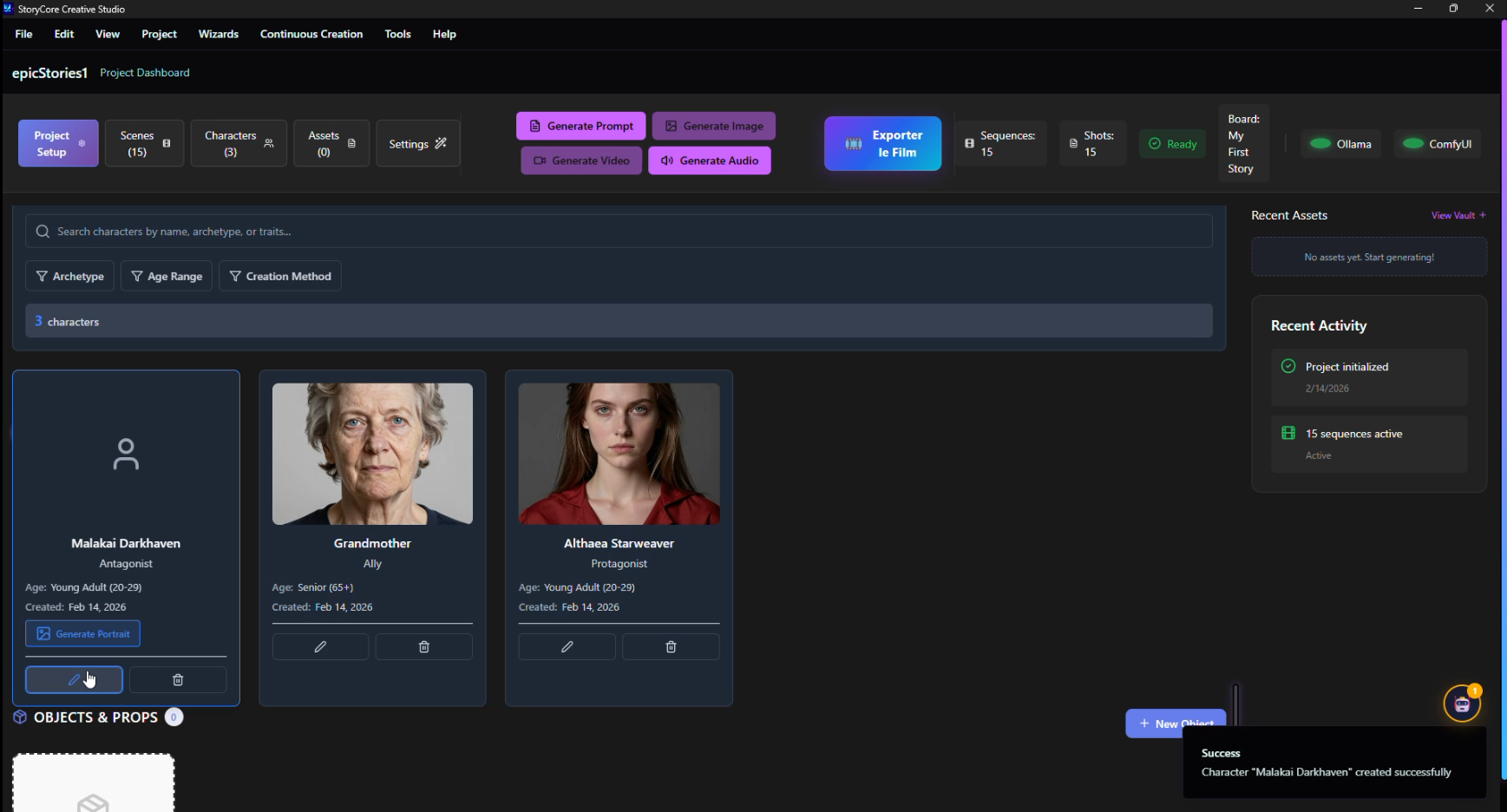
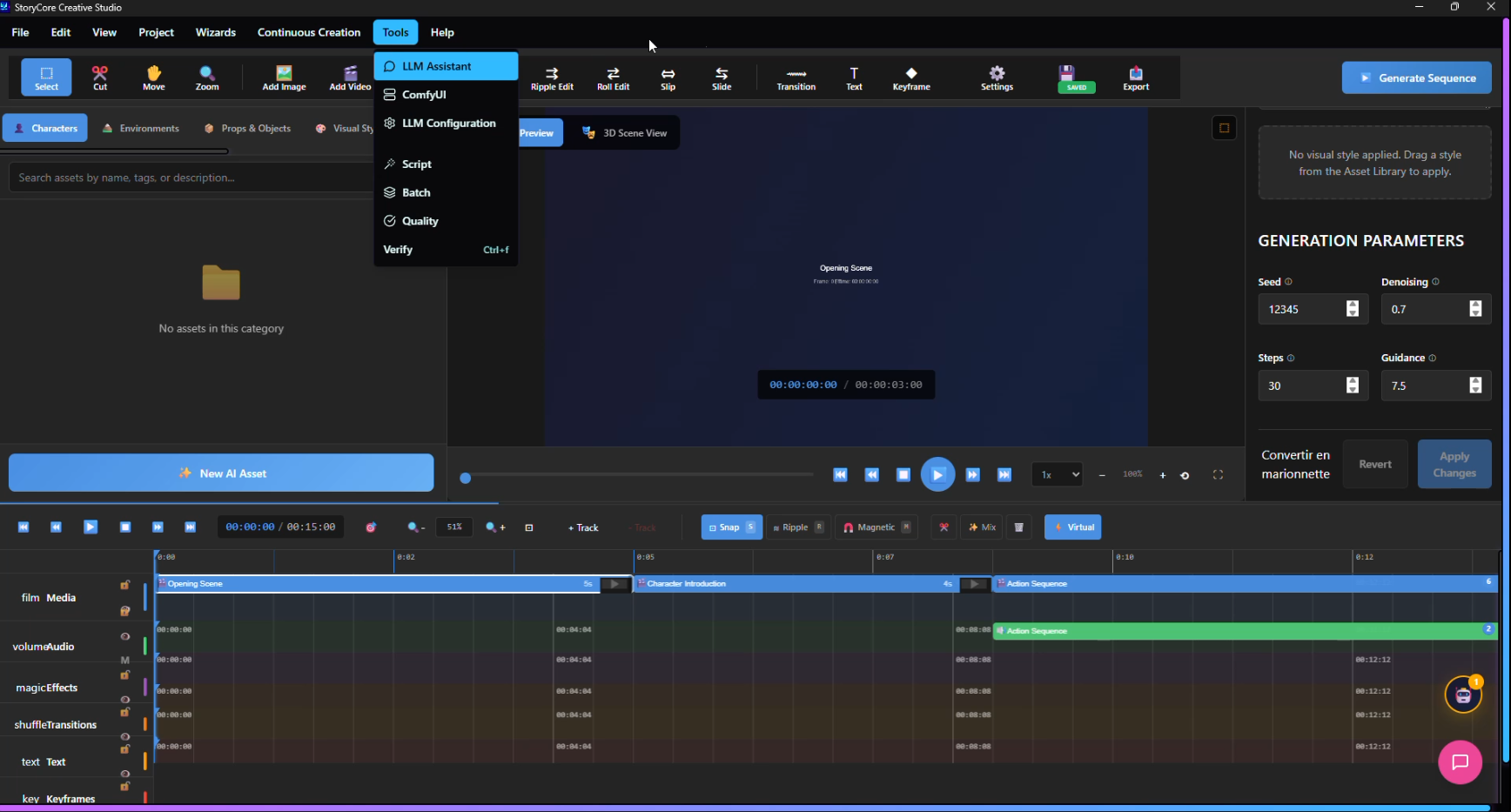
📸 Interface

✨ Key Features
🎬 Video Generation
Advanced Production Features
- Visual Coherence System: Master Coherence Sheet ensures consistent style.
- Total Recall (Living Protocol): Persistent neural memory that captures stylistic decisions, character facts, and production rules as they emerge during chat or creation.
- Multimodal Vision Analysis: Native support for analyzing reference images to extract visual archetypes, atmospheres, and cinematic styles.
- Multi-Model Support: Flux, SDXL, NewBie, Qwen 2.5-VL, HunyuanVideo, Wan Video.
- Self-Correcting: Automatic quality detection and auto-fix capability.
- Advanced Video AI (Power Tools):
- Smart Zoom & Pan Scan: Intelligent face-tracking and dynamic reframing (9:16 vertical video support).
- Magic Mask: AI-driven subject isolation and background removal.
- Transcription & OCR Search: Navigate and search your video timeline by spoken words or on-screen text.
- Cinematic Flow: Automated J-cuts and L-cuts for professional dialogue transitions.
- Audio Mastering: Auto-Ducking, Voice Isolation, and High-Fidelity Cinematic EQ presets.
- VFX Polish: Hellation, Color Isolation (Sin City style), and Dynamic Grain/Vignette.
- Multi-Angle Camera: Instant scene variations from different cinematic angles (Low/High/Aerial).
- Voice-Directed 3D Controls (VDC): Orchestrate your 3D scene using natural language. Add objects (cars, props, NPCs), adjust camera distances, and change lighting modes (Dramatic, Night, Bright) in real-time.
- Automated Visual Coherence: The engine automatically injects your project's visual style into every generation, ensuring that all 3D-to-Image and Prompt-to-Video outputs strictly follow your artistic direction.
- Composition Architect (v3.5): Professional-grade layout system with interactive overlays (Rule of Thirds, Golden Ratio, Perspective/Vanishing lines, Safe Areas).
- Shot Mockup Editor: Layer-based spatial prototyping. Pre-visualize scenes by dragging characters, props, and background extras onto a 16:9 canvas before rendering.
- Emotional Graph RAG: Advanced narrative mapping that detects complex relationship states (Loves, Hates, Trusts, Betrayed, Rivalry) to drive deep dialogue generation.
- Character Consistency Sheets: Effortless generation of Face/Profile/Back reference sheets for steady character design.
- Enhanced Neural Assistant (v4): Floating AI companion with contextual pro-active buttons (Storyteller, Style, Logic), account management shortcuts, and dynamic layout adaptation.
- tttLRM 3D Reconstruction (CVPR 2026): Transform single images or 360 videos into high-fidelity 3D Gaussian Splats at 1024 resolution. Features Test-Time Training (TTT) adaptation for superior geometry.
- Native Gaussian Splat Viewer: Premium 3D viewer integrated into the UI with OrbitControls, real-time rendering, and glassmorphism interface.
- Automated 3D Set Builder: Automatically drafts 3D blocking layouts (primitives) from script breakdowns. Generates native manifests for PrimitiveAnything and Playbook-nodes in ComfyUI.
- Pro-Grade Lip-Sync Hub: End-to-end phoneme-to-viseme pipeline. Generates precise animation data for Blender to sync character mouth movements with AI-generated audio instantly.
- Make-It-Animatable (PuppeT): Native support for rigging 3D puppets directly in ComfyUI, allowing AI-driven animation and posing of character meshes.
- Blender-in-ComfyUI Link: Bidirectional synchronization between Blender's 3D viewport and ComfyUI's generative nodes for real-time AI-enhanced 3D rendering.
- Material Modifier Sync: Link StoryCore’s aesthetic palettes to ComfyUI material nodes (Roughness, Metallic, Emissive) for consistent look-and-feel across 3D and 2D assets.
- Weighted Prompt Composer (v1.0): Advanced semantic weighting system (0-100) for verbs and adjectives. Includes inline Hue Picker for color terms, Global Tone control (❄️/🔥), and Post-Response Compliance analysis.
- Stable LLM VRAM Management: Proactive memory management for local models (Ollama/LM Studio). Features auto-purge, éphémère loading (keep_alive: 0) for analysis tasks, and automatic OOM recovery.
🛠 Neural Augmented Creation & Project Genesis
Methodology & Asset Creation
- "Bout en Bout" (End-to-End) Methodology: Strict production bible enforcement for different modes (Fiction, Documentary, Music Video, Social Media, Cinematic).
- Context-Bound Intelligence: Every created character, world, and story part is cross-referenced with the Total Recall Working Context, ensuring zero narrative drift.
- Autonomous Genesis: AI can now autonomously suggest names, archetypes, and lore based on the project's living protocol, transforming creative prompts into fully realized entities instantly.
- Multi-Methodology Weaving: From legacy sequential generation to advanced structured drafting, the methodology engine uses neural augmentation to maintain consistency across different creative workflows.
- Vision-to-Asset Genesis: Transform visual inspiration into persistent project assets (Characters, Worlds, Objects) with the integrated Multimodal Vision system.
✍️ Story & Content Creation
Audio & Dialogue
- AI Dialogue: Natural voice generation with emotion control.
- Background Music: Automatic composition based on scene mood.
- Sound Effects: Integrated SFX library and synchronization.
🛠️ Production Tools
Tracking & Registry
- Production Ledger: A verified manifest of all AI-generated assets (Character Sheets, Style Guides, Lore fragments).
- Director Rig Metadata: High-fidelity technical metadata for shots (Lens geometry, Sensor look, Emotional intensity).
- World Aesthetic Registry: Persistent visual intent registry (Colors, Vibe, Artistic Signature) integrated with the World Genesis engine.
- Production Guide: Comprehensive shot recap with Technical Rig metadata (Lens, Sensor, Emotion).
🧠 Neural Brain — RLM Engine + GraphRAG
Reasoning & Lore Consistency
Questions
What is StoryCore-Engine?
zedarvates/StoryCore-Engine is a public repo on GitHub by zedarvates. A local‑first AI pipeline that generates coherent images, videos, stories, dialogues, and spatial audio from an augmented storyboard. It structures prompts, ensures narrative continuity, automates sound spatialization, and provides a reproducible workflow for fast, high‑quality multimedia creation.
Is StoryCore-Engine open source?
It declares the MIT license on GitHub.