dify
Build Agentic workflows, RAG pipelines, with rich AI model and tool support on one collaborative workspace. Deploy on cloud, VPC, or self-hosted, so teams move from prototype to production without rebuilding the stack.
- 162k
- Python
- 10 h ago
A platform for running and comparing harness self-improvement methods.
Repo zjunlp/HarnessGrad, read from GitHub 1 min ago. zjunlp has not joined Take My Repo.
zjunlp/HarnessGrad is a public repo on GitHub by zjunlp. A platform for running and comparing harness self-improvement methods. It declares the MIT license on GitHub. It is written mainly in Python, has 27 stars and last changed on 2026-11-20. Nobody has reviewed it on Take My Repo yet, which says nothing about its quality. Read from GitHub on 2026-11-21.

Build agent harnesses that improve with feedback.
Run reproducible experiments, build for a new domain, or turn corrections into changes to your own harness.
🧭 Contents · 🧪 Experiments · 🛠️ Customize · 🌱 Evolve · 📚 Docs · 💬 Community · 📖 Citation
|
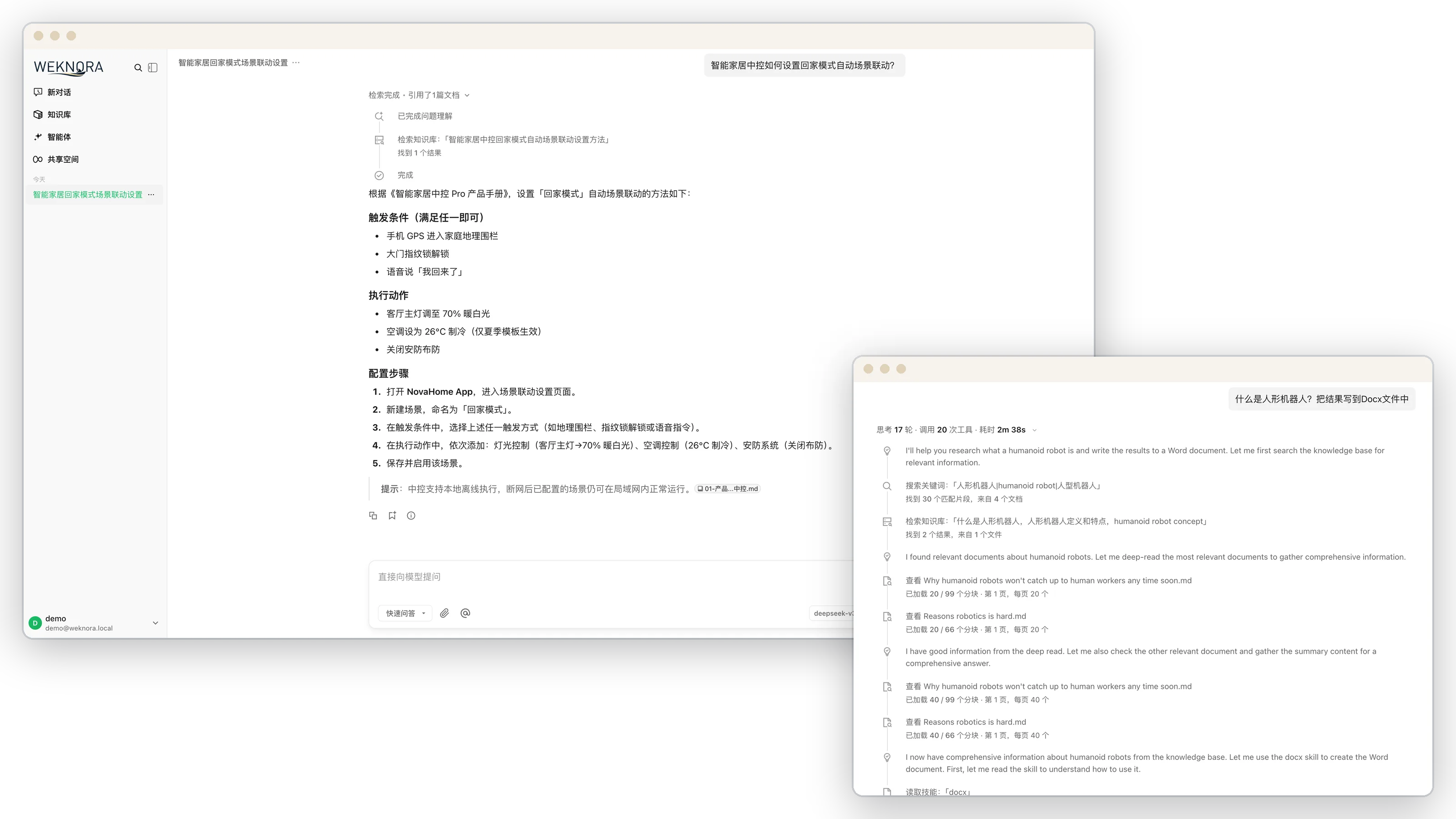
🧪 Run experiments Follow how a harness changes across rounds. Open experiments → |
🛠️ Customize a harness See a domain harness collect evidence and answer. Open customization → |
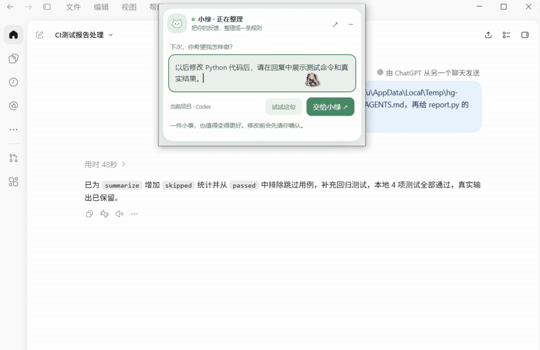
🌱 Evolve your harness Turn a correction into a proposed change. Open personal evolution → |
Tip
Expand a workflow to see what you can build with HarnessGrad and how to get started.
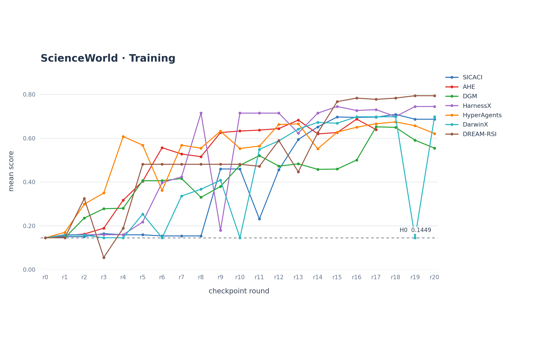
Track how a harness performs as an improvement method edits it over successive rounds. The charts below show runs on three benchmarks.
| ALFWorld | AppWorld | ScienceWorld |
|---|---|---|
  |
  |
  |
How does one round of DGM change Loop’s performance on math word problems? The task agent uses Loop 0.2.0 (study source) with Qwen3.5-9B to solve five GSM8K training questions. DGM uses DeepSeek Harness (headless) with DeepSeek-V4.1-Flash to edit Loop, then HarnessGrad scores the candidate on the same questions. Set up the two agents and GSM8K.
harnessgrad run --preset gsm8k-dgm-study
Open runs/gsm8k-dgm-study/end-summary.md to compare the two rounds. For a repeat run, add --run-id with a new name.
Choose a harness → Select an RSI method → Run tasks → Inspect the evidence. Use the same recorded conditions when comparing results, then explore the learning curve, versions and task trajectories in the Console.

A research run is one point in a harness × method × benchmark space: a harness solves tasks, a method proposes edits to that harness between rounds, and a benchmark scores each candidate. HarnessGrad provides tasks and scoring, isolated execution, and version control for candidate harnesses, with a recorded curve for each experiment.
[!NOTE] The inventory lists declared integrations; each harness and benchmark has its own preparation and runtime requirements.
The table records the inventory at this README revision; the benchmark row is checked against the declared adapters.
| axis | what ships | where |
|---|---|---|
| harnesses | 8: loop, codex, opencode, deepseek-harness, openclaw, miniagent, miniswe, oracle |
base_harness/<name>/ |
| RSI methods | 19: dgm, rrsi, adas, ahe, ace, skillopt, evoprompt, evo_harness, opro, tthe, dream_rsi, sica_ci, gepa, darwinx, arbor, hyperagents, meta_harness, harnessx, modular_rsi |
experiments/method-<name>.json |
| benchmarks | 56 declared adapters; preparation and runtime prerequisites vary — every one listed: agentdojo, aime, alfworld, appworld, authored_example_fix_bug, bbeh, bfcl_v3, bird_minidev, browsecomp, chessbench_puzzles, cooperbench, costbench, costbench_dynamic, deepsearchqa, deepswe, ds1000, fever, gaia, gsm8k, harvey_lab, hle, hotpotqa, jericho, jobbench, kumo, livecodebench, livemathbench, locomo, math, math500, memoryagentbench, musique, nq, officeqa_pro, personamem_v2, physicsquestions, reasoning_gym, scienceworld, searchqa, sportsunderstanding, spreadsheetbench, spreadsheetbench2, strategyqa, strongreject, supergpqa, swe_bench, swe_bench_pro, tau2_bench, tau3_bench, tau_bench, terminal_bench, travelplanner, triviaqa, twowikimultihopqa, widesearch, workbench |
data/datasets/, detail in DATASETS.md |
harness.json and an entrypoint accepting --task and --workdir. See bring your own harness.A harness supplies harness.json and an entrypoint accepting --task and --workdir (interface). The platform runs dataset tasks and scoring, isolates execution, versions candidate harnesses, and records each run's outcomes and receipts. Dataset and harness prerequisites still need to be installed separately.
Each round records the candidate harness hash and its changes, alongside the run's model roles and measurement metadata.
[!IMPORTANT] Compare results only when the task selection, scorer, models and other relevant conditions support it. Failed or incomplete measurements are not scores; do not substitute proxy scores under a benchmark name. See the measurement policy.
Requires Linux, Python 3.12+, Git, uv, and a working bubblewrap. See the first-use guide for setup details.
git clone https://github.com/zjunlp/HarnessGrad.git
cd HarnessGrad
uv venv --seed --python 3.12 ~/.venvs/harnessgrad
source ~/.venvs/harnessgrad/bin/activate
uv pip install -e .
./install.sh --check
Set the shared external dataset directory in your local .env:
HG_DATA_ROOT=/path/to/datasets
See downloads for preparation and locations, and datasets for adapter details.
[!TIP] New to HarnessGrad? The first-use guide includes an installation control that does not need a model call or dataset download.
Use the shared Console to inspect experiments, harness versions and task trajectories.
export HG_CONSOLE_RUNS="$PWD/runs"  # existing run-record directory
python console/server.py --port 4460
Open http://127.0.0.1:4460/ from the repository root, or point HG_CONSOLE_RUNS to another existing run-record directory. The Console binds to localhost by default.
 Experiments |
 Versions |
 Trajectories |
Thank you to everyone who contributes harnesses, methods, benchmarks, and improvements to HarnessGrad! The three charts show the most recent 30 days; each line includes contributions made before that window.
Want to join? Bring a harness, add a method, or onboard a benchmark, then open a pull request. We will add your name to the relevant contributor chart.


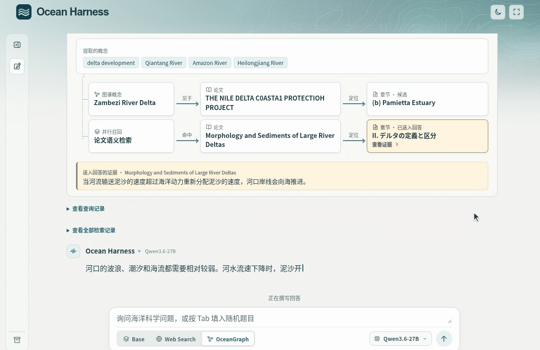
Ocean Harness is one example built with HarnessGrad. It combines domain sources, research tools, and an answer workflow to answer ocean questions with citations. Build a harness for your own domain using the workflow below.
Use Python 3.12+ and install from the HarnessGrad checkout. For model-generated edits, configure an editor endpoint in the customization guide.
python -m pip install .Choose a starting harness → Edit a candidate → Inspect the diff → Try it on tasks.
Start from a base or saved candidate, edit its files with an assistant and evaluate the result. See bring your own harness. The customization proposal command can also generate an unevaluated candidate from explicitly supplied feedback and text, with options to refine instructions from failure feedback, propose memory-backed skills and export a source-checked patch for review.
[!TIP] Already have a harness? Run
harnessgrad customize inspect --root ./my-harnessto see the components declared in its manifest, or see bring your own harness for the entrypoint and manifest format.
Install HarnessGrad and configure an OpenAI-compatible editor endpoint as described in the customization guide. Choose the files and feedback you want to share with that endpoint; for example, put the following in feedback.json:
[{"id": "review-1", "kind": "failure", "text": "The task ended without running the project tests."}]harnessgrad customize collect --root ./my-harness --skill skills/main.md --feedback ./feedback.json > request.json harnessgrad customize propose --request request.json --max-calls 8 > proposal.json harnessgrad customize review --request request.json --proposal proposal.json --root ./my-harness
Replace ./my-harness and skills/main.md with your own selected paths. The proposal includes candidate text and a diff for review; use the guide to export a patch and test it on a copy.
The same Console used to inspect experiments also provides a workspace for editing harness candidates. See the workbench guide for setup and sessions.

Harness editor

Xiao Lü is one example of personal Harness evolution built with HarnessGrad. The desktop assistant shows how a correction from a session can become a scoped change proposal for review.
Use Python 3.12+ and install from the HarnessGrad checkout. To build the native desktop shell, follow the desktop setup guide.
python -m pip install .Open the local personal workspace with a synthetic session. Choose an existing project directory and a separate state directory outside the checkout and project.
harnessgrad personal demo --state-root /path/to/state --project /path/to/project
harnessgrad personal serve --state-root /path/to/state
Open the printed local URL and select the service's connection.json in the browser. This example previews the workspace without model calls. For the desktop workflow shown above, see the personal evolution guide and the proposal preview in PR #64.
If the platform, the measurement protocol or a curve produced here is useful in your work:
@misc{xu2026harnessgrad,
  title  = {HarnessGrad: Harness as A Continual Learner},
  author = {Buqiang Xu and Yenan Wang and Yutong Yu and Rongyao Li and
            Jintian Zhang and Shuofei Qiao and Xuehai Wang and Zirui Xue and
            Yijun Chen and Ningyu Zhang},
  year   = {2026},
}
MIT. Third-party benchmark code keeps its own licence and provenance next to the code that uses it (PROVENANCE.json, LICENSE.upstream).
zjunlp/HarnessGrad is a public repo on GitHub by zjunlp. A platform for running and comparing harness self-improvement methods.
It declares the MIT license on GitHub.
Its maker has not tagged a system, so it is unknown here. Its README says what it needs.
Open "Take it" on its page: Take My Repo writes an install plan for your machine and hands it to your AI agent (Claude Code, Codex or Cursor), which asks you before each step. Take My Repo has not tested it on any machine.
Its last change on GitHub was on 2026-11-20. Take My Repo does not judge from that whether it is maintained.
Nobody has reviewed it on Take My Repo yet, which says nothing about its quality.
Build Agentic workflows, RAG pipelines, with rich AI model and tool support on one collaborative workspace. Deploy on cloud, VPC, or self-hosted, so teams move from prototype to production without rebuilding the stack.
A command-line benchmarking tool
Open-source LLM knowledge platform: turn raw documents into a queryable RAG, an autonomous reasoning agent, and a self-maintaining Wiki.
An open-source long-horizon SuperAgent harness that researches, codes, and creates. With the help of sandboxes, memories, tools, skill, subagents and message gateway, it handles different levels of tasks that could take minutes to hours.
The agent harness performance optimization system. Skills, instincts, memory, security, and research-first development for Claude Code, Codex, Opencode, Cursor and beyond.
[EMNLP 2022] An Open Toolkit for Knowledge Graph Extraction and Construction
[ACL 2024] An Easy-to-use Knowledge Editing Framework for LLMs.
Must-read Papers on Knowledge Editing for Large Language Models.