
spring-boot-seed
SpringBoot骨架项目,集成SpringBoot、Mybatis、Druid、Mapper、PageHelper、Redis、Shiro、Swagger2、Log4j2等技术
- 246
- Java
- MIT
- 8 y ago
本项目记录一些常见对象转换的方法,例如:文件转换、日期时间转换、stream流转换、集合对象转换等
Repo zzycreate/java-convert-example, read from GitHub 1 min ago. zzycreate has not joined Take My Repo.
zzycreate/java-convert-example is a public repo on GitHub by zzycreate. 本项目记录一些常见对象转换的方法,例如:文件转换、日期时间转换、stream流转换、集合对象转换等. It declares no license on GitHub. Public does not mean open source: without a license, nobody is granted the right to reuse it. It is written mainly in Java, has 5 stars and last changed on 2021-04-26. Nobody has reviewed it on Take My Repo yet, which says nothing about its quality. Read from GitHub on 2026-11-19.
平时的java项目中会存在各种对象的互相转换的情况,本项目记录一些常见对象转换的方法,例如:文件转换、日期时间转换、stream流转换、集合对象转换等
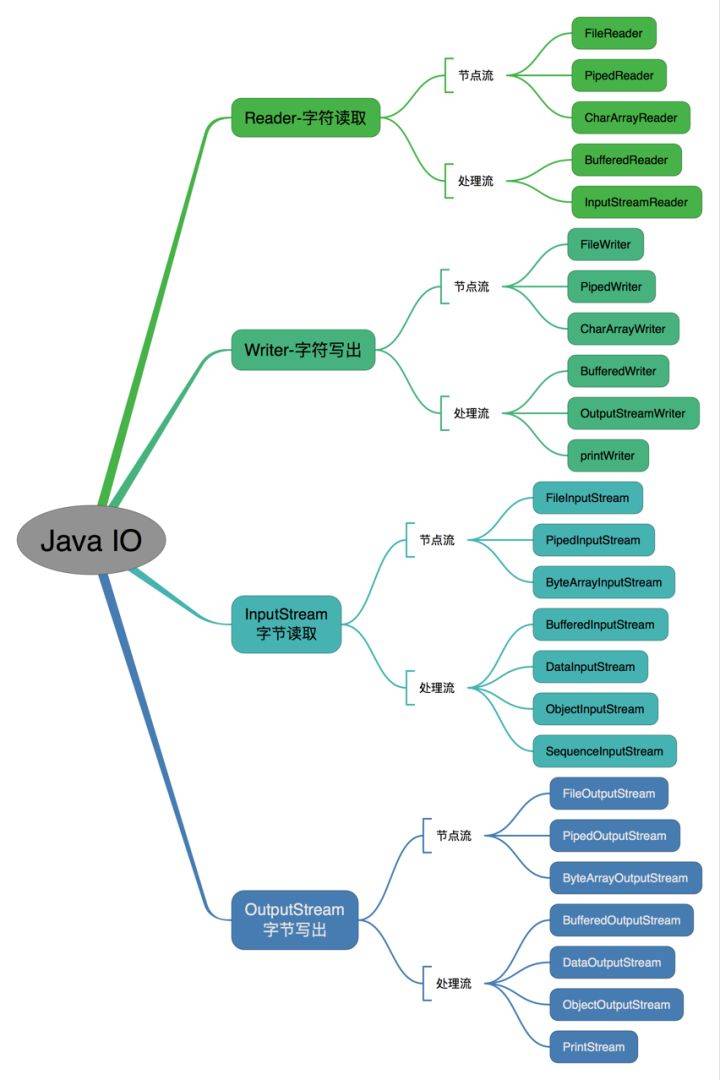
Java 为文件操作设计了很多的类,有数据相关的 IO Stream 流,与文件相关的File、Path等对文件系统的抽象。
Java 的 io 包和几乎包含了所有操作输入、输出需要的类,另外 java1.4 开始推出的 nio 接口能更高效的完成一些工作。
Java io 包中的流支持很多种格式,比如:基本类型、对象、本地化字符集等等。所有这些流类代表了输入源和输出目标。
一个流可以理解为一个数据的序列。输入流表示从一个源读取数据,输出流表示向一个目标写数据。
按照操作方式分类:

按照操作对象分类:

java 1.4 版本后,重新设计出了一套新的 IO 接口:Non-blocking IO(NIO)
java 文件操作的基础是 File/Path, 一个代表文件,一个代表路径,两者组合完整地描述各种操作系统中的文件,尤其适合 Linux 的 'Everything is a File' 的哲学。
由于 Files 是 nio 在 java7 新增的内容,使用本方法需要首先将程序的 jdk 升级到 jdk7+; Files 工具类提供了各种读写创建删除文件等操作,可以很方便的操作文件和流。
DEMO 参考: String2FileWithJavaNioExample
    List<String> lines = Arrays.asList("The second line", "The second line");
    Path path = Paths.get("filename.txt");
    try {
        Files.write(path, lines, StandardCharsets.UTF_8);
    } catch (IOException e) {
        e.printStackTrace();
    }
标准的IO编程接口是面向字节流和字符流的。而NIO是面向通道和缓冲区的,数据总是从通道中读到buffer缓冲区内,或者从buffer写入到通道中。
Java NIO 的 Channel 和 IO 流的对比:
DEMO 参考: String2FileWithJavaNioExample
使用 FileOutputStream 的 FileChannel:
    String data = "The second line" + System.getProperty("line.separator") +
                          "The second line" + System.getProperty("line.separator");
    // use ByteBuffer wrap data
    final ByteBuffer buffer = ByteBuffer.wrap(data.getBytes());
    // try-with-resources auto close the channel
    try (// open channel
        final FileOutputStream fos = new FileOutputStream(new File("filename.txt"));
        FileChannel channel = fos.getChannel()) {
        // write buffer to channel
        while (buffer.hasRemaining()) {
            channel.write(buffer);
        }

    } catch (IOException e) {
        e.printStackTrace();
    }
使用 RandomAccessFile 的 FileChannel:
    String data = "The second line" + System.getProperty("line.separator") +
                          "The second line" + System.getProperty("line.separator");
    final ByteBuffer buffer = ByteBuffer.wrap(data.getBytes());
    try(final RandomAccessFile file = new RandomAccessFile("filename.txt", "rw");
        FileChannel channel = file.getChannel()){

        while (buffer.hasRemaining()){
            channel.write(buffer);
        }

    } catch (IOException e) {
        e.printStackTrace();
    }
使用 PrintWriter/FileWriter 一般写入的内容比较少,如果需要写入大量数据,应该要使用缓冲流,提高效率。
DEMO 参考: String2FileWithWriterExample
    try (Writer writer = new BufferedWriter(new OutputStreamWriter(
            new FileOutputStream("filename.txt", true), StandardCharsets.UTF_8))) {
        writer.write("The second line" + System.getProperty("line.separator") +
        "The second line" + System.getProperty("line.separator"));
    } catch (IOException e) {
        e.printStackTrace();
    }
使用PrintWrite可以很简单的使用println进行单行输入,但是存在的文件会被截断
DEMO 参考: String2FileWithWriterExample
    try (PrintWriter writer = new PrintWriter("filename.txt", "UTF-8")) {
        writer.println("The first line");
        writer.println("The second line");
    } catch (FileNotFoundException | UnsupportedEncodingException e) {
        e.printStackTrace();
    }
FileWriter 在创建的时候可以指定追加/覆盖模式,避免 PrintWriter 截断已存在的文件。
DEMO 参考: String2FileWithWriterExample
    try (FileWriter writer = new FileWriter(new File("filename.txt"), true)) {
        writer.append("The first line").append(System.getProperty("line.separator"))
                .append(LINE2).append(System.getProperty("line.separator"));
    } catch (IOException e) {
        e.printStackTrace();
    }
Commons-io 项目地址: apache/commons-io
使用 commons-io 包中的 FileUtils 进行文件写入, 重构的方法可以设置文件编码和写入模式
DEMO 参考: String2FileWithCommonsExample
    try {
        String data = "The second line" + System.getProperty("line.separator") +
                              "The second line" + System.getProperty("line.separator");
        FileUtils.writeStringToFile(new File("filename.txt"), data, StandardCharsets.UTF_8, true);
    } catch (IOException e) {
        e.printStackTrace();
    }
Guava 的官方开源项目地址: google/guava
guava 的 Files 可以直接向文件中写入 byte[] 数据
Files 已被标注为 @Beta 不稳定的版本,并提示使用 jdk7 nio 的 Files、MoreFiles 等工具类利用 nio 的 Path 进行文件处理
DEMO 参考: String2FileWithGuavaExample
    try {
        String data = "The second line" + System.getProperty("line.separator") +
                          "The second line" + System.getProperty("line.separator");
        Files.write(data.getBytes(), new File("filename.txt"));
    } catch (IOException e) {
        e.printStackTrace();
    }
guava 的 CharSink 可以直接向文件中写入字符数据,ByteSink 则可以写入字节数据
Files 中的 write、append、copy 等方法本质上都是调用的这些 Sink 类。
DEMO 参考: String2FileWithGuavaExample
    try {
        String data = "The second line" + System.getProperty("line.separator") +
                          "The second line" + System.getProperty("line.separator");
       Files.asCharSink(new File("filename.txt"), StandardCharsets.UTF_8, FileWriteMode.APPEND).write(data);
    } catch (IOException e) {
        e.printStackTrace();
    }
NIO 的 Files 工具类提供多种 read 方法可以快速进行文件读取
DEMO 参考: File2StringWithNioExample
使用 readAllBytes 读取字节:
    try {
        return new String(Files.readAllBytes(Paths.get("filename.txt")));
    } catch (IOException e) {
        e.printStackTrace();
    }
使用 readAllLines 逐行读取字符串:
    try {
        List<String> lines = Files.readAllLines(Paths.get("filename.txt"), StandardCharsets.UTF_8);
        StringBuilder sb = new StringBuilder();
        lines.forEach(s -> sb.append(s).append(SEPARATOR));
        return sb.toString();
    } catch (IOException e) {
        e.printStackTrace();
    }
    return null;
由于 Stream 内部无法在 lambda 中使用带有 checked Exception 的方法,因此要对异常的抓取,防止发生异常
使用 lines 逐行读取字符串:
    try (Stream<String> lines = Files.lines(Paths.get("filename.txt"), StandardCharsets.UTF_8)) {
        StringBuilder content = new StringBuilder();
        lines.forEach(s -> content.append(s).append(SEPARATOR));
        return content.toString();
    } catch (IOException e) {
        e.printStackTrace();
    }
Scanner 默认的缓冲大小为 1024, 可以读取文件,但是读取空文件的时候会出现异常,见 [Scanner的讨论](https://stackoverflow
.com/questions/326390/how-do-i-create-a-java-string-from-the-contents-of-a-file)
Scanner 使用正则表达式 \A. 匹配开始节点。
DEMO 参考: File2StringWithScannerExample
    try (Scanner scanner = new Scanner(new File("filename.txt"), "UTF-8")) {
        return scanner.useDelimiter("\\A").next();
    } catch (FileNotFoundException e) {
        e.printStackTrace();
    }
BufferedReader 缓冲流,可以高效的读取文件,使用 Reader 和 InputStream 组合可以设置各种配置。
DEMO 参考: File2StringWithReaderExample
    // new BufferedReader(new FileReader("filename.txt"));
    try (BufferedReader reader = new BufferedReader(new InputStreamReader(new FileInputStream("filename.txt"), StandardCharsets.UTF_8))) {
        String line;
        StringBuilder stringBuilder = new StringBuilder();
        while ((line = reader.readLine()) != null) {
            stringBuilder.append(line).append(SEPARATOR);
        }
        return stringBuilder.toString();
    } catch (IOException e) {
        e.printStackTrace();
    }
使用 BufferReader 的 lines 方法逐行读取数据:
    try (BufferedReader reader = new BufferedReader(new FileReader("filename.txt"))) {
        return reader.lines().collect(Collectors.joining(System.getProperty("line.separator"));
    } catch (IOException e) {
        e.printStackTrace();
    }
仅仅使用 FileInputStream 进行文件读取,从 FileInputStream 写入 byte[] 缓存,转换为文本数据,这段代码只需要 jdk1.0+
DEMO 参考: File2StringWithReaderExample
    FileInputStream fis = null;
    try {
        fis = new FileInputStream("filename.txt");
        byte[] buffer = new byte[fis.available()];
        int length = fis.read(buffer);
        return new String(buffer, 0, length, StandardCharsets.UTF_8);
    } catch (IOException e) {
        e.printStackTrace();
    } finally {
        if (fis != null) {
            try {
                fis.close();
            } catch (IOException e) {
                e.printStackTrace();
            }
        }
    }
    return null;
commons-io 的 IOUtils 工具类提供了大量 IO 相关的工具方法,使用 IOUtils.copy 直接将 Reader/InputStream 转换为 Writer/OutputStream
DEMO 参考: File2StringWithCommonsExample
使用 FileReader 读取文件,使用 StringWriter 将流中的内容输出出来:
    try (FileReader fileReader = new FileReader("filename.txt");
         StringWriter stringWriter = new StringWriter()) {
        IOUtils.copy(fileReader, stringWriter);
        return stringWriter.toString();
    } catch (IOException e) {
        e.printStackTrace();
    }
commons-io 的 FileUtils 提供了文件相关的工具方法, 使用 FileUtils.readByFileUtilsReadFileToString 读取文件内容
DEMO 参考: File2StringWithCommonsExample
    try {
        return FileUtils.readFileToString(new File("filename.txt"), StandardCharsets.UTF_8);
    } catch (IOException e) {
        e.printStackTrace();
    }
直接使用 guava 的 Files 转换为 ByteSource/CharSource 然后直接 read 成字符串:
    try {
        // Resources.asCharSource(new URL(""), StandardCharsets.UTF_8).read();
        return Files.asCharSource(new File("filename.txt"), StandardCharsets.UTF_8).read();
    } catch (IOException e) {
        e.printStackTrace();
    }
或者使用 readLines 逐行读取:
    try {
        return String.join(System.getProperty("line.separator"), Files.readLines(new File("filename.txt"), StandardCharsets.UTF_8));
    } catch (IOException e) {
        e.printStackTrace();
    }
标准的IO编程接口是面向字节流和字符流的。而NIO是面向通道和缓冲区的,数据总是从通道中读到buffer缓冲区内,或者从buffer写入到通道中。
Java NIO 的 Channel 和 IO 流的对比:
Buffer 及其子类不是线程安全的
Buffer 的属性:
几个属性的关系: 0 <= mark <= position <= limit <= capacity
Buffer 的方法:
使用不同的 Channel 同时操作同一个 Buffer 可以实现文件的复制。
DEMO 参考: File2FileWithNioExample
    try (FileInputStream input = new FileInputStream("filename.txt");
         FileOutputStream output = new FileOutputStream("filename.txt");
         ReadableByteChannel from = input.getChannel();
         WritableByteChannel to = output.getChannel()) {
        ByteBuffer buffer = ByteBuffer.allocateDirect(16 * 1024);
        while (from.read(buffer) != -1) {
            // Prepare the buffer to be drained
            buffer.flip();

            // Make sure that the buffer was fully drained
            while (buffer.hasRemaining()) {
                to.write(buffer);
            }

            // Make the buffer empty, ready for filling
            buffer.clear();
        }
    } catch (IOException e) {
        e.printStackTrace();
    }
jdk 1.1 就开始提供了基础的日期时间相关的功能,java.util.Date、java.util.Calendar、java.text.DateFormat、java.sql.Date、java.sql.Time、
java.sql.Timestamp 等是 jdk 1.1 中常用的日期时间类,java.util.Date 代表了时间,java.util.Calendar 代表了日期,java.text.DateFormat
用于格式化时间,java.sql.Date 是 java.util.Date 的包装类,代表了数据库中的 DATE,java.sql.Time 代表数据库的时间(不含日期), java.sql.Timestamp 代表了数据库的 TIMESTAMP。
SimpleDateFormat 时间格式化常用字符及含义:
| 字母 | 含义 | 示例 |
|---|---|---|
| G | 纪元 | 在 Locale.CHINA语言环境下,如 '公元'; 在Locale.US语言环境下,如 'AD' |
| y | 年份。一般用 yy 表示两位年份,yyyy 表示 4 位年份 | 使用 yy 表示的年扮,如 11; 使用 yyyy 表示的年份,如 2011 |
| M | 月份。一般用 MM 表示月份,如果使用 MMM,则会根据语言环境显示不同语言的月份 | 使用 MM 表示的月份,如 05; 使用 MMM 表示月份,在 Locale.CHINA语言环境下,如“十月”; 在Locale.US语言环境下,如 Oct |
| d | 月份中的天数。一般用 dd 表示天数 | 使用 dd 表示的天数,如 10 |
| D | 年份中的天数。表示当天是当年的第几天, 用 D 表示 | 使用 D 表示的年份中的天数,如 295 |
| E | 星期几。用 E 表示,会根据语言环境的不同, 显示不同语言的星期几 | 使用 E 表示星期几, 在 Locale.CHINA 语言环境下,如“星期四”; 在 Locale.US 语言环境下,如 Thu |
| H | 一天中的小时数(0~23)。一般用 HH 表示小时数 | 使用 HH 表示的小时数,如 18 |
| h | 一天中的小时数(1~12)。一般使用hh表 示小时数 | 使用 hh 表示的小时数,如 10 (注意 10 有可能是 10 点,也可能是 22 点) |
| m | 分钟数。一般使用 mm 表示分钟数 | 使用 mm 表示的分钟数,如 29 |
| s | 秒数。一般使用 ss 表示秒数 | 使用 ss 表示的秒数,如 38 |
| S | 毫秒数。一般使用 SSS 表示毫秒数 | 使用 SSS 表示的毫秒数,如 156 |
Date 代表了一个特定的时间,可以精确到毫秒,也能表示年月日等日期概念。
但 util 中的日期时间操作存在一些问题:
Java 8 新增的日期时间 API 遵循 JSR 310 设计规范,解决上述 API 中的缺陷。
主要的操作对象有:
这些对象都是线程安全,且不可变,API 方法设计简单,转换容易,配合 java.time.format.DateTimeFormatter 可以很容易的进行格式化。
以上这些对象的关联关系:
Java 8日期/时间API是JSR-310的实现,它的实现目标是克服旧的日期时间实现中所有的缺陷,新的日期/时间API的一些设计原则是:
示例代码: Jdk1DateExample.java
    // 毫秒值
    long timestamp = System.currentTimeMillis();

    // java.util.Date 除了一下两种构造方法,其他构造方法均已过期
    Date date = new Date();
    Date date1 = new Date(timestamp);

    // sql date/time/timestamp 是针对SQL语言使用的,Date只有日期而没有时间,Time只有时间而没有日期
    java.sql.Date sqlDate = new java.sql.Date(timestamp);
    java.sql.Date sqlDate1 = new java.sql.Date(date1.getTime());
    java.sql.Time sqlTime = new java.sql.Time(timestamp);
    java.sql.Time sqlTime1 = new java.sql.Time(date1.getTime());
    java.sql.Timestamp sqlTimestamp = new java.sql.Timestamp(timestamp);
    java.sql.Timestamp sqlTimestamp1 = new java.sql.Timestamp(date1.getTime());

    // Calendar 代表日历, GregorianCalendar 代表公历
    Calendar calendar = Calendar.getInstance();
    GregorianCalendar gregorianCalendar = new GregorianCalendar();
示例代码: Jdk1DateExample.java
    long timestamp = System.currentTimeMillis();
    Date date = new Date(timestamp);
    java.sql.Date sqlDate = new java.sql.Date(timestamp);
    java.sql.Time sqlTime = new java.sql.Time(timestamp);
    java.sql.Timestamp sqlTimestamp = new java.sql.Timestamp(timestamp);
    Calendar calendar = Calendar.getInstance();
    GregorianCalendar gregorianCalendar = new GregorianCalendar();

    // Date 除了 getTime() 方法可以获取时间戳毫秒值外,其他 get 方法在 jdk8 中均已过期,不推荐时间
    // sql date/time/timestamp 均为 util date 的子类,过期方法类似
    long s = date.getTime();
    long sqlTimes = sqlDate.getTime();
    long sqlTime1 = sqlTime.getTime();
    long sqlTime2 = sqlTimestamp.getTime();
    long sqlNano1 = sqlTimestamp.getNanos();
    long sqlNano2 = sqlTimestamp.getNanos();

    Date calendarTime = calendar.getTime();
    int year = calendar.get(Calendar.YEAR);
    // 由于月份是从0开始,一般 +1 之后才和人的主观感受一直
    int month = calendar.get(Calendar.MONTH) + 1;
    int dateNum = calendar.get(Calendar.DATE);
    int hour = calendar.get(Calendar.HOUR_OF_DAY);
    int minute = calendar.get(Calendar.MINUTE);
    int second = calendar.get(Calendar.SECOND);
    // 星期
    int dayOfWeek = calendar.get(Calendar.DAY_OF_WEEK);
    // 日期
    int dayOfMonth = calendar.get(Calendar.DAY_OF_MONTH);

    boolean isLeapYear = gregorianCalendar.isLeapYear(year);
JSR 303 的日期时间对象虽然多,但是操作的 API 基本类似,很容易理解,以下距离没有列举所有情况,但其他操作基本类似。
对象的创建基本都是 now (当前时间)、of (静态构造方法)、parse (文本解析)、at (维度组合)、to (对象转换)、between (区间) 等简单明了的 API。
示例代码: Jdk8TimeExample.java
    LocalTime time = LocalTime.now();
    LocalTime time1 = LocalTime.of(13, 14, 15);
    LocalTime time2 = LocalTime.ofSecondOfDay(47655);
    LocalTime time3 = LocalTime.parse("13:14:15");

    LocalDate date = LocalDate.now();
    LocalDate date1 = LocalDate.of(2019, 5, 10);
    LocalDate date2 = LocalDate.ofYearDay(2019, 130);
    LocalDate date3 = LocalDate.parse("2019-05-10");

    LocalDateTime dateTime = LocalDateTime.now();
    LocalDateTime dateTime1 = LocalDateTime.of(2019, 5, 10, 13, 14, 15);
    LocalDateTime dateTime2 = LocalDateTime.of(date, time);
    LocalDateTime dateTime3 = date.atStartOfDay();
    LocalDateTime dateTime4 = date.atTime(time);
    LocalDateTime dateTime5 = date.atTime(13, 14, 15);
    LocalDateTime dateTime6 = time.atDate(date);

    ZonedDateTime zonedDateTime = ZonedDateTime.now();
    ZonedDateTime zonedDateTime1 = dateTime.atZone(ZoneId.systemDefault());
    ZonedDateTime zonedDateTime2 = dateTime.atZone(ZoneId.of("Asia/Shanghai"));

    LocalDateTime dateTime7 = zonedDateTime.toLocalDateTime();
    LocalDate date4 = zonedDateTime.toLocalDate();
    LocalTime time4 = zonedDateTime.toLocalTime();

    Instant instant = dateTime.toInstant(ZoneOffset.of("+08:00"));
    Instant instant1 = zonedDateTime.toInstant();
    Instant instant2 = new Date().toInstant();

    Duration duration = Duration.between(time, time1);
    Period period = Period.between(date, date1);
对象的 get 方法可以获取对象结构的组成部分,is方法可以用做时间的简单判断。
示例代码: Jdk8TimeExample.java
    ZonedDateTime zonedDateTime = ZonedDateTime.now();
    LocalDateTime dateTime = zonedDateTime.toLocalDateTime();
    LocalDate date = dateTime.toLocalDate();
    LocalTime time = dateTime.toLocalTime();

    int year = date.getYear();
    Month month = date.getMonth();
    int monthValue = date.getMonthValue();
    int dayOfYear = date.getDayOfYear();
    int dayOfMonth = date.getDayOfMonth();
    DayOfWeek dayOfWeek = date.getDayOfWeek();

    int hour = time.getHour();
    int minute = time.getMinute();
    int second = time.getSecond();
    int nano = time.getNano();

    ZoneId zone = zonedDateTime.getZone();
    ZoneOffset offset = zonedDateTime.getOffset();

    LocalDateTime now = LocalDateTime.now();

    System.out.println(String.format("dateTime is before now: %s", dateTime.isBefore(now)));
    System.out.println(String.format("dateTime is before now: %s", dateTime.isAfter(now)));
    System.out.println(String.format("date is leap year(闰年): %s", dateTime.toLocalDate().isLeapYear()));
以下为 jdk 1.1 时间日期与 jdk1.8 时间日期的转换
示例代码: DateLocalDateTimeConvertExample.java
    Instant instant = new Date().toInstant();
    Instant instant1 = Instant.ofEpochMilli(new Date().getTime())
示例代码: DateLocalDateTimeConvertExample.java
    LocalDateTime localDateTime = LocalDateTime.ofInstant(new Date().toInstant(), ZoneId.systemDefault());
    LocalDate localDate = LocalDateTime.ofInstant(new Date().toInstant(), ZoneId.systemDefault()).toLocalDate();
    LocalTime localTime = LocalDateTime.ofInstant(new Date().toInstant(), ZoneId.systemDefault()).toLocalTime();
示例代码: DateLocalDateTimeConvertExample.java
Date date = new Date(Instant.now().toEpochMilli());
示例代码: DateLocalDateTimeConvertExample.java
Date date = new Date(LocalDateTime.now().toInstant(ZoneOffset.of("+08:00")).toEpochMilli());
以下为字符串与时间日期的转换
示例代码: DateTimeStringExample.java
使用 SimpleDateFormat 按照格式解析字符串,可能会出现异常,格式见前文表格。
    try {
        SimpleDateFormat sdf = new SimpleDateFormat("yyyy-MM-dd HH:mm:ss");
        Date date = sdf.parse("2019-01-02 15:23:46");
    } catch (ParseException e) {
        e.printStackTrace();
    }
或者间接利用 LocalDateTime 进行字符串解析
    DateTimeFormatter dateTimeFormatter = DateTimeFormatter.ofPattern("yyyy-MM-dd HH:mm:ss");
    LocalDateTime localDateTime = LocalDateTime.parse("2019-05-10 13:14:15", dateTimeFormatter);
    Date date = Date.from(localDateTime.toInstant(ZoneOffset.of("+08:00")));
示例代码: DateTimeStringExample.java
    DateTimeFormatter dateTimeFormatter = DateTimeFormatter.ofPattern("yyyy-MM-dd HH:mm:ss");
    LocalDateTime dateTime = DateTimeStringExample.toLocalDateTime("2019-05-10 13:14:15", dateTimeFormatter);
示例代码: DateExample.java
利用 SimpleDateFormat 进行时间的格式化:
    SimpleDateFormat sdf = new SimpleDateFormat("yyyy-MM-dd HH:mm:ss");
    String str = sdf.format(new Date);
利用 DateTimeFormatter 进行时间的格式化:
    ZonedDateTime zonedDateTime = date.toInstant().atZone(ZoneId.systemDefault());
    DateTimeFormatter dateTimeFormatter = DateTimeFormatter.ofPattern("yyyy-MM-dd HH:mm:ss");
    String str = zonedDateTime.format(dateTimeFormatter);
示例代码: DateExample.java
    ZonedDateTime zonedDateTime = Instant.now().atZone(ZoneId.systemDefault());
    DateTimeFormatter dateTimeFormatter = DateTimeFormatter.ofPattern("yyyy-MM-dd HH:mm:ss");
    String str = zonedDateTime.format(dateTimeFormatter);
示例代码: DateExample.java
    long epochMilli = new Date().getTime();
    long epochMilli1 = Instant.now().toEpochMilli();
    long epochMilli2 = new Date().toInstant().toEpochMilli();
示例代码: DateExample.java
    long epochMilli = System.currentTimeMillis();
    Date date = new Date(epochMilli);
    Instant instant = Instant.ofEpochMilli(epochMilli);
Stream 不是集合元素,它不是数据结构并不保存数据,它是有关算法和计算的,它更像一个高级版本的 Iterator。 原始版本的 Iterator,用户只能显式地一个一个遍历元素并对其执行某些操作; 高级版本的 Stream,用户只要给出需要对其包含的元素执行什么操作,比如 “过滤掉长度大于 10 的字符串”、“获取每个字符串的首字母”等,Stream 会隐式地在内部进行遍历,做出相应的数据转换。
Stream 就如同一个迭代器(Iterator),单向,不可往复,数据只能遍历一次,遍历过一次后即用尽了,就好比流水从面前流过,一去不复返。
而和迭代器又不同的是,Stream 可以并行化操作,迭代器只能命令式地、串行化操作。 顾名思义,当使用串行方式去遍历时,每个 item 读完后再读下一个 item。而使用并行去遍历时,数据会被分成多个段,其中每一个都在不同的线程中处理,然后将结果一起输出。
Stream 流的使用基本分为三种操作:生成 Stream 流数据源、Stream 流中值操作、Stream 流结束操作。另外还有 short-circuiting 操作作为补充。
想要获取 Stream 流数据源有很多种方式:
一个流可以后面跟随零个或多个 intermediate 操作。其目的主要是打开流,做出某种程度的数据映射/过滤,然后返回一个新的流,交给下一个操作使用。 这类操作都是惰性化的(lazy),就是说,仅仅调用到这类方法,并没有真正开始流的遍历。只有在 Terminal 操作执行时才会真正的执行这些 Intermediate 操作。
常用的 Intermediate 操作有:map (mapToInt, flatMap 等)、 filter、 distinct、 sorted、 peek、 limit、 skip、 parallel、 sequential、 unordered
一个流只能有一个 terminal 操作,当这个操作执行后,流就被使用“光”了,无法再被操作。所以这必定是流的最后一个操作。 Terminal 操作的执行,才会真正开始流的遍历,并且会生成一个结果,或者一个 side effect。
常用的 Terminal 操作有:forEach、 forEachOrdered、 toArray、 reduce、 collect、 min、 max、 count、 anyMatch、 allMatch、 noneMatch、 findFirst、 findAny、 iterator
当操作一个无限大的 Stream,而又希望在有限时间内完成操作,则在管道内拥有一个 short-circuiting 操作是必要非充分条件。
常用的 Short-circuiting 操作有:anyMatch、 allMatch、 noneMatch、 findFirst、 findAny、 limit
集合对象本身提供了 stream() 和 parallelStream() ,两个方法可以直接获取 Stream 流
    Stream<String> listStream = list.stream();
    Stream<String> listParallelStream = list.parallelStream();
    Stream<String> setStream = set.stream();
    Stream<String> setParallelStream = set.parallelStream();
数组对象转换需要利用工具类 Arrays、 Stream 的静态方法
    Stream<String> arrayStream = Arrays.stream(array);
    Stream<String> arrayStream1 = Stream.of(array);
IO 流可以包装成 BufferedReader 转换为 Stream
    BufferedReader reader = new BufferedReader(new InputStreamReader(new FileInputStream("input.txt"), StandardCharsets.UTF_8));
    Stream<String> stream = reader.lines();
    IntStream intStream = IntStream.range(1, 4);
    DoubleStream doubleStream = DoubleStream.builder().add(1.1).add(2.1).add(3.1).add(4.1).build();
    LongStream longStream = LongStream.of(1L, 2L, 3L, 4L);
示例代码: StreamIntermediateExample.java
map 的作用就是把 input Stream 的每一个元素,映射成 output Stream 的另外一个元素。
    // 转大写
    List<String> stringList = list.stream()
            .map(String::toUpperCase)
            .collect(Collectors.toList()); // [ABC, EFG, HIJ]

    // 数据计算
    List<Integer> intList = Arrays.asList(1, 2, 3, 4, 5, 6, 7, 8, 9).stream()
            .map(n -> n * n)
            .collect(Collectors.toList()); // [1, 4, 9, 16, 25, 36, 49, 64, 81]

    // 获取对象属性
    List<String> list = list.stream()
            .map(Item::getDetail).map(ItemDetail::getValue)
            .collect(Collectors.toList()); // [v1, v5, v3, v2, v4]
flatMap 把 input Stream 中的层级结构扁平化
    Stream<List<Integer>> inputStream = Stream.of(
            Arrays.asList(1),
            Arrays.asList(2, 3),
            Arrays.asList(4, 5, 6)
    );
    // 将集合对象里面的数据拿出来转换为扁平结构
    Stream<Integer> outputStream = inputStream.
            flatMap((childList) -> childList.stream()); // [1, 2, 3, 4, 5, 6]
filter 对原始 Stream 进行某项测试,通过测试的元素被留下来生成一个新 Stream。
    Integer[] sixNums = {1, 2, 3, 4, 5, 6};
    // 对2取模等于0的是偶数,filter留下数字中的偶数
    Integer[] evens = Stream.of(sixNums)
            .filter(n -> n % 2 == 0)
            .toArray(Integer[]::new); // [2, 4, 6]
distinct 是对元素进行去重,去重是利用了对象的 hashCode() 和 equals() 方法
如果distinct()正在处理有序流,那么对于重复元素,将保留以遭遇顺序首先出现的元素,并且以这种方式选择不同元素是稳定的。 在无序流的情况下,不同元素的选择不一定是稳定的,是可以改变的。distinct()执行有状态的中间操作。 在有序流的并行流的情况下,保持distinct()的稳定性是需要很高的代价的,因为它需要大量的缓冲开销。 如果我们不需要保持遭遇顺序的一致性,那么我们应该可以使用通过BaseStream.unordered()方法实现的无序流。
    Integer[] nums = {1, 1, 2, 3, 4, 5, 4, 5, 6};
    Integer[] evens = Stream.of(nums)
            .distinct()
            .toArray(Integer[]::new);// [1, 2, 3, 4, 5, 6]
sorted 方法用于排序,利用 Comparator 类的静态方法可以快速构造一个比较器实现排序。
    List<Integer> list = Arrays.asList(5, 2, 4, 8, 6, 1, 9, 3, 7);

    // sorted() 无参方法为自然排序
    List<Integer> sorted = list.stream().sorted().collect(Collectors.toList());// [1, 2, 3, 4, 5, 6, 7, 8, 9]

    // 使用 Comparator.reverseOrder() 获得一个自然逆序比较器,用于逆序排序
    List<Integer> reverse = list.stream().sorted(Comparator.reverseOrder()).collect(Collectors.toList());// [1, 2, 3, 4, 5, 6, 7, 8, 9]

    // 使用 Comparator.comparing() 获取一个自定义比较器,显现自定义对象的排序
    List<Item> codeSorted = StreamIntermediateExample.newItems().stream()
            .sorted(Comparator.comparing(Item::getCode))
            .collect(Collectors.toList());
    // [Item(name=Name1, code=1, number=1.1, detail=ItemDetail(id=101, value=v1)), Item(name=Name2, code=2, number=2.2, detail=ItemDetail(id=202, value=v2)), Item(name=Name3, code=3, number=3.3, detail=ItemDetail(id=303, value=v3)), Item(name=Name4, code=4, number=4.4, detail=ItemDetail(id=404, value=v4)), Item(name=Name5, code=5, number=5.5, detail=ItemDetail(id=505, value=v5))]

    List<Item> codeReverse = StreamIntermediateExample.newItems().stream()
            .sorted(Comparator.comparing(Item::getCode).reversed())
            .collect(Collectors.toList());
    // [Item(name=Name5, code=5, number=5.5, detail=ItemDetail(id=505, value=v5)), Item(name=Name4, code=4, number=4.4, detail=ItemDetail(id=404, value=v4)), Item(name=Name3, code=3, number=3.3, detail=ItemDetail(id=303, value=v3)), Item(name=Name2, code=2, number=2.2, detail=ItemDetail(id=202, value=v2)), Item(name=Name1, code=1, number=1.1, detail=ItemDetail(id=101, value=v1))]
某些流的返回的元素是有确定顺序的,我们称之为 encounter order。这个顺序是流提供它的元素的顺序,比如数组的encounter order是它的元素的排序顺序,List是它的迭代顺序(iteration order),对于HashSet,它本身就没有encounter order。
一个流是否是encounter order主要依赖数据源和它的中间操作,比如数据源List和Array上创建的流是有序的(ordered),但是在HashSet创建的流不是有序的。
sorted()方法可以将流转换成encounter order的,unordered可以将流转换成encounter order的。
注意,这个方法并不是对元素进行排序或者打散,而是返回一个是否encounter order的流。
可以参见 stackoverflow 上的问题: stream-ordered-unordered-problems
除此之外,一个操作可能会影响流的有序,比如map方法,它会用不同的值甚至类型替换流中的元素,所以输入元素的有序性已经变得没有意义了,但是对于filter方法来说,它只是丢弃掉一些值而已,输入元素的有序性还是保障的。
对于串行流,流有序与否不会影响其性能,只是会影响确定性(determinism),无序流在多次执行的时候结果可能是不一样的。
对于并行流,去掉有序这个约束可能会提高性能,比如distinct、groupingBy这些聚合操作。
peek() 接受一个 Consumer 消费者方法,而 map() 接受一个 Function 方法; Consumer 方法返回值是 void,而 Function 方法有返回值,peek 和 map 方法的区别主要在于流处理过程中返回值的不同。 peek() 方法是 Intermediate 方法,而 forEach() 方法是 Terminal 方法; 如果 peek 方法后没有 Terminal 方法,则 peek 并不会真正的执行,forEach 方法则会立即执行。 forEach 和 peek 都是接受 Consumer 对象的,因此如果在 Stream 流处理的过程中做一些数据操作或者打印操作,选择 peek 方法,该方法还会返回 Stream 流,用于下一步处理; 如果已经是处理的最后一步,则选择 forEach 用于最终执行整个流。
    // [Abc, efG, HiJ] -> [Abc, efG, HiJ]
    List<String> peek = StreamIntermediateExample.newStringList().stream()
            .peek(str -> {
                if ("Abc".equals(str)) {
                    str = str.toUpperCase();
                }
            }).collect(Collectors.toList());
peek 方法对对象的修改,会影响到集合里面的元素,但如果集合中是 String 这种,则不会改变, 因为修改后的 String 在常量池中是另一个对象,由于 Consumer 无法返回该对象,Stream 内的元素仍然指向原来的 String。 对对象的修改则是改变堆中对象的数据,对象的引用并没有发生变化,Stream 中的元素任然指向原对象,只是对象内部已经发生了改变。
    // [Name1, Name5, Name3, Name2, Name4] -> [xxx, Name5, Name3, Name2, Name4]
    List<String> peek1 = StreamIntermediateExample.newItems().stream()
            .peek(item -> {
                if (item.getCode() == 1) {
                    item.setName("xxx");
                }
            })
            .map(Item::getName)
            .collect(Collectors.toList());
limit 方法会对一个Stream进行截断操作,获取其前N个元素,如果原Stream中包含的元素个数小于N,那就获取其所有的元素;

    List<Integer> numbers = Arrays.asList(1, 2, 3, 4, 5, 6);

    // 截取指定元素位置以内的元素
    List<Integer> limit2 = numbers.stream().limit(2).collect(Collectors.toList());// [1, 2]

    List<Integer> limit6 = numbers.stream().limit(6).collect(Collectors.toList());// [1, 2, 3, 4, 5, 6]

    List<Integer> limit8 = numbers.stream().limit(8).collect(Collectors.toList());// [1, 2, 3, 4, 5, 6]
skip 方法会返回一个丢弃原Stream的前N个元素后剩下元素组成的新Stream,如果原Stream中包含的元素个数小于N,那么返回空Stream;
    List<Integer> numbers = Arrays.asList(1, 2, 3, 4, 5, 6);

    // 忽略指定元素位置以内的元素
    List<Integer> skip2 = numbers.stream().skip(2).collect(Collectors.toList());// [3, 4, 5, 6]

    List<Integer> skip6 = numbers.stream().skip(6).collect(Collectors.toList());// []

    List<Integer> skip8 = numbers.stream().skip(8).collect(Collectors.toList());// []
parallel stream是基于fork/join框架的,简单点说就是使用多线程来完成的,使用parallel stream时要考虑初始化fork/join框架的时间, 如果要执行的任务很简单,那么初始化fork/join框架的时间会远多于执行任务所需时间,也就导致了效率的降低. 根据附录doug Lee的说明,任务数量*执行方法的行数>=10000或者执行的是消耗大量时间操作(如io/数据库)才有必要使用
Java 8为ForkJoinPool添加了一个通用线程池,这个线程池用来处理那些没有被显式提交到任何线程池的任务。 它是ForkJoinPool类型上的一个静态元素,它拥有的默认线程数量等于运行计算机上的处理器数量。 当调用Arrays类上添加的新方法时,自动并行化就会发生。 比如用来排序一个数组的并行快速排序,用来对一个数组中的元素进行并行遍历。自动并行化也被运用在Java 8新添加的Stream API中。
并行流是 JDK8 对多线程的应用,但是难以控制,要想用好并行流,需要深入理解 ForkJoinPool 。 以下的例子详阅:深入浅出parallelStream
    System.out.println("Hello World!");
    // 构造一个10000个元素的集合
    List<Integer> list = new ArrayList<>();
    for (int i = 0; i < 10000; i++) {
        list.add(i);
    }
    // 统计并行执行list的线程
    Set<Thread> threadSet = new CopyOnWriteArraySet<>();
    // 并行执行
    list.stream().parallel().forEach(integer -> {
        Thread thread = Thread.currentThread();
        // System.out.println(thread);
        // 统计并行执行list的线程
        threadSet.add(thread);
    });
    System.out.println("threadSet一共有" + threadSet.size() + "个线程"); // 6
    System.out.println("系统一个有" + Runtime.getRuntime().availableProcessors() + "个cpu"); // 8
    List<Integer> list1 = new ArrayList<>();
    List<Integer> list2 = new ArrayList<>();
    for (int i = 0; i < 100000; i++) {
        list1.add(i);
        list2.add(i);
    }
    Set<Thread> threadSetTwo = new CopyOnWriteArraySet<>();
    CountDownLatch countDownLatch = new CountDownLatch(2);
    Thread threadA = new Thread(() -> {
        list1.stream().parallel().forEach(integer -> {
            Thread thread = Thread.currentThread();
            // System.out.println("list1" + thread);
            threadSetTwo.add(thread);
        });
        countDownLatch.countDown();
    });
    Thread threadB = new Thread(() -> {
        list2.stream().parallel().forEach(integer -> {
            Thread thread = Thread.currentThread();
            // System.out.println("list2" + thread);
            threadSetTwo.add(thread);
        });
        countDownLatch.countDown();
    });

    threadA.start();
    threadB.start();
    countDownLatch.await();
    System.out.println("threadSetTwo一共有" + threadSetTwo.size() + "个线程"); // 9

    System.out.println("---------------------------");
    // [Thread[main,5,main],
    // Thread[ForkJoinPool.commonPool-worker-3,5,main],
    // Thread[ForkJoinPool.commonPool-worker-1,5,main],
    // Thread[ForkJoinPool.commonPool-worker-4,5,main],
    // Thread[ForkJoinPool.commonPool-worker-5,5,main],
    // Thread[ForkJoinPool.commonPool-worker-2,5,main]]
    System.out.println(threadSet);
    // [Thread[ForkJoinPool.commonPool-worker-6,5,main],
    // Thread[ForkJoinPool.commonPool-worker-7,5,main],
    // Thread[Thread-0,5,],
    // Thread[ForkJoinPool.commonPool-worker-5,5,main],
    // Thread[Thread-1,5,],
    // Thread[ForkJoinPool.commonPool-worker-4,5,main],
    // Thread[ForkJoinPool.commonPool-worker-3,5,main],
    // Thread[ForkJoinPool.commonPool-worker-2,5,main],
    // Thread[ForkJoinPool.commonPool-worker-1,5,main]]
    System.out.println(threadSetTwo);
    System.out.println("---------------------------");
    threadSetTwo.addAll(threadSet);
    // [Thread[ForkJoinPool.commonPool-worker-6,5,main],
    // Thread[ForkJoinPool.commonPool-worker-7,5,main],
    // Thread[Thread-0,5,],
    // Thread[ForkJoinPool.commonPool-worker-5,5,main],
    // Thread[Thread-1,5,],
    // Thread[ForkJoinPool.commonPool-worker-4,5,main],
    // Thread[ForkJoinPool.commonPool-worker-3,5,main],
    // Thread[ForkJoinPool.commonPool-worker-2,5,main],
    // Thread[ForkJoinPool.commonPool-worker-1,5,main],
    // Thread[main,5,main]]
    // 执行forEach本身的线程也作为线程池中的一个工作线程
    System.out.println(threadSetTwo);
    System.out.println("threadSetTwo一共有" + threadSetTwo.size() + "个线程");
    System.out.println("系统一个有" + Runtime.getRuntime().availableProcessors() + "个cpu");
通过parallel()方法可以将串行流转换成并行流,sequential()方法将流转换成串行流。
顺序流和并行流相对,这种使用的方法很少,暂时没有研究。
示例代码: StreamTerminalExample.java
collect 方法是 Terminal 操作,可以将 Stream 流转换为集合,Collectors 中提供了一些便捷的生成 Collector 的方法,
例如 toList() 用于生成 List 列表,toSet() 可以用于生成 Set 堆,toMap() 可以用于生成 Map。
    List<String> list = Arrays.asList("apple", "orange", "banana", "pear");
    List<String> collectList = list.stream().filter(s -> s.length() > 5).collect(Collectors.toList());//[orange, banana]
    Set<String> collectSet = list.stream().filter(s -> s.length() > 5).collect(Collectors.toSet());// [orange, banana]
Collectors.toMap() 有三个重构方法,推荐至少使用三个参数的 toMap() 方法,BinaryOperator<U> mergeFunction
这个参数有利于解决,生成Map时的主键重复问题,避免因为源数据问题产生问题。
    Map<Integer, Item> collectMap1 = items.stream()
            .collect(Collectors.toMap(Item::getCode, Function.identity()));
    Map<Integer, Item> collectMap2 = StreamConstant.newItems().stream()
            .collect(Collectors.toMap(Item::getCode, Function.identity(), (a, b) -> a));
toCollection() 可以用于生成各种各样自定义的集合结构。
    Stack<String> collect = items.stream()
                .map(Item::getName)
                .collect(Collectors.toCollection(Stack::new));
Collector包含四种不同的操作:supplier(初始构造器), accumulator(累加器), combiner(组合器), finisher(终结者)。
简单分组:
    Map<Integer, List<Item>> groupingByCollect = StreamConstant.newItems().stream()
            .collect(Collectors.groupingBy(Item::getCode));
平均值:
    Double average = StreamConstant.newItems().stream()
            .collect(Collectors.averagingInt(Item::getCode));
统计:
    IntSummaryStatistics summaryStatistics = StreamConstant.newItems().stream()
            .collect(Collectors.summarizingInt(Item::getCode));// IntSummaryStatistics{count=5, sum=15, min=1, average=3.000000, max=5}
拼接(三个参数分别是:连接符、字符串前缀、字符串后缀):
String join = list.stream()
            .collect(Collectors.joining(" and ", "The ", " are fruits"));// The apple and orange and banana and pear are fruits
Collector.of() 方法可以创建了一个新的collector,我们必须给这个collector提供四种功能:supplier, accumulator, combiner,finisher.
supplier 初始化构造分割符;accumulator 处理数据,并叠加数据;combiner 进行数据连接,finisher 生成最终数据。
    Collector<Item, StringJoiner, String> personNameCollector =
            Collector.of(
                    () -> new StringJoiner(" | "),               // supplier
                    (j, p) -> j.add(p.getName().toUpperCase()),  // accumulator
                    (j1, j2) -> j1.merge(j2),                    // combiner
                    StringJoiner::toString);                     // finisher
    String names = StreamConstant.newItems().stream()
            .collect(personNameCollector);
    System.out.println(names);  // NAME1 | NAME5 | NAME3 | NAME2 | NAME4
toArray() 方法可以将流中的数据放入一个数组中。无参方法只能生成 Object[] 对象数组,单参方法可以指定生成的数组类型。
    List<String> list = Arrays.asList("apple", "orange", "banana", "pear");
    Object[] objects = list.stream().filter(s -> s.length() > 5).toArray();
    String[] strings = list.stream().filter(s -> s.length() > 5).toArray(String[]::new);
forEach 方法接收一个 Lambda 表达式,然后在 Stream 的每一个元素上执行该表达式。
一般认为,forEach 和常规 for 循环的差异不涉及到性能,它们仅仅是函数式风格与传统 Java 风格的差别。
    // Java 8
    list.stream()
            .filter(s -> s.length() > 5)
            .forEach(System.out::println);
    // Pre-Java 8
    for (String s : list) {
        if (s.length() > 5) {
            System.out.println(s);
        }
    }
forEach 是 terminal 操作,因此它执行后,Stream 的元素就被“消费”掉了,你无法对一个 Stream 进行两次 terminal 运算。
    Stream<String> stream = list.stream().filter(s -> s.length() > 5);
    stream.forEach(element -> System.out.println("1: "+element));// ok
    stream.forEach(element -> System.out.println("2: "+element));// java.lang.IllegalStateException: stream has already been operated upon or closed
要想实现上述类似功能,可以使用 peek 方法,peek是中间方法,流还没有被消费掉。或者利用Supplier提供者,Supplier的get方法可以构造新的Stream。
    Supplier<Stream<String>> streamSupplier= () -> (list.stream().filter(s -> s.length() > 5));
    streamSupplier.get().forEach(element -> System.out.println("1: "+element));
    streamSupplier.get().forEach(element -> System.out.println("2: "+element));
forEachOrdered 是为了保证执行后数据的有序性。
Stream 的 reduce 方法,返回单个的结果值,并且reduce操作每处理一个元素总是创建一个新值。常用的方法有average、sum、min、max、count,都可以使用reduce方法实现。
<U> U reduce(U identity,BiFunction<U,? super T,U> accumulator,BinaryOperator<U> combiner)
#第一个参数identity返回实例u,传递你要返回的U类型对象的初始化实例u, 用于提供一个循环计算的初始值

#第二个参数累加器accumulator,可以使用二元ℷ表达式(即二元lambda表达式),声明你在u上累加你的数据来源t的逻辑
#例如(u,t)->u.sum(t),此时lambda表达式的行参列表是返回实例u和遍历的集合元素t,函数体是在u上累加t
#BinaryOperator 的函数方法为 apply(U u, T t), 第一个参数为上次函数计算的返回值,第二个参数为 Stream 中的元素,函数方法会将两个值计算apply,得到的值赋值给下次执行该方法的第一个参数

#第三个参数组合器combiner,同样是二元ℷ表达式,(u,t)->u
#lambda表达式行参列表同样是(u,t),函数体返回的类型则要和第一个参数的类型保持一致
具体的一个示例:
    Supplier<Stream<Integer>> supplier = () -> (Stream.of(1, 2, 3, 4).filter(p -> p > 2));
    List<Integer> result = supplier.get()
            .collect(() -> new ArrayList<>(), (list, item) -> list.add(item), (one, two) -> one.addAll(two));
    System.out.println(result);// [3, 4]
    /* 或者使用方法引用 */
    result = supplier.get().collect(ArrayList::new, List::add, List::addAll);
    System.out.println(result);// [3, 4]
一般比较大小需要比较器 Comparator, min 和 max 返回值类型是 Optional。
count 是对满足条件的数据进行统计,计算次数。等价于 return mapToLong(e -> 1L).sum();
    Supplier<Stream<Integer>> supplier = () -> (Stream.of(1, 2, 3, 4).filter(p -> p > 2));
    Optional<Integer> min = supplier.get().min(Integer::compareTo);// Optional[3]
    Optional<Integer> max = supplier.get().max(Integer::compareTo);// Optional[4]
    long count = supplier.get().count();// 2
它们都不是要遍历全部元素才能返回结果。例如 allMatch 只要一个元素不满足条件,就 skip 剩下的所有元素,返回 false。对清单 13 中的 Person 类稍做修改,加入一个 age 属性和 getAge 方法。
    boolean b1 = StreamConstant.newItems().stream().map(Item::getCode).anyMatch(i -> i > 3);// true
    boolean b2 = StreamConstant.newItems().stream().map(Item::getCode).anyMatch(i -> i > 5);// false
    boolean b3 = StreamConstant.newItems().stream().map(Item::getCode).allMatch(i -> i > 3);// false
    boolean b4 = StreamConstant.newItems().stream().map(Item::getCode).allMatch(i -> i > 5);// false
    boolean b5 = StreamConstant.newItems().stream().map(Item::getCode).noneMatch(i -> i > 3);// false
    boolean b6 = StreamConstant.newItems().stream().map(Item::getCode).noneMatch(i -> i > 5);// true
findFirst 是一个 termimal 兼 short-circuiting 操作,它总是返回 Stream 的第一个元素,或者空。 findAny 是搜索到任何一个符合条件的结果返回,因为流可能是并行的,因此顺序可能不是确定的。如果顺序是确定的,使用 findFirst 可以方便的获取第一个元素。
    Optional<String> first = StreamConstant.newStringList().stream().findFirst();// Optional[Abc]
    String any = StreamConstant.newStringList().stream()
            .filter(s -> s.length() > 5).findAny().orElse("ERROR");// ERROR
利用 Map 的 key 不能重复的特性进行去重,实现下方静态方法,在需要的使用结合 filter 和 distinctByKey 方法进行去重。
示例代码: DistinctByKey.java
    public static <T> Predicate<T> distinctByKey(Function<? super T, ?> keyExtractor) {
        Map<Object, Boolean> seen = new ConcurrentHashMap<>();
        // putIfAbsent 如果map中有值,则返回原值,新值也不会放入map中,如果原来没有值,则返回null,本次put的值也会放入map中
        return t -> seen.putIfAbsent(keyExtractor.apply(t), Boolean.TRUE) == null;
    }
使用的时候只需要使用 filter 过滤掉重复项:
示例代码: StreamSpecialExample.java
items.stream().filter(distinctByKey(Item::getName)).collect(Collectors.toList());
BigDecimal 对象求和:
    //计算 总金额
    BigDecimal totalMoney = stream().map(Item::getDetail).map(ItemDetail::getMoney)
            .reduce(BigDecimal.ZERO, BigDecimal::add);
    System.err.println("totalMoney:" + totalMoney.setScale(2, RoundingMode.HALF_UP));  //totalMoney:166.50
基本类型求和:
    //计算 数量
    double sum = stream().mapToDouble(Item::getNumber).sum();
    System.err.println("sum:" + sum);  //sum:16.5
参考文章:
zzycreate/java-convert-example is a public repo on GitHub by zzycreate. 本项目记录一些常见对象转换的方法,例如:文件转换、日期时间转换、stream流转换、集合对象转换等.
It declares no license on GitHub. Public does not mean open source: without a license, nobody is granted the right to reuse it.
Its maker has not tagged a system, so it is unknown here. Its README says what it needs.
Open "Take it" on its page: Take My Repo writes an install plan for your machine and hands it to your AI agent (Claude Code, Codex or Cursor), which asks you before each step. Take My Repo has not tested it on any machine.
Its last change on GitHub was on 2021-04-26. Take My Repo does not judge from that whether it is maintained.
Nobody has reviewed it on Take My Repo yet, which says nothing about its quality.
SpringBoot骨架项目,集成SpringBoot、Mybatis、Druid、Mapper、PageHelper、Redis、Shiro、Swagger2、Log4j2等技术
