
aether-agent
A coding agent that lives in your terminal. Local Ollama first, or hosted models through the Aether AI fleet.
- 16
- Apache-2.0
- 4 wk ago
Repo AetherAI3/aether-agent, read from GitHub 17 min ago. AetherAI3 has not joined Take My Repo.
In short
AetherAI3/aether-agent is a public repo on GitHub by AetherAI3. A coding agent that lives in your terminal. Local Ollama first, or hosted models through the Aether AI fleet. It declares the Apache-2.0 license on GitHub. It is written mainly in TypeScript, has 16 stars and last changed on 2026-10-26. Nobody has reviewed it on Take My Repo yet, which says nothing about its quality. Read from GitHub on 2026-11-24.


Aether Agent
Build, test, and review from your terminal.
An open-source coding agent that reads your repository, makes changes, and runs your checks. Choose hosted models or local Ollama. Keep working in the same terminal.
Quickstart · v4.21.0 update · Features · Models · Terminal · Docs · Contribute
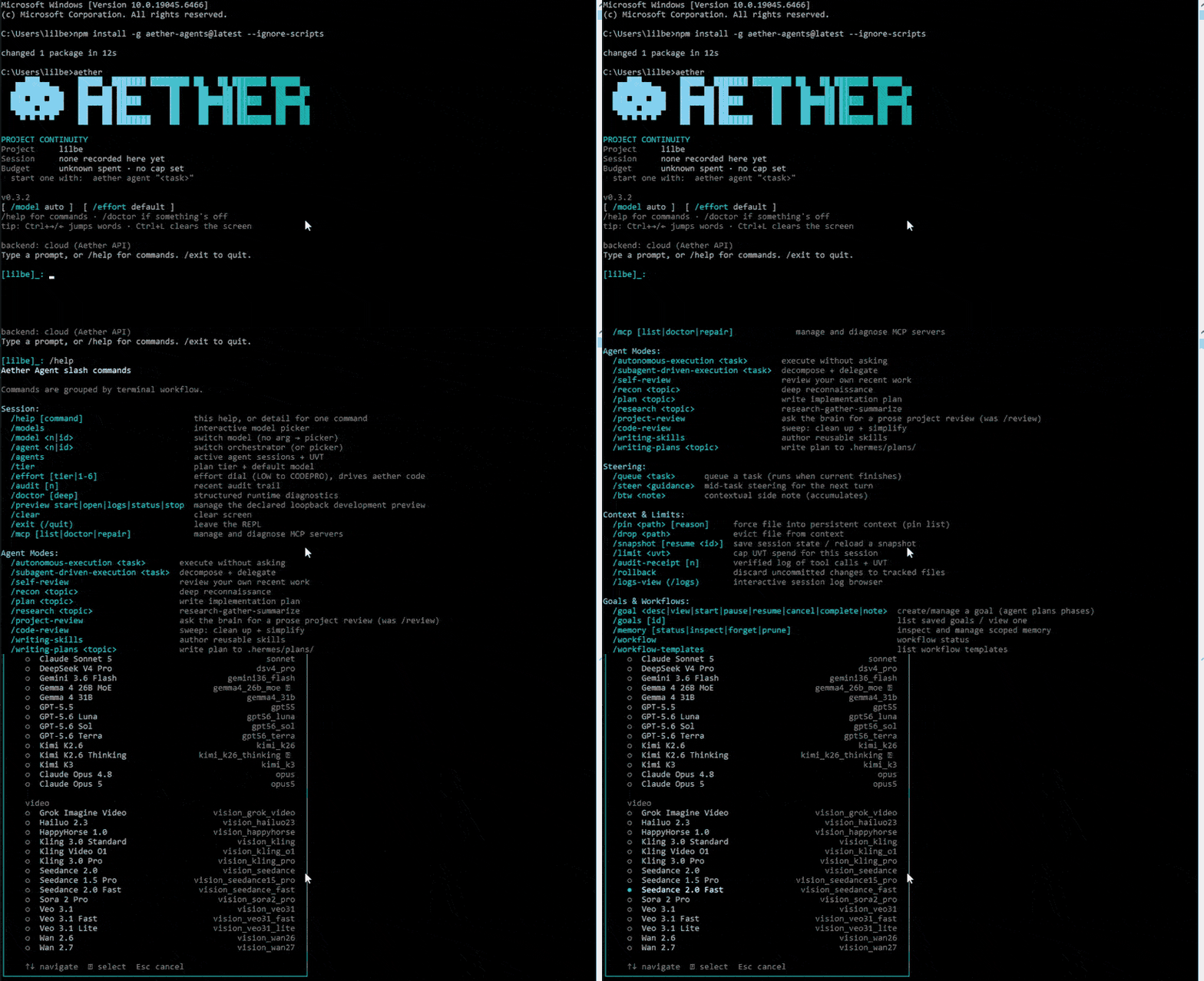
Install → launch → /help → /models
What you can do
| Workflow | What you get |
|---|---|
| Code and verify | Repository search, file edits, Git tools, and checks with real exit codes. |
| Chat and use your shell | Run !commands between messages; open an interactive terminal on Linux. Terminal guide ↓ |
| Choose your model | Hosted account models or local Ollama with no account required. Model setup ↓ |
| Continue your work | Resume project sessions, review changes, and export redacted handoffs. Commands ↓ |
| Connect tools | MCP servers, agent skills, and local development previews. Command reference |
| Use account agents | Shared Online conversations and guided ATS workspace setup. Account agents ↓ |
Quickstart
Node.js 24+ required. Run inside the repository you want to work on:
npm install -g aether-agents@latest --ignore-scripts
aether auth login
aether
Type /help for commands or /models to choose a model. For a coding task with a specific check:
aether agent --test-cmd "npm test" "fix the failing test"
For a multiline task, save the specification in task.md and run
aether agent --prompt-file task.md. You can also pipe UTF-8 text to
aether agent --prompt-file - (for example,
cat task.md | aether agent --prompt-file -). The whole input is one literal
coding task; see prompt input rules
for the size limit and flag conflicts.
To inspect the current checkout and receive a plan without changing it, run
aether agent --planning "outline the migration", or use /plan <topic> in a
local interactive session. Planning permits only file reading, directory
listing, and repository search; it skips worktree creation and verification.
Save a plan or execute a phase later through the explicit goal controls.
The cloud chat route refuses /plan because its tools execute on the server.
A completed check records its exit code. Changing the repository makes that verification stale until you run it again.
The npm version badge shows the published CLI version. Run
aether --version to check your installation. For the latest published build,
use npm install -g aether-agents@latest --ignore-scripts.
Prefer Python? pipx install aether-agent installs a launcher for the same CLI. Python setup.
What's new in v4.21.0
- Find and enter commands faster. The idle composer describes slash commands, searches earlier prompts with Ctrl+R, and supports multiline editing with undo and yank.
- Keep task context under your control. Pin bounded files for a coding turn, inspect what reached the model, and run a trusted skill for one local turn.
- Use safer task inputs.
aether agent --prompt-fileaccepts one literal specification, while planning runs with read-only host tools. Tool denials carry the operator's feedback into the failed result.
See the full v4.21.0 release notes for fixes, install options, and qualification limits.
Choose your model
| Hosted | Local Ollama |
|---|---|
Sign in with aether auth login. |
No Aether account required. |
aether models shows your account's available models. |
Use a model installed at your Ollama endpoint. |
Coding tasks send prompts and selected context to Aether; tools and checks run in your checkout through aether agent. |
Inference stays at your configured endpoint, which defaults to loopback. |
To use Ollama, install and start it, then run:
aether setup --local
aether local pull qwen2.5-coder:7b --yes
aether local use qwen2.5-coder:7b --yes
aether agent --local --test-cmd "npm test" "fix the failing test"
If you set OLLAMA_HOST to a remote endpoint, prompts go there. Network tools have their own permissions.
Browse the offline model catalogue
A dated, sanitized offline fallback snapshot is available as HTML, JSON, and Markdown. It was generated at 2026-09-22T01:47:56.169Z from Cloud public projection model-catalogue-v1 with verified digest sha256:f5f516625932d8932bfca221aa5dbf3eb1d7b415eba8dabe298da24b984c64f7. Listed availability is not an account entitlement; use aether models while signed in.
Chat and terminal
In the local coding console, switch between conversation and your own commands:
Explain the failing test
!npm test
/shell-result
/shell-result lines
/shell-result drop 8-10
/shell-result send
!commands run locally with zero model API calls. Output streams into the console with an exit code. /shell-result stages and previews the exact bounded attachment, including the command, captured directory, exit status, and any omitted bytes. Edit it with drop, replace, mask, or redact, then choose /shell-result send or /shell-result cancel. Redaction helps identify common secrets but does not guarantee their removal. A later shell command cannot change the staged attachment. For pipes and JSON sessions, /shell-result send is the explicit one-step send form.
| Platform | Local shell | Interactive programs |
|---|---|---|
| Linux | Persistent Bash: keeps cwd, exports, and functions. | /terminal python3 starts a terminal with input and resize support. Requires Python 3 and TTY input/output. |
| macOS | Persistent Bash: keeps cwd, exports, and functions. | Use an external terminal. |
| Windows | One-shot cmd.exe by default. /shell-profile use powershell explicitly starts a persistent PowerShell session for cwd, environment values, and functions. |
Use an external terminal. |
On Windows, run /shell-profile list to see the installed executable and version before choosing PowerShell. /shell-profile status shows the active profile and cwd; /shell-profile use cmd returns to the compatibility profile. Switching or /shell-reset discards shell state without replaying commands. PowerShell commands keep their own quoting and syntax; Bash commands are not translated.
Shell: Ctrl+C cancels the command; /shell-reset starts fresh after cancellation or failure. Commands wait for an active model/tool turn to finish.
Linux terminal: Ctrl+] returns to chat; /terminal-attach reconnects; /terminal-stop ends it. Local tools pause while that terminal is running, including when detached.
Shell and terminal output stays out of saved chat history and automatic hosted prompts. Account-agent DMs use a separate console. Full shell and Linux guide.
In the raw terminal composer, Ctrl+J adds a newline, Enter submits, Ctrl+_
undoes recent edits, and Ctrl+Y restores killed text. The single-row input
shows newlines as ⏎ with a line count. If your terminal sends LF for Enter,
set aether config set lfSubmits true to keep LF as submit. Composer details.
Ctrl+R searches this workspace's submitted prompts newest first. Type to narrow
matches, repeat Ctrl+R for older ones, Enter to insert a match for editing, or
Escape to restore your draft. AETHER_NO_HISTORY=1 disables prompt history.
If you decline a model-requested tool call, you can add one short instruction
for that denial, such as Use the offline unit suite. The tool stays blocked;
the instruction is returned once with its failed result. Enter skips the note,
and Escape cancels it. Approval details.
Type / at an idle raw terminal prompt to browse described commands. Use
arrows or Tab to choose, Enter to insert editable command text, then Enter
again to run it; Escape restores your earlier draft.
On a local model, /skill user/fix-ci Investigate the failing unit test uses
that trusted skill for one idle task, then restores your normal skill defaults.
The task text stays literal; the run header shows the resolved skill digest and
host tool limits. Busy, queued, line-input, --no-skills, and server-executed
cloud chat invocations are refused. Skill details.
Use /pin src/guide.md to attach that file's complete, bounded UTF-8 content
to each admitted coding turn. The file is read from the execution checkout, so
a worktree turn uses its own copy. /context shows what the last turn actually
included, with digests and omissions but no file bodies; /context next <task>
previews a draft, and /context content src/guide.md explicitly previews local
admitted content. /drop src/guide.md stops automatic inclusion on later turns.
Server-executed cloud chat reports pin delivery as unsupported when the local
host cannot inspect it. Limits and details.
Everyday commands
| Goal | Command |
|---|---|
| Run a coding task | aether agent "your task" |
| Continue a project session | aether sessions |
| Review changes and verification | aether review |
| Connect or diagnose tools | aether mcp, aether skills |
| Manage a local dev preview | aether preview |
| Check your environment | aether doctor, aether pc map, aether pc doctor |
| Configure the CLI | aether settings |
| Preview and approve a branch and PR | aether ship |
Use aether help <command> or the complete command reference for flags and slash commands. PC diagnostics and approved browser helpers have platform-specific limits; see the PC guide.
Account agents and ATS
Use the same managed agents and Online conversations from your terminal:
aether agent list
aether agent chat
aether agent list and show report fresh registry, DM, and model/UVT
readiness for the signed-in account. aether doctor --live checks the same
read-only Cloud contract; plain aether doctor leaves account readiness
unverified. A saved DM is reported as admitted only when Cloud confirms
message admission.
In aether agent chat, in-chat help lists controls for the selected agent and
can refresh the shared conversation. The header shows Cloud DM sync
separately from ATS local setup. Transcript messages show their time and any
reported admission state; a saved message is not an admitted run.
ATS is the trading adapter for account agents. Create a workspace with aether agent create ATS Atlas; guided setup covers memory, strategies, and data settings.
| Capability | Current status |
|---|---|
| Shared account agents and Online chats | Requires the matching Cloud adapter and account admission. |
| ATS workspace and strategy preparation | Local memory setup, native Nano compiler checks, and data-provider configuration. |
Questions
What is aether-agent?
AetherAI3/aether-agent is a public repo on GitHub by AetherAI3. A coding agent that lives in your terminal. Local Ollama first, or hosted models through the Aether AI fleet.
Is aether-agent open source?
It declares the Apache-2.0 license on GitHub.
Does aether-agent run on macOS, Windows or Linux?
Its maker tagged it for macOS, Windows and Linux, or as Docker or cross-platform. That is declared by the maker; Take My Repo has not tested it.
How do I install aether-agent?
Open "Take it" on its page: Take My Repo writes an install plan for your machine and hands it to your AI agent (Claude Code, Codex or Cursor), which asks you before each step. Take My Repo has not tested it on any machine.






