
ContinualVLA
Can VLA Models Learn from Real-World Data Continually without Forgetting?
- 11
- Apache-2.0
- 6 mo ago
Repo Agentic-Intelligence-Lab/ContinualVLA, read from GitHub 23 h ago. Agentic-Intelligence-Lab has not joined Take My Repo.
In short
Agentic-Intelligence-Lab/ContinualVLA is a public repo on GitHub by Agentic-Intelligence-Lab. Can VLA Models Learn from Real-World Data Continually without Forgetting? It declares the Apache-2.0 license on GitHub. It is written mainly in Python, has 11 stars and last changed on 2026-06-12. Nobody has reviewed it on Take My Repo yet, which says nothing about its quality. Read from GitHub on 2026-11-23.
ContinualVLA
Can VLA Models Learn from Real-World Data Continually without Forgetting?
Jiarun Zhu, Yijun Hong, Xiaoquan Sun, Zetian Xu, Mingqi Yuan, Zhiyong Wang, Wenjun Zeng, Jiayu Chen
Agentic Intelligence Lab (AIL), The University of Hong Kong
Official implementation of the paper "Can VLA Models Learn from Real-World Data Continually without Forgetting?". This codebase is built on Physical Intelligence's openpi.
Overview
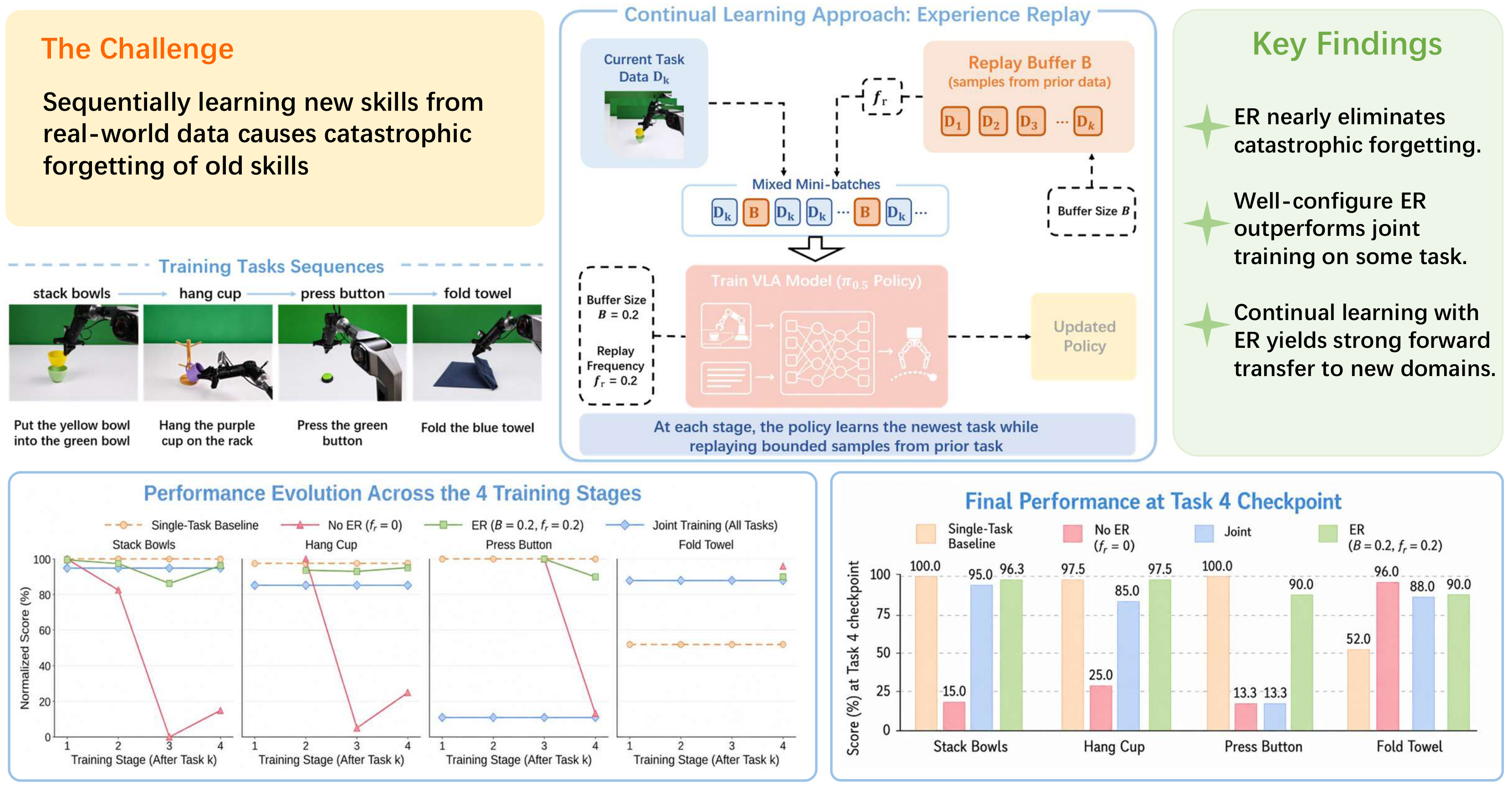
Vision-language-action (VLA) models provide a promising foundation for general-purpose robotics. However, deploying them in the real world requires the ability to continually acquire new skills while retaining previously learned behaviors -- a challenge largely unexplored under realistic conditions.
This work provides the first empirical study of real-world continual VLA learning and offers practical guidance for deploying long-lived robot policies.
Key Contributions
- Real-world continual learning dataset: Four sequential manipulation tasks spanning rigid-object pick-and-place, contact-rich pressing, and deformable-object folding.
- Empirical findings: VLA models suffer significant catastrophic forgetting when continually learning from heterogeneous real-world demonstrations.
- Systematic evaluation of experience replay: Key implementation factors that govern the success of replay-based continual learning are identified and analyzed.
Installation
1. Clone and set up the environment
git clone https://github.com/Agentic-Intelligence-Lab/ContinualVLA.git
cd ContinualVLA

# Create a clean Python 3.11+ virtual environment
python3.11 -m venv .venv && source .venv/bin/activate

# Install PyTorch with CUDA 12 support (adjust for your CUDA version: https://pytorch.org)
pip install torch==2.7.1 torchvision==0.22.1 torchaudio==2.7.1 --index-url https://download.pytorch.org/whl/cu126

# Install all remaining dependencies
pip install -r requirements.txt

# Install the local workspace packages
pip install -e packages/openpi-client
pip install -e .
Requirements
- Python 3.11+
- PyTorch 2.7+ with CUDA 12 support (see pytorch.org for other CUDA versions)
- 8 GPUs recommended for training (tested on NVIDIA A100/H100)
2. Obtain pretrained Pi0.5 weights
Training fine-tunes from the Pi0.5 base model. Download the weights from HuggingFace:
bash scripts/download_pi05base.sh
This downloads the JAX-format checkpoint to ~/.cache/openpi/pi05_base. Convert it to PyTorch format:
python examples/convert_jax_model_to_pytorch.py \
  --checkpoint_dir ~/.cache/openpi/pi05_base \
  --output_path ~/.cache/openpi/pi05_base_pytorch
Set the environment variable to point to the converted weights:
export OPENPI_PYTORCH_WEIGHT_PATH="$HOME/.cache/openpi/pi05_base_pytorch"
You can also download from Google Cloud Storage if you have GCS access (gs://openpi-assets/checkpoints/pi05_base/params).
Dataset
The real-world continual learning dataset (part of the RoboNever project) consists of four sequential manipulation tasks collected on a Piper dual-arm robotic arm:
| Task | Description | Type | Episodes | HuggingFace |
|---|---|---|---|---|
| Stack Bowls | Pick and stack bowls | Rigid-object pick-and-place | 500 | Download |
| Hang Cup | Hang a cup on a rack | Articulated-object manipulation | 500 | Download |
| Fold Towel | Fold a deformable towel | Deformable-object manipulation | 500 | Download |
| Press Button | Press a button with precise contact | Contact-rich manipulation | 500 | Download |
Quick Download
# Set dataset root (default: /data/datasets)
export OPENPI_DATA_ROOT="/path/to/datasets"

# Download all 4 tasks
bash scripts/download_dataset.sh
Load with LeRobot
from lerobot.common.datasets.lerobot_dataset import LeRobotDataset
ds = LeRobotDataset("Ray0v0/cl-piper-single-stack-bowls")
Data Format
All datasets are in LeRobot v2.1 format with:
- Robot: Piper dual-arm (14-DOF: 6 joints + 1 gripper per arm)
- Cameras: 4 views (head, left_wrist, right_wrist, front_view) at 480x640
- FPS: 30
- Total: 2,000 episodes, ~560K frames across all tasks
Data directory structure
Set OPENPI_DATA_ROOT to point to your dataset storage (defaults to /data/datasets). The expected directory layout:
$OPENPI_DATA_ROOT/
├── realworld_piper/
│   ├── stack_bowls_20260413/
│   ├── hang_cup_20260413/
│   ├── fold_towel_20260417/
│   └── press_button_20260414/
└── ...
You can override the path for individual tasks by editing the local_roots entries in src/openpi/training/config.py.
Training
Before training, set the required environment variables:
export WANDB_API_KEY="your_key"                # Weights & Biases logging
export OPENPI_DATA_ROOT="/path/to/datasets"    # Dataset root directory
export OPENPI_PYTORCH_WEIGHT_PATH="$HOME/.cache/openpi/pi05_base_pytorch"  # Pretrained weights
Single-Task Training
export OPENPI_NORM_STATS_DIR="./assets/pi05_piper_stack_bowls_20260413_4cam/piper_stack_bowls_20260413_4cam"

bash scripts/train_pytorch.sh \
  --config-name pi05_piper_stack_bowls_20260413_4cam_hold_dim7_13 \
  --exp-name my_experiment \
  --gpus 0,1,2,3,4,5,6,7 \
  --nproc 8
Joint (Multi-Task) Training
Train on all tasks simultaneously as a baseline:
bash scripts/train_joint.sh --steps 20000
Continual Learning via Data Replay
Train sequentially across tasks with experience replay to mitigate forgetting:
bash scripts/train_cl.sh
Key hyperparameters (set as environment variables):
DATA_BUFFER_SIZE: Fraction of data retained from old tasks (default: 0.2)DATA_REPLAY_RATIO: Per-step probability of sampling from replay buffer (default: 0.2)REPLAY_MODE: Buffer sampling mode --"episode"or"transition"
Resume from a checkpoint:
bash scripts/train_cl_resume.sh
Configuration
Training configurations are defined in src/openpi/training/config.py. Key config names:
pi05_piper_stack_bowls_20260413_4cam_hold_dim7_13pi05_piper_hang_cup_20260413_4cam_hold_dim7_13pi05_piper_fold_towel_20260417_4cam_hold_dim7_13pi05_piper_press_button_20260414_4cam_hold_dim7_13pi05_piper_4tasks_joint(joint training baseline)
Computing Normalization Statistics
Norm stats are pre-computed and stored in assets/. To recompute:
python scripts/compute_norm_stats.py --config-name <config_name>
You can also use a shared norm stats file across tasks by setting OPENPI_NORM_STATS_DIR.
Project Structure
├── scripts/              # Training and utility scripts
│   ├── train_pytorch.sh  # Main PyTorch training launcher
│   ├── train_cl.sh       # Continual learning loop
│   ├── train_joint.sh    # Joint multi-task baseline
│   └── train_cl_resume.sh
├── src/openpi/
│   ├── models/           # Model implementations (Pi0, Pi0-FAST)
│   ├── models_pytorch/   # PyTorch model implementations
│   ├── policies/         # Robot-specific policy transforms
│   ├── training/         # Training loop, config, data loading, replay buffer
│   ├── serving/          # Policy server for deployment
│   └── shared/           # Shared utilities
├── assets/               # Normalization statistics
└── third_party/          # External dependencies (ALOHA, LIBERO)
Citation
If you find this work useful, please cite:
@article{zhu2026continualvla,
  title={Can VLA Models Learn from Real-World Data Continually without Forgetting?},
  author={Zhu, Jiarun and Hong, Yijun and Sun, Xiaoquan and Xu, Zetian and
          Yuan, Mingqi and Wang, Zhiyong and Zeng, Wenjun and Chen, Jiayu},
  journal={arXiv preprint arXiv:2605.26820},
  year={2026}
}
License
This project is released under the MIT License.
The codebase builds on openpi by Physical Intelligence, which is also MIT-licensed. The Gemma model weights are subject to their own license terms.
Acknowledgements
This work is supported by the Agentic Intelligence Lab (AIL) at The University of Hong Kong. We thank the Physical Intelligence team for open-sourcing the openpi codebase.
Questions
What is ContinualVLA?
Agentic-Intelligence-Lab/ContinualVLA is a public repo on GitHub by Agentic-Intelligence-Lab. Can VLA Models Learn from Real-World Data Continually without Forgetting?
Is ContinualVLA open source?
It declares the Apache-2.0 license on GitHub.
Does ContinualVLA run on macOS, Windows or Linux?
Its maker has not tagged a system, so it is unknown here. Its README says what it needs.
How do I install ContinualVLA?
Open "Take it" on its page: Take My Repo writes an install plan for your machine and hands it to your AI agent (Claude Code, Codex or Cursor), which asks you before each step. Take My Repo has not tested it on any machine.