
rea
Reverse engineer anything with agents, from app behavior down to native binaries.
- 476k
- TypeScript
- MIT
- 55 min ago
Real-time detection of Jetpack Compose best practices and rule violations directly in Android Studio.
Repo AndroidPoet/compose-guard, read from GitHub 2 h ago. AndroidPoet has not joined Take My Repo.
AndroidPoet/compose-guard is a public repo on GitHub by AndroidPoet. Real-time detection of Jetpack Compose best practices and rule violations directly in Android Studio. It declares the Apache-2.0 license on GitHub. It is written mainly in Kotlin, has 119 stars and last changed on 2026-09-02. Nobody has reviewed it on Take My Repo yet, which says nothing about its quality. Read from GitHub on 2026-11-24.

Catch Jetpack Compose mistakes as you type — 39 best-practice rules from the Compose Rules guidelines, surfaced live in Android Studio & IntelliJ IDEA with inline highlights, gutter icons, and one-click fixes.
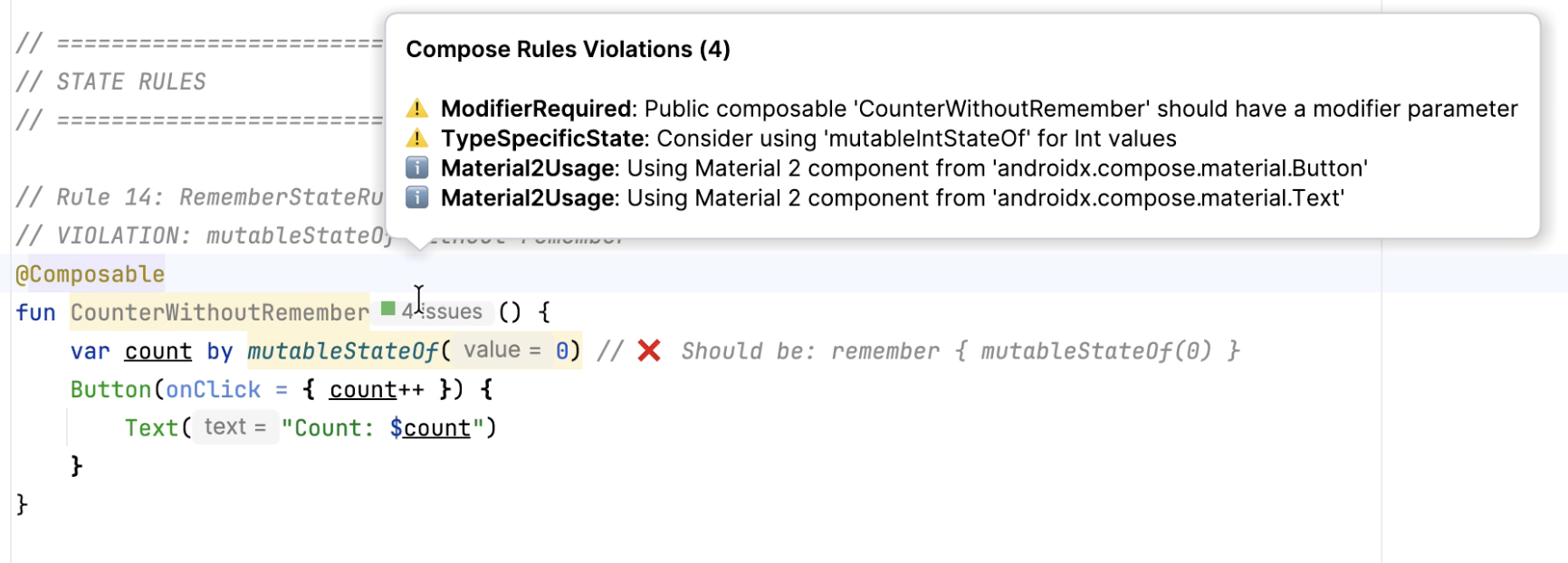
The Compose Rules catch the subtle mistakes that hurt
Compose code — missing Modifier parameters, un-remembered state, unstable collections, reused
modifiers, and dozens more. ComposeGuard brings those checks into the editor, so you fix them
while the code is still fresh instead of discovering them in a build log or a code review.
@Composable summarizes its status at a glance:modifier parameter, wrap in remember, switch to a type-specific
state, make a preview private, swap to an immutable collection, and more.Or install directly from the JetBrains Marketplace.
Once installed, ComposeGuard automatically analyzes any Kotlin file containing @Composable
functions — no configuration required. Here are a few things it catches:
// 🟠 Naming: Unit-returning composables should be PascalCase
@Composable
fun userCard(user: User) { }              // → rename to "UserCard"

// 🟠 Modifier: public UI composables should expose a Modifier
@Composable
fun ProductCard(product: Product) {       // → add `modifier: Modifier = Modifier`
    Column { Text(product.name) }
}

// 🔴 State: state must be remembered
@Composable
fun Counter() {
    val count = mutableStateOf(0)         // → wrap in remember { }
}

// 🟠 Stricter: prefer stable collections
@Composable
fun ItemList(items: List<Item>) { }       // → use ImmutableList<Item>
Hover any highlight for the full explanation, or press Alt+Enter to apply a fix.
To intentionally allow a violation, annotate the declaration with @Suppress using the rule id
(the same id shown in the warning, e.g. ModifierRequired). The quick fix can insert this for you:
@Suppress("ModifierRequired")
@Composable
fun SplashLogo() {
    Image(painterResource(R.drawable.logo), contentDescription = null)
}

// Multiple rules at once:
@Suppress("ModifierRequired", "ComposableNaming")
@Composable
fun splash() { /* ... */ }
Suppression works at the function, property, or class level. To turn rules off project-wide instead, use Configuration.
ComposeGuard ships 39 rules based on the Compose Rules guidelines. Severity legend: 🔴 Error · 🟠 Warning · ⚪ Weak warning · 🔵 Info.
| Rule id | Checks | Severity |
|---|---|---|
ComposableNaming |
Unit-returning composables use PascalCase; value-returning use camelCase | 🟠 |
CompositionLocalNaming |
CompositionLocal properties are prefixed with Local |
🟠 |
PreviewNaming |
@Preview functions reference Preview in their name |
⚪ |
MultipreviewNaming |
Multipreview annotation classes reference Preview |
⚪ |
ComposableAnnotationNaming |
@ComposableTargetMarker annotations end with Composable |
⚪ |
EventParameterNaming |
Event lambdas use present tense (onClick, not onClicked) |
⚪ |
| Rule id | Checks | Severity |
|---|---|---|
ModifierRequired |
Public, UI-emitting composables expose a Modifier parameter |
🟠 |
ModifierDefaultValue |
modifier parameters default to Modifier |
🟠 |
ModifierNaming |
The main modifier is named modifier; others follow xModifier |
⚪ |
ModifierTopMost |
The modifier is applied to the root-most layout | 🟠 |
ModifierReuse |
The same modifier isn't applied to multiple live nodes | 🟠 |
ModifierOrder |
Modifier chain order is intentional (e.g. padding before clickable) |
🟠 |
AvoidComposed |
Prefer Modifier.Node over the deprecated composed { } factory |
🟠 |
| Rule id | Checks | Severity |
|---|---|---|
RememberState |
mutableStateOf and friends are wrapped in remember { } |
🔴 |
TypeSpecificState |
Primitives use mutableIntStateOf / mutableFloatStateOf / … |
🟠 |
DerivedStateOfCandidate |
Values computed from state use derivedStateOf |
🟠 |
FrequentRecomposition |
Hot observable sources use lifecycle-aware collection | 🟠 |
DeferStateReads |
Fast-changing state reads are deferred to lambda modifiers | 🟠 |
HoistState |
State is hoisted to the appropriate level | 🔵 |
MutableStateParameter |
Pass value + callback instead of a MutableState parameter |
🟠 |
| Rule id | Checks | Severity |
|---|---|---|
ParameterOrdering |
Order is required → modifier → optional → trailing content |
⚪ |
TrailingLambda |
The content slot is the trailing lambda; event handlers are not | ⚪ |
MutableParameter |
Avoid inherently mutable types (MutableList, ArrayList, …) as parameters |
🟠 |
ExplicitDependencies |
Make injected ViewModels explicit parameters | ⚪ |
ViewModelForwarding |
Don't forward a ViewModel into another composable | 🟠 |
| Rule id | Checks | Severity |
|---|---|---|
ContentEmission |
A composable emits content or returns a value, not both | 🟠 |
MultipleContentEmitters |
A composable emits a single piece of content | 🟠 |
ContentSlotReused |
A content slot isn't invoked more than once on the same pass | 🟠 |
EffectKeys |
Changing captured values are passed as effect keys | 🟠 |
LambdaParameterInEffect |
Lambda parameters used in effects are wrapped in rememberUpdatedState |
🟠 |
MovableContent |
movableContentOf is remembered |
🔴 |
PreviewVisibility |
@Preview composables are private |
🟠 |
ComponentDefaultsVisibility |
A <Component>Defaults object matches its composable's visibility |
🟠 |
LazyListMissingKey |
Lazy list items provide a stable key |
🔵 |
ComposableNestingDepth |
Composables are not nested deeper than the configured limit (opt-in) | ⚪ |
LazyListContentType |
Heterogeneous lazy lists set a contentType |
🔵 |
| Rule id | Checks | Severity |
|---|---|---|
UnstableCollections |
Prefer ImmutableList / PersistentList over List, Set, Map |
🟠 |
CompositionLocalAllowlist |
Custom CompositionLocals are declared only when allowlisted (opt-in) | 🟠 |
Material2Usage |
Migrate androidx.compose.material (M2) imports to Material 3 |
🔵 |
Suppress any rule with
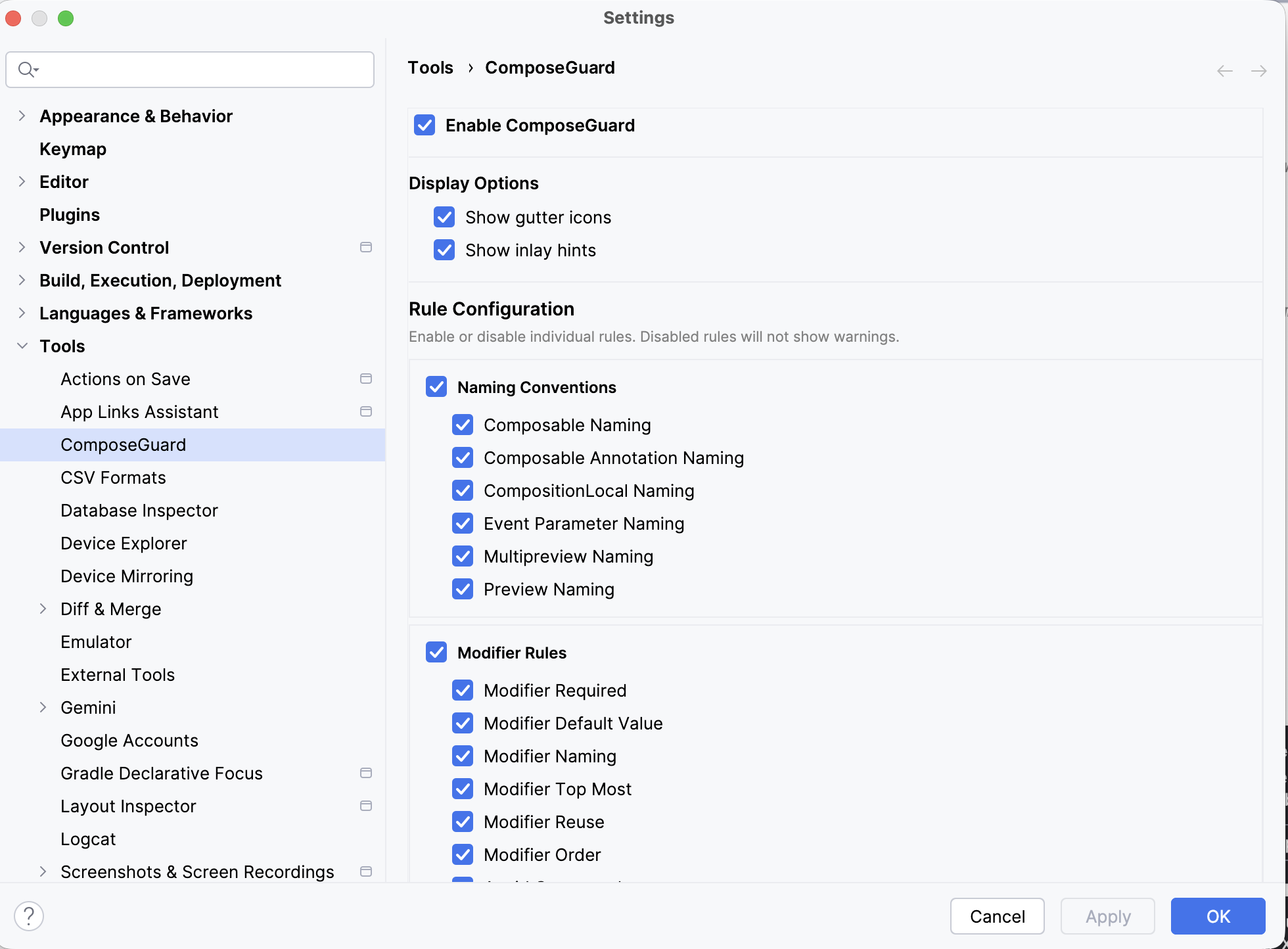
@Suppress("<RuleId>"), or toggle it in Settings → Tools → ComposeGuard.
ComposeGuard includes a tool window that tracks rule violations across your project.
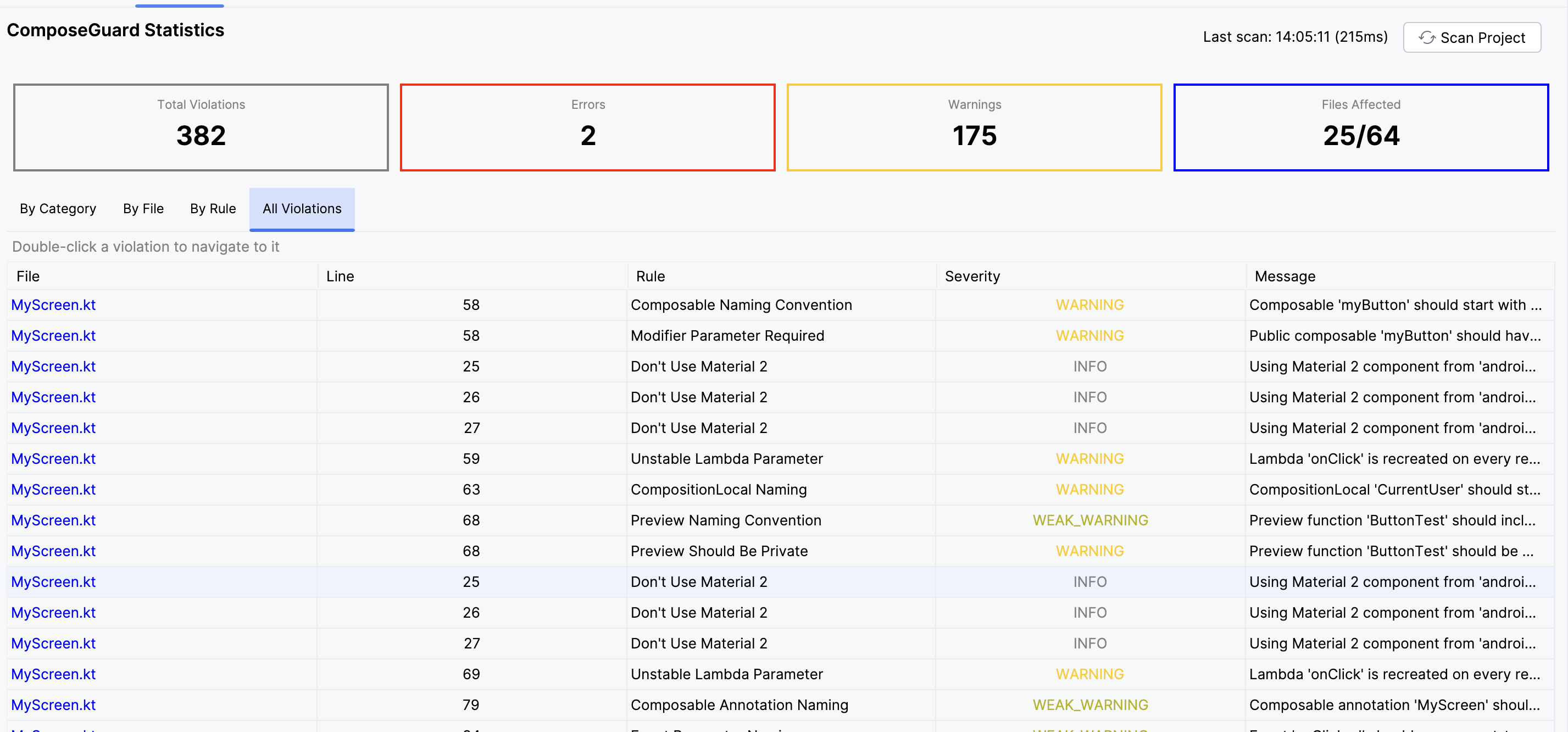
Open it from View → Tool Windows → ComposeGuard, or click a ComposeGuard gutter icon.
Configure ComposeGuard at Settings → Tools → ComposeGuard.
.editorconfig)ComposeGuard reads the same compose_* keys that the upstream Compose Rules ktlint ruleset uses, so a team can commit one .editorconfig and share it between the IDE plugin and CI. Keys are read from the nearest .editorconfig (walking up to the one marked root = true) in any section that applies to Kotlin files, for example [*.{kt,kts}]. Lists are comma-separated; entries containing regex metacharacters are treated as regular expressions.
| Key | Affects | Meaning |
|---|
AndroidPoet/compose-guard is a public repo on GitHub by AndroidPoet. Real-time detection of Jetpack Compose best practices and rule violations directly in Android Studio.
It declares the Apache-2.0 license on GitHub.
Its maker has not tagged a system, so it is unknown here. Its README says what it needs.
Open "Take it" on its page: Take My Repo writes an install plan for your machine and hands it to your AI agent (Claude Code, Codex or Cursor), which asks you before each step. Take My Repo has not tested it on any machine.
Flutter makes it easy and fast to build beautiful apps for mobile and beyond
f.k.a. Awesome ChatGPT Prompts. Share, discover, and collect prompts from the community. Free and open source — self-host for your organization with complete privacy.
🩵 A free, open-source app store for developers' releases on GitHub, Codeberg & Forgejo — browse, discover, and install apps with one click. Formerly GitHub Store.
Its last change on GitHub was on 2026-09-02. Take My Repo does not judge from that whether it is maintained.
Nobody has reviewed it on Take My Repo yet, which says nothing about its quality.
Take My Repo cannot say: it does not audit code and has not run compose-guard. What is known comes from GitHub. It declares the Apache-2.0 license on GitHub. Its last change was on 2026-09-02. It has 119 stars, which measure popularity, not safety. Nobody has reviewed it on Take My Repo yet, which says nothing about its quality. Read the source before you run it. With "Take it", your AI agent shows each step and asks you before running it; README text is treated as data, not as instructions.


