Using Arduino to Develop With Texas Instruments Processors
Use Arduino as a replacement for Energia to develop on Texas Instruments LaunchPad products.
Energia was originally created in 2012 as a fork from Arduino specifically to support Texas Instruments LaunchPads. However, it is no longer maintained. The last version was released in 2019.
Fortunately, Texas Instruments processor cores can be loaded into Arduino using the Arduino Boards Manager. I created this repo to maintain the Energia MSP430, MSP432, and Tiva cores so that they can continue to be used with Arduino.
Loading a LaunchPad Board into Arduino IDE
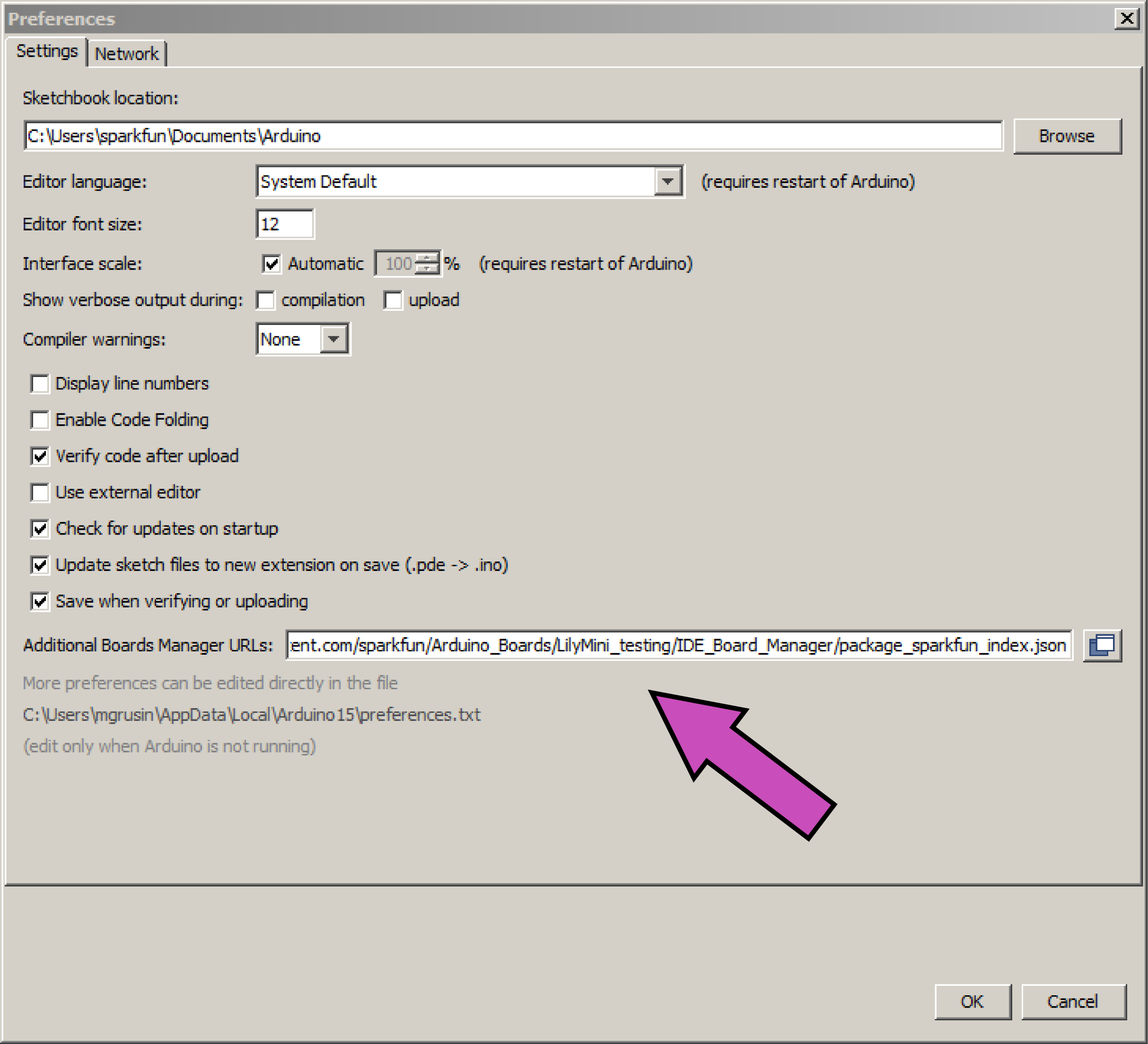
Open the Arduino Preferences pane
Click on the box next to the text field labeled Additional Boards Manager URLs
Add the following URL to the list (on a line of its own):
https://raw.githubusercontent.com/Andy4495/TI_Platform_Cores_For_Arduino/main/json/package_energia_optimized_index.json
Click OK to close the window and OK to close the Preferences pane
Open Tools->Board->Boards Manager... menu item
Select the board platform you wish to install:
- Use the search box at the top to make it easier to find the board (e.g., "MSP430")
- Hover the mouse over the board platform you want, and click "Install"
- It can take several minutes to download and install a board package
Once the board package is installed, you can select the board you want with the Tools->Board menu
Energia Application Libraries and Examples
Energia includes several libraries and example sketches at the application level of the IDE instead of in the platform cores. This means that if you install an MSP or Tiva core into Arduino, you don't end up getting every library and example sketch that you would when using the Energia IDE.
Most of the libraries and examples included with the Energia application are either readily available with Arduino or are obsolete. However, some are particular to the platforms supported by Energia and are not directly available with Arduino. I have published standalone libraries to allow them to be loaded into Arduino.
These libraries are included in the Arduino Library Manager registry, so they can easily be installed from the Sketch->Include Library->Manage Libraries... menu. Note that some of the library names needed to be shortened to meet the registry name length recommendation.
Installing LaunchPad Drivers
Depending on your host machine and the specific board you are programming, you may need to install drivers and/or configuration files in order to communicate with the LaunchPad. If you see a message along the lines of "Error connecting to the target", then a missing driver or configuration file is likely the cause.
MacOS
No drivers should be needed for MSP432, Tiva, or the newer MSP430 LaunchPads (including the MSP430G2ET).
The old MSP430G2 (non-ET) LaunchPads work without drivers when using version 0.25 of the mspdebug tool, which is included with the msp430 v1.1.0 and msp430gcc9 v3.0.0 cores. Versions of mspdebug included with older MSP430 cores required separate drivers to be installed.
[!NOTE]
While you don't need drivers, the mspdebug tool used to connect to the old MSP430G2 (non-ET) LaunchPads requires some libraries to be installed.
In particular, if you get a "no such file" error similar to the following:
Reason: tried: '/usr/local/opt/hidapi/lib/libhidapi.0.dylib' (no such file), '/System/Volumes/Preboot/Cryptexes/OS/usr/local/opt/hidapi/lib/libhidapi.0.dylib' (no such file), '/usr/local/opt/hidapi/lib/libhidapi.0.dylib' (no such file)
Then you need to install the hidapi and libusb-compat libraries. I use the Homebrew tool:
brew install hidapi libusb-compat
Windows
On Windows, the drivers can be installed using either of the methods below:
Install Code Composer Studio IDE from Texas Instruments.
Code Composer Studio is a free professional-level IDE for Texas Instruments processors. It is fully supported and regularly updated by Texas Instruments. However, it is a large download (> 1 GB), and installs many more packages than are needed if you are just using the Arduino IDE. You are essentially installing a full IDE that you won't be using, just to get the drivers.
Even with this in mind, I use this method to install the drivers, because this way I know they are up-to-date and supported.
Also note, per TI:
Code Composer Studio is going through a major update. As part of this major update Code Composer Studio is transitioning from the Eclipse application framework to the much more modern Theia framework. Code Composer Studio Theia is now available for most devices and additional features are being added with each release. The final planned Eclipse-based release is expected to be CCS 12.8.
I currently have installed the Eclipse-based version of CCS and have not tested the Theia-based version. However, I expect that the drivers installed by either version are the same.
Or, follow the host platform and board-specific instructions from the Energia website for Windows to install just the drivers (without the full CCS IDE).
The driver packages from the Energia website are no longer supported and will not be updated. They probably still work, but do not expect any support if you run into issues with them.
Linux
On Linux, no drivers are required for MSP430, MSP432, or Tiva LaunchPads. Just run the following steps from the Energia Linux Install Guide page to add the udev rules:
Download the udev rules: TI udev rules
Open a terminal and execute the following command:
sudo mv 71-ti-permissions.rules /etc/udev/rules.d/
If your Linux distribution supports the service command you can activate the new rules with sudo service udev restart. If your board is plugged in, unplug it and plug it back in.
If your Linux distribution does not support the service command, or if you are still unable to upload to the LaunchPad, then restart your computer to activate the rules.
MSP432G2 (non-ET) LaunchPads
If you are having trouble uploading to one of the older "non-ET" versions of the MSP-EXP430G2 LaunchPads, try the following:
Disconnect and re-connect the USB plug from the LaunchPad board two or three times, and make sure to insert the plug fully for a solid connection. Since these LaunchPads are over ten years old, it is possible that some oxidation or corrosion on the either the board or USB connection is causing intermittent contact.
On Windows, try selecting "MSP432G2ET" in the Tools->Board menu. That is, choose the ET board instead of the non-ET board. The dslite tool used to program the newer LauchPads also works with the non-GT G2 LaunchPads on Windows (this does not work for Linux or MacOS).
MSP430 Compiler Versions
There are two different platform cores available for MSP430 processors. The main difference between them is the compiler version:
- "Energia MSP430 boards" - Installs MSP430 boards with the old GCC 4.6 compiler
- "Energia MSP430 boards (GCCv9)" - Installs MSP430 boards with the newer GCC 9.3 compiler
The GCC 4.6 compiler is the last version officially published by Energia. GCC 4.6 was released in 2012 and does not support C++11 or C++14.
GCC 9.3 fully supports C++11 and C++14 by default. GCC9.3 is the last MSP430 GCC compiler version released by Texas Instruments.
Having two distinct platform cores allows you to have both compilers installed so that you can easily switch between them. Code which was originally compiled with GCC 4.6 may run into some compatibility issues when compiled with GCC 9.3, as outlined in this migration README.
If you install both platforms, be sure to select the correct platform core and board from the Tools->Board menu.
Note that the MSP432 and Tiva platforms install GCC 8.3, which fully support C++11 and C++14 by default.
GitHub Actions and Arduino Command Line
In order to select the GCC 9.3 compiler from a workflow or when using the Arduino command line directly, be sure to use the following parameters:
fqbn: energia:msp430gcc9:<LaunchPad-Board-Name>
platforms.name: energia:msp430gcc9
Board Packages and PlatformIO
Per GitHub user chemmex, it is possible to use these processor cores with PlatformIO. Some manual setup and configuration is required, which includes editing the platformio.ini file. For more details, refer to this issue comment and this PlatformIO discussion.
Updated Board Package Versions to Remove Python 2 Dependency
Python 2 has long since reached its end of life, and recent Linux distros (Debian 12, Ubuntu 24.04, Mint 22, etc.) no longer include it. Unfortunately, the version of the DSLite tool used by the Energia-created board packages has a dependency on Python 2. Attempting to upload an Arduino sketch on these newer distros will create an error similar to the following (see issue #6):
/home/user/.arduino15/packages/energia/tools/dslite/9.3.0.1863/DebugServer/bin/DSLite: error while loading shared libraries: libpython2.7.so.1.0: cannot open shared object file: No such file or directory
The following board package verions contain an updated DSLite tool based on the latest version of TI's UniFlash and do not have a Python 2 dependency. These are compatible with current Linux distros and continue to be compatible with Windows, MacOS, and older Linux distros.
| Platform |
Version Not Dependent on Python 2 |
| MSP430 |
1.1.0 and later |
| MSP432 |
5.30.0 and later |
| Tiva |
1.1.0 and later |
More Detailed Information
The following sections contain more details on the board packages, sample GitHub action files, and the descriptions of the various files included in this repo.
Texas Instruments Platform Cores for Arduino IDE
With the end of development of the Energia IDE, I created this repository as an archive of the key files and packages needed to develop for various Texas Instruments LaunchPads.
This repository contains tested JSON index files and hadware platform cores for the Texas Instruments MSP430, MSP432, and Tiva C microcontrollers for use with the Arduino IDE or CLI. In addition, platform cores for msp432e (ethernet), cc13xx, cc3220emt, and cc3200 are also included but have not been tested.
Platform cores are used to add support for boards to the Arduino development software. The cores in this repo were originally developed for the Energia IDE, which is a fork of the Arduino IDE specifically for Texas Instruments processors. Software for many TI processors can now be developed directly using the Arduino IDE once the appropriate platform core is installed.
Using the TI Cores with GitHub Actions
In addition to being able to use the Arduino IDE/CLI to develop for TI processors, it is also possible to use the compile-arduino-sketches GitHub action to automatically verify that sketches compile whenever they are checked into GitHub. Since the action uses the Arduino CLI, all you need to do is configure the workflow to install the appropriate platform core to have the action compile for TI processors.