SpotAPI
Typed async Spotify tools for Python, built on Spotify’s private API. Search public data without an API key, control playback without Premium, and build catalogue, playlist and player apps.
- 1.1k
- GPL-3.0
- 11 h ago
Repo Aran404/SpotAPI, read from GitHub 8 h ago. Aran404 has not joined Take My Repo.
In short
Aran404/SpotAPI is a public repo on GitHub by Aran404. Typed async Spotify tools for Python, built on Spotify’s private API. Search public data without an API key, control playback without Premium, and build catalogue, playlist and player apps. It declares the GPL-3.0 license on GitHub. It is written mainly in Python, has 1,097 stars and last changed on 2026-11-24. Nobody has reviewed it on Take My Repo yet, which says nothing about its quality. Read from GitHub on 2026-11-25.
Similar repos



SpotAPI
Build Spotify apps in Python with a typed, async API.
Use SpotAPI for Spotify's public catalogue, playlists and connected players.
No developer app or API key for public data.
Get started · Explore · Python API · Documentation · Sponsor
Language: English · Português (Brasil) · Español · Français · 日本語
Get started
Python 3.11+ is required. Start with a real search—no Spotify login, Client ID or configuration needed.
python -m pip install spotapi
python -m spotapi search "Daft Punk"
Use the same API in Python:
import asyncio
from spotapi import Public

async def main():
    results = await Public.search("Daft Punk", limit=5)
    for track in results.tracks:
        print(track.name, track.uri)

asyncio.run(main())
More Python examples · Playlist audit and CSV export · No-API-key Python guide
The first request may be slower while SpotAPI discovers and caches the current web-player queries.
Try the interactive terminal explorer:
python -m pip install "spotapi[demo]"
python -m spotapi discover "Daft Punk"
Navigate search results, artwork and Spotify links without signing in. Discover example · Troubleshooting
Explore in the terminal
The CLI goes beyond search. Inspect an artist, pull track credits, or list a public playlist:
python -m spotapi search "Daft Punk" --type artist --json
python -m spotapi get SPOTIFY_URL
python -m spotapi playlist items PLAYLIST_ID --limit 10
These work without a developer API key. Account operations—liked music, private playlists and control of your existing Spotify player—require your own Spotify session. See the account guide and player guide.
Connect: control your Spotify player
Connect brings searching, device selection, up-next, playback and a live activity log into one keyboard-friendly terminal session. It operates an existing signed-in Spotify player; it does not stream, download or decrypt tracks.
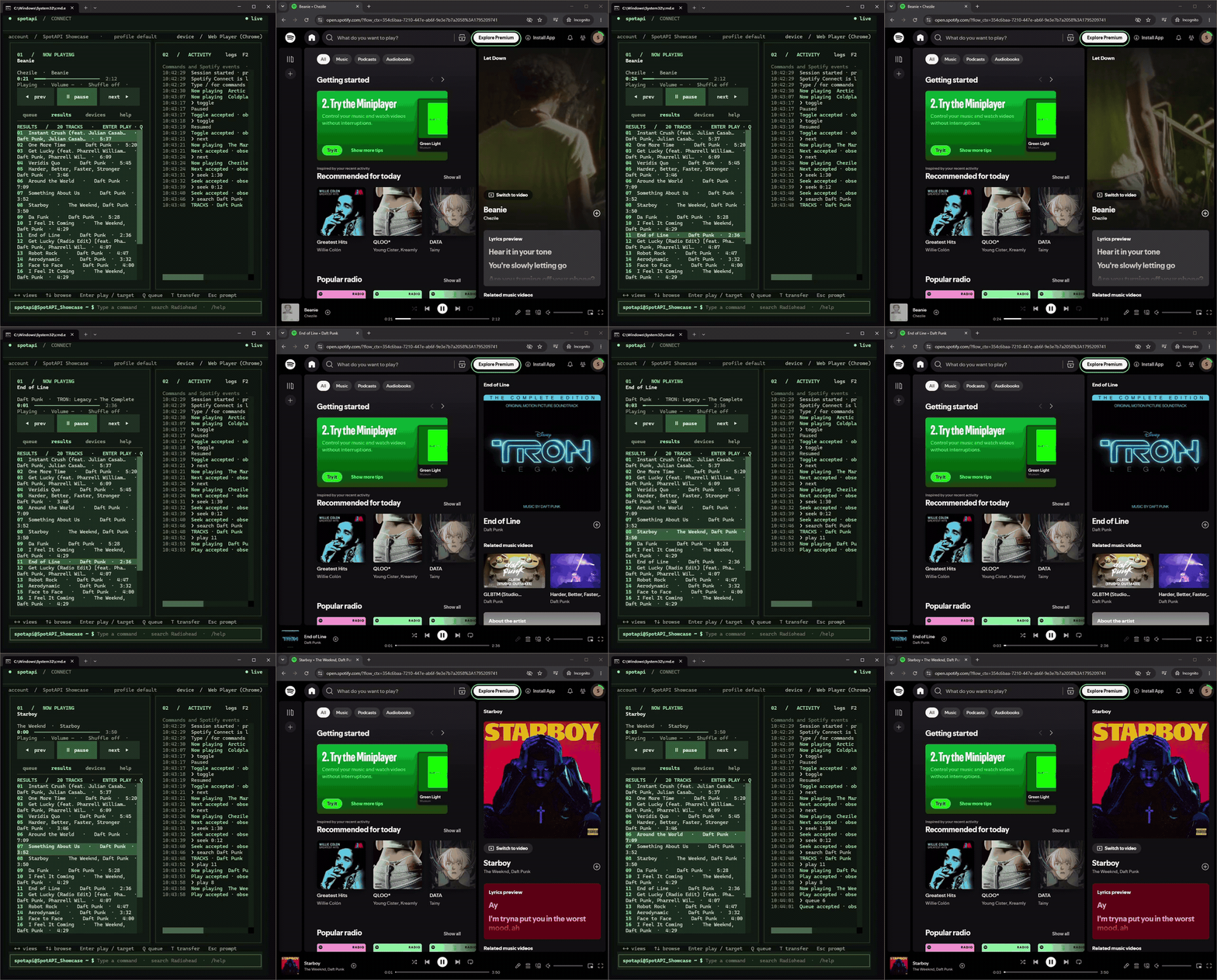
Connect · Search, navigate and control an existing Spotify player from your terminal. Spotify plays the audio; SpotAPI sends the controls.
Launch Connect:
python -m pip install "spotapi[connect,browser]"
python -m playwright install chromium
python -m spotapi connect
First-time browser sign-in is covered by these commands. Already use SPOTIFY_COOKIE or a saved Connect profile? Install only spotapi[connect] and skip the browser download.
Use search Daft Punk, queue 1, pause, next or seek 1:30. Ctrl+P opens the command palette. See the Connect guide for device selection and setup.
See what else it can do
SpotAPI also powers Studio, a desktop music explorer built on the same library. Open tracks, inspect credits, follow artists and albums, and display timed lyrics. With a connected Spotify player, clicking a lyric can seek playback to that line.
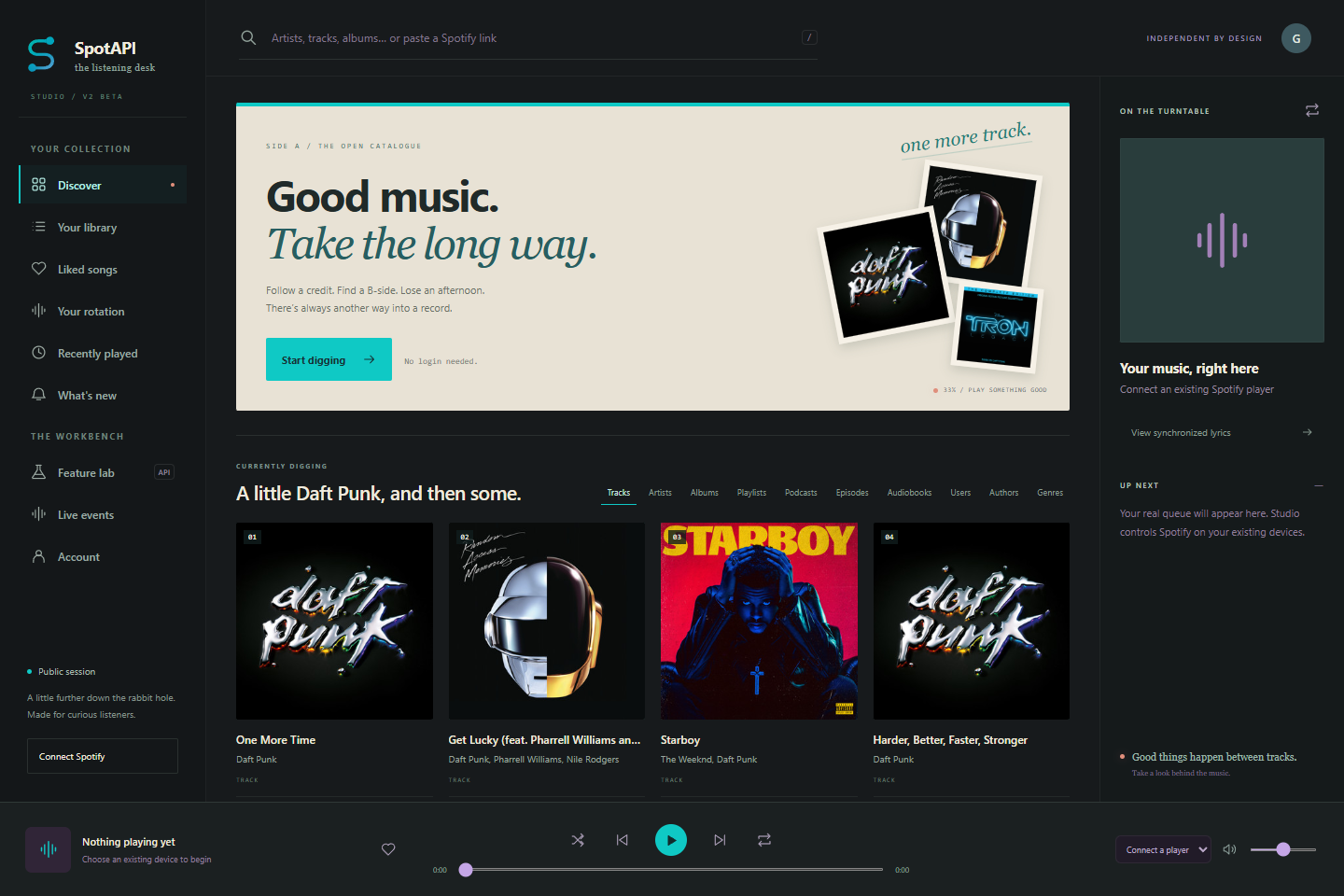
Watch the synchronized-lyrics demo (GIF, about 11 MB) · Studio itself does not stream full Spotify tracks.
python -m pip install "spotapi[studio]"
python -m spotapi studio
Studio uses a native WebView. Studio setup explains platform requirements and Spotify sign-in. Lyric availability depends on the source and account entitlements; seeking needs an authenticated, controllable player.
Support SpotAPI
Sponsors help keep SpotAPI free and fund maintenance, testing and documentation. Become a sponsor.
Sponsors
|
Reliable residential proxies for Python automation and web data collection. 90M+ IPs, global targeting, rotating & sticky sessions, and HTTP(S)/SOCKS5 support. Paid sponsor · Affiliate link. SpotAPI may earn a commission from purchases. |

Build with Python
Reuse a catalogue session for related operations:
import asyncio
from spotapi import Catalogue


async def main() -> None:
    async with Catalogue() as spotify:
        results = await spotify.search("Daft Punk")
        if results.artists:
            artist = await spotify.get_artist(results.artists[0].uri)
            print(artist.name)


asyncio.run(main())
Working with large playlists? Audit up to 10,000 playlist occurrences, identify duplicate tracks and unavailable entries, and export a CSV. The example pages through results instead of loading the whole playlist into memory. Run it from a repository checkout.
Where to go next
| Build | Start here |
|---|---|
| Music search or public metadata tools | Public catalogue |
| A playlist organizer that handles duplicate tracks correctly | Playlist API |
| A live now-playing display or controller | Player example |
| A personal music dashboard | Account and statistics |
| A DJ crate using tempo and harmonic keys | Playlist crate |
| An experimental local music recommender | Taste Lab |
Why SpotAPI?
- Start without credentials. Public catalogue search and metadata require no Spotify developer app.
- Typed, async results. Work with Python models instead of guessing dictionary keys.
- Explicit I/O. Reading a model doesn't silently trigger another HTTP request.
- More than read-only metadata. With your authenticated session, manage saved music, edit playlist occurrences and control existing players.
- Designed for exploration. Use the CLI, Discover and Studio to understand capabilities before integrating them into code.
SpotAPI uses unofficial Spotify web-player endpoints, so behavior can change when Spotify changes those endpoints. It is not a substitute for the official Web API in every use case, and public-data access is different from authenticated playback access. Compare the APIs · Verification boundaries
Documentation and migration
Quickstart · API reference · Coming from Spotipy · CLI and discovery · Troubleshooting
Upgrading from v1? SpotAPI 2 is async-first and contains breaking changes. Existing v1 apps can pin spotapi==1.2.8 while migrating, or use SyncCatalogue for new synchronous scripts. Read the migration guide.
Contributing
Bug reports, reproducible issues and thoughtful contributions are welcome. Contributing · Tests · Legal notice · GPL-3.0
If SpotAPI helps you build something, star the repository to help other developers discover it.
Questions
What is SpotAPI?
Aran404/SpotAPI is a public repo on GitHub by Aran404. Typed async Spotify tools for Python, built on Spotify’s private API. Search public data without an API key, control playback without Premium, and build catalogue, playlist and player apps.
Is SpotAPI open source?
It declares the GPL-3.0 license on GitHub.
Does SpotAPI run on macOS, Windows or Linux?
Its maker has not tagged a system, so it is unknown here. Its README says what it needs.
How do I install SpotAPI?
Open "Take it" on its page: Take My Repo writes an install plan for your machine and hands it to your AI agent (Claude Code, Codex or Cursor), which asks you before each step. Take My Repo has not tested it on any machine.