
Point-UV-Diffusion
(ICCV2023) This is the official PyTorch implementation of ICCV2023 paper: Texture Generation on 3D Meshes with Point-UV Diffusion
- 219
- 3 y ago
Repo CVMI-Lab/Point-UV-Diffusion, read from GitHub 1 min ago. CVMI-Lab has not joined Take My Repo.
In short
CVMI-Lab/Point-UV-Diffusion is a public repo on GitHub by CVMI-Lab. (ICCV2023) This is the official PyTorch implementation of ICCV2023 paper: Texture Generation on 3D Meshes with Point-UV Diffusion. It declares no license on GitHub. Public does not mean open source: without a license, nobody is granted the right to reuse it. It is written mainly in C++, has 219 stars and last changed on 2023-12-06. Nobody has reviewed it on Take My Repo yet, which says nothing about its quality. Read from GitHub on 2026-11-25.
Texture Generation on 3D Meshes with Point-UV Diffusion
Project Page | Dataset | Paper
Texture Generation on 3D Meshes with Point-UV Diffusion (ICCV 2023 Oral)
Xin Yu, Peng Dai, Wenbo Li, Lan Ma, Zhengzhe Liu, Xiaojuan Qi
Table of Contents
- Introduction
- Installation
- Dataset Preparation
- Project Structure
- Configuration
- Training
- Testing
- Evaluation Metrics
- Citation
- Acknowledgments
Introduction
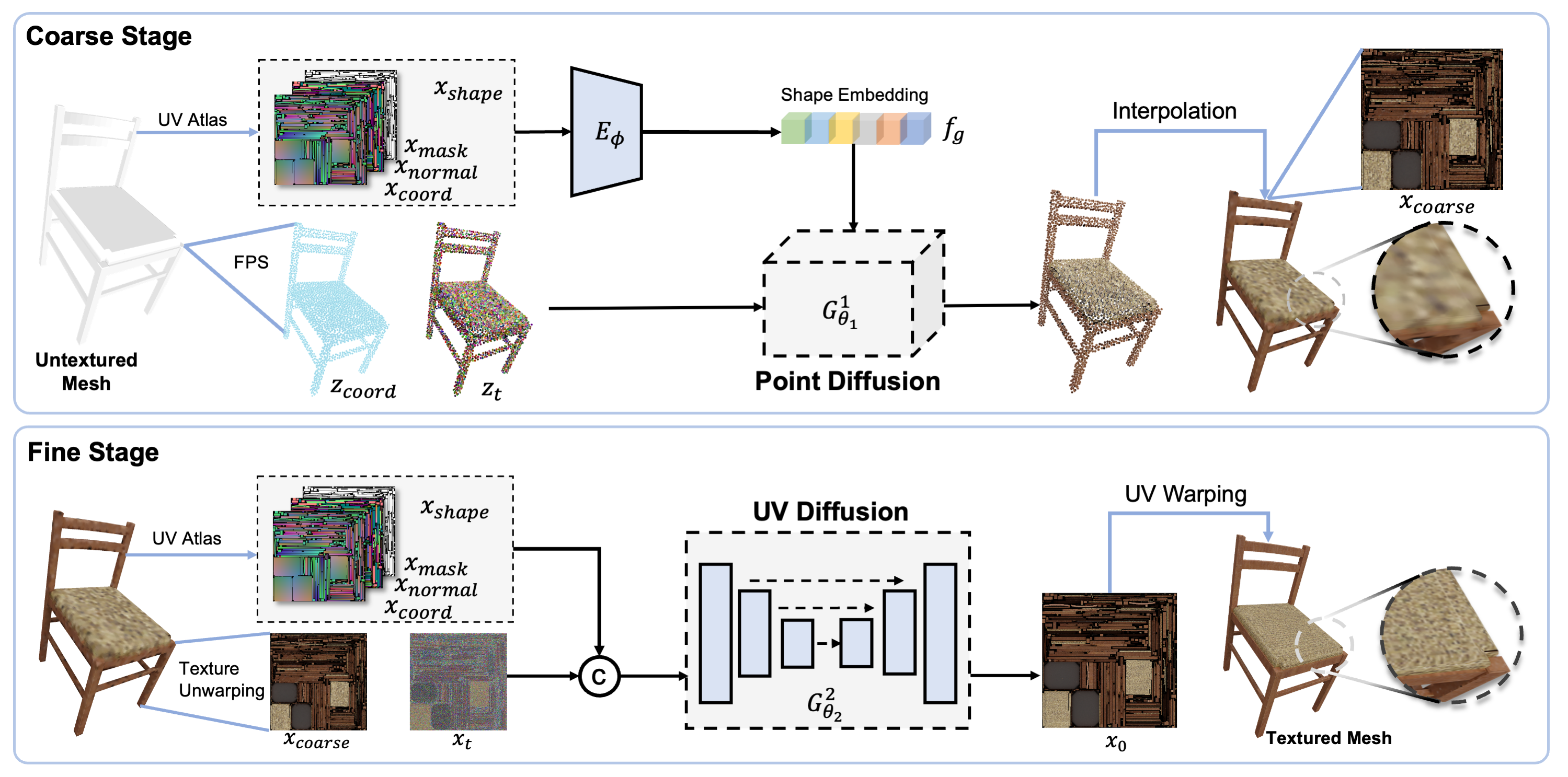
In this work, we delve into a novel texture representation based on UV maps and investigate the advanced diffusion model for texture generation. The 2D nature of the UV map enables it to circumvent the cost of high-resolution point/voxel representations. Besides, the UV map is compatible with arbitrary mesh topologies, thereby preserving the original geometric structures. We introduce Point-UV diffusion, a two stage coarse-to-fine framework consisting of point diffusion and UV diffusion. Specifically, we initially design a point diffusion model to generate color for sampled points that act as low-frequency texture components. This model is equipped with a style guidance mechanism that alleviates the impact of biased color distributions in the dataset and facilitates diversity during inference. Next, we project these colorized points onto the 2D UV space with 3D coordinate interpolation, thereby generating a coarse texture image that maintains 3D consistency and continuity. Given the coarse textured image, we develop a UV diffusion model with elaborately designed hybrid conditions to improve the quality of the textures.

Installation
-
Clone the Repository:
Start by cloning the repository to your local machine. -
Set Up the Environment:
Create and activate a new conda environment namedpoint_uv_diffwith Python 3.8.15.conda create -n point_uv_diff python==3.8.15 conda activate point_uv_diff
-
Install PyTorch and Related Packages:
Install specific versions of PyTorch, torchvision, and torchaudio using the following command.pip install torch==1.11.0+cu113 torchvision==0.12.0+cu113 torchaudio==0.11.0 --extra-index-url https://download.pytorch.org/whl/cu113
-
Install PyTorch Geometric Dependencies:
pip install --no-index --no-cache-dir torch-cluster torch-scatter torch-sparse -f https://data.pyg.org/whl/torch-1.11.0+cu113.html
pip install --no-cache-dir torch-geometric
-
Install Additional Requirements:
Finally, install the remaining dependencies listed in therequirements.txtfile.pip install -r requirements.txt
Follow these steps to set up the development environment for the project.
Dataset Preparation
You can access our preprocessed dataset via this Dropbox link. After downloading and unzipping the dataset, the folder structure should be organized as follows:
.
├── clip_image_data
│   ├── 03001627
│   └── 04379243
├── clip_text_data
│   ├── 03001627
│   └── 04379243
├── coarse_model
│   ├── 02828884
│   ├── 02958343
│   ├── 03001627
│   └── 04379243
├── final_split_files
│   ├── 02828884
│   ├── 02958343
│   ├── 03001627
│   └── 04379243
└── uv_model_512
    ├── 02828884
    ├── 02958343
    ├── 03001627
    └── 04379243
After successfully downloading the dataset, please remember to update the data_dir field in the configs/paths/default.yaml file to reflect the path where you've saved the dataset.
For example, open configs/paths/default.yaml and modify it as follows:
data_dir: 'path/to/your/downloaded/dataset'
We release the dataset processing scripts here.
Directory Descriptions
clip_image_data: Contains the preprocessed data used for image-conditioned training and testing.clip_text_data: Contains the preprocessed data used for text-conditioned training and testing.coarse_model: Contains the preprocessed data used for coarse-stage training and testing.final_split_files: Contains the data split files for training and testing.uv_model_512: Contains the preprocessed data used for training and testing with a UV model at 512 resolution.
Project Structure
src/: Contains the source code.configs/: Configuration files for training and testing.results/: Store the results here.
Configuration
The project uses YAML configuration files stored in the configs/ directory. You can specify settings for data modules, models, training, and evaluation.
Training
To train the model, navigate to the src/ directory and execute the following:
bash train.sh
The script uses the following command to launch the training:
python -m torch.distributed.launch --master_port [PORT] --nproc_per_node [NUM_GPUS] \
train.py experiment=[EXPERIMENT_NAME] \
datamodule.batch_size=[BATCH_SIZE_PER_GPU]
Testing
To test the model, navigate to the src/ directory and execute the following:
bash test.sh
The script uses the following command to launch the testing:
python -m torch.distributed.launch --master_port [PORT] --nproc_per_node [NUM_GPUS] \
test.py experiment=[EXPERIMENT_NAME] \
ckpt_name=[CHECKPOINT_PATH]
Downloading Pretrained Models
You can download our pretrained models via this Dropbox link. Please maintain the following directory structure; otherwise, you may encounter errors. For instance, for the image-conditioned model:
.
├── image_condition
│   ├── table_image_coarse
│   │   ├── ckpt
│   │   │    └── ckpt.pth
Evaluation Metrics
The evaluation metrics can be computed using the evaluate_metric.py script. For example, after doing cascaded inference for the table category and get the results, simply run:
python -m torch.distributed.launch --master_port 1234 --nproc_per_node 1 evaluate_metric.py \
experiment=table_fine \
+evaluate_result_folder=../results/test/pretrain/uncondition/table_fine/static_timestamped
Here evaluate_result_folder is the path to the generated results. The script will compute the FID and KID scores.
Citation
If you find our work useful in your research, please consider citing:
@inproceedings{yu2023texture,
  title={Texture Generation on 3D Meshes with Point-UV Diffusion},
  author={Yu, Xin and Dai, Peng and Li, Wenbo and Ma, Lan and Liu, Zhengzhe and Qi, Xiaojuan},
  booktitle={Proceedings of the IEEE/CVF International Conference on Computer Vision},
  pages={4206--4216},
  year={2023}
}
Acknowledgments
Our codebase is constructed upon frameworks such as Hydra and OmegaConf, which provide modularity and ease of modification.
Additionally, our implementation references several outstanding code repositories, specifically:
We extend our gratitude to the developers of these libraries for making their code publicly available, thereby contributing to the broader research community.
Contact
If you have any questions, please contact Xin Yu via yuxin27g@gmail.com.
Questions
What is Point-UV-Diffusion?
CVMI-Lab/Point-UV-Diffusion is a public repo on GitHub by CVMI-Lab. (ICCV2023) This is the official PyTorch implementation of ICCV2023 paper: Texture Generation on 3D Meshes with Point-UV Diffusion.
Is Point-UV-Diffusion open source?
It declares no license on GitHub. Public does not mean open source: without a license, nobody is granted the right to reuse it.