
SC-GS
[CVPR 2024] Code for SC-GS: Sparse-Controlled Gaussian Splatting for Editable Dynamic Scenes
- 658
- MIT
- 17 mo ago
Repo CVMI-Lab/SC-GS, read from GitHub 1 min ago. CVMI-Lab has not joined Take My Repo.
In short
CVMI-Lab/SC-GS is a public repo on GitHub by CVMI-Lab. [CVPR 2024] Code for SC-GS: Sparse-Controlled Gaussian Splatting for Editable Dynamic Scenes. It declares the MIT license on GitHub. It is written mainly in Python, has 658 stars and last changed on 2025-06-27. Nobody has reviewed it on Take My Repo yet, which says nothing about its quality. Read from GitHub on 2026-11-25.
Similar repos
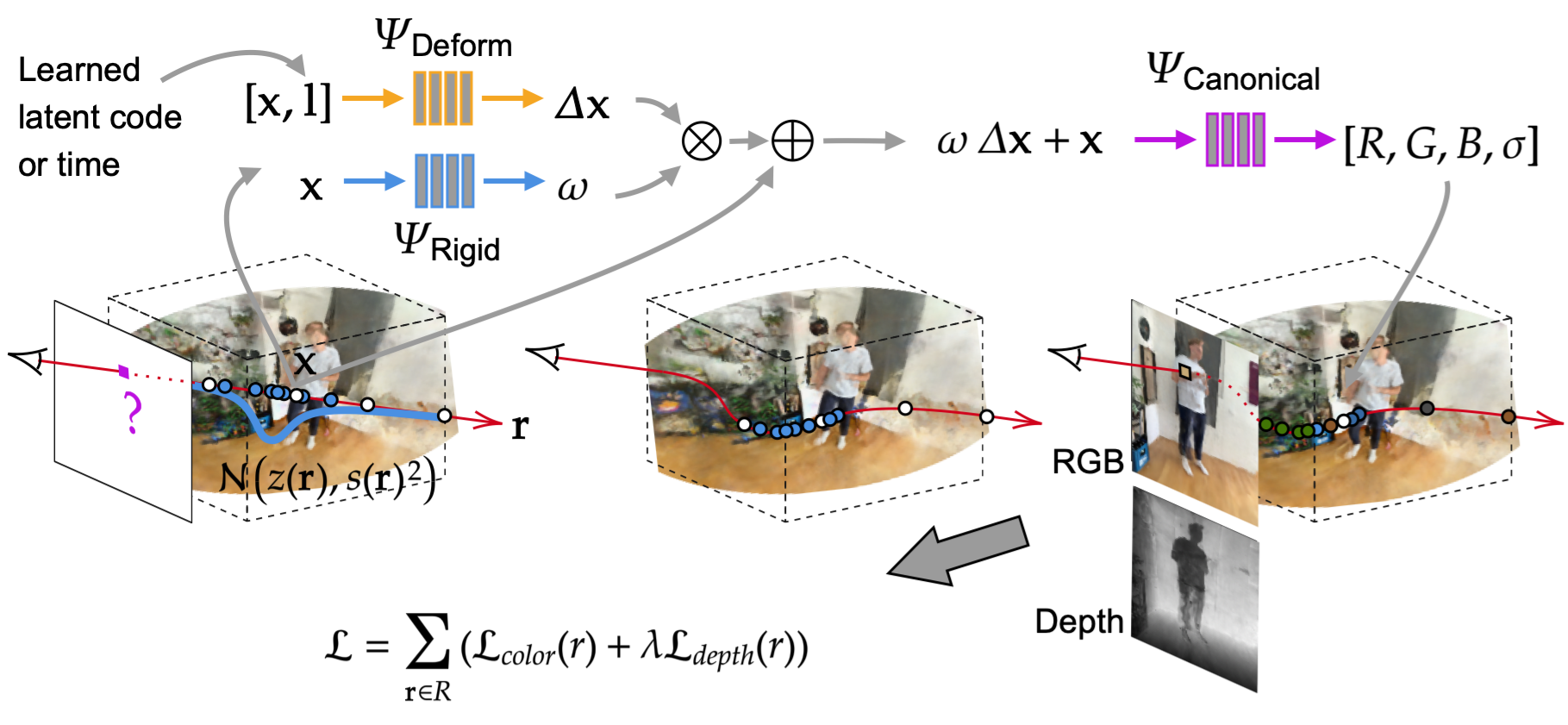
DGD-NeRF
Depth-Guided Dynamic Neural Radiance Field using RGB-D data

SC-GS: Sparse-Controlled Gaussian Splatting for Editable Dynamic Scenes


This is the code for SC-GS: Sparse-Controlled Gaussian Splatting for Editable Dynamic Scenes.



With interactive editing empowered by SC-GS, users can effortlessly edit and customize their digital assets with interactive editing features.

Given (a) an image sequence from a monocular dynamic video, we propose to represent the motion with a set of sparse control points, which can be used to drive 3D Gaussians for high-fidelity rendering.Our approach enables both (b) dynamic view synthesis and (c) motion editing due to the motion representation based on sparse control points
Updates
2025.06.19

Now, editing static Gaussians from .ply files is supported via edit_gui.py. The example command below demonstrates editing a Gaussian cat generated by TRELLIS:
python edit_gui.py --gs_path ${PATH_TO_PLY} # --model_path ${PATH_TO_SAVE} # You can save your edited Gaussian to ${PATH_TO_SAVE} by clicking the button `save`
2025.05.21
Editing Real-World Static Objects
Solving a reported issues that invertable laplacian matrix causing slow editing. Editing real world static object is now flexible and show interesting results.
1. Masking the Object to Edit
When editing, remember to mask the object you want to modify. If you are using MiVOS and encounter an issue with non-digital image names (e.g., frame_000.jpg causing errors), you can resolve it by replacing the line in this file with the following:
fnames = sorted(glob.glob(os.path.join(path, '*.jpg')), key=lambda x: int(''.join(char for char in os.path.basename(x).split('.')[0] if char.isdigit())))
2. Training and Editing Static Scenes
Run the following command to train and edit a static scene:
CUDA_VISIBLE_DEVICES=0 python train_gui.py \
    --source_path "XXX/person-small" \
    --model_path "outputs/person/" \
    --is_scene_static \
    --gui \
    --deform_type "node" \
    --node_num "512" \
    --gt_alpha_mask_as_dynamic_mask \
    --gs_with_motion_mask \
    --W "800" \
    --H "800" \
    --white_background \
    --init_isotropic_gs_with_all_colmap_pcl
3. Editing Results on I-N2N Scenes
By following the editing guidance, you can easily achieve satisfactory geometry editing results on static scenes, as demonstrated in Instruct-NeRF2NeRF:


2024-03-17:
-
Editing static scenes is now supported! Simply include the
--is_scene_staticargument and you are good to go! -
Video rendering is now supported with interpolation of editing results. Press the button
sv_kptto save each edited result and pressrender_trajto render the interpolated motions as a video. Click thespiralto switch the camera-motion pattern of the rendered video between a spiral trace and a fixed pose. -
On self-captured real-world scenes where Gaussian number will be too large, the dimension of hyper coordinates that seperate close but disconnected parts can be set to 2 to speed up the rendering:
--hyper_dim 2. Also remember to remove--is_blenderin such cases!
2024-03-07
We offer two ARAP deformation strategies for motion editing: 1. iterative deformation and 2. deformation from Laplacian initialization.
2024-03-06
To prevent initialization failure of control points, you use the argument --init_isotropic_gs_with_all_colmap_pcl on self-captured datasets.
Install
git clone https://github.com/yihua7/SC-GS --recursive
cd SC-GS

pip install -r requirements.txt

# a modified gaussian splatting (+ depth, alpha rendering)
pip install ./submodules/diff-gaussian-rasterization

# simple-knn
pip install ./submodules/simple-knn
Run
Train wit GUI
-
To begin the training, select the 'start' button. The program will begin with pre-training control points in the form of Gaussians for 10,000 steps before progressing to train dynamic Gaussians.
-
To view the control points, click on the 'Node' button found on the panel located after 'Visualization'.
# Train with GUI (for the resolution of 400*400 with best PSNR)
CUDA_VISIBLE_DEVICES=0 python train_gui.py --source_path YOUR/PATH/TO/DATASET/jumpingjacks --model_path outputs/jumpingjacks --deform_type node --node_num 512 --hyper_dim 8 --is_blender --eval --gt_alpha_mask_as_scene_mask --local_frame --resolution 2 --W 800 --H 800 --gui

# Train with GUI (for the resolution of 800*800)
CUDA_VISIBLE_DEVICES=0 python train_gui.py --source_path YOUR/PATH/TO/DATASET/jumpingjacks --model_path outputs/jumpingjacks --deform_type node --node_num 512 --hyper_dim 8 --is_blender --eval --gt_alpha_mask_as_scene_mask --local_frame --W 800 --H 800 --random_bg_color --white_background --gui
Train with terminal
- Simply remove the option
--guias following:
# Train with terminal only (for the resolution of 400*400 with best PSNR)
CUDA_VISIBLE_DEVICES=0 python train_gui.py --source_path YOUR/PATH/TO/DATASET/jumpingjacks --model_path outputs/jumpingjacks --deform_type node --node_num 512 --hyper_dim 8 --is_blender --eval --gt_alpha_mask_as_scene_mask --local_frame --resolution 2 --W 800 --H 800
Evalualuate
-
Every 1000 steps during the training, the program will evaluate SC-GS on the test set and print the results on the UI interface and terminal. You can view them easily.
-
You can also run the evaluation command by replacing
train_gui.pywithrender.pyin the command of training. Results will be saved in the specified log directoryoutputs/XXX. The following is an example:
# Evaluate with GUI (for the resolution of 400*400 with best PSNR)
CUDA_VISIBLE_DEVICES=0 python render.py --source_path YOUR/PATH/TO/DATASET/jumpingjacks --model_path outputs/jumpingjacks --deform_type node --node_num 512 --hyper_dim 8 --is_blender --eval --gt_alpha_mask_as_scene_mask --local_frame --resolution 2 --W 800 --H 800
Editing
2 min editing guidance:
(The video was recorded prior to the addition of the editing mode selection menu in the UI. In the video, the deformation was performed using the arap_from_init method.)
editing_guidance_with_bgm.mp4
Editing Mode
We offer two deformation strategies for editing: (1) iterative ARAP deformation and (2) ARAP starts with the initial frozen moment. Users can select their preferred strategy from the Editing Mode drop-down menu on the UI interface.

(1) Iterative deformation (arap_iterative):
-
Pros: It allows easy achievement of large-scale deformation without rotating artifacts.
-
Cons: It may be difficult to revert to the previous state after unintentionally obtaining unwanted deformations due to the iterative state update.
(2) Deformation from the initial frozen moment (arap_from_init):
-
Pros: It ensures that the deformed state can be restored when control points return to their previous positions, making it easier to control without deviation.
Questions
What is SC-GS?
CVMI-Lab/SC-GS is a public repo on GitHub by CVMI-Lab. [CVPR 2024] Code for SC-GS: Sparse-Controlled Gaussian Splatting for Editable Dynamic Scenes.
Is SC-GS open source?
It declares the MIT license on GitHub.
Does SC-GS run on macOS, Windows or Linux?
Its maker has not tagged a system, so it is unknown here. Its README says what it needs.
How do I install SC-GS?
Open "Take it" on its page: Take My Repo writes an install plan for your machine and hands it to your AI agent (Claude Code, Codex or Cursor), which asks you before each step. Take My Repo has not tested it on any machine.



