
OICR-PyTorch
Implementation of Multiple Instance Detection Network with Online Instance Classifier Refinement with PyTorch
- 24
- 4 y ago
Repo CatOneTwo/OICR-PyTorch, read from GitHub 1 min ago. CatOneTwo has not joined Take My Repo.
In short
CatOneTwo/OICR-PyTorch is a public repo on GitHub by CatOneTwo. Implementation of Multiple Instance Detection Network with Online Instance Classifier Refinement with PyTorch. It declares no license on GitHub. Public does not mean open source: without a license, nobody is granted the right to reuse it. It is written mainly in Python, has 24 stars and last changed on 2022-12-07. Nobody has reviewed it on Take My Repo yet, which says nothing about its quality. Read from GitHub on 2026-11-24.

OICR-PyTorch
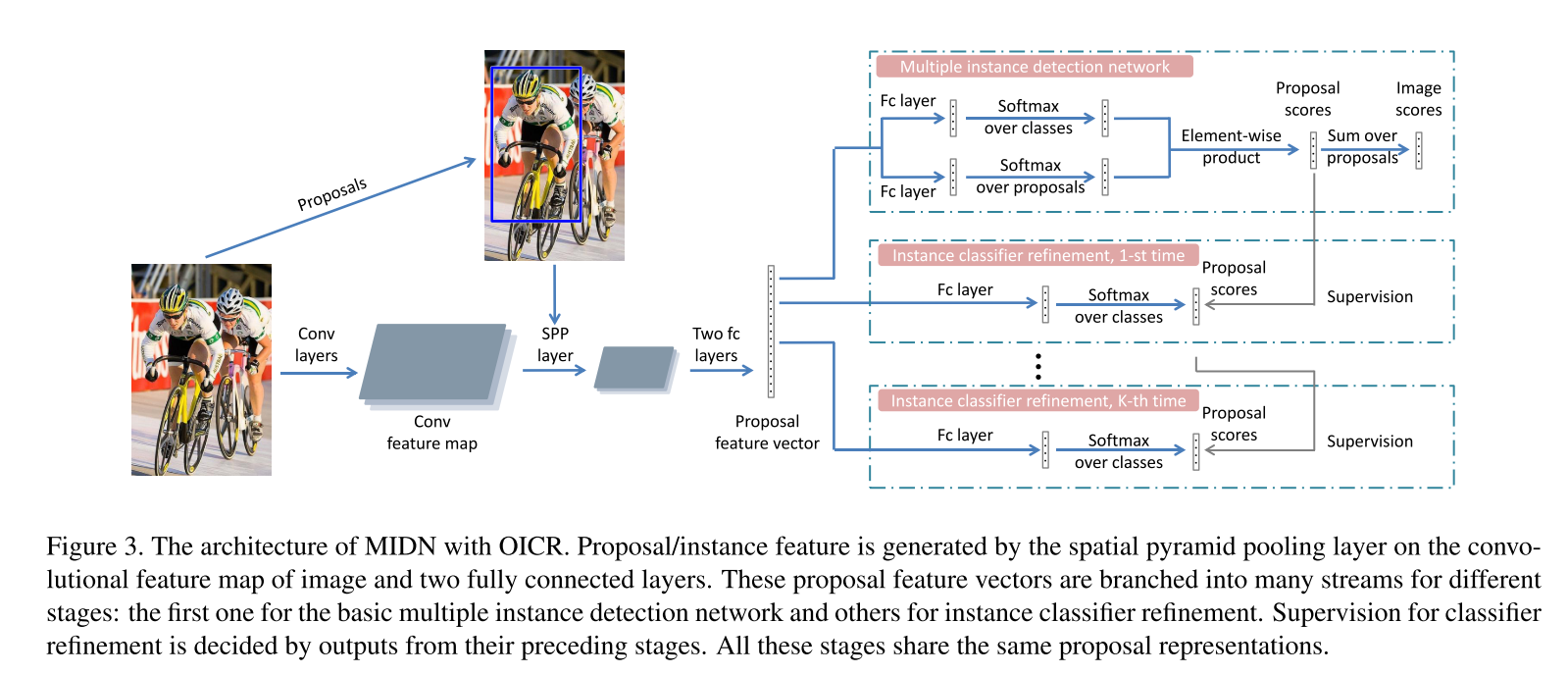
This repository contains the PyTorch implementation of paper Multiple Instance Detection Network with Online Instance Classifier Refinement (CVPR 2017)
Related code: WSDDN PyTorch
Architecture
Results
VOC2007 test
| aero | bike | bird | boat | bottle | bus | car | cat | chair | cow | table | dog | horse | mbike | person | plant | sheep | sofa | train | tv | mAP | |
|---|---|---|---|---|---|---|---|---|---|---|---|---|---|---|---|---|---|---|---|---|---|
| Ap | 61.1 | 67.9 | 42.8 | 13.0 | 12.5 | 67.2 | 66.7 | 38.5 | 20.3 | 49.5 | 35.3 | 28.5 | 33.8 | 67.4 | 5.7 | 20.5 | 41.7 | 42.6 | 62.1 | 67.3 | 42.2 |
VOC2007 trainval
| aero | bike | bird | boat | bottle | bus | car | cat | chair | cow | table | dog | horse | mbike | person | plant | sheep | sofa | train | tv | mean | |
|---|---|---|---|---|---|---|---|---|---|---|---|---|---|---|---|---|---|---|---|---|---|
| CorLoc | 80.4 | 82.7 | 67.3 | 42.6 | 41.2 | 80.2 | 85.5 | 51.5 | 42.7 | 78.8 | 43.3 | 40.5 | 52.0 | 88.4 | 15.7 | 57.1 | 81.4 | 53.2 | 74.1 | 82.8 | 62.1 |
Contents
- Requirements: software
- Requirements: hardware
- Basic installation
- Installation for training and testing
- Extra Downloads (selective search)
- Extra Downloads (ImageNet models)
- Usage
Requirements: software
Python3 packages and versions used (listed using freeze frin pip) are in requirements.txt.
You can create a new virtual environment and then install thses packages from requirements.txt.
conda create -n env_name python=3.6
pip install -r $OICR_ROOT/requirements.txt
You can also install these packages by yourself.
Besides, you should install Octave, which is mostly compatible with MATLAB.
sudo apt-get install octave
Requirements: hardware
- We used cuda 9.0 and cudnn 7.0 on Ubuntu 16.04
- We used an Nvidia GeForce GTX with 10.9G of memory. But it shold be ok to train if you have a GPU with at least 8Gb.
- NOTICE: different versions of Pytorch have different memory usages.
Basic installation
Clone this repository
git clone https://github.com/CatOneTwo/OICR-PyTorch
Installation for training and testing
- Create a "data" folder in $OICR_ROOT and enter in this folder
cd $OICR_ROOT
mkdir data
cd data
- Download the training, validation, test data, and VOCdevkit
wget https://pjreddie.com/media/files/VOCtrainval_06-Nov-2007.tar
wget https://pjreddie.com/media/files/VOCtest_06-Nov-2007.tar
- Extract all of these tars into one directory named
VOCdevkittar xvf VOCtrainval_06-Nov-2007.tar tar xvf VOCtest_06-Nov-2007.tar
- Download the VOCdevkit evaluation code adapted to octave
wget http://inf.ufrgs.br/~lfazeni/CVPR_deepvision2020/VOCeval_octave.tar
- Extract VOCeval_octave
tar xvf VOCeval_octave.tar
- Download pascal annotations in the COCO format
wget http://inf.ufrgs.br/~lfazeni/CVPR_deepvision2020/coco_annotations_VOC.tar
- Extract the annotations
tar xvf coco_annotations_VOC.tar
- It should have this basic structure
$VOC2007/
$VOC2007/annotations
$VOC2007/JPEGImages
$VOC2007/VOCdevkit
# ... and several other directories ...
- [Optional] download and extract PASCAL VOC 2012.
Observation: The
wget http://host.robots.ox.ac.uk/pascal/VOC/voc2012/VOCtrainval_11-May-2012.tar
tar xvf VOCtrainval_11-May-2012.tar
2012 test setis only available in the PASCAL VOC Evaluation Server to download. You must create a user and download it by yourself. After downloading, you can extract it in the data folder.
Extra Downloads (selective search)
- Download the proposals data generated by selective search to data folder
wget http://inf.ufrgs.br/~lfazeni/CVPR_deepvision2020/selective_search_data.tar
- Extract the proposals
tar xvf selective_search_data.tar
Extra Downloads (ImageNet models)
- Download the pre-trained VGG16 model to data folder
wget http://inf.ufrgs.br/~lfazeni/CVPR_deepvision2020/pretrained_model.tar
- Extract the pre-trained VGG16 model
tar xvf pretrained_model.tar
Usage
To Train the OICR network on VOC 2007 trainval set:
python3 code/tasks/train.py --cfg configs/baselines/vgg16_voc2007.yaml --model midn_oicr
To Evaluate the OICR network on VOC 2007:
On trainval (corloc)
python3 code/tasks/test.py --cfg configs/baselines/vgg16_voc2007.yaml --dataset voc2007trainval --model midn_oicr --load_ckpt snapshots/midn_oicr/<some-running-date-time>/ckpt/model_step24999.pth
On test (detection mAP)
python3 code/tasks/test.py --cfg configs/baselines/vgg16_voc2007.yaml --dataset voc2007test --model midn_oicr --load_ckpt snapshots/midn_oicr/<some-running-date-time>/ckpt/model_step24999.pth
To Visualize the detection results:
After evaluating OICR on test dataset, you will get detections.pkl. Then you can run the visualization script to show the results in a openCV window.
python3 code/tasks/visualize.py --cfg configs/baselines/vgg16_voc2007.yaml --dataset voc2007test --detections snapshots/midn_oicr/<some-running-date-time>/test/model_step24999/detections.pkl
You can also save the visualizations as images. First create a folder to save the outputs and pass it with the --output argument
mkdir output
python3 code/tasks/visualize.py --cfg configs/baselines/vgg16_voc2007.yaml --dataset voc2007test --detections snapshots/midn_oicr/<some-running-date-time>/test/model_step24999/detections.pkl --output output
My model
You can download my model by baidu netdisk:
Link: https://pan.baidu.com/s/1BMrqbVe6uCsOgsu5rMm3mg Code: icyb
Put this folder in your $OICR_ROOT, then test and visualize model.
Note <some-running-date-time> is replaced by final in this folder, so you should also make changes when you run the code.
Notes
Below is the code structure
- code
- datasets: VOC dataset file
- layers: layer and loss files
- models: OICR model based on layers
- tasks: train, test and visualize files
- utils: files used for other directories
- configs
- baselines: config files for model and dataset
- data
- pretrained_model: VGG16 model weights
- selective_search_data: selective search for VOC data
- VOCdevikit: VOC dataset
All code files are in code directory. If you want to design a model based on OICR, you can modify layers and model.
References
Questions
What is OICR-PyTorch?
CatOneTwo/OICR-PyTorch is a public repo on GitHub by CatOneTwo. Implementation of Multiple Instance Detection Network with Online Instance Classifier Refinement with PyTorch.
Is OICR-PyTorch open source?
It declares no license on GitHub. Public does not mean open source: without a license, nobody is granted the right to reuse it.
Does OICR-PyTorch run on macOS, Windows or Linux?
Its maker tagged it for Linux. That is declared by the maker; Take My Repo has not tested it.


