
ArcadeSpaceShooter_Console
A simple Space Shooter game coded and designed in C++ language in Console Mode.
- 10
- C++
- MIT
- 10 mo ago
A node-based finite state machine for Godot 4, with a slime enemy that idles, roams, chases, telegraphs a leap, staggers and dies.
Repo CodingQuests/godot-state-machine, read from GitHub 1 min ago. CodingQuests has not joined Take My Repo.
CodingQuests/godot-state-machine is a public repo on GitHub by CodingQuests. A node-based finite state machine for Godot 4, with a slime enemy that idles, roams, chases, telegraphs a leap, staggers and dies. It declares the MIT license on GitHub. It is written mainly in GDScript, has 1 stars and last changed on 2026-10-09. Nobody has reviewed it on Take My Repo yet, which says nothing about its quality. Read from GitHub on 2026-11-24.
A simple Space Shooter game coded and designed in C++ language in Console Mode.
A node-based finite state machine for Godot 4: one node per state, transitions by signal, and a slime enemy that idles, roams, chases, telegraphs a leap, staggers when hit and dies.

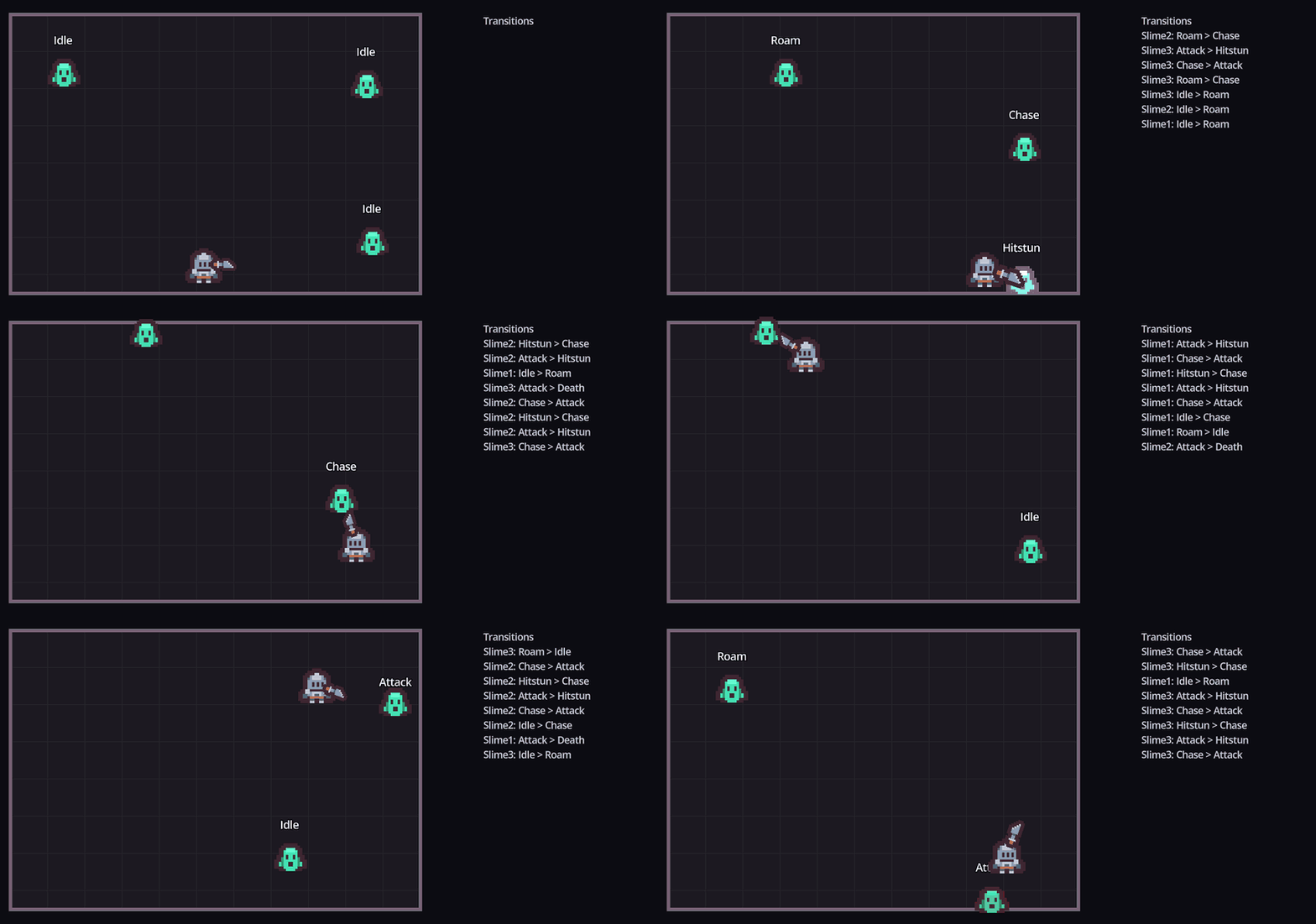
The label over each slime is its current state; the list on the right is every transition as it happens.
StateMachine (about 70 lines) and State (about 30)
are the whole system. Everything else is the demo.extends State, and its node name is its state name. The Scene tree shows the
whole machine at a glance.transitioned.emit("Chase"). States never reference each other or the machine,
so you can add or remove one without touching the rest.change_state("Hitstun") lets a hit, a
cutscene or a trigger interrupt whatever the AI was doing.enter(), exit(), update(delta) every frame and
physics_update(delta) every physics frame.state_changed(from, to) signal for debug labels, logs, analytics or
animation.
Three slimes idle and roam until you come within range. Then they chase you, crouch and flash red, and leap. Hit one while it is recovering from a leap (it turns pale blue) for double damage. Dead slimes come back after three seconds.
Clone the repository:
git clone https://github.com/CodingQuests/godot-state-machine.git
Or download it with Code > Download ZIP and unzip it.
Then open Godot, click Import, pick the project.godot file inside the folder,
and click Import & Edit.
Idle or Roam, then Chase, then
Attack when it gets close.Slime (CharacterBody2D)
StateMachine initial_state = Idle
Idle
Roam
Chase
Attack
Hitstun
Death
On ready, the StateMachine gives every State child a reference to the node
it drives (actor, the machine's parent) and listens to its transitioned
signal. Then it enters the initial state and runs the active one:
func _process(delta: float) -> void:
	if current_state:
		current_state.update(delta)


func _physics_process(delta: float) -> void:
	if current_state:
		current_state.physics_update(delta)
Each state checks its own exit conditions and announces where to go next. This is the whole Idle state:
# Stand still for idle_time, then start roaming.
extends State

@export var idle_time: float = 1.5
var _timer: float = 0.0

func enter() -> void:
	_timer = idle_time
	actor.velocity = Vector2.ZERO

func physics_update(delta: float) -> void:
	if actor.detection.can_see(actor.target):
		transitioned.emit("Chase")
		return
	_timer -= delta
	actor.move_and_slide()
	if _timer <= 0.0:
		transitioned.emit("Roam")
| State | Does | Leaves to |
|---|---|---|
Idle |
Stands still for a moment | Roam after a timer, Chase on sight |
Roam |
Walks a random direction | Idle after a timer, Chase on sight |
Chase |
Paths toward the player with NavigationAgent2D |
Attack in range, Idle past the leash distance |
Attack |
Wind-up (squash, red flash), leap, land, recover (vulnerable) | Chase if the player got away, otherwise winds up again |
Hitstun |
Staggers while the knockback fades | Chase |
Death |
Fades out and frees the slime | Nothing: there is no way out |
Hitstun and Death are never entered by another state. The slime's
take_hit() forces them from outside with state_machine.change_state().
The Attack state commits to a direction during the wind-up and only checks for
a hit on the landing frame, so you can always see it coming and step aside. After
landing, the slime is vulnerable for a moment, which is your opening.
project.godot                     Project file and input actions
state_machine/StateMachine.gd     The machine
state_machine/State.gd            The base class for states
demo/Main.tscn                    The arena: navigation, three slimes, the player, the log
demo/main.gd                      Demo only: navigation polygon, labels, log, respawns
demo/Slime.tscn                   The slime with its StateMachine and six states
demo/slime.gd                     The slime's body: health, knockback, forcing Hitstun and Death
demo/states/                      Idle, Roam, Chase, Attack, Hitstun, Death
demo/detection.gd                 Distance-based "can I see the player?"
demo/player.gd                    Demo only: movement and a sword swing
assets/kenney_tiny-dungeon/       Kenney Tiny Dungeon sprites (CC0) and their license
state_machine/ folder into your project.Node child to your character and attach StateMachine.gd.Node per state and attach a script that extends State.
The node's name is the state's name.initial_state on the StateMachine, or leave it empty to start in the
first child.actor to reach your character and emit
transitioned.emit("OtherState") to move on.The same machine works for a player, a door, a boss phase or a menu: actor is
whatever node the machine sits under.
idle_time, roam_speed,
chase_speed, leash_distance, attack_range, windup_time, leap_time,
leap_distance, stun_time). Select a state node and change them in the
Inspector.detection_radius in demo/detection.gd. Swap in a raycast for line
of sight.transitioned into it
from an existing state.state_changed to an AnimationPlayer or
AnimationTree and play the matching animation for each state.transitioned.emit("Chsae") is silently
ignored, so keep names consistent.NavigationPolygon for levels with walls inside.MIT for the code. See LICENSE.
The knight, sword and slime sprites are from
Tiny Dungeon by Kenney, released under
CC0 1.0. Details in THIRD_PARTY_ASSETS.md, and the pack's
original license is in assets/kenney_tiny-dungeon/License.txt.
Want to understand how this works instead of just copying it?
CodingQuests teaches you how to build systems like this step by step in Godot, with interactive lessons and real projects.
Other free, MIT-licensed Godot 4 projects that work well next to this one:
All twelve are listed on the CodingQuests GitHub profile.
Made by CodingQuests.
CodingQuests/godot-state-machine is a public repo on GitHub by CodingQuests. A node-based finite state machine for Godot 4, with a slime enemy that idles, roams, chases, telegraphs a leap, staggers and dies.
It declares the MIT license on GitHub.
Its maker tagged it for Windows. That is declared by the maker; Take My Repo has not tested it.
State machines, statecharts, and actors for complex logic
Community-built comprehensive 2D content creation appplication for graphic design, digital art, and interactive real-time motion graphics powered by a node-based procedural graphics engine
Open "Take it" on its page: Take My Repo writes an install plan for your machine and hands it to your AI agent (Claude Code, Codex or Cursor), which asks you before each step. Take My Repo has not tested it on any machine.
Its last change on GitHub was on 2026-10-09. GitHub counts 0 open issues and pull requests. Take My Repo does not judge from that whether it is maintained.
Nobody has reviewed it on Take My Repo yet, which says nothing about its quality.
Take My Repo cannot say: it does not audit code and has not run godot-state-machine. What is known comes from GitHub. It declares the MIT license on GitHub. Its last change was on 2026-10-09. It has 1 stars, which measure popularity, not safety. Nobody has reviewed it on Take My Repo yet, which says nothing about its quality. Read the source before you run it. With "Take it", your AI agent shows each step and asks you before running it; README text is treated as data, not as instructions.