
godot-stats-leveling
Reusable RPG stats and leveling for Godot 4: health and mana pools, attributes, source-tagged modifiers, XP curves and stat points.
- 0
- MIT
- 7 wk ago
Repo CodingQuests/godot-stats-leveling, read from GitHub 1 min ago. CodingQuests has not joined Take My Repo.
In short
CodingQuests/godot-stats-leveling is a public repo on GitHub by CodingQuests. Reusable RPG stats and leveling for Godot 4: health and mana pools, attributes, source-tagged modifiers, XP curves and stat points. It declares the MIT license on GitHub. It is written mainly in GDScript, has 0 stars and last changed on 2026-10-09. Nobody has reviewed it on Take My Repo yet, which says nothing about its quality. Read from GitHub on 2026-11-24.
Similar repos

Godot Stats & Leveling
Reusable RPG stats and XP leveling components for Godot 4: health and mana pools, attributes, flat and percent modifiers you can tag by source, and a level curve with stat points to spend.

Features
Statresource: a base value, a min and max, a current value, andvalue_changedanddepletedsignals.- Pools and attributes. Health, stamina and mana are pools you spend and
refill. Strength, dexterity and the rest are attributes.
get_value()returns the right number for each: a pool's live value, or an attribute's fully modified value. - Source-tagged modifiers.
set_modifier(&"strength", &"equipment/iron_sword", 20)adds a bonus you can remove later by name, without touching any other bonus. Setting the same source twice replaces it instead of stacking. - Clear by source or by category:
clear_source(&"equipment/iron_sword")takes one item off every stat it touched, andclear_modifiers_from_prefix("buff/")wipes a whole category. - Flat and percent:
(base + flat) * (1 + percent), so a +25% blessing scales your gear too. StatsComponent: attach it to any character. Each instance duplicates its stat definitions, so enemies sharing one.tresnever share health.LevelingComponent: an exponential XP curve, several level-ups from one big XP gain, stat points per level, and per-stat point costs.- Save and load:
get_stats_snapshot()andget_save_data()return plain dictionaries you can write to disk. StatPresets: ready-made stat sets (souls-like, simple RPG, action, survival, minimal).
Demo

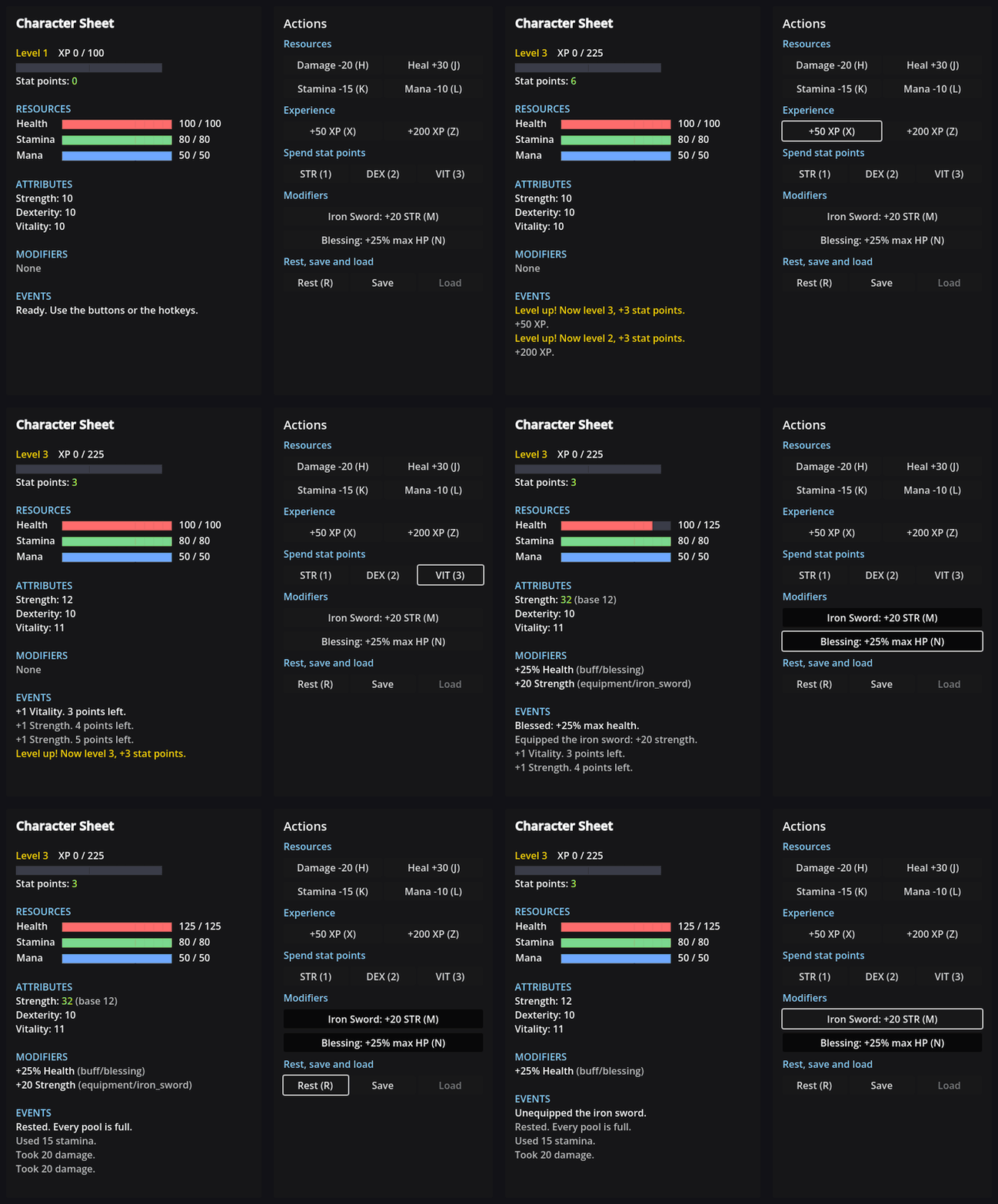
World.tscn is a character sheet. The right panel has buttons for damage,
healing, XP, spending points, two modifiers (an iron sword and a blessing), rest,
save and load. Every button also has a hotkey, shown in brackets.
Requirements
- Godot 4.7 or later, standard build (GDScript only, no .NET needed).
- Tested on Godot 4.7.2 stable on Windows. Earlier 4.x versions are untested.
- Uses the Compatibility renderer, so it runs on older GPUs too.
Installation
Clone the repository:
git clone https://github.com/CodingQuests/godot-stats-leveling.git
Or download it with Code > Download ZIP and unzip it.
Then open Godot, click Import, pick the project.godot file inside the folder,
and click Import & Edit.
Quick Start
- Press F5.
- Click +200 XP to level up, then spend the points on STR, DEX or VIT.
- Toggle the Iron Sword and watch Strength go up by 20, then come back down.
- Toggle the Blessing, then Rest: max health grows by 25% and the pool fills to the new max.
- Click Save, change some things, then Load.
How It Works
One stat
A Stat keeps a base value and a list of modifiers, and works out its maximum
from them:
var max_computed: float:
	get:
		var flat := _flat_modifiers
		var percent := _percent_modifiers
		for mod: Dictionary in _mods.values():
			flat += mod.get("flat", 0.0)
			percent += mod.get("percent", 0.0)
		return clampf((base_value + flat) * (1.0 + percent), min_value, max_value)
current_value clamps itself between min_value and that maximum, and emits
depleted when it hits the bottom.
Pools and attributes
A pool (health, stamina, mana) is spent and refilled, so its value is
current_value. A +25% max health buff raises the ceiling, not the health you have
right now. An attribute (strength, defense) is never spent, so its value is its
modified maximum. A +20 strength sword counts the moment you equip it.
StatsComponent.get_value() makes that distinction for you, using the exported
pool_stats list. Add your own pool, like &"energy", to that list in the
Inspector.
Modifiers with a source
# Equip
stats.set_modifier(&"strength", &"equipment/iron_sword", 20.0)
stats.set_modifier(&"defense", &"equipment/iron_sword", 5.0)

# Unequip: one call takes it off every stat it touched
stats.clear_source(&"equipment/iron_sword")

# A +25% buff, then the end of a run wiping every buff
stats.set_modifier(&"health", &"buff/blessing", 0.0, 0.25)
stats.clear_modifiers_from_prefix("buff/")
The older add_flat_modifier() and add_percent_modifier() still work for a
quick unnamed bonus, but you have to remember the exact amount to remove it.
Levelling
LevelingComponent needs stats_component_path pointing at its sibling
StatsComponent. XP to reach the next level is
base_xp_requirement * xp_scaling_factor ^ (level - 2), so with the defaults level
2 needs 100 XP, level 3 needs 150 and level 4 needs 225. add_xp() loops, so one
big reward can grant several levels. spend_stat_point() raises a stat's base
value permanently.
Project Structure
project.godot                     Project file
World.tscn                        The demo: a character sheet and an actions panel
Scripts/stat.gd                   One stat: base, min, max, current, modifiers
Scripts/stats_component.gd        A character's set of stats, and the modifier API
Scripts/leveling_component.gd     XP, levels and stat points
Scripts/stat_presets.gd           Ready-made stat sets
Scripts/example_player.gd         Demo only: buttons, hotkeys and the character sheet
Using It In Your Own Game
-
Copy
stat.gd,stats_component.gdandleveling_component.gd(andstat_presets.gdif you want the presets). -
Add a
StatsComponentnode to your character and fill instat_definitions, either in the Inspector withStatresources or in code:stats.stat_definitions = StatPresets.get_soulslike_stats() stats._initialize_stats()
-
Add a
LevelingComponentnext to it and setstats_component_pathto theStatsComponent. -
Use it:
stats.modify_value(&"health", -20.0)       # take damage
var damage := 5.0 + stats.get_value(&"strength") * 0.5
leveling.add_xp(40)                        # on a kill
stats.stat_depleted.connect(func(stat_name):
	if stat_name == &"health":
		die()
)
Customizing It
- XP curve:
base_xp_requirement,xp_scaling_factor,max_levelandstat_points_per_levelon theLevelingComponent. - Expensive stats:
leveling.set_stat_cost(&"luck", 2). - Your own pools: add names to
pool_statson theStatsComponent. - New stats at runtime:
stats.ensure_stat(&"crit_chance", 5.0)adds a stat only if it is not there yet. - Presets: add your own static function to
stat_presets.gdthat returns anArray[Stat].
Known Limitations
- Snapshots save base and current values, level, XP and points. Modifiers are not saved: re-apply them from your equipment and buffs when you load.
_initialize_stats()builds the stats. It runs in_ready(); call it again yourself if you setstat_definitionsin code afterwards, as the demo does.- Stat points always add 1 to the base value. Spending a point on vitality does
not also raise health; connect
stat_point_spentif you want derived stats. - The demo is a UI panel, not a game scene.
- Tested on Godot 4.7.2 on Windows only.
License
MIT. See LICENSE.
Third-Party Assets
None. The demo uses Godot's built-in UI theme and fonts.
Learn How It Works
Want to understand how this works instead of just copying it?
CodingQuests teaches you how to build systems like this step by step in Godot, with interactive lessons and real projects.
- Stats & Leveling System
builds these components lesson by lesson, from a single
Statresource to levelling and stat points. The first 4 lessons are free with a free account, and the first 2 need no account at all.
More Free Godot Resources from CodingQuests
Other free, MIT-licensed Godot 4 projects that work well next to this one:
- Inventory System: A slot inventory with stacking, drag and drop, tooltips, item use and save data.
- Save System: Save slots where picked-up items stay picked up and opened chests stay open.
- Hitbox and Hurtbox: Health, hitbox and hurtbox components with one hit per swing, knockback, hit-stop and i-frames.
- Dialogue and Quest System: Branching dialogue with conditions and effects, quests that track themselves, and a visual dialogue editor.
All twelve are listed on the CodingQuests GitHub profile.
Made by CodingQuests.
Questions
What is godot-stats-leveling?
CodingQuests/godot-stats-leveling is a public repo on GitHub by CodingQuests. Reusable RPG stats and leveling for Godot 4: health and mana pools, attributes, source-tagged modifiers, XP curves and stat points.
Is godot-stats-leveling open source?
It declares the MIT license on GitHub.
Does godot-stats-leveling run on macOS, Windows or Linux?
Its maker tagged it for Windows. That is declared by the maker; Take My Repo has not tested it.


