
OrderManagerPro
OrderManagerPro is a native Windows desktop application built for warehouse, inbound logistics, and stock control teams to register, triage, investigate, and analyze order/delivery discrepancies in real time.
- 1
- MIT
- 4 d ago
Repo Creator-NL/OrderManagerPro, read from GitHub 1 d ago. Creator-NL has not joined Take My Repo.
In short
Creator-NL/OrderManagerPro is a public repo on GitHub by Creator-NL. OrderManagerPro is a native Windows desktop application built for warehouse, inbound logistics, and stock control teams to register, triage, investigate, and analyze order/delivery discrepancies in real time. It declares the MIT license on GitHub. It is written mainly in C#, has 1 stars and last changed on 2026-11-20. Nobody has reviewed it on Take My Repo yet, which says nothing about its quality. Read from GitHub on 2026-11-24.
OrderManagerPro
Warehouse Order Discrepancy, Stock Control Investigation & Analytics Suite
Developed by Biohazard Corp (@Creator-NL)
Overview
OrderManagerPro is a native Windows desktop application built for warehouse, inbound logistics, and stock control teams to register, triage, investigate, and analyze order/delivery discrepancies in real time.
Instead of tracking missing items, supplier shortages, or warehouse picking/receiving errors across scattered spreadsheets and emails, OrderManagerPro connects Inbound, Stock Control, and Management in a unified SQL-backed workflow — complete with automated financial threshold triage, linked-order detection, multi-language UI (EN / NL / DE), and executive KPI dashboards.
Key Features
1. Automated Inbound Triage & Threshold Routing (DB_AddNewInquiry)
- Automatic Value & Percentage Evaluation: As Inbound staff enter
Order Amount,Product Price, andProblem Amount, OrderManagerPro automatically calculates both the financial value of the discrepancy (ProblemAmount × ProductPrice) and the discrepancy percentage (ProblemAmount / OrderAmount × 100):- Low-Threshold Discrepancies (
< 50currency units AND< 5%of order quantity): Automatically routed to direct resolution without tying up stock investigators. - High-Threshold Discrepancies (
≥ 50currency units OR≥ 5%of order quantity): Automatically routed to active Stock Control investigation (Active).
- Low-Threshold Discrepancies (
- Two-Step Form Verification (
Check→Add): Validates all required fields (Supplier,Order Number,Delivery Number,Product Number,Order Amount,Product Price,Problem Type,Problem Amount,Creator) and locks inputs for review before database insertion.
2. Stock Control Investigation & Linked-Order Detection (DB_ViewActiveInquiries, DB_ViewActiveInquiry)
- Live Queue Color Coding & Collision Prevention:
- Orange Status Indicator: Alerts Stock Control staff when an inquiry is already being investigated by a colleague (
InvestigatedBy). - Red Status Indicator: Flags complex cases escalated for Senior Approval (
DB_ViewSeniorInquiries).
- Orange Status Indicator: Alerts Stock Control staff when an inquiry is already being investigated by a colleague (
- Automatic Linked-Inquiry Discovery (
DB_FoundInquiryLinks): When opening an active inquiry, the system automatically checks the database for any other inquiries sharing the sameOrderNumberand surfaces a Found Inquiry Links button so investigators immediately see related multi-line issues. - Structured Root-Cause Recording: Tracks
InquiryResult(Found,Not Found,Senior Approval),MistakeType,AmountFound,FoundLocation,FoundHandlingUnit,MistakeMadeBy,InvestigatedBy, andInvestigatorComment.
3. End-to-End Inquiry Lifecycle (Active → Ready → Finished)
flowchart LR
    A["Inbound: Add New Inquiry"] --> B{"Auto-Triage<br/>Value >= 50 or >= 5%?"}
    B -- "Yes" --> C["Active Queue<br/>(Stock Control)"]
    B -- "No" --> E["Direct / Auto-Routed"]
    C --> D{"Investigation<br/>Result"}
    D -- "Escalated" --> S["Senior Inquiries Queue"]
    S --> R["Ready Queue (Inbound Review)"]
    D -- "Found / Not Found" --> R
    R --> F["Finished Archive & KPI Analytics"]
4. Executive Analytics & SLA Time Tracking (Analyzing/)
- Main Dashboard (
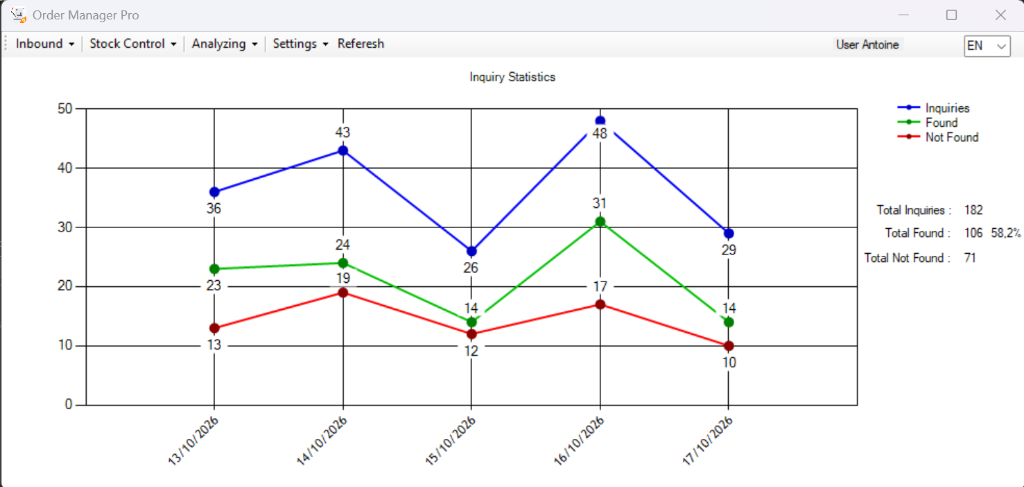
MainWindow): Displays a 14-day trend chart ofInquiries,Found, andNot Founditems alongside live summary counters and overall recovery rate (% Found). - Analyzing Dashboard (
AnalyzingDashBoard): 4-panel analytics view with custom date-range filtering:- Total Inquiries Pie Chart
- Mistakes Made By (
DB_MistakesMadeBy): Identifies recurring error patterns by operator or station. - Mistakes By Type (
DB_MistakesByType): Breaks down discrepancies by error category. - Resolution Time Tracking (
TimeTracking): Calculates turnaround time in hours between inquiry creation (DateAndTimeCreated) and investigation completion (DateAndTimeReady).
5. Role-Based Access Control (RBAC) & Multi-Language UI
- SHA-256 Password Authentication (
Login.cs): Assigns users to tailored permission groups:Inbound: Add new inquiries, search inquiries, processReadyinquiries, and viewFinishedinquiries.Stock Control: InvestigateActiveinquiries, reviewSenior Approvalinquiries, and browseFinishedinquiries.Admin: Full access to Inbound, Stock Control, Analytics Dashboards, User Management (DB_Users), and Database Settings (DB_DataBaseSettings).Super Admin: System-level administration console (SuperAdmin) for database path configuration, clipboard TSV/Excel batch import, and user provisioning.
- Instant Trilingual Localization (
EN/NL/DE): Switch the UI on the fly between English, Dutch (Nederlands), and German (Deutsch), or assign a default language per user account.
Project Structure
OrderManagerPro/
├── database/
│   └── schema.sql                       # SQL Server LocalDB schema & seed accounts
├── OrderManagerPro/
│   ├── Analyzing/
│   │   ├── AnalyzingDashBoard.cs        # Multi-chart executive analytics dashboard
│   │   ├── DB_MistakesByType.cs         # Discrepancy breakdown by mistake category
│   │   ├── DB_MistakesMadeBy.cs         # Discrepancy breakdown by operator/source
│   │   └── TimeTracking.cs              # Inquiry turnaround SLA tracking (hours)
│   ├── Home/
│   │   └── MainWindow.cs                # Role-aware main dashboard & 14-day KPI chart
│   ├── Inquiries/
│   │   ├── DB_AddNewInquiry.cs          # Inbound registration & automatic threshold triage
│   │   ├── DB_FoundInquiryLinks.cs      # Linked inquiries sharing the same OrderNumber
│   │   ├── DB_SearchInquiries.cs        # Multi-criteria inquiry search & filter
│   │   ├── DB_ViewActiveInquiries.cs    # Stock Control queue with status color-coding
│   │   ├── DB_ViewActiveInquiry.cs      # Investigation workspace & root-cause logging
│   │   ├── DB_ViewFinishedInquiries.cs  # Completed inquiries archive
│   │   ├── DB_ViewReadyInquiries.cs     # Investigated inquiries awaiting Inbound closure
│   │   ├── DB_ViewReadyInquiry.cs       # Inbound final review & state transition to Finished
│   │   ├── DB_ViewSeniorInquiries.cs    # Escalated inquiries awaiting Senior Approval
│   │   └── ViewFoundInquiry.cs          # Read-only detail view for searched/finished items
│   ├── Settings/
│   │   ├── DB_AddNewUser.cs             # User creation with SHA-256 password hashing
│   │   ├── DB_DataBaseSettings.cs       # Database path configuration & clipboard import
│   │   ├── DB_EditUser.cs               # User directory & role management
│   │   ├── DB_Users.cs                  # User management hub
│   │   └── SuperAdmin.cs                # Super Admin system setup panel
│   ├── Login.cs                         # Authentication & role-based routing
│   └── Program.cs                       # Application entry point
└── OrderManagerPro.sln                  # Visual Studio Solution
Database Setup
By default, OrderManagerPro connects to a local SQL Server Express LocalDB file at:
C:\DataBase\DatabaseOrderManagerPro.mdf
Quick LocalDB Initialization
- Ensure SQL Server Express LocalDB is installed (included with Visual Studio's Data storage and processing workload).
- Create the folder
C:\DataBase\. - Create a LocalDB database file named
C:\DataBase\DatabaseOrderManagerPro.mdfand executedatabase/schema.sqlto create theUsersandOrderProblemstables along with optional demo accounts:admin/ Password:1(Role:Admin)inbound/ Password:1(Role:Inbound)stockcontrol/ Password:1(Role:Stock Control)
Getting Started & Building from Source
Prerequisites
- Windows 10 or Windows 11
- Visual Studio 2022 (with .NET desktop development workload)
- .NET Framework 4.8
- SQL Server Express LocalDB (
(LocalDB)\MSSQLLocalDB)
Clone & Compile
git clone https://github.com/Creator-NL/OrderManagerPro.git
cd OrderManagerPro
- Open
OrderManagerPro.slnin Visual Studio 2022. - Build and run (
F5or Build > Build Solution).
Official Links & Support
- Official Product Page: https://biohazard-corp.nl/ordermanagerpro.html
- Official Website: https://biohazard-corp.nl
- GitHub Profile: @Creator-NL
- Sponsor / Donate: PayPal (@biohazardcorp)
- Contact:
contact@biohazard-corp.nl
License
Distributed under the MIT License. See LICENSE for full details.
Questions
What is OrderManagerPro?
Creator-NL/OrderManagerPro is a public repo on GitHub by Creator-NL. OrderManagerPro is a native Windows desktop application built for warehouse, inbound logistics, and stock control teams to register, triage, investigate, and analyze order/delivery discrepancies in real time.
Is OrderManagerPro open source?
It declares the MIT license on GitHub.
Does OrderManagerPro run on macOS, Windows or Linux?
Its maker tagged it for Windows. That is declared by the maker; Take My Repo has not tested it.