
coredumpy.nvim
Inspect dump files from coredumpy in neovim.
- 18
- MIT
- 18 mo ago
Repo Davidyz/coredumpy.nvim, read from GitHub 1 min ago. Davidyz has not joined Take My Repo.
In short
Davidyz/coredumpy.nvim is a public repo on GitHub by Davidyz. Inspect dump files from coredumpy in neovim. It declares the MIT license on GitHub. It is written mainly in Lua, has 18 stars and last changed on 2025-05-31. Nobody has reviewed it on Take My Repo yet, which says nothing about its quality. Read from GitHub on 2026-11-23.
Coredumpy.nvim
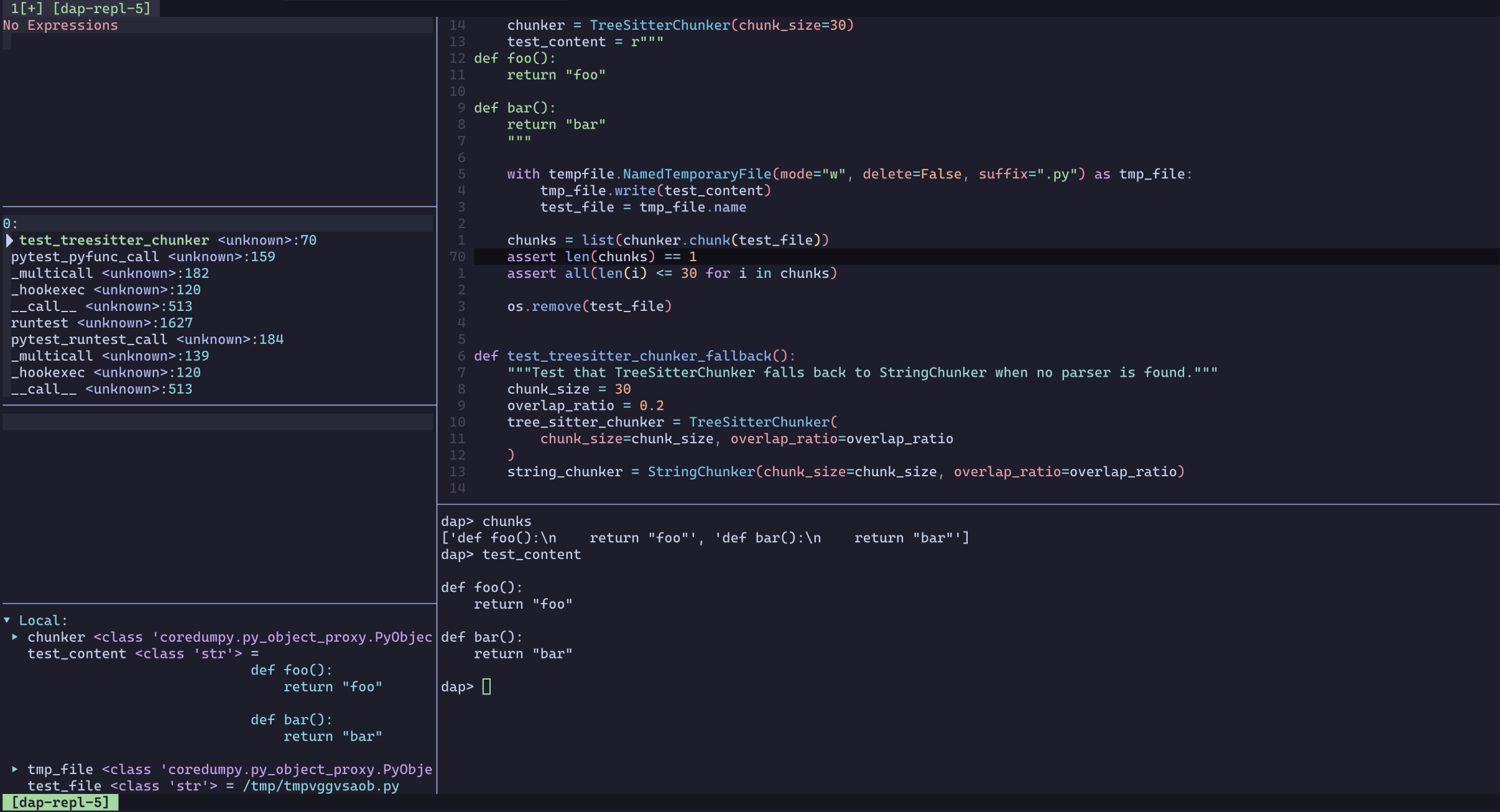
Coredumpy is a Python post-mortem debugging tool. It takes a snapshot of failed tests and saves the internals of the program into a dump file to be inspected later. This plugin, inspired by the VSCode counterpart created by the creator of coredumpy creates a neovim DAP session so that you can inspect a dump file in your favourite editor.
Installation & Configuration
{
  "Davidyz/coredumpy.nvim",
  cmd = { "Coredumpy" },
  opts = {
    host = "127.0.0.1",
    port = 6742,
    python = nil,
    timeout_ms = 10000,
  },
  dependencies = { "mfussenegger/nvim-dap" }
}
host and port are hardcoded in coredumpy, so it's usually not necessary to
touch them. python would be the path to your interpreter, or a function that
returns the path. timeout_ms is the timeout for fetching dump file from Github
Action.
You'll also need to have Coredumpy 0.4.1+ installed on your system/in your venv.
If you want to directly work with dump files uploaded to Github Actions
artifacts, you'll also need
to have gh installed and configured, as well as the
zcat command, which is usually part of the unzip package.
Working with Python Interpreters & Virtual Environments
By default (when opts.python is set to nil), coredumpy.nvim tries to pick
up the coredumpy executable from $PATH. If it finds it, it'll be used to
start the debugger. Otherwise, it'll fallback to using python in your current
shell to start the debugger (equivalent to python -m coredumpy host). To
use a different interpreter (for a virtual environment, for example), you can
set opts.python to a string (path to the interpreter) or a function that
returns a string (return the path to the interpreter). This enables the plugin
to dynamically invoke the appropriate python interpreter.
For example, if you're using venv-selector.nvim and installed coredumpy in your virtual environments, you can use the following setup so that this plugin automatically pick up the virtual environment from venv-selector:
{
  "Davidyz/coredumpy.nvim",
  cmd = { "Coredumpy" },
  opts = function()
    return {
      -- This will call require("venv-selector").python() when you start a
      -- Coredumpy session.
      python = require("venv-selector").python,
    },
  end,
  dependencies = { "mfussenegger/nvim-dap", "linux-cultist/venv-selector.nvim" }
}
Usage

The UI is powered by nvim-dap-ui. nvim-dap-view should work too but I haven't tested it because I don't use nvim nightly.
For instructions to use coredumpy, see the upstream repo and this post from the creator of coredumpy.
Working with Local Dump Files
This plugin tries to replicate the behaviour of the VSCode counterpart. It's an inspector of a dump file produced by Coredumpy.
Suppose your dump file is located at path/to/dump/file.dump, you can use the
following user command to initialise a debugging process:
:Coredumpy path/to/dump/file.dump
Working with Remote Dump Files
If you deployed coredumpy on Github Action, you'll be given URLs to download the artifacts. There will be both a standard Github URL that you can click to download the artifact from a browser:
https://github.com/<owner>/<repo>/actions/runs/<run_id>/artifacts/<artifact_id>
and a VSCode URL intended to use from VSCode:
vscode://gaogaotiantian.coredumpy-vscode/load-github-artifact?owner=<owner>&repo=<repo>&artifactId=<artifact_id>
This plugin is able to handle both of the URLs. Simply run:
:Coredumpy <url>
Coredumpy.nvim will parse the URL, download the artifact to a temporary directory and open it in nvim-dap, saving you the trouble of doing it manually.
Credits
- @gaogaotiantian for creating coredumpy and fixing the reference ID issue;
- debugpy.nvim for nvim-dap related code.
Questions
What is coredumpy.nvim?
Davidyz/coredumpy.nvim is a public repo on GitHub by Davidyz. Inspect dump files from coredumpy in neovim.
Is coredumpy.nvim open source?
It declares the MIT license on GitHub.
Does coredumpy.nvim run on macOS, Windows or Linux?
Its maker has not tagged a system, so it is unknown here. Its README says what it needs.
How do I install coredumpy.nvim?
Open "Take it" on its page: Take My Repo writes an install plan for your machine and hands it to your AI agent (Claude Code, Codex or Cursor), which asks you before each step. Take My Repo has not tested it on any machine.
Is coredumpy.nvim still maintained?
Its last change on GitHub was on 2025-05-31. GitHub counts 0 open issues and pull requests. Take My Repo does not judge from that whether it is maintained.
What do people who ran coredumpy.nvim say?
Nobody has reviewed it on Take My Repo yet, which says nothing about its quality.