 Docs |
 Roadmap |
 Slack |
 WeChat Group |
 Zhihu |
English |
中文
Composable and Embeddable Communication Runtime for AI Services
DLSlime is a PeerAgent-centered communication and microservice toolkit for
distributed AI systems. PeerAgent is the runtime hub: application services such
as SlimeRPC and DLSlimeCache build on it, NanoCtrl supplies service governance
and coordination metadata around it, and endpoint APIs below it drive
heterogeneous transports such as RDMA, TCP, NVLink, and Ascend Direct.
DLSlime is designed to be adopted one layer at a time. Applications can start
with direct endpoints, add PeerAgent coordination, use NanoCtrl for governance,
or build on SlimeRPC and DLSlimeCache when they need service-shaped components.
The same layers are exposed as Python/C++ APIs, local services, and HTTP
control-plane contracts, so DLSlime can be embedded into existing serving,
inference, cache, or RL systems instead of replacing them.
Latest News
2025
- [2025/12] DLSlime was featured at the Global C++ and System Software Technology Conference in the talk “Design and Implementation of a Flexible and Efficient Heterogeneous Transfer Library”. View the session page.
- [2025/09] DLSlime was open-sourced as DeepLink's unified communication library for efficient heterogeneous training and inference. Read the WeChat article.
- [2025/07] DLSlime supports the DeepLink ultra-large-scale cross-region hybrid training solution released by Shanghai AI Laboratory, including the “3D parallelism + PS” architecture and kilometer-scale heterogeneous training deployments. Read the SHLab news.
- [2025/06] DLSlime provides DeepSeek-V3 PD disaggregation support for LMDeploy.
PeerAgent-Centered Architecture
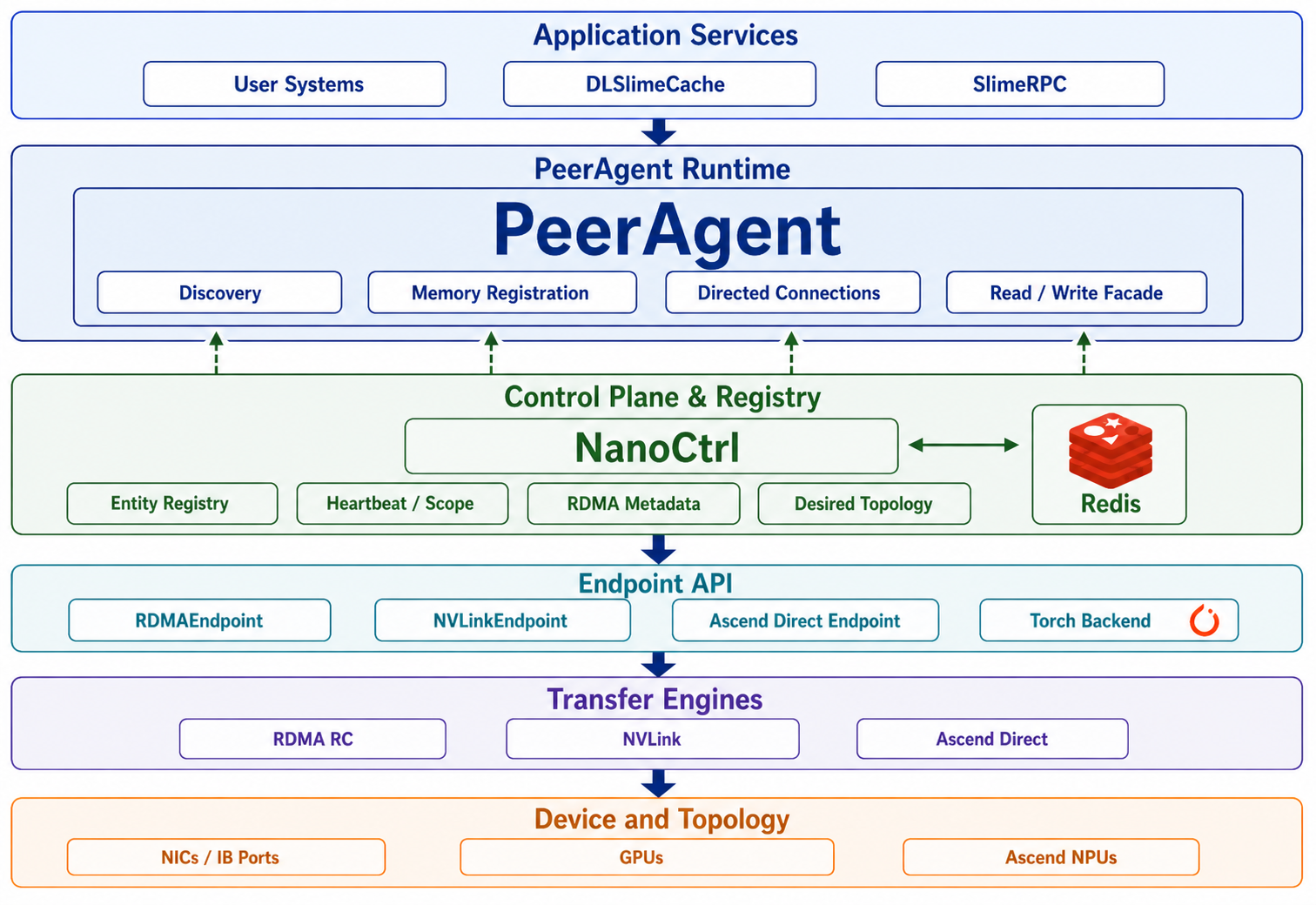
DLSlime is organized around PeerAgent. Application services attach to
PeerAgent, NanoCtrl provides service governance and coordination metadata, and
endpoint APIs drive the underlying transfer engines and devices. The diagram
below shows these layers without requiring applications to bind themselves to one
transport or topology.
How The Layers Work Together
- A service starts and registers itself with NanoCtrl as a generic entity, for
example
kind=cache or kind=rpc-worker.
- Each service attaches to a PeerAgent instead of managing transport state
directly.
- PeerAgents register their resource records and memory regions with NanoCtrl.
- Clients discover services by
kind and scope, then reach the service through
its PeerAgent.
- PeerAgents exchange connection intent and memory-region metadata through
NanoCtrl/Redis.
- Endpoint objects issue the actual transfer through RDMA, NVLink, Ascend
Direct, or the selected backend.
Usage Scenarios
Direct Endpoint Access
Use the Endpoint API directly when the application already controls peer
placement, metadata exchange, and memory lifetime. This is the lowest-level path
through DLSlime: it avoids NanoCtrl and PeerAgent, and maps application transfer
logic straight onto endpoint-to-endpoint data movement.
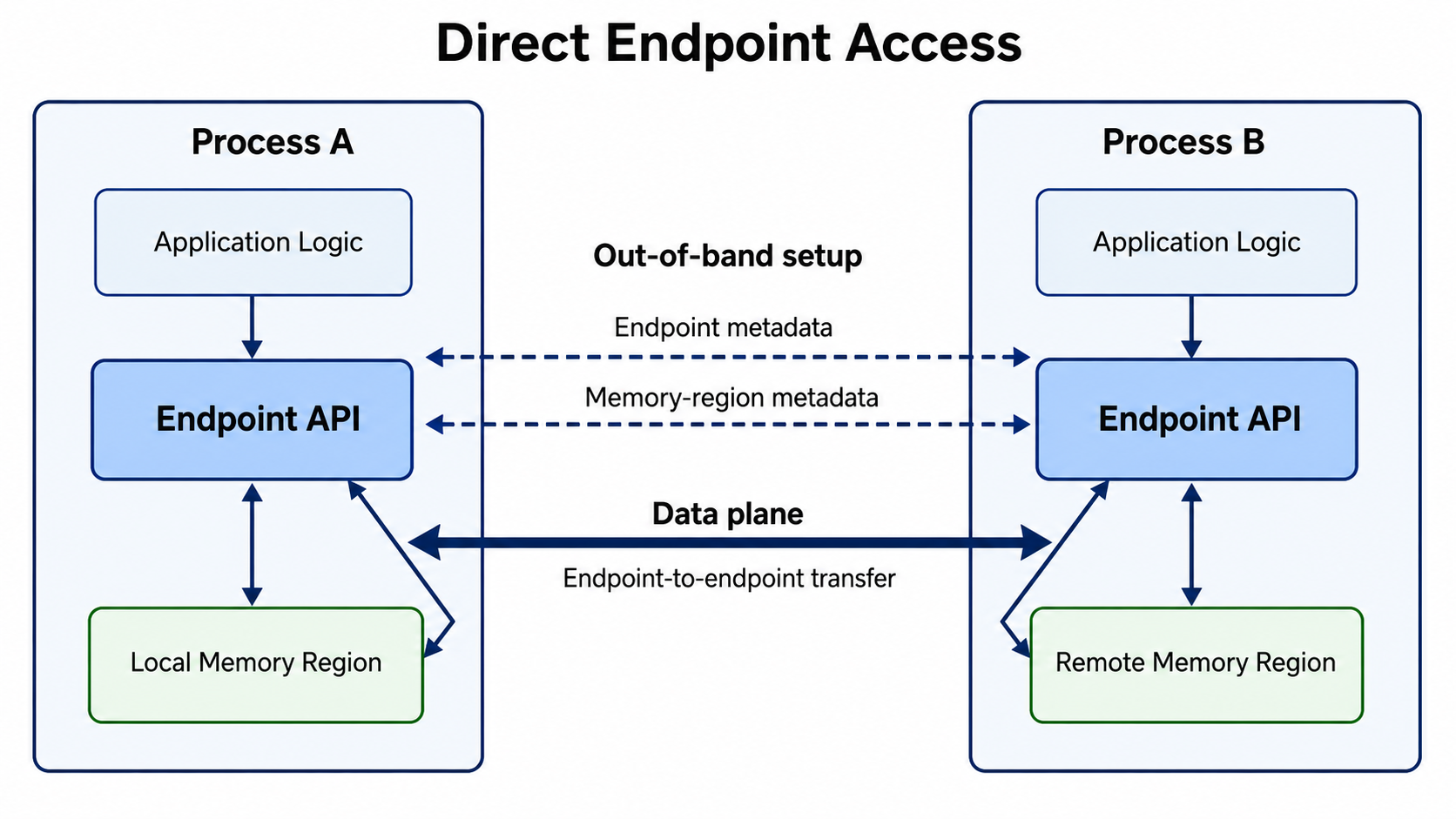
Typical examples are two-process RDMA read/write tests, NVLink transfer checks,
and backend bring-up where explicit setup is more useful than service discovery.
Example: p2p_rdma_rc_read.py,
p2p_rdma_rc_write.py,
p2p_nvlink.py, and
p2p_ascend_read.py.
python dlslime/examples/python/p2p_rdma_rc_read.py
python dlslime/examples/python/p2p_rdma_rc_write.py
python dlslime/examples/python/p2p_rdma_rc_write_with_imm_data.py
python dlslime/examples/python/p2p_rdma_rc_send_recv_gdr.py
torchrun --nproc_per_node=2 dlslime/examples/python/p2p_nvlink.py
python dlslime/examples/python/p2p_ascend_read.py
Ascend Direct setup details live in
docs/huawei_ascend/README.md.
TCP Fallback Transport
Use TCP when the hosts have no RDMA NICs or when a peer connection has to
traverse a network without RDMA capability. The TCP transport exposes the same
primitives — endpoint_info / connect, two-sided send / recv, one-sided
read / write, and named memory regions — and plugs into PeerAgent through
the same control plane via connect_to(transport="tcp"). Immediate-data ops
(write_with_imm, imm_recv) are RDMA-only and raise NotImplementedError
on TCP.
BUILD_TCP is ON by default.
Raw TcpEndpoint, no NanoCtrl required:
python dlslime/examples/python/p2p_tcp_rc_send_recv.py
PeerAgent over TCP:
nanoctrl start
python dlslime/examples/python/p2p_tcp_send_recv_peer_agent.py
python dlslime/examples/python/p2p_tcp_rc_write_peer_agent.py
python dlslime/examples/python/p2p_tcp_rc_read_peer_agent.py
See docs/src/guide/tcp-transport.md for the
full surface, one-sided I/O setup, and the test reference.
PeerAgent-to-PeerAgent Access
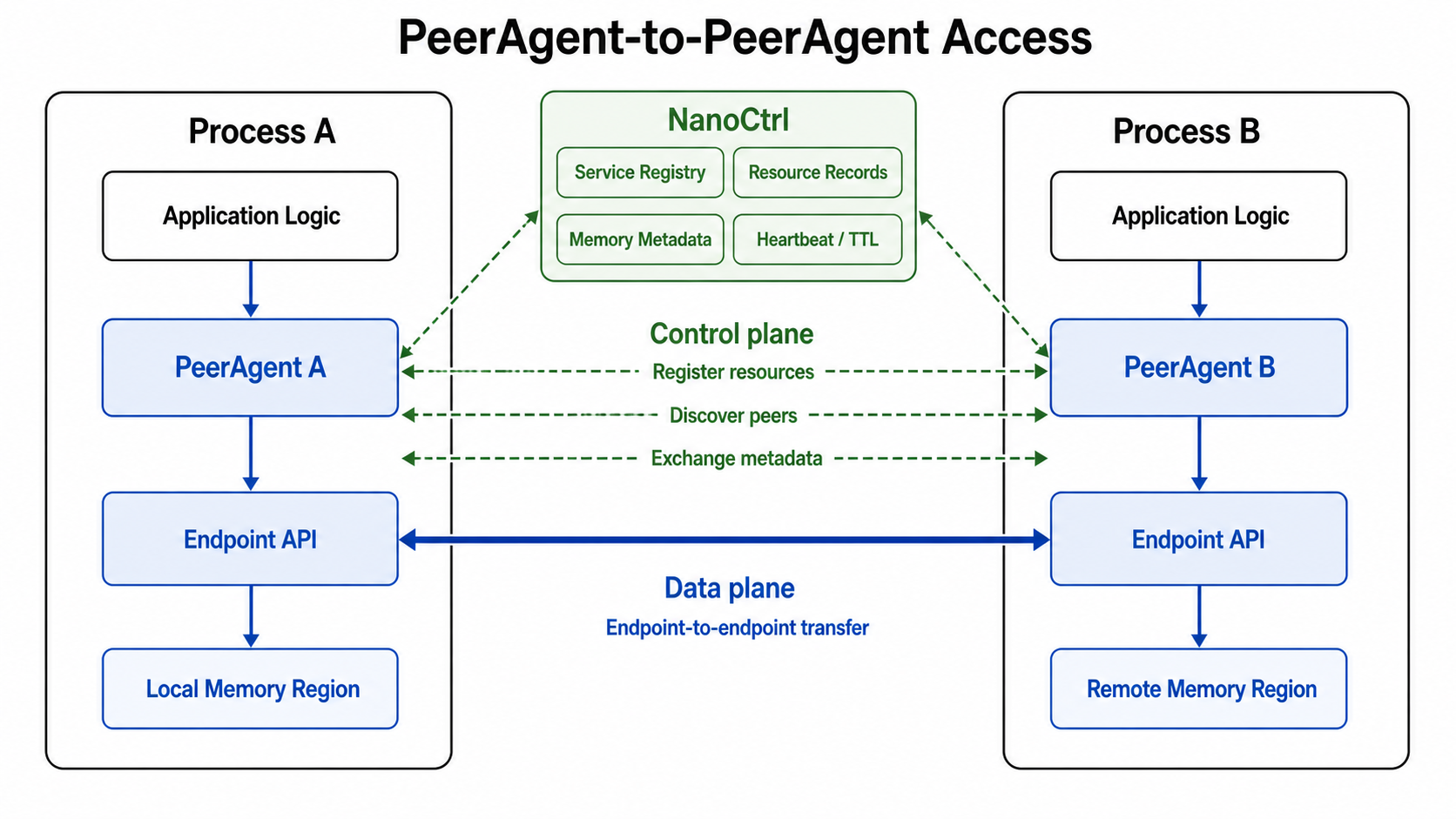
Use PeerAgent when the application wants peer-to-peer data movement without
managing connection setup, memory-region discovery, and stale-state cleanup by
itself. Each process owns a PeerAgent, registers its resources through NanoCtrl,
and then uses the PeerAgent facade to read or write remote memory through the
selected endpoint.
This path keeps the same endpoint data plane as direct access, but moves
coordination into NanoCtrl and PeerAgent. It is the right starting point for
multi-process services, dynamic peer discovery, and higher-level components such
as SlimeRPC and DLSlimeCache.
Example:
p2p_rdma_rc_read_ctrl_plane.py
and
p2p_rdma_multi_agents_ctrl_plane.py.
nanoctrl start
python dlslime/examples/python/p2p_rdma_rc_read_ctrl_plane.py
DLSlimeCache Service
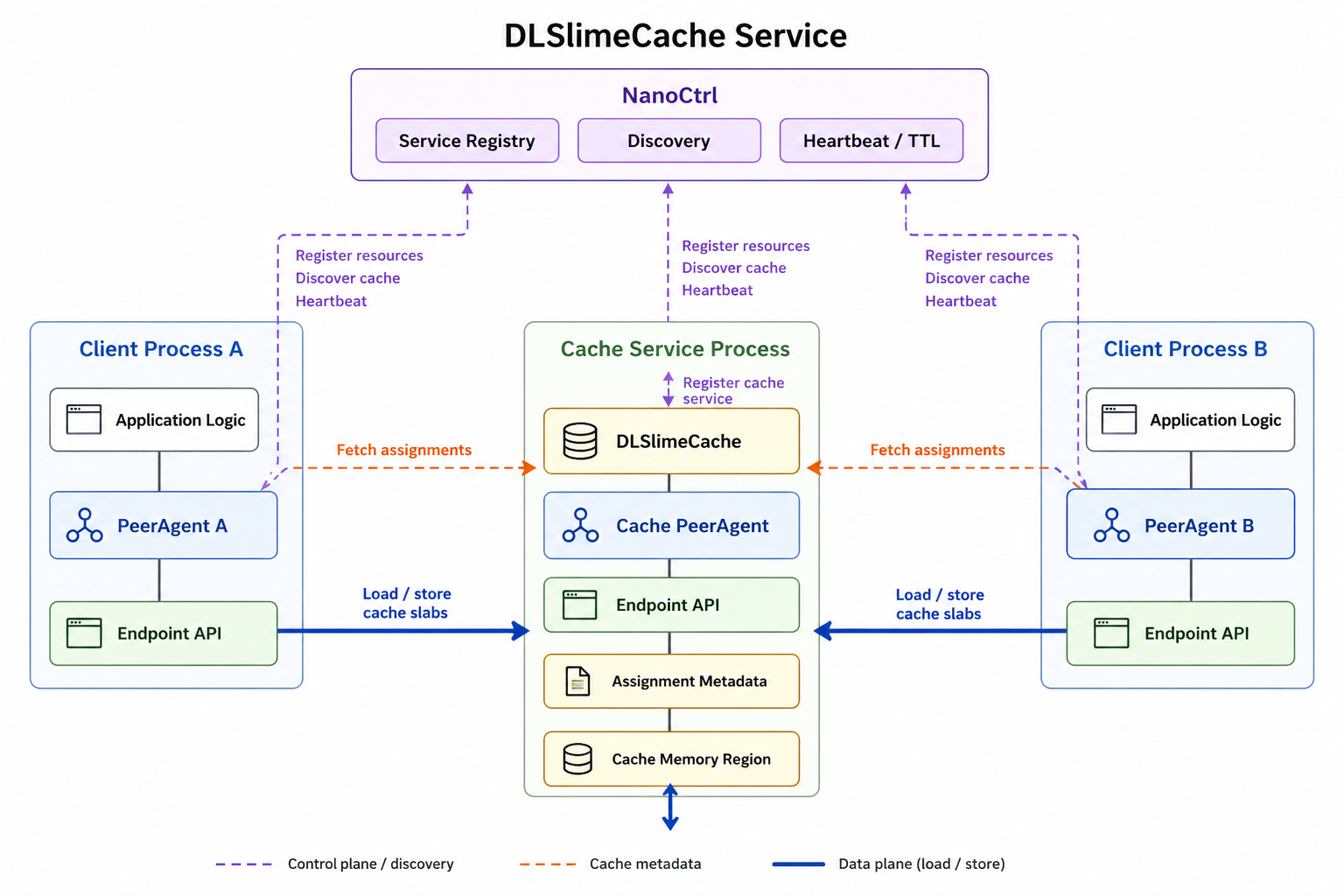
Use DLSlimeCache when multiple PeerAgent clients need a shared RDMA-backed cache
service. PeerAgent A and PeerAgent B discover the Cache Service through
NanoCtrl, fetch cache assignment metadata from the service, and then read or
write cache slabs through the same PeerAgent and endpoint data plane.
In this path, NanoCtrl keeps the Cache Service discoverable as a registered
service, the Cache Service owns the cache memory region and assignment
manifests, and PeerAgent clients perform the data movement without embedding
cache placement logic into each application process.
Example: cache_client_example.py and
dlslime-cache design.
nanoctrl start
dlslime-cache start --ctrl http://127.0.0.1:4479 \
  --host 127.0.0.1 --port 8765 --memory-size 1G

python dlslime/examples/python/cache_client_example.py --url http://127.0.0.1:8765

dlslime-cache stop
SlimeRPC Service
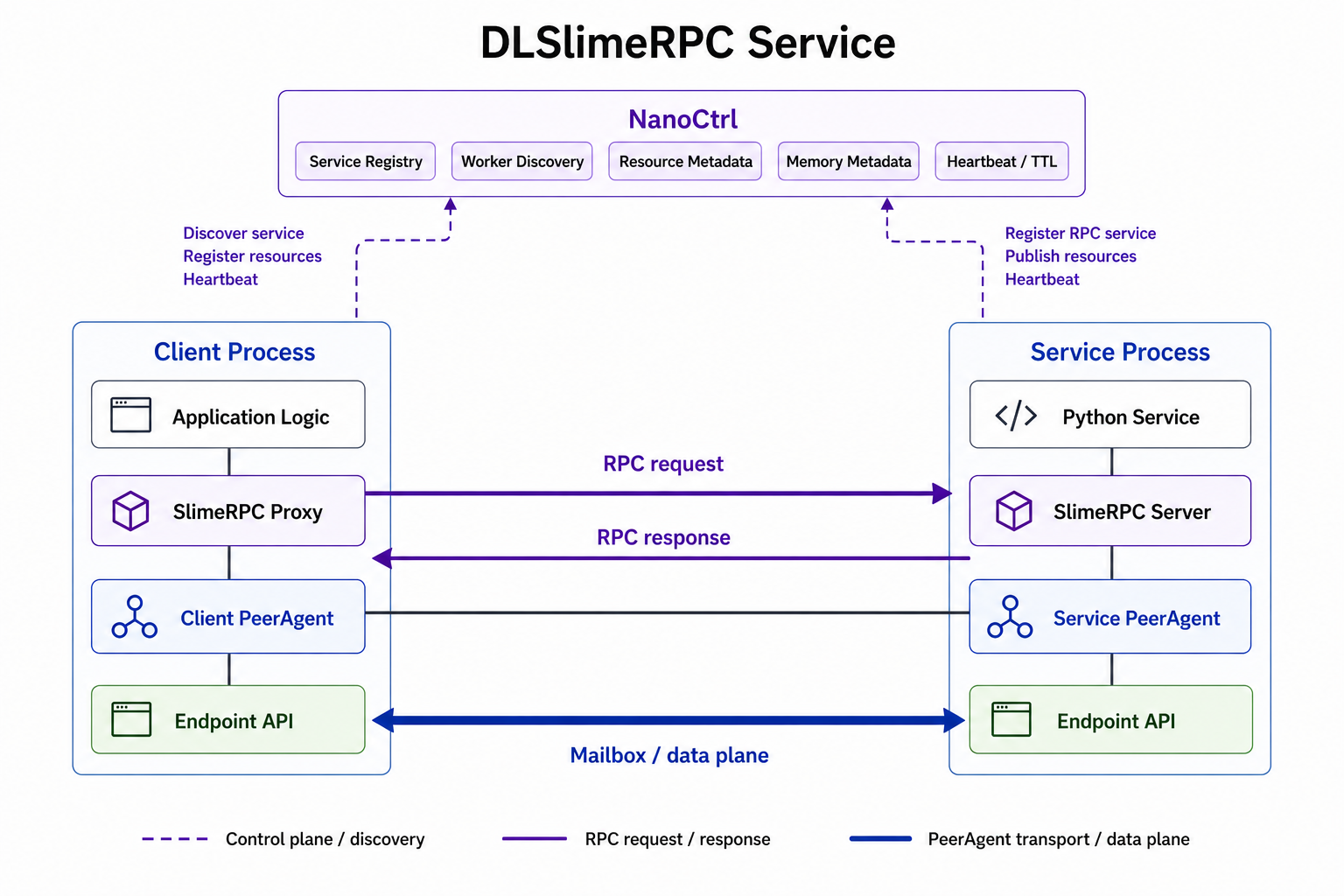
Use SlimeRPC when application logic should call a Python service while keeping
the transport and peer coordination inside DLSlime. A client process uses a
SlimeRPC proxy on top of its PeerAgent, the service process serves Python
methods through a SlimeRPC server on top of its own PeerAgent, and NanoCtrl keeps
the RPC service discoverable.
RPC request and response messages are carried by the PeerAgent transport rather
than the control plane. This keeps service invocation at the application layer
while reusing the same PeerAgent, endpoint, and mailbox data path as lower-level
peer-to-peer flows.
Example: rpc_example.py and
rpc_flatbuf_example.py.
nanoctrl start
python dlslime/examples/python/rpc_example.py --ctrl http://127.0.0.1:4479
Disaggregated Inference Service
Use DLSlime for disaggregated inference when prefill and decode run as separate
serving roles. This follows the same pattern used by LMDeploy DistServe:
a proxy routes requests to dedicated Prefill and Decode workers, Prefill
computes prompt KV cache, Decode generates tokens, and a migration/data-plane
backend transfers KV cache between the two roles.
In DLSlime terms, each Prefill or Decode worker can be modeled as a service with
its own PeerAgent. NanoCtrl keeps the worker roles discoverable by kind, stores
resource and memory metadata for the PeerAgents, and lets the serving proxy or
workers build the required prefill-to-decode connections. The KV cache transfer
then uses the PeerAgent and endpoint data plane instead of going through the
control plane.
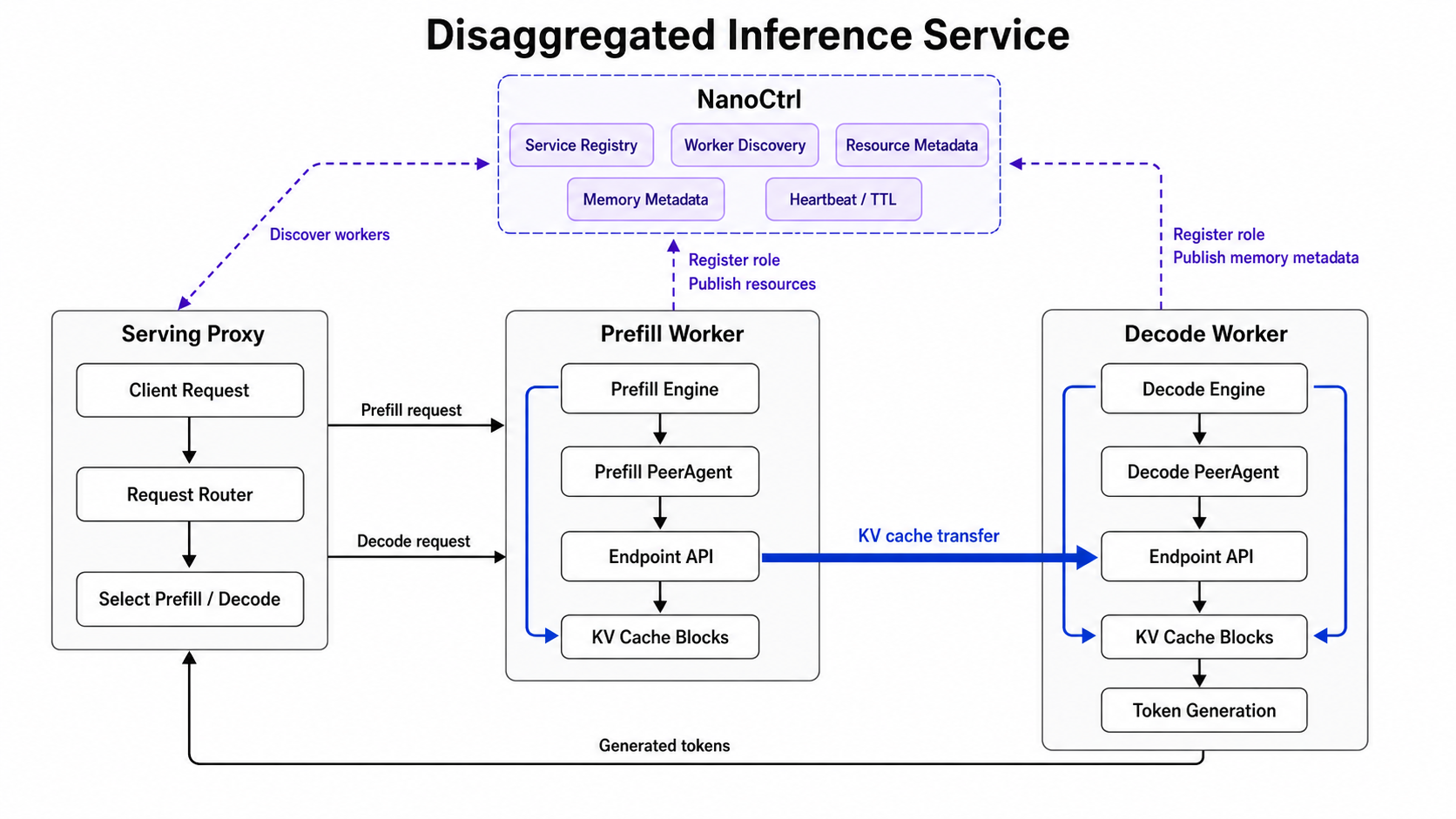
LMDeploy reference: DistServe with DLSlimeBackend and DistServe with MooncakeBackend.
RL Service
Coming soon.
Install
From PyPI
pip install dlslime dlslime-ctrl
The PyPI package is built with the default CMake flags. Build from source when
you need optional transports or local C++ changes.
From Source
git clone https://github.com/deeplink-org/DLSlime.git
cd DLSlime
pip install -v --no-build-isolation -e dlslime
pip install -e dlslime-ctrl                 # optional: Rust control plane
Pass CMake flags through the environment when enabling optional components:
BUILD_NVLINK=ON BUILD_TORCH_PLUGIN=ON \
  pip install -v --no-build-isolation -e dlslime
For a pure C++ build:
cmake -S dlslime -B build -GNinja -DBUILD_PYTHON=OFF -DBUILD_RDMA=ON
cmake --build build
Build Flags
| Flag |
Default |
Description |
BUILD_RDMA |
ON |
Build the RDMA transfer engine |
BUILD_TCP |
ON |
Build the TCP transfer engine (fallback transport) |
BUILD_PYTHON |
OFF in CMake, ON in pyproject.toml |
Build Python bindings |
BUILD_NVLINK |
OFF |
Build the NVLink transfer engine |
BUILD_ASCEND_DIRECT |
OFF |
Build Ascend Direct transport |
BUILD_TORCH_PLUGIN |
OFF |
Build DLSlime as a torch backend |
BUILD_BENCH |
OFF |
Build C++ transfer-engine benchmarks |
BUILD_TEST |
OFF |
Build C++ tests |
USE_MACA |
OFF |
Enable Metax platform support for torch backend builds |
Benchmarks
Benchmark commands and historical performance tables now live under the
benchmark directory:
Common entry points:
# Aggregated RDMA transfer benchmark, two nodes
torchrun --master-addr <addr> --master-port 6006 \
  --nnodes 2 --nproc-per-node 8 --node-rank <rank> \
  dlslime/bench/python/agg_transfer_bench_spmd.py \
  --qp-num 8 --transfer-engine dlslime \
  --batch-size 64 --num-iteration 100 --num-concurrency 8

# SlimeRPC vs Ray local benchmark
bash dlslime/bench/python/run_rpc_bench.sh
Repository Layout
dlslime/         Core Python package, C++ bindings, runtime primitives
  ├── dlslime/   Python sources
  ├── examples/  Runnable examples for endpoint, PeerAgent, cache, RPC
  ├── bench/     Benchmark scripts and benchmark README
  └── tests/     Python and C++ tests
dlslime-ctrl/    Rust control plane (service registry, observability)
docker/          Docker Compose deployment for dlslime-ctrl
docs/            Design notes, roadmap, and platform guides
scripts/         Repo-wide automation (release.sh, ...)
Documentation
License
See LICENSE.


 WeChat Group