
Alpha-SQL
🔥[ICML'25] Official repository for the paper "Alpha-SQL: Zero-Shot Text-to-SQL using Monte Carlo Tree Search"
- 165
- MIT
- 6 mo ago
Repo HKUSTDial/Alpha-SQL, read from GitHub 24 h ago. HKUSTDial has not joined Take My Repo.
In short
HKUSTDial/Alpha-SQL is a public repo on GitHub by HKUSTDial. 🔥[ICML'25] Official repository for the paper "Alpha-SQL: Zero-Shot Text-to-SQL using Monte Carlo Tree Search". It declares the MIT license on GitHub. It is written mainly in Python, has 165 stars and last changed on 2026-06-10. Nobody has reviewed it on Take My Repo yet, which says nothing about its quality. Read from GitHub on 2026-11-23.
Similar repos
compute-optimal-tts
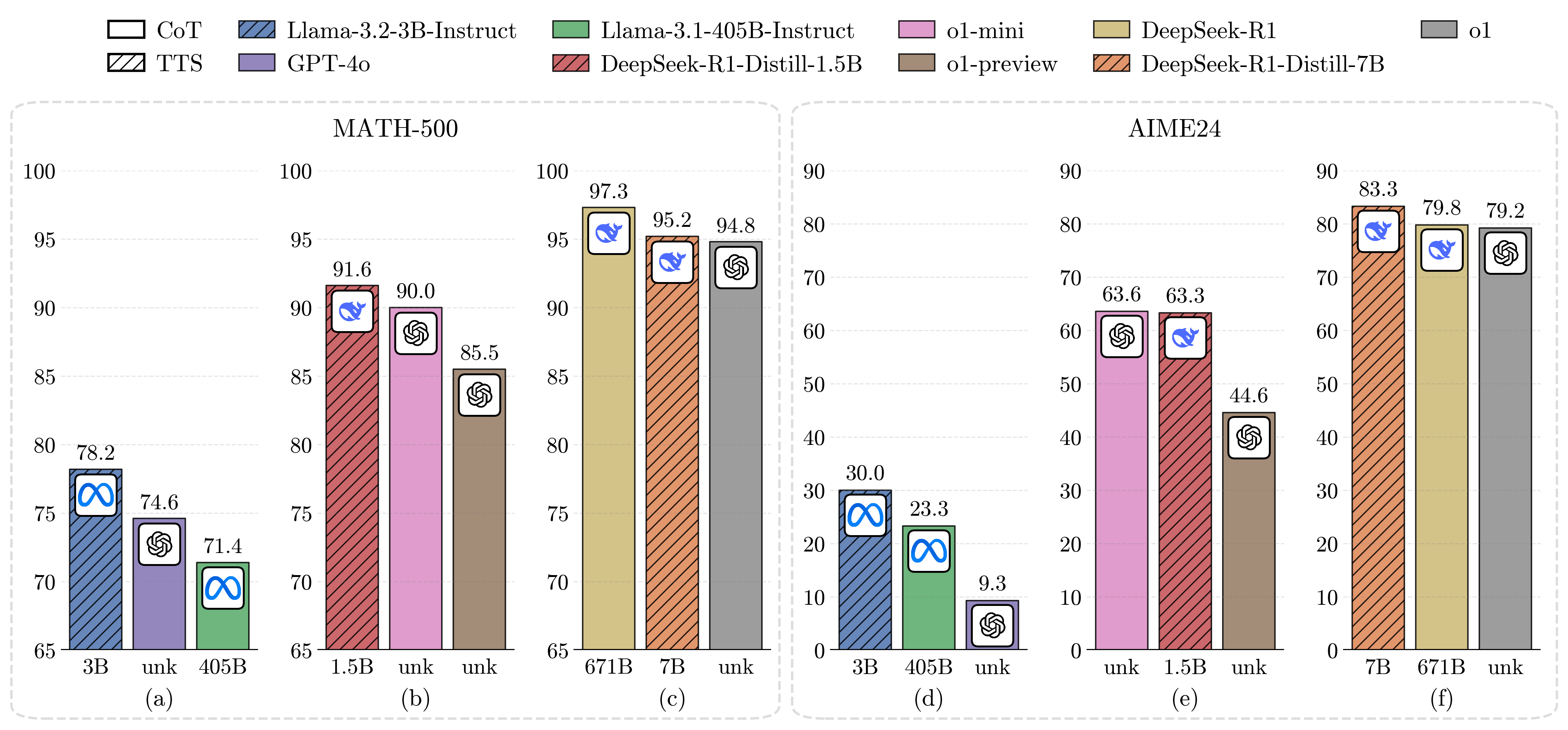
Official codebase for "Can 1B LLM Surpass 405B LLM? Rethinking Compute-Optimal Test-Time Scaling".

🚀 Alpha-SQL: Zero-Shot Text-to-SQL using Monte Carlo Tree Search
✨ If you find our work helpful, please don't hesitate to give us a star ⭐ !
📖 Introduction
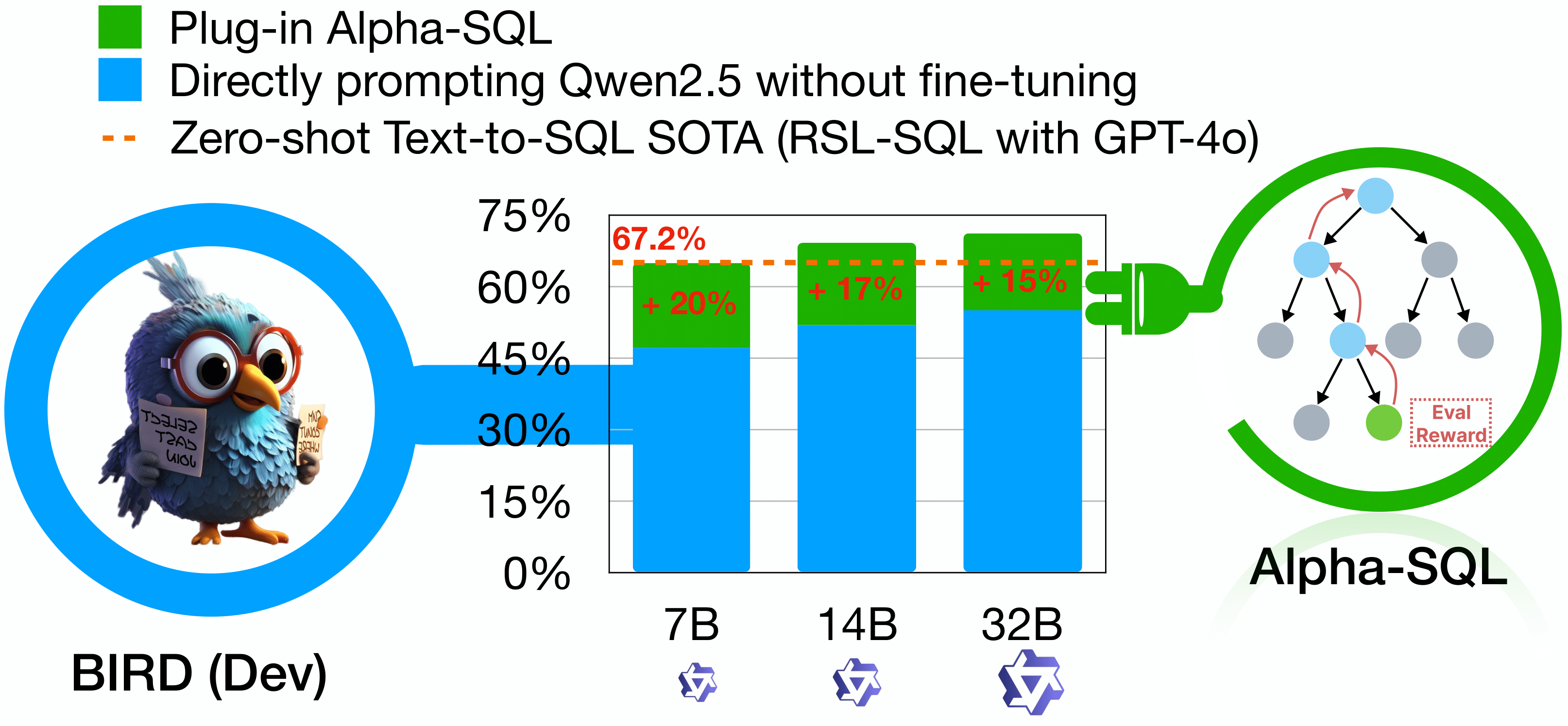
Text-to-SQL, which enables natural language interaction with databases, serves as a pivotal method across diverse industries. With new, more powerful large language models (LLMs) emerging every few months, fine-tuning has become incredibly costly, labor-intensive, and error-prone. As an alternative, zero-shot Text-to-SQL, which leverages the growing knowledge and reasoning capabilities encoded in LLMs without task-specific fine-tuning, presents a promising and more challenging direction.
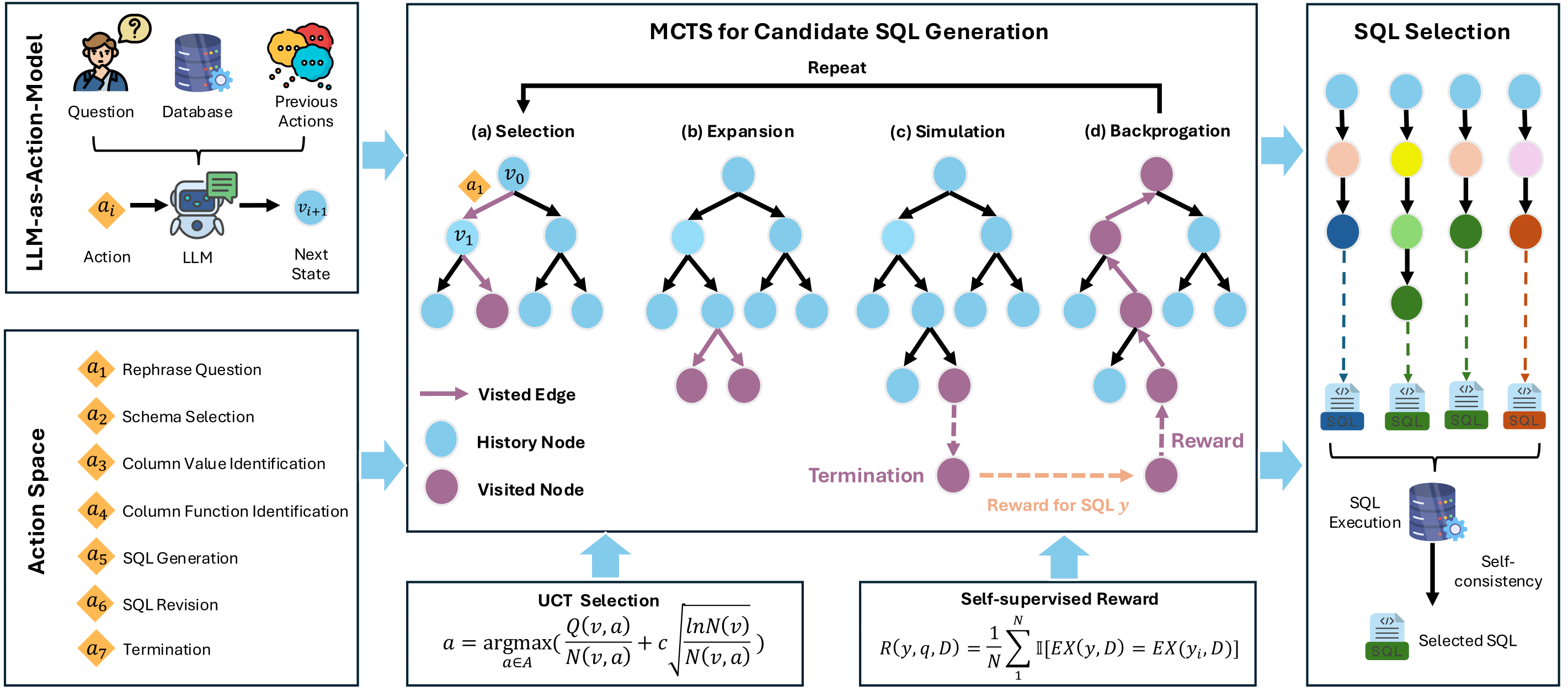
To address this challenge, we propose Alpha-SQL, a novel approach that leverages a Monte Carlo Tree Search (MCTS) framework to iteratively infer SQL construction actions based on partial SQL query states. To enhance the framework's reasoning capabilities, we introduce LLM-as-Action-Model to dynamically generate SQL construction actions during the MCTS process, steering the search toward more promising SQL queries. Moreover, Alpha-SQL employs a self-supervised reward function to evaluate the quality of candidate SQL queries, ensuring more accurate and efficient query generation.
📁 Project Structure
AlphaSQL/
├── 📂 data/
│   └── 📂 bird/
│       └── 📂 dev/
│           ├── 📄 dev.json
│           └── 📂 dev_databases/
├── 📂 config/
│   ├── 📄 qwen7b_sds_exp.yaml
│   └── 📄 qwen32b_bird_dev.yaml
├── 📂 results/
│   └── 📄 dev_pred_sqls.json
├── 📂 script/
│   ├── 📄 preprocess.sh
│   ├── 📄 qwen32b_bird_dev_exp.sh
│   ├── 📄 qwen7b_sds_exp.sh
│   └── 📄 sql_selection.sh
├── 📂 alphasql/
│   ├── 📂 runner/
│   │   ├── 📄 preprocessor.py
│   │   ├── 📄 sql_selection.py
│   │   ├── 📄 mcts_runner.py
│   │   ├── 📄 selection_runner.py
│   │   └── 📄 task.py
│   ├── 📂 templates/
│   │   ├── 📄 schema_selection.txt
│   │   ├── 📄 sql_revision.txt
│   │   ├── 📄 sql_generation.txt
│   │   ├── 📄 raphrase_question.txt
│   │   ├── 📄 identify_column_functions.txt
│   │   ├── 📄 identify_column_values.txt
│   │   └── 📄 keywords_extraction.txt
│   ├── 📂 config/
│   │   └── 📄 mcts_config.py
│   ├── 📂 database/
│   │   ├── 📄 sql_execution.py
│   │   ├── 📄 utils.py
│   │   ├── 📄 sql_parse.py
│   │   ├── 📄 schema.py
│   │   ├── 📄 database_manager.py
│   │   └── 📄 lsh_index.py
│   ├── 📂 llm_call/
│   │   ├── 📄 cost_recoder.py
│   │   ├── 📄 openai_llm.py
│   │   └── 📄 prompt_factory.py
│   └── 📂 algorithm/
│       ├── 📂 selection/
│       │   └── 📄 utils.py
│       └── 📂 mcts/
│           ├── 📄 mcts_node.py
│           ├── 📄 mcts_action.py
│           ├── 📄 mcts.py
│           └── 📄 reward.py
├── 📄 README.md
├── 📄 requirements.txt
└── 📄 .env
📥 Dataset Preparation
Download required resources:
- Bird dataset: Bird Official Website
Unzip the dataset to
data/birddirectoty following the project structure above.
🛠️ Environment Setup
AlphaSQL Env
conda create -n alphasql python=3.11
conda activate alphasql

pip install -r requirements.txt
VLLM Env
conda create -n vllm python=3.12 -y
conda activate vllm

git clone https://github.com/vllm-project/vllm.git
cd vllm
pip install -e .
🚀 Deploy Local LLM Using VLLM
conda activate vllm

# For 4 GPUs
CUDA_VISIBLE_DEVICES=0,1,2,3 vllm serve Qwen/Qwen2.5-Coder-32B-Instruct --served-model-name Qwen/Qwen2.5-Coder-32B-Instruct --port 9999 -tp 4

# For 8 GPUs
CUDA_VISIBLE_DEVICES=0,1,2,3,4,5,6,7 vllm serve Qwen/Qwen2.5-Coder-32B-Instruct --served-model-name Qwen/Qwen2.5-Coder-32B-Instruct --port 9999 -tp 8
🏃♂️Run AlphaSQL
1. Switch AlphaSQL Conda Env
conda activate alphasql
2. Dataset Preprocessing
Configure your
.envfile based onenv.example:# Required: OpenAI API Configuration (for LLM) OPENAI_API_KEY=your-api-key OPENAI_BASE_URL=https://api.openai.com/v1 # Or your custom endpoint # Required: Embedding Model Configuration EMBEDDING_MODEL=text-embedding-3-large # Or text-embedding-3-small, text-embedding-ada-002 # Optional: Separate embedding service (if using different base URL or API key) # EMBEDDING_API_KEY=your-embedding-api-key # EMBEDDING_BASE_URL=https://api.openai.com/v1 # or http://localhost:8080/v1Important Note:
- If your embedding model uses a different base URL than your LLM, configure
EMBEDDING_BASE_URLandEMBEDDING_API_KEYseparately - If not set, embedding will automatically use
OPENAI_BASE_URLandOPENAI_API_KEY - Example: LLM uses local VLLM (
http://localhost:9999/v1), embedding uses OpenAI API (https://api.openai.com/v1) - See
EMBEDDING_CONFIG.mdfor detailed configuration examples
- If your embedding model uses a different base URL than your LLM, configure
Run the following:
bash script/preprocess.sh
3. Generate SQL Candidates
Modify
OPENAI_API_KEYandOPENAI_BASE_URLin.envfile (we need to accessQwen/Qwen2.5-Coder-32B-Instructmodel of VLLM delopyment)OPENAI_API_KEY="EMPTY" OPENAI_BASE_URL="http://0.0.0.0:9999/v1"Run the following:
bash script/qwen32b_bird_dev_exp.sh
4. Select Final SQL
Run the following:
bash script/sql_selection.shThe final
pred_sqls.jsonwill in the project root dir (defined inscript/sql_selection.shOUTPUT_PATH variable)
📝 Citation
If you find our work useful or inspiring, please kindly cite:
@inproceedings{alpha-sql,
  author       = {Boyan Li and
                  Jiayi Zhang and
                  Ju Fan and
                  Yanwei Xu and
                  Chong Chen and
                  Nan Tang and
                  Yuyu Luo},
  title        = {Alpha-SQL: Zero-Shot Text-to-SQL using Monte Carlo Tree Search},
  booktitle    = {Forty-Second International Conference on Machine Learning, {ICML} 2025,
                  Vancouver, Canada, July 13-19, 2025},
  publisher    = {OpenReview.net},
  year         = {2025}
}
Questions
What is Alpha-SQL?
HKUSTDial/Alpha-SQL is a public repo on GitHub by HKUSTDial. 🔥[ICML'25] Official repository for the paper "Alpha-SQL: Zero-Shot Text-to-SQL using Monte Carlo Tree Search".
Is Alpha-SQL open source?
It declares the MIT license on GitHub.
Does Alpha-SQL run on macOS, Windows or Linux?
Its maker has not tagged a system, so it is unknown here. Its README says what it needs.
How do I install Alpha-SQL?
Open "Take it" on its page: Take My Repo writes an install plan for your machine and hands it to your AI agent (Claude Code, Codex or Cursor), which asks you before each step. Take My Repo has not tested it on any machine.