
FileAudit
FileAudit is a small internal PHP dashboard for storing and searching Windows file deletion and modification events. Uses plain PHP, MariaDB, PDO, and no external dependencies.
- 0
- 5 wk ago
Repo HenrysCat/FileAudit, read from GitHub 6 h ago. HenrysCat has not joined Take My Repo.
In short
HenrysCat/FileAudit is a public repo on GitHub by HenrysCat. FileAudit is a small internal PHP dashboard for storing and searching Windows file deletion and modification events. Uses plain PHP, MariaDB, PDO, and no external dependencies. It declares no license on GitHub. Public does not mean open source: without a license, nobody is granted the right to reuse it. It is written mainly in PHP, has 0 stars and last changed on 2026-10-19. Nobody has reviewed it on Take My Repo yet, which says nothing about its quality. Read from GitHub on 2026-11-24.


FileAudit
FileAudit is a small internal PHP dashboard for storing and searching Windows file audit events. It uses plain PHP, MariaDB, PDO, and no external dependencies.
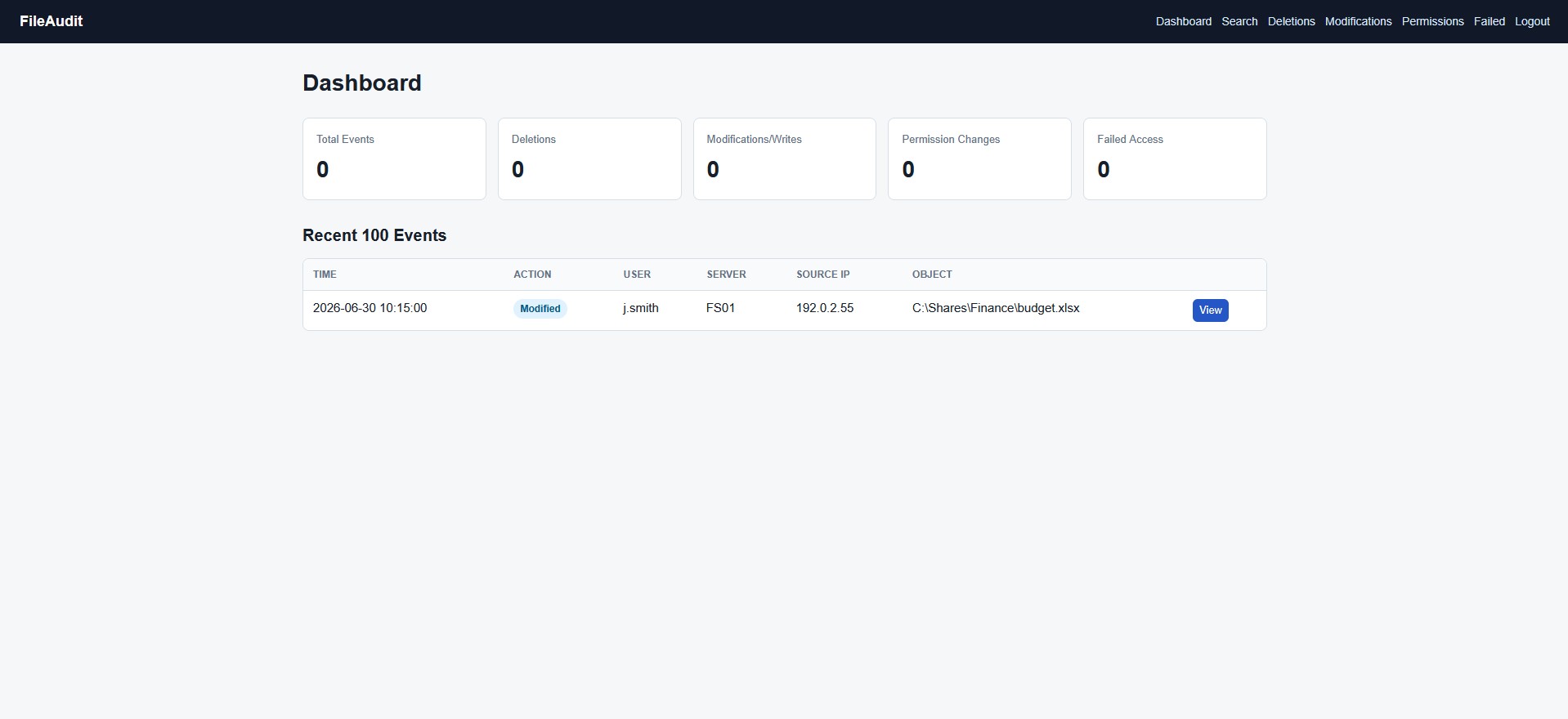
Setting up for the first time? Start at Install on Debian. Updating a server that is already running FileAudit? See Upgrading an existing install instead.
Upgrading an existing install
FileAudit has no version file, so work out what you need from the database itself. Run each check below; if it returns nothing, apply that step. The steps are cumulative and must be applied in order.
Back up first:
mysqldump -u fileaudit_user -p fileaudit > ~/fileaudit-backup-$(date +%F).sql
Run every command below from the normal shell prompt, not from inside mysql>.
1. DNS URL log table (added 2026-07-15)
mysql -u fileaudit_user -p fileaudit -e "SHOW TABLES LIKE 'dns_queries';"
No rows means you need it:
mysql -u fileaudit_user -p fileaudit < database/dns-schema.sql
2. resolved_action column (added 2026-07-31)
mysql -u fileaudit_user -p fileaudit -e "SHOW COLUMNS FROM audit_events LIKE 'resolved_action';"
No rows means you need it:
ALTER TABLE audit_events ADD COLUMN resolved_action VARCHAR(32) NULL AFTER raw_json;
ALTER TABLE audit_events ADD INDEX idx_resolved_action (resolved_action, time_created);
See Deleted vs Replaced for what this column does.
3. Performance migration (added 2026-08-25)
mysql -u fileaudit_user -p fileaudit -e "SHOW INDEX FROM audit_events WHERE Key_name = 'idx_path_lookup';"
No rows means you need it. Run this before deploying the new PHP. The updated code no longer filters legacy .tmp rows at read time, so deploying first would leave them visible in the UI until this migration purges them.
mysql -u fileaudit_user -p fileaudit < database/migrations/2026-08-25-performance.sql
On a large table the index rebuild can take tens of minutes, so run it inside tmux or screen. The file is idempotent and safe to re-run if it stops partway. Performance and retention explains what it changes.
4. Ingest filters table (added 2026-10-19)
mysql -u fileaudit_user -p fileaudit -e "SHOW TABLES LIKE 'ingest_filters';"
No rows means you need it:
mysql -u fileaudit_user -p fileaudit < database/migrations/2026-10-19-ingest-filters.sql
This only creates a small new table, so it is quick and needs no maintenance window. It also seeds a starting set of filters (.log, .etl, Thumbs.db, desktop.ini, .DS_Store). If the PHP is deployed first, ingest carries on unfiltered and the Filters page shows a reminder to run this. See Ingest filters.
5. Deploy the PHP
Copy app/, public/ and bin/ across together. app/functions.php and the pages under public/ changed in the same commit and depend on each other's function signatures, so a half-finished copy produces fatal errors. Copying app/functions.php last keeps that window as short as possible.
config/config.php needs no changes. Every setting added since the initial release has a built-in default, so an older config file still works. Compare it against config/config.example.php only if you want to tune retention, result-count limits or resolver batch sizes.
6. Verify
From the project root:
find . -name '*.php' -exec php -l {} \; | grep -v 'No syntax errors'
php bin/maintain.php status
php bin/maintain.php resolve
The first prints nothing if every file is valid. status should report a sane row count and unresolved deletion rows trending to 0 after resolve runs. Then load each page in the browser, and confirm the collector's next run returns resolved, pruned and filtered in its JSON response.
Install on Debian
sudo apt update
sudo apt install apache2 mariadb-server php8.4 php8.4-mysql libapache2-mod-php8.4
If your Debian release does not provide PHP 8.4 packages, use the default supported PHP packages instead:
sudo apt install apache2 mariadb-server php php-mysql libapache2-mod-php
Enable Apache rewrite only if your environment needs it. This app does not require pretty routing.
Create the database
Log in to MariaDB as root:
mysql -u root -p
Then run:
CREATE DATABASE fileaudit CHARACTER SET utf8mb4 COLLATE utf8mb4_unicode_ci;
CREATE USER 'fileaudit_user'@'localhost' IDENTIFIED BY 'change_this_password';
GRANT ALL PRIVILEGES ON fileaudit.* TO 'fileaudit_user'@'localhost';
FLUSH PRIVILEGES;
Import the schema:
mysql -u fileaudit_user -p fileaudit < database/schema.sql
Run that import command from the normal Debian shell prompt, not from inside the mysql> or MariaDB> prompt. If you are already inside MariaDB, type exit first.
database/schema.sql is for fresh installs only and creates both tables. If you are updating a server that already has data, do not import it — follow Upgrading an existing install instead.
Configure the app
Copy the example config and edit the values:
cp config/config.example.php config/config.php
Create an admin password hash:
php -r "echo password_hash('change_this_admin_password', PASSWORD_DEFAULT), PHP_EOL;"
Put the generated hash in ADMIN_PASSWORD_HASH. Set API_TOKEN to a long random value. If you want to restrict collectors by IP, add addresses to TRUSTED_COLLECTOR_IPS; leave it empty to allow any source IP with the correct token.
Set APP_TIMEZONE to the timezone you want displayed in the dashboard, for example:
'APP_TIMEZONE' => 'Europe/London',
DNS query records have their own retention period. The default is seven days:
'DNS_LOG_RETENTION_DAYS' => 7,
To reduce repeated browsing noise, FileAudit also keeps only one DNS query for the same computer IP and domain within one minute. Change DNS_LOG_DEDUPLICATE_MINUTES in config/config.php to adjust the interval, or set it to 0 to retain every query.
Collector timestamps are stored in UTC; the dashboard converts them for display.
Apache
Point the Apache virtual host document root at the public directory, not the repository root.
Create or edit a site file under /etc/apache2/sites-available/:
sudo nano /etc/apache2/sites-available/fileaudit.conf
Example if the project is installed at /var/www/fileaudit:
<VirtualHost *:80>
    ServerName fileaudit.internal
    DocumentRoot /var/www/fileaudit/public

    <Directory /var/www/fileaudit/public>
        Require all granted
        AllowOverride None
    </Directory>
</VirtualHost>
If you copied the project to /var/www/html, use this path instead:
DocumentRoot /var/www/html/public

<Directory /var/www/html/public>
    Require all granted
    AllowOverride None
</Directory>
Enable the site and reload Apache:
sudo a2ensite fileaudit.conf
sudo systemctl reload apache2
If Apache still shows the default page, disable the default site and reload again:
sudo a2dissite 000-default.conf
sudo systemctl reload apache2
fileaudit.internal only works if your DNS or hosts file resolves that name to the server. For local testing on the server itself, use localhost or 127.0.0.1.
Test the API
Run this from the normal Debian terminal after Apache, MariaDB, config/config.php, and the schema are in place. Replace the bearer token with the exact API_TOKEN value from config/config.php.
curl -X POST http://localhost/api/ingest.php \
  -H "Authorization: Bearer replace_this_with_a_long_random_token" \
  -H "Content-Type: application/json" \
  -d '{
    "server_name": "FS01",
    "computer_name": "FS01",
    "event_id": 4663,
    "record_id": 123456,
    "time_created": "2026-06-30T10:15:00Z",
    "username": "j.smith",
    "domain_name": "EXAMPLE",
    "source_ip": "192.0.2.55",
    "object_name": "C:\\Shares\\Finance\\budget.xlsx",
    "action": "Modified",
    "access_mask": "0x2",
    "process_name": "C:\\Windows\\explorer.exe",
    "status": "Success"
  }'
If Apache DocumentRoot points to /var/www/html instead of /var/www/html/public, the test URL would be http://localhost/public/api/ingest.php. The cleaner setup is to point DocumentRoot at the public directory and use http://localhost/api/ingest.php.
Expected first successful response:
{"ok":true,"inserted":1,"duplicates":0,"errors":[]}
Running the same event again should be treated as a duplicate:
{"ok":true,"inserted":0,"duplicates":1,"errors":[]}
If you see Bearer token required, check that the curl command starts with curl -X POST and includes exactly one authorization header like:
-H "Authorization: Bearer replace_this_with_a_long_random_token"
Deletion correlation and Windows collector
FileAudit supports Windows event IDs 4656 and 4659 and stores correlation fields used to match deletion confirmation events with nearby path-bearing events.
Required event IDs:
4656- A handle to an object was requested4659- A handle to an object was requested with intent to delete4660- An object was deleted4663- An attempt was made to access an object4670- Permissions on an object were changed5145- Detailed file share access check
Event 4660 often confirms deletion but does not include the file or folder path. Event 4659 is a strong delete-intent signal. FileAudit stores handle_id and logon_id so the event detail page can show related 4656, 4659, or 4663 events from the same server within plus/minus 2 minutes.
Database schema
Fresh installs use database/schema.sql, which already includes the correlation fields, the resolved_action column and every index. No separate migration is required.
Existing installs need those applied in order — see Upgrading an existing install.
Deleted vs Replaced
A confirmed 4660 only means Windows deleted an object; it does not mean the path is gone for good. Many applications save by deleting the original file and immediately creating a new file at the same path (an atomic "safe save"), which is indistinguishable from a real removal by looking at a single event. FileAudit resolves this once enough time has passed for correlated events to arrive (a few minutes) and stores the outcome in resolved_action:
Deleted- a4660confirmed the delete, and the path was not created or modified again within 2 minutes.Replaced- a4660confirmed the delete, but the same path was created or modified again within 2 minutes, so the file was not actually left missing.DeleteRequested- no confirming4660was found for the handle; this is a delete-intent/access signal only.
4659 alone is never displayed as Deleted on its own - it only becomes Deleted or Replaced once a real, handle-correlated 4660 is found.
This resolution runs as background work during collector ingest (resolve_pending_deletions() in app/functions.php, called from public/api/ingest.php), in slices bounded by RESOLVE_BATCH_SIZE and RESOLVE_MAX_SECONDS. It no longer runs from page loads, where it cost several hundred serial queries before any HTML was sent.
One consequence is visible in the UI: a newly collected 4663/4659 row shows as DeleteRequested until the next collector run classifies it - roughly the 3 minute correlation grace window plus the collector interval. That is the honest state, since nothing has confirmed the delete yet, and it settles to Deleted or Replaced on its own.
To drain a large existing backlog in one go:
php bin/maintain.php resolve
Performance and retention
audit_events is append-only and high volume, so the read path is built to stay bounded as it grows.
Counts are capped. List pages stop counting at
EVENT_COUNT_LIMIT(default 10,000) and display the total as e.g.10,000+. An exactCOUNT(*)is proportional to table size and ran on every page view. Raise the limit to trade page speed for an exact total.List queries select only displayed columns.
raw_jsonis a full copy of every event, averaging around 1 KB and roughly 60% of the table's data size. It is only ever displayed on the single-event detail page, so fetching it for 100 list rows pulled it through the buffer pool and into PHP memory for nothing.Deletion resolution is background work, driven by the collector rather than by page loads.
Retention is opt-in.
AUDIT_LOG_RETENTION_DAYSdefaults to0, meaning keep everything. Set it to a number of days and old rows are removed in bounded chunks during ingest. DNS records are retained separately viaDNS_LOG_RETENTION_DAYS.
Questions
What is FileAudit?
HenrysCat/FileAudit is a public repo on GitHub by HenrysCat. FileAudit is a small internal PHP dashboard for storing and searching Windows file deletion and modification events. Uses plain PHP, MariaDB, PDO, and no external dependencies.
Is FileAudit open source?
It declares no license on GitHub. Public does not mean open source: without a license, nobody is granted the right to reuse it.
Does FileAudit run on macOS, Windows or Linux?
Its maker has not tagged a system, so it is unknown here. Its README says what it needs.


