gptq
Code for the ICLR 2023 paper "GPTQ: Accurate Post-training Quantization of Generative Pretrained Transformers".
- 2.4k
- Python
- Apache-2.0
- 3 y ago
The maintainer has not written a description at the source.
Repo IST-DASLab/PanzaMail, read from GitHub 1 min ago. IST-DASLab has not joined Take My Repo.
IST-DASLab/PanzaMail is a public repo on GitHub by IST-DASLab. It declares the Apache-2.0 license on GitHub. It is written mainly in Python, has 304 stars and last changed on 2026-02-15. Nobody has reviewed it on Take My Repo yet, which says nothing about its quality. Read from GitHub on 2026-11-22.

Train Panza on your own data for free with a Lightning Studios account here:
Interact with Panza models we trained on our test datasets here:
Our datasets are also available on Huggingface:
Panza is an automated email assistant customized to your writing style and past email history.
Its main features are as follows:

mbox format (see tutorial below).For most email clients, it is possible to download a user's past emails in a machine-friendly .mbox format. For example, GMail allows you to do this via Google Takeout, whereas Thunderbird allows one to do this via various plugins.
One key part of Panza is a dataset-generation technique we call data playback: Given some of your past emails in .mbox format, we automatically create a training set for Panza by using a pretrained LLM to summarize the emails in instruction form; each email becomes a (synthetic instruction, real email) pair.
Given a dataset consisting of all pairs, we use these pairs to "play back" your sent emails: the LLM receives only the instruction, and has to generate the "ground truth" email as a training target.
We find that this approach is very useful for the LLM to "learn" the user's writing style.
We then use parameter-efficient finetuning to train the LLM on this dataset, locally. We found that we get the best results with the RoSA method, which combines low-rank (LoRA) and sparse finetuning. If parameter efficiency is not a concern, that is, you have a more powerful GPU, then regular, full-rank/full-parameter finetuning can also be used. We find that a moderate amount of further training strikes the right balance between matching the writer's style without memorizing irrelevant details in past emails.
Once we have a custom user model, Panza can be run locally together with a Retrieval-Augmented Generation (RAG) module. Specifically, this functionality stores past emails in a database and provides a few relevant emails as context for each new query. This allows Panza to better insert specific details, such as a writer's contact information or frequently used Zoom links.
The overall structure of Panza is as follows:

We tested Panza using python 3.10. If you are running a different version, you can either install it directly or, for instance, using miniconda:
conda create -n panza python=3.10 -y
conda activate panza
Then, Install the required packages:
pip install .If you want to also finetune models using Panza, you will need to install additional packages:
pip install .[training]
To quickly get started with building your own personalized email assistant, follow the steps bellow:
We provide a description for doing this for GMail via Google Takeout.
Deselect all.Mail section (search for the phrase Messages and attachments in your Gmail account in MBOX format).All Mail data included and deselect everything except Sent.Next step.Create export.Sent.mbox and place it in the data/ directory.For Outlook accounts, we suggest doing this via a Thunderbird plugin for exporting a subset of your email as an MBOX format, such as this add-on.
At the end of this step you should have the downloaded emails placed inside data/Sent.mbox.
Panza is configured through a set of yaml configurations defined in configs/. There is a single high-level config under configs/base.yaml, and the rest are organized under the main functionalities of the code.
Note that these task-specific configs can, in some cases, be used to override base configs.
Specific use cases, such as hyperparameter tuning, are covered in more detail in scripts/README.md.
configs/data_preparation.yaml. Additionally, a custom user config must be created under config/users/ (see below).configs/panza_finetuning.yaml and the method-specific ones are in configs/finetuning/interface, which presents the outputs in a useful form - through a command-line interface, a web interface, a gmail client, or in a bulk .json format (useful for evaluation). The configs for serving are in panza_writer.yaml, and for the interfaces, under configs/interfaces.These scripts are described in more detail in scripts/README.md, but a few customizations need to happen immediately.
:warning: Before continuing, make sure you complete the following setup:
users/default.yaml directly. If running Panza for multiple users, copy this file to, for example, users/jen.yaml and specify the user in Panza training commands..mbox dump.). The username does not have to link to the email itself - it is simply used as a name for the various data files that will come out of the data preparation process. A handy way to set this is if you set it to be the output of the whoami call in your shell.prompt_preambles/user_preamble.txt to include some basic information about yourself that Panza can use to customize your emails with your correct full name, address, phone number, etc.Additionally, please perform the following login steps to be able to download the base model.
huggingface-cli login.wandb login. Then, set wandb_disabled=false in configs/finetuning/base.yaml.You are now ready to move to scripts.
cd scriptsRun CUDA_VISIBLE_DEVICES=X ./prepare_data.sh.
- Extracts your emails in text format to `data/<username>_clean.jsonl` which you can manually inspect.
- Creates synthetic prompts for your emails as described in the [data playback](#film_projector-step-1-data-playback) section. The results are stored in `data/<username>_clean_summarized.jsonl` and you can inspect the `"summary"` field.
- Splits data into training and test subsets. See `data/train.jsonl` and `data/test.jsonl`.
- Creates a vector database from the embeddings of the training emails which will later be used for *Retrieval-Augmented Generation (RAG)*. See `data/<username>.pkl` and `data/<username>.faiss`.
NB: if you did not change the default configuration in user/default.yaml to reflect your particulars but rather created a new file, you need to add the additional flag to the above command where you specify user=x where your config file was named x.yaml.
OutOfMemoryError. If this is the case, you can either:
configs/panza_preparation.yaml.
We currently support LLaMA3-8B-Instruct and Mistral-Instruct-v0.2 LLMs as base models; the former is the default, but we obtained good results with either model.
[Recommended] For parameter efficient fine-tuning, run ./train_rosa.sh.
If a larger GPU is available and full-parameter fine-tuning is possible, run ./train_fft.sh.
We have prepopulated the training configs with parameter values that worked best for us. We recommend you try those first, but you can also experiment with different hyper-parameters by passing extra arguments to the training script, such as lr, lora_lr, num_epochs. All the trained models are saved in the checkpoints directory.
Examples:
CUDA_VISIBLE_DEVICES=X ./train_rosa.sh                                   # Will use the default parameters.

CUDA_VISIBLE_DEVICES=X ./train_rosa.sh finetuning.lr=1e-6 finetuning.rosa_lr=1e-6 finetuning.max_duration=7ep
On a smaller GPU, it may be necessary to further train in lower precision (QRoSA). This can be run as follows:
./train_rosa.sh finetuning.precision=amp_bf16 finetuning.model.weight_bias_dtype=4bit
whoami command. This is used to locate the name of the user configs inside the configs/user directory as above. If you directly modified default.yaml, or created another yaml file where the name of that file does not match with the output of whoami, there will be an error. This is an easy fix. You can either:
whoami.
user=x where x is the name of the yaml file you created. For example: ./train_rosa.sh user=alonso
CUDA_VISIBLE_DEVICES to specify a specific GPU, please add this in the shell script directly by export CUDA_VISIBLE_DEVICES=x where x is the ID of the GPU you wish to use.
map function where n_proc>1. To alleviate this issue, you can set torch.set_num_threads(1) in src/panza/finetuning/train.py or set the equivalent parameter in configs/finetuning/rosa.yaml.
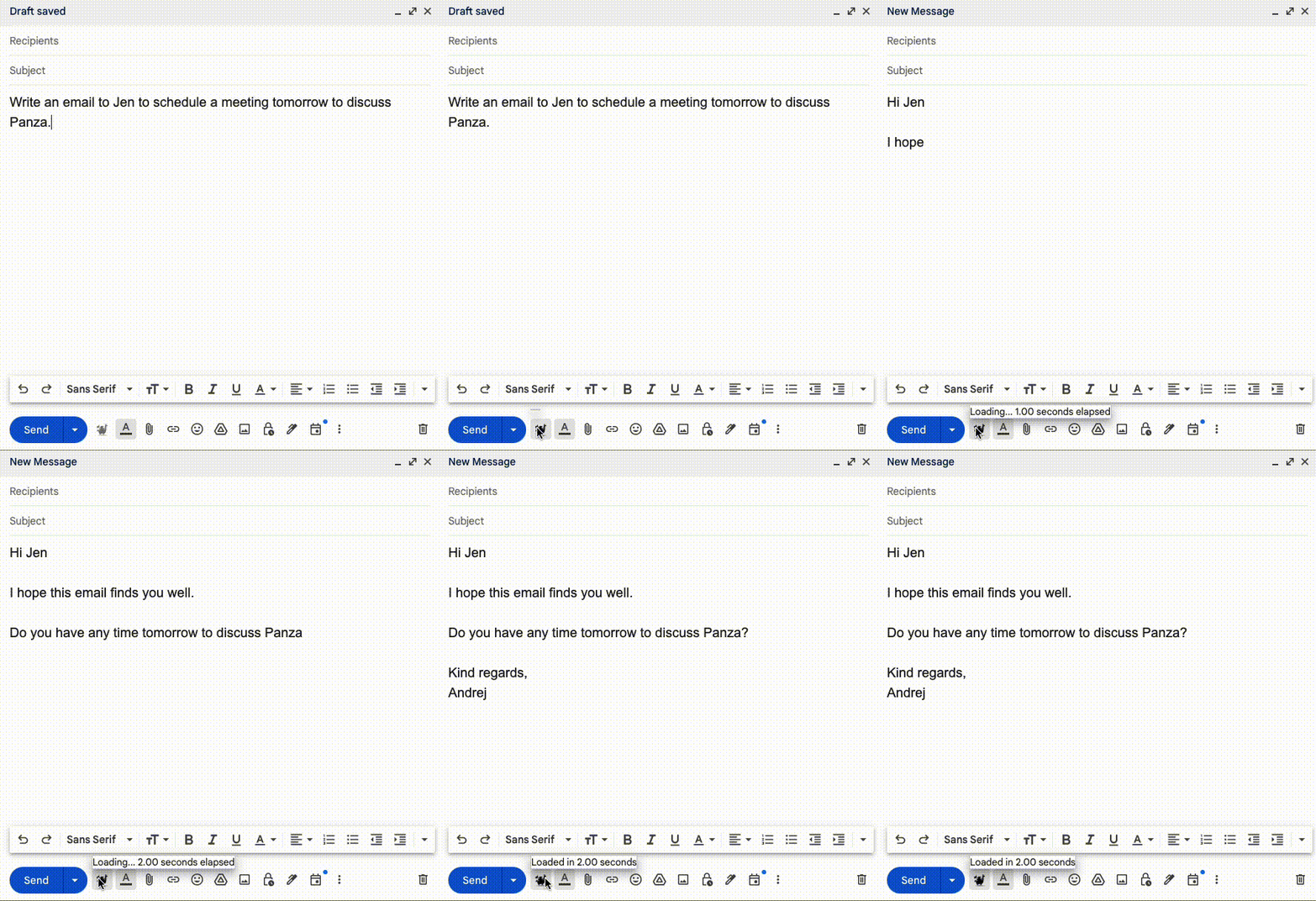
CUDA_VISIBLE_DEVICES=0 ./runner.sh user=USERNAME interfaces=cli writer/llm=transformers checkpoint=latest.writer/llm=transformers with writer/llm=peftIn addition to the Panza package itself, we have also created a tool that will allow you to use Panza directly within your Gmail session. We have published this extension on Google Chrome here. Here is a written guide on how to get this setup below.
CUDA_VISIBLE_DEVICES=0 API_KEYS=panza_beta ./runner.sh user=USERNAME interfaces=web writer/llm=peft checkpoint=latest.
panza_beta.configs/interfaces/web.json file. However, our browser extension sends API requests to localhost:5001 only in this beta version.localhost. To correctly use the server, you will have to enable port forwarding from the remote machine to your local device. This is done by VSCode automatically if you are SSH'ed into a remote server, and spin up Panza there.
📧 Have fun with your new email writing assistant! 📧
If you liked our work and want to contribute to improve the system, please feel free to do so! Make a fork of our repository and once you have made your changes, submit a pull request so that we can review!
One thing to mention: we want to make sure that we all adhere to the same coding standards, so we have added Black, a code formatter, as a prehook. To ensure that all your files are formatted with Black, do the following:
pip install .[contributing]
pre-commit install
The goal of Panza is to give users full control of their data and models trained on it. As such, no part of Panza, including the Chrome/GMail plugin collects any information about its users, outside of the normal summary statistics collected by Github and Google (such as the number of stars/forks/downloads). If you choose to run any part of Panza on a hosted service, e.g., on Amazon Web Services or Google Colab, we take no responsibility for any data collection or data breaches that may occur. Additionally, running the Panza web client or the GUI interface (via Gradio) risks providing unauthorized access to the models. Please use at your own risk.
Panza was conceived by Nir Shavit and Dan Alistarh and built by the Distributed Algorithms and Systems group at IST Austria. The contributors are (in alphabetical order):
Dan Alistarh, Eugenia Iofinova, Andrej Jovanovic, Eldar Kurtic, Ilya Markov, Armand Nicolicioiu, Mahdi Nikdan, Andrei Panferov, Nir Shavit, and Sean Yang.
Contact: dan.alistarh@ist.ac.at
We thank our collaborators Michael Goin and Tony Wang at NeuralMagic and MIT for their helpful testing and feedback.
IST-DASLab/PanzaMail is a public repo on GitHub by IST-DASLab. Its maker has not written a description.
It declares the Apache-2.0 license on GitHub.
Its maker has not tagged a system, so it is unknown here. Its README says what it needs.
Open "Take it" on its page: Take My Repo writes an install plan for your machine and hands it to your AI agent (Claude Code, Codex or Cursor), which asks you before each step. Take My Repo has not tested it on any machine.
Its last change on GitHub was on 2026-02-15. GitHub counts 11 open issues and pull requests. Take My Repo does not judge from that whether it is maintained.
Nobody has reviewed it on Take My Repo yet, which says nothing about its quality.
Code for the ICLR 2023 paper "GPTQ: Accurate Post-training Quantization of Generative Pretrained Transformers".
FP16xINT4 LLM inference kernel that can achieve near-ideal ~4x speedups up to medium batchsizes of 16-32 tokens.
Code for the ICML 2023 paper "SparseGPT: Massive Language Models Can Be Accurately Pruned in One-Shot".
Code for the paper "QMoE: Practical Sub-1-Bit Compression of Trillion-Parameter Models".