
debug-toolbar
Debuggability elevated. Debug toolbar for ASGI applications.
- 8
- MIT
- 12 d ago
Repo JacobCoffee/debug-toolbar, read from GitHub 1 min ago. JacobCoffee has not joined Take My Repo.
In short
JacobCoffee/debug-toolbar is a public repo on GitHub by JacobCoffee. Debuggability elevated. Debug toolbar for ASGI applications. It declares the MIT license on GitHub. It is written mainly in Python, has 8 stars and last changed on 2026-11-09. Nobody has reviewed it on Take My Repo yet, which says nothing about its quality. Read from GitHub on 2026-11-21.
debug-toolbar
Async-native debug toolbar for Python ASGI frameworks with first-class Litestar support.
Documentation: https://jacobcoffee.github.io/debug-toolbar
Source Code: https://github.com/JacobCoffee/debug-toolbar
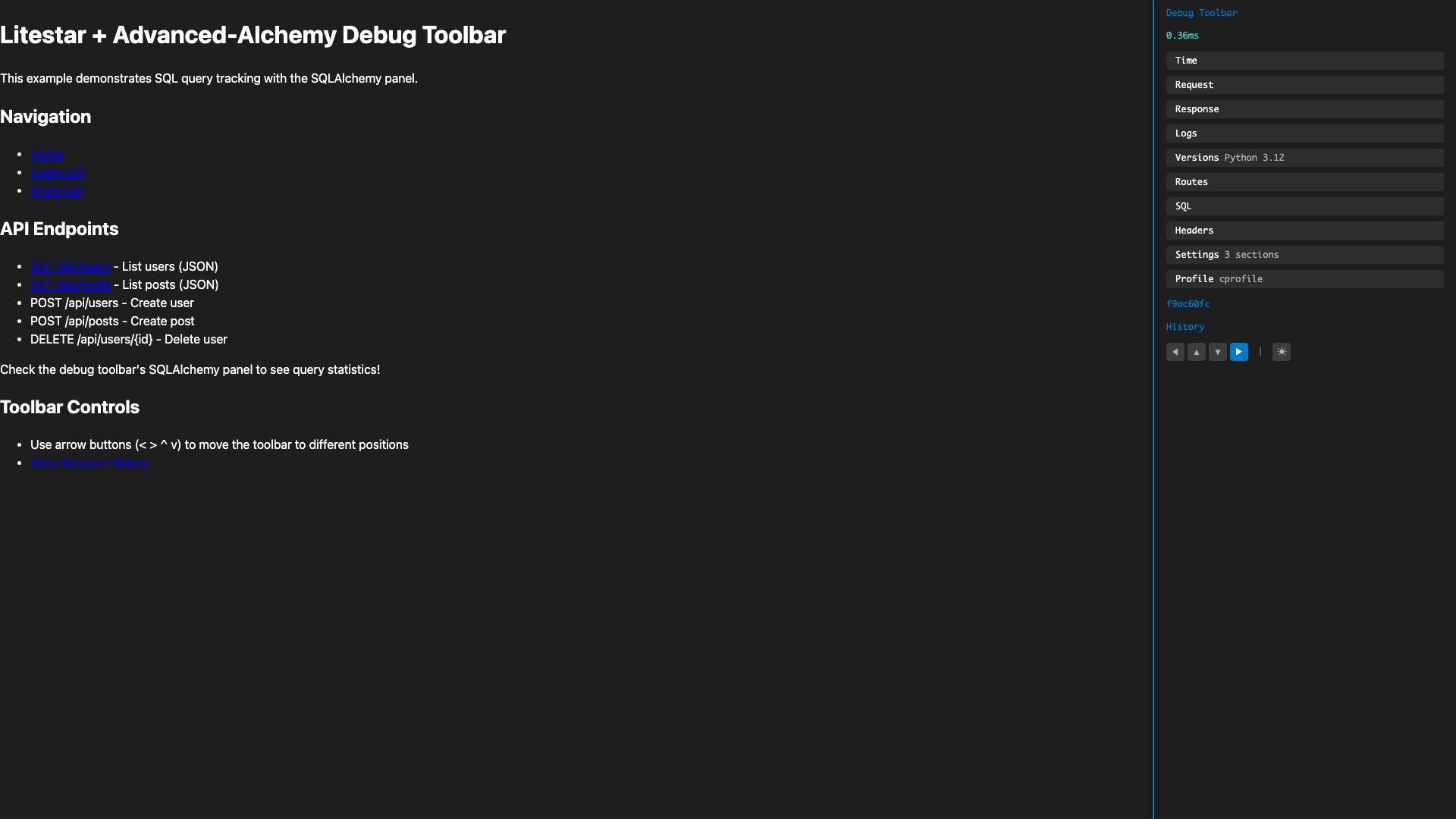
Screenshots

More Screenshots
Full-Width Top Position

SQL Queries with EXPLAIN

EXPLAIN Query Plan Modal

Light Theme

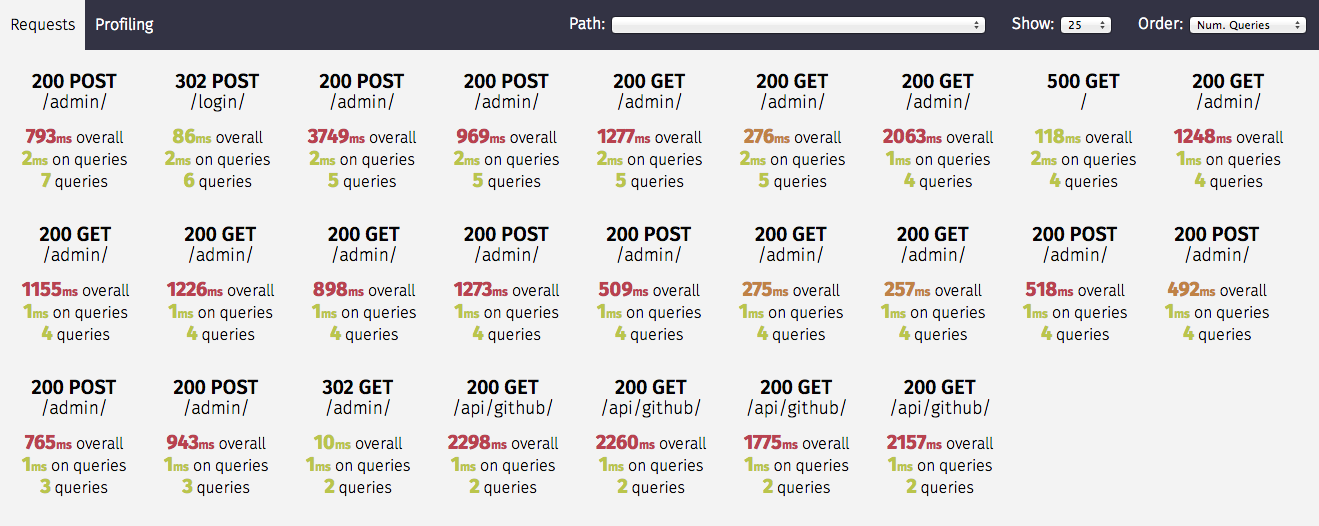
Request History

Events Panel (Lifecycle Hooks)

N+1 Query Detection

Alerts Panel (Proactive Issue Detection)

MCP Integration (Claude Code)

Memory Panel

SQL Panel with Query Analysis

Profiling Panel

WebSocket Panel (Live Updates)

Features
- Async-Native: Built from the ground up for async/await patterns
- Framework-Agnostic Core: Core package works with any ASGI framework
- Litestar Integration: First-class plugin support for Litestar applications
- Pluggable Panels: Easy to add, remove, or customize debug panels
- Minimal Overhead: Negligible performance impact when disabled
- Type-Safe: Full type annotations with strict type checking
- Dark/Light Themes: Toggle between dark and light themes
- Flexible Positioning: Place toolbar on any edge (left, right, top, bottom)
- SQL Query Analysis: EXPLAIN query plans for PostgreSQL, SQLite, MySQL, MariaDB
- N+1 Detection: Automatic detection of N+1 query patterns with fix suggestions
- Flame Graphs: Interactive profiling visualization in speedscope format
- Memory Profiling: Multi-backend support (tracemalloc, memray)
- Proactive Alerts: Automatic detection of security, performance, and database issues
- MCP Integration: AI assistant integration for automated debugging with Claude Code
- WebSocket Debugging: Real-time connection tracking with live updates and message inspection
Installation
# Core package only
pip install litestar-debug-toolbar

# With Litestar integration
pip install litestar-debug-toolbar[litestar]

# With Advanced-Alchemy SQLAlchemy panel
pip install litestar-debug-toolbar[advanced-alchemy]

# All extras
pip install litestar-debug-toolbar[all]
Or with uv:
uv add litestar-debug-toolbar[litestar]
Quick Start
Litestar
from litestar import Litestar, get
from debug_toolbar.litestar import DebugToolbarPlugin, LitestarDebugToolbarConfig

@get("/")
async def index() -> dict[str, str]:
    return {"message": "Hello, World!"}

config = LitestarDebugToolbarConfig(enabled=True)
app = Litestar(
    route_handlers=[index],
    plugins=[DebugToolbarPlugin(config)],
)
With SQLAlchemy (Advanced-Alchemy)
from litestar import Litestar
from advanced_alchemy.extensions.litestar import SQLAlchemyPlugin, SQLAlchemyAsyncConfig
from debug_toolbar.litestar import DebugToolbarPlugin, LitestarDebugToolbarConfig

db_config = SQLAlchemyAsyncConfig(connection_string="sqlite+aiosqlite:///app.db")
toolbar_config = LitestarDebugToolbarConfig(
    enabled=True,
    extra_panels=["debug_toolbar.extras.advanced_alchemy.SQLAlchemyPanel"],
)

app = Litestar(
    plugins=[
        SQLAlchemyPlugin(config=db_config),
        DebugToolbarPlugin(toolbar_config),
    ],
)
Generic ASGI
from debug_toolbar import DebugToolbar, DebugToolbarConfig

config = DebugToolbarConfig(enabled=True)
toolbar = DebugToolbar(config)

# Wrap your ASGI app
app = toolbar.wrap(your_asgi_app)
Built-in Panels
| Panel | Description |
|---|---|
| Timer | Request timing and CPU time |
| Request | HTTP method, path, headers, cookies |
| Response | Status code, response headers |
| Logging | Log records captured during request |
| Versions | Python and package versions |
| Headers | Categorized headers with security analysis |
| Settings | Application configuration viewer |
| Templates | Jinja2/Mako render tracking |
| Profiling | cProfile/pyinstrument with flame graphs |
| Alerts | Proactive security/performance issue detection |
| Memory | Memory profiling (tracemalloc/memray) |
| Cache | Redis/memcached operation tracking |
| Routes | Application routes (Litestar-specific) |
| Events | Lifecycle hooks and exception handlers (Litestar-specific) |
| WebSocket | Real-time connection tracking, message inspection, live updates |
| SQLAlchemy | Query tracking with N+1 detection (requires advanced-alchemy extra) |
Configuration
from debug_toolbar.litestar import LitestarDebugToolbarConfig

config = LitestarDebugToolbarConfig(
    enabled=True,
    exclude_paths=["/_debug_toolbar", "/static", "/health"],
    max_request_history=50,
    intercept_redirects=False,
    show_toolbar_callback=lambda request: request.app.debug,
    extra_panels=["myapp.panels.CustomPanel"],
    exclude_panels=["VersionsPanel"],
)
Creating Custom Panels
from typing import Any, ClassVar
from debug_toolbar.core import Panel, RequestContext

class MyCustomPanel(Panel):
    panel_id: ClassVar[str] = "MyCustomPanel"
    title: ClassVar[str] = "My Panel"
    template: ClassVar[str] = "panels/my_panel.html"
    has_content: ClassVar[bool] = True

    async def generate_stats(self, context: RequestContext) -> dict[str, Any]:
        return {"custom_data": "Your debug information here"}
Development
# Clone the repository
git clone https://github.com/JacobCoffee/debug-toolbar.git
cd debug-toolbar

# Install dependencies
make dev

# Run tests
make test

# Run all CI checks
make ci
Package Structure
debug_toolbar/
├── core/           # Framework-agnostic core
│   ├── panels/     # Built-in panels
│   │   ├── timer.py, request.py, response.py  # Default panels
│   │   ├── headers.py, settings.py            # Optional panels
│   │   ├── profiling.py, memory/, alerts.py   # Advanced panels
│   │   ├── templates.py, cache.py             # Integration panels
│   │   └── websocket.py                       # WebSocket debugging
│   ├── config.py   # DebugToolbarConfig
│   ├── context.py  # RequestContext (contextvars-based)
│   ├── panel.py    # Panel base class
│   ├── storage.py  # LRU request history storage
│   └── toolbar.py  # DebugToolbar manager
├── litestar/       # Litestar integration
│   ├── panels/     # Litestar-specific panels (routes, events)
│   ├── config.py   # LitestarDebugToolbarConfig
│   ├── middleware.py
│   └── plugin.py   # DebugToolbarPlugin
└── extras/         # Optional integrations
    └── advanced_alchemy/  # SQLAlchemy panel with N+1 detection
Versioning
This project uses Semantic Versioning.
- Major versions introduce breaking changes
- Major versions support currently supported Litestar versions
- See the Litestar Versioning Policy for details
Contributing
Contributions are welcome! Please see CONTRIBUTING.rst for guidelines.
License
MIT License - see LICENSE for details.
Acknowledgements
Inspired by:
Questions
What is debug-toolbar?
JacobCoffee/debug-toolbar is a public repo on GitHub by JacobCoffee. Debuggability elevated. Debug toolbar for ASGI applications.
Is debug-toolbar open source?
It declares the MIT license on GitHub.
Does debug-toolbar run on macOS, Windows or Linux?
Its maker has not tagged a system, so it is unknown here. Its README says what it needs.
How do I install debug-toolbar?
Open "Take it" on its page: Take My Repo writes an install plan for your machine and hands it to your AI agent (Claude Code, Codex or Cursor), which asks you before each step. Take My Repo has not tested it on any machine.
Is debug-toolbar still maintained?
Its last change on GitHub was on 2026-11-09. Take My Repo does not judge from that whether it is maintained.
What do people who ran debug-toolbar say?
Nobody has reviewed it on Take My Repo yet, which says nothing about its quality.