

AutoGPT
AutoGPT is the vision of accessible AI for everyone, to use and to build on. Our mission is to provide the tools, so that you can focus on what matters.
- 188k
- Python
- 13 min ago
Private AI agents for highly regulated teams, and for anyone who wants AI on their own computer. Open-source Python agent framework that runs fully offline.
Repo MervinPraison/PraisonAI, read from GitHub 10 min ago. MervinPraison has not joined Take My Repo.
MervinPraison/PraisonAI is a public repo on GitHub by MervinPraison. Private AI agents for highly regulated teams, and for anyone who wants AI on their own computer. Open-source Python agent framework that runs fully offline. It declares the MIT license on GitHub. It is written mainly in Python, has 9,382 stars and last changed on 2026-11-24. Nobody has reviewed it on Take My Repo yet, which says nothing about its quality. Read from GitHub on 2026-11-25.
AutoGPT is the vision of accessible AI for everyone, to use and to build on. Our mission is to provide the tools, so that you can focus on what matters.

AI agents that run on your own computers, even fully offline.
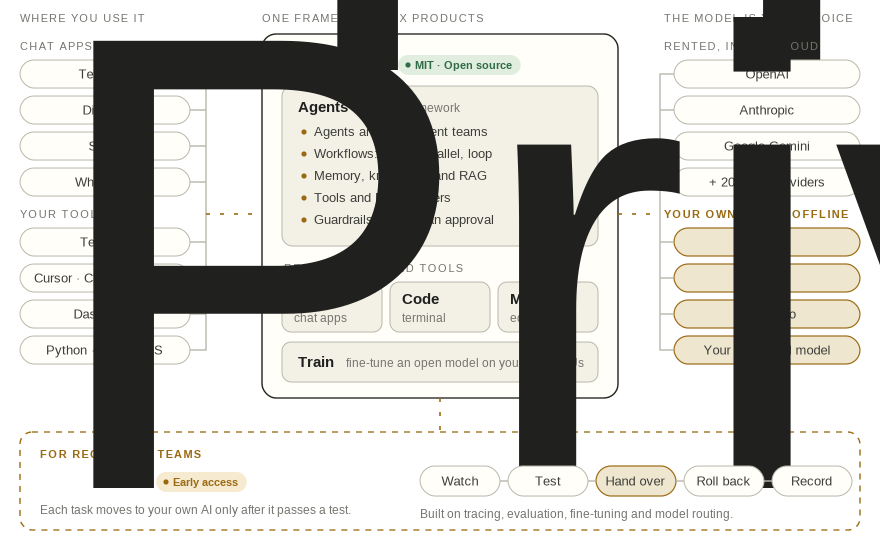
2M+ downloads · 9.3K stars · 600+ releases in the last year · 80+ contributors · MIT
|
Private AI (early access) Private AI that earns trust one task at a time. Each task moves to your own AI only after it passes a test. If quality slips, it moves back automatically, and every step is recorded for regulators. For banks, insurers and hospitals.  How the handover works · What's new |
||
|
Agents Python agent framework: teams, workflows, memory, tools. pip install praisonaiagentsYour first agent |
Bot Your agent on Telegram, Discord, Slack and WhatsApp, 24/7. pip install "praisonai-bot[gateway,bot]"praisonai-bot onboard
|
Code An agent in your terminal that reads and edits your code. pip install praisonai-codepraisonai-code code
|
|
MCP Your agents and tools inside Cursor, Claude Desktop and other MCP clients. pip install praisonai-mcppraisonai-mcp connect cursor
|
Train Fine-tune an open model on your own GPUs, and train agents on past runs. pip install "praisonai-train[llm]"praisonai-train --help
|
All of it CLI, bots, dashboard and integrations in one install. pip install "praisonai[dashboard]"praisonai setup
|

A real run with pip install praisonai: a local Llama 3.2 model through Ollama, with no API key set.
Set a key for any supported provider (OpenAI shown here), or skip the key and use a local model as in the next section.
pip install praisonai
export OPENAI_API_KEY="your-api-key"
from praisonai import Agent

agent = Agent(instructions="You are a helpful assistant.")
print(agent.start("In two sentences, why do some companies keep their data on their own computers?"))
Only want the lightweight core? pip install praisonaiagents and write from praisonaiagents import Agent; the rest of the code is the same.
Run the same agent on a model on your own computer with Ollama. You need no API key, and your prompts and answers stay on the machine.
Install the package and pull the model while you still have internet; after that, the agent runs with no network at all. pip install praisonai includes local-model support; with only the core library, use pip install "praisonaiagents[llm]".
# Start Ollama first (the app, or "ollama serve" in another terminal)
ollama pull llama3.2
export DO_NOT_TRACK=true   # keeps telemetry off (PraisonAI sends none unless you turn it on)
from praisonai import Agent

agent = Agent(instructions="You are a helpful assistant.", model="ollama/llama3.2")
print(agent.start("Why is the sky blue?"))
If Ollama runs on another computer on your network, pass base_url (or set OLLAMA_API_BASE):
agent = Agent(instructions="...", model="ollama/llama3.2", base_url="http://192.168.1.10:11434")
vLLM and LM Studio work the same way: use hosted_vllm/ (vLLM) or lm_studio/ with your server's base_url. More in the Ollama guide and Models docs.
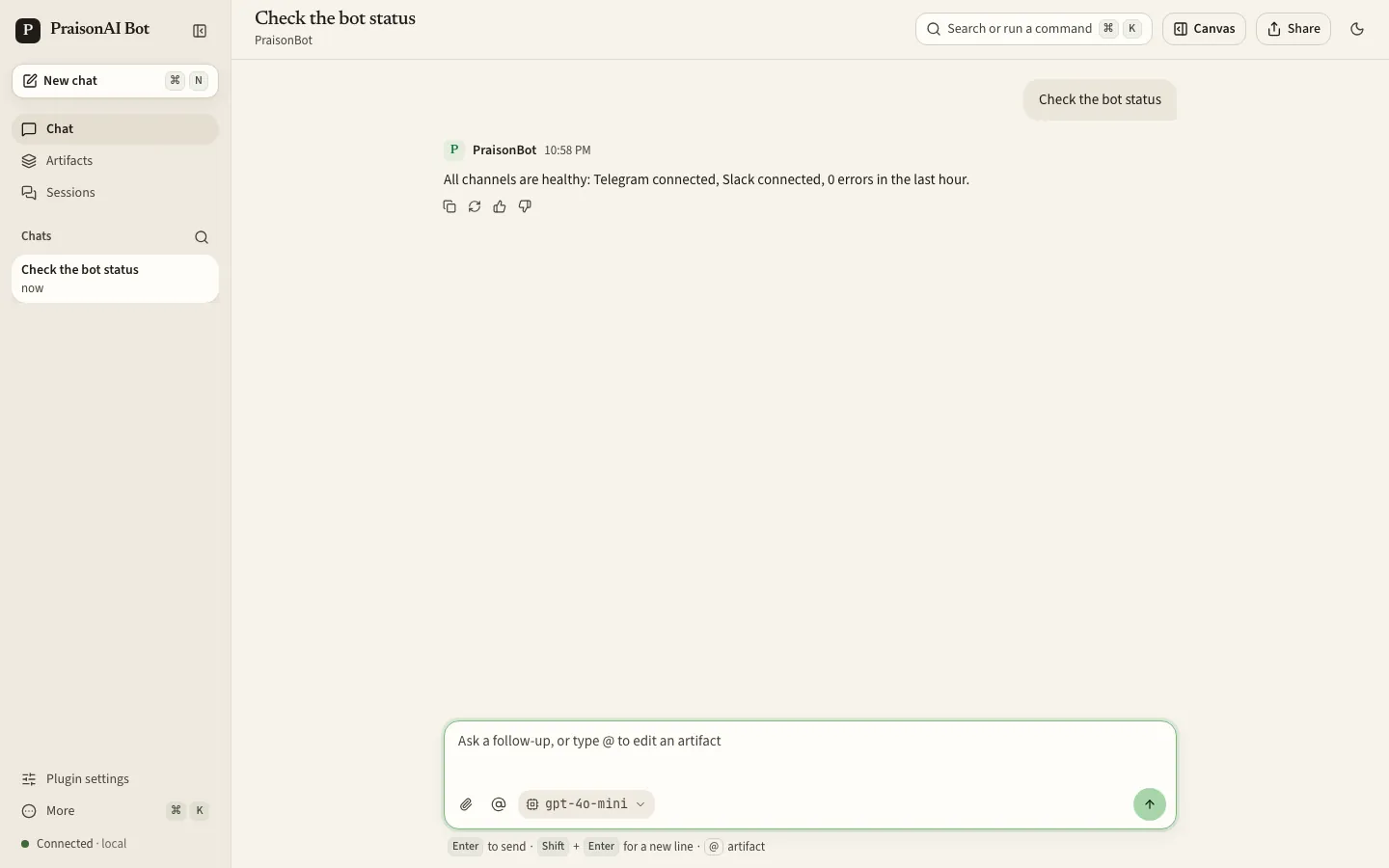 Bots Telegram, Discord, Slack and WhatsApp, with memory. Gateway |
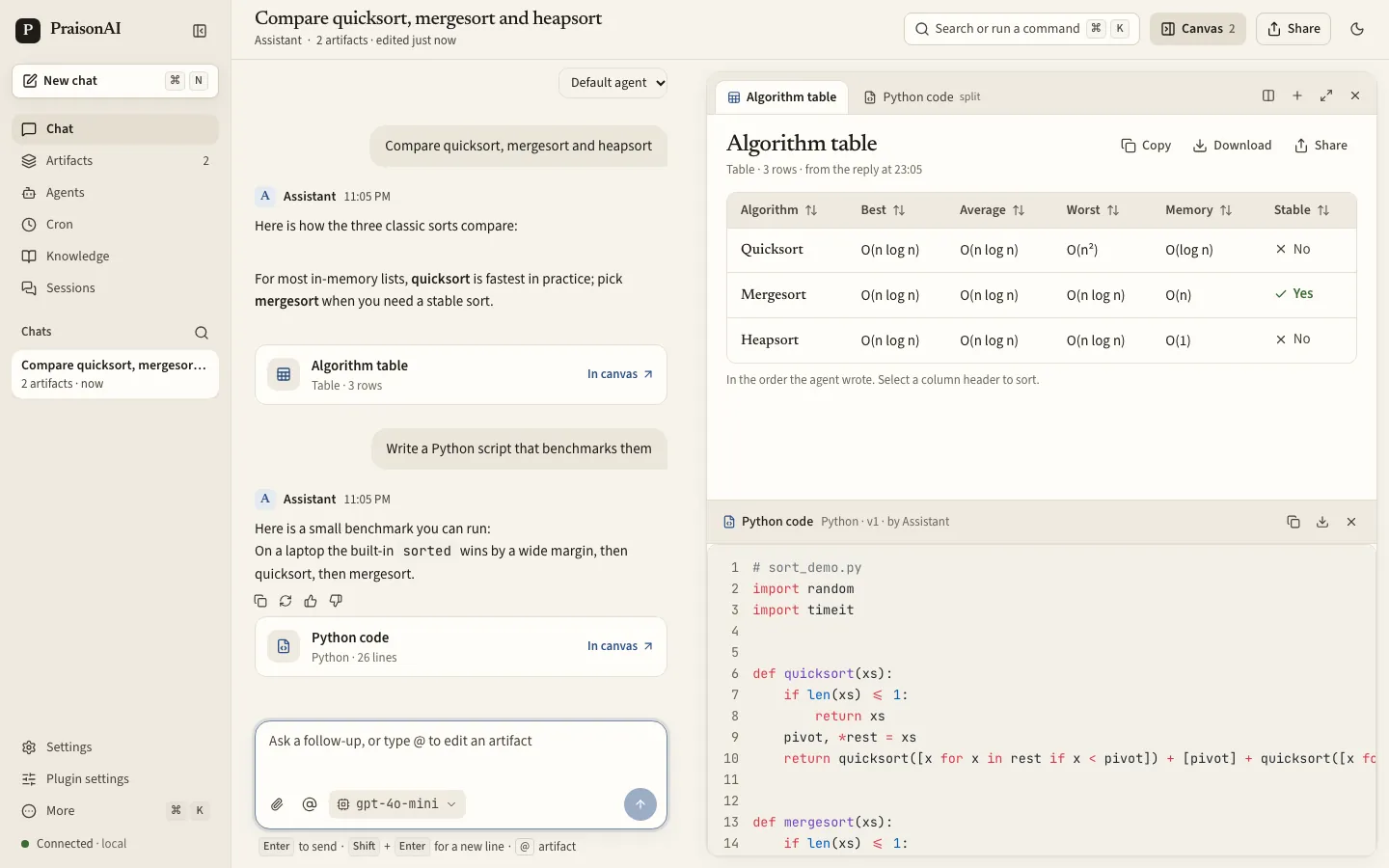 Dashboard Chat, agents, memory, knowledge and channels in one app. |
 Your agents in Cursor praisonai-mcp connect cursor: 85 tools, one command. A real run.
|
| Multi-agent teams Handoffs, route, parallel, loop and repeat. |
Memory and RAG Memory, knowledge and sessions, with zero extra deps to start. |
Tools and MCP Your own @tool or any MCP server. |
Coding agentpraisonai code, run and chat in your terminal. |
Browser automation An agent that uses websites for you. |
Sandboxes Run tools in Docker, E2B, Modal and more. |
| Fine-tuning Train an open model on your own past work. |
YAML, no code Agents and workflows from one file. |
Deploy Ship agents as APIs or to the cloud. |
Most frameworks hand you one or two layers and leave the rest as homework. PraisonAI covers all five — plus the outer layer that decides where your agent actually runs.
Each layer wraps the one inside it. When an agent misbehaves, the layer tells you where to look.
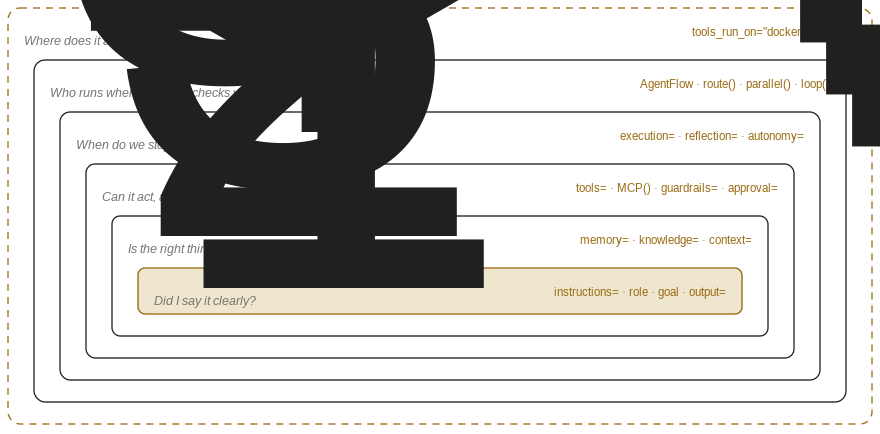
| Layer | The question it answers | PraisonAI |
|---|---|---|
| 1 · Prompt | Did I say it clearly? | instructions=, role/goal/backstory, output=, templates= |
| 2 · Context | Is the right thing in the window? | memory=, knowledge=, context=, handoff ContextPolicy |
| 3 · Harness | Can it act, and be checked? | tools=, MCP(), guardrails=, approval=, hooks=, sandbox= |
| 4 · Loop | When do we stop? | execution=ExecutionConfig(...), reflection=, autonomy=, doom-loop detection |
| 5 · Graph | Who runs when, and who checks whom? | AgentFlow, route(), parallel(), loop(), repeat() |
| ⬡ Managed | Where does it actually run? | tools_run_on="docker" — one shared sandbox for the tools, or run_on="anthropic" for the whole agent |
Role, instructions, examples, output format.
from praisonai import Agent

agent = Agent(
    role="Senior Data Analyst",
    goal="Turn raw numbers into decisions",
    output="verbose",              # markdown-formatted output
)
agent.start("Summarise Q3 revenue trends")
Write, select, compress, isolate — the four context operations, one parameter each.
from praisonai import Agent

agent = Agent(
    instructions="You are a support engineer.",
    memory={"user_id": "u-42"},    # write    — persists across runs (needs a user_id)
    knowledge=["docs/"],           # select   — retrieves only what's relevant
    context="summarize",           # compress — auto-compacts before the limit
)
Isolate is
handoffs=[specialist]— a sub-agent inherits the last few messages and the intersection of your tools, not your whole transcript. 📖 Handoffs
Agent = Model + Harness. Tool dispatch, plus the guides that steer before acting and the sensors that observe after.
from praisonai import Agent, MCP, tool

@tool
def deploy(env: str) -> str:
    """Deploy the current build to an environment."""
    return f"Deployed to {env}"

agent = Agent(
    name="ReleaseEngineer",
    instructions="You are a release engineer.",
    tools=[deploy, MCP("npx -y @modelcontextprotocol/server-filesystem /tmp")],
    approval=True,                 # guide — human gate before risky tools run
)
agent.start("Deploy to staging, then list the files you can read")
Hard iteration caps, budget ceilings, no-progress detection and completion checks — every brake is explicit.
from praisonai import Agent, ExecutionConfig

agent = Agent(
    instructions="Fix the failing tests.",
    execution=ExecutionConfig(max_iter=30, max_budget=0.50, on_budget_exceeded="stop"),
    autonomy=True,                 # required to drive the loop with run_autonomous()
)
result = agent.run_autonomous("Refactor the auth module", max_iterations=5)

print(result.completion_reason)
# goal | no_tool_calls | max_iterations | timeout | doom_loop | needs_help | error
# (with on_budget_exceeded="stop", hitting the cap raises BudgetExceededError,
#  surfaced here as completion_reason="error")
Doom-loop detection is on by default. Repeated identical tool calls and A→B→A→B oscillation get caught — while a poller whose output keeps changing does not. 📖 Doom Loop Detection
Topology as a versionable artifact: prompt chaining, routing, parallelisation, orchestrator-worker.
MervinPraison/PraisonAI is a public repo on GitHub by MervinPraison. Private AI agents for highly regulated teams, and for anyone who wants AI on their own computer. Open-source Python agent framework that runs fully offline.
It declares the MIT license on GitHub.
Its maker tagged it for macOS, Windows and Linux, or as Docker or cross-platform. That is declared by the maker; Take My Repo has not tested it.
Composio powers 1000+ toolkits, tool search, context management, authentication, and a sandboxed workbench to help you build AI agents that turn intent into action.
This is the repo for Vue 2. For Vue 3, go to https://github.com/vuejs/core
A collection of 100+ specialized Claude Code subagents covering a wide range of development use cases
The agent harness performance optimization system. Skills, instincts, memory, security, and research-first development for Claude Code, Codex, Opencode, Cursor and beyond.
Reverse engineer anything with agents, from app behavior down to native binaries.
Open "Take it" on its page: Take My Repo writes an install plan for your machine and hands it to your AI agent (Claude Code, Codex or Cursor), which asks you before each step. Take My Repo has not tested it on any machine.
Its last change on GitHub was on 2026-11-24. GitHub counts 132 open issues and pull requests. Take My Repo does not judge from that whether it is maintained.
Nobody has reviewed it on Take My Repo yet, which says nothing about its quality.
Take My Repo cannot say: it does not audit code and has not run PraisonAI. What is known comes from GitHub. It declares the MIT license on GitHub. Its last change was on 2026-11-24. It has 9,382 stars, which measure popularity, not safety. Nobody has reviewed it on Take My Repo yet, which says nothing about its quality. Read the source before you run it. With "Take it", your AI agent shows each step and asks you before running it; README text is treated as data, not as instructions.




