
PraisonAIUI
PraisonAIUI gives you a full-featured AI dashboard with multi-agent chat, memory, skills, sessions, and 19 admin pages — all from a single app.py. It also supports YAML-driven chat bots and static documentation sites.
- 17
- 11 h ago
Repo MervinPraison/PraisonAIUI, read from GitHub 8 h ago. MervinPraison has not joined Take My Repo.
In short
MervinPraison/PraisonAIUI is a public repo on GitHub by MervinPraison. PraisonAIUI gives you a full-featured AI dashboard with multi-agent chat, memory, skills, sessions, and 19 admin pages — all from a single app.py. It also supports YAML-driven chat bots and static documentation sites. It declares no license on GitHub. Public does not mean open source: without a license, nobody is granted the right to reuse it. It is written mainly in Python, has 17 stars and last changed on 2026-11-23. Nobody has reviewed it on Take My Repo yet, which says nothing about its quality. Read from GitHub on 2026-11-23.
PraisonAIUI 🦅
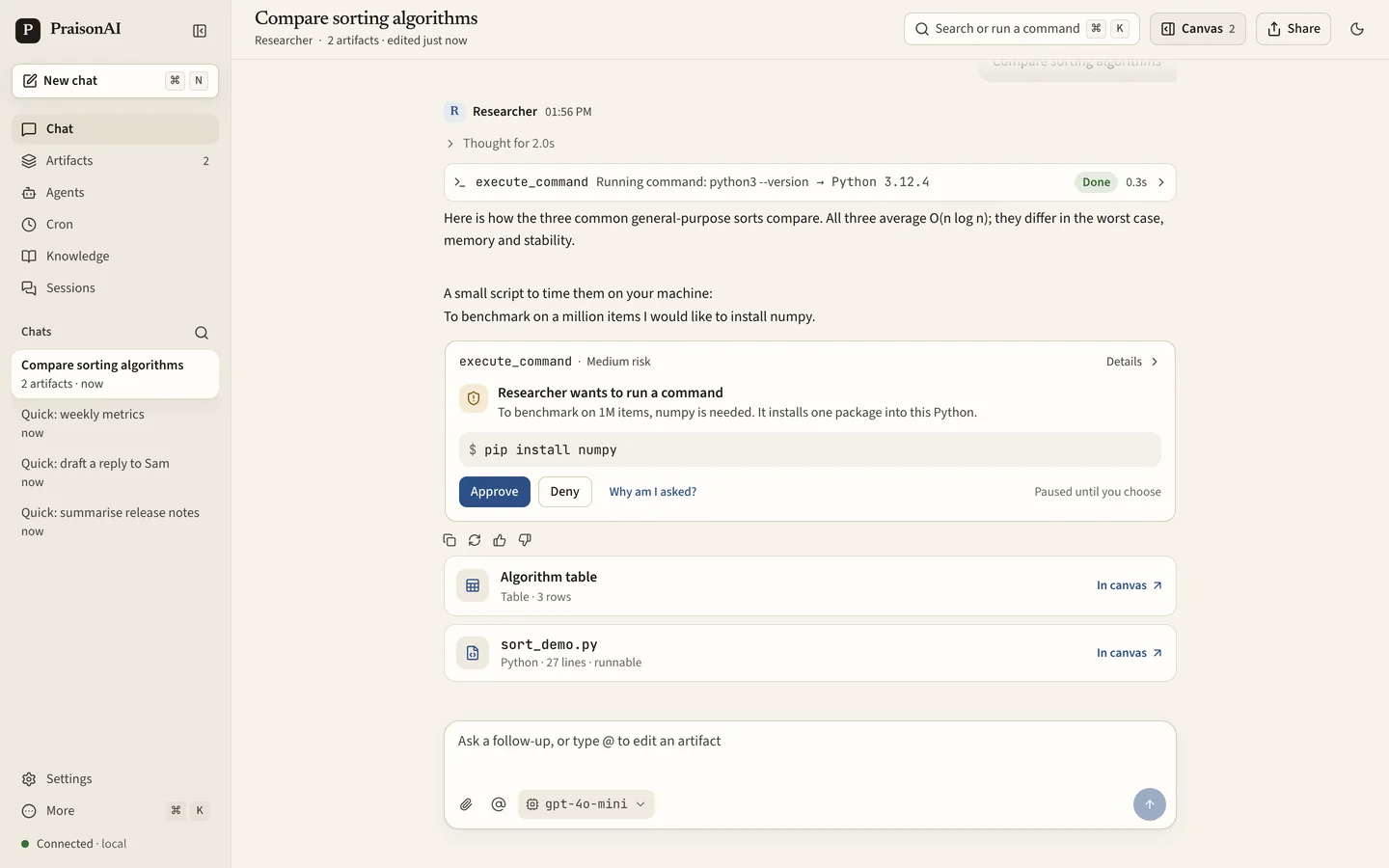
A web UI for your AI agents from one Python file: streaming chat, selectable layouts, an artifacts canvas, admin pages, plugins and documentation sites.
Quick start
pip install aiui
Create app.py:
import praisonaiui as aiui

@aiui.reply
async def on_message(message: str):
    await aiui.say(f"You said: {message}")
Run it:
aiui run app.py
Open http://localhost:8000. A chat app opens in the React app shell (style: app)
in the Chat layout. For a real model, see
examples/python/03-chat-with-ai
(OpenAI, token streaming with aiui.stream_token()).
What you get
- React app shell: one sidebar for every page, a command palette (⌘K / Ctrl+K), light and dark themes, and phone layouts.
- Streaming chat over WebSocket (Server-Sent Events fallback): tool calls, reasoning, inline approvals and questions, attachments, Stop, history and starters.
- Six layouts for the app shell, from a plain chat to a mission-control board. Each is its own lazy chunk, so only the one on screen is downloaded.
- Artifacts canvas: in the Chat and Canvas layout, code, tables and documents the agent produces open in a side canvas, with an artifacts index page.
- React pages for Overview, Sessions, Agents, Logs and Config inside the layouts; every other built-in page (memory, skills, cron, knowledge, usage, approvals and more) runs inside the shell as a hosted dashboard view. React Cron and Knowledge pages are (planned).
- Your own pages from Python (
@aiui.page,aiui.register_page) or React (registerPagefrom@aiui/sdk, shipped as a plugin). - YAML chat: a complete agent chat from a YAML file, no Python.
- Documentation sites:
aiui buildturns Markdown into a static site. - Secure defaults: same-origin only, a Host check against DNS rebinding, single-use WebSocket tickets, and auth that covers every route and socket when you turn it on.
Layouts
Layouts apply to the app shell (style: app). Pick one with
aiui.set_layout("command"), YAML layout: command, AIUI_LAYOUT=command, or
preview one with ?layout=<id> in the URL.
| Id | Title | For |
|---|---|---|
chat |
Chat | The Chat and Canvas frame without the canvas. What aiui run opens for a chat app |
chat-canvas |
Chat and Canvas | Chat beside a canvas of the artifacts the agent makes. The app shell default for create_app() and PraisonAI |
workbench |
Quiet Workbench | A quiet sidebar with your chats, and the page beside it |
command |
Command Deck | Keyboard first: a command bar, session tabs and a run inspector |
guided |
Guided Studio | Plain language and large buttons; every step explained |
mission |
Mission Control | Agents, runs and approvals at a glance |
?layout=classic shows the shell's own frame (sidebar and header), which is
always available. See Layouts.
UI styles
The style decides which frontend serves the app. Set it with --style,
aiui.set_style() or YAML style:; otherwise aiui run detects it from your code.
| Style | What it renders | When it is used |
|---|---|---|
app |
The React app shell with selectable layouts | The default: create_app(), aiui run, apps with @aiui.reply or @aiui.page |
chat |
The classic React chat (fullscreen, sidebar or floating) | --style chat |
dashboard |
The legacy vanilla-JS admin dashboard | Only when asked for: --style dashboard, set_style("dashboard"), AIUI_SHELL=legacy |
docs |
A documentation site (sidebar, table of contents, search) | aiui build and --style docs |
agents |
A tabbed multi-agent view | Detected for @aiui.profiles with registered agents |
playground |
Side-by-side input and output panels for prompt testing | --style playground |
custom |
A site built from your YAML templates and components | --style custom |
aiui run app.py                  # app shell, Chat layout
aiui run app.py --style chat     # classic chat
aiui run app.py --pages all      # app shell with every page, grouped
aiui run app.py --style dashboard  # the legacy UI
Building a dashboard of your own? Build a focused app:
only your pages (aiui.only_my_pages("chat")), the new shell, and the app's
own chat history. See also UI styles and
React app shell.
YAML chat
Define an agent in YAML and run it without writing Python (needs
pip install praisonai and a model key such as OPENAI_API_KEY):
# chat.yaml
name: My Assistant
instructions: You are a helpful assistant.
model: gpt-4o-mini
welcome: "Hi! How can I help?"
starters:
  - label: What can you do?
    message: Tell me about your capabilities
tools:
  - web_search
  - calculate
datastore: json
aiui run chat.yaml
More in examples/yaml/.
Documentation sites
aiui init --template docs                      # writes aiui.yaml
mkdir docs && echo "# Hello" > docs/index.md   # your Markdown pages
aiui build                                     # static site in ./aiui
aiui serve                                     # build and serve on http://localhost:8000
The commands read aiui.yaml; a project that still has the old name,
aiui.template.yaml, keeps working.
Docs sites use the PraisonAI Pro design: the app shell's colours and type (Geist and Geist Mono, self-hosted), search (⌘K / Ctrl+K), previous and next links, footer columns and a phone drawer. See Getting started and the CLI reference.
Extending
| I want to… | Use |
|---|---|
| Add a page from Python | @aiui.page("metrics", title="Metrics") or aiui.register_page(...) |
| Add a React page, block, tool renderer, settings section or layout | A UI plugin: a Python package with a praisonaiui.plugins entry point and its own built JS against @aiui/sdk |
| Choose which pages show | aiui.set_pages([...]) / aiui.only_my_pages("chat") or YAML extensions: / pages: |
| Brand it | aiui.set_branding(title="Acme", logo="/static/logo.svg"), aiui.set_theme(...), aiui.set_brand_color(...) |
| Inject JS or CSS | aiui.set_custom_js(path), aiui.set_custom_css(css) |
Start from examples/plugins/aiui-hello-plugin
and UI plugins; aiui plugins list and
aiui plugins doctor show what is installed and why a plugin failed to load.
Configuration
| Setting | Where |
|---|---|
| Style, layout, branding, theme, pages | app.py (aiui.set_*) or config.yaml. See Configuration |
| Auth | create_app(require_auth=True), YAML auth.requireAuth, or AUTH_ENFORCE=true. See Deployment |
| Another site calling the server | AIUI_ALLOWED_ORIGINS=https://app.example.com |
| A reverse proxy forwarding a public host name to a local server | AIUI_ALLOWED_HOSTS=aiui.example.com |
| Data directory | AIUI_DATA_DIR (default ~/.praisonaiui) |
| Layout for one run | AIUI_LAYOUT=<id> |
| Persistence | aiui run app.py --datastore json (also memory, sdk, json:/path) |
The CLI has management commands for a running server (sessions, memory,
skills, schedule, approval, config, eval, traces, pages, plugins,
doctor, health). Run aiui --help for the list.
Documentation
Full documentation: https://ui.praison.ai
- Installation and Quick start
- Layouts, UI styles, React app shell
- UI plugins, Python API, CLI
- Deployment and security
- Changelog
Development
git clone https://github.com/MervinPraison/PraisonAIUI.git
cd PraisonAIUI
pip install -e ".[dev]"
pytest tests/unit tests/integration
The React source is in src/frontend/ and its build is committed under
src/praisonaiui/templates/frontend/ (cd src/frontend && npm ci && npm run build && npm run sync).
Contributors read ARCHITECTURE.md (rules and PR checklist) and
AGENTS.md (commands and layout of the repository).
| Path | What it is |
|---|---|
src/praisonaiui/ |
The Python package: server, CLI, features, plugin registry |
src/frontend/ |
React source for the app shell, chat, layouts and docs UI |
examples/ |
Runnable examples: python/, yaml/, plugins/ |
docs/ |
User documentation (served at ui.praison.ai) |
tests/ |
Unit and integration tests |
License
MIT © Praison Limited. Third-party vendored source is listed in THIRD_PARTY_NOTICES.md.
Questions
What is PraisonAIUI?
MervinPraison/PraisonAIUI is a public repo on GitHub by MervinPraison. PraisonAIUI gives you a full-featured AI dashboard with multi-agent chat, memory, skills, sessions, and 19 admin pages — all from a single app.py. It also supports YAML-driven chat bots and static documentation sites.
Is PraisonAIUI open source?
It declares no license on GitHub. Public does not mean open source: without a license, nobody is granted the right to reuse it.