
MooER
MooER: Moore-threads Open Omni model for speech-to-speech intERaction. MooER-omni includes a series of end-to-end speech interaction models along with training and inference code, covering but not limited to end-to-end speech interaction, end-to-end speech translation and speech recognition.
- 219
- 23 mo ago
Repo MooreThreads/MooER, read from GitHub 2 min ago. MooreThreads has not joined Take My Repo.
In short
MooreThreads/MooER is a public repo on GitHub by MooreThreads. MooER: Moore-threads Open Omni model for speech-to-speech intERaction. MooER-omni includes a series of end-to-end speech interaction models along with training and inference code, covering but not limited to end-to-end speech interaction, end-to-end speech translation and speech recognition. It declares no license on GitHub. Public does not mean open source: without a license, nobody is granted the right to reuse it. It is written mainly in Python, has 219 stars and last changed on 2025-01-08. Nobody has reviewed it on Take My Repo yet, which says nothing about its quality. Read from GitHub on 2026-11-25.
Similar repos


AI models this project points to
English | 中文
MooER: Moore-threads Open Omni model for speech-to-speech intERaction
† equal contribution
🔥 Updates
2024/10/24: We released the 1.5B speech translation model MooER-MTL-5K-1.5B.2024/10/24: 🎉🎉🎉 We released the new Omni (MooER-omni-v1) and Speech-To-Speech Translation (MooER-S2ST-v1) models which support Mandarin input. The Omni model can hear, think and talk to you! See our demo here.2024/09/03: We have open-sourced the training and inference code for MooER! You can follow this tutorial to train your own audio understanding model and tasks or fine-tune based on our 80k hours model.2024/08/27: We released MooER-80K-v2 which was trained using 80K hours of data. The performance of the new model can be found below. Currently, it only supports the speech recognition task. The speech translation and the multi-task models will be released soon.2024/08/09: We released a Gradio demo running on Moore Threads S4000.2024/08/09: We released the inference code and the pretrained speech recognition and speech translation (zh->en) models using 5000 hours of data.2024/08/09: We release MooER v0.1 technical report on arXiv.
📝 Roadmap
- Technical report
- Inference code and pretrained ASR/AST models using 5k hours of data
- Pretrained ASR model using 80k hours of data
- Traning code for MooER
- LLM-based speech-to-speech translation (S2ST, Mandrin Chinese to English)
- GPT-4o-like audio-LLM supporting chat using speech
- 1.5B AST models
- Training code and technical report about our new Omni model
- Omni audio-LLM that supports multi-turn conversation
- Pretrained AST and multi-task models using 80k hours of data
- LLM-based timbre-preserving Speech-to-speech translation
📖 Introduction
🔥 Hi there! We have updated our Omni model with the ability to listen, think and talk! Check our examples here. Please refer to the Download, Inference and Gradio Demo sections for the model usage.
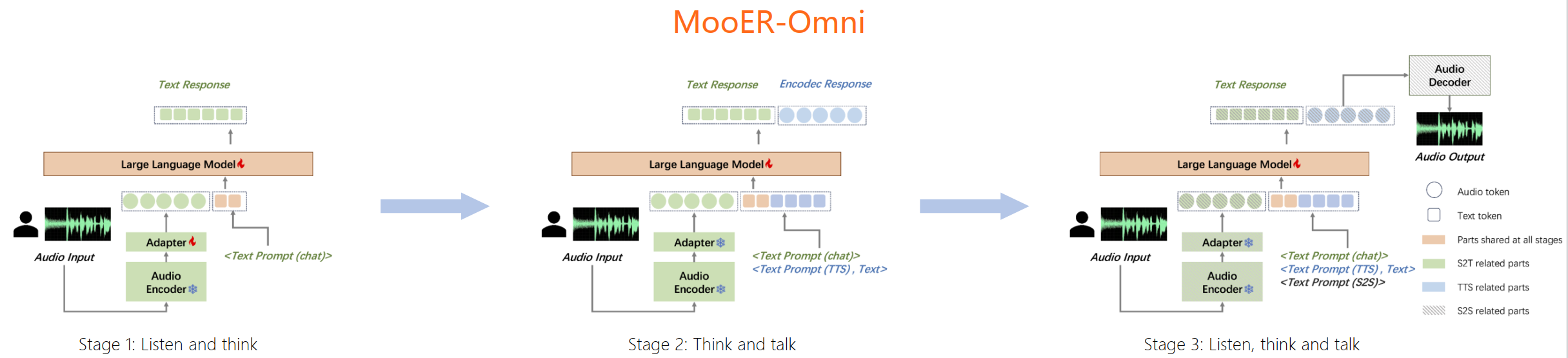
The training procedure of our model is demonstrated in the following figure. We will release the training code and the technical report soon!
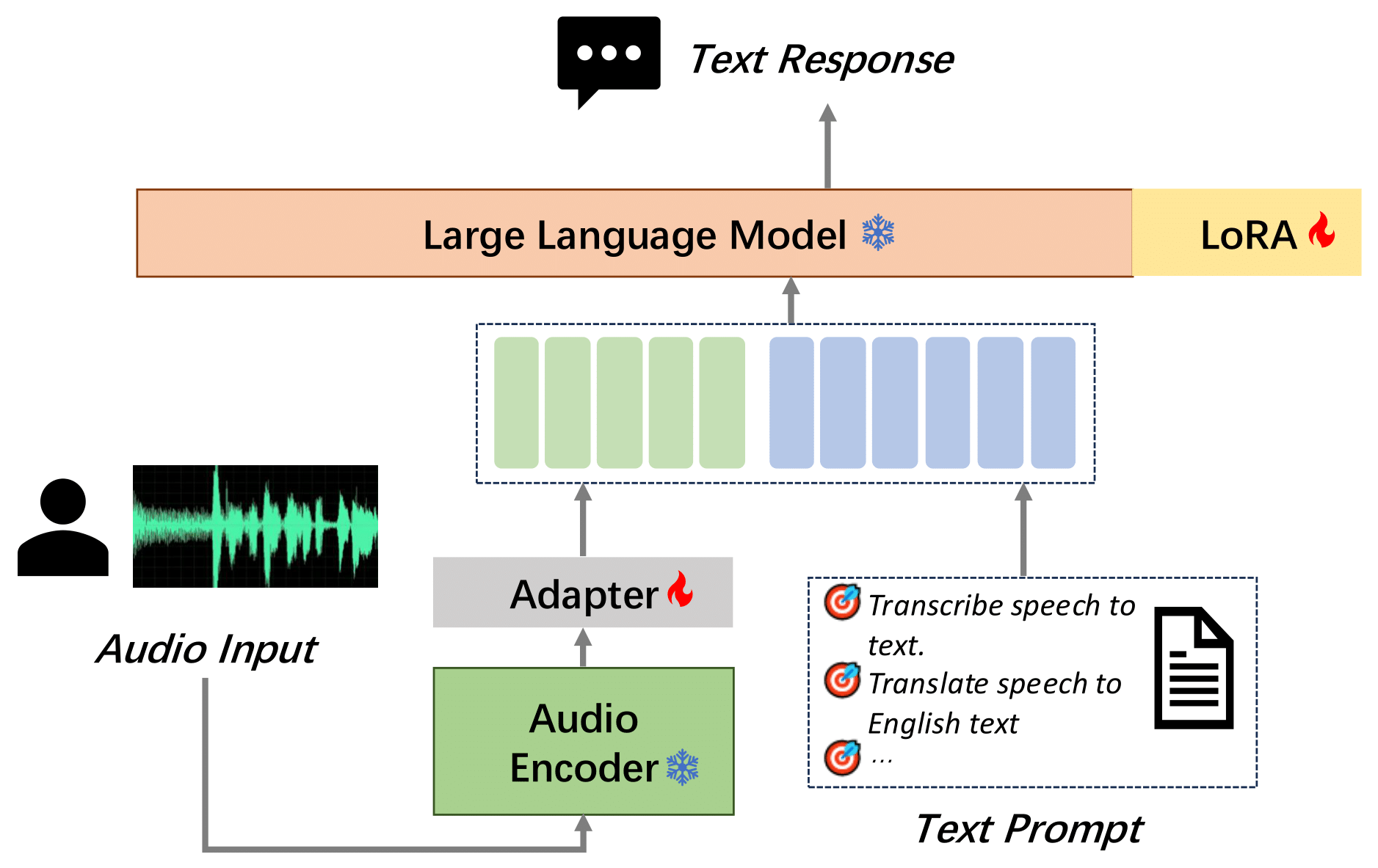
We introduce MooER (摩耳): an LLM-based speech recognition and translation model developed by Moore Threads. With the MooER framework, you can transcribe the speech into text (automatic speech recognition, ASR) and translate the speech into other languages (automatic speech translation, AST) in an LLM-based end-to-end manner. Some of the evaluation results of the MooER are presented in the subsequent section. More detailed experiments, along with our insights into model configurations, training strategies, etc, are provided in our technical report.
We proudly highlight that MooER is developed using Moore Threads S4000 GPUs. To the best of our knowledge, this is the first LLM-based speech model trained and inferred using entirely domestic GPUs.
🥊 Evaluation Results
We present the training data and the evaluation results below. For more comprehensive information, please refer to our report.
Training data
We utilize 5,000 hours of speech data (MT5K) to train our basic MooER-5K model. The data sources include:
| Dataset | Duration |
|---|---|
| aishell2 | 137h |
| librispeech | 131h |
| multi_cn | 100h |
| wenetspeech | 1361h |
| in-house data | 3274h |
Note that, data from the open-source datasets were randomly selected from the full training set. The in-house speech data, collected internally without transcription, were transcribed using a third-party ASR service.
Since all the above datasets were originally collected only for the speech recognition task, no translation labels are available. We leveraged a third-party machine translation service to generate pseudo-labels for translation. No data filtering techniques were applied.
At this moment, we are also developing a new model trained with 80,000 hours of speech data.
Speech Recognition
The performance of speech recognition is evaluated using word error rate (WER) and character error rate (CER).
| Language | Testset | Paraformer-large | SenseVoice-small | Qwen-audio | Whisper-large-v3 | SeamlessM4T-v2 | MooER-5K | MooER-80K | MooER-80K-v2 |
|---|---|---|---|---|---|---|---|---|---|
| Chinese | aishell1 | 1.93 | 3.03 | 1.43 | 7.86 | 4.09 | 1.93 | 1.25 | 1.00 |
| aishell2_ios | 2.85 | 3.79 | 3.57 | 5.38 | 4.81 | 3.17 | 2.67 | 2.62 | |
| test_magicdata | 3.66 | 3.81 | 5.31 | 8.36 | 9.69 | 3.48 | 2.52 | 2.17 | |
| test_thchs | 3.99 | 5.17 | 4.86 | 9.06 | 7.14 | 4.11 | 3.14 | 3.00 | |
| fleurs cmn_dev | 5.56 | 6.39 | 10.54 | 4.54 | 7.12 | 5.81 | 5.23 | 5.15 | |
| fleurs cmn_test | 6.92 | 7.36 | 11.07 | 5.24 | 7.66 | 6.77 | 6.18 | 6.14 | |
| average | 4.15 | 4.93 | 6.13 | 6.74 | 6.75 | 4.21 | 3.50 | 3.35 | |
| English | librispeech test_clean | 14.15 | 4.07 | 2.15 | 3.42 | 2.77 | 7.78 | 4.11 | 3.57 |
| librispeech test_other | 22.99 | 8.26 | 4.68 | 5.62 | 5.25 | 15.25 | 9.99 | 9.09 | |
| fleurs eng_dev | 24.93 | 12.92 | 22.53 | 11.63 | 11.36 | 18.89 | 13.32 | 13.12 | |
| fleurs eng_test | 26.81 | 13.41 | 22.51 | 12.57 | 11.82 | 20.41 | 14.97 | 14.74 | |
| gigaspeech dev | 24.23 | 19.44 | 12.96 | 19.18 | 28.01 | 23.46 | 16.92 | 17.34 | |
| gigaspeech test | 23.07 | 16.65 | 13.26 | 22.34 | 28.65 | 22.09 | 16.64 | 16.97 | |
| average | 22.70 | 12.46 | 13.02 | 12.46 | 14.64 | 17.98 | 12.66 | 12.47 |
Speech Translation (zh -> en)
For speech translation, the performance is evaluated using BLEU score.
| Testset | Speech-LLaMA | Whisper-large-v3 | Qwen-audio | Qwen2-audio | SeamlessM4T-v2 | MooER-5K | MooER-5K-MTL |
|---|---|---|---|---|---|---|---|
| CoVoST1 zh2en | - | 13.5 | 13.5 | - | 25.3 | - | 30.2 |
| CoVoST2 zh2en | 12.3 | 12.2 | 15.7 | 24.4 | 22.2 | 23.4 | 25.2 |
| CCMT2019 dev | - | 15.9 | 12.0 | - | 14.8 | - | 19.6 |
🏁 Getting Started
🛠️ Build Environtment
Currently, only Linux is supported. Ensure that git and python are installed on your system. We recommend Python version >=3.8. It is highly recommanded to install conda to create a virtual environment.
For efficient LLM inference, GPUs should be used. For Moore Threads S3000/S4000 users, please install MUSA toolkit rc2.1.0. A docker image is also available for S4000 users. If you use other GPUs, install your own drivers/toolkits (e.g. cuda).
Build the environment with the following steps:
git clone https://github.com/MooreThreads/MooER
cd MooER

# (optional) create env using conda
conda create -n mooer python=3.8
conda activate mooer

# install the dependencies
apt update
apt install ffmpeg sox
pip install -r requirements.txt
Docker image usage for Moore Threads S4000 users is provided:
sudo docker run -it \
    --privileged \
    --name=torch_musa_release \
    --env MTHREADS_VISIBLE_DEVICES=all \
    -p 10010:10010 \
    --shm-size 80g \
    --ulimit memlock=-1 \
    mtspeech/mooer:v1.0-rc2.1.0-v1.1.0-qy2 \
    /bin/bash

# If you are nvidia user, you can try this image with cuda 11.7
sudo docker run -it \
    --privileged \
    --gpus all \
    -p 10010:10010 \
    --shm-size 80g \
    --ulimit memlock=-1 \
    mtspeech/mooer:v1.0-cuda11.7-cudnn8 \
    /bin/bash
💾 Download Pretrained Models
🔥 Update [2024/10/25]
The new MooER-Omni-v1 and MooER-S2ST-v1 are available. Please download them manually and place the checkpoints in pretrained_models.
# MooER-Omni-v1
git lfs clone https://modelscope.cn/models/MooreThreadsSpeech/MooER-omni-v1

# MooER-S2ST-v1
git lfs clone https://modelscope.cn/models/MooreThreadsSpeech/MooER-S2ST-v1
Update [2024/08/27]
The new MooER-80K-v2 is released. You can download the new model and update pretrained_models.
# use modelscope
git lfs clone https://modelscope.cn/models/MooreThreadsSpeech/MooER-MTL-80K

# use huggingface
git lfs clone https://huggingface.co/mtspeech/MooER-MTL-80K
The md5sum's of the updated files are provided.
./pretrained_models/
`-- asr
    |-- adapter_project.pt               # af9022e2853f9785cab49017a18de82c
    `-- lora_weights
        |-- README.md
        |-- adapter_config.json          # ad3e3bfe9447b808b9cc16233ffacaaf
        `-- adapter_model.bin            # 3c22b9895859b01efe49b017e8ed6ec7
Original release
First, download the pretrained models from ModelScope or HuggingFace.
# use modelscope
git lfs clone https://modelscope.cn/models/MooreThreadsSpeech/MooER-MTL-5K

# use huggingface
git lfs clone https://huggingface.co/mtspeech/MooER-MTL-5K
Put the downloaded files in pretrained_models
cp MooER-MTL-5K/* pretrained_models
Then, download Qwen2-7B-Instruct by:
# use modelscope
git lfs clone https://modelscope.cn/models/qwen/qwen2-7b-instruct

# use huggingface
git lfs clone https://huggingface.co/Qwen/Qwen2-7B-Instruct
Put the downloaded files into pretrained_models/Qwen2-7B-Instruct.
Finally, all these files should be orgnized as follows. The md5sum's are also provided.
Questions
What is MooER?
MooreThreads/MooER is a public repo on GitHub by MooreThreads. MooER: Moore-threads Open Omni model for speech-to-speech intERaction. MooER-omni includes a series of end-to-end speech interaction models along with training and inference code, covering but not limited to end-to-end speech interaction, end-to-end speech translation and speech recognition.
Is MooER open source?
It declares no license on GitHub. Public does not mean open source: without a license, nobody is granted the right to reuse it.