vllm
A high-throughput and memory-efficient inference and serving engine for LLMs
- 97k
- Python
- Apache-2.0
- 2 h ago
CSGLite is a lightweight local LLM inference platform. One command downloads, loads, and chats with models. It ships a web UI, OpenAI-compatible API, llama.cpp inference, resumable downloads, marketplace browsing, and one-click AI app and coding-agent setup—all in a single cross-platform binary.
Repo OpenCSGs/csglite, read from GitHub 24 h ago. OpenCSGs has not joined Take My Repo.
OpenCSGs/csglite is a public repo on GitHub by OpenCSGs. CSGLite is a lightweight local LLM inference platform. One command downloads, loads, and chats with models. It ships a web UI, OpenAI-compatible API, llama.cpp inference, resumable downloads, marketplace browsing, and one-click AI app and coding-agent setup—all in a single cross-platform binary. It declares no license on GitHub. Public does not mean open source: without a license, nobody is granted the right to reuse it. It is written mainly in Go, has 53 stars and last changed on 2026-11-23. Nobody has reviewed it on Take My Repo yet, which says nothing about its quality. Read from GitHub on 2026-11-23.
A high-throughput and memory-efficient inference and serving engine for LLMs
A lightweight tool for running large language models locally, powered by models from the CSGHub platform.
Inspired by Ollama, CSGLite provides model download, local inference, interactive chat, and an OpenAI-compatible REST API — all from a single binary.
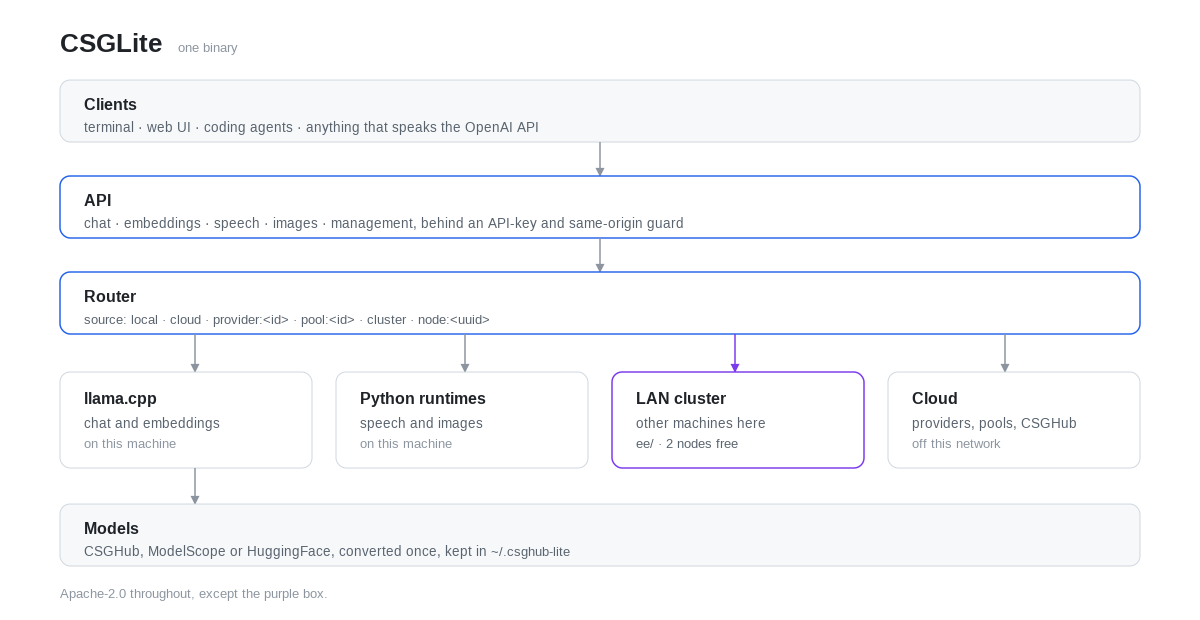
A request arrives at one of the compatible APIs, the router decides where it runs, and the answer comes back in the same shape whether it was served here, by another machine on your network, or by a provider.
csghub-lite run downloads, loads, and chatslogprobs, top_logprobs, logit_bias, and response_format), Responses, Embeddings, Images, Audio, Realtime, and the Decisions API (POST /ai-gateway/v1/decisions); the official OpenAI SDKs work with base_url pointed at CSGLiteDownload the desktop client from the CSGLite product page.
curl -fsSL https://hub.opencsg.com/csghub-lite/install.sh | sh
Pin a release version:
curl -fsSL https://hub.opencsg.com/csghub-lite/install.sh | CSGHUB_LITE_VERSION=v0.8.55 sh
irm https://hub.opencsg.com/csghub-lite/install.ps1 | iex
git clone https://github.com/opencsgs/csglite.git
cd csglite
make build
# Binary is at bin/csghub-lite
Download the latest binary for your platform from the Releases page.
For Docker installation, see the Docker guide.
# Run a model — downloads, starts server, and chats (all automatic)
csghub-lite run Qwen/Qwen3-0.6B-GGUF

# Keep a model loaded until you stop it manually
csghub-lite run Qwen/Qwen3-0.6B-GGUF --keep-alive -1

# Search for models on CSGHub
csghub-lite search "qwen"

# Check running models (model stays loaded after exit)
csghub-lite ps

# Set CSGHub access token (optional, for private models)
csghub-lite login
Note: The install script automatically installs llama-server (required for inference). If you installed from source, install it separately:
brew install llama.cpp(macOS) or download from llama.cpp releases.
Machines on the same network can share one pool of compute. Give every machine the same secret and they find each other; there is no separate create or join step:
csghub-lite config set cluster_secret "a-long-shared-secret"
csghub-lite config set cluster_name "lab"
csghub-lite restart
The same values can be set at install time with CSGHUB_LITE_CLUSTER_SECRET
and CSGHUB_LITE_CLUSTER_NAME. The first machine to start creates the cluster;
later ones join when they see it. A request this machine cannot serve is
forwarded to a member that can, models are copied over the LAN instead of
downloaded again, and an address that changes on reboot is picked up
automatically. Two nodes work without a licence; more need a CSGLite Enterprise
licence. A machine with no secret stays a single node and opens no cluster
port.
Routing, model sync, join tokens, and admission codes are in the cluster command reference.
CSGLite can run several model families locally today, with more runtime types planned. The model detail page shows whether a downloaded model is currently supported for local inference.
| Capability | Status | Runtime | Typical models |
|---|---|---|---|
| Text generation / chat | Supported | llama.cpp | Qwen/Qwen3, GLM, Llama, Mistral, DeepSeek distilled GGUF models |
| Embeddings | Supported | llama.cpp | BGE, GTE, E5, Sentence Transformers-compatible embedding models |
| Vision-language chat | Supported | llama.cpp multimodal | Qwen2.5-VL, Gemma 3 / 4 vision, Idefics-style multimodal models |
| Text-to-image | Supported | Diffusers runtime; MLX on Apple Silicon | Qwen-Image, Qwen-Image-2.1 MLX (including Turbo), FLUX, Stable Diffusion, PixArt, Sana, CogView, Z-Image, Kolors, Hunyuan |
| Image-to-image | Supported | Diffusers runtime; MLX on Apple Silicon for one reference image | Qwen-Image-Edit, FLUX Kontext, inpaint, img2img, editing pipelines |
| Automatic speech recognition | Supported | Python ASR runtime | FunASR, Whisper, Wav2Vec2-family ASR models |
| Text-to-speech | Supported | Python TTS runtime | VoxCPM, Qwen3-TTS, Kokoro, MMS-TTS and other transformers-native TTS models |
| Realtime voice | Supported | Python ASR + TTS runtimes | Full-duplex over WebRTC or WebSocket, OpenAI Realtime-compatible |
| Decisions | Supported | llama.cpp (decision LoRA or native head) | JEV models such as autotrust/JEV-9B and its GGUF quantizations; native decision models such as convaiinnovations/laya; OpenAI Decisions API-compatible |
| Image-to-video | Coming soon | - | Stable Video Diffusion, SV3D |
| Text-to-video | Coming soon | - | Video generation Diffusers models |
Image requests use POST /ai-gateway/v1/images/generations and POST /ai-gateway/v1/images/edits.
NVIDIA, AMD, and CPU machines run Diffusers checkpoints. Apple Silicon uses
MFLUX for MLX Qwen-Image-2.1 checkpoints and Diffusers for the other image
families. Other MLX image checkpoints are unsupported on every platform,
including before download. The model library disables Run for any
downloaded model that cannot run locally.
| Model | Runtime | Notes |
|---|---|---|
Qwen/Qwen-Image, Qwen/Qwen-Image-2512 |
Diffusers | Text-to-image |
Qwen/Qwen-Image-Edit, Qwen/Qwen-Image-Edit-2511 |
Diffusers | Image editing, including multi-image edits |
mlx-community/Qwen-Image-2.1-MLX-4bit |
MFLUX on Apple Silicon | Text-to-image and one reference image, 40 steps by default. Runs on a 16 GB Mac: about 4 minutes for 1024x1024. Python 3.10 or newer. n=1 only |
OsaurusAI/Qwen-Image-2.1-Turbo-mflux-4bit and other mflux-saved Qwen-Image-2.1 bundles |
MFLUX on Apple Silicon | Turbo is the 8-step distilled checkpoint, sampled on the fixed sigma grid in its model_index.json; the steps request field is ignored. About 70 seconds for 1024x1024 on a 16 GB Mac. Weights are under the Qwen Research License (non-commercial) |
| FLUX, Stable Diffusion, Stable Cascade, PixArt, Sana, CogView, Z-Image, Kolors, Hunyuan, Kandinsky, Lumina, AuraFlow, GLM-Image, Ovis-Image | Diffusers | Text-to-image when model_index.json names that pipeline |
| FLUX Kontext, Stable Diffusion img2img and inpaint | Diffusers | Image-to-image and editing |
GGUF image models such as unsloth/Qwen-Image-2.1-Turbo-GGUF |
Not supported | A GGUF image file holds only the denoiser and needs a separate VAE and text encoder. Download a Diffusers or MLX version of the model instead |
Speech synthesis runs in its own Python runtime, never through llama.cpp: the
vocoder or codec decoder that turns model output into a waveform only exists in
the model's own inference stack. Synthesize with POST /ai-gateway/v1/audio/speech, or
select a text-to-speech model in Chat and send text to hear it.
| Model | Size | Voices | Notes |
|---|---|---|---|
openbmb/VoxCPM2 |
4.6 GB | Reference-audio cloning | Streams natively; the audio VAE ships with the model |
Qwen/Qwen3-TTS-12Hz-0.6B-CustomVoice |
2.3 GB | 9 presets, 5 Chinese incl. Beijing and Sichuan | Codec ships with the model |
hexgrad/Kokoro-82M |
327 MB | 54 presets, 8 Chinese | Smallest option |
facebook/mms-tts-eng |
145 MB | Single speaker | Same code path serves the MMS family across many languages |
GET /api/tts-voices?model=<id> lists what a given model can render, since
voices differ per model rather than being a fixed set. The transformers-native
path also covers SpeechT5, Bark, ParlerTTS, CSM, Dia and FastSpeech2 models.
Full-duplex speech, compatible with the OpenAI Realtime API and served by the same recognition and synthesis runtimes:
| Transport | Endpoint | Audio |
|---|---|---|
| WebRTC | POST /ai-gateway/v1/realtime/calls (SDP offer in, SDP answer out) |
Media tracks: Opus in, PCMU out; events on the oai-events DataChannel |
| WebSocket | GET /ai-gateway/v1/realtime |
Base64 PCM16 in input_audio_buffer.append and response.output_audio.delta |
GET /ai-gateway/v1/realtime/transcription opens a recognition-only session. Recognition
streams partial transcripts as you speak, synthesis starts playing before the
sentence is finished, and response.cancel stops playback for barge-in. Set
defaults and limits in the realtime section of config.json
(default_asr_model, default_tts_model, max_sessions, and the ICE options
for a deployment that has to pin its media ports). The protocol and the
measured latencies are in
docs/guides/realtime-audio-api.md.
CSGLite implements the OpenAI Decisions API,
POST /ai-gateway/v1/decisions, for local decision models: JEV models tagged jev or
typed-decisions (for example autotrust/JEV-9B and its GGUF quantizations)
and native decision models whose head llama.cpp runs directly (for example
convaiinnovations/laya and laya-typed-decisions). A request shares one
input across up to 200 questions and returns calibrated probabilities instead
of generated text:
| Question type | Use it to | Main result |
|---|---|---|
predicate |
check whether a condition is true | probability |
OpenCSGs/csglite is a public repo on GitHub by OpenCSGs. CSGLite is a lightweight local LLM inference platform. One command downloads, loads, and chats with models. It ships a web UI, OpenAI-compatible API, llama.cpp inference, resumable downloads, marketplace browsing, and one-click AI app and coding-agent setup—all in a single cross-platform binary.
It declares no license on GitHub. Public does not mean open source: without a license, nobody is granted the right to reuse it.
Never stop coding. Free MIT AI gateway: one endpoint, 375 providers (150+ free), 1,400+ models Kimi, Claude, GPT, Gemini, GLM, DeepSeek, MiniMax. Works with Claude Code, Codex, Cursor, OpenCode, Cline & Copilot. Quota-aware auto-fallback, RTK+Caveman compression saves 15-95% tokens, MCP/A2A, Desktop/PWA. Built by 900+ contributors
⚡ Pure-Rust WebGPU inference engine — OpenAI-API compatible, GGUF native, runs on any GPU. No Python. No llama.cpp. Single binary.
All-in-one New-API/Sub2API account hub: balance/usage dashboard, auto check-in, one-click keys, price comparison, health checks, plus advanced channel management | 一站式 New-API/Sub2API 等中转站账号管理:余额/用量看板、自动签到、密钥一键使用、价格对比、可用性测试,另提供高级渠道管理
The agent harness performance optimization system. Skills, instincts, memory, security, and research-first development for Claude Code, Codex, Opencode, Cursor and beyond.
Its maker has not tagged a system, so it is unknown here. Its README says what it needs.
Open "Take it" on its page: Take My Repo writes an install plan for your machine and hands it to your AI agent (Claude Code, Codex or Cursor), which asks you before each step. Take My Repo has not tested it on any machine.
Its last change on GitHub was on 2026-11-23. Take My Repo does not judge from that whether it is maintained.
Nobody has reviewed it on Take My Repo yet, which says nothing about its quality.
Take My Repo cannot say: it does not audit code and has not run csglite. What is known comes from GitHub. It declares no license on GitHub. Public does not mean open source: without a license, nobody is granted the right to reuse it. Its last change was on 2026-11-23. It has 53 stars, which measure popularity, not safety. Nobody has reviewed it on Take My Repo yet, which says nothing about its quality. Read the source before you run it. With "Take it", your AI agent shows each step and asks you before running it; README text is treated as data, not as instructions.