jetson_stats
📊 Simple package for monitoring and control your NVIDIA Jetson [Orin, Xavier, Nano, TX] series
- 2.6k
- Python
- AGPL-3.0
- 7 d ago
C++ library for monitoring CPU, Memory and execution time targeting Linux embedded devices
Repo Orange-OpenSource/cppuprofile, read from GitHub 1 min ago. Orange-OpenSource has not joined Take My Repo.
Orange-OpenSource/cppuprofile is a public repo on GitHub by Orange-OpenSource. C++ library for monitoring CPU, Memory and execution time targeting Linux embedded devices. It declares the BSD-3-Clause license on GitHub. It is written mainly in C++, has 43 stars and last changed on 2025-08-25. Nobody has reviewed it on Take My Repo yet, which says nothing about its quality. Read from GitHub on 2026-11-22.
This project provides a tiny C++ profiling library for monitoring:
This library aims at collecting metrics on embedded devices to monitor device performance while operating heavy tasks or booting for example. Those metrics can be useful to check that load is properly spread onto all CPU cores or that memory is not starved.
This library can also run on non-embedded devices like servers or desktop PCs. It is compatible with Linux and Windows.
Metrics are stored in a CSV file (the path is configurable).
The library is lightweight, simple and easy to use. It can be easily used from an existing application or integrated in a dedicated monitoring application.
Full API documentation is available here.
#include <uprofile/uprofile.h>
...
uprofile::start("uprofile.log");
uprofile::startSystemMemoryMonitoring(200);
uprofile::startCPUUsageMonitoring(200);
...
uprofile::stop();
uprofile::timeBegin("my_custom_function");
...
uprofile::timeEnd("my_custom_function");
uprofile::start("uprofile.log", 500000 /* max file size in bytes */);
It will generate two rotating files with the most recent events. With the above example, both files will be uprofile_0.log and uprofile_1.log.
The library also supports GPU metrics monitoring like usage and memory. Since GPU monitoring is specific to each vendor, an interface IGPUMonitor is available to abstract each vendor monitor system.
To monitor a specific GPU, you must subclass IGPUMonitor:
#include <uprofile/igpumonitor.h>

class MyGPUMonitor: public uprofile::IGPUMonitor {
public:
    const std::vector<float>& getUsage() const override;
    void getMemory(std::vector<int>& usedMem, std::vector<int>& totalMem) override;
}
As you can see from the interface methods, ccpuprofile supports multi-gpu monitoring.
And then inject it at runtime to the uprofile monitoring system:
uprofile::addGPUMonitor(new MyGPUMonitor);
uprofile::start("uprofile.log");
uprofile::startGPUMemoryMonitoring(200);
uprofile::startGPUUsageMonitoring(200);
Here is the list of GPUs supported by cppuprofile
nvidia-smi). Pass -DGPU_MONITOR_NVIDIA=ON as compile option and inject uprofile::NvidiaMonitor from monitors/nvidiamonitor.h as GPUMonitor. The nvidia-smi tool should be installed into /usr/bin directory.The build process is based on CMake. Minimum version is 2.8.
$ cmake -Bbuild .
$ cmake --build build
By default, it generates a shared library on Linux and a dynamic library (DLL) on Windows. To link with this library on Windows, you must
pass -DUPROFILE_DLL definition to CMake.
If you want to generate a static library, you must use -DBUILD_SHARED_LIBS=OFF CMake option.
If you want to disable profiling in Release mode or if you want to only enable profiling in particular cases, you can use the PROFILE_ENABLED option (set to ON by default).
To disable the profiling:
$ cmake -Bbuild . -DPROFILE_ENABLED=OFF
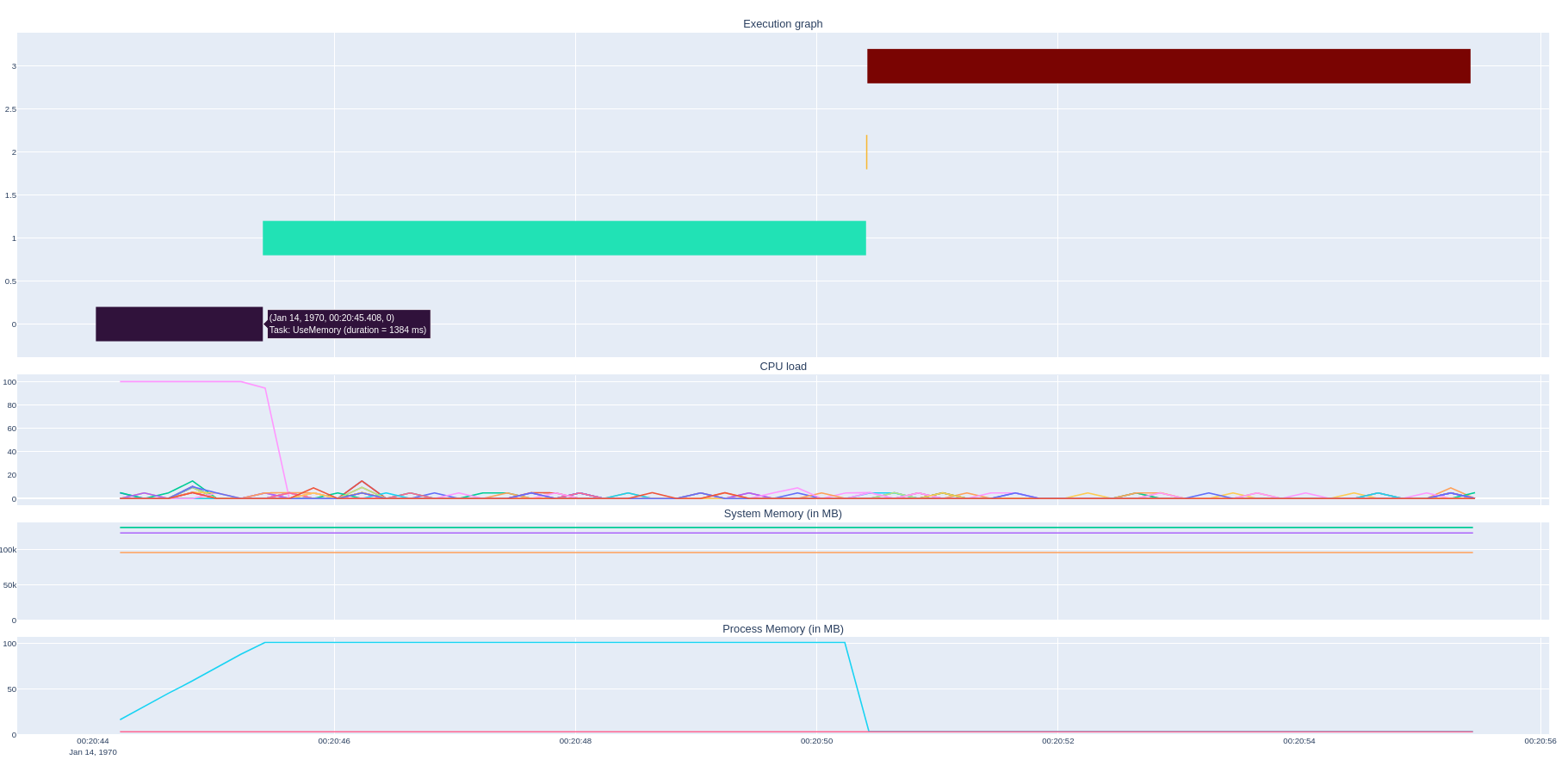
The project also brings a tool for displaying the different metrics in a single view:

This tool is written in Python3. It requires a set of dependency packages. To install them:
$ pip3 install -r requirements.txt
Then
$ ./tools/show-graph uprofile.log
Note that you can filter the metrics to display with --metric argument.
The project provides a C++ sample application called uprof-sample
that shows how to use the cppuprofile library. You can build it with SAMPLE_ENABLED option:
$ cmake -Bbuild . -DSAMPLE_ENABLED=ON
$ cmake --build build
$ ./build/sample/uprof-sample
A python binding pyuprofile is available for exposing cppuprofile library APIs to Python.
pyuprofile depends on PyBind11, so you need to install this library first:
For Ubuntu:
$ sudo apt install python-pybind11
Then, to build and install the module in your system
$ cd bindings/python
$ pip install .
$ CMAKE_COMMON_VARIABLES="-DGPU_MONITOR_NVIDIA=ON" pip install .
pyuprofile from python$ python bindings/python/sample.py
The library compiles on Windows but only time execution is supported so far. Monitoring metrics like CPU Usage and system, process and nvidia GPU memory are not supported.
Contributions are welcomed.
This project is licensed under BSD-3-Clause license. See LICENSE file for any further information.
Orange-OpenSource/cppuprofile is a public repo on GitHub by Orange-OpenSource. C++ library for monitoring CPU, Memory and execution time targeting Linux embedded devices.
It declares the BSD-3-Clause license on GitHub.
Its maker tagged it for Windows and Linux. That is declared by the maker; Take My Repo has not tested it.
Open "Take it" on its page: Take My Repo writes an install plan for your machine and hands it to your AI agent (Claude Code, Codex or Cursor), which asks you before each step. Take My Repo has not tested it on any machine.
Its last change on GitHub was on 2025-08-25. GitHub counts 0 open issues and pull requests. Take My Repo does not judge from that whether it is maintained.
Nobody has reviewed it on Take My Repo yet, which says nothing about its quality.
📊 Simple package for monitoring and control your NVIDIA Jetson [Orin, Xavier, Nano, TX] series
An interactive NVIDIA-GPU process viewer and beyond, the one-stop solution for GPU process management.
A free, powerful, multi-purpose tool that helps you monitor system resources, debug software and detect malware. Brought to you by Winsider Seminars & Solutions, Inc. @ https://windows-internals.com
A cross-platform hardware monitor with real-time metrics, local history, and customizable dashboards.
OUDS Web is an accessible, ergonomic and Orange branded framework based on Orange Unified Design System and Bootstrap
AIVC is a fully-learned video codec. It is able to code video sequences at different rates and it features tunable coding configurations.
RAN simulator with E2 termination compliant with flexric supports E2AP v1.01, KPM v3 and pre-RC v1.01
Our vision of mobile & web accessibility guidelines and best practices, with valid/invalid examples