PowerCLI-DatastoreUploader
Using Vmware's PowerCLI but with a GUI frontend
- 8
- 8 y ago
Repo PowerShellCrack/PowerCLI-DatastoreUploader, read from GitHub 24 h ago. PowerShellCrack has not joined Take My Repo.
In short
PowerShellCrack/PowerCLI-DatastoreUploader is a public repo on GitHub by PowerShellCrack. Using Vmware's PowerCLI but with a GUI frontend. It declares no license on GitHub. Public does not mean open source: without a license, nobody is granted the right to reuse it. It is written mainly in PowerShell, has 8 stars and last changed on 2018-06-15. Nobody has reviewed it on Take My Repo yet, which says nothing about its quality. Read from GitHub on 2026-11-24.
Similar repos
rufus
The Reliable USB Formatting Utility



PowerCLI-GUIs
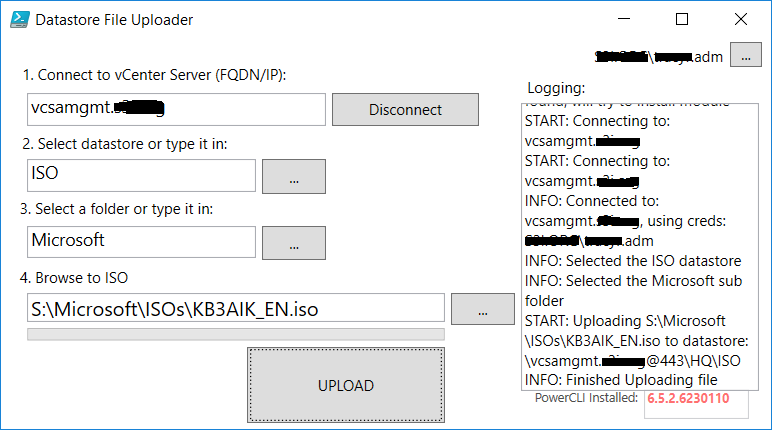
Using Vmware's PowerCLI but with a GUI frontendSCRIPT: DatastoreUploader.ps1
LANGUAGE: Powershell with XAML
DESCRIPTION: A simple form that will allow administrators to easily upload files in their vCenter datastore. Designed for ISO uploads but support any other files as well (untested).
Questions
What is PowerCLI-DatastoreUploader?
PowerShellCrack/PowerCLI-DatastoreUploader is a public repo on GitHub by PowerShellCrack. Using Vmware's PowerCLI but with a GUI frontend.
Is PowerCLI-DatastoreUploader open source?
It declares no license on GitHub. Public does not mean open source: without a license, nobody is granted the right to reuse it.