
FormEase
Format and compress photos, signatures, and documents to exact government, visa, and exam portal requirements. Runs 100% in your browser — nothing ever leaves your device.
- 3
- MIT
- 3 wk ago
Repo RootDeveloperDS/FormEase, read from GitHub 1 min ago. RootDeveloperDS has not joined Take My Repo.
In short
RootDeveloperDS/FormEase is a public repo on GitHub by RootDeveloperDS. Format and compress photos, signatures, and documents to exact government, visa, and exam portal requirements. Runs 100% in your browser — nothing ever leaves your device. It declares the MIT license on GitHub. It is written mainly in TypeScript, has 3 stars and last changed on 2026-11-04. Nobody has reviewed it on Take My Repo yet, which says nothing about its quality. Read from GitHub on 2026-11-24.


FormEase
Format and compress photos, signatures, and documents right in your browser.
100% Client-Side Sovereign • Nothing leaves your device • Verified compliance presets
📦 Release History (v4.9.0.0) • How It Works • UI Showcase • Privacy Architecture • Quick Start
📦 Release History: For detailed version logs, architectural upgrades, and bug fixes across all releases, see the Full Changelog.
The Problem
Every government portal, university admission form, and visa application demands files in absurdly specific formats:
"Passport photo must be between 20 KB and 50 KB, exactly 350×350 pixels, JPEG only."
"Signature must be 10 KB to 20 KB, 2:1 aspect ratio, black ink on white background."
"Marksheet PDF must be under 200 KB, grayscale."
If your file is 3.8 MB (a normal phone photo), you need to somehow shrink it to under 50 KB — 76 times smaller — without making it look terrible. Most people end up on sketchy compression websites, uploading their passport photos and identity documents to servers they've never heard of, guessing slider positions, downloading, checking the size, realizing it's still wrong, and repeating the whole process.
Three documents. Multiple attempts each. Hours wasted. And your personal photos sitting on a stranger's server.
FormEase eliminates this entire process.
What FormEase Does
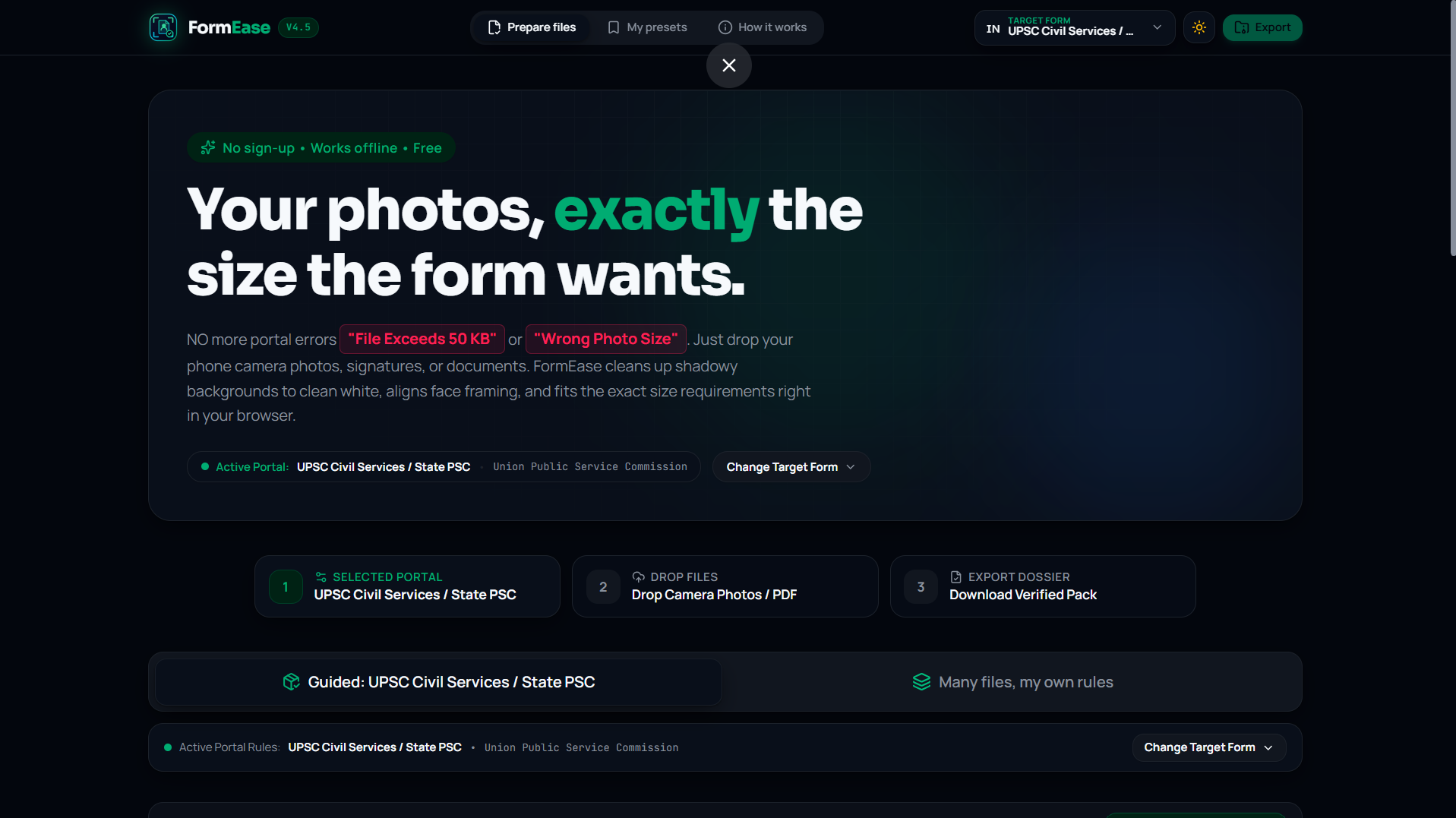
FormEase is a browser-based tool that takes your raw phone camera photos, messy desk-photo signatures, and oversized document scans — and automatically formats them to the exact specifications of the portal you're applying to.
How it works
1. Pick your portal
Select the form you're filling from a built-in library of real-world presets:
| Preset | Photo | Signature | Document |
|---|---|---|---|
| 🇺🇸 US Visa (DS-160) | 600×600 px, max 240 KB | — | — |
| 🇺🇸 US Passport | 600×600 px, 2×2" at 300 DPI | — | — |
| 🇪🇺 Schengen Visa | 413×531 px (35×45 mm) | — | — |
| 🇮🇳 UPSC Civil Services | 350×350 px, 20–50 KB | 350×175 px, 10–20 KB | PDF < 200 KB |
| 🇮🇳 SSC | 350×450 px, 20–50 KB | 360×180 px, 10–20 KB | — |
| 🇮🇳 NTA (NEET / JEE) | 400×500 px, 10–200 KB | 350×175 px, 4–30 KB | PDF < 300 KB |
| 🇮🇳 Passport Seva / PAN | 350×450 px, < 50 KB | 360×180 px, < 30 KB | PDF < 200 KB |
| 🌐 General Job / University | 500×500 px, < 100 KB | — | PDF < 500 KB |
The moment you select a preset, all upload slots automatically reconfigure to that portal's exact pixel dimensions, aspect ratio, file-size limits, and format requirements. No looking up the rules. No guessing.
2. Drop your files
Each slot has a drag-and-drop zone. Drop your raw camera photo. Drop your phone snapshot of your signature on paper. Drop your marksheet scan or PDF.
3. FormEase does the heavy lifting
The moment a file lands, the processing engine runs — entirely inside your browser:
-
Smart compression — A binary-search algorithm adjusts JPEG quality across up to 7 iterations, converging on the highest possible quality that still fits within the size ceiling. If the limit is 50 KB, the output is typically 47–49 KB — not 28 KB. Maximum quality, always within limits.
-
Signature ink cleaner — One-click background removal turns your messy desk-photo signature (grey shadows, paper creases, uneven lighting) into crisp black ink on pure white paper.
-
Document enhancer — Converts colour scans to high-contrast grayscale with text sharpening. Your marksheet stays readable at 200 KB.
-
Face alignment guide — An interactive biometric overlay shows exactly where to position your eyes, chin, and head crown — matching the face-coverage percentages that portals require.
-
Live byte counter & ambient breathing glow — Shows compressed size updating in real-time with color-coded ambient glowing border feedback (Emerald for photos, Blue for signatures, Amber for documents) during optimization.
-
Zero-shift resolution explainer — If an image hits the mathematical compression limit for your selected dimensions, a floating popover explains the bottleneck with zero layout jumping, complete with a 1-click Auto-Scale button that fixes dimensions instantly.
-
Responsive collapsible controls — Advanced pixel dimensions & overrides collapse smoothly into clean accordions for zero-clutter mobile & tablet usability.
4. Download your ready-to-submit bundle
One click exports a verified .ZIP containing all formatted files, renamed with portal-standard filenames (like 01_PASSPORT_PHOTO_47KB.jpg), and a VALIDATION_SUMMARY.txt that proves every file meets the portal's constraints.
Upload. Submit. Done.
Nothing Leaves Your Device
Every image compression website on the internet uploads your files to a remote server. Your passport photo, your signature, your identity documents — stored on someone else's computer.
FormEase is different. There is no server. The entire application is a static bundle of HTML, CSS, and JavaScript. All image processing happens through the HTML5 Canvas API directly in your browser's memory. The network tab stays at zero outbound requests.
This isn't a marketing claim — it's an architectural constraint. There is no backend to send data to. No account needed. No cookies. No tracking. No ads.
If you turn off WiFi and refresh the page, it still works.
A built-in privacy monitor (useOfflineTelemetry) patches window.fetch and XMLHttpRequest to actively detect and warn about any outbound network calls — proving the zero-upload guarantee in real-time.
Two Ways to Use It
Guided Dossier Mode
Pre-configured slots for Photo, Signature, and Document — locked to the requirements of whatever portal you selected. Best for filling actual application forms.
Batch Sandbox Mode
A universal multi-file drop zone where you can compress any number of images or PDFs with custom size limits. Each file gets its own card with independent controls. Switch instantly between a spacious 2-Column Studio Grid (with independent crops, ink cleaners, and size steppers per card) and an ultra-dense Compact List View for auditing dozens of files at a glance.
Design & Ergonomics
FormEase is designed with the craft and polish of Apple, Stripe, and Linear system software:
UI Showcase & Dual-Theme System
| 🌙 Midnight Dark Mode | ☀️ Paper Light Mode |
|---|---|
 |
 |
- Dual-theme semantic engine — Switch seamlessly between Paper Light (
#f8fafc) and Midnight Dark (#020617/#0f172a) palettes. Both themes feature contrast ratios calibrated for zero eye strain during lengthy form-filling sessions. - Ambient breathing glow feedback — Real-time recompression emits a gentle, hardware-accelerated domain-colored pulsing ring (
border-2 ring-4 animate-pulse) directly around the active slot or card without blocking modals or layout shifts. - Decoupled input buffers — Type freely into KB limits and pixel steppers without cursor jumping or mid-keystroke resets; inputs commit on blur or Enter.
- Inertia physics engine — Powered by
lenisfor hardware-accelerated, buttery smooth scrolling across complex dossiers and multi-file queues. - Universal feedback collector — Integrated in-app feedback dialog with star ratings and sentiment chips, allowing instant user input with verifiable delivery receipts.
- Touch & mobile optimized — Fully responsive down to 320px screens with collapsible control drawers, wrapped toolbars, and touch-friendly padding.
How the Compression Engine Works
Most compressors pick a quality level, compress once, and hope for the best. If the output is 28 KB when the limit is 50 KB, they call it done — wasting 44% of possible image quality.
FormEase uses a binary-search convergence loop:
Given:  ceiling = 50 KB
Target: land between 92% and 98.5% of ceiling (46 KB – 49.25 KB)

Iteration 1:  quality = 0.52  →  62 KB  (too big, lower quality)
Iteration 2:  quality = 0.28  →  33 KB  (too small, raise quality)
Iteration 3:  quality = 0.40  →  44 KB  (under 92%, raise quality)
Iteration 4:  quality = 0.46  →  48.1 KB  ✓ (in the sweet spot — stop)

Result: 48.1 KB out of 50 KB — 96.2% of ceiling utilized
If the quality drops below 0.22 (unacceptable artifacts), the engine automatically downscales the canvas by 8–10% and re-runs the convergence. This guarantees the output is always visually clean.
For PDFs, the engine accounts for PDF structural overhead (~3–4 KB for xref tables, page dictionaries, catalog objects) by setting the image compression target to ceiling - 4KB before wrapping.
Specialized Processing Pipelines
Signature Ink Cleaning
When you photograph your signature on a desk with a phone camera, the result has grey shadows, paper texture, uneven lighting, and faded ink.
The binarization pipeline:
- Analyzes the luminance histogram to find the paper's background brightness (70th percentile)
- Every pixel above the bleach threshold → pure white (
#FFFFFF) - Every dark pixel below threshold → multiplied by an ink-darkness factor for solid, scanner-quality strokes
- Optional: preserves natural blue ink hue instead of converting to pure black
One-click preset buttons: White Paper (aggressive bleach), Bold Ink (maximum stroke darkness), Clean Scan (balanced).
Document Enhancement
For marksheets and certificates:
- Grayscale conversion using ITU-R BT.709 coefficients — reduces file size by ~60%
- Contrast boost with configurable intensity (1.0× to 2.0×)
- Text sharpening via a 3×3 unsharp convolution kernel
- Brightness adjustment (-50 to +50) to clean dingy paper backgrounds
EXIF Orientation Correction
Phone photos contain invisible EXIF metadata that can make images appear rotated in browsers. FormEase reads the raw EXIF orientation tag (0x0112) from the JPEG binary header and normalizes the canvas before any cropping or compression — so what you see in the viewfinder is exactly what you get in the download.
Client-Side PDF Processing
- PDF rendering via
pdfjs-dist— parses uploaded PDFs and renders pages to canvas without a server - PDF generation via
pdf-lib— wraps optimized canvas images back into compliant PDF files - Headroom guardrail — subtracts 4 KB from the target ceiling before image compression to account for PDF wrapper structure
Customization
Adjustable Controls Per Slot
Every slot gives you control over:
- File size ceiling — drag a slider or type an exact KB limit
- Pixel dimensions — width and height with linked aspect-ratio lock
- Aspect ratio presets — common ratios (1:1, 35:45, 2:1, 4:5, A4, etc.)
- Quick size presets — one-click buttons for common limits (20 KB, 50 KB, 100 KB, 240 KB)
Save Custom Presets
If your portal isn't in the default list, configure the exact limits you need and save the configuration as a named custom preset. It persists in your browser's local storage — next time you visit, your preset is waiting.
Tech Stack
| Layer | Technology | Purpose |
|---|
Questions
What is FormEase?
RootDeveloperDS/FormEase is a public repo on GitHub by RootDeveloperDS. Format and compress photos, signatures, and documents to exact government, visa, and exam portal requirements. Runs 100% in your browser — nothing ever leaves your device.
Is FormEase open source?
It declares the MIT license on GitHub.
Does FormEase run on macOS, Windows or Linux?
Its maker has not tagged a system, so it is unknown here. Its README says what it needs.
How do I install FormEase?
Open "Take it" on its page: Take My Repo writes an install plan for your machine and hands it to your AI agent (Claude Code, Codex or Cursor), which asks you before each step. Take My Repo has not tested it on any machine.


