
flutter
Flutter makes it easy and fast to build beautiful apps for mobile and beyond
- 181k
- Dart
- BSD-3-Clause
- 26 min ago
Disney's API Test Automation Framework with reporting and CI integration
Repo Rustam-Z/test-automation-framework-example-mini-project, read from GitHub 11 h ago. Rustam-Z has not joined Take My Repo.
Rustam-Z/test-automation-framework-example-mini-project is a public repo on GitHub by Rustam-Z. Disney's API Test Automation Framework with reporting and CI integration. It declares no license on GitHub. Public does not mean open source: without a license, nobody is granted the right to reuse it. It is written mainly in Python, has 2 stars and last changed on 2024-03-16. Nobody has reviewed it on Take My Repo yet, which says nothing about its quality. Read from GitHub on 2026-11-24.
Flutter makes it easy and fast to build beautiful apps for mobile and beyond
Our workflow
CI pipeline to execute tests on DEV environment, generate Allure test execution report, and send email notification. Reports are available in https://rustam-z.github.io/disney-test-api-taf/.
Workflows
.github/workflows/main.yml runs after each push to main branch, and sends email only to zokirovrustam202@gmail.com..github/workflows/manual_triggering.yml is triggered manually.
Why do we need it? In case we have a PROD hotfix, and before pushing changes to PROD directly, developers need to push changes to DEV, and execute tests in DEV.
And after verifying that we don't have non critical defects, we can merge hotfix to PROD..github/workflows/scheduled.yml runs daily at 9 AM. And sends emails to zokirovrustam202@gmail.com, madiyor5552@mail.ru, nnarziev@gmail.com.Steps:
Create repository environment variables for running pipeline:
DEV_SUPERUSER_EMAIL
DEV_SUPERUSER_PASSWORD
How to execute tests manually within GitHub actions?
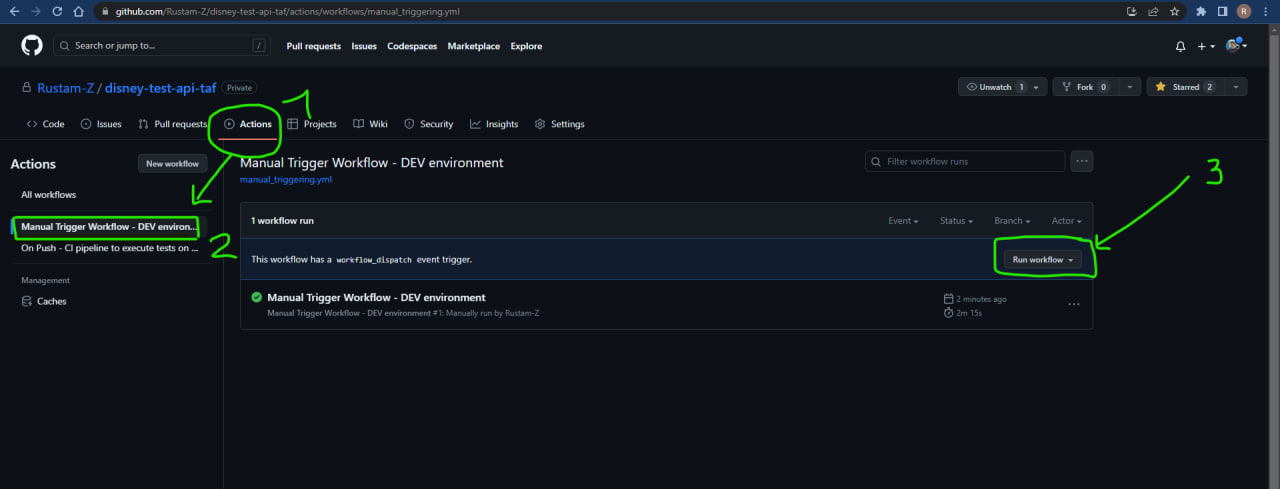
Sending test report emails
How to get email password?
Create repository secrets:
MAIL_USERNAME
MAIL_PASSWORD
poetry shell & poetry install.[Windows] Provide the Python path to the virtual environment: C:\Users\<USER>\AppData\Local\pypoetry\Cache\virtualenvs\ip-manager-taf-api-<HASH>-py3.11\Scripts\python.exe
.config.yaml should be created in root of project. Run generate_config.py file to generate config file automatically.
But you need to have .env with SUPERUSER credentials. Use env-template to create .env file.config-template.yaml as config file template. You need to create users for facility. To create a user you need to create a role. To create a facility you need to create a customer..config.yaml includes API URLs for DEV, STAGING and PROD envs. /core/enums/environments.py # The list of env: DEV, STAGING, PROD.
/core/config/__init__.py # Change this file, if you change the schema of config file.
/tests/conftest.py # Change PyTest hooks.
/paths.py # The paths for common project files. Change here if you edit the name of config file.
Tests can run in DEV, PROD environments. You can change default running env in .config.yaml file that you created. Or provide --env flag while executing tests. It will override CONFIG.env.
python -m pytest tests/ -s
python -m pytest --reruns 3 -s --env=dev -v tests/  # Run all available tests.
python -m pytest --reruns 3 -s --env=dev -v -m smoke tests/  # Run all smoke tests. Tests with smoke marker.

# Flags
# `-n auto` = level of parallelism to run multiple tests simultaneously. NOT WORKING TEMPORARY!
# `--reruns 5` = maximum number of times the tests to run if failed.
# - `--reruns-delay 1` = amount of seconds to wait before the next re-run.
# `--lf` or `--last-failed` = to run last failed tests.
# `-v` = verbose, to get more info.
# `-m` = mark expression.
Execute tests and generate allure_results directory using the command below.
python -m pytest --reruns 3 -s --env=dev -v --alluredir=.output/allure_results tests/
To generate report, execute generate_test_report.sh. It will generate test results report in .output/allure_report directory.
Or you can manually use the command below, if you don't want to keep the history of test executions.
allure generate .output/allure_results -o .output/allure_report --clean
`\api`: API service layer, contains API related business logic and use cases: API responses & requests models, request endpoints, headers, params.
`\core`: includes framework related helpers: HTTP client, API responses validators, helpers, config, common enums.
`\data`: test data layer.
`\fixtures`: test setup and teardown helpers.
`\tests`: test layer, actual functional API and UI tests.
Request models -> fake request models are inside test data layer.

Response -> all successful and error response models contain status, message, data, error.
SuccessResponse, checks that status is False, data should be object.
ErrorResponse, checks that status is True, error should be object.

Common responses models in common_models.py. Ex: AuthErrorResponse.

Other response models are created for successful responses per API.
status field content is checked via pydantic SuccessResponse and ErrorResponse.error schema is NOT validated for all responses, as it is not defined, and generated by backend framework.message is not validated separately yet for success, error. It will be done in the future, when backend will support this feature.1. @mobile() # Fixture for mobile which uses `/?is_for_mobile=true`
2. @users() # Authentication -> auth, unauth requests.
Rustam-Z/test-automation-framework-example-mini-project is a public repo on GitHub by Rustam-Z. Disney's API Test Automation Framework with reporting and CI integration.
It declares no license on GitHub. Public does not mean open source: without a license, nobody is granted the right to reuse it.
f.k.a. Awesome ChatGPT Prompts. Share, discover, and collect prompts from the community. Free and open source — self-host for your organization with complete privacy.
Build Agentic workflows, RAG pipelines, with rich AI model and tool support on one collaborative workspace. Deploy on cloud, VPC, or self-hosted, so teams move from prototype to production without rebuilding the stack.
Its maker has not tagged a system, so it is unknown here. Its README says what it needs.
Open "Take it" on its page: Take My Repo writes an install plan for your machine and hands it to your AI agent (Claude Code, Codex or Cursor), which asks you before each step. Take My Repo has not tested it on any machine.
Its last change on GitHub was on 2024-03-16. Take My Repo does not judge from that whether it is maintained.
Nobody has reviewed it on Take My Repo yet, which says nothing about its quality.
Take My Repo cannot say: it does not audit code and has not run test-automation-framework-example-mini-project. What is known comes from GitHub. It declares no license on GitHub. Public does not mean open source: without a license, nobody is granted the right to reuse it. Its last change was on 2024-03-16. It has 2 stars, which measure popularity, not safety. Nobody has reviewed it on Take My Repo yet, which says nothing about its quality. Read the source before you run it. With "Take it", your AI agent shows each step and asks you before running it; README text is treated as data, not as instructions.


