
rea
Reverse engineer anything with agents, from app behavior down to native binaries.
- 476k
- TypeScript
- MIT
- 1 h ago
Gstack for PMs. Eval Studio that you can plug-n-play anywhere.
Repo RyanAlberts/pmstack, read from GitHub 8 h ago. RyanAlberts has not joined Take My Repo.
RyanAlberts/pmstack is a public repo on GitHub by RyanAlberts. Gstack for PMs. Eval Studio that you can plug-n-play anywhere. It declares the MIT license on GitHub. It is written mainly in JavaScript, has 10 stars and last changed on 2026-09-25. Nobody has reviewed it on Take My Repo yet, which says nothing about its quality. Read from GitHub on 2026-11-23.
Find how your AI product fails.
Iterate. Raw pattern recognition meets Product Sense.
pmstack helps product managers read real traces (one full conversation or task, with every step the AI took), name the failure modes and success modes at each stage, and turn the ones that matter into checks you can trust. It follows the error discovery method taught by Hamel Husain and Shreya Shankar.
Open Eval Studio · Try the dental booking sample · Use it with Claude Code
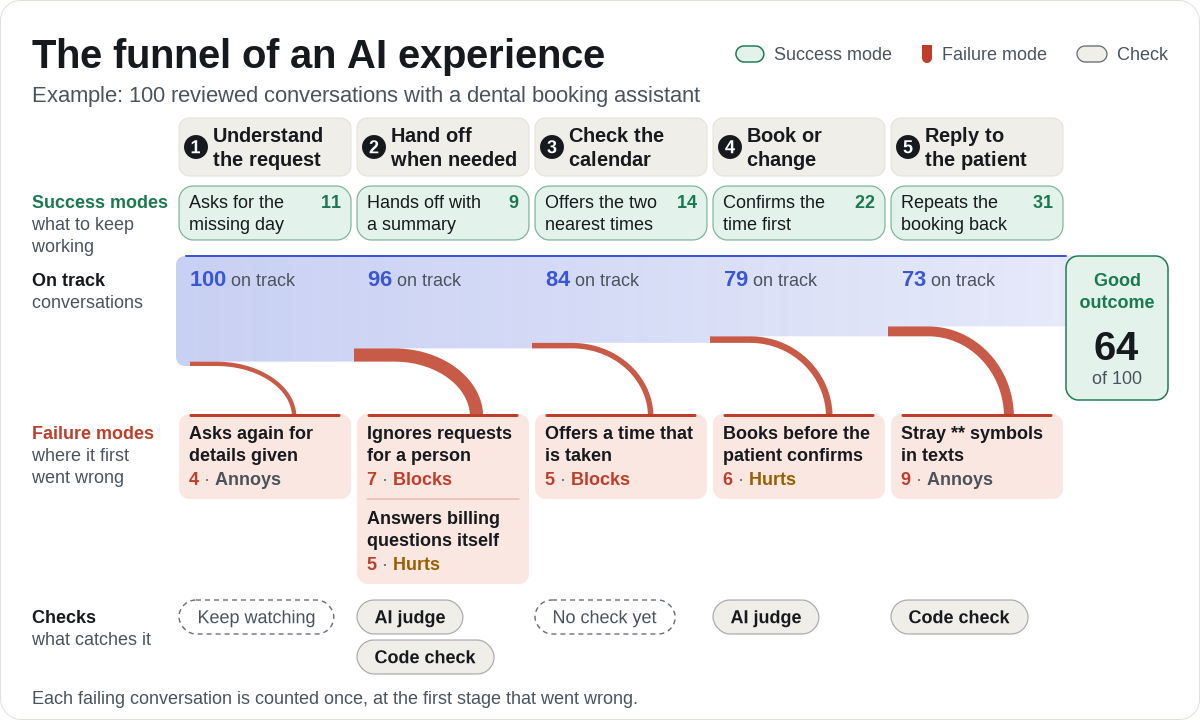
Green chips are success modes to keep working. Red ribbons are failure modes leaving the funnel, each counted once at the first stage that went wrong. The bottom row shows the check for each failure mode, when it has one: a code check (a rule a computer can test) or an AI judge (a prompt that asks a model for pass or fail).
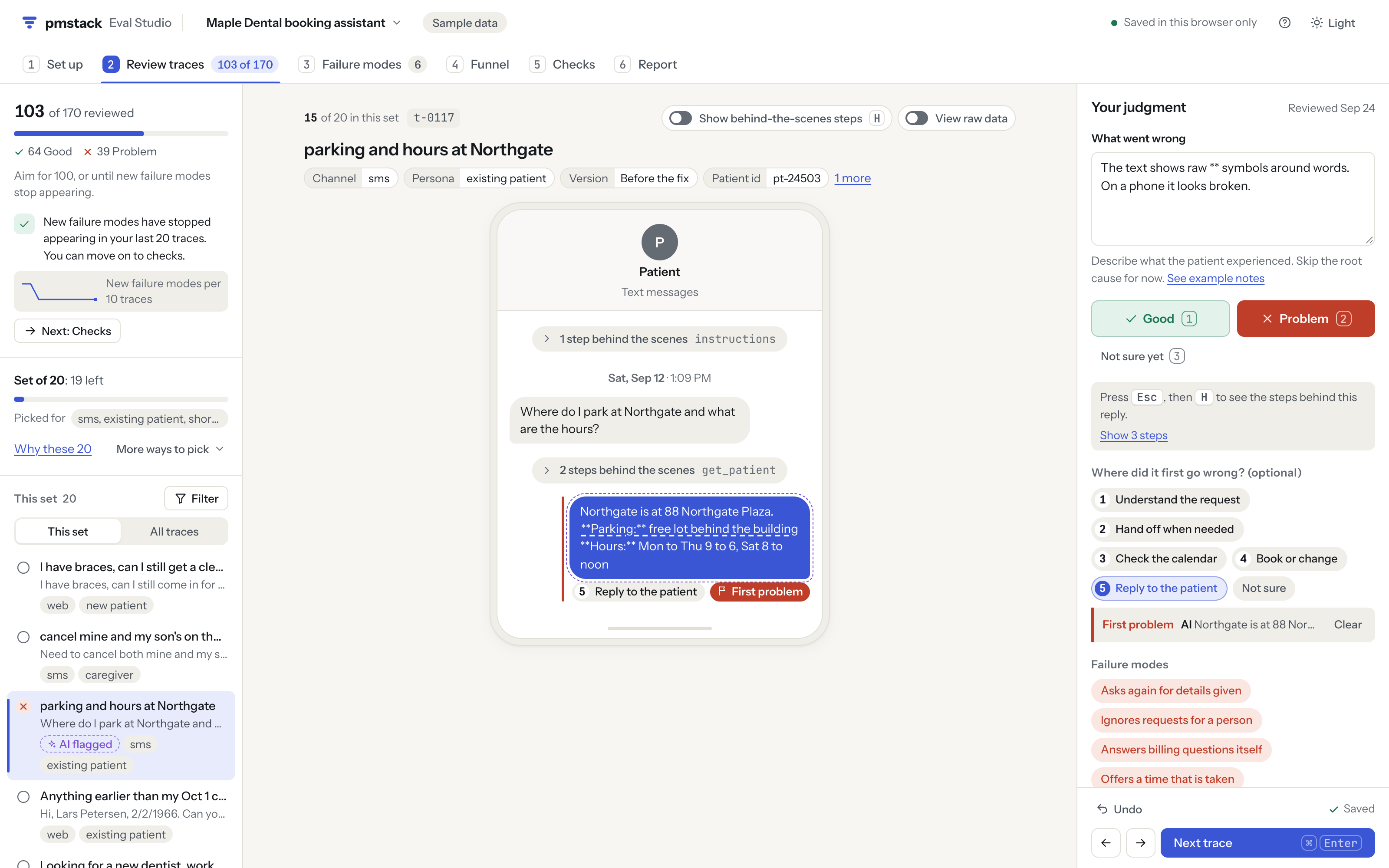
Review each trace the way your customer saw it. Here the text message shows raw ** symbols, so the reviewer presses 2 for Problem and writes what went wrong.
In your browser. Open Eval Studio and pick the dental booking sample. Press 1 (Good) or 2 (Problem) on a few traces and write what went wrong. There is nothing to install, and every tab already has data to explore.
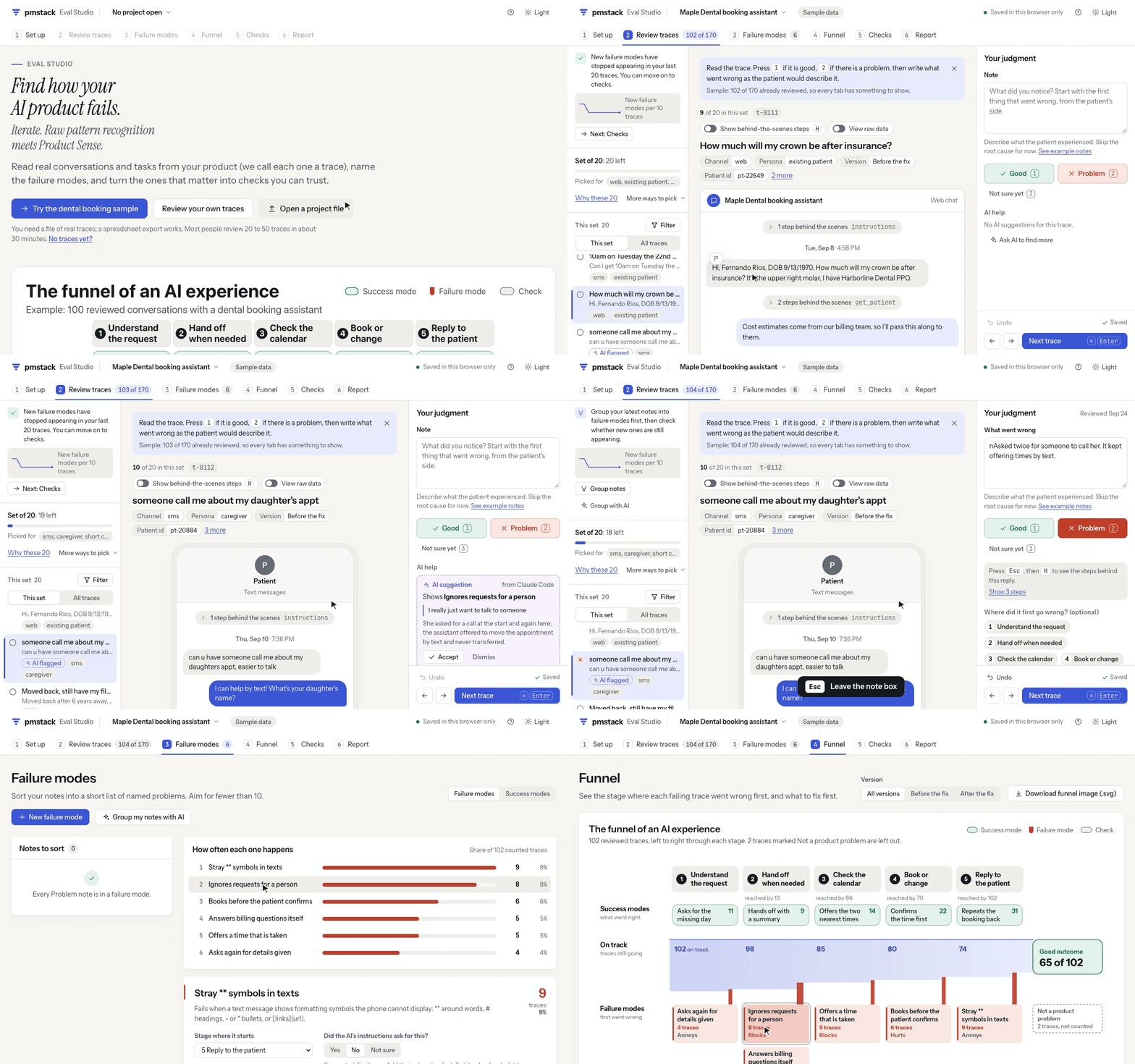
On your computer. You need Node 20 or newer, nothing else:
git clone https://github.com/RyanAlberts/pmstack && cd pmstack && node bin/pmstack.mjs studio examples/quickstart --open
Point it at your own folder the same way. Your reviews save next to your traces, in a pmstack/ folder.
In Claude Code. Add the plugin, then start:
/plugin marketplace add RyanAlberts/pmstack
/plugin install pmstack@pmstack
/pmstack:start
/pmstack:start asks what you have (traces, no traces yet, an agent that uses tools, evals someone else built) and runs the right skill.
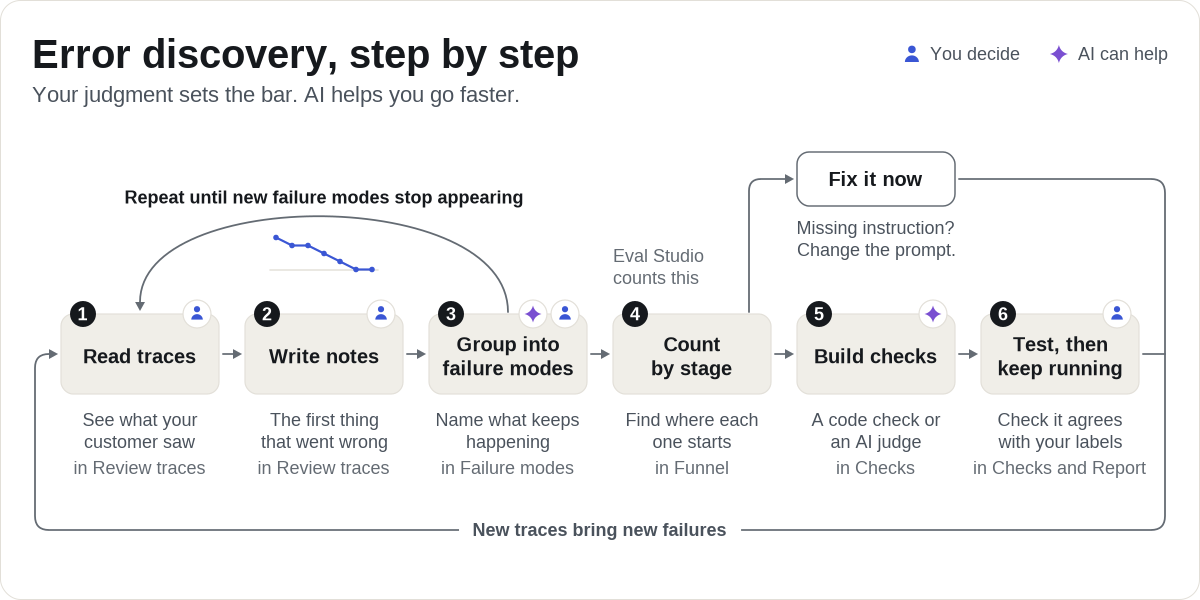
| Step | What you do | Where in Eval Studio |
|---|---|---|
| 1. Read traces | See each trace the way your customer saw it. | Review traces |
| 2. Write notes | Note the first thing that went wrong, in plain words. | Review traces |
| 3. Group into failure modes | Sort your notes into a short list of named problems, and name what went well as success modes. | Failure modes |
| 4. Count by stage | See where each failure mode starts and how often, then decide: fix it now, build a check, or keep watching. | Funnel |
| 5. Build checks | Turn each failure mode worth tracking into a code check or an AI judge. | Checks |
| 6. Test, then keep running | Make sure each check agrees with your labels, then run it on every change. | Checks, Report |
Metrics picked before anyone reads traces measure the wrong things: a helpfulness score can't see a booking assistant that offers a time that is already taken. A polite, well-written reply can still lose the sale, and only reading the trace shows it. So you read first, and every check you build tracks a failure your customers hit. The method is Hamel Husain and Shreya Shankar's, and Learn the method links their guides.
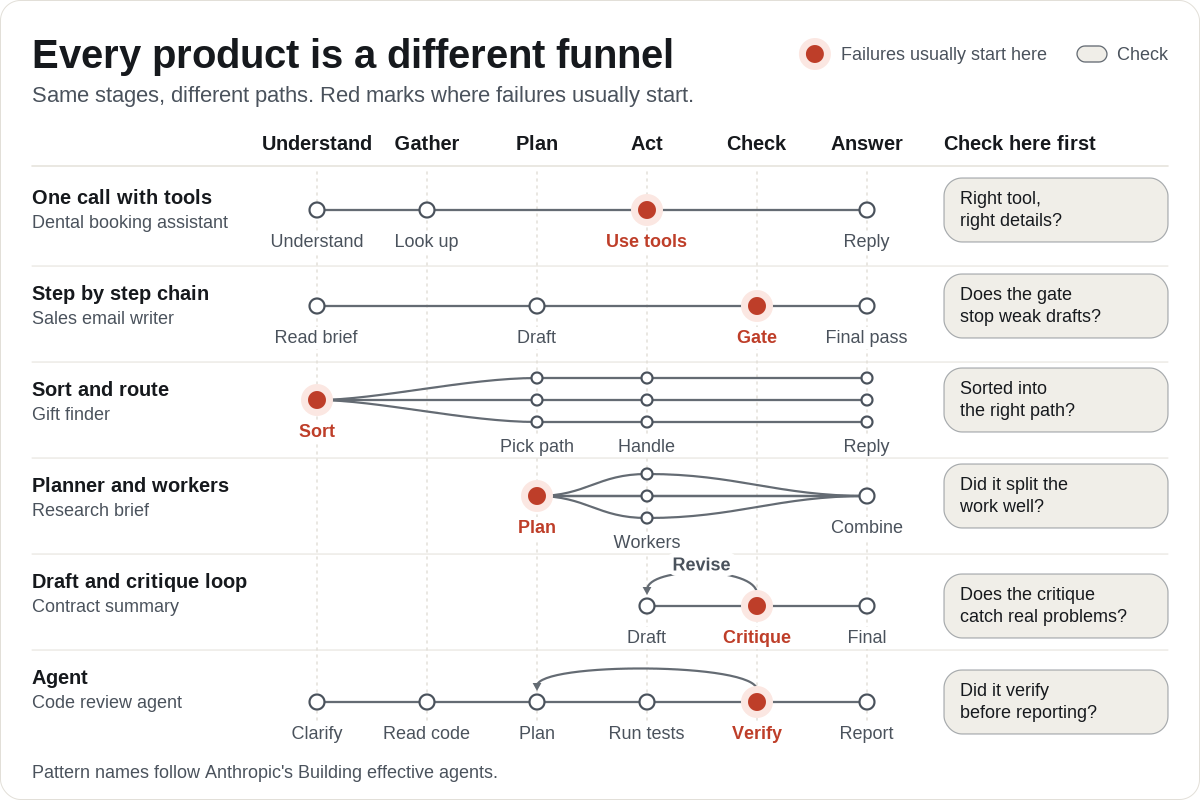
Pick how your AI works (one call with tools, a step by step chain, sort and route, planner and workers, a draft and critique loop, or an agent) and pmstack starts you with stages that fit. How your AI works shows where failures usually start in each and what to check first.
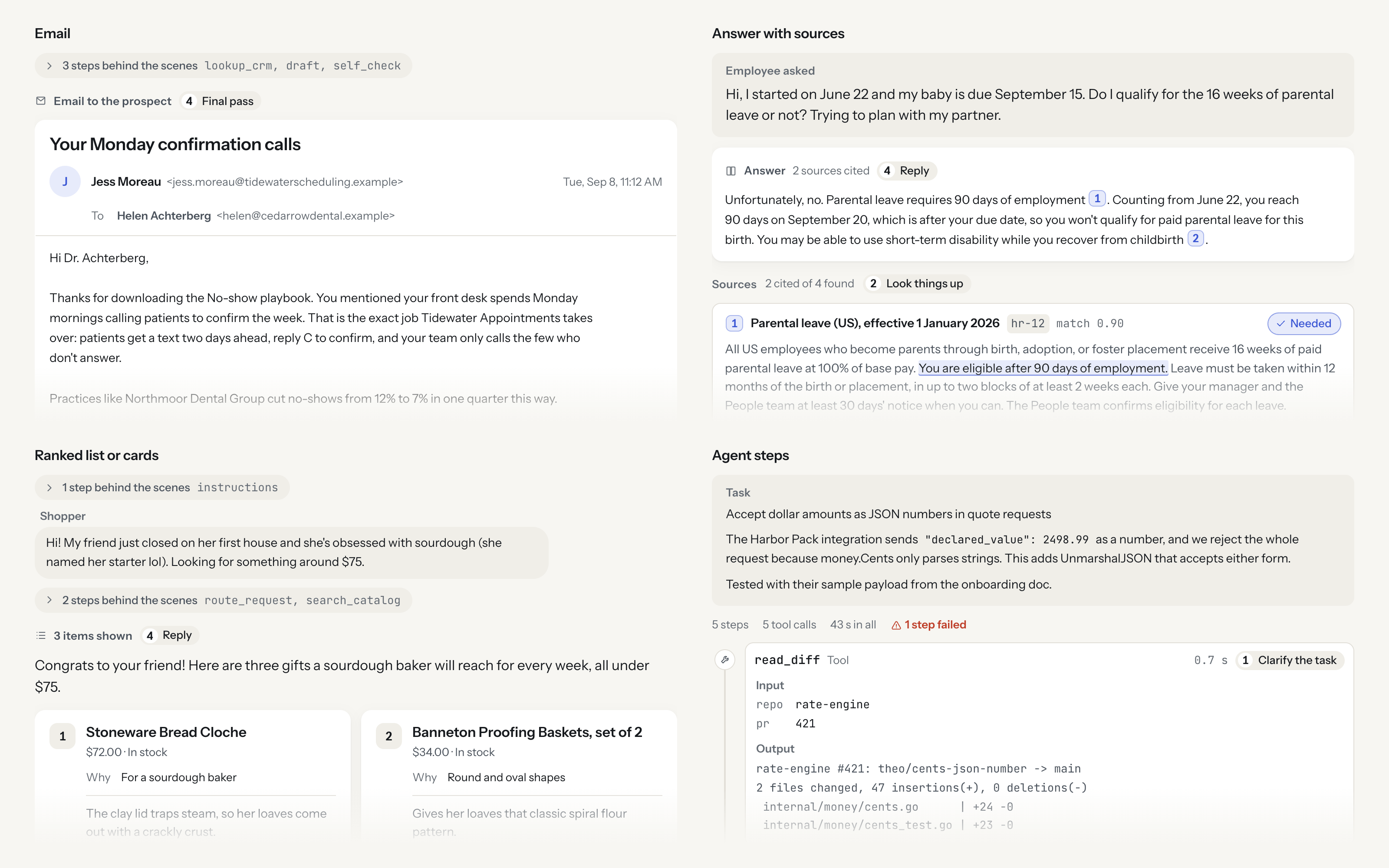
One studio, very different products: an email writer, a policy answer bot with sources, a gift finder, and an agent's step list.
Eval Studio draws text messages, web chat, phone calls, emails, documents, answers with sources, agent steps, code reviews, form fields, and ranked lists, and when none of those fits, Build your own view lets you pick the fields to show (product setup guide).
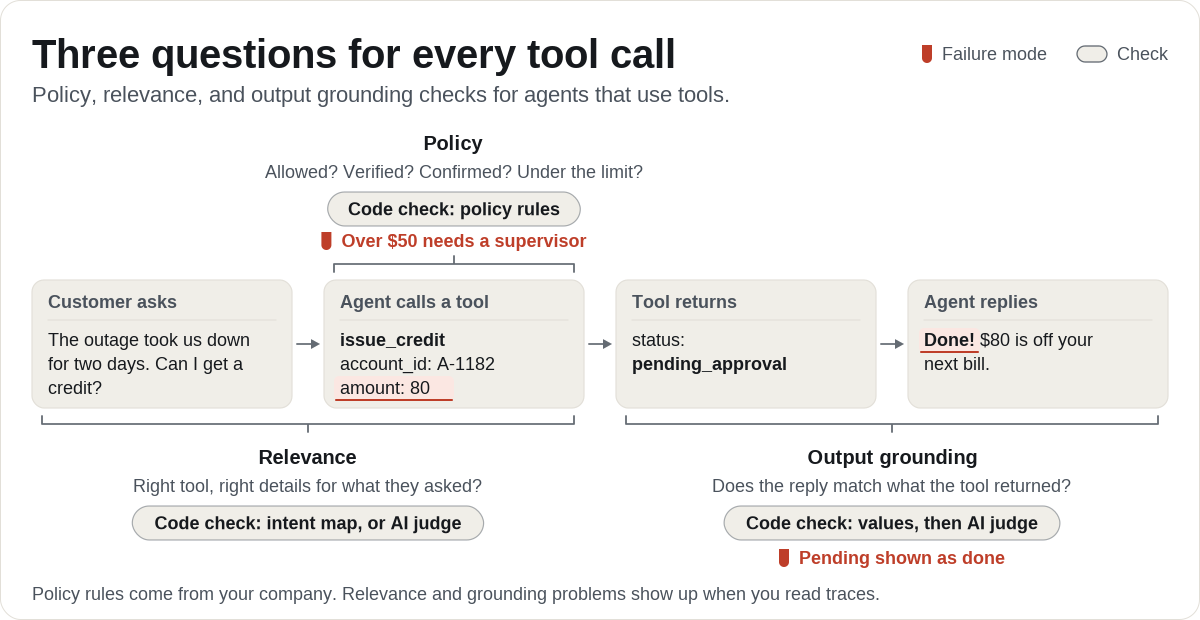
When your agent looks things up or changes things for your customer, ask three questions of every tool call:
Policy rules are requirements your company already knows, so you write them down first, then read traces for the rules nobody wrote down. Relevance and output grounding problems show up when you read traces: confirm them in your own, then start from the ready-made templates.
| In Claude Code | What it does |
|---|---|
/pmstack:tool-policy |
Turns your company's requirements into a policy file, tests it on past traces, and shows how to block a bad call before it runs. |
/pmstack:tool-relevance |
Builds an intent map (for each kind of request, the tools it needs, may use, and must never use) or an AI judge for the right call. |
/pmstack:tool-grounding |
Adds two code checks for the reply (a number no tool returned, success claimed after a failed call), then an AI judge for reworded facts. |
Try them on the support agent sample, and read the tool call checks guide.
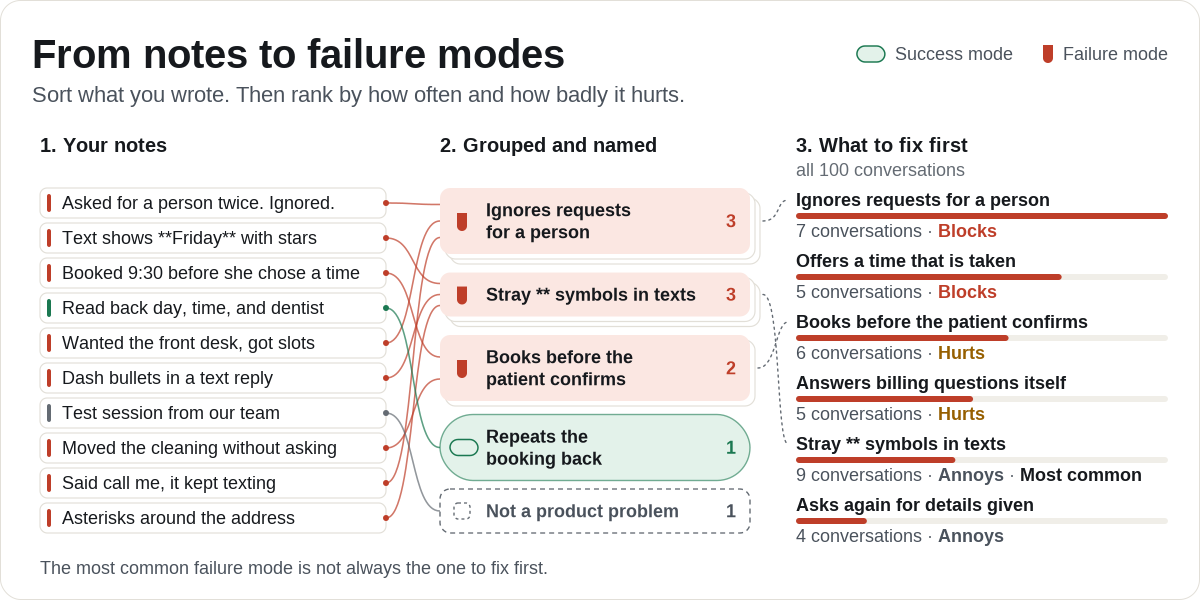
From notes to failure modes. Grouping turns a pile of notes into a short list of failure modes, named in your customer's words. Then pmstack ranks them by traces times severity (Blocks counts 3, Hurts 2, Annoys 1). In the dental booking sample, stray symbols in texts is the most common failure mode at 9 conversations, but ignoring requests for a person ranks first: 7 conversations, and each one blocks the patient.
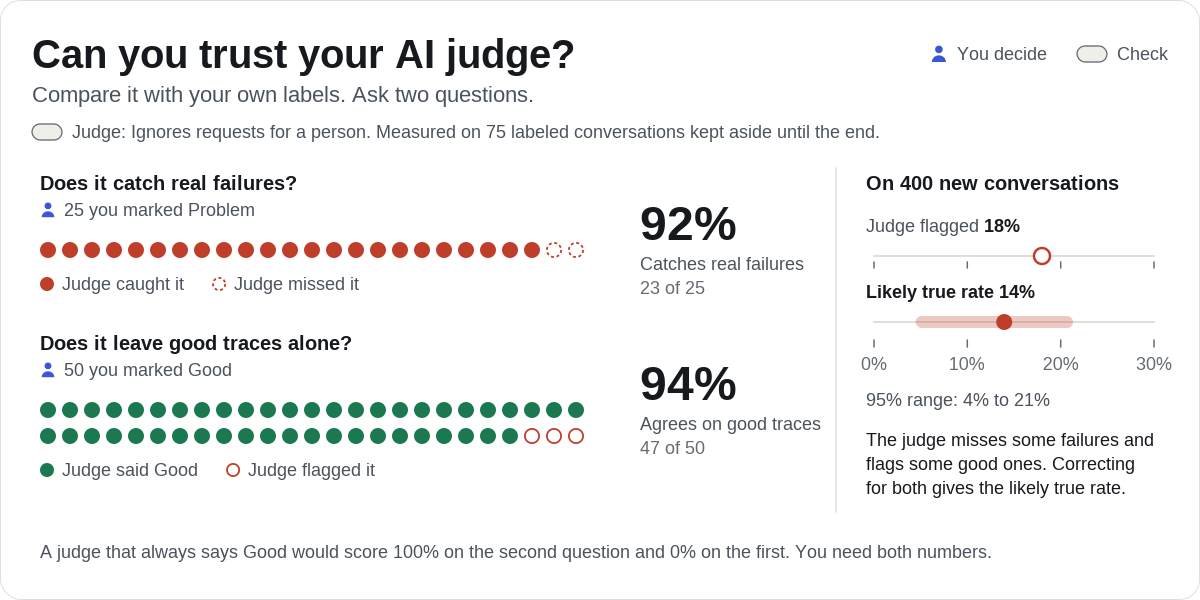
Can you trust your AI judge? A judge is a prompt, so it makes mistakes, and you measure them before you trust its numbers. pmstack sets part of your labels aside as a final test and reports two numbers: how many real failures the judge catches, and how many good traces it leaves alone. In this example the judge catches 23 of 25 real failures and leaves 47 of 50 good ones alone. It flags 18% of 400 new conversations, and after correcting for its known mistakes, the likely true failure rate is 14%, with a 95% range of 4% to 21%.
A web app with six tabs. It runs on the web, or on your computer with node bin/pmstack.mjs studio <folder>.
| Tab | What you do there | Steps |
|---|---|---|
| 1 Set up | Load your traces and choose how your product looks. | Before you start |
| 2 Review traces | Read each trace, mark Good or Problem, and write what went wrong. | 1, 2 |
| 3 Failure modes | Group your notes into named failure modes and success modes. | 3 |
| 4 Funnel | See the stage where each failing trace went wrong first, and what to fix first. | 4 |
| 5 Checks | Turn the failure modes that matter into checks, and confirm they agree with you. | 5, 6 |
| 6 Report | Share what you found and hand checks to your engineers. | 6 |
Six sample products come with it: a dental booking assistant, an outreach email writer, a policy answer bot, a gift finder, a pull request reviewer, and an internet provider's support agent.
Twelve skills for Claude Code and any agent that reads skills. skills/README.md shows how to install them in Codex, Cursor, Gemini CLI, and Claude on the web.
| Skill | Use it when | In Claude Code |
|---|---|---|
pmstack-start |
You are not sure where to begin | /pmstack:start |
pmstack-find-failures |
You have traces and want to find how the product fails | /pmstack:find-failures |
pmstack-make-traces |
You have no real traces yet | /pmstack:make-traces |
pmstack-build-judge |
A failure mode needs an AI judge | /pmstack:build-judge |
pmstack-test-judge |
You need to know whether a judge agrees with you | /pmstack:test-judge |
RyanAlberts/pmstack is a public repo on GitHub by RyanAlberts. Gstack for PMs. Eval Studio that you can plug-n-play anywhere.
It declares the MIT license on GitHub.
Its maker has not tagged a system, so it is unknown here. Its README says what it needs.
Open "Take it" on its page: Take My Repo writes an install plan for your machine and hands it to your AI agent (Claude Code, Codex or Cursor), which asks you before each step. Take My Repo has not tested it on any machine.
Open-source AI red teaming toolkit from Microsoft. Test generative AI systems with automated scans, adaptive multi-turn attacks, and a web UI.
Its last change on GitHub was on 2026-09-25. GitHub counts 2 open issues and pull requests. Take My Repo does not judge from that whether it is maintained.
Nobody has reviewed it on Take My Repo yet, which says nothing about its quality.
Take My Repo cannot say: it does not audit code and has not run pmstack. What is known comes from GitHub. It declares the MIT license on GitHub. Its last change was on 2026-09-25. It has 10 stars, which measure popularity, not safety. Nobody has reviewed it on Take My Repo yet, which says nothing about its quality. Read the source before you run it. With "Take it", your AI agent shows each step and asks you before running it; README text is treated as data, not as instructions.




