
HushPinterest
HushPinterest Morphe patches for Pinterest. Hides promoted pins, AI-labeled pins, and much more.
- 60
- GPL-3.0
- 5 d ago
Repo SysAdminDoc/HushPinterest, read from GitHub 7 h ago. SysAdminDoc has not joined Take My Repo.
In short
SysAdminDoc/HushPinterest is a public repo on GitHub by SysAdminDoc. HushPinterest Morphe patches for Pinterest. Hides promoted pins, AI-labeled pins, and much more. It declares the GPL-3.0 license on GitHub. It is written mainly in Java, has 60 stars and last changed on 2026-11-19. Nobody has reviewed it on Take My Repo yet, which says nothing about its quality. Read from GitHub on 2026-11-23.
Similar repos
rea
Reverse engineer anything with agents, from app behavior down to native binaries.


If HushPinterest makes Pinterest better for you, a coffee helps me keep testing patches and maintaining them as Pinterest changes.
 HushPinterest
 is a set of Morphe patches for Pinterest on Android. It takes promoted pins out of your feed and can hide the pins Pinterest labels as AI. It also adds pin and board downloads, your own browser and share sheet, privacy switches and a long list of small interface fixes, all controlled from a settings page inside Pinterest.
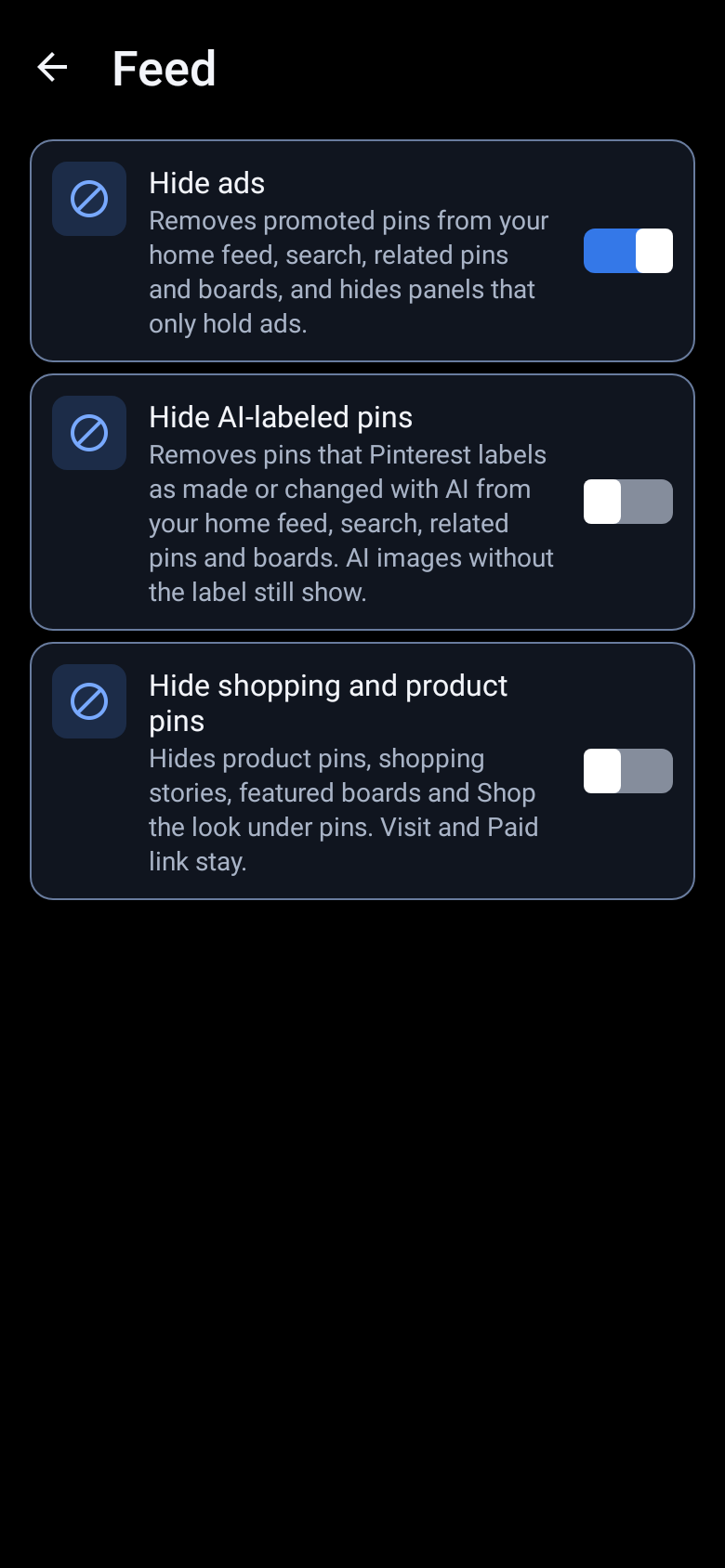
Hide ads, Disable analytics, Strip link tracking, Hide advertising ID and Fix push notifications start on. Every other switch starts off, so a freshly patched Pinterest looks like stock until you turn something on. What changed in each version is in the changelog.
The latest release is v0.0.14, with 36 patches. Add this repo to Morphe Manager as a patch source and it'll offer each new release when it comes out.
Add HushPinterest to Morphe Manager
[!IMPORTANT] Keep your signing key. Morphe Manager signs the patched Pinterest with a key it makes on your phone, and Android only installs an update over it when the update carries that same key. Right after your first patch, open Settings > System > Import & export > Signing key in Manager and tap Export. Keep the
Morphe.keystorefile somewhere private, since anyone who has it can sign an APK your phone accepts as an update. On a new phone, import it before you patch anything.
Install
- Install Morphe Manager 2.5.0 or newer.
- Add HushPinterest as a patch source with the link above. Or in Manager open Sources, tap +, choose Remote and enter
github.com/SysAdminDoc/HushPinterest. - Get Pinterest 14.44.0, version code 14448030. APKMirror has it as a plain APK for Android 10 or newer, so there's nothing to merge. Pick that file in Manager.
- Patch it with the default selection. It holds every switch, so you don't need Expert mode. GmsCore support, Spoof signature for Google sign-in and Change package name are left out. If you want one, turn on Settings > Advanced > Expert mode in Manager and pick it before you patch.
A patched Pinterest can't install over the stock app, because Android only accepts an update signed with the same key. Save anything local you need, uninstall stock Pinterest, then install the patched one. Your boards and pins come back when you sign in. Local settings and drafts don't. If you'd rather keep stock Pinterest, patch with Change package name and the patched app installs beside it as a separate app with its own sign-in.
In Brazil, Indonesia, Singapore and Thailand, Android has been checking who made the apps people install from the big app stores since September 30, 2026, and Google plans to check every install on certified phones in 2027. A patched Pinterest is signed with your own key, which no registered developer owns, so once those checks reach Manager's installs you'll need Android's advanced flow first (turn on developer mode, wait a day, then allow apps from unverified developers).
There are Hush patch sources for other apps too: Hushfacebook for Facebook, HushGram for Instagram, HushMessenger for Messenger, HushPine for PineDrama, HushTelegram for Telegram, HushThreads for Threads, Hushfeed for TikTok and HushTumblr for Tumblr. Each one is a separate source in Manager, so add only the ones for apps you patch.
Signing in
Sign in with your email and a Pinterest password. Google's sign-in button checks the app's signing certificate, and a patched Pinterest carries your key instead of Pinterest's, so it won't work.
If you joined through Google or Facebook, or don't know your Pinterest password, tap Forgot your password? on Pinterest's login page, enter the email on your account and set a password from the reset link. It's separate from your Google password, and you don't need to unlink Google. Pinterest's password help has the steps.
With microG-RE on your phone, Google sign-in can go through it instead. Patch with GmsCore support (it brings Spoof signature for Google sign-in along) and add your Google account in microG-RE's settings. Leave GmsCore support out if you use Google Play services, because it moves Google sign-in and push notifications over to microG-RE.
Spoof signature for Google sign-in on its own is for the XSpoofSignatures LSPosed module. Stock Google Play services never reads what it adds.
Opening Pinterest links
Android hands a pinterest.com or pin.it link to the Pinterest app only when the app proves it belongs to Pinterest's sites, and a re-signed app can't. To open those links in the patched app, go to its App info page, tap Open by default, then Add link, and select the Pinterest sites. The Links page in HushPinterest settings has a button that goes straight there.
Settings
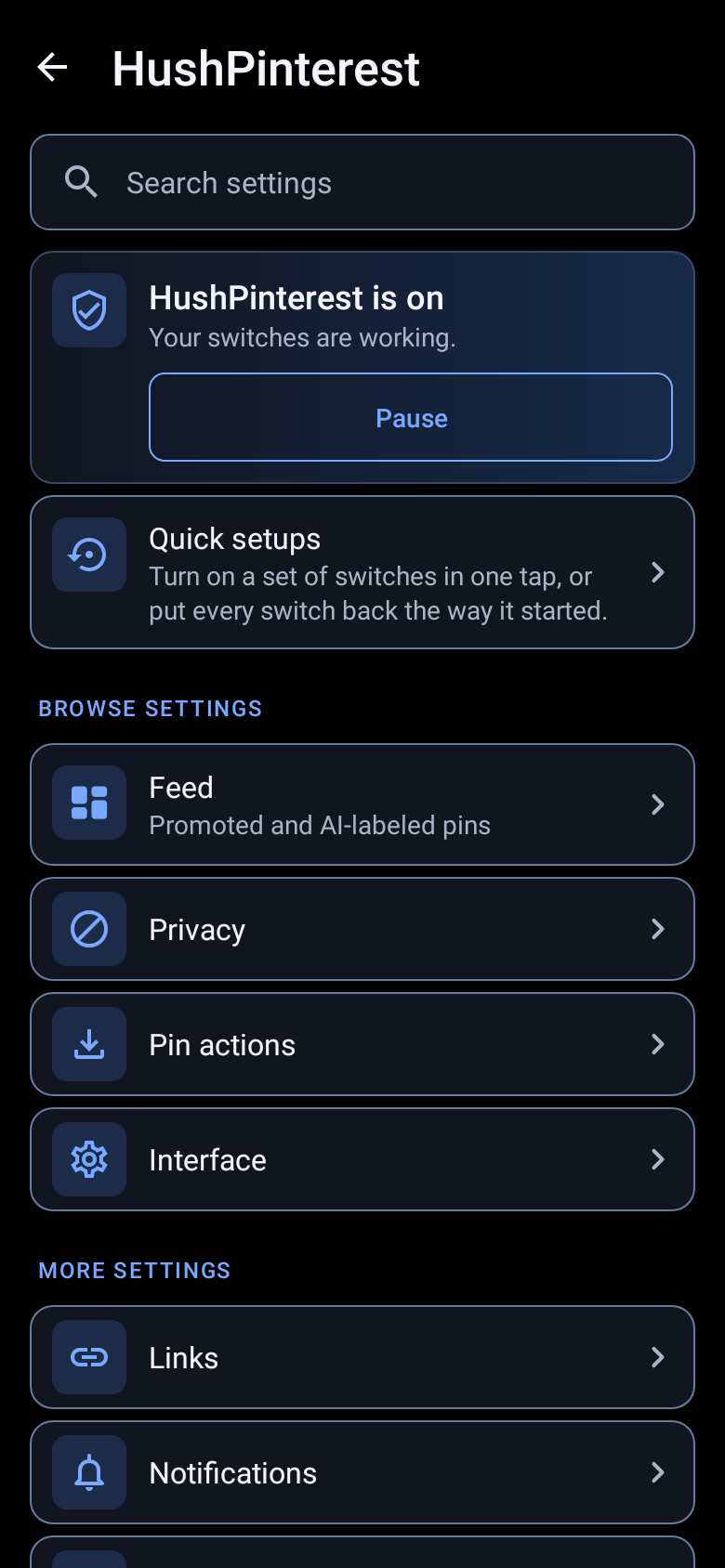
Open Pinterest's settings and tap HushPinterest. You can also long-press the Pinterest logo at the top of your home feed. From your home screen, long-press the Pinterest icon and tap HushPinterest. Pinterest's App info page has it too, under Additional settings in the app (Samsung calls it Configure in Pinterest).
Switches take effect without patching again. A screen that's already open may need reopening, and a few switches need Pinterest to restart. When you flip one of those, a Restart row shows up at the top of the page, and tapping it reopens Pinterest on the same settings page. Quick setups on the home page turns on the Quiet or Privacy switches in one tap, or puts every switch back the way it started. Pause turns every switch back to Pinterest's own behavior without forgetting your choices. Changes made to the app itself stay in place while it's on. GmsCore support still sends Google sign-in and push notifications to microG-RE, Remove ad tracking permissions keeps those permissions out, Change package name keeps the copy separate, and Disable analytics leaves Firebase's collection flags off in the manifest. To undo those, patch again without them. You can export your switches to a file and import them later, with a preview of every change and one Undo. The file holds settings only, never your account, media or signing key. Setup and backup guide under About explains all of this, and the Pinterest's own settings page says where Pinterest keeps the options HushPinterest leaves alone.
Downloads
Download pins adds a Download row to a pin's menu. For an image it saves the original when Pinterest's media host has one, or the largest size when it doesn't. For a video it saves the best MP4 Pinterest supplies, and streaming-only videos can't be saved. Files go to your Download folder. Turn on Save in Pinterest's folder to keep them in Pictures/100PINT/Pins, or use Pick a download folder.
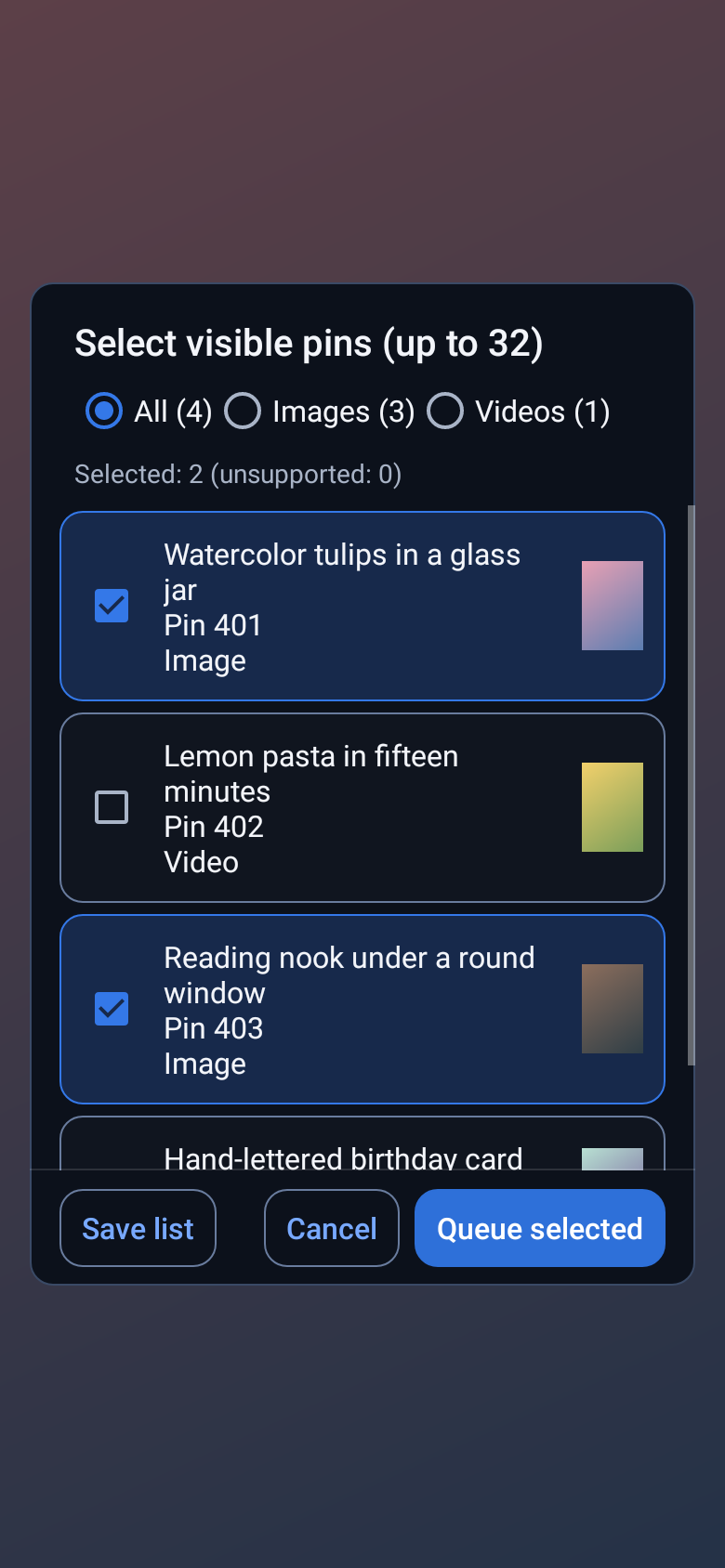
From a feed, search or board grid, Download visible pins in a pin's menu lets you pick up to 32 pins already on screen. Download board saves up to 500 pins Pinterest has loaded for a board and skips the ones already in Download history, so scroll to the end of the board first if you want all of it. Both pickers can also save the chosen pins' links with Save list, as a bookmarks file you can import into a browser or bookmark app, or as a JSON file. Long-press download adds a Download button to the round menu you get when you hold a pin in a grid, and Long-press view adds a View button there that opens the picture full screen, with pinch and double-tap zoom.
Download history under Pin actions shows Android's status for each download, with Retry, Open file, Share file and, for images, Set as wallpaper. Two more switches there hold downloads to unmetered networks or keep them off while you roam.
Patches
There are 50 patches. Where a patch has a switch, its description names the settings page that holds it.
| Patch | What it does |
|---|---|
AMOLED black |
Paints the bottom bar pure black in dark mode, so it matches Pinterest's black pages on OLED screens. The comments sheet, a pin's menu, the Save to sheet that lists your boards, the other menus and sheets, the buttons over boards and profiles, and Pinterest's pop-up messages can go black too, each with its own switch. Light mode stays as it is. Starts off. Turn them on in HushPinterest settings > Interface. |
Change package name |
Gives the patched Pinterest its own package name and app name (HushPinterest unless you pick another), so it installs beside the Pinterest you already have instead of over it. It's a separate app with its own sign-in. It isn't selected by default. Works as soon as you patch it in, with no switch. |
Custom save sound |
Plays a sound file you pick on your phone when you save a pin, in place of Pinterest's chime. Pinterest's other sounds stay. Starts off. Pick the sound with Pick a save sound in HushPinterest settings > Interface, which turns the switch on for you. |
Custom splash logo |
Shows a logo you pick on the screen you see while Pinterest starts, in place of Pinterest's, on Android 13 and newer. Pick the picture in the patch's Logo option when you patch. Leave it empty for HushPinterest's logo. Starts off. Turn it on in HushPinterest settings > Interface. |
Customize board tabs |
Tidies the top of board tabs on Home. You can hide the See board button and the More ideas for line and move the board name. You can also stop the picture changing by keeping it or by choosing a pin, a photo from your phone or plain black. Starts off. Turn them on in HushPinterest settings > Interface. |
Disable analytics |
Stops Pinterest from sending usage reports, crash reports and ad-tracking data to outside companies, and turns off Google's analytics inside the app. Good if you'd rather share less. On by default. Turn it off in HushPinterest settings > Privacy. |
Disable update nag |
Stops Pinterest's pop-ups asking you to update from the Play Store. You can still update Pinterest yourself. Good if the reminders get annoying. Starts off. Turn it on in HushPinterest settings > Updates. |
Download board |
Adds Download board to a board's menu. It saves every pin Pinterest has loaded for that board, up to 500, and skips ones already in Download history, so you can keep a board without picking pins one at a time. Needs Download pins on too. Starts off. Turn it on in HushPinterest settings > Pin actions. |
Download pins |
Adds downloads for a pin, or for several pins you select in a grid. Saves the original image or the highest-quality video Pinterest supplies to your phone. When it saves an image, Pinterest's own Download image row is hidden. Downloads go to the Download folder. Turn on Save in Pinterest's folder to keep them in Pictures/100PINT/Pins with Pinterest's own saves, or use Pick a download folder to choose any folder inside Pictures, DCIM, Download or Documents. Starts off. Copy image puts an image pin's full-size picture on the clipboard, and Share image sends it through Android's share menu. Each has its own switch, also off. Save pins you download also saves a pin you download to your profile, and Download pins you save also downloads a pin you save. Those two start off as well. Turn them on in HushPinterest settings > Pin actions. |
Expand board list |
Opens the Save to sheet all the way up when you save a pin, so more of your boards show without dragging it. Starts off. Turn it on in HushPinterest settings > Interface. |
Questions
What is HushPinterest?
SysAdminDoc/HushPinterest is a public repo on GitHub by SysAdminDoc. HushPinterest Morphe patches for Pinterest. Hides promoted pins, AI-labeled pins, and much more.
Is HushPinterest open source?
It declares the GPL-3.0 license on GitHub.
Does HushPinterest run on macOS, Windows or Linux?
Its maker tagged it for Windows. That is declared by the maker; Take My Repo has not tested it.
How do I install HushPinterest?
Open "Take it" on its page: Take My Repo writes an install plan for your machine and hands it to your AI agent (Claude Code, Codex or Cursor), which asks you before each step. Take My Repo has not tested it on any machine.





