
HushTumblr
HushTumblr Morphe patches for Tumblr. Takes ads and clutter out of your dashboard, and much more.
- 28
- GPL-3.0
- 5 d ago
Repo SysAdminDoc/HushTumblr, read from GitHub 8 h ago. SysAdminDoc has not joined Take My Repo.
In short
SysAdminDoc/HushTumblr is a public repo on GitHub by SysAdminDoc. HushTumblr Morphe patches for Tumblr. Takes ads and clutter out of your dashboard, and much more. It declares the GPL-3.0 license on GitHub. It is written mainly in Java, has 28 stars and last changed on 2026-11-19. Nobody has reviewed it on Take My Repo yet, which says nothing about its quality. Read from GitHub on 2026-11-23.
Similar repos
rea
Reverse engineer anything with agents, from app behavior down to native binaries.


 HushTumblr
Morphe patches for Tumblr on Android. Patch the Tumblr bundle in Morphe Manager and you get a quieter Tumblr with its own HushTumblr settings page. It can drop ads and paid Blaze posts, hide suggestions, filter posts by type or by your own words, and trim the bottom bar.
The latest release is v0.0.11, with 57 patches. Add this repo to Morphe Manager as a patch source and it'll offer each new release when it comes out. Changes are listed in the changelog.
Add HushTumblr to Morphe Manager
[!IMPORTANT] Back up your signing key right after your first patch. In Morphe Manager open Settings > System > Import & export > Signing key and tap Export, then keep
Morphe.keystoresomewhere private. Android only updates a patched Tumblr with an APK signed by the same key, so on a new phone import it before you patch anything.
Install
- Install Morphe Manager 2.6.0 or newer.
- Add HushTumblr as a patch source: https://morphe.software/add-source?github=SysAdminDoc%2FHushTumblr
- Download the Tumblr 47.0.0.108 bundle (
.apkm, version code 1470000108) from APKMirror. - Patch it with the default selection. That's every patch except Spoof signature for Google sign-in, which you can pick after turning on Settings → Advanced → Expert mode in Morphe Manager.
- Uninstall stock Tumblr, then install the patched app. Your blogs and follows come back when you sign in, but drafts kept only on the phone don't.
Sign in with your email and Tumblr password. Google's sign-in checks the app's signing certificate, so it won't work on a patched Tumblr. If you joined through Google, set a Tumblr password first from the password reset page.
There are Hush patch sources for other apps too: Hushfacebook for Facebook, HushGram for Instagram, HushMessenger for Messenger, HushPine for PineDrama, HushPinterest for Pinterest, HushTelegram for Telegram, HushThreads for Threads and Hushfeed for TikTok. Each one is a separate source in Manager, so add only the ones for apps you patch.
Settings
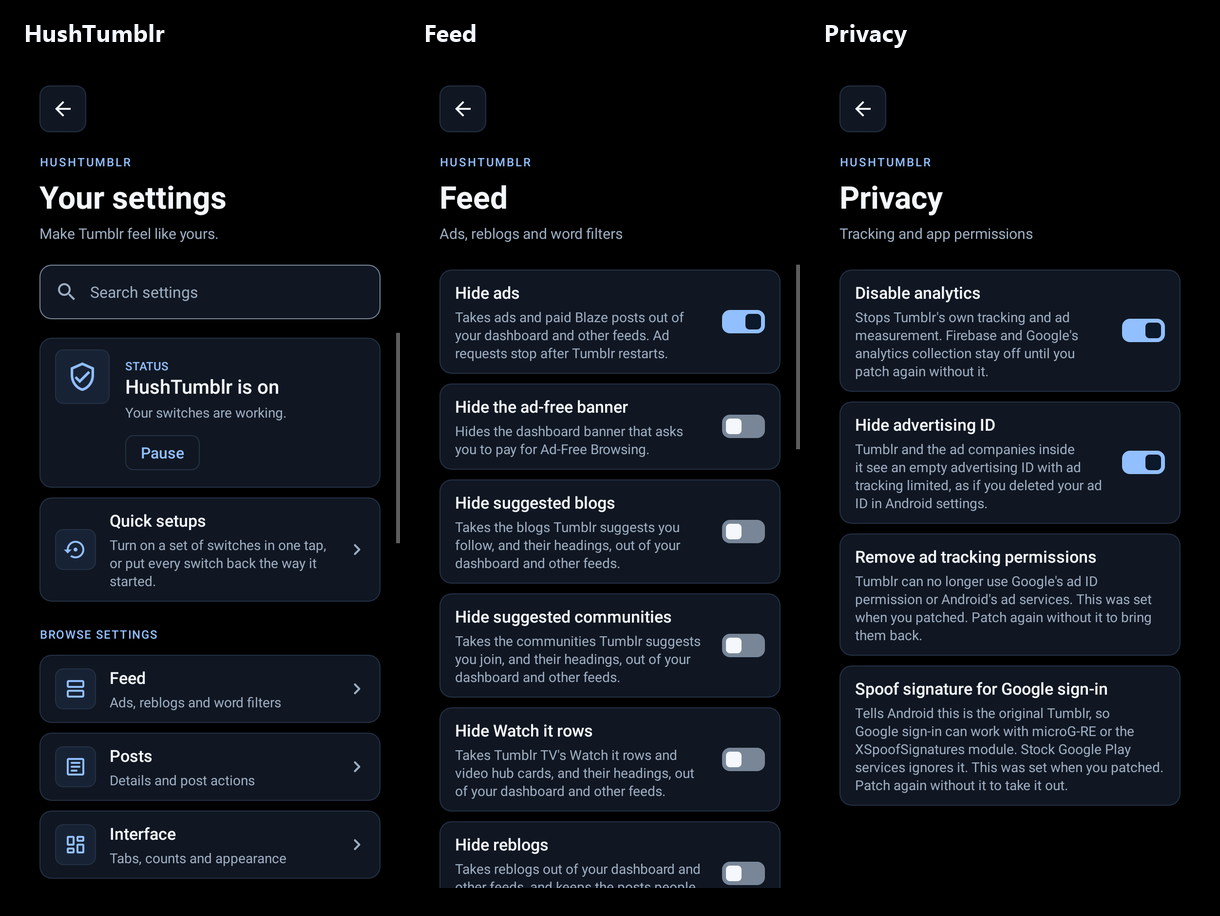
Long-press the Tumblr logo at the top of your dashboard. You can also tap HushTumblr at the bottom of Tumblr's Settings, or long-press the Tumblr icon. Switches apply without patching again, though a few, like Disable analytics, finish after Tumblr restarts, and a Restart row at the top of the page does that for you. Pause keeps your saved choices and makes the switches act as off, apart from Debug logging. Changes made while patching stay in the app. The same page backs up your settings.
Patches
There are 59 patches.
| Patch | What it does |
|---|---|
Collapse long posts |
Cuts long posts in your timelines to about a screen, with Tumblr's own Read more row under them. Tap it and the whole post opens right there in the timeline. A long entry in a reblog trail gets cut the same way, and its Read more opens the post. Asks keep Tumblr's layout. Starts off. Turn it on in Tumblr settings > HushTumblr > Posts, where you can make the cut half a screen or two screens instead. |
Dark background color |
Makes the background of Tumblr's Dark Mode palette black, which can save battery on OLED screens, or another dark color you pick when patching. On Android 12 or newer it can follow your wallpaper's colors instead. Blog and tag pages take it too, in place of their own colors. Other palettes stay as they are. Starts off. Turn it on in Tumblr settings > HushTumblr > Interface. |
Disable analytics |
Turns off Firebase and Google's analytics collection, and Tumblr's own tracking and ad measurement once it restarts. LiveRamp's identity tracker doesn't start when Tumblr launches, and Crashlytics crash reports stay off while the switch is on. The Firebase and Google analytics part stays until you patch again without it. On by default. Turn it off in Tumblr settings > HushTumblr > Privacy. |
Disable update prompts |
Stops Tumblr asking Google Play for a newer version and showing Play's update prompt. Starts off. Turn it on in Tumblr settings > HushTumblr > Updates. |
Filter activity notifications |
Hides selected likes, reblogs, replies, follows, mentions, asks and boops from the activity list as pages load. Each switch starts off. Choose them in Tumblr settings > HushTumblr > Notifications. |
Fit full-screen videos |
Shows tall videos whole in the full-screen player, instead of filling the screen's height and cutting off the sides. Starts off. Turn it on in Tumblr settings > HushTumblr > Interface. |
Fix push notifications |
Lets the patched app sign up for push notifications. Firebase can refuse a patched Tumblr whose request doesn't name Tumblr's original signature, so this sends its fingerprint. On by default. Turn it off in Tumblr settings > HushTumblr > Notifications. |
Hide Blaze prompts |
Hides the prompts to pay for Blaze, Tumblr's way to promote a post. That covers the Blaze buttons on your blog and dashboard, the nudge after you post, the Blaze banners, and the Blaze buttons on posts: the flame under your own posts, Blaze in a post's menu and the share sheet, and Promote in community posts. Starts off. Turn it on in Tumblr settings > HushTumblr > Interface. |
Hide Featured posts |
Takes the staff-picked posts Tumblr shows under a Featured header out of your dashboard and other feeds. Starts off. Turn it on in Tumblr settings > HushTumblr > Feed. |
Hide Tumblr TV |
Takes the Tumblr TV tab out of the bottom bar, and stops sign-up from sending you there. Starts off. Turn it on in Tumblr settings > HushTumblr > Interface. |
Hide Watch it rows |
Takes Tumblr TV's Watch it rows and video hub cards out of your dashboard and other feeds, along with their headings. Starts off. Turn it on in Tumblr settings > HushTumblr > Feed. |
Hide ads |
Takes ad cards and paid Blaze posts out of your dashboard and other feeds. Sponsored banners go too, along with the one-line app promos (Made with WordPress and its Install button) on tag pages and in search. A sponsored header at the top of Explore stays empty. Tumblr stops asking its ad networks for more and stops showing a full-screen ad when you open a blog, and the ad networks don't start when Tumblr launches. Its Keep Blaze posts option leaves the Blaze posts in. On by default. Turn it off in Tumblr settings > HushTumblr > Feed. |
Hide advertising ID |
Tumblr and the ad companies inside it see an empty advertising ID with ad tracking limited, as if you'd deleted your ad ID in Android. On by default. Turn it off in Tumblr settings > HushTumblr > Privacy. |
Hide blog notification reminders |
Hides the pop-up suggesting you turn on notifications for a blog. Your subscriptions and notification settings stay as they are. Starts off. Turn it on in Tumblr settings > HushTumblr > Interface. |
Hide filtered posts |
Takes the posts Tumblr covers with "This post contains filtered content" out of your dashboard, searches and other feeds, so your filtered tags and words hide them completely. Starts off. Turn it on in Tumblr settings > HushTumblr > Feed. |
Hide gift purchase popups |
Hides the pop-up suggesting you buy a gift for a blog. You can still open gifting yourself. Starts off. Turn it on in Tumblr settings > HushTumblr > Interface. |
Line between posts |
Draws a thin line in the gap between posts, so it's easier to see where one ends and the next begins. Starts off. Turn it on in Tumblr settings > HushTumblr > Interface. |
App font |
Replaces Tumblr's own font with your phone's font, or a font file you choose in settings. Fonts a post's author picked stay as they are. Starts off. Turn it on in Tumblr settings > HushTumblr > Interface. |
Hide hashtags |
Takes the tags off the bottom of posts in your dashboard, other feeds and Tumblr TV, and keeps the source link. Starts off. Turn it on in Tumblr settings > HushTumblr > Posts. |
Hide liked posts |
Takes the posts you've already liked out of your dashboard as each page loads. Your likes and the rest of Tumblr still show them. Starts off. Turn it on in Tumblr settings > HushTumblr > Feed. |
Hide note counts |
Takes the like, reblog and comment counts off the footer under posts, community posts included, and the counts off a post's notes, from the top and its tabs to each comment's likes and replies. The buttons stay and still work. Starts off. Turn it on in Tumblr settings > HushTumblr > Posts. |
Hide photo posts |
Takes photo posts out of your dashboard and other feeds as each page loads. A post with pictures and no video, its reblog trail included, counts as a photo post. Starts off. Turn it on in Tumblr settings > HushTumblr > Feed. |
Hide posts with these words |
Hides posts matching your word list. Choose whether to check current text, the reblog trail, tags or summaries. Allowed words can keep a matching post, but other enabled filters still apply. Both word editors let you type a made-up post and see what the word filter would do with it. Starts off. Turn it on in Tumblr settings > HushTumblr > Feed. |
Hide reblogs |
Takes reblogs out of your dashboard and other feeds as each page loads, and keeps the posts people made themselves. Starts off. Turn it on in Tumblr settings > HushTumblr > Feed. |
Hide reblogs of your posts |
Takes other people's reblogs of your posts out of your dashboard as each page loads. Your blog and the rest of Tumblr still show them. Starts off. Turn it on in Tumblr settings > HushTumblr > Feed. |
Hide suggested blogs |
Takes the blogs Tumblr suggests you follow out of your dashboard and other feeds, whether as cards, rows or carousels, along with their headings. Starts off. Turn it on in Tumblr settings > HushTumblr > Feed. |
Hide suggested communities |
Takes the communities Tumblr suggests you join out of your dashboard and other feeds, along with their headings. Starts off. Turn it on in Tumblr settings > HushTumblr > Feed. |
Hide suggested tags |
Takes the tags Tumblr suggests you follow out of your dashboard and other feeds, along with their headings. Starts off. Turn it on in Tumblr settings > HushTumblr > Feed. |
Hide text posts |
Takes text posts out of your dashboard and other feeds as each page loads. A post with no pictures or video, its reblog trail included, counts as a text post. Starts off. Turn it on in Tumblr settings > HushTumblr > Feed. |
Hide the Communities tab |
Takes the Communities tab out of the bottom bar and stops the Communities tips in the post editor. Starts off. Turn it on in Tumblr settings > HushTumblr > Interface. |
Hide the Explore tab |
Takes the Explore and search button off the bottom bar. Starts off. Turn it on in Tumblr settings > HushTumblr > Interface. |
Hide the Follow button |
Takes the Follow button out of the header of posts from blogs you don't follow yet. Starts off. Turn it on in Tumblr settings > HushTumblr > Posts. |
Hide the Notifications tab |
Takes the Notifications button off the bottom bar. Starts off. Turn it on in Tumblr settings > HushTumblr > Interface. |
Hide the Save button |
Takes the Save button out of the footer under posts in your dashboard and other feeds, when Tumblr shows one. Starts off. Turn it on in Tumblr settings > HushTumblr > Posts. |
Hide the ad-free banner |
Hides the banner on your dashboard that asks you to pay for Ad-Free Browsing. Starts off. Turn it on in Tumblr settings > HushTumblr > Feed. |
Questions
What is HushTumblr?
SysAdminDoc/HushTumblr is a public repo on GitHub by SysAdminDoc. HushTumblr Morphe patches for Tumblr. Takes ads and clutter out of your dashboard, and much more.
Is HushTumblr open source?
It declares the GPL-3.0 license on GitHub.
Does HushTumblr run on macOS, Windows or Linux?
Its maker has not tagged a system, so it is unknown here. Its README says what it needs.
How do I install HushTumblr?
Open "Take it" on its page: Take My Repo writes an install plan for your machine and hands it to your AI agent (Claude Code, Codex or Cursor), which asks you before each step. Take My Repo has not tested it on any machine.





