rea
Reverse engineer anything with agents, from app behavior down to native binaries.
- 475k
- TypeScript
- MIT
- 41 min ago
One click opens Codex CLI in a real PowerShell tab. Pins the shell, contributes a native terminal profile, adds resume/fork sessions. VS Code + VSCodium.
Repo SysAdminDoc/codex-terminal, read from GitHub 1 min ago. SysAdminDoc has not joined Take My Repo.
SysAdminDoc/codex-terminal is a public repo on GitHub by SysAdminDoc. One click opens Codex CLI in a real PowerShell tab. Pins the shell, contributes a native terminal profile, adds resume/fork sessions. VS Code + VSCodium. It declares the MIT license on GitHub. It is written mainly in TypeScript, has 0 stars and last changed on 2026-09-14. Nobody has reviewed it on Take My Repo yet, which says nothing about its quality. Read from GitHub on 2026-11-23.
If this project helps you, a coffee helps me keep working on it.
One click opens Codex CLI in a real terminal tab, in the shell you chose, in the right directory.
The official Codex extension's toolbar button opens a webview — it has no command that opens
the CLI in a terminal at all. The community launchers that do all call Terminal.sendText()
against whatever your default profile happens to be, so they type codex into a prompt that
may still be initialising, and they open Git Bash if that is your default. This extension
pins the shell and hands Codex to it as an argument instead.
| Codex Terminal | Other launchers | |
|---|---|---|
| Shell | Pinned per setting — pwsh by default on Windows |
Whatever your default profile is |
| Launch | pwsh -NoLogo -NoExit -Command codex |
createTerminal() then sendText('codex') |
| Race with shell startup | Impossible — the shell never sees a keystroke | Possible; the command can interleave with a slow profile banner |
| Shell history | Clean | codex is left in it |
Terminal + dropdown |
Contributes a native Codex profile | — |
| Session control | New / Resume last / Resume picker / Fork last | New only |
| Tab identity | Project name plus Codex's live activity title | Usually just node or pwsh |
| Codex exits | -NoExit leaves a live prompt so you can read the error |
Tab disappears |
Codex launched into an editor-area tab. Nothing was typed at the prompt — codex was the
shell's own argument, and -NoExit left a live prompt behind it:
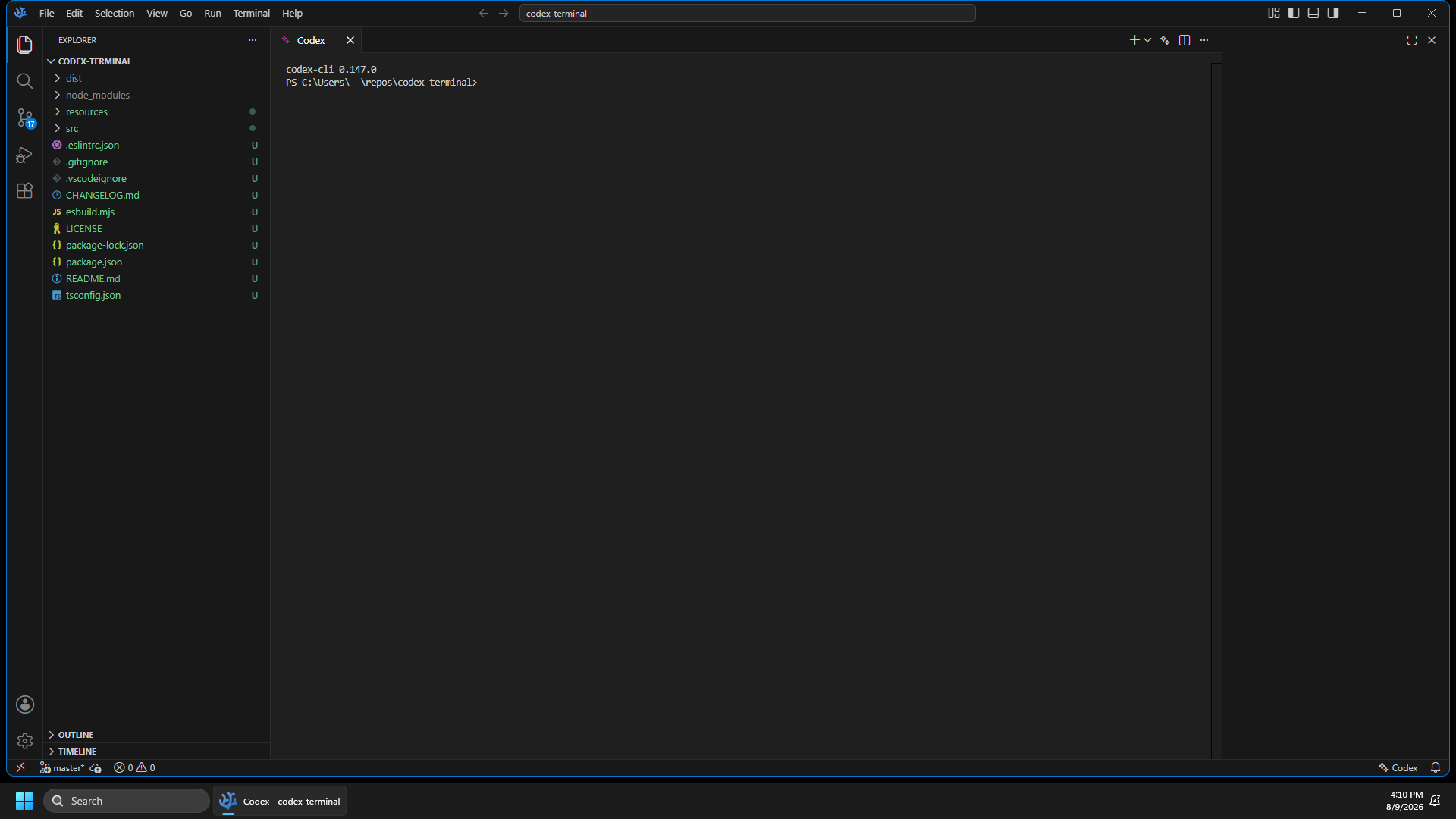
The real Codex TUI, started in the workspace folder:
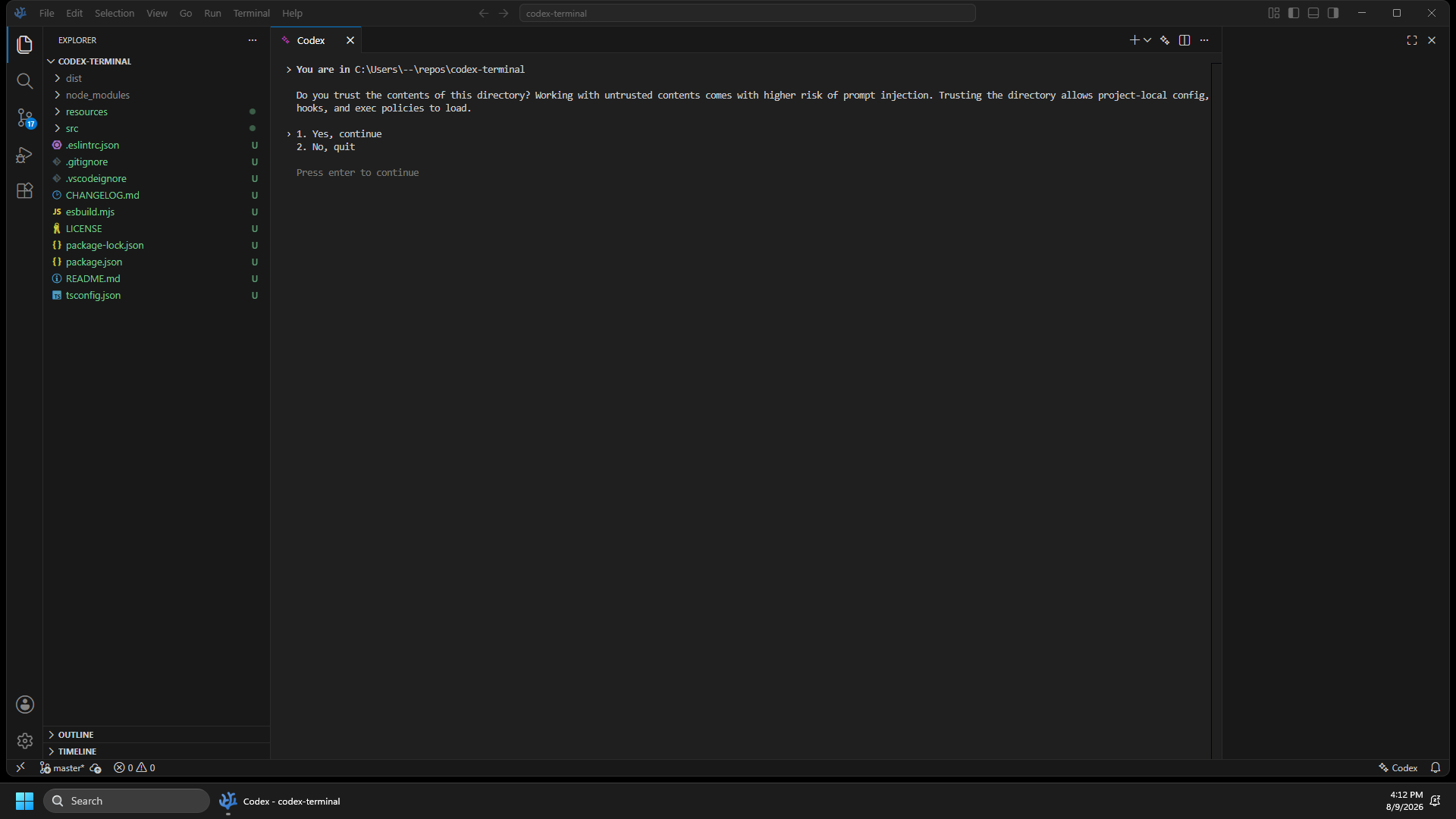
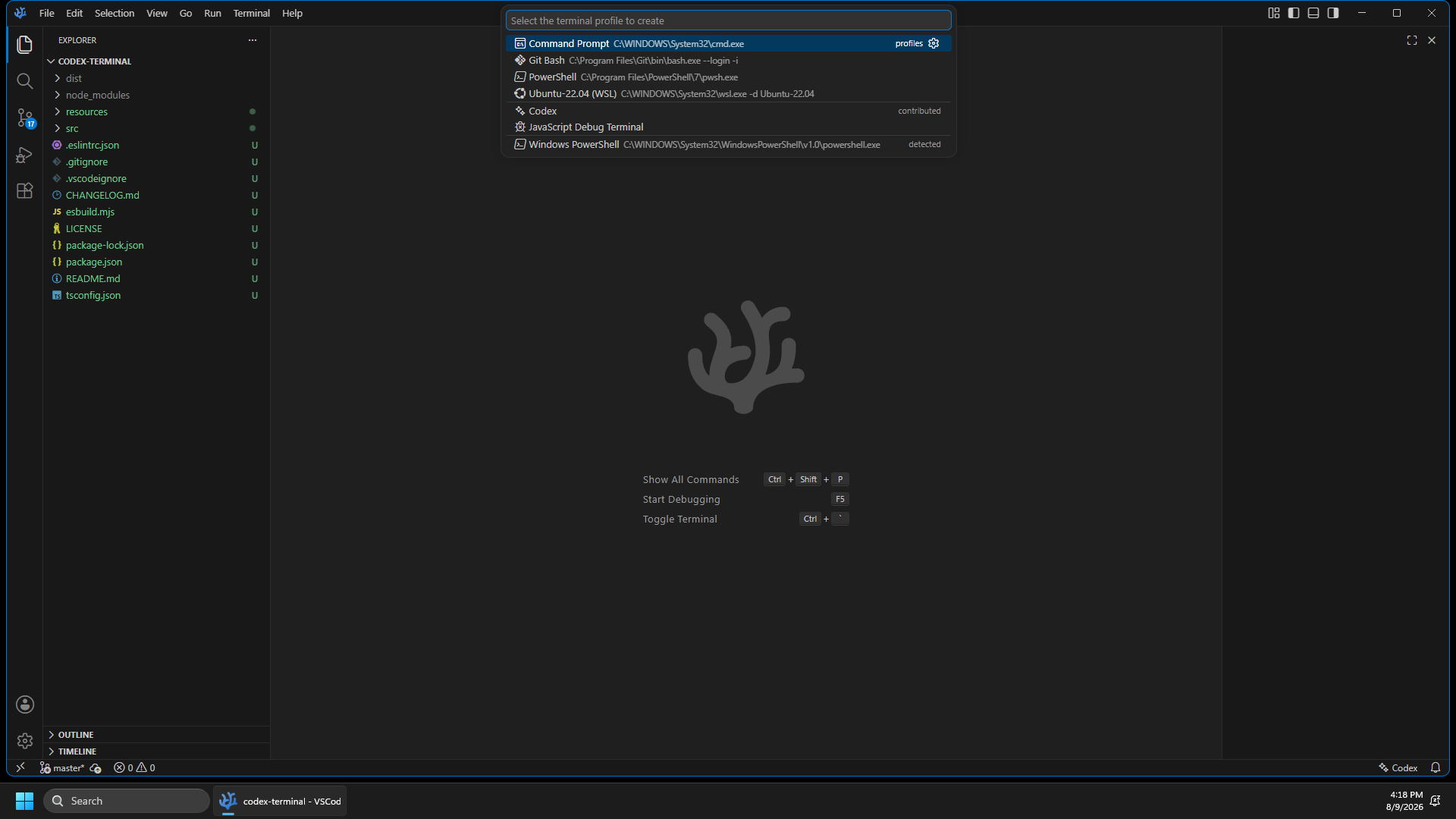
Codex in the terminal profile dropdown, next to the shells VS Code detected itself:
On first install, VS Code opens a localized Get started with Codex Terminal walkthrough. It covers installing the CLI, launching a session, choosing the native terminal profile, and finding conversations in History; completed steps stay complete and the walkthrough remains available from VS Code's Getting Started page.
>_ icon opens a Launch panel with every action. This is the one
surface that is always present, so it is the reliable button."workbench.statusBar.visible": false — no extension can render there, and nothing warns
you. Use the activity bar instead."workbench.startupEditor": "none").+ dropdown — pick Codex.codexTerminal.cwd, so the working directory is the
project you want shown. A path pasted only into the chat prompt is not visible to VS Code's
terminal API and cannot rename an already-created tab.terminal.integrated.confirmOnKill: "never", so closing
any terminal in this editor, not only a Codex tab, immediately terminates its running
processes.terminal.integrated.tabs.description and terminal.integrated.tabs.allowAgentCliTitle). A
third, terminal.integrated.confirmOnKill, turns close confirmation off for every terminal in
this editor. Each is written once: the extension records what it held beforehand, says what
it changed, and never writes that key again. Change one yourself and it stays changed, across
configuration events and window reloads.
Codex Terminal: Revert Workbench Settings puts all three back and turns
codexTerminal.applyWorkbenchSettings off, so the revert survives a reload; turning that
setting back on re-applies from scratch..jsonl rollouts, groups them by repository — every git worktree of a repository
sits under one entry, with a level naming each worktree when there is more than one — and keeps the first real prompt as a preview.
Click a session to resume it in a terminal, in the directory it was originally written in;
the inline actions open a readable Markdown transcript or copy its id, and the context menu adds
resume, fork, the raw rollout, and archive/unarchive/delete. New and changed rollouts refresh the view
automatically. A row at the top reports how much disk Codex's session store is using — it grows
without bound, and archive/unarchive/delete hand the work to Codex so its
own state database stays in step. Expand a session to list the files it changed — added,
edited or deleted — read back from the rollout; click one to open it. Deleted files are shown
without a link. Archived sessions appear in their own group and can be unarchived from the
row's context menu. Where Codex's compatible SQLite projections are available, a row also shows
the last durable turn state; a failed usage-limit turn includes its reset time. Those databases
are opened read-only, and an unknown generation falls back to the rollout scan. The file-change
scan runs when you expand the row, not during the listing. Each session also exposes a lazy
Commands node with deduplicated shell commands that can be copied, and the Command Palette
can send a recent prompt from Codex's history to a live session.thread/name/set,
which is the only writer — the CLI has no rename command — so codex resume <name> finds it
from any shell. Add thread-title to codexTerminal.titleItems to show it in the tab. A
Codex thread name can be replaced but never unset, so clearing a name here clears only the
local one.Codex Terminal: New Session, Resume Last Session,
Resume Session (picker), Fork Last Session, Focus Codex Terminal,
Send Recent Prompt to Codex, New Session with Profile…, Send File Reference to Codex,
Ask Codex About Selection…,
Review Uncommitted Changes with Codex, Review Changes Against Base Branch…,
Review This Commit with Codex, Revert Workbench Settings, Check Codex App Server,
Doctor, Show Log.codex review --uncommitted or
let you choose a base branch for codex review --base <branch>. The Source Control history
graph adds a commit action for codex review --commit <sha>. Each review opens in the
repository's root and uses the configured shell, arguments and profile plumbing.@src/file.ts#L10-L20
on the Codex prompt without submitting it, so you can type the question after it.
Ask Codex About Selection… takes the question in an input box and submits reference and
question together, for when you already know what you want to ask. If several Codex sessions
are live, either command asks which one should receive the reference.~/.codex/<name>.config.toml profiles, plus a free-text
entry for profiles that are not stored locally. The selected profile is passed as
--profile <name> and appended to the terminal tab name.codex resume <id>. If no readable metadata exists, it falls back to Codex's picker.codexTerminal.notifyOnCompletion to install a
per-launch notify hook in the extension's storage. The setting is opt-in and does not write to
Codex's user configuration. It needs a node on your PATH: Codex runs the hook from the
terminal's environment, where the editor's own binary is not a usable script runtime. Without
one, no hook is registered and the log says so rather than leaving a hook that misfires.Everything stays on your machine; the extension makes no network requests and collects no
telemetry. It reads Codex's own session files under $CODEX_HOME/sessions to show live
activity, list history and export transcripts, plus the compatible state_5.sqlite and
thread_history_1.sqlite projections under $CODEX_HOME for durable turn state. Those databases
are opened read-only and are optional; if their generation or schema is unfamiliar, the rollout
scan remains the source of truth. It writes a small crash-recovery journal
into its own extension storage — which sessions a window had open, their ids and timestamps,
and by default Codex's closing message for each turn so an interrupted session is recognisable.
Both are switchable: see codexTerminal.monitor.enabled and
codexTerminal.journal.storeMessages. When turn-completion notifications are enabled, a
short-lived hand-off file contains only the workspace, timestamp and event type — never
Codex's notification payload — and the same journal.storeMessages opt-out removes pending
hand-offs. It also changes three workbench settings, which it announces and can revert.
Exported transcripts redact recognised bearer tokens and API-key shapes by default and put the replacement count in the Markdown header; the machine-scoped
codexTerminal.transcript.redactSecrets setting can opt out with an explicit warning.
| Setting | Default | Notes |
|---|---|---|
codexTerminal.shell |
auto |
auto, pwsh, powershell, cmd, bash, zsh, custom, editorDefault. auto = PowerShell 7 if installed, else Windows PowerShell; the login shell elsewhere. |
codexTerminal.customShellPath |
"" |
Used only when shell is custom. |
codexTerminal.command |
codex |
Bare name or absolute path. Spaces are quoted for you. |
codexTerminal.args |
[] |
Appended to every launch, e.g. ["--model","gpt-5.1-codex"]. |
codexTerminal.keepShellOpen |
true |
Adds -NoExit / /K / exec $SHELL -i. |
codexTerminal.location |
editor |
editor, editorBeside, panel. |
codexTerminal.reuseTerminal |
false |
true focuses the existing Codex tab instead of opening a new one. |
codexTerminal.cwd |
activeFileWorkspaceFolder |
Also activeFileFolder, firstWorkspaceFolder, prompt (choose in multi-root workspaces). |
codexTerminal.env |
{} |
Extra environment variables. |
codexTerminal.terminalName |
Codex |
Tab label. |
codexTerminal.iconColor |
terminal.ansiMagenta |
Theme color id, or "" for the default. |
codexTerminal.showStatusBarButton |
true |
The old showStatusBarItem key is migrated once per extension version. |
codexTerminal.showEditorTitleButton |
true |
|
codexTerminal.showContextInStatusBar |
true |
Append the highest context usage across live sessions to the status bar — the session nearest its limit is the one about to compact. |
codexTerminal.stallSeconds |
45 |
Seconds of silence after which a working session is reported as producing no output. Codex writes nothing both while awaiting an approval and while stuck, and the two are indistinguishable from its session file. |
codexTerminal.notifyOnCompletion |
false |
Opt in to turn-completion notifications without modifying ~/.codex/config.toml; machine-scoped, and the temporary hand-off stores only event metadata. |
codexTerminal.tabTitle |
live |
live leaves the tab name unset so Codex's own title — including its activity indicator — drives the tab. static shows a fixed project — Codex label and cannot animate; see below. |
codexTerminal.titleItems |
["activity", "project-name", "app-name"] |
Codex title items. The default gives the live activity indicator, the project name, and the constant Codex marker used to recognise our tabs after a window reload. |
codexTerminal.history.maxSessions |
200 |
Maximum recent sessions shown in the History view. |
codexTerminal.modelRates |
{} |
Your token prices per model, in USD per million tokens, used to estimate what a session cost. Empty by default; see below. |
codexTerminal.applyWorkbenchSettings |
true |
Whether the extension may set two title settings and the global close-confirmation setting. Each is written once and never rewritten; Revert Workbench Settings turns this off. Off means the tab cannot show Codex's live title and close confirmation is not changed. |
codexTerminal.appServer.enabled |
false |
Experimental, machine-scoped. Host a codex app-server for this window and attach launched terminals to it with --remote ws://127.0.0.1:<port>, so Codex reports activity over its own protocol instead of it being inferred from session files. A workspace cannot enable it in Restricted Mode. Needs an editor built on Node 22 or newer; every failure falls back to a plain codex launch and logs why. |
codexTerminal.monitor.enabled |
true |
Read Codex's session files for live activity and crash recovery. Off stops all reading of your conversations — and with it both the live status and interrupted-session recovery, since each needs to know which conversation a tab belongs to. Launching, resuming and history are unaffected. |
codexTerminal.journal.storeMessages |
true |
Keep Codex's closing message per turn in the crash journal. Turning it off keeps conversation text out of it and removes what is already recorded, from every window's journal, not just this one's. Identifiers and timestamps, which is all recovery needs, are still kept. |
codexTerminal.transcript.includeToolCalls |
true |
Include the commands Codex ran and the patches it applied in an exported transcript. Each block is capped: an apply_patch call carries the entire new contents of every file it writes. |
codexTerminal.transcript.includeToolOutput |
false |
Also include what those commands printed back. Off by default — tool output is the bulk of a session and is rarely what you came back to read. |
codexTerminal.transcript.redactSecrets |
true |
Replace recognised bearer tokens and API-key shapes in exported Markdown and report the count in its header. Machine-scoped; turning it off may expose credentials. |
While Codex is working you get a spinner in the Launch panel, a count on the activity-bar
badge, and a spinner in the status bar — plus Codex's own live indicator in the tab
title under tabTitle: live.
The one place it cannot appear is the tab's icon. No stable VS Code API changes a terminal
icon after the terminal is created, and the command that changes it takes no icon argument, so
it can only open a picker. Animation is therefore in the tab's text and in the sidebar, not
on the icon. The extension host cannot read the operating-system preference behind
workbench.reduceMotion: auto, so auto does not suppress these spinners. Set
"workbench.reduceMotion": "on" to use still icons; off and auto animate, while the
wording always carries the state.
Each running session also says what Codex last finished doing — Working · ran npm run check,
Working · edited monitor.ts, Working · searched vscode terminal api. The wording is past
tense because Codex records a step only once it completes; there is no "started" event to read.
Silent stateCodex does not always record a terminal event for every turn. Across the full store of 121
rollouts there are 198 task_started events, 108 task_complete events, and 29 turn_aborted
events; 61 turns have no terminal record at all. A turn_aborted record is detected and shown as
Interrupted. A turn with no terminal record can remain claiming to be working until the
Silent threshold, which is why silence is treated as uncertainty rather than completion.
A session that has written nothing for far longer than any real turn goes quiet and is marked
Silent: it stops spinning, stops counting toward the badge, and reports how long it has been
quiet. It is deliberately not called Idle — Codex writes nothing while waiting for an approval
and nothing while wedged, so "finished" would be a guess. The threshold is 10 minutes, or twice
codexTerminal.stallSeconds if you have raised it; the largest gap measured inside a genuinely
working turn was 269 seconds across 80,779 samples. Any new output puts the session straight back
to working.
Two collapsed sections at the bottom of the Launch panel — Plugins and MCP servers —
report what Codex itself says it has: codex plugin list --json and codex mcp list --json,
both read-only, with no command that can install, enable or remove anything. A plugin that is
installed but disabled says so, and so does an MCP server, with Codex's own reason.
They are collapsed because that is also when the work happens: nothing runs until a section is opened, and the answer is then held for a minute rather than re-read on every tree refresh. A list that cannot be read says why in the row and puts the full output in the log, rather than rendering as an empty section — "no plugins installed" and "I could not ask" are different answers and only one of them is ever true.
Neither section needs codexTerminal.appServer.enabled. The app server exposes the same
information, but it is off by default and its protocol carries no compatibility guarantee, so
the sections would be empty for almost everyone.
English and Spanish ship. Set VS Code's display language (Configure Display Language, or the Spanish language pack) and the Launch panel, the History view, every command title and every setting description come back translated.
Both surfaces are covered — package.nls.es.json for the manifest and l10n/bundle.l10n.es.json
for everything the extension says at runtime — and a test asserts they stay complete in both
directions, so adding an English string without a translation fails the build rather than
falling back silently. Adding a locale means those two files and one entry in the test's list.
Every session row ends with the share of your rate-limit window Codex has reported spending —
73% weekly limit — and the tooltip adds when it rolls over: 73% of the weekly limit · resets in 3d 4h. The status bar tooltip carries the tightest window across every live session, because
they all bill one account.
Nothing is computed or guessed. Codex writes rate_limits into its session file beside the
token counts, and this reads it: 55,975 of the 55,977 usage records in the local store carry a
populated window. Where Codex reports no window — which is the normal state of the second slot
on a pro plan — the row and tooltip say nothing rather than showing a zero.
On a subscription this, not the cost estimate below, is the number that stops the next turn.
A session row can show what it cost, but only at prices you supply:
"codexTerminal.modelRates": {
  "gpt-5.6": { "input": 1.25, "cachedInput": 0.125, "output": 10 }
}
Rates are USD per million tokens — the unit price lists are published in, so a number can be
copied across without arithmetic. A key that is a prefix of the recorded model matches it, so
one gpt-5.6 entry prices gpt-5.6-luna and gpt-5.6-sol alike; a more specific key wins over
a family one. Omitting cachedInput bills cache hits at the full input rate.
Nothing is shipped, deliberately. Codex records release aliases rather than the names on any
price page — gpt-5.6-luna and gpt-5.6-sol were the only two models across the 60 most recent
sessions here — so a bundled table would price nothing today and would go stale without ever
looking wrong. A model you have not priced shows no cost at all and names itself in the
tooltip, which is the key to add; it never shows $0.00.
Two details decide whether the number means anything:
input_tokens as the
whole prompt with cached_input_tokens inside it. Those sessions run 98% cached, so reading
the two as separate charges would inflate a real session from $41 to roughly $300.pro. When a plan is present the tooltip says
so and calls the figure what it is — what the same tokens would list at, not a charge anyone
is making.A spinner that helps a sighted operator is a text label that changes several times a minute, and a label that changes is a label that gets read out. Two things keep that from turning into noise:
<a role="button"> with no aria-live region anywhere around it, and re-applies its
aria-label only when the string actually differs. Nothing there is announced unless you focus
the status bar (Focus Status Bar), so the spinner is silent by construction.The status bar item announces the transition that matters most, too: finishing the last turn changes it from working in N sessions to N sessions open, none working, rather than falling back to the same label it uses when nothing is running at all.
Measured on Windows with VSCodium 1.126 running under --force-renderer-accessibility (the mode
that puts the editor into Screen Reader Optimized), reading the UI Automation tree directly: the
entry's accessible name is the extension's own label, not its ticking text, and the platform
exposes no live-region setting on it.
tabTitle: static cannot animateSupplying a name to a terminal does more than set a label. VS Code records an extension-supplied
name as the instance's static title and, on that path, never subscribes to the title the process
emits — so a named terminal has no live title to show, in either its title or its description.
Codex publishes its activity indicator through exactly that channel. live therefore leaves the
name unset and lets Codex own the tab text; static trades the animation for a fixed label.
editorDefault is the one racy modeEvery mode except editorDefault passes Codex as a shell argument. editorDefault has no
shell of its own to hand arguments to, so it falls back to typing the command — the behaviour
every other launcher has all the time. It exists for people who have a heavily customised
default profile they want honoured; prefer any other mode.
1.101.0 or newer. This is the first stable host with the MCP provider
API and the Node 22 extension runtime used by the optional SQLite projections.PATH (npm install -g @openai/codex), or an absolute path in
codexTerminal.command. Verify with codex --version.codex login once in a terminal.The extension uses the published @types/vscode package (^1.101.0; the current resolved
version is 1.125.0) and does not vendor editor typings. The MCP provider and node:sqlite are
still feature-detected at runtime, so a downstream host that bypasses the engine floor falls
back to the existing inventory and rollout readers instead of failing activation.
The extension supplies the shell, working directory, and Codex arguments; Codex itself still
owns the TUI. If the same symptom appears when you run codex in a plain terminal, it is a CLI
issue rather than an extension launch issue. Start with:
codex --version
codexcodex --version and codex in a plain terminal before changing extension settings.codex in
a plain terminal; identical flicker there is outside this extension.codex --version and
then codex outside VS Code. This extension keeps the shell open after an exit so the error
remains readable, but it cannot repair a CLI that exits on its own.Codex Terminal: Doctor and inspect the report for the
resolved command and --version output. A missing or misspelled command offers an install link;
an absolute path in codexTerminal.command must point to an existing executable.Do not double-click the
.vsix. It is not an installer — it is an archive the editor unpacks. On Windows with Visual Studio installed,.vsixis associated with Visual Studio's VSIX Installer, which will report "The install of Codex Terminal was not successful for all the selected products. One or more extensions are for Visual Studio Code." That message is the wrong program refusing the file, not a broken package.
Easiest: download install.cmd next to the .vsix and double-click that. It finds the
.vsix beside it and installs into every VS Code family editor on your PATH (VSCodium,
VS Code, Insiders, Cursor).
Command line:
codium --install-extension codex-terminal-0.12.0.vsix   # VSCodium
code   --install-extension codex-terminal-0.12.0.vsix   # VS Code
Or from inside the editor: Extensions view → ... menu (top of the sidebar) →
Install from VSIX… → pick the file.
Either way, reload the window afterwards (Developer: Reload Window, or just open a new
window) — a running extension host does not pick up a freshly installed extension. The >_
Codex icon then appears in the activity bar.
npm install
npm run check     # clean, compile, lint, test, bundle
npm run l10n:export # refresh the default English localization bundle
npm run package   # -> dist/codex-terminal-0.12.0.vsix
npm run check runs the headless unit suite over shell quoting, command resolution, session
history, and diagnostics. Run
npm run test:integration separately to boot the hostile-settings VS Code host suite.
Releases are unsigned — this project does not use code signing — so the check is a
reproducible build instead. npm run package stamps the archive with the commit's timestamp
via SOURCE_DATE_EPOCH, which makes the .vsix byte-identical for a given commit, and writes
dist/SHA256SUMS.txt.
To confirm a downloaded .vsix is what this repository builds:
git checkout v0.12.0
npm ci
npm run package
Get-FileHash -Algorithm SHA256 dist\codex-terminal-0.12.0.vsix
The hash must match SHA256SUMS.txt on the release. A mismatch means the file you downloaded
is not the file this source produces.
Publishing is intentionally credential-free in this checkout; credentials belong in the release runner, never in git or a shell history.
For the Visual Studio Marketplace, use Microsoft Entra ID workload identity federation rather
than a global Azure DevOps PAT. Create an Azure DevOps Azure Resource Manager service connection
with manual workload federation, connect it to a user-assigned managed identity, grant that
identity Contributor access to the Marketplace publisher, and authorize the pipeline. The tagged
release job then runs npm run package followed by vsce publish --azure-credential from an
AzureCLI@2 task. Global Azure DevOps PATs are retired on 2026-12-01.
For Open VSX, the publishing account must first accept the Eclipse Open VSX Publisher
Agreement, and its GitHub Username must match the
account used to publish. After the namespace decision is made, create the namespace matching the
publisher field in package.json:
npm exec -- ovsx create-namespace <publisher>
npm run package
$env:OVSX_PAT = '<Open VSX token>'
npm run publish:openvsx
ovsx is pinned in devDependencies; publish:openvsx passes the token through OVSX_PAT and
publishes only the versioned VSIX produced by npm run package. Namespace creation and agreement
acceptance remain operator-gated external steps, so this repository does not attempt them.
Not affiliated with, endorsed by, or sponsored by OpenAI. "Codex" is used only to name the CLI this extension launches.
SysAdminDoc/codex-terminal is a public repo on GitHub by SysAdminDoc. One click opens Codex CLI in a real PowerShell tab. Pins the shell, contributes a native terminal profile, adds resume/fork sessions. VS Code + VSCodium.
It declares the MIT license on GitHub.
Its maker tagged it for Windows. That is declared by the maker; Take My Repo has not tested it.
Open "Take it" on its page: Take My Repo writes an install plan for your machine and hands it to your AI agent (Claude Code, Codex or Cursor), which asks you before each step. Take My Repo has not tested it on any machine.
Its last change on GitHub was on 2026-09-14. GitHub counts 0 open issues and pull requests. Take My Repo does not judge from that whether it is maintained.
Reverse engineer anything with agents, from app behavior down to native binaries.
Nobody has reviewed it on Take My Repo yet, which says nothing about its quality.
The agent that grows with you
A curated list of awesome Claude Skills, resources, and tools for customizing Claude AI workflows
Open-source Windows and Office activator featuring HWID, Ohook, TSforge, and Online KMS activation methods, along with advanced troubleshooting.
The agent harness performance optimization system. Skills, instincts, memory, security, and research-first development for Claude Code, Codex, Opencode, Cursor and beyond.
Fair-code workflow automation platform with native AI capabilities. Combine visual building with custom code, self-host or cloud, 400+ integrations.
Hushfacebook Morphe patches for Facebook. Hide ads, suggested posts, save videos and photos, tune playback and Reels, and use a focused Marketplace mode, and much more.
HushGram v0.0.22: Morphe patches for Instagram that hide ads, suggested posts and much more. 197 patches for Instagram 456.0.0.53.78.
Morphe patches for Facebook Messenger. Privacy switches and fewer promotions.
Local-first, open-source Android automation with readable rules, honest permission gates, and no account or cloud runtime.
Inspect, debloat, back up, freeze, and control Android apps from one open-source package manager. Works without root, with Shizuku, ADB, or root when needed.