
FreeCAD
Official source code of FreeCAD, a free and opensource multiplatform 3D parametric modeler.
- 36k
- C++
- LGPL-2.1
- 3 h ago
TigerQR / TigerQR+: the QR labels of the TigerTag ecosystem for filament spools. qr.tigertag.io links, nine label formats, test vectors and reference code (CC-BY-4.0, Apache-2.0).
Repo TigerTag-Project/TigerQR-Label, read from GitHub 5 d ago. TigerTag-Project has not joined Take My Repo.
TigerTag-Project/TigerQR-Label is a public repo on GitHub by TigerTag-Project. TigerQR / TigerQR+: the QR labels of the TigerTag ecosystem for filament spools. qr.tigertag.io links, nine label formats, test vectors and reference code (CC-BY-4.0, Apache-2.0). It declares the CC-BY-4.0 license on GitHub. It is written mainly in HTML, has 1 stars and last changed on 2026-11-12. Nobody has reviewed it on Take My Repo yet, which says nothing about its quality. Read from GitHub on 2026-11-20.
Official source code of FreeCAD, a free and opensource multiplatform 3D parametric modeler.



Reference site · TigerQR Playground · TigerQR on tigersystem.io · Link contract · TigerTag protocol
TigerQR is the QR label of the TigerTag ecosystem: a sticker for a 3D-printing filament spool whose QR code opens the right page on any phone, with no app. TigerQR+ is the same label when it is linked to a product of the TigerTag+ catalogue; TigerQR when it is not, the same logic as TigerTag and TigerTag+. Every label carries one short link on
qr.tigertag.io, and the path alone says what it is.
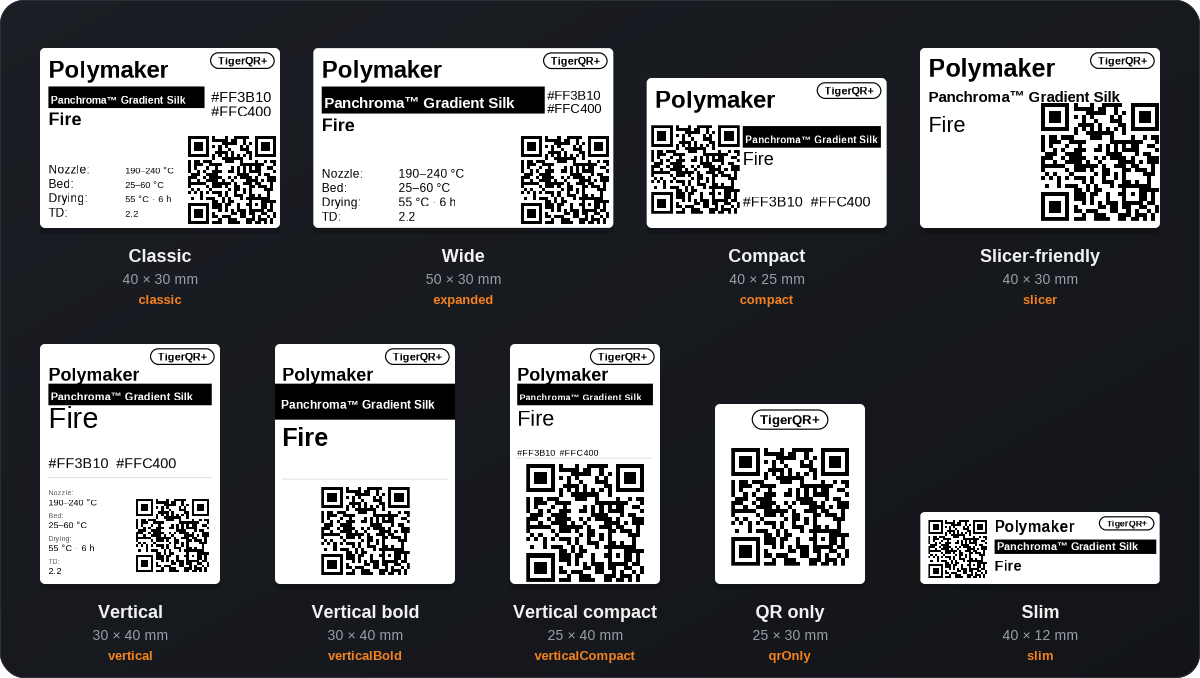
This repository is the public reference for what a TigerQR label prints and what its link means:
the specification, the test vectors every reader is checked against, the reference code
qr.tigertag.io runs, the example labels and the
reference site built from them.
.json and .ttag| If you want to | Go to |
|---|---|
| Make a label for a catalogue product, in every format | TigerQR Playground |
| See the labels explained, and build a link | Reference site · tigersystem.io/en/tiger-qr-labels |
| Read a scanned link in your own app | Reading a link, src/parse.ts, test-vectors/links.json |
| Print the link of a spool or a product | Building a link, src/links.ts |
| Draw a label in your own app or site | How a label is drawn, The public label API |
| Every edge case of the contract | Spool ids and QR links |
The detailed specification is in spec/links.md (the links, how they are read,
what they answer) and spec/labels.md (the formats and how a label is drawn).
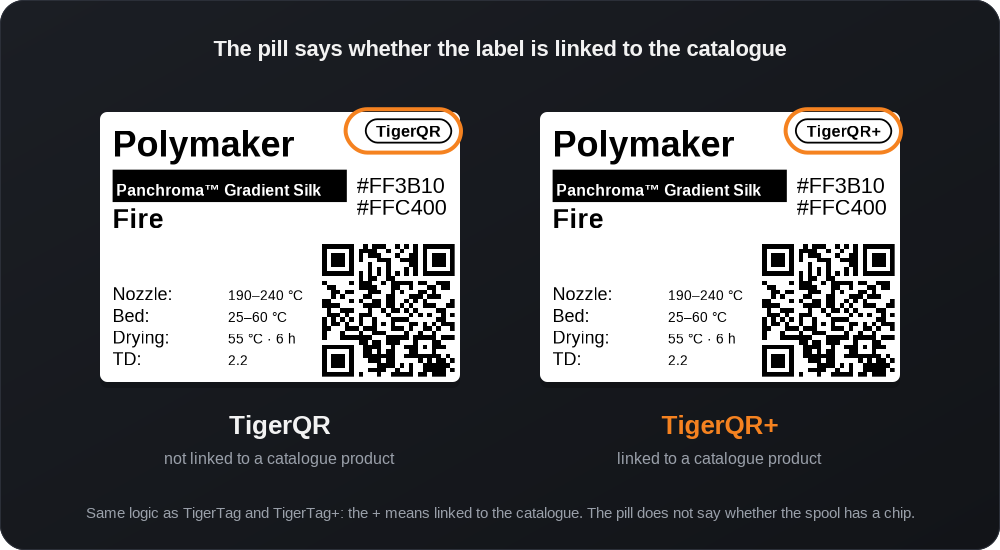
The outlined pill in the corner of every label is its name:
| Pill | When | Like |
|---|---|---|
| TigerQR+ | the label's reference is a catalogue product (a real id_product) or a TigerTag+ chip; every Filament Label |
TigerTag+ |
| TigerQR | anything else, so a TigerTag chip with no product gives TigerQR | TigerTag |
As with TigerTag and TigerTag+, the + means linked to the catalogue. The pill does not say
whether the spool has a chip: a spool without a chip (TigerData+) linked to a product is TigerQR+.
Every label points to https://qr.tigertag.io/. The path says what it is, so an app reads it
offline, without the website.
| Label on | Link | What the path is |
|---|---|---|
| a spool with a chip (TigerTag, TigerTag+) | qr.tigertag.io/1d33dbda0d1080 |
The chip's NFC UID in hex, 14 characters. The twin chip's UID opens the same spool. |
| a spool without a chip (TigerData, TigerData+) | qr.tigertag.io/6130922252 |
The TigerData id without its TigerData_ prefix, 10 or 17 digits. The long form TigerData_6130922252 opens too. |
| a catalogue product (TigerQR+) | qr.tigertag.io/p/2673739332 |
p/ and the id_product in decimal, always 10 digits with leading zeros (p/0010303748). Labels printed with 8 hex characters (p/9f5e0644) still open. |
Links are printed lowercase and read in any case. Nothing is printed in clear next to the code: the QR code is the way back to the spool or the product.
flowchart TD
  QR["QR scanned<br/>qr.tigertag.io/#lt;path#gt;"]
  QR -- "/#lt;14 hex#gt;" --> CHIP["Spool with a chip<br/>TigerTag / TigerTag+"]
  QR -- "/#lt;10 or 17 digits#gt;" --> DATA["Spool without a chip<br/>TigerData / TigerData+"]
  QR -- "/p/#lt;10 digits#gt;" --> PROD["Catalogue product, public<br/>page · .json · .ttag"]
  CHIP --> OWNER{"Is the spool's owner<br/>signed in?"}
  DATA --> OWNER
  OWNER -- "yes" --> SPOOL["Their spool<br/>page · .json · .ttag"]
  OWNER -- "no" --> OTHER["The product and the owner's name<br/>.json / .ttag: 303 to /p/"]
  classDef private fill:#f08c0022,stroke:#f08c00,stroke-width:2px
  classDef public fill:#2f9e4422,stroke:#2f9e44,stroke-width:2px
  class CHIP,DATA,OWNER,SPOOL private
  class PROD,OTHER public
Orange is private to the spool's owner; green is public.
| Link | The owner, signed in to their TigerSystem account | Anyone else (not signed in, another account, a friend) |
|---|---|---|
| Spool | the spool | the spool's catalogue product and the owner's display name, never the spool itself |
| Product | the catalogue product | the catalogue product, with no sign-in |
p/…) answers a 302 to the product's catalogue page on tigersystem.io.?weight=<grams> and ?note=<text>; they are passed on to the owner's
spool page. These links are never printed.404..json and .ttagAdd .json (the data) or .ttag (the file Tiger Studio imports) to any link to build your own
interface: /p/2673739332.json,
/p/2673739332.ttag. The ending is read in any case.
| Link | The owner (Authorization: Bearer <ID token>) |
Anyone else |
|---|---|---|
…/p/<id>.json |
the catalogue record (?lang= picks the text language), cacheable, any origin |
the same |
…/p/<id>.ttag |
the TigerData+ record Tiger Studio creates from the product, as a file to import | the same |
…/<spool id>.json |
the spool | 303 to the product's .json (404 without a product) |
…/<spool id>.ttag |
the spool as a .ttag file |
303 to the product's .ttag (404 without a product) |
A product that left the catalogue answers {"error":"not-in-catalogue"} with status 404.
A link that is shared (from a Share button, never printed) may start with the sharer's language:
qr.tigertag.io/fr/p/2673739332. The page and its preview
on social networks then open in that language for everyone, link-preview crawlers included.
<lang> is one of en, fr, de, es, it, zh, pt, pt-pt, pl, ru, nl,
written lowercase and read in any case.404./<lang>/ first, then reads the rest: /fr/p/2673739332 is the product /p/2673739332.The reference is splitLangPrefix in src/parse.ts.
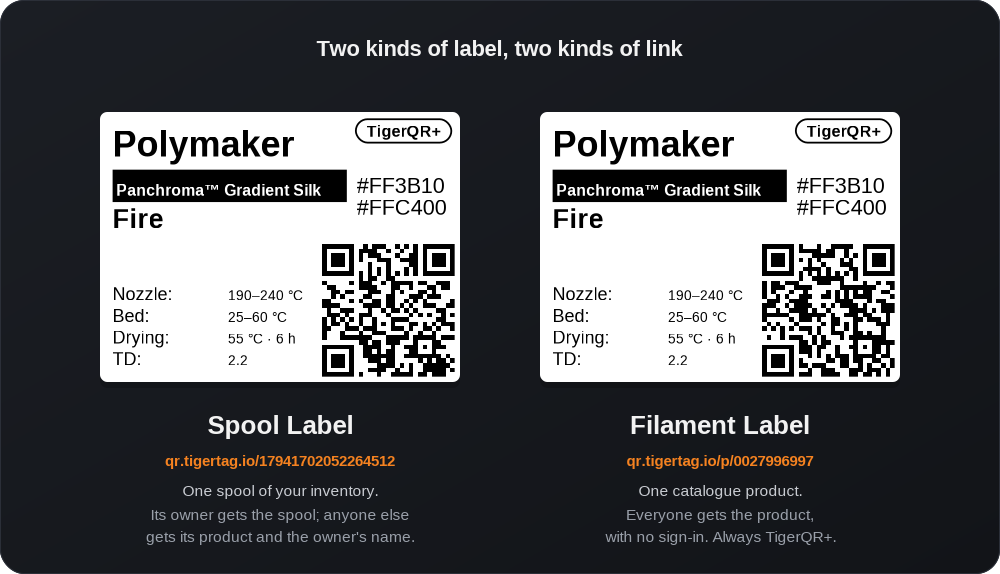
| Label | Its QR code | Printed for | Pill |
|---|---|---|---|
| Spool Label | the spool link | a spool of your inventory that has a QR link | TigerQR+ or TigerQR |
| Filament Label | the product link | a catalogue product: a swatch, a shelf, a showroom | always TigerQR+ |
The owner scanning a Spool Label gets the spool; anyone else gets its product. A Filament Label opens the product for everyone.
What a label carries
Only what does not change: never the remaining weight, the note, the rack or the owner.
TigerTag-Project/TigerQR-Label is a public repo on GitHub by TigerTag-Project. TigerQR / TigerQR+: the QR labels of the TigerTag ecosystem for filament spools. qr.tigertag.io links, nine label formats, test vectors and reference code (CC-BY-4.0, Apache-2.0).
It declares the CC-BY-4.0 license on GitHub.
Its maker has not tagged a system, so it is unknown here. Its README says what it needs.
An open-source framework for building polished, maintainable business software with Laravel.
A unified tool for 3D printing filament management with RFID read/write support, compatible with multiple brands (Bambu, Creality, Snapmaker, and more).
:pencil2: Web-based image segmentation tool for object detection, localization, and keypoints
:house_with_garden: Open source home automation that puts local control and privacy first.
π RuView turns commodity WiFi signals into real-time spatial intelligence, vital sign monitoring, and presence detection — all without a single pixel of video.
Open "Take it" on its page: Take My Repo writes an install plan for your machine and hands it to your AI agent (Claude Code, Codex or Cursor), which asks you before each step. Take My Repo has not tested it on any machine.
Its last change on GitHub was on 2026-11-12. Take My Repo does not judge from that whether it is maintained.
Nobody has reviewed it on Take My Repo yet, which says nothing about its quality.
Take My Repo cannot say: it does not audit code and has not run TigerQR-Label. What is known comes from GitHub. It declares the CC-BY-4.0 license on GitHub. Its last change was on 2026-11-12. It has 1 stars, which measure popularity, not safety. Nobody has reviewed it on Take My Repo yet, which says nothing about its quality. Read the source before you run it. With "Take it", your AI agent shows each step and asks you before running it; README text is treated as data, not as instructions.


