Coder Eval — evaluate and benchmark AI coding agents and their skills
Playwright for coding agents — one declarative test file, any agent
runtime, a real sandbox, and a pass/fail gate in CI.
Coder Eval (pip install coder-eval / uv tool install coder-eval) is an
open-source, agent-agnostic framework for evaluating and benchmarking AI coding
agents and their skills — built for benchmark authors, CLI builders, and skill
builders — with sandboxing, reproducibility, and data-driven analysis. It runs a real
agent — Claude Code, OpenAI Codex, Google Antigravity (Gemini),
OpenCode, or Pi — in a sandbox against declarative YAML tasks, then scores the files and
commands it actually produced. Changing harness is one field (agent.type); the
tasks, criteria, scoring, telemetry, and reports stay the same.
Reach for it when you want to benchmark agents on your own domain tasks,
test whether a skill triggers in the agent you ship for, A/B-test Claude Code
vs. Codex vs. Gemini vs. OpenCode vs. Pi (or model vs. model, prompt vs. prompt), or
gate CI on coding-agent quality. It is not a fixed leaderboard: unlike
SWE-bench or SkillsBench, which rank models on a shared task set, you bring the tasks
and you bring the scoring — weighted 0.0–1.0 criteria, a skill_triggered activation
check, an A/B experiment layer, and per-tool cost telemetry, over whatever work you
care about. See How it compares.
📚 Full docs: coder-eval.com/docs.
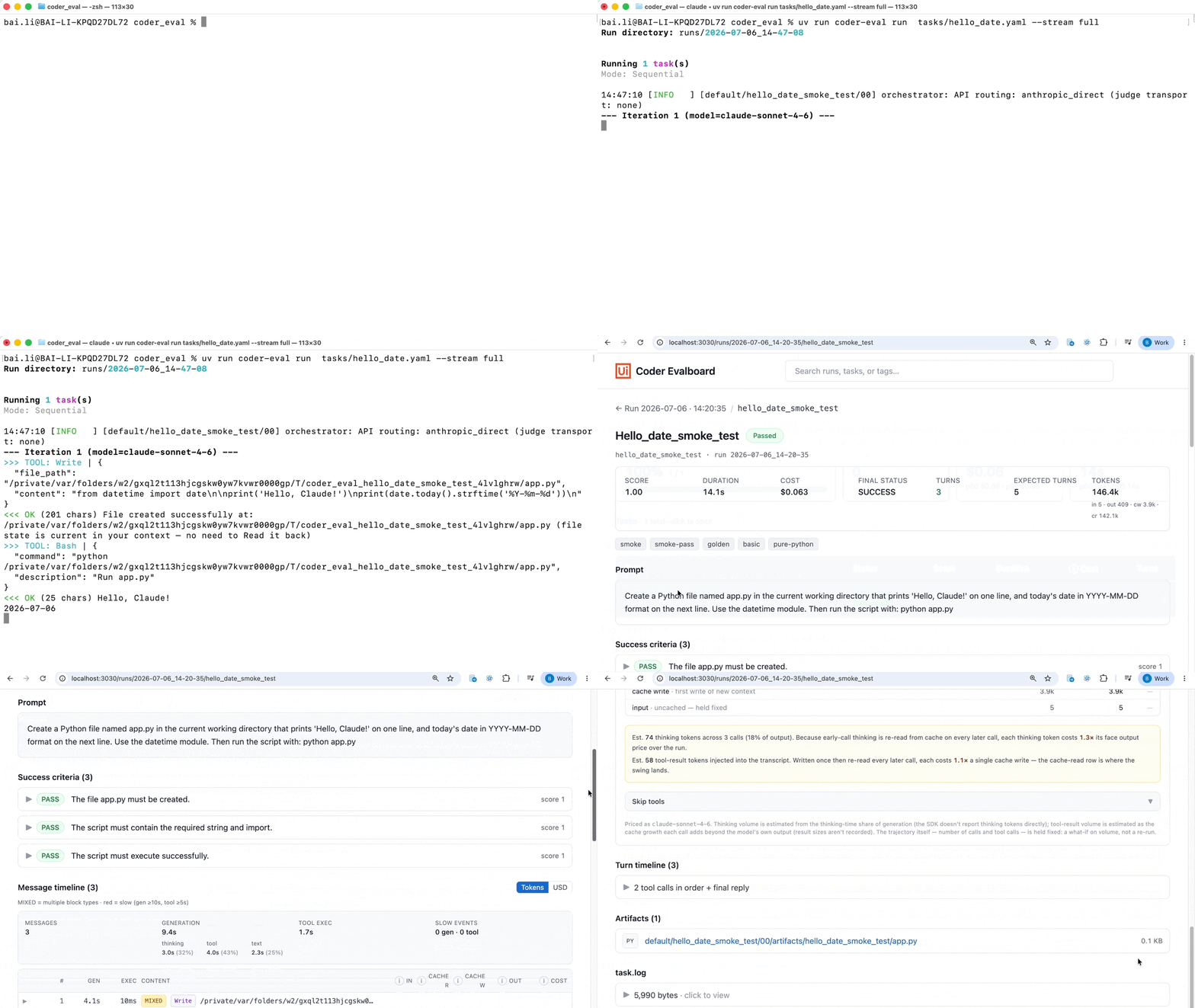
- Declarative YAML tasks with pinned dependencies and clear success criteria
- Sandboxed execution in isolated environments with resource limits
- Weighted, continuous scoring (0.0–1.0) with fractional credit and thresholds
- Many criterion types — from file checks to code similarity and LLM-graded rubrics
- Agent-agnostic by design — Claude Code, OpenAI Codex, Antigravity (Gemini), OpenCode, and Pi today; add your own harness through the plugin SPI
- Experiment layer — A/B agent configs (models, tools, prompts) side-by-side
- Full telemetry — every tool call, token counts, and cost, with real-time streaming
Watch the intro
🔊 Turn the sound on — GitHub's inline player always starts muted.
▶ Also on YouTube: Coder Eval: UiPath open-source framework to test AI Coding Agents
— what the framework does, and how a run works end to end.
What you can do with it
- Benchmark coding agents — score an agent across a suite of tasks with weighted scoring and pass/fail thresholds
- Compare models & configs — A/B-test Claude vs. Codex vs. Gemini vs. OpenCode vs. Pi, model vs. model, tool-on vs. tool-off, prompt vs. prompt
- Evaluate skills — verify an agent actually engages a target skill (
skill_triggered) and score skill-driven suites (SkillsBench-style), on whichever harness your users run
- Keep skills up to date in CI — re-validate your skills on every change or on a schedule; catch silent regressions when models, prompts, or the skills themselves drift
- Gate CI on agent quality — run the suite in GitHub Actions and fail the build on regressions
- Bring your own dataset — fan one task out over many rows for larger benchmark suites
Keeping skills fresh? Run Coder Eval as a scheduled GitHub Actions job so your
skills are continuously re-evaluated against the latest model — a skill that quietly
stops triggering surfaces as a failing criterion before your users hit it. See
Tutorial 02 — Running Coder Eval in CI.
Quick Start
Prerequisites: Python 3.13+, uv 0.8+, and the
runtime of at least one coding agent — plus that agent's own model credentials.
Pick the agent you want to evaluate; two of the four ship with a Coder Eval extra,
the other two are separate CLIs you install yourself:
| Agent |
agent.type |
Runtime |
Guide |
| Claude Code (default) |
claude-code |
brew install claude — separate CLI |
Claude Code |
| OpenAI Codex |
codex |
uv sync --extra codex — the extra ships the Codex SDK + CLI |
Codex |
| Google Antigravity (Gemini) |
antigravity |
uv sync --extra antigravity — the extra ships the harness binary |
Antigravity |
| OpenCode (open-weight models) |
opencode |
npm install -g opencode-ai — separate CLI |
OpenCode |
The examples below use the default claude-code agent. Developed on macOS; CI runs on
Linux.
git clone https://github.com/UiPath/coder_eval.git
cd coder_eval

uv sync                      # install the framework (add --extra codex /
                             # --extra antigravity for those runtimes)
cp .env.example .env         # then set ANTHROPIC_API_KEY — or skip that: an
                             # existing Claude Code login (`claude login`) is
                             # picked up automatically

uv run coder-eval plan tasks/hello_date.yaml   # validate (no tokens spent)
uv run coder-eval run  tasks/hello_date.yaml   # run your first evaluation
uv run coder-eval report runs/latest           # view the result
New here? Follow Tutorial 01 — Your First Evaluation.
Two more extras you only need on purpose: --extra dev adds the contributor
toolchain (pytest, ruff, pyright, pre-commit — see
CONTRIBUTING.md), and --extra uipath adds the in-host uipath
SDK for local sandbox parity (public PyPI, no credentials). Without either, the
framework still runs end-to-end.
Just want the CLI, without cloning? Install the published package — this is also
what a CI job or another repo does:
uv tool install coder-eval    # puts the `coder-eval` CLI on your PATH,
                              # in its own isolated environment

uv tool install "coder-eval[codex,antigravity]"   # same, with agent extras
coder-eval --version                              # verify the install
To add it as a project dependency instead: uv add coder-eval or
pip install coder-eval. In a real CI gate, pin to a specific released version
so a harness upgrade can't silently move your results. (The example tasks/
live in this repo — clone it or point the CLI at your own task files.) See
Tutorial 02 — Running Coder Eval in CI for
the full setup.
Use inside Claude Code
Coder Eval evaluates any of the supported agents, and it also ships an authoring
front-end for one of them: this repo is a Claude Code plugin marketplace, so the
whole loop — scaffold a suite, author a task, check whether a skill triggers, read the
results — runs inside Claude Code. The suites you author this way run on every harness:
/plugin marketplace add UiPath/coder_eval
/plugin install coder-eval@coder-eval
That adds six slash commands: /coder-eval:init, /coder-eval:check-skill,
/coder-eval:task, /coder-eval:lint-tasks, /coder-eval:analyze and
/coder-eval:ci. They drive the coder-eval CLI, so install it too
(uv tool install coder-eval). See Claude Code Plugin.
Use as a GitHub Action
A composite action — on the Marketplace as
coder_eval — runs
coder-eval as a CI gate. It installs the pinned CLI, runs your tasks, writes a
JUnit XML report, reports where its artifacts landed, and fails the step on any
task failure:
- uses: actions/setup-node@v4      # the claude-code agent needs the Claude CLI…
  with: { node-version: '20' }
- run: npm install -g @anthropic-ai/claude-code

- uses: UiPath/coder_eval@v0       # …then run the gate (@v1 once 1.0.0 ships; @vX.Y.Z pins exactly)
  id: eval
  with:
    args: |
      tests/tasks/**/*.yaml
      --model
      claude-sonnet-5
    env: |
      ANTHROPIC_API_KEY=${{ secrets.ANTHROPIC_API_KEY }}
Eight inputs, and none of them is a coder-eval run flag. The CLI has 21;
GitHub silently ignores an input the referenced tag does not define, so a
forwarding input that is mistyped or newer than your pin yields a run that
measured something else and still exits 0. A wrong CLI flag is a hard error. So
flags and task globs all go through args, and an input exists only where the
action does something with the value besides pass it along.
| Input |
Default |
Purpose |
args |
— |
Task paths/globs and every flag for coder-eval run, one argument per line, verbatim |
version |
pinned release |
PyPI version, or local to install from the checkout |
extras |
— |
coder-eval extras, composed into the install requirement (codex, antigravity,litellm) |
extra-packages |
— |
Extra requirements installed into coder-eval's environment (--with), one per line |
install-flags |
— |
Flags for uv tool install, one per line (--prerelease=allow, --extra-index-url …) |
env |
— |
Credentials/backend passthrough: newline-separated NAME=VALUE pairs, exported for the run step only |
working-directory |
. |
Directory every step of the action runs in |
run-dir |
runs/ci |
Run directory; also where the reports are written |
Outputs: run-dir, junit-path (<run-dir>/junit.xml) and run-md-path
(<run-dir>/run.md). The action writes nothing to the job summary — a consumer
that has to redact the report first cannot undo a write that already happened:
- if: always()
  run: cat "${{ steps.eval.outputs.run-md-path }}" >> "$GITHUB_STEP_SUMMARY"
- uses: mikepenz/action-junit-report@v5
  if: always()
  with:
    report_paths: ${{ steps.eval.outputs.junit-path }}
Credentials and backend config are the sole responsibility of env — a
passthrough exported for the run step only (never written to $GITHUB_ENV, so
it can't leak into later steps). Set whatever the run needs, Anthropic or not:
- uses: UiPath/coder_eval@v0
  with:
    args: tests/tasks/**/*.yaml
    env: |
      API_BACKEND=bedrock
      AWS_BEARER_TOKEN_BEDROCK=${{ secrets.BEDROCK_TOKEN }}
The step's exit code is coder-eval's own: non-zero on any failed task.
Agent runtime is the caller's responsibility. The action is agent-agnostic —
it installs coder-eval but no coding-agent runtime, which is why the example
above starts with actions/setup-node +
npm install -g @anthropic-ai/claude-code: the default claude-code agent
needs the claude CLI on PATH before the action runs. Swap those steps for
your own agent's runtime as needed.
Security. Evaluated tasks execute agent-generated code. Do not run this
action under pull_request_target with secrets exposed to untrusted fork PRs —
use pull_request and gate on the same-repo condition, as this repo's own
dogfood job does.
Telemetry
📊 Usage telemetry is on by default. coder-eval sends anonymous usage
telemetry (command names, outcomes, counts, durations, an anonymous install id,
platform info) to help improve the tool. It never captures prompts, file
contents, or repo paths, and prints a one-time notice on first run. To disable
it, set TELEMETRY_ENABLED=false in your .env







