aideml
AIDE: an LLM agent for machine learning engineering - the research Weco grew out of. Referenced in OpenAI MLE-bench.
- 1.6k
- Python
- MIT
- 2 d ago
Agentic Search for Pre-training Data Selection
Repo WecoAI/AutoData, read from GitHub 22 h ago. WecoAI has not joined Take My Repo.
WecoAI/AutoData is a public repo on GitHub by WecoAI. Agentic Search for Pre-training Data Selection. It declares the MIT license on GitHub. It is written mainly in Python, has 8 stars and last changed on 2026-09-18. Nobody has reviewed it on Take My Repo yet, which says nothing about its quality. Read from GitHub on 2026-11-22.
Agentic search for pre-training data selection
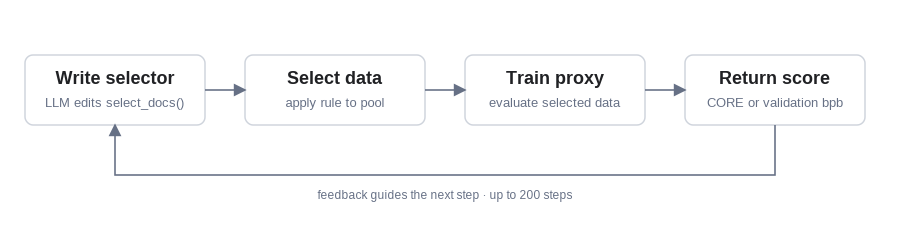
AutoData automates pre-training data selection. An LLM writes a Python
select_docs() function that chooses documents from a training corpus. AutoData
then trains a small proxy language model on a subsample of those documents and
evaluates it. WECO uses the score to guide the LLM's next revision, repeating this
AIDE-style search loop.
You can use AutoData in two ways:
The included setup uses ClimbMix, precomputed document features, and nanochat for training. Local GPUs are the default; Modal is an optional backend for training from a recipe.
You need Git, Python 3.10 or newer, and
uv.
git clone https://github.com/WecoAI/AutoData.git
cd AutoData

uv venv --python 3.11 .venv-run
uv pip install --python .venv-run/bin/python \
    weco huggingface_hub numpy pyarrow
source .venv-run/bin/activate

cp .env.example .env
$EDITOR .env
source .env

git clone https://github.com/karpathy/nanochat.git "$AUTODATA_NANOCHAT_ROOT"
(cd "$AUTODATA_NANOCHAT_ROOT" && uv venv && uv sync --extra gpu)
Authenticate for dataset downloads if required by the dataset's access settings:
hf auth login
To run a new search, also run weco login and export OPENAI_API_KEY,
ANTHROPIC_API_KEY, or GEMINI_API_KEY for the LLM selected in the launcher.
Configuration lives in three places:
| File | Configure |
|---|---|
.env.example |
Data paths, local GPUs, staging, and output |
search/launch/run.sh |
LLM, proxy, metric, and search length |
search/instructions/ |
Target, budget, features, and objective |
Source .env in every new shell.
The published experiments use ClimbMix and an aligned feature bank:
hf download karpathy/climbmix-400b-shuffle --repo-type dataset \
    --local-dir "$AUTODATA_POOL_DIR"

hf download WecoAI/autodata-climbmix-features --repo-type dataset \
    --local-dir "$AUTODATA_FEATURES_DIR"
Prepare nanochat's tokenizer once:
(cd "$AUTODATA_NANOCHAT_ROOT" && \
    .venv/bin/python -m nanochat.dataset -n 8 && \
    .venv/bin/python -m scripts.tok_train)
Check the paths, parquet schema, feature alignment, and selector contract:
python -m pipeline.check_setup
The corpus contains 6,543 parquet shards (about 600 GB).
shard_06542.parquet is held out for validation. The 22.7 GiB feature bank
aligns with the training documents through shard_offsets.json.
The current search path expects:
shard_*.parquet files with a text column;AUTODATA_VAL_SHARD;shard_offsets.json mapping that order back to the shards.For a different schema or raw-text-only search, adapt the selector template, instruction file, and evaluator together. The dataset card defines the published feature schema.
The default launcher runs 200 search steps, optimizes CORE (higher is better), and uses a depth-8 proxy model. Each candidate requires proxy training, so a search is substantially more expensive than running the selector alone.
Before launching:
core / maximize with full_core.md, or val_bpb / minimize with
full.md.AUTODATA_EVAL_DEPTH in search/launch/run.sh.Depth 8 is the published default. Depth 12 is a larger, more expensive proxy.
source .venv-run/bin/activate
source .env
bash search/launch/run.sh
The default evaluator trains two proxy seeds in parallel. Set
AUTODATA_WECO_GPUS to exactly two local GPU IDs, such as 0,1. Its training
settings use FP8 and are configured for H100 GPUs.
WECO starts from uniform sampling and rewrites
search/data_select_template.py. Candidates
must return exactly budget sorted, unique int64 document IDs and be
deterministic for a given seed:
def select_docs(budget: int, seed: int) -> np.ndarray:
    ...
WECO stores run history and outputs under .runs/.
The output of search is a data-selection recipe: a Python file containing
select_docs() and its document BUDGET. Once discovered, the same recipe can
select training data for new models at different sizes. Each target model is
trained from scratch; proxy-model weights are not reused.
For example, a recipe discovered with a small d8 proxy can be used to select
data for a larger d24 model. This separates the cost of discovering a selection
rule from the cost of training the final model.
Use one of the included recipes, or save the selector from
your chosen WECO search step as a Python file under recipes/. Pass that file
to --selector; it must expose select_docs() and BUDGET.
The included training backend supports nanochat models at these depths:
| Setting | Available values | Meaning |
|---|---|---|
--sizes |
d8, d12, d16, d20, d24 |
Target model depth; for example, d24 has 24 transformer layers |
--selector |
Path to a recipe .py file |
The document-selection rule to reuse |
--gpus |
Local CUDA device IDs | GPUs assigned to each training job |
--key |
A unique experiment name | Names the cached selection and training outputs |
--ratio |
Positive integer | Training tokens per nanochat scaling parameter; defaults to 10 for d8–d20, 8 for d24 |
The data-selection budget and the model's training-token budget are separate:
the recipe chooses a document pool, while the model size and --ratio determine
how many tokens training consumes. Detailed training defaults are defined in
pipeline/train_local.py.
This command applies the included GPT-5.5 CORE recipe and trains fresh d24
models on the selected data, using eight local GPUs:
source .venv-run/bin/activate
source .env

python -m pipeline.build_and_launch \
    --selector recipes/autodata_core_gpt55_step105.py \
    --key core_gpt55_step105 \
    --sizes d24 \
    --train-seeds 42 43 44 \
    --gpus 0,1,2,3,4,5,6,7
The launcher runs the selector, writes the selected documents to Parquet files, and starts nanochat training. It evaluates each trained model using validation bits per byte (lower is better) and CORE (higher is better).
To evaluate the same recipe across several larger model sizes, use
--sizes d16 d20 d24 and a new --key, such as core_gpt55_transfer.
For comparisons between selectors, keep the target model, training-token
budget, and evaluation settings the same.
The supplied configurations use FP8 and batch sizes intended for H100 GPUs.
For a smaller local run, choose d8 and adjust precision and batch size:
python -m pipeline.build_and_launch \
    --selector recipes/autodata_core_gpt55_step105.py \
    --key local_d8 \
    --sizes d8 \
    --sub-seeds-d8 42 \
    --gpus 0 \
    --no-fp8 \
    --device-batch-size 4
Useful overrides are --gpus, --no-fp8, --device-batch-size,
--total-batch-size, --max-seq-len, --ratio, and --timeout-hours.
Other model architectures require adapting the training backend; --sizes
selects among the supported nanochat configurations.
Local jobs run serially on the GPUs you select. Outputs are stored in:
| Location | Contents |
|---|---|
AUTODATA_STAGE_DIR |
Cached document IDs and materialized training Parquets |
AUTODATA_LOCAL_RUNS_DIR (default: results/local_runs) |
Per-run training logs and checkpoints |
pipeline/<key>_local.json |
Final metrics and output paths; override with --out |
Allow about 25 GB for a materialized selection and additional space for model
checkpoints. Set AUTODATA_STAGE_DIR to a fast local disk if /dev/shm is too
small. Use a new --key when changing the recipe or selection budget to avoid
reusing cached document IDs.
Generated results and run outputs are ignored by Git. No experiment result files are included in this repository.
The same recipe-to-training workflow can use Modal GPUs. Install and
authenticate Modal, then create the volumes configured in .env and upload
the validation shard:
uv pip install --python .venv-run/bin/python modal
modal token new
modal volume create "$AUTODATA_SCRATCH_VOL"
modal volume create "$AUTODATA_ARCHIVE_VOL"
modal volume put "$AUTODATA_ARCHIVE_VOL" "$AUTODATA_VAL_SHARD" /val_shard.parquet
modal deploy pipeline/modal_train.py

python -m pipeline.build_and_launch \
    --backend modal \
    --selector recipes/autodata_core_gpt55_step105.py \
    --key core_gpt55_modal \
    --sizes d24 \
    --train-seeds 42 43 44
The launcher materializes data locally, uploads it, and submits training jobs.
It writes call handles to pipeline/<key>_modal.json. Add --parallel to run
each training job in its own Modal container.
The six included recipes are Python selectors discovered by WECO, one for each
LLM and objective pair. All use BUDGET = 14,374,266 documents and load features
from AUTODATA_FEATURES_DIR. Pass a recipe to --selector in the training
command above; the filename records the search step from which it was saved.
| Objective | GPT-5.5 | Claude Opus 4.7 | Gemini 3 Pro |
|---|---|---|---|
| CORE | step105 |
step63 |
step93 |
| Validation bpb | step149 |
step93 |
step112 |
d8 and d12 train on fixed 880,000- and 2,310,000-document subsamples.
Larger sizes use the full selection. Do not deploy a recipe above the budget it
was searched under.
To use a recipe as the starting point for a new search, replace the selector template with that recipe, then run the standard launcher:
source .venv-run/bin/activate
source .env
cp recipes/autodata_core_gpt55_step105.py search/data_select_template.py
bash search/launch/run.sh
This overwrites the current template. Set the desired LLM and matching objective
in search/launch/run.sh before launching, as described in
Run a search.
| Path | Contents |
|---|---|
search/ |
WECO launchers, selectors, prompts, and evaluation |
pipeline/ |
Materialization and local or Modal training |
recipes/ |
Pre-discovered selectors |
eval/ |
Training-configuration calculations |
DATASET_CARD.md |
Feature-bank schema and provenance |
The training stack is karpathy/nanochat, and the raw pool is karpathy/climbmix-400b-shuffle.
@misc{autodataselection2026,
  title         = {{AutoData}: Agentic Search for Pre-training Data Selection},
  author        = {Yan Meng and Dhruv Srikanth and Bingchen Zhao and Zhengyao Jiang and Yuxiang Wu},
  year          = {2026},
  eprint        = {2609.19754},
  archivePrefix = {arXiv},
  primaryClass  = {cs.AI},
  url           = {https://arxiv.org/abs/2609.19754}
}
WecoAI/AutoData is a public repo on GitHub by WecoAI. Agentic Search for Pre-training Data Selection.
It declares the MIT license on GitHub.
Its maker has not tagged a system, so it is unknown here. Its README says what it needs.
Open "Take it" on its page: Take My Repo writes an install plan for your machine and hands it to your AI agent (Claude Code, Codex or Cursor), which asks you before each step. Take My Repo has not tested it on any machine.
Its last change on GitHub was on 2026-09-18. Take My Repo does not judge from that whether it is maintained.
Nobody has reviewed it on Take My Repo yet, which says nothing about its quality.
AIDE: an LLM agent for machine learning engineering - the research Weco grew out of. Referenced in OpenAI MLE-bench.
Curated list of AutoResearch use cases with optimization traces and open source implementations
Production-Grade Autoresearch. Ideal for agent harness engineering, prompt engineering, ML model development, GPU kernels, and other optimizable code.