authelia
The Single Sign-On Multi-Factor portal for web apps. OpenID Certified™ and Post-Quantum Cryptography Ready.
- 30k
- Go
- Apache-2.0
- 13 h ago
Full-stack task manager in TypeScript: NestJS 11 + Prisma + PostgreSQL 16 API and React 18 + Vite + Tailwind 4 UI. JWT auth with refresh-token rotation, RBAC roles, Kanban board, Swagger docs, 99 tests (94% coverage), Docker Compose and GitHub Actions CI.
Repo alberto2005-coder/taskflow, read from GitHub 3 h ago. alberto2005-coder has not joined Take My Repo.
alberto2005-coder/taskflow is a public repo on GitHub by alberto2005-coder. Full-stack task manager in TypeScript: NestJS 11 + Prisma + PostgreSQL 16 API and React 18 + Vite + Tailwind 4 UI. JWT auth with refresh-token rotation, RBAC roles, Kanban board, Swagger docs, 99 tests (94% coverage), Docker Compose and GitHub Actions CI. It declares the GPL-3.0 license on GitHub. It is written mainly in TypeScript, has 2 stars and last changed on 2026-11-16. Nobody has reviewed it on Take My Repo yet, which says nothing about its quality. Read from GitHub on 2026-11-21.
Gestor de tareas colaborativo con autenticación, roles y base de datos relacional. Proyecto full-stack en TypeScript: NestJS + Prisma + PostgreSQL en el backend y React + Vite + Tailwind en el frontend.
TaskFlow permite a equipos pequeños organizar su trabajo con proyectos, tareas y comentarios, apoyándose en tres roles con permisos distintos:
| Funcionalidad | Descripción |
|---|---|
| 🔐 Autenticación JWT | Registro, inicio de sesión, refresh token con rotación y revocación (logout). |
| 👥 Roles | ADMIN · MANAGER · MEMBER con autorización verificada siempre en el backend. |
| 📁 Proyectos | Crear, editar, archivar, eliminar y gestionar miembros. |
| 📋 Tablero Kanban | Columnas TODO → IN_PROGRESS → DONE con cambio de estado en un clic. |
| 💬 Comentarios | Hilo de comentarios por tarea. |
| 📊 Dashboard | Resumen de mis tareas por estado y progreso por proyecto (solo ADMIN/MANAGER). |
| 🧑💼 Administración | Gestión de usuarios y roles (solo ADMIN). |
| 📄 Swagger | Documentación interactiva en /api/docs. |
apps/api| Capa | Tecnología |
|---|---|
| Framework | NestJS 11 (Express 5) |
| ORM | Prisma 6 |
| Base de datos | PostgreSQL 16 |
| Auth | JWT (@nestjs/jwt) + Passport + bcrypt |
| Validación | class-validator + ValidationPipe (whitelist) |
| Documentación | Swagger / OpenAPI (@nestjs/swagger) |
| Seguridad | helmet, CORS restringido, compression |
| Tests | Jest + Supertest |
apps/web| Capa | Tecnología |
|---|---|
| UI | React 18 + TypeScript |
| Bundler | Vite 8 |
| Estilos | Tailwind CSS 4 |
| Rutas | React Router 7 |
| Estado del servidor | TanStack Query 5 |
| Estado de cliente | Zustand (con persistencia) |
| Formularios | React Hook Form + Zod |
| Tests | Vitest + Testing Library |
| Herramienta | Uso |
|---|---|
| Docker Compose | db (PostgreSQL 16) + api + web (Nginx) |
| GitHub Actions | Lint → Formato → Migraciones → Tests → Build |
| ESLint 10 + Prettier | Estilo de código en ambos apps |
flowchart LR
    subgraph Cliente["Navegador (React + Vite)"]
        UI["UI · Tailwind"] --> RQ["TanStack Query"]
        RQ --> ST["Zustand<br/>(access + refresh token)"]
    end

    subgraph API["API (NestJS · Puerto 4000)"]
        CTRL["Controllers<br/>auth · users · projects · tasks · dashboard"]
        GUARD["Guards globales<br/>JwtAuthGuard → RolesGuard"]
        SVC["Services<br/>+ permissions.ts"]
        PRISMA["PrismaService"]
        CTRL --> GUARD --> SVC --> PRISMA
    end

    DB[("PostgreSQL 16<br/>taskflow / taskflow_test")]

    UI -- "HTTP + JSON<br/>Authorization: Bearer" --> CTRL
    PRISMA -- "SQL (migraciones Prisma)" --> DB

    subgraph Dev["Herramientas"]
        SW["Swagger /api/docs"]
        CI["GitHub Actions CI"]
    end

    CTRL -.-> SW
    CI -.->|"lint · test · build"| API
Patrón por módulo: controller (HTTP + decoradores de roles) → service (lógica de negocio y
permisos) → PrismaService (acceso a datos). La autorización fina (¿puede este usuario tocar
este recurso?) vive en src/users/permissions.ts, una capa pura y testeable.
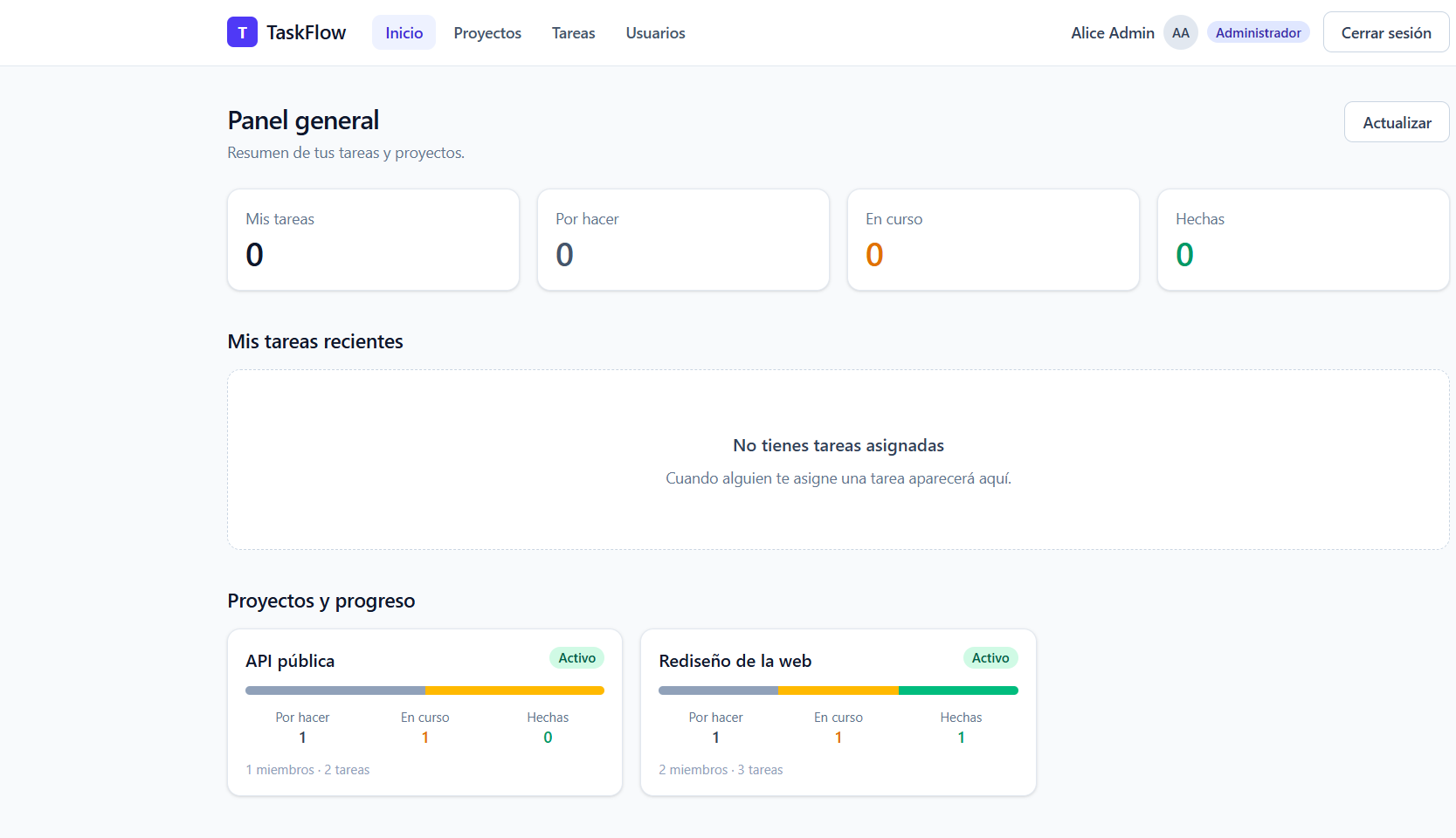
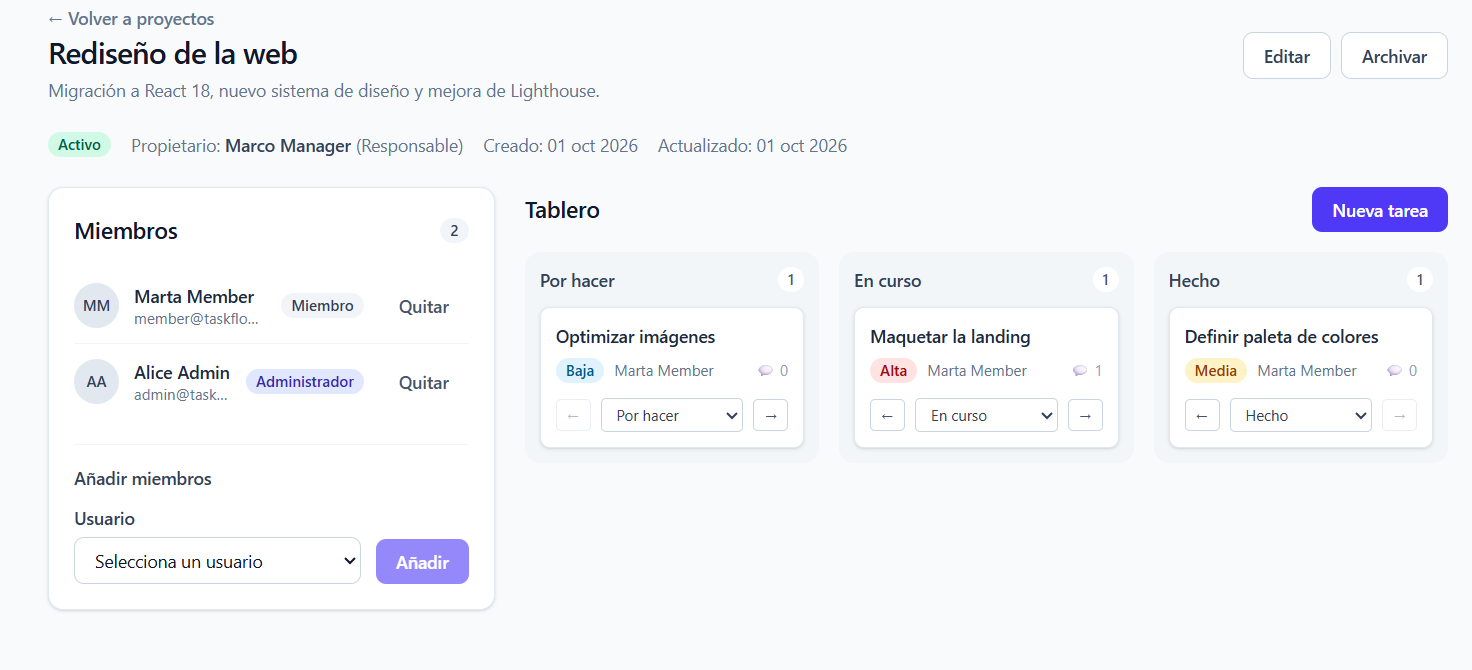
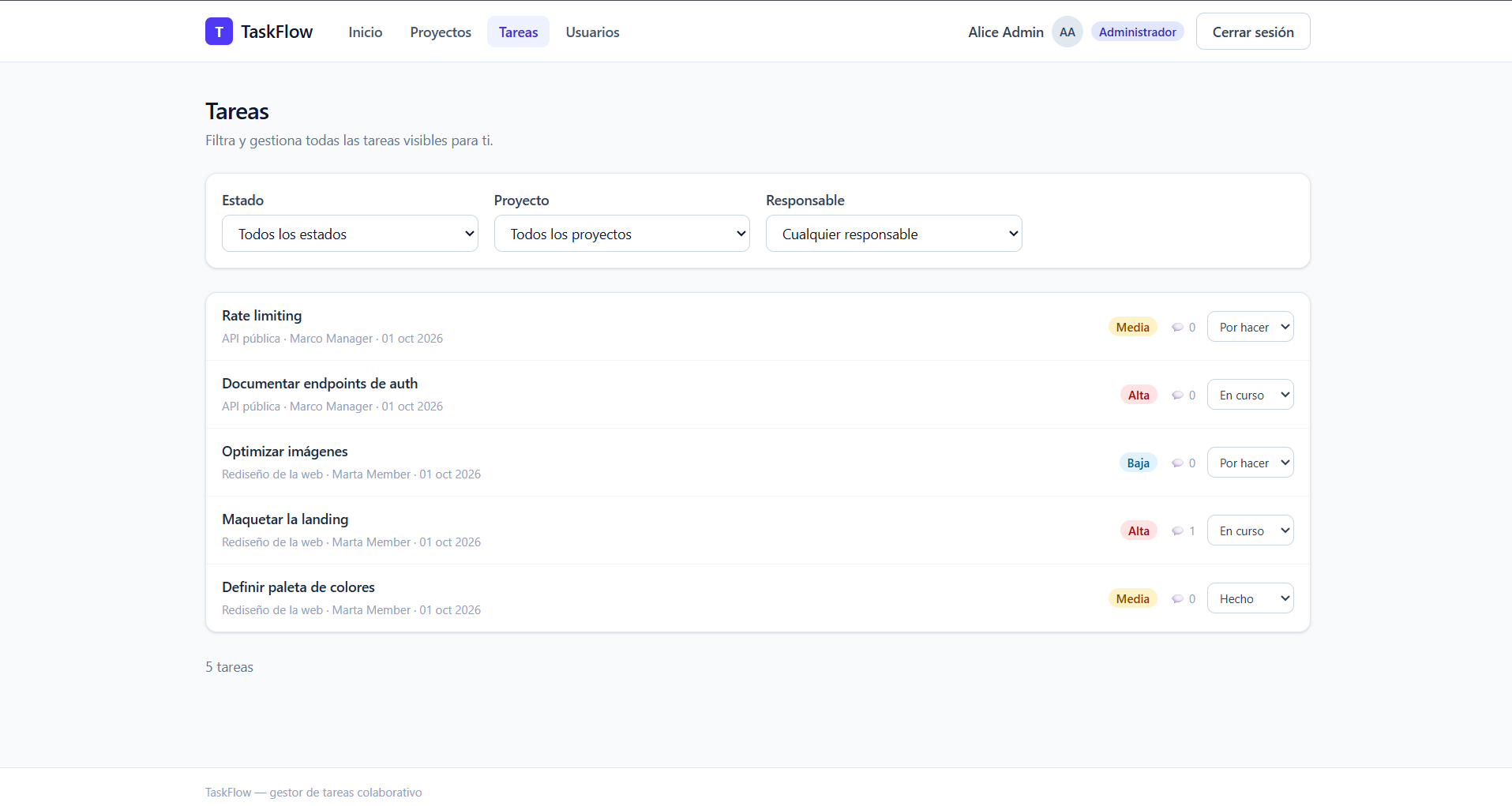
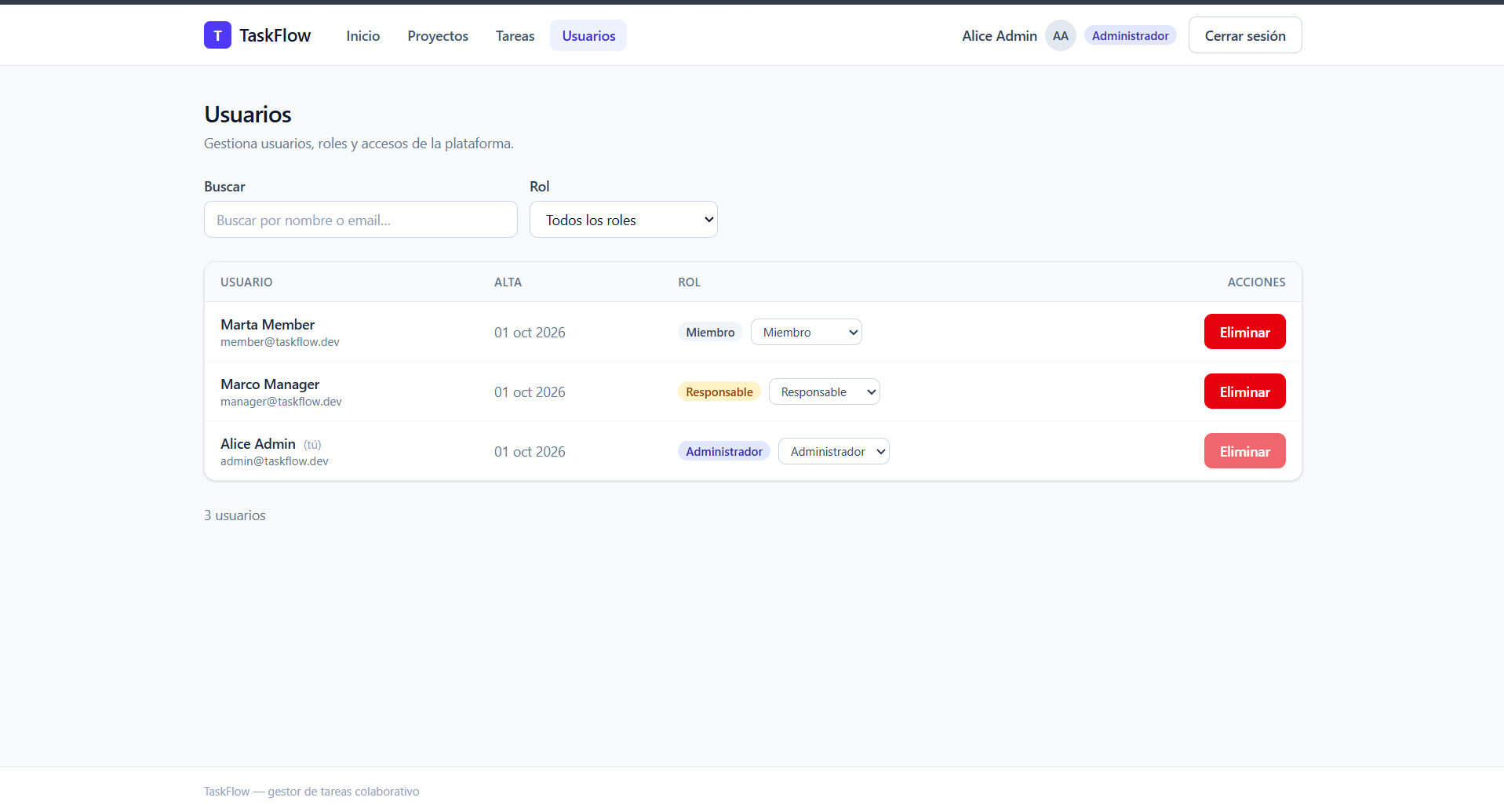
Captura real de la aplicación funcionando sobre los datos del seed. La galería completa (15 imágenes, incluidas registro, edición, permisos, Swagger y la CI) está en
docs/imagenes/y cada pantalla está comentada en la guía de usuario.
Panel general — resumen de tareas y progreso por proyecto:
Detalle de proyecto — panel de miembros y tablero Kanban:
Listado de tareas — filtros por estado, proyecto y responsable:
Administración de usuarios (solo ADMIN):
| Requisito | Versión mínima | Comprobación |
|---|---|---|
| Node.js | 24 (recomendado; la API funciona desde la 20) | node -v |
| npm | 10+ | npm -v |
| Git | 2.x | git --version |
| Docker (opcional) | 24+ con Compose v2 | docker compose version |
| PostgreSQL (solo si no usas Docker) | 16 | psql --version |
git clone https://github.com/alberto2005-coder/taskflow.git TaskFlow
cd TaskFlow
cp .env.example .env          # ajusta credenciales si lo necesitas
docker compose up
Con eso quedan levantados:
| Servicio | URL | Descripción |
|---|---|---|
| 🌐 Frontend | http://localhost:5173 | React (Nginx en producción) |
| 🔌 API | http://localhost:4000/api | NestJS |
| 📚 Swagger | http://localhost:4000/api/docs | Documentación OpenAPI |
| 🗄️ PostgreSQL | localhost:5432 |
Base de datos taskflow |
El contenedor
apiejecutaprisma migrate deployautomáticamente al arrancar.
Útil si no tienes Docker:
# 1. Dependencias del monorepo (npm workspaces)
npm install

# 2. Variables de entorno
cp .env.example .env
#   → DATABASE_URL=postgresql://postgres:postgres@localhost:5432/taskflow

# 3. Base de datos local (si ya tienes PostgreSQL):
#    createdb taskflow && createdb taskflow_test
#    o con Docker solo la base de datos:
docker compose up -d db

# 4. Migraciones + datos de demostración
npm run db:migrate
npm run db:seed

# 5. Arrancar API (4000) y Web (5173) a la vez
npm run dev
npm run db:seed)| Contraseña | Rol | |
|---|---|---|
admin@taskflow.dev |
Taskflow123! |
ADMIN |
manager@taskflow.dev |
Taskflow123! |
MANAGER |
member@taskflow.dev |
Taskflow123! |
MEMBER |
Copia .env.example a .env en la raíz (y apps/api/.env.example a apps/api/.env si trabajas
solo con la API):
| Variable | Ejemplo | Descripción |
|---|---|---|
DATABASE_URL |
postgresql://postgres:postgres@localhost:5432/taskflow |
Base de datos principal |
TEST_DATABASE_URL |
postgresql://postgres:postgres@localhost:5432/taskflow_test |
Base de datos de pruebas |
API_PORT |
4000 |
Puerto del servidor NestJS |
CORS_ORIGIN |
http://localhost:5173 |
Origen permitido (coma separada) |
JWT_ACCESS_SECRET |
(cadena larga y secreta) | Firma del access token |
JWT_ACCESS_TTL |
15m |
Caducidad del access token |
JWT_REFRESH_SECRET |
(distinta de la anterior) | Firma del refresh token |
JWT_REFRESH_TTL |
7d |
Caducidad del refresh token |
VITE_API_URL |
http://localhost:4000/api |
Base de la API en el navegador |
⚠️ Nunca subas
.envreal al repositorio (.envestá en.gitignore).
erDiagram
    USER ||--o{ PROJECT : "posee (ownerId)"
    USER ||--o{ PROJECT_MEMBER : "pertenece"
    PROJECT ||--o{ PROJECT_MEMBER : "tiene"
    PROJECT ||--o{ TASK : "contiene"
    USER ||--o{ TASK : "asignada a (assigneeId)"
    TASK ||--o{ COMMENT : "recibe"
    USER ||--o{ COMMENT : "escribe"
    USER ||--o{ REFRESH_TOKEN : "tiene"

    USER {
      uuid id PK
      string email UK
      string name
      string passwordHash
      enum role "ADMIN | MANAGER | MEMBER"
      datetime createdAt
    }
    PROJECT {
      uuid id PK
      string name
      string description
      enum status "ACTIVE | ARCHIVED"
      uuid ownerId FK
    }
    PROJECT_MEMBER {
      uuid projectId PK_FK
      uuid userId PK_FK
      datetime joinedAt
    }
    TASK {
      uuid id PK
      string title
      string description
      enum status "TODO | IN_PROGRESS | DONE"
      enum priority "LOW | MEDIUM | HIGH"
      uuid projectId FK
      uuid assigneeId FK
    }
    COMMENT {
      uuid id PK
      string content
      uuid taskId FK
      uuid authorId FK
    }
    REFRESH_TOKEN {
      uuid id PK
      string tokenHash UK "SHA-256"
      datetime expiresAt
      uuid userId FK
    }
Las migraciones viven en apps/api/prisma/migrations/ y se aplican con
npm run db:migrate (desarrollo) o prisma migrate deploy (producción/CI).
| Acción | ADMIN |
MANAGER |
MEMBER |
|---|---|---|---|
| Gestionar usuarios y roles | ✅ | ❌ | ❌ |
| Crear proyecto | ✅ | ✅ | ❌ |
| Editar / archivar / borrar proyecto | ✅ | solo el que posee | ❌ |
| Añadir o quitar miembros | ✅ | solo de su proyecto | ❌ |
| Crear, editar o borrar tareas | ✅ | solo en su proyecto | ❌ |
| Cambiar estado de una tarea | ✅ | solo en su proyecto | solo las asignadas a él |
| Comentar en tareas | ✅ | ✅ | ✅ (en sus proyectos) |
| Ver el progreso por proyecto | ✅ | ✅ | ❌ |
| Ver proyectos | todos | los que posee + los que es miembro | solo los que es miembro |
Ver tareas (GET /tasks) |
todas | las de sus proyectos | solo las asignadas a él |
Estas reglas se aplican en el backend (
permissions.ts+ guards). La interfaz solo oculta botones: no es una barrera de seguridad.
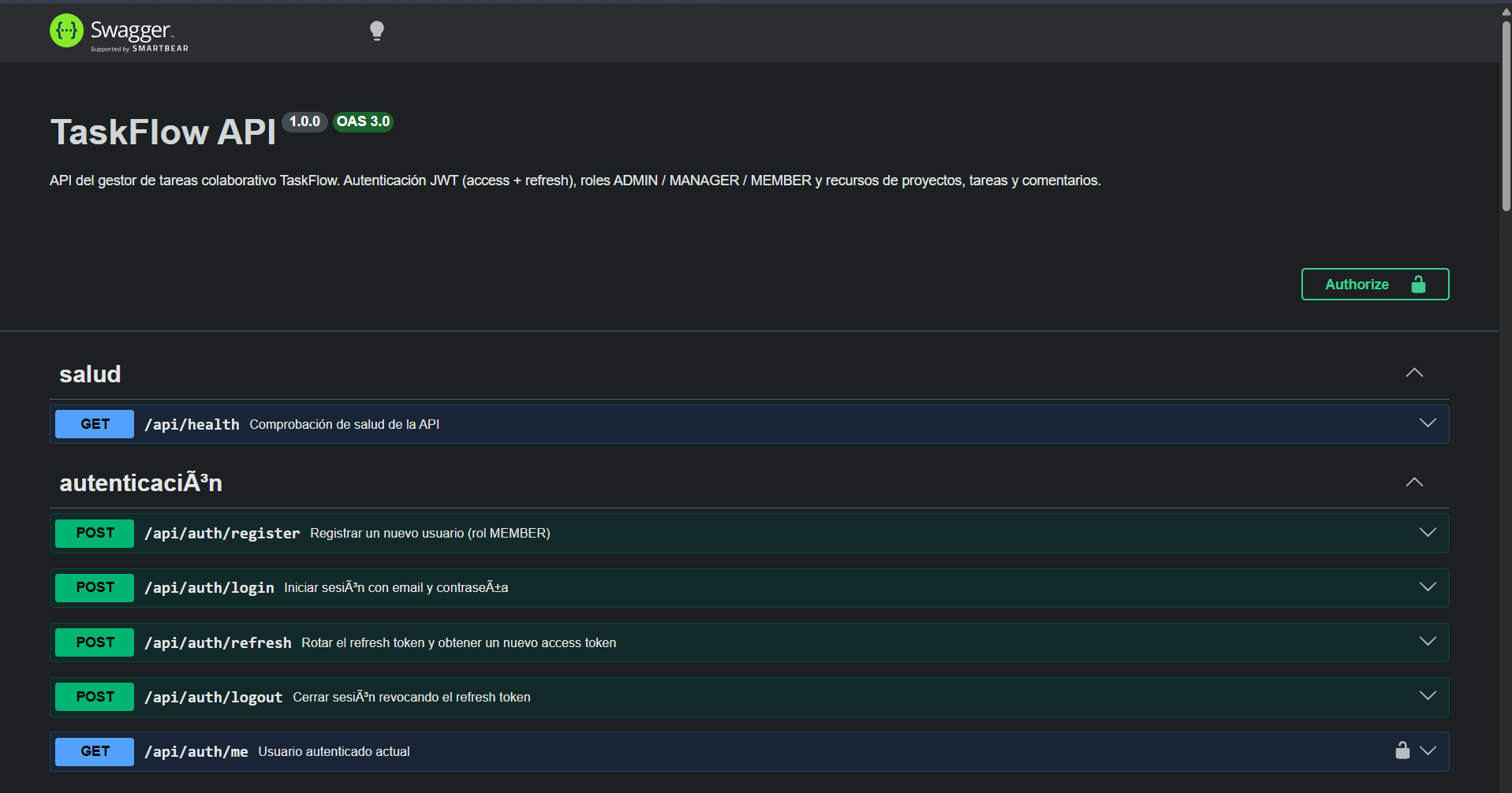
Documentación completa y try-it-out en /api/docs.
Detalle campo a campo en docs/API.md.
| Método | Ruta | Acceso |
|---|---|---|
POST |
/api/auth/register |
público |
POST |
/api/auth/login |
público |
POST |
/api/auth/refresh |
público |
POST |
/api/auth/logout |
público |
GET |
/api/auth/me |
autenticado |
GET |
/api/health |
público |
GET · POST |
/api/users |
ADMIN |
GET · PATCH · DELETE |
/api/users/:id |
ADMIN o el propio usuario |
PATCH |
/api/users/:id/role |
ADMIN |
GET · POST |
/api/projects |
autenticado · crear: MANAGER/ADMIN |
GET · PATCH · DELETE |
/api/projects/:id |
visibilidad / gestión |
POST · DELETE |
/api/projects/:id/members[/:userId] |
dueño o ADMIN |
GET · POST |
/api/projects/:id/tasks |
visibilidad / crear: MANAGER/ADMIN |
GET |
/api/tasks |
según rol |
GET · PATCH · DELETE |
/api/tasks/:id |
según permisos |
PATCH |
/api/tasks/:id/status |
asignado, dueño o ADMIN |
GET · POST |
/api/tasks/:id/comments |
miembros del proyecto |
GET |
/api/dashboard |
autenticado |
Errores: 400 validación · 401 sin sesión/token inválido · 403 rol insuficiente ·
404 recurso inexistente o invisible · 409 conflicto (email duplicado).
Vista real de la documentación interactiva en /api/docs:
TaskFlow/
├── .github/workflows/ci.yml     # Pipeline de CI
├── docker-compose.yml           # db + api + web
├── package.json                 # npm workspaces (raíz)
├── tsconfig.base.json
├── .env.example
├── docs/
│   ├── API.md                   # Contrato REST
│   ├── USUARIO.md               # Guía de usuario
│   ├── DESARROLLADOR.md         # Guía de desarrollo
│   └── DESPLIEGUE.md            # Despliegue y operaciones
└── apps/
    ├── api/                     # NestJS
    │   ├── prisma/              # schema.prisma · migrations/ · seed.ts
    │   ├── src/
    │   │   ├── auth/            # registro · login · refresh · JWT strategy
    │   │   ├── users/           # gestión de usuarios + permissions.ts
    │   │   ├── projects/        # proyectos y miembros
    │   │   ├── tasks/           # tareas y comentarios
    │   │   ├── dashboard/       # resumen del usuario
    │   │   ├── prisma/          # PrismaService (global)
    │   │   └── common/          # guards · decoradores · DTOs compartidos
    │   └── test/                # TODOS los tests (unit + integración)
    └── web/                     # React + Vite
        └── src/
            ├── features/        # auth · dashboard · projects · tasks · users
            ├── components/      # UI reutilizable
            ├── lib/             # cliente API tipado
            ├── store/           # Zustand (sesión)
            └── routes/          # router y guardas
En la raíz del monorepo:
| Script | Descripción |
|---|---|
npm run dev |
API (4000) + Web (5173) en paralelo |
npm run build |
Compila ambos proyectos |
npm test |
Ejecuta todos los tests |
npm run lint |
ESLint en apps/api y apps/web |
npm run format / format:check |
Prettier |
npm run db:up / db:down |
Levanta/solo la base de datos con Docker |
npm run db:migrate |
prisma migrate dev |
npm run db:seed |
Datos de demostración |
npm run db:reset |
Reinicia la base de datos y la re-migra |
Dentro de apps/api: dev, build, test, test:cov, lint,
prisma:generate, prisma:migrate, prisma:migrate:deploy, prisma:seed, prisma:studio.
Dentro de apps/web: dev, build, preview, test, test:watch, lint.
npm test              # todo
npm run test:api      # solo API
npm run test:web      # solo Web
npm run test:cov -w apps/api   # con informe de cobertura
Estrategia (documentada en docs/DESARROLLADOR.md):
| Nivel | Herramienta | Qué cubre |
|---|---|---|
| Unitario | Jest | Lógica de permisos, servicios de auth/usuarios con Prisma simulado |
| Integración | Jest + Supertest | Flujo HTTP completo contra PostgreSQL real (taskflow_test) |
| Componente | Vitest + RTL | Formularios, tablero Kanban, cliente API (incl. refresh en 401) |
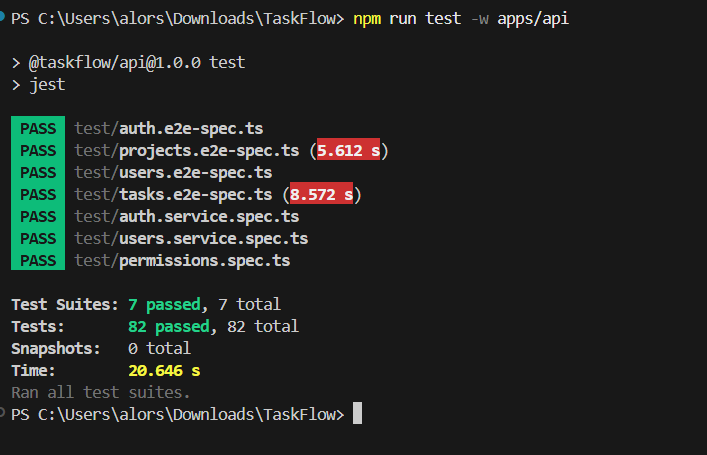
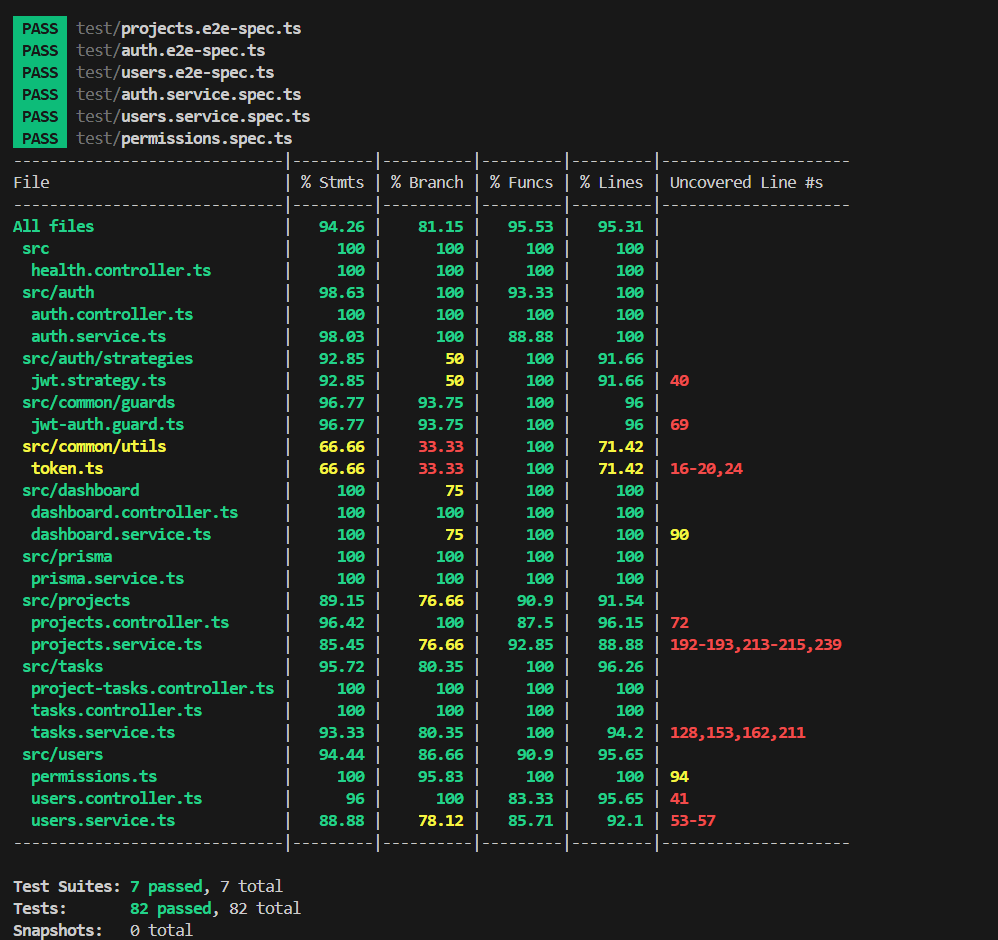
Resultados verificados (2026-10-01):
| Suite | Comando | Resultado |
|---|---|---|
| API (unit + integración) | npm run test -w apps/api |
✅ 82/82 tests en 7 suites (≈ 20 s) |
| Frontend (componentes) | npm run test -w apps/web |
✅ 17/17 tests en 4 ficheros (≈ 8,5 s) |
| Cobertura de la API | npm run test:cov -w apps/api |
✅ exit 0 · global 94,26 % · permissions.ts 100 % · src/auth 98,63 % |
La salida íntegra (listado de suites y tabla de cobertura) está en
docs/DESARROLLADOR.md §8.
apps/api/test/.maxWorkers: 1) porque comparten base de datos; cada fichero
empieza con las tablas vacías.src/auth ≥ 70 % y src/users/permissions.ts ≥ 90 % (declarados
por directorio/ruta, no con globs, porque Jest evalúa los umbrales glob fichero a fichero)..github/workflows/ci.yml se ejecuta en cada push y pull request a main:
postgres:16-alpine como base de datos de pruebas.npm ciprisma generatenpm run lint + npm run format:checkprisma migrate deploynpm testnpm run buildPasada real en GitHub Actions (primer push, 2026-10-01):
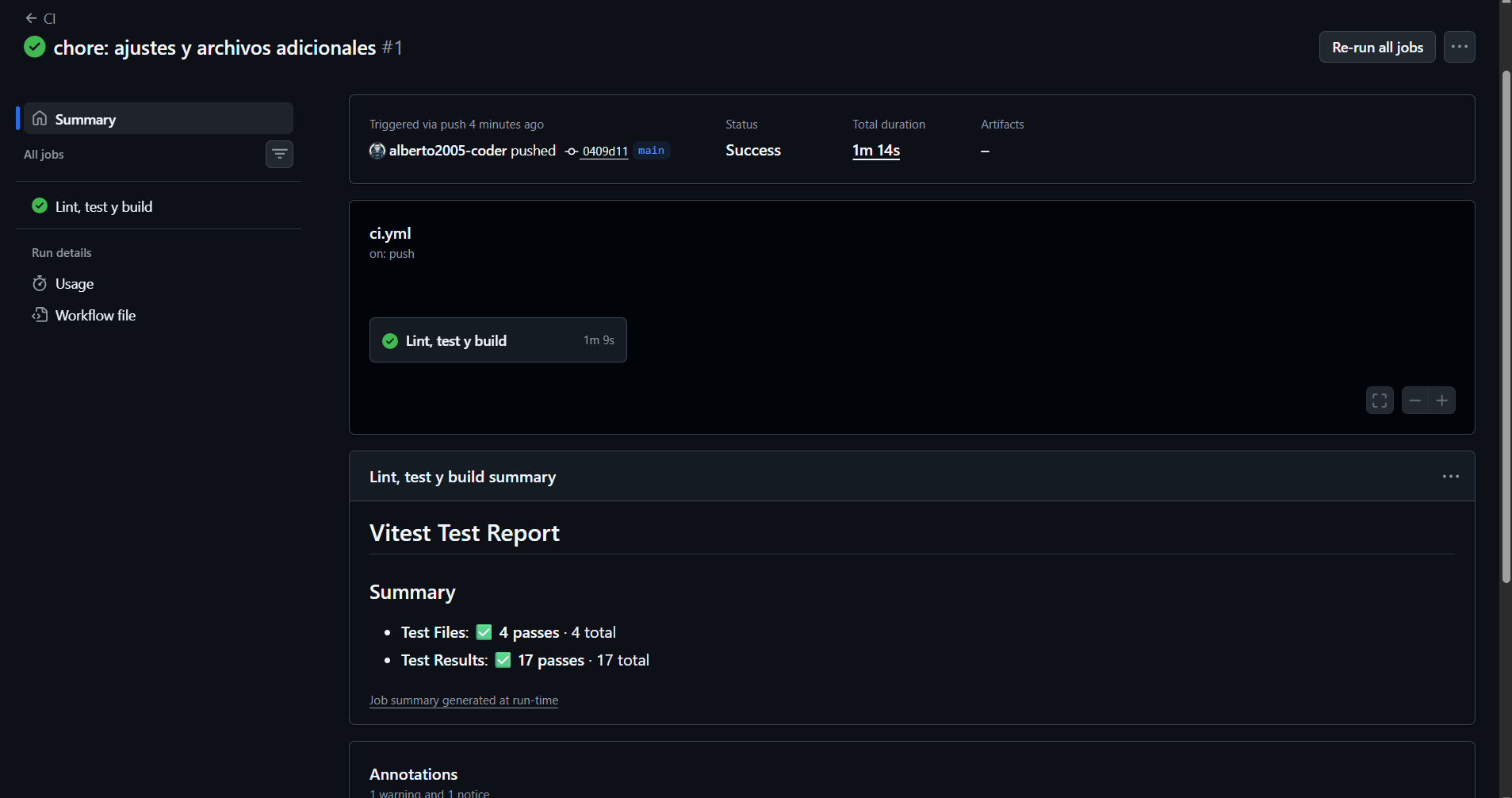
La badge superior del README consulta el estado de esta misma workflow en tiempo real.
| Documento | Contenido |
|---|---|
README.md |
Este archivo: visión general y arranque |
docs/USUARIO.md |
Guía de usuario con capturas de pantalla paso a paso |
docs/DESARROLLADOR.md |
Guía para desarrolladores: arquitectura, convenciones, tests |
docs/API.md |
Contrato REST completo (fuentes de verdad para FE y BE) |
docs/DESPLIEGUE.md |
Despliegue con Docker, CI/CD y operaciones |
Swagger (/api/docs) |
Documentación interactiva de la API |
| Síntoma | Causa probable | Solución |
|---|---|---|
Can't reach database server at localhost:5432 |
PostgreSQL parado | docker compose up -d db o inicia el servicio local |
Password authentication failed |
Credenciales distintas | Revisa DATABASE_URL en .env y el usuario de PostgreSQL |
| Tests de integración omitidos | No había base de datos | Levanta db y vuelve a ejecutar npm test |
| Puerto 4000/5173 ocupado | Otro proceso | Cambia API_PORT o server.port en vite.config.ts |
PrismaClient desactualizado |
Schema cambiado | npm run prisma:generate -w apps/api |
| Error de migración | Migraciones locales divergentes | npm run db:reset (⚠️ borra datos de desarrollo) |
| CORS bloqueado en el navegador | Origen no permitido | Añade tu URL a CORS_ORIGIN |
/api/docsCopyright © 2026 Alberto Ortiz (alberto2005-coder).
Repositorio original: https://github.com/alberto2005-coder/taskflow — cita visiblemente el proyecto original en forks y variaciones.
Este proyecto está bajo la Licencia GPL-3.0; el texto completo y vinculante está en
LICENSE. Resumen orientativo:
| ✅ Permitido | Usar, copiar, modificar y distribuir con fines personales, educativos y comerciales, manteniendo la atribución al autor original. |
| 🍴 Forks y variaciones | Deben citar el proyecto original y al autor, e indicar los cambios realizados. |
| 📄 Redistribución | Si distribuyes copias o versiones modificadas, publica su código fuente bajo GPL-3.0 (copyleft); incluye este LICENSE íntegro y conserva los avisos de copyright. |
Hecho con TypeScript de punta a punta. Licencia GPL-3.0.
Collaborative task manager featuring authentication, role-based access control, and a relational database. Full-stack TypeScript project: NestJS + Prisma + PostgreSQL on the backend and React + Vite + Tailwind on the frontend.
TaskFlow enables small teams to organize their work through projects, tasks, and comments, backed by three distinct permission roles:
| Feature | Description |
|---|---|
| 🔐 JWT Authentication | Registration, login, and refresh tokens with rotation and revocation (logout). |
| 👥 Roles | ADMIN · MANAGER · MEMBER with authorization strictly enforced on the backend. |
| 📁 Projects | Create, edit, archive, delete, and manage project members. |
| 📋 Kanban Board | TODO → IN_PROGRESS → DONE columns with one-click status transitions. |
| 💬 Comments | Task-level comment threads. |
| 📊 Dashboard | Summary of my tasks by status and project progress tracking (for ADMIN/MANAGER). |
| 🧑💼 Administration | User and role management (exclusive to ADMIN). |
| 📄 Swagger | Interactive API documentation hosted at /api/docs. |
apps/api| Layer | Technology |
|---|---|
| Framework | NestJS 11 (Express 5) |
| ORM | Prisma 6 |
| Database | PostgreSQL 16 |
| Auth | JWT (@nestjs/jwt) + Passport + bcrypt |
| Validation | class-validator + ValidationPipe (whitelist) |
| Documentation | Swagger / OpenAPI (@nestjs/swagger) |
| Security | helmet, restricted CORS, compression |
| Testing | Jest + Supertest |
apps/web| Layer | Technology |
|---|---|
| UI | React 18 + TypeScript |
| Bundler | Vite 8 |
| Styling | Tailwind CSS 4 |
| Routing | React Router 7 |
| Server State | TanStack Query 5 |
| Client State | Zustand (with persistence) |
| Forms | React Hook Form + Zod |
| Testing | Vitest + Testing Library |
| Tool | Purpose |
|---|---|
| Docker Compose | db (PostgreSQL 16) + api + web (Nginx) |
| GitHub Actions | Lint → Format → Migrations → Tests → Build |
| ESLint 10 + Prettier | Code formatting and linting across both apps |
flowchart LR
    subgraph Client["Browser (React + Vite)"]
        UI["UI · Tailwind"] --> RQ["TanStack Query"]
        RQ --> ST["Zustand<br/>(access + refresh token)"]
    end

    subgraph API["API (NestJS · Port 4000)"]
        CTRL["Controllers<br/>auth · users · projects · tasks · dashboard"]
        GUARD["Global Guards<br/>JwtAuthGuard → RolesGuard"]
        SVC["Services<br/>+ permissions.ts"]
        PRISMA["PrismaService"]
        CTRL --> GUARD --> SVC --> PRISMA
    end

    DB[("PostgreSQL 16<br/>taskflow / taskflow_test")]

    UI -- "HTTP + JSON<br/>Authorization: Bearer" --> CTRL
    PRISMA -- "SQL (Prisma migrations)" --> DB

    subgraph Dev["Tools"]
        SW["Swagger /api/docs"]
        CI["GitHub Actions CI"]
    end

    CTRL -.-> SW
    CI -.->|"lint · test · build"| API
Module Design Pattern: controller (HTTP routing + role decorators) → service (business logic and permissions) → PrismaService (database access). Fine-grained authorization checks (can this user touch this specific resource?) live in src/users/permissions.ts, a pure, isolated, and easily testable layer.
Actual screenshots of the application running with seeded demo data. The complete gallery (15 images, including registration, editing, permissions, Swagger, and CI) can be found in
docs/imagenes/, and every screen is broken down in the user guide.
Dashboard — task overview and project progress:
Project Detail — members panel and Kanban board:
Task List — filtered by status, project, and assignee:
User Management (ADMIN only):
| Requirement | Minimum Version | Verification Command |
|---|---|---|
| Node.js | 24 (recommended; API runs from v20+) | node -v |
| npm | 10+ | npm -v |
| Git | 2.x | git --version |
| Docker (optional) | 24+ with Compose v2 | docker compose version |
| PostgreSQL (only if not using Docker) | 16 | psql --version |
git clone https://github.com/alberto2005-coder/taskflow.git TaskFlow
cd TaskFlow
cp .env.example .env          # customize credentials if needed
docker compose up
This brings up all required services:
| Service | URL | Description |
|---|---|---|
| 🌐 Frontend | http://localhost:5173 | React (served via Nginx in production) |
| 🔌 API | http://localhost:4000/api | NestJS |
| 📚 Swagger | http://localhost:4000/api/docs | OpenAPI documentation |
| 🗄️ PostgreSQL | localhost:5432 |
taskflow database |
The
apicontainer automatically executesprisma migrate deployon startup.
Useful if you prefer running without Docker:
# 1. Monorepo dependencies (npm workspaces)
npm install

# 2. Environment configuration
cp .env.example .env
#   → DATABASE_URL=postgresql://postgres:postgres@localhost:5432/taskflow

# 3. Local database (if PostgreSQL is installed locally):
#    createdb taskflow && createdb taskflow_test
#    or launch only the database container with Docker:
docker compose up -d db

# 4. Run migrations + seed demo data
npm run db:migrate
npm run db:seed

# 5. Start API (4000) and Web (5173) concurrently
npm run dev
npm run db:seed)| Password | Role | |
|---|---|---|
admin@taskflow.dev |
Taskflow123! |
ADMIN |
manager@taskflow.dev |
Taskflow123! |
MANAGER |
member@taskflow.dev |
Taskflow123! |
MEMBER |
Copy .env.example to .env in the root folder (and copy apps/api/.env.example to apps/api/.env if working only inside the backend):
| Variable | Example | Description |
|---|---|---|
DATABASE_URL |
postgresql://postgres:postgres@localhost:5432/taskflow |
Primary database connection string |
TEST_DATABASE_URL |
postgresql://postgres:postgres@localhost:5432/taskflow_test |
Test suite database connection string |
API_PORT |
4000 |
NestJS server port |
CORS_ORIGIN |
http://localhost:5173 |
Allowed CORS origin (comma-separated for multiples) |
JWT_ACCESS_SECRET |
(long, secure random string) | Access token signing secret |
JWT_ACCESS_TTL |
15m |
Access token lifespan |
JWT_REFRESH_SECRET |
(different secure random string) | Refresh token signing secret |
JWT_REFRESH_TTL |
7d |
Refresh token lifespan |
VITE_API_URL |
http://localhost:4000/api |
Base API URL consumed by the client app |
⚠️ Never commit real production
.envfiles (.envis ignored via.gitignore).
erDiagram
    USER ||--o{ PROJECT : "owns (ownerId)"
    USER ||--o{ PROJECT_MEMBER : "belongs to"
    PROJECT ||--o{ PROJECT_MEMBER : "has"
    PROJECT ||--o{ TASK : "contains"
    USER ||--o{ TASK : "assigned to (assigneeId)"
    TASK ||--o{ COMMENT : "receives"
    USER ||--o{ COMMENT : "writes"
    USER ||--o{ REFRESH_TOKEN : "has"

    USER {
      uuid id PK
      string email UK
      string name
      string passwordHash
      enum role "ADMIN | MANAGER | MEMBER"
      datetime createdAt
    }
    PROJECT {
      uuid id PK
      string name
      string description
      enum status "ACTIVE | ARCHIVED"
      uuid ownerId FK
    }
    PROJECT_MEMBER {
      uuid projectId PK_FK
      uuid userId PK_FK
      datetime joinedAt
    }
    TASK {
      uuid id PK
      string title
      string description
      enum status "TODO | IN_PROGRESS | DONE"
      enum priority "LOW | MEDIUM | HIGH"
      uuid projectId FK
      uuid assigneeId FK
    }
    COMMENT {
      uuid id PK
      string content
      uuid taskId FK
      uuid authorId FK
    }
    REFRESH_TOKEN {
      uuid id PK
      string tokenHash UK "SHA-256"
      datetime expiresAt
      uuid userId FK
    }
Migrations are stored in apps/api/prisma/migrations/ and applied using npm run db:migrate (development) or prisma migrate deploy (production/CI).
| Action | ADMIN |
MANAGER |
MEMBER |
|---|---|---|---|
| Manage users and roles | ✅ | ❌ | ❌ |
| Create projects | ✅ | ✅ | ❌ |
| Edit / archive / delete projects | ✅ | Owned projects only | ❌ |
| Add or remove project members | ✅ | Owned projects only | ❌ |
| Create, edit, or delete tasks | ✅ | Owned projects only | ❌ |
| Change task status | ✅ | Owned projects only | Assigned tasks only |
| Comment on tasks | ✅ | ✅ | ✅ (in assigned projects) |
| View progress across projects | ✅ | ✅ | ❌ |
| View projects | All | Owned + member projects | Member projects only |
View tasks (GET /tasks) |
All | Tasks in their projects | Assigned tasks only |
These authorization rules are enforced strictly in the backend (
permissions.ts+ guards). The UI merely hides controls and does not replace real server security.
Full interactive API testing is available at /api/docs.
Field-by-field payload specifications can be viewed in docs/API.md.
| Method | Path | Access |
|---|---|---|
POST |
/api/auth/register |
Public |
POST |
/api/auth/login |
Public |
POST |
/api/auth/refresh |
Public |
POST |
/api/auth/logout |
Public |
GET |
/api/auth/me |
Authenticated |
GET |
/api/health |
Public |
GET · POST |
/api/users |
ADMIN |
GET · PATCH · DELETE |
/api/users/:id |
ADMIN or profile owner |
PATCH |
/api/users/:id/role |
ADMIN |
GET · POST |
/api/projects |
Authenticated · Creation: MANAGER/ADMIN |
GET · PATCH · DELETE |
/api/projects/:id |
Project visibility / management |
POST · DELETE |
/api/projects/:id/members[/:userId] |
Project owner or ADMIN |
GET · POST |
/api/projects/:id/tasks |
Project visibility / Creation: MANAGER/ADMIN |
GET |
/api/tasks |
Role-based |
GET · PATCH · DELETE |
/api/tasks/:id |
Permission-based |
PATCH |
/api/tasks/:id/status |
Assignee, owner, or ADMIN |
GET · POST |
/api/tasks/:id/comments |
Project members |
GET |
/api/dashboard |
Authenticated |
Error Responses: 400 Validation error · 401 Unauthorized / missing session · 403 Insufficient permissions · 404 Resource missing or restricted · 409 Conflict (duplicate email).
Interactive documentation preview in /api/docs:
TaskFlow/
├── .github/workflows/ci.yml     # CI Pipeline
├── docker-compose.yml           # db + api + web
├── package.json                 # npm workspaces (root)
├── tsconfig.base.json
├── .env.example
├── docs/
│   ├── API.md                   # REST contract documentation
│   ├── USUARIO.md               # User manual
│   ├── DESARROLLADOR.md         # Developer guide
│   └── DESPLIEGUE.md            # Deployment & ops guide
└── apps/
    ├── api/                     # NestJS
    │   ├── prisma/              # schema.prisma · migrations/ · seed.ts
    │   ├── src/
    │   │   ├── auth/            # register · login · refresh · JWT strategy
    │   │   ├── users/           # user management + permissions.ts
    │   │   ├── projects/        # projects and members
    │   │   ├── tasks/           # tasks and comments
    │   │   ├── dashboard/       # user analytics & overview
    │   │   ├── prisma/          # PrismaService (global)
    │   │   └── common/          # guards · decorators · shared DTOs
    │   └── test/                # ALL tests (unit + integration)
    └── web/                     # React + Vite
        └── src/
            ├── features/        # auth · dashboard · projects · tasks · users
            ├── components/      # reusable UI components
            ├── lib/             # typed API client
            ├── store/           # Zustand (session storage)
            └── routes/          # router & navigation guards
In the root monorepo directory:
| Script | Description |
|---|---|
npm run dev |
Runs API (4000) + Web (5173) concurrently |
npm run build |
Builds both applications for production |
npm test |
Executes all test suites |
npm run lint |
Runs ESLint across apps/api and apps/web |
npm run format / format:check |
Formats or validates code style via Prettier |
npm run db:up / db:down |
Spins up / tears down the Docker PostgreSQL database |
npm run db:migrate |
Runs prisma migrate dev |
npm run db:seed |
Populates demo data |
npm run db:reset |
Drops, re-migrates, and re-seeds the development database |
Inside apps/api: dev, build, test, test:cov, lint, prisma:generate, prisma:migrate, prisma:migrate:deploy, prisma:seed, prisma:studio.
Inside apps/web: dev, build, preview, test, test:watch, lint.
npm test              # Run everything
npm run test:api      # Run API tests only
npm run test:web      # Run Frontend tests only
npm run test:cov -w apps/api   # Run API tests with coverage report
Testing Strategy (detailed in docs/DESARROLLADOR.md):
| Level | Tool | Scope |
|---|---|---|
| Unit | Jest | Permission evaluation, auth/user business logic using mocked Prisma |
| Integration | Jest + Supertest | End-to-end HTTP pipeline against a live PostgreSQL instance (taskflow_test) |
| Component | Vitest + RTL | Form validations, Kanban board interactions, API client (including 401 refresh flows) |
Verified Test Results (2026-10-01):
| Suite | Command | Outcome |
|---|---|---|
| API (unit + integration) | npm run test -w apps/api |
✅ 82/82 tests passing across 7 suites (≈ 20 s) |
| Frontend (components) | npm run test -w apps/web |
✅ 17/17 tests passing across 4 files (≈ 8.5 s) |
| API Coverage | npm run test:cov -w apps/api |
✅ exit 0 · Global 94.26% · permissions.ts 100% · src/auth 98.63% |
The full execution summary (suites breakdown and coverage report) can be found in docs/DESARROLLADOR.md §8.
apps/api/test/.maxWorkers: 1) to prevent collisions across the shared test database; each test file begins with truncated tables.src/auth ≥ 70% and src/users/permissions.ts ≥ 90% (configured per directory/path rather than globs, as Jest assesses glob thresholds on a file-by-file basis)..github/workflows/ci.yml runs automatically on every pull request and push to main:
postgres:16-alpine test service.npm ciprisma generatenpm run lint + npm run format:checkprisma migrate deploynpm testnpm run buildSample GitHub Actions run (first push, 2026-10-01):
The status badge at the top of this README reflects the real-time status of this CI workflow.
| Document | Scope |
|---|---|
README.md |
This file: overview, stack, and quickstart guide |
docs/USUARIO.md |
User guide with visual walkthroughs and step-by-step flows |
docs/DESARROLLADOR.md |
Developer guide: architectural patterns, conventions, and test setups |
docs/API.md |
Complete REST specification (source of truth for frontend & backend) |
docs/DESPLIEGUE.md |
Deployment instructions for Docker, CI/CD, and operations |
Swagger (/api/docs) |
Interactive OpenAPI interface |
| Symptom | Probable Cause | Resolution |
|---|---|---|
Can't reach database server at localhost:5432 |
PostgreSQL is down | Run docker compose up -d db or start your local service |
Password authentication failed |
Credential mismatch | Check DATABASE_URL in .env against your PostgreSQL configuration |
| Integration tests skipped | Database unavailable | Spin up db and re-run npm test |
| Port 4000 or 5173 already in use | Conflicting local process | Update API_PORT or server.port inside vite.config.ts |
PrismaClient is out of sync |
Schema changed without generation | Run npm run prisma:generate -w apps/api |
| Migration conflict | Out-of-sync local migrations | Run npm run db:reset (⚠️ deletes development data) |
| CORS rejected by browser | Origin not whitelisted | Add your frontend origin URL to CORS_ORIGIN |
/api/docsCopyright © 2026 Alberto Ortiz (alberto2005-coder).
Original Repository: https://github.com/alberto2005-coder/taskflow — attribution to the original author must remain visible on all forks and derivatives.
This project is licensed under the GPL-3.0 License; the complete, legally binding terms can be found in LICENSE. Summary of terms:
| ✅ Permissions | Use, copy, modify, and distribute for personal, educational, and commercial purposes, provided original author attribution is preserved. |
| 🍴 Forks & Derivatives | Must retain attribution to the original author/project and document any modifications made. |
| 📄 Redistribution | Any redistributed copies or modifications must be published under the GPL-3.0 license (copyleft); must retain the full LICENSE file and copyright notices. |
Built end-to-end with TypeScript. GPL-3.0 License.
alberto2005-coder/taskflow is a public repo on GitHub by alberto2005-coder. Full-stack task manager in TypeScript: NestJS 11 + Prisma + PostgreSQL 16 API and React 18 + Vite + Tailwind 4 UI. JWT auth with refresh-token rotation, RBAC roles, Kanban board, Swagger docs, 99 tests (94% coverage), Docker Compose and GitHub Actions CI.
It declares the GPL-3.0 license on GitHub.
Its maker tagged it for macOS, Windows and Linux, or as Docker or cross-platform. That is declared by the maker; Take My Repo has not tested it.
Open "Take it" on its page: Take My Repo writes an install plan for your machine and hands it to your AI agent (Claude Code, Codex or Cursor), which asks you before each step. Take My Repo has not tested it on any machine.
Its last change on GitHub was on 2026-11-16. Take My Repo does not judge from that whether it is maintained.
The Single Sign-On Multi-Factor portal for web apps. OpenID Certified™ and Post-Quantum Cryptography Ready.
Nobody has reviewed it on Take My Repo yet, which says nothing about its quality.
An open-source, self-hostable PaaS alternative to Vercel, Heroku & Netlify that lets you easily deploy static sites, databases, full-stack applications and 360+ one-click services on your own servers.
Flutter makes it easy and fast to build beautiful apps for mobile and beyond
f.k.a. Awesome ChatGPT Prompts. Share, discover, and collect prompts from the community. Free and open source — self-host for your organization with complete privacy.
Modular Discord.js v14 bot with slash commands for moderation, tickets, economy, music and utilities, with one file per command category.
Un navegador web ligero y experimental construido con Tauri, utilizando Arti (Rust) para enrutar el tráfico nativamente a través de la red Tor.
Cotizador dinámico de precios para PrestaShop. Permite a las tiendas de fabricación bajo demanda o impresión 3D calcular costes exactos en el frontend antes del checkout.
Herramienta desarrollada en Java con una interfaz gráfica nativa mediante Swing. Permite leer y parsear distintos formatos de archivos de datos (.json, .xml, .csv) de forma modular, aplicando patrones de diseño orientados a objetos.
A state-of-the-art, fully automated multi-chain cryptocurrency escrow bot for Discord. Supports BTC, LTC, SOL, ETH, USDT, and USDC with dynamic deterministic wallet derivation, AES key encryption, real-time blockchain monitoring, and a built-in reputation rating system.
Siete plantillas de una sola página (portafolio, SaaS, blog, tienda, agencia, dashboard y restaurante) con servidor Node nativo, API REST y base de datos SQLite. Arrancan con npm start, sin npm install. Documentación completa en español.