
rea
Reverse engineer anything with agents, from app behavior down to native binaries.
- 472k
- TypeScript
- MIT
- 2 h ago
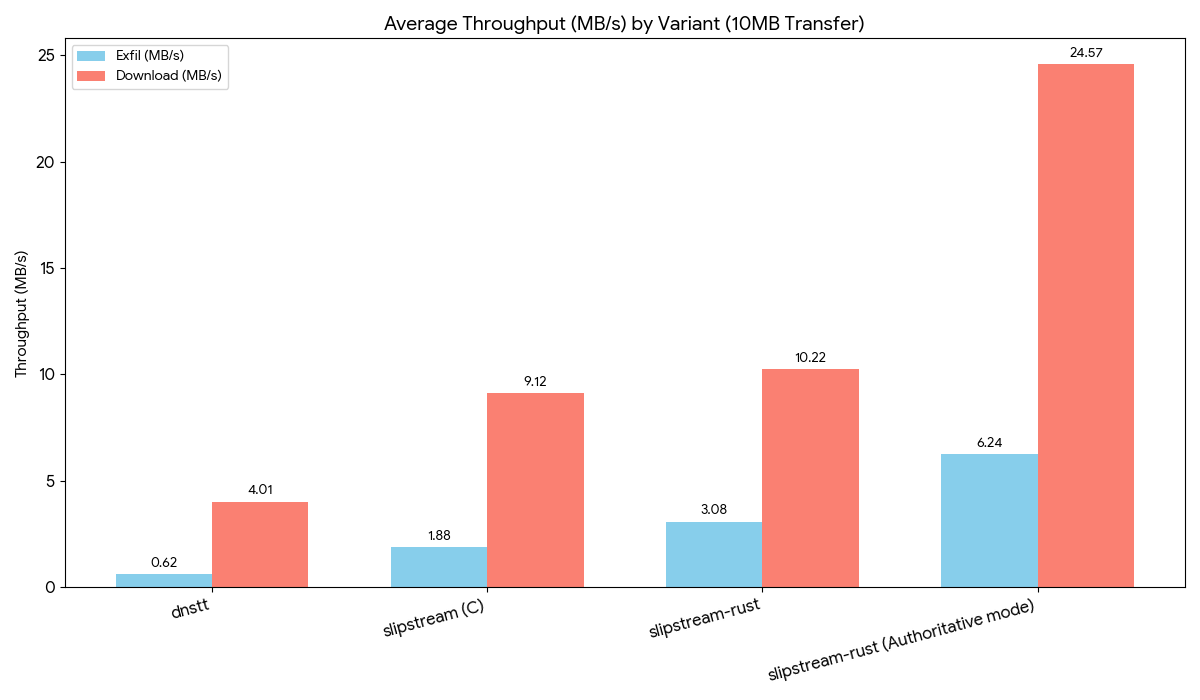
Android VPN client with DNS tunneling (DNSTT, NoizDNS & Slipstream), NaiveProxy, SSH, Tor, and DoH support — featuring a built-in DNS scanner.
Repo anonvector/SlipNet, read from GitHub 1 min ago. anonvector has not joined Take My Repo.
anonvector/SlipNet is a public repo on GitHub by anonvector. Android VPN client with DNS tunneling (DNSTT, NoizDNS & Slipstream), NaiveProxy, SSH, Tor, and DoH support — featuring a built-in DNS scanner. It declares the AGPL-3.0 license on GitHub. It is written mainly in C, has 1,606 stars and last changed on 2026-11-03. Nobody has reviewed it on Take My Repo yet, which says nothing about its quality. Read from GitHub on 2026-11-21.
SlipNet is NOT available on any app store. Any version you find on Google Play, the Apple App Store, or any other marketplace is not published by us and may be outdated, modified, or unsafe. The only official sources are this GitHub repository and our Telegram channel.
Copyright (C) 2026 Anonvector

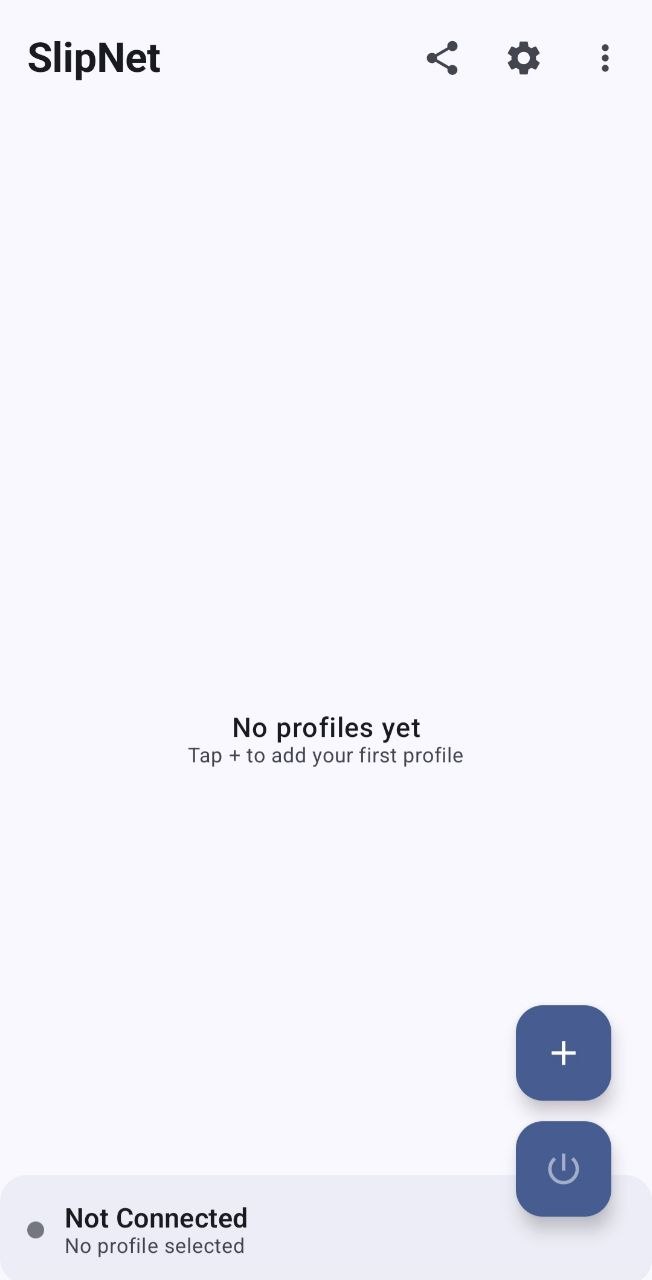
A fast, modern VPN client featuring DNS tunneling with support for multiple protocols. Available as an Android app (Jetpack Compose + Kotlin) and a cross-platform CLI client (Go).
This is open-source anti-censorship software designed to help users in countries with internet censorship access the free internet. It is comparable to Tor, Psiphon, Outline VPN (Google Jigsaw), and dnstt. This project does not target, exploit, or attack any systems — it is a client-side privacy tool used voluntarily by end users.
Full step-by-step user guide (installation, profiles, scanner, troubleshooting, sharing & backup, security notes) — available in English and Persian:
If you want to support development:
0xd4140058389572D50dC8716e768e687C050Dd5C948wa9asF4AdZCq8KvPqBmqN3s98XFQ2MG7pL8MY6hAc6ZXBd8D61LArebdmAwCk5jBBbR2BuiHkSraEYFhx5AdDqLxDB4GUJoin our Telegram channel for updates, support, and discussions:
SlipNet supports multiple tunnel types with optional SSH chaining:
| Tunnel Type | Protocol | Description |
|---|---|---|
| DNSTT | KCP + Noise | Stable and reliable DNS tunneling |
| DNSTT + SSH | KCP + Noise + SSH | DNSTT with SSH chaining for zero DNS leaks |
| NoizDNS | KCP + Noise | DPI-resistant DNS tunneling |
| NoizDNS + SSH | KCP + Noise + SSH | NoizDNS with SSH chaining |
| VayDNS | KCP + Noise | Optimized DNS tunneling with configurable wire format |
| VayDNS + SSH | KCP + Noise + SSH | VayDNS with SSH chaining |
| Soar | Soar (X25519 + ChaCha20-Poly1305) | Multi-resolver DNS tunnel with resolver discovery (getlantern/soar) |
| Soar + SSH | Soar + SSH | Soar with SSH chaining |
| Slipstream | QUIC | High-performance QUIC tunneling |
| Slipstream + SSH | QUIC + SSH | Slipstream with SSH chaining |
| SSH | SSH | Standalone SSH tunnel (no DNS tunneling) |
| NaiveProxy | HTTPS (Chromium) | HTTPS tunnel with authentic Chrome TLS fingerprinting |
| NaiveProxy + SSH | HTTPS + SSH | NaiveProxy with SSH chaining for extra encryption |
| DOH | DNS over HTTPS | DNS-only encryption via HTTPS (RFC 8484) |
| Tor | Tor Network | Connect via Tor with Snowflake, obfs4, Meek, or custom bridges |
Note: DNSTT is the default and recommended tunnel type for most users. NoizDNS adds DPI resistance on top of DNSTT for censored networks. VayDNS offers an optimized wire format with configurable QNAME lengths, record types, and rate limiting. Soar sends through every resolver at once (UDP, TCP/53, or both), recovers quickly from loss, and can discover more working resolvers on its own. SSH variants add an extra layer of encryption and can prevent DNS leaks.
To use this client, you must run a compatible server. The official, supported way is SlipGate — a one-command Linux installer that sets up every protocol SlipNet supports (DNSTT, NoizDNS, VayDNS, Slipstream, SSH, NaiveProxy, VLESS).
SlipGate — one-command server installer with interactive management menu
Soar profiles connect to a standard soar-server. Delegate a zone (e.g. t.example.com) to the server with an NS record, then:
go install github.com/getlantern/soar/cmd/soar-server@latest
(umask 077; soar-server keygen | awk '$1 == "private" { print $2 }' > key)
soar-server pubkey key        # paste this public key into the SlipNet profile
soar-server -zone t.example.com -key-file key -listen :53
By default soar-server only lets streams reach public addresses on ports 80 and 443. SlipNet resolves DNS through the tunnel with DNS over HTTPS, so plain Soar profiles work with these defaults. Soar + SSH connects to SSH on the server itself (127.0.0.1), so it needs -allow-private -allow-ports 22,80,443 (with your SSH port). Note that -allow-private lets anyone holding the server's public key reach private addresses from the server, including other services on 127.0.0.1.


ssh/sshpass binaries needed)Install Rust
curl --proto '=https' --tlsv1.2 -sSf https://sh.rustup.rs | sh
Add Android targets
rustup target add aarch64-linux-android armv7-linux-androideabi i686-linux-android x86_64-linux-android
Set up OpenSSL for Android
OpenSSL will be automatically downloaded when you build for the first time. You can also set it up manually:
./gradlew setupOpenSsl
This will download pre-built OpenSSL libraries or build from source if the download fails. OpenSSL files will be installed to ~/android-openssl/android-ssl/.
To verify your OpenSSL setup:
./gradlew verifyOpenSsl
Clone the repository
git clone https://github.com/anonvector/SlipNet.git
cd SlipNet
Initialize submodules
git submodule update --init --recursive
Build the project
./gradlew assembleDebug
Or open the project in Android Studio and build from there.
SlipNet includes a cross-platform CLI client for macOS, Linux, and Windows. It supports DNSTT, NoizDNS, VayDNS, SSH, and SOCKS5 tunnel types. It connects using a slipnet:// config URI and starts a local SOCKS5 proxy. For a GUI alternative, see SlipStreamGUI.
Pre-built binaries are available on the Releases page:
| Platform | Binary |
|---|---|
| macOS (Apple Silicon) | slipnet-darwin-arm64 |
| macOS (Intel) | slipnet-darwin-amd64 |
| Linux (x64) | slipnet-linux-amd64 |
| Linux (ARM64) | slipnet-linux-arm64 |
| Windows (x64) | slipnet-windows-amd64.exe |
# Basic usage — auto-detects server if DNS delegation isn't set up
./slipnet 'slipnet://BASE64...'

# Specify a custom DNS resolver
./slipnet --dns 1.1.1.1 'slipnet://BASE64...'

# Use a custom local proxy port
./slipnet --port 9050 'slipnet://BASE64...'

# Limit DNS query size (smaller = stealthier, slower)
# Presets: 100 (large), 80 (medium), 60 (small), 50 (minimum)
./slipnet --max-query-size 80 'slipnet://BASE64...'

# Randomize query size with padding (e.g. 50–70 byte queries)
./slipnet --max-query-size 50 --query-padding 20 'slipnet://BASE64...'

# Show version
./slipnet --version
Once connected, configure your apps to use the SOCKS5 proxy:
# Test with curl
curl --socks5-hostname 127.0.0.1:1080 https://ifconfig.me

# If the server requires SOCKS5 authentication (username:password)
curl --socks5-hostname user:pass@127.0.0.1:1080 https://ifconfig.me

# Firefox: Settings → Network → SOCKS5 proxy: 127.0.0.1:1080
#          Check "Proxy DNS when using SOCKS v5"

# Chrome (launch with proxy flag):
google-chrome --proxy-server="socks5://127.0.0.1:1080"
The CLI auto-detects when DNS delegation isn't available and falls back to connecting directly to the server via its NS record.
All transport settings (TLS, WebSocket, HTTP CONNECT, payload) are embedded in the slipnet:// config URI exported from the app. The CLI auto-detects the tunnel type and transport — no extra flags needed.
DNS tunnels encode traffic in DNS queries. The config specifies the tunnel type, and the CLI handles everything automatically.
# DNSTT — reliable DNS tunneling (default)
./slipnet 'slipnet://BASE64...'

# NoizDNS — DPI-resistant DNS tunneling
./slipnet 'slipnet://BASE64...'

# VayDNS — optimized wire format with configurable record types and QNAME
./slipnet 'slipnet://BASE64...'

# Override DNS resolver (useful when ISP blocks certain resolvers)
./slipnet --dns 1.1.1.1 'slipnet://BASE64...'

# Connect directly to server (bypass recursive resolvers)
./slipnet --direct 'slipnet://BASE64...'

# Override uTLS fingerprint for DoH/DoT transports
./slipnet --utls Chrome_120 'slipnet://BASE64...'

# Limit query size for restrictive networks
./slipnet --max-query-size 80 'slipnet://BASE64...'
SSH is chained through the DNS tunnel for an extra layer of encryption and zero DNS leaks.
# DNS tunnel carries raw SSH — all settings from config
./slipnet 'slipnet://BASE64...'

# Override port and DNS resolver
./slipnet --port 9050 --dns 8.8.8.8 'slipnet://BASE64...'
Connects directly via SSH and runs a SOCKS5 proxy through the SSH session. No external ssh or sshpass binaries needed — uses native Go SSH.
# Plain SSH — credentials and host from config
./slipnet 'slipnet://BASE64...'

# Custom local port
./slipnet --port 9050 'slipnet://BASE64...'
The config enables TLS wrapping with a custom SNI hostname. The CLI wraps the SSH connection in TLS automatically — useful for bypassing DPI that blocks SSH.
# Config has sshTlsEnabled=true, sshTlsSni=cdn.example.com
# CLI auto-detects and wraps SSH in TLS
./slipnet 'slipnet://BASE64...'
Connection flow: TCP → TLS (custom SNI) → SSH → SOCKS5
Routes SSH through an HTTP CONNECT proxy. Supports custom Host headers for CDN-based facades.
# Config has sshHttpProxyHost, sshHttpProxyPort, optional custom Host header
./slipnet 'slipnet://BASE64...'
Connection flow: TCP → HTTP CONNECT tunnel → (optional TLS) → SSH → SOCKS5
Tunnels SSH through a WebSocket connection. Compatible with CDN WebSocket proxies (Cloudflare Workers, xray, wstunnel, websockify, etc.).
# Config has sshWsEnabled=true, sshWsPath, sshWsUseTls, optional custom Host
./slipnet 'slipnet://BASE64...'
Connection flow (wss): TCP → TLS → WebSocket upgrade → WS frames → SSH → SOCKS5
Connection flow (ws): TCP → WebSocket upgrade → WS frames → SSH → SOCKS5
Sends raw bytes before the SSH handshake to disguise the initial connection. The payload supports placeholders that are resolved at connect time.
# Config has sshPayload with template like "GET / HTTP/1.1\r\nHost: [host]\r\n\r\n"
./slipnet 'slipnet://BASE64...'
Connection flow: TCP → raw payload bytes → (optional TLS) → SSH → SOCKS5
Supported placeholders: [host] (SSH server), [port] (SSH port), [crlf] (\r\n), [cr] (\r), [lf] (\n)
Forwards to a remote SOCKS5 proxy (e.g., microsocks on the server) via SSH port forwarding.
# Config has tunnel type "socks5" or "direct_socks"
./slipnet 'slipnet://BASE64...'
The CLI includes a built-in DNS scanner with multiple scan modes:
Tests resolvers for DNS tunnel compatibility using EDNS probing, NXDOMAIN hijacking detection, and latency measurement. Each resolver gets a score from 0–6.
# Scan with a file of resolver IPs
./slipnet scan --domain t.example.com --ips resolvers.txt

# Scan a single IP
./slipnet scan --domain t.example.com --ip 8.8.8.8

# Use the built-in resolver list
./slipnet scan --domain t.example.com
Runs DNS scanning and automatically feeds resolvers meeting the score threshold into end-to-end tunnel tests. Each E2E test starts a real tunnel through the resolver and makes an HTTP request.
# Using a slipnet:// config (auto-extracts domain, pubkey, and mode)
./slipnet scan --config 'slipnet://BASE64...' --ips resolvers.txt

# Manual domain + pubkey
./slipnet scan --domain t.example.com --ips resolvers.txt --e2e --pubkey HEXKEY

# With NoizDNS mode
./slipnet scan --domain t.example.com --ips resolvers.txt --e2e --pubkey HEXKEY --noizdns

# With VayDNS mode
./slipnet scan --domain t.example.com --ips resolvers.txt --e2e --pubkey HEXKEY --vaydns
Skips the DNS scan entirely and runs E2E tunnel tests directly on the provided resolvers. Useful when you already have a list of known-good resolvers and want to verify tunnel connectivity.
# Using a slipnet:// config
./slipnet scan --config 'slipnet://BASE64...' --ips resolvers.txt --e2e-only

# Manual domain + pubkey
./slipnet scan --domain t.example.com --pubkey HEXKEY --ips resolvers.txt --e2e-only

# With custom concurrency and timeout
./slipnet scan --config 'slipnet://BASE64...' --ips resolvers.txt --e2e-only --e2e-concurrency 20 --e2e-timeout 20000
Sends HMAC-authenticated probes to verify that the tunnel server is genuine. Requires SlipGate running on the server.
# Using a slipnet:// config
./slipnet scan --config 'slipnet://BASE64...' --ips resolvers.txt --verify

# Manual domain + pubkey with custom probe settings
./slipnet scan --domain t.example.com --pubkey HEXKEY --ips resolvers.txt --verify --rounds 5 --threshold 2
Running ./slipnet with no arguments launches an interactive menu with all modes accessible via numbered options:
  1) Connect (DNSTT / NoizDNS / VayDNS / Slipstream)
  2) DNS Scanner
  3) DNS Scanner + E2E Test
  4) Quick Scan (single IP)
  5) Prism (server-verified scan)
  6) E2E Test Only
  7) Help
  0) Exit
git clone https://github.com/anonvector/SlipNet.git
cd SlipNet
git submodule update --init --recursive
cd cli
CGO_ENABLED=0 go build -trimpath -ldflags="-s -w" -o slipnet .
Cross-compile for other platforms:
# Linux
CGO_ENABLED=0 GOOS=linux GOARCH=amd64 go build -trimpath -ldflags="-s -w" -o slipnet-linux-amd64 .

# Windows
CGO_ENABLED=0 GOOS=windows GOARCH=amd64 go build -trimpath -ldflags="-s -w" -o slipnet-windows-amd64.exe .

# macOS Intel
CGO_ENABLED=0 GOOS=darwin GOARCH=amd64 go build -trimpath -ldflags="-s -w" -o slipnet-darwin-amd64 .
cli/                        # Cross-platform CLI client (Go)
├── main.go                 # URI parser, tunnel client, SOCKS5 proxy
├── go.mod
└── go.sum
app/
├── src/main/
│   ├── java/app/slipnet/
│   │   ├── data/               # Data layer (repositories, database, native bridge)
│   │   │   ├── local/          # Room database and DataStore
│   │   │   ├── mapper/         # Entity mappers
│   │   │   ├── native/         # JNI bridge to Rust
│   │   │   └── repository/     # Repository implementations
│   │   ├── di/                 # Hilt dependency injection modules
│   │   ├── domain/             # Domain layer (models, use cases)
│   │   │   ├── model/          # Domain models
│   │   │   ├── repository/     # Repository interfaces
│   │   │   └── usecase/        # Business logic use cases
│   │   ├── presentation/       # UI layer (Compose screens)
│   │   │   ├── common/         # Shared UI components
│   │   │   ├── home/           # Home screen
│   │   │   ├── navigation/     # Navigation setup
│   │   │   ├── profiles/       # Profile management screens
│   │   │   ├── settings/       # Settings screen
│   │   │   └── theme/          # Material theme configuration
│   │   ├── service/            # Android services
│   │   │   ├── SlipNetVpnService.kt
│   │   │   ├── QuickSettingsTile.kt
│   │   │   └── BootReceiver.kt
│   │   └── tunnel/             # VPN tunnel implementation
│   └── rust/                   # Rust native library
│       └── slipstream-rust/    # QUIC/DNS tunneling implementation
├── build.gradle.kts
└── proguard-rules.pro
SlipNet follows Clean Architecture principles with three main layers:
Each server profile contains:
soar-server pubkey (base64 or hex)IP or IP:port entries)[host], [port], [crlf], [cr], [lf]https://cloudflare-dns.com/dns-query)Contributions are welcome! Please feel free to submit a Pull Request.
git checkout -b feature/amazing-feature)git commit -m 'Add some amazing feature')git push origin feature/amazing-feature)SlipNet is licensed under the GNU Affero General Public License v3.0.
anonvector/SlipNet is a public repo on GitHub by anonvector. Android VPN client with DNS tunneling (DNSTT, NoizDNS & Slipstream), NaiveProxy, SSH, Tor, and DoH support — featuring a built-in DNS scanner.
It declares the AGPL-3.0 license on GitHub.
Its maker has not tagged a system, so it is unknown here. Its README says what it needs.
Open "Take it" on its page: Take My Repo writes an install plan for your machine and hands it to your AI agent (Claude Code, Codex or Cursor), which asks you before each step. Take My Repo has not tested it on any machine.
Its last change on GitHub was on 2026-11-03. Take My Repo does not judge from that whether it is maintained.
Nobody has reviewed it on Take My Repo yet, which says nothing about its quality.
Reverse engineer anything with agents, from app behavior down to native binaries.
Advanced DNS tunneling VPN for censorship bypass, optimized beyond DNSTT and SlipStream with low-overhead ARQ, resolver load balancing, high packet-loss stability and speed.
Flutter makes it easy and fast to build beautiful apps for mobile and beyond
f.k.a. Awesome ChatGPT Prompts. Share, discover, and collect prompts from the community. Free and open source — self-host for your organization with complete privacy.
⏺ SlipGate — Unified tunnel manager for Linux servers. Deploys and manages DNS tunnels (DNSTT, NoizDNS, Slipstream) and HTTPS proxies (NaiveProxy) with systemd integration, multi-tunnel DNS routing, user management, and one-tap client sharing via slipnet:// URIs.