neotex
Resurrecting 80s ANSI into a clear, modern file format.
- 2
- GPL-3.0
- 9 mo ago
Repo badele/neotex, read from GitHub 11 h ago. badele has not joined Take My Repo.
In short
badele/neotex is a public repo on GitHub by badele. Resurrecting 80s ANSI into a clear, modern file format. It declares the GPL-3.0 license on GitHub. It has 2 stars and last changed on 2026-02-26. Nobody has reviewed it on Take My Repo yet, which says nothing about its quality. Read from GitHub on 2026-11-23.
Similar repos
wttr.in
:partly_sunny: The right way to check the weather


Resurrecting 80s ANSI art into a clear, modern file format.
Neotex is a file format designed to make viewing and sharing ANSI art files (often encoded in CP437) easier. The concept is simple: separate the text content from the style sequences, allowing clean copy/paste of the text while preserving all formatting information.
Why Neotex?
- Clean copy/paste: Raw text is directly readable and copyable
- Human-readable format: Styles are expressed in a compact, readable format
- Easy to parse: Simple line-by-line structure, ideal for implementation
- Preserves ANSI art: All color and effect information is retained
Example
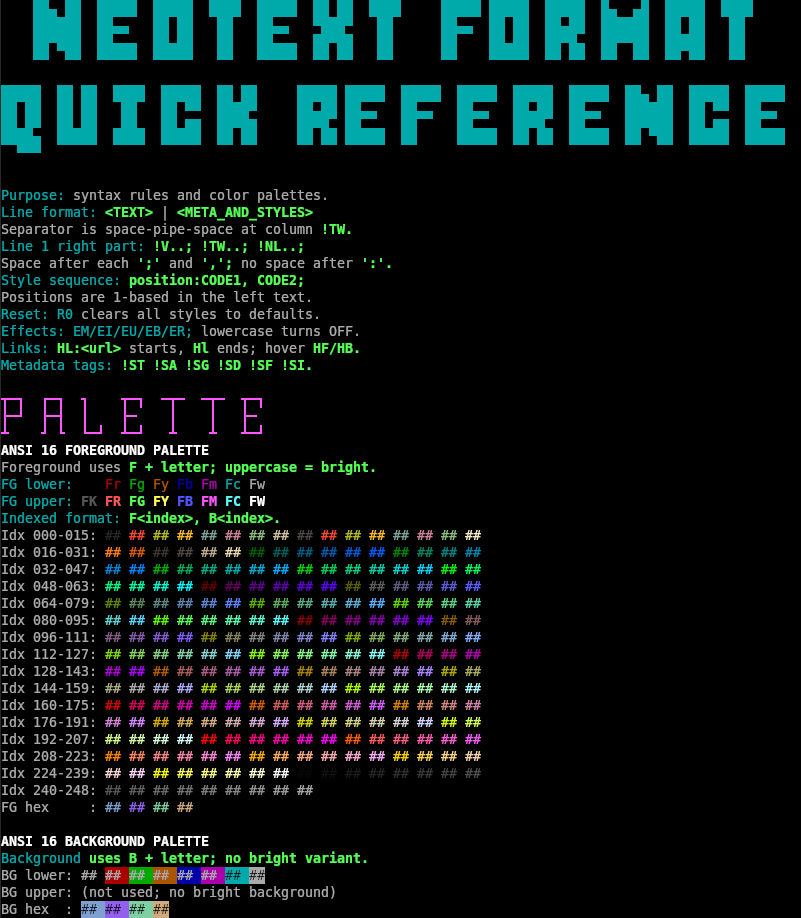
This example generated from this neotex example file
Format Structure
Each line in a .neo file follows this structure:
<TEXT> | <METADATA_AND_STYLES>
- Left part: the text content (Unicode characters)
- Separator: the exact sequence
|(space, pipe, space) - Right part: metadata and style sequences
Required rules:
- The
|is placed at columnyydefined by!TWxx/yy; pad the text so the separator lands there. - The first line's right part starts with
!V…; !TW…; !NL…;in that order, with a required space after each;. Subsequent lines may omit these labels. - A space is required after every
;and after every,; no space after:. - Style sequences are optional.
Simple Example
Hello World | !V1; !TW11/11; !NL1; 1:FR; 7:FG;
This line displays "Hello World" with:
- Position 1: "Hello" in bright red (FR = Foreground Red bright)
- Position 7: "World" in bright green (FG = Foreground Green bright)
Complete Specification
1. Metadata
Metadata starts with !. Only the first line must begin its right part with the
three required labels !V…; !TW…; !NL…; (in that order, with a space after each
;). Subsequent lines may include optional metadata or none at all.
Values may be written with or without an equals sign: !KEYvalue; or
!KEY=value;. When values are wrapped in < >, both !KEY<value>; and
!KEY=<value>; are valid. Use < > for values containing spaces or special
characters.
| Metadata | Format | Description |
|---|---|---|
!V<semver> |
!V1.0.0; |
Neotex format version (accepts 1, 1.2, or full 1.0.0) |
!TW<t>/<m> |
!TW80/120; |
Width: t = trimmed width, m = max width |
!NL<n> |
!NL25; |
Total number of lines |
!ST<text> |
!ST<My Art>; |
SAUCE title (stored on a dedicated metadata line) |
!SA<text> |
!SA<Author>; |
SAUCE author |
!SG<text> |
!SG<Group>; |
SAUCE group |
!SD<YYYYMMDD> |
!SD<20260119>; |
SAUCE creation date |
!SF<text> |
!SF<Web437_ToshibaSat_8x14>; |
SAUCE font info (TInfoS) |
!SI |
!SI; |
SAUCE iCE colors / NonBlink flag |
Palette entries are also metadata: use !P<idx>=RRGGBB; or !P<idx>=<RRGGBB>;.
The form !P<idx><RRGGBB>; is invalid and should be rejected.
Only line 1 enforces the !V…; !TW…; !NL…; prefix; other lines can carry the
optional metadata above (including SAUCE tags) or simply style sequences.
splitans writes SAUCE labels on a trailing empty line; width/height are still
carried by !TW/!NL.
Example:
Hello | !V1; !TW5/5; !NL1; 1:FR;
2. Style Sequences
General format of a sequence:
<POSITION>:<STYLE1>, <STYLE2>, ...;
- POSITION: Character index (1-based) where the style applies
- STYLES: List of style codes separated by commas
- Each sequence ends with
; - A space is required after each
;(except end of line) and after each,; no space after:. - Sequences are optional: a line may have none.
3. Color Codes
ANSI 16 Colors
| Normal | Code | Color | Bright | Code | Color (bright) |
|---|---|---|---|---|---|
 |
Fk |
Black |  |
FK |
Bright Black (Gray) |
 |
Fr |
Red |  |
FR |
Bright Red |
 |
Fg |
Green |  |
FG |
Bright Green |
 |
Fy |
Yellow |  |
FY |
Bright Yellow |
 |
Fb |
Blue |  |
FB |
Bright Blue |
 |
Fm |
Magenta |  |
FM |
Bright Magenta |
 |
Fc |
Cyan |  |
FC |
Bright Cyan |
 |
Fw |
White |  |
FW |
Bright White |
FD |
Default |
Foreground (text): Prefix F Background: Prefix B
| Color | Code | Description |
|---|---|---|
|
Bk |
Background Black |
|
Br |
Background Red |
|
Bg |
Background Green |
|
By |
Background Yellow |
|
Bb |
Background Blue |
|
Bm |
Background Magenta |
|
Bc |
Background Cyan |
|
Bw |
Background White |
BD |
Background Default |
Note: Background colors do not have bright variants (uppercase). The "bright" effect is achieved through letter case for foreground only.
256 Colors (Indexed Palette)
F<index>   Foreground indexed (0-255)
B<index>   Background indexed (0-255)
Examples:
F123: Foreground color index 123B200: Background color index 200
RGB Colors (True Color)
F<RRGGBB>   Foreground RGB (hex)
B<RRGGBB>   Background RGB (hex)
Examples:
FF0080: Foreground RGB(255, 0, 128) - pinkB00FF00: Background RGB(0, 255, 0) - green
Palette Colors
Palette entries are declared as metadata and referenced by index in styles.
!P<idx>=RRGGBB;
!P<idx>=<RRGGBB>;
idxis a non-negative integer, unbounded, and independent fromF<index>/B<index>.!P<idx>=RRGGBB;is recommended because it is compact and unambiguous.!P<idx>=<RRGGBB>;is allowed.!P<idx><RRGGBB>;is invalid and should be rejected.- Palette entries may appear on any line, like other metadata.
Use palette entries in style sequences:
FP<idx>   Foreground palette color
BP<idx>   Background palette color
If a style references an undefined palette index, parsers must raise an error.
Link Hover Colors
Use the same formats as foreground/background but prefix with HF (hover
foreground) or HB (hover background). Hover colors persist until changed and
apply when a renderer supports pointer hover on hyperlinks.
HFY: Hover foreground bright yellowHBk: Hover background blackHF123: Hover foreground indexed color 123HB00FF00: Hover background RGB green
4. Effect Codes
| Code | Effect | Code | Deactivation |
|---|---|---|---|
EM |
Dim | Em |
Dim OFF |
EI |
Italic | Ei |
Italic OFF |
EU |
Underline | Eu |
Underline OFF |
EB |
Blink | Eb |
Blink OFF |
ER |
Reverse | Er |
Reverse OFF |
Note: There is no Bold effect. The "bright" version of a color (uppercase) replaces this effect.
5. Hyperlink Codes
Hyperlinks (OSC 8) are encoded alongside other styles:
| Code | Description |
|---|---|
HL:<url> |
Start hyperlink at this position (URL wrapped in <...>) |
Hl |
End the current hyperlink |
- Pair with
HF/HBhover colors to define hover palette; hover colors are not reset byR0. - Hyperlink codes can be combined with other styles at the same position.
Example:
Click me | !V1; !TW80/80; !NL101; 1:HL:<https://example.com>, FG, HFY, HBk; 9:Hl;
6. Special Code
| Code | Description |
|---|---|
R0 |
Full reset (resets all styles to default) |
Developer Guide (implementers)
Line layout
- Each line is
<TEXT> | <RIGHT_PART>with the exact separator|(space, pipe, space). - The
|must be placed at the column declared by!TWt/m; pad the left text accordingly. - A space is mandatory after every
;and,(except at end of line). No space after:.
First line header (mandatory)
- The right part of line 1 must start with:
!V…; !TWt/m; !NLn; - Keep this exact order and a space after each
;.
Metadata (two families)
- Simple key/value:
!KEYvalue;or!KEY=value;(no colon). Example:!TW80/120;,!NL25;,!V1.0.0;. - SAUCE tags (values wrapped in
< >, optional=):!ST<title>; !ST=<title>; !SA<author>; !SA=<author>; !SG<group>; !SD<YYYYMMDD>;!SF<font>; !SI; - Palette entries:
!P<idx>=RRGGBB;(recommended) or!P<idx>=<RRGGBB>;
Questions
What is neotex?
badele/neotex is a public repo on GitHub by badele. Resurrecting 80s ANSI into a clear, modern file format.
Is neotex open source?
It declares the GPL-3.0 license on GitHub.
Does neotex run on macOS, Windows or Linux?
Its maker has not tagged a system, so it is unknown here. Its README says what it needs.
How do I install neotex?
Open "Take it" on its page: Take My Repo writes an install plan for your machine and hands it to your AI agent (Claude Code, Codex or Cursor), which asks you before each step. Take My Repo has not tested it on any machine.
Is neotex still maintained?
Its last change on GitHub was on 2026-02-26. GitHub counts 0 open issues and pull requests. Take My Repo does not judge from that whether it is maintained.