
Pithos
A dependency-free C inference engine for Liquid AI's LFM2 / LFM2.5 models. Terminal chat, an OpenAI-compatible server, a web agent and a terminal agent, all in one executable.
- 49
- MIT
- 1 h ago
Repo benmaster82/Pithos, read from GitHub 20 min ago. benmaster82 has not joined Take My Repo.
In short
benmaster82/Pithos is a public repo on GitHub by benmaster82. A dependency-free C inference engine for Liquid AI's LFM2 / LFM2.5 models. Terminal chat, an OpenAI-compatible server, a web agent and a terminal agent, all in one executable. It declares the MIT license on GitHub. It is written mainly in C, has 49 stars and last changed on 2026-11-24. Nobody has reviewed it on Take My Repo yet, which says nothing about its quality. Read from GitHub on 2026-11-24.
Similar repos
hermes-agent
The agent that grows with you


AI models this project points to
- LiquidAI/LFM2.5-24B-A2B-GGUFLinked in the README
- LiquidAI/LFM2.5-8B-A1BLinked in the README
- LiquidAI/LFM2.5-8B-A1B-GGUFLinked in the README
- LiquidAI/LFM3-1.7BLinked in the README
- LiquidAI/LFM3-1.7B-GGUFLinked in the README
- LiquidAI/LFM3-Audio-2BLinked in the README
- LiquidAI/LFM3-Audio-2B-GGUFLinked in the README
- Qwen/Qwen3.6-35B-A3BLinked in the README

A dependency-free C inference engine for Liquid AI's LFM2 / LFM2.5 / LFM3 models, Qwen3.6 and Inkling 2 Mini.
Terminal chat, an OpenAI-compatible server, a web agent, a terminal agent and a voice, all in one executable.
Website & setup guide · Quick start · Screenshots · Results · Terminal agent · Speech · Xbox One · MCP · Roadmap
| About 1.9× faster than llama.cpp | 17–22 tok/s against 11 tok/s with CUDA, on the same laptop and model (head-to-head) |
| Runs a 13.5 GB model on 16 GB of RAM | experts stream from disk, the hot ones live in a 4 GB GPU |
| Agents included | Pandora in the browser, and a terminal agent that runs commands, fixes code and checks its own work |
| Hears and speaks | with LFM3-Audio-2B: transcription and translation in 18 languages, streamed speech (WAV, PCM, MP3) and voice conversations on the /talk page (speech) |
| Runs on an Xbox One | an OpenAI-compatible server for your home network, with LFM3-1.7B on the console's GPU: 29.5 tok/s generation, ~140 tok/s prompt; with LFM3-Audio-2B you talk to it through the controller's headset (Xbox One) |
Pithos is an inference engine written from scratch in C11 with no dependencies: no external
libraries at build time, only the operating system API (Win32 or POSIX). It runs GGUF models of
Liquid AI's LFM2 / LFM2-MoE / LFM3 architectures and is tuned for LFM2.5-24B-A2B-Q4_K_M.gguf
(24 billion parameters, about 2 billion active per token) on an ordinary laptop. Two smaller models
are validated too: LFM2.5-8B-A1B, a mixture of experts that fits
in 8 GB of RAM (about 22 tokens per second on the CPU alone), and the small
LFM3-1.7B: about 80 tokens per second with the GPU, 20 on the CPU alone.
LFM3-Audio-2B (experimental) adds speech: it
transcribes, translates, speaks and holds voice conversations. Two models of other families run too,
as experimental: Qwen3.6-35B-A3B, the largest, and
Inkling 2 Mini, a looped mixture of experts.
Pithos is the engine and the server (in the myth, the pithos is Pandora's jar: it holds the model). Pandora is the agent in the web interface.
- CPU inference with AVX2 / AVX / NEON integer kernels that read the quantized weights in place.
- Optional OpenCL GPU acceleration: hot experts and all dense layers in VRAM, with the remaining experts computed on the CPU in parallel. On dedicated GPUs the prompt runs there too (LFM2.5-8B: almost 4× the CPU alone).
- Optional Direct3D 12 GPU acceleration (
--gpu d3d12, Windows and Xbox): for dense models such as LFM3, the whole forward pass, prompt included, runs on the GPU. - Optional Vulkan GPU acceleration (
--gpu vulkan, Windows and Linux; experimental): the same kernels and the same whole forward pass as Direct3D 12, on any GPU with a Vulkan 1.1 driver. - One option chooses the GPU backend,
--gpu; by default (auto) Pithos picks the fastest one measured for the model (Choosing the GPU). - An Xbox One app: the server runs on a console in Developer Mode, with a status and chat screen on the TV, and with LFM3-Audio-2B a full-screen voice assistant used through the controller's headset.
- Works with models larger than the free RAM (asynchronous read-ahead, expert prediction).
- OpenAI-compatible HTTP server with prompt reuse across turns, also after a restart.
- Speech with LFM3-Audio-2B:
/v1/audio/transcriptions,/v1/audio/translationsand/v1/audio/speech(WAV, PCM or MP3, streamed), spoken answers, dictation and a voice mode in Pandora, and the/talkpage for voice conversations. - Reasoning levels: high, medium, low or off, from the command line, the API or a selector in Pandora.
- Pandora, a single-file web chat with an agent mode: web search, files, calculator and any MCP server.
- A terminal agent that works on tasks with shell commands, background processes, files and the web, on Windows and Linux, in a safe mode (you approve every action) or an autonomous one.
Screenshots
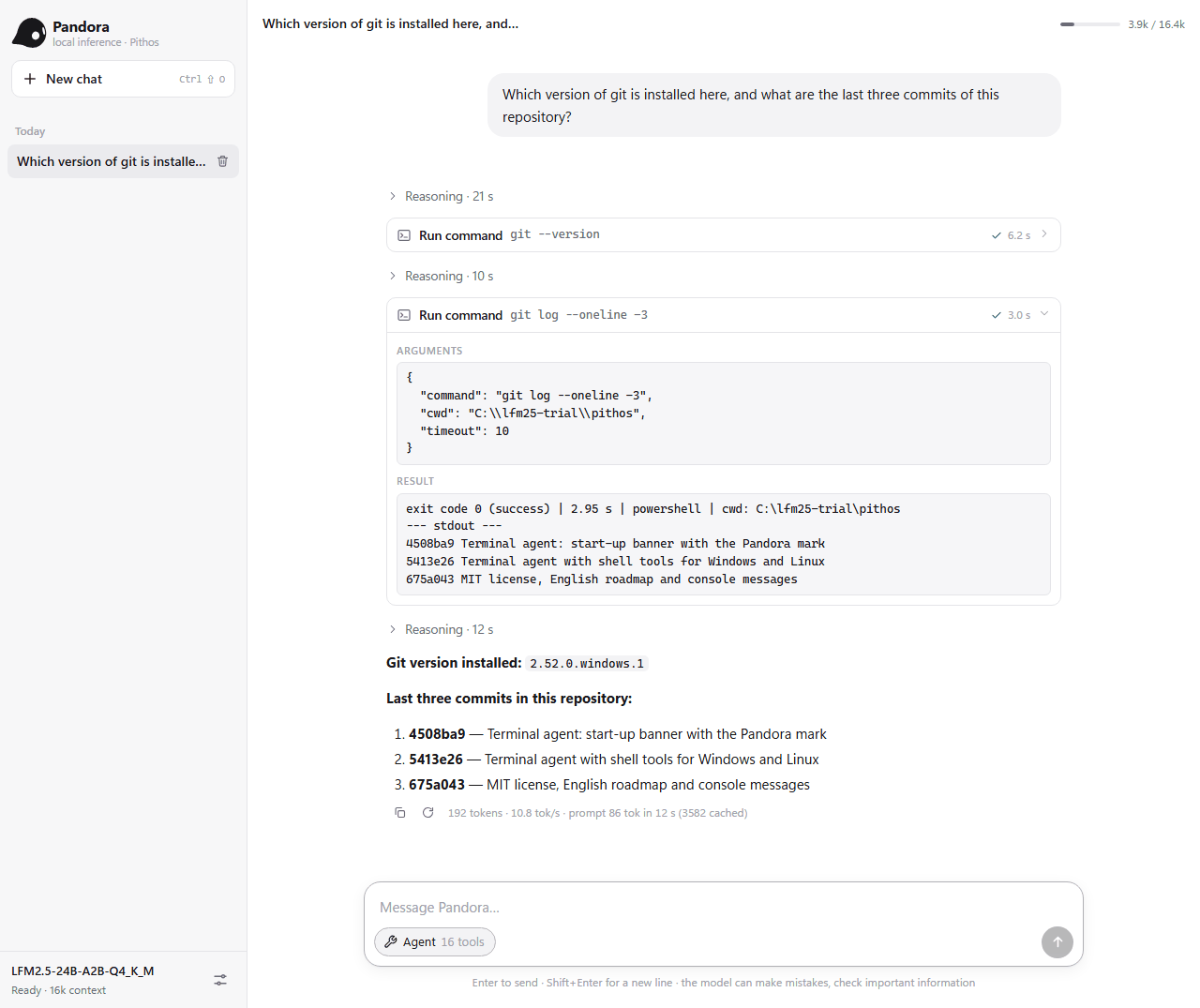
Pandora, the web agent, answers with real tools. Here it runs two git commands through the
shell tools (pithos --server --shell) and summarizes them. Each card shows the command, the exit
code, the run time and the output.
The terminal agent in autonomous mode (pithos --auto). It is asked to make failing tests
pass. It reads the code, finds the bug, fixes it with edit_file, runs the tests and reads the
file back. On Windows PowerShell 5.1 the && it wrote was rewritten automatically.

Both are real sessions with LFM2.5-24B-A2B on the reference laptop (i5-10500H, GTX 1650 4 GB).
Pithos.X Server on an Xbox One S: the TV screen while the server runs. More in Xbox One.

Quick start
Prebuilt binaries for Windows x64, Linux x64 and Linux ARM64 (experimental) are on the
Releases page: extract the archive, put the model
in a models folder next to the program and skip the build step below. The Linux x64 binary needs
glibc 2.34 or newer (Ubuntu 22.04, Debian 12, RHEL / Rocky 9 and later). The ARM64 archive has two programs:
pithos for cores with dot product (Raspberry Pi 5, RK3566 / RK3588) and pithos-armv8 for older
ones (Raspberry Pi 3 / 4). Otherwise build from source:
- Get the model (see Downloading the model below).
On Linux,
bash build.sh --download-modelcan handle both the build and this download (--download-model=lfm2.5-8bor--download-model=lfm3-1.7bfor the smaller models,--download-model=lfm3-audio-2bfor the speech model,--list-modelsfor the choices). - Build. On Windows run
build.cmd; on Linux runbash build.sh; on macOS runmake(see Building). You can compile before downloading the model. - Run.
server.cmd                                 server + web chat in the browser (http://127.0.0.1:8080)
build\pithos.exe                           interactive chat in the terminal
build\pithos.exe -p "Hello, who are you?"  single answer
build\pithos.exe --server                  OpenAI-compatible API + web interface
build\pithos.exe --agent                   terminal agent in the current folder (safe mode)
build\pithos.exe --bench                   prompt and generation benchmark
On Linux / macOS the binary is build/pithos, with the same options. For the console, see
Xbox One: the app is built on a Windows PC and installed over the network.
Downloading the model
Three models are validated, and Qwen3.6 and Inkling 2 Mini are experimental. Choose by the memory of your computer:
| Model | Download | RAM | Best for |
|---|---|---|---|
| LFM2.5-24B-A2B (the reference, MoE) | 13.5 GiB | 16 GB | the deepest answers; it also runs when the model does not fit in RAM, from disk |
| LFM2.5-8B-A1B (MoE) | 4.8 GiB | 8 GB | a larger model on the CPU: it fits in RAM and generates as fast as LFM3-1.7B there |
| LFM3-1.7B (dense) | 1.0 GiB | 4 GB | modest hardware, the fastest with a GPU (the whole model in VRAM), the Xbox One |
| Qwen3.6-35B-A3B (MoE, experimental) | 19.1 GiB | 16 GB | the largest; it runs from disk when it does not fit in RAM, best with a GPU |
| Inkling 2 Mini (looped MoE, experimental) | 10.9 GiB | 16 GB | strong at coding and agents for its size; each token runs 48 layers |
For speech, LFM3-Audio-2B (experimental, 1.2 GiB with its audio projector, 4 GB of RAM) transcribes, translates, speaks and holds voice conversations.
Pithos uses by default the file LFM2.5-24B-A2B-Q4_K_M.gguf from Liquid AI's public repository
LiquidAI/LFM2.5-24B-A2B-GGUF. No account
is needed.
| Size | 14,526,258,464 bytes (13.5 GiB): keep about 15 GB free on the disk |
| SHA-256 | d3334405b96228eb9908cdebb5c6194908f2da64282bda852afc3a3910c64e7d |
| Direct link | https://huggingface.co/LiquidAI/LFM2.5-24B-A2B-GGUF/resolve/main/LFM2.5-24B-A2B-Q4_K_M.gguf |
| License | LFM Open License v1.0 (see the model card) |
Where to put it. Pithos looks for models/LFM2.5-24B-A2B-Q4_K_M.gguf in the current folder, then
in ../models and ../../models. The simplest choice is a models folder inside the Pithos folder,
which .gitignore already excludes. Any other location works with -m PATH, and the terminal agent,
which runs in your project folders, usually needs it.
The commands below run from the Pithos folder. All of them resume an interrupted download when you run them again.
Windows (PowerShell). curl.exe ships with Windows 10 and 11. Write curl.exe, not curl,
which in Windows PowerShell 5.1 is an alias of a different command.
New-Item -ItemType Directory -Force models | Out-Null
curl.exe -L -C - -o models\LFM2.5-24B-A2B-Q4_K_M.gguf https://huggingface.co/LiquidAI/LFM2.5-24B-A2B-GGUF/resolve/main/LFM2.5-24B-A2B-Q4_K_M.gguf
Get-FileHash models\LFM2.5-24B-A2B-Q4_K_M.gguf -Algorithm SHA256    # compare with the SHA-256 above
Linux / macOS.
mkdir -p models
curl -L -C - -o models/LFM2.5-24B-A2B-Q4_K_M.gguf https://huggingface.co/LiquidAI/LFM2.5-24B-A2B-GGUF/resolve/main/LFM2.5-24B-A2B-Q4_K_M.gguf
# or: wget -c -O models/LFM2.5-24B-A2B-Q4_K_M.gguf <the same URL>
sha256sum models/LFM2.5-24B-A2B-Q4_K_M.gguf     # macOS: shasum -a 256 models/LFM2.5-24B-A2B-Q4_K_M.gguf
With the Hugging Face CLI (any system). If Python is installed, this is the most robust option on slow or unstable connections.
pip install -U huggingface_hub
hf download LiquidAI/LFM2.5-24B-A2B-GGUF LFM2.5-24B-A2B-Q4_K_M.gguf --local-dir models
With a browser. Open the direct link above and save the file into the models folder.
To check that the file is found and complete, run build\pithos.exe -p "Hello" (Linux:
build/pithos -p "Hello"). The first lines report the model (model: lfm2moe | 40 layers ...).
Pithos also rejects a truncated file and names the tensor that is missing.
LFM2.5-8B-A1B: the middle ground
LiquidAI/LFM2.5-8B-A1B is a mixture of experts like
the reference model, with the same architecture (lfm2moe
Questions
What is Pithos?
benmaster82/Pithos is a public repo on GitHub by benmaster82. A dependency-free C inference engine for Liquid AI's LFM2 / LFM2.5 models. Terminal chat, an OpenAI-compatible server, a web agent and a terminal agent, all in one executable.
Is Pithos open source?
It declares the MIT license on GitHub.
Does Pithos run on macOS, Windows or Linux?
Its maker tagged it for macOS, Windows and Linux, or as Docker or cross-platform. That is declared by the maker; Take My Repo has not tested it.
How do I install Pithos?
Open "Take it" on its page: Take My Repo writes an install plan for your machine and hands it to your AI agent (Claude Code, Codex or Cursor), which asks you before each step. Take My Repo has not tested it on any machine.






