
llm-wiki-memory
Local, git-versioned memory for AI coding agents. No RAG, no Docker, no external service. Capture, compile, recall over a local LLM wiki with on-device embeddings and an MCP server.
- 130
- JavaScript
- MIT
- 2 mo ago
The maintainer has not written a description at the source.
Repo ctxr-dev/kit, read from GitHub 1 min ago. ctxr-dev has not joined Take My Repo.
ctxr-dev/kit is a public repo on GitHub by ctxr-dev. It declares the MIT license on GitHub. It is written mainly in JavaScript, has 0 stars and last changed on 2026-05-31. Nobody has reviewed it on Take My Repo yet, which says nothing about its quality. Read from GitHub on 2026-11-21.
In the maintainer's words. Shown from GitHub; Take My Repo does not keep a copy.
Universal CLI for Agent Skills artifacts: install,
validate, update, and scaffold skills, agents, commands, rules,
output-styles, and bundles for Claude Code, OpenAI Codex CLI, and any other
harness that follows the open Agent Skills standard. The canonical install
location is .agents/<type>/<name>/ (project) and ~/.agents/<type>/<name>/
(user); kit auto-creates discovery-mirror symlinks at .claude/<type>/<name>
and ~/.codex/<type>/<name> so harnesses that don't read .agents/ natively
still find the artefact. The package.json files field is the single
source of truth for what each package ships, and the manifest filename
.ctxr-manifest.json is written per install root. Run the CLI via
npx @ctxr/kit@latest; no global install required.
npx @ctxr/kit@latest install @ctxr/skill-code-review     # add the code-review skill
npx @ctxr/kit@latest list                                # see what's installed
That's the whole loop. Run npx @ctxr/kit@latest --help for the full command set.
node:test, and the modern node:fs API).agents/<type>/; user-scope installs
(--user) land canonically under ~/.agents/<type>/. Discovery-mirror
symlinks at .claude/<type>/ (and ~/.codex/<type>/ at user scope)
are created automatically so Claude Code and Codex CLI both find every
installed artefact without extra configuration.Kit is run exclusively via npx — no global install required.
npx @ctxr/kit@latest <command>
Every example below uses the npx @ctxr/kit@latest form. If you prefer a short
alias, add one to your shell (alias kit='npx @ctxr/kit@latest') — kit itself
never asks you to install it globally.
kit is interactive by default. In a terminal, every command that has
a choice to make prompts you with an arrow-key menu or a short question:
install shows a destination menu with the canonical candidate
locations (.agents/<type>/, ~/.agents/<type>/, or a custom path
you type) and pre-highlights the one kit would auto-pick.install asks per-item
whether to keep it there (update in place) or move it to the
chosen destination.update pre-flights the list — if any identifier you named isn't
installed yet, it prints the missing list and exits so you don't
silently update "everything except those".remove that finds an artifact in multiple locations asks which one to
remove. Missing identifiers are soft-skipped with a one-line note.init runs a 9-question wizard (type, name, author, description,
license, target, overwrite confirmation, git init, npm install) with
smart defaults drawn from git config and the current directory name.Non-interactive mode kicks in automatically in three cases, no flag required:
CI=true environment variable is set (GitHub Actions, GitLab CI,
CircleCI, Travis, Buildkite, and most other CI runners set this).kit install X < /dev/null, or kit
running under spawn() with piped stdio).--yes / -y flag on the command line.In non-interactive mode every prompt resolves to its declared default, and
install never destructively moves an existing install — it updates in
place at whatever location the artifact is currently at. This keeps
automation stable: pipelines that run npx @ctxr/kit@latest install X will
always land the artifact in a predictable place.
# All equivalent — all three trigger silent, no-prompt behavior:
npx @ctxr/kit@latest install @ctxr/skill-code-review --yes
CI=true npx @ctxr/kit@latest install @ctxr/skill-code-review
npx @ctxr/kit@latest install @ctxr/skill-code-review < /dev/null
If you need prompts even under CI=true (rare, but useful in dev
containers), pass -i / --interactive. That flag overrides all three
auto-detection triggers.
kit understands every artifact type the Agent Skills standard recognises,
plus a bundle meta-type that groups several of them into a single
installable package.
| Type | Canonical install path | ctxr.target |
Typical payload |
|---|---|---|---|
skill |
.agents/skills/<name>/ |
folder |
SKILL.md + assets |
agent |
.agents/agents/<name>.md |
file or folder |
Single .md (or wrapper) |
command |
.agents/commands/<name>.md |
file |
Single .md |
rule |
.agents/rules/<name>.md |
file |
Single .md |
output-style |
.agents/output-styles/<name>.md |
file |
Single .md |
bundle |
(cascades to ctxr.includes) |
n/a | No payload |
BREAKING (
@ctxr/kit2.0.0): theteammeta-type was renamed tobundle. Bothctxr.type: "team"andctxr.target: "team"are rejected at install and validate time with a pointing error. No alias, no shim: no consumer was onteamat cutover. Update your package.json: replace"type": "team"with"type": "bundle"AND remove any"target"field on bundle meta-packages (bundles do not usectxr.target; for ordinary artifacts it must be"folder"or"file").
Each canonical install also gets a discovery-mirror symlink at
.claude/<type>/<name> (project) and ~/.codex/<type>/<name> (user
scope) so Claude Code and Codex CLI both auto-discover the artefact;
see Install locations below.
Every artifact package declares a ctxr block in its package.json. Only
type and target (or includes for bundles) are required: kit reads
nothing else. The npm-native files field is the single source of truth
for what ships in the package.
{
  "name": "@ctxr/skill-code-review",
  "version": "1.0.5",
  "files": [
    "SKILL.md",
    "code-reviewer.md",
    "reviewers",
    "overlays",
    "README.md",
    "LICENSE"
  ],
  "ctxr": {
    "type": "skill",
    "target": "folder"
  }
}
{
"name": "@ctxr/bundle-full-stack",
"files": ["README.md"],
"ctxr": {
"type": "bundle",
"includes": [
"@ctxr/skill-code-review",
"@ctxr/agent-researcher",
"@ctxr/rule-typescript-strict"
]
}
}ctxr.type: one of skill | agent | command | rule | output-style | bundle. Picks the destination directory.ctxr.target: "folder" (wrap full payload in a folder) or "file" (copy the single payload file flat). Required for every non-bundle type.ctxr.includes: required only for bundles. Array of package specs to install when this bundle is installed.kit never introduces a second copy list. There is no ctxr.copy, no
ctxr.entry, no prefix-inferred type. If npm pack would ship it, kit
installs it; if not, it doesn't.
npx @ctxr/kit@latest install <source> [<source>...] [options]Install one or more artifacts in a single command. Sources can be mixed — npm packages, GitHub shorthand, and local paths all work side by side.
# single artifact
npx @ctxr/kit@latest install @ctxr/skill-code-review

# mixed batch — different types, different sources
npx @ctxr/kit@latest install \
  @ctxr/skill-code-review \
  @ctxr/agent-researcher \
  @ctxr/rule-typescript-strict \
  github:ctxr-dev/output-style-teaching

# install any published artifact (a bundle meta-package would cascade to its members)
npx @ctxr/kit@latest install @ctxr/agent-staff-engineer

# user-global instead of project-local
npx @ctxr/kit@latest install @ctxr/skill-code-review --user

# explicit destination
npx @ctxr/kit@latest install @ctxr/skill-code-review --dir .agents/skills

# local path (must start with ./, /, or ~/)
npx @ctxr/kit@latest install ./path/to/local-skill
Batch behavior: if one package in the batch fails (broken ctxr block,
target: "file" payload that resolves to ≠1 file, network error on a single
fetch), that package is reported and skipped — the rest of the batch
proceeds and kit exits non-zero only if anything failed. No all-or-nothing
abort.
| Location | Role |
|---|---|
.agents/<type>/ |
Project-scope canonical (real files live here) |
.claude/<type>/ |
Project-scope discovery mirror (symlink, auto) |
~/.agents/<type>/ |
User-global canonical (real files live here) |
~/.claude/<type>/ |
User-global discovery mirror for Claude Code (symlink) |
~/.codex/<type>/ |
User-global discovery mirror for Codex CLI (symlink) |
| Custom path | Via --dir <path> (mirrors are skipped) |
For project-scope installs kit also upserts a row in AGENTS.md at
the project root, with stable <!-- ctxr:skills:start --> /
<!-- ctxr:skills:end --> markers. Anything you author outside the
markers is preserved verbatim across re-installs and removes.
To disable kit's AGENTS.md emitter entirely (no creates, no upserts,
no removes) set CTXR_NO_AGENTS_MD=1 in the environment. Useful when
AGENTS.md is hand-authored, kept in .gitignore, or otherwise managed
outside kit.
.claude/<type>/<name>/ installsWhen kit install runs and detects a real (non-symlink) directory at
the legacy .claude/<type>/<name>/ path with a recorded manifest row,
it moves the directory to .agents/<type>/<name>/, replaces the
original with a symlink, and migrates the manifest row. The same
applies to user-scope installs at ~/.claude/<type>/. Migration is
idempotent and skipped when --dir is set (a deliberate custom layout
is left alone). kit update does NOT auto-migrate; it preserves
whatever layout you originally chose so a routine update never
surprises you with a relocation.
Auto-detect: kit always installs canonically to .agents/<type>/
and creates the discovery mirrors automatically. If a legacy real
.claude/<type>/<name>/ install is found, the migration step above
moves it to the canonical path before installing.
npx @ctxr/kit@latest update [name]Re-install one or all artifacts in place using the source recorded in the manifest. Searches every project- and user-scope manifest, so you don't need to remember where each artifact lives.
npx @ctxr/kit@latest update                          # update everything
npx @ctxr/kit@latest update ctxr-skill-code-review   # update one
Team updates cascade to every member.
npx @ctxr/kit@latest remove <name> [--keep-members]Remove an installed artifact (or bundle). For bundles, every member listed
in the manifest is removed too unless --keep-members is passed.
npx @ctxr/kit@latest remove ctxr-skill-code-review
npx @ctxr/kit@latest remove ctxr-bundle-full-stack --keep-members
npx @ctxr/kit@latest list [path]List installed artifacts from every discovered location, grouped by type.
npx @ctxr/kit@latest list
npx @ctxr/kit@latest list ./other-project
npx @ctxr/kit@latest info <source>Show details about an installed or remote artifact: type, target layout, source, version, file count, install paths.
npx @ctxr/kit@latest info @ctxr/skill-code-review
npx @ctxr/kit@latest info ctxr-agent-researcher
npx @ctxr/kit@latest validate [path]Validate an artifact package's structure ahead of publishing. Dispatches
to a per-type validator: skill validation (frontmatter, broken-link
checker, file budget) is the heaviest; the rest are thin frontmatter
sanity checks plus the universal target: "file" ⇒ exactly-one-.md-file
rule that the installer enforces.
npx @ctxr/kit@latest validate                  # validate package in current dir
npx @ctxr/kit@latest validate ./my-skill       # validate at a path
npx @ctxr/kit@latest init [--type <type>] [name]Scaffold a new artifact package from a template. Defaults to
--type skill because that's the most common authoring case.
npx @ctxr/kit@latest init my-skill                       # default --type skill
npx @ctxr/kit@latest init --type agent my-agent          # scaffold an agent
npx @ctxr/kit@latest init -t command deploy              # short-form flag
npx @ctxr/kit@latest init --type bundle bundle-full-stack  # scaffold a bundle meta-package
Each template ships a package.json with the right ctxr block already
filled in, plus README.md, LICENSE, and .gitignore (the skill
template additionally ships .markdownlint.jsonc and a starter
SKILL.md; file-target templates ship a pre-named ctxr-{{name}}.md).
The scaffolded result passes npx @ctxr/kit@latest validate immediately — edit
the contents, then publish.
| Flag | Effect |
|---|---|
--dir <path> |
Operate against a specific directory |
--user |
Use ~/.claude/<type>/ (user-global) instead of project |
-i, --interactive |
Prompt for choices where applicable |
--help, -h |
Show help (top-level or per-command) |
--version, -v |
Print the installed version of @ctxr/kit |
Run npx @ctxr/kit@latest <command> --help for command-specific options.
Releases are PR-gated. Version bumps land on main through a review gate like any other change; only the tag push is automated.
Enable these on the repo before your first release:
NPM_TOKEN set to an npm access token with publish rights on the @ctxr scope (npm token create, then Settings → Secrets → Actions → add NPM_TOKEN).release.yml can open its version-bump PR with GITHUB_TOKEN. If the checkbox is greyed out, an organization-level Actions policy is restricting it; ask an org admin to unlock the setting first.javascript-typescript and actions.main requiring PR review + code scanning. The release flow works without it; gates are strictly stricter when enabled.main (the workflow refuses any other ref).patch / minor / major.package.json on a fresh release/v<version> branch and opens a PR to main titled release: v<version>.tag-on-main.yml fires automatically:
v<version> tag via GITHUB_TOKEN.v<version> tag. The workflow re-runs lint / validate / test:unit / test:integration / test:e2e, verifies the tag matches package.json, and publishes @ctxr/kit to npm.Why a manual dispatch for step 5? GitHub's built-in
GITHUB_TOKENcannot trigger further workflows (on: push: tagswon't fire when a workflow pushed the tag). So the tag auto-creation stops at the tag. Publishing is one extra click. To make it fully automatic, swap the push credential intag-on-main.ymlfor a GitHub App token or fine-grained PAT stored as a repo secret (actions/create-github-app-tokenor asecrets.TAG_PUSH_PAT), then thepush: tagstrigger onpublish.ymlwill fire and step 5 happens by itself.
From Run workflow on Release to published on npm is one dispatch + one PR merge + one dispatch (or one dispatch + one PR merge, once a PAT/App-token is wired in).
Release workflow fails with "dispatched from non-main ref" — you selected a feature branch in the Actions UI. Re-dispatch with main.
tag-on-main fails with "Tag vX.Y.Z exists but points at …" — a stale/orphan tag from a prior failed release. Delete and re-run:
git push origin --delete vX.Y.Z
Then merge a trivial no-op PR to main (or revert-and-re-merge the release PR) to retrigger tag-on-main. Direct pushes to main may be blocked by branch protection, so the PR path is the reliable retrigger.
publish.yml fails on "Verify version matches tag" — tag and package.json disagree. Investigate the merge commit; this should not happen under the PR-based flow.
GitHub Actions is not permitted to create pull requests — org or enterprise policy blocks the GITHUB_TOKEN from opening PRs. Enable Allow GitHub Actions to create and approve pull requests at the org level (Settings → Actions → General → Workflow permissions), or ask the enterprise admin to unlock the setting.
npm install
npm test                  # unit + integration
npm run test:unit         # unit only
npm run test:integration  # integration only
npm run test:e2e          # multi-location + multi-type
ctxr-dev/kit is a public repo on GitHub by ctxr-dev. Its maker has not written a description.
It declares the MIT license on GitHub.
Its maker has not tagged a system, so it is unknown here. Its README says what it needs.
Open "Take it" on its page: Take My Repo writes an install plan for your machine and hands it to your AI agent (Claude Code, Codex or Cursor), which asks you before each step. Take My Repo has not tested it on any machine.
Its last change on GitHub was on 2026-05-31. Take My Repo does not judge from that whether it is maintained.
Nobody has reviewed it on Take My Repo yet, which says nothing about its quality.
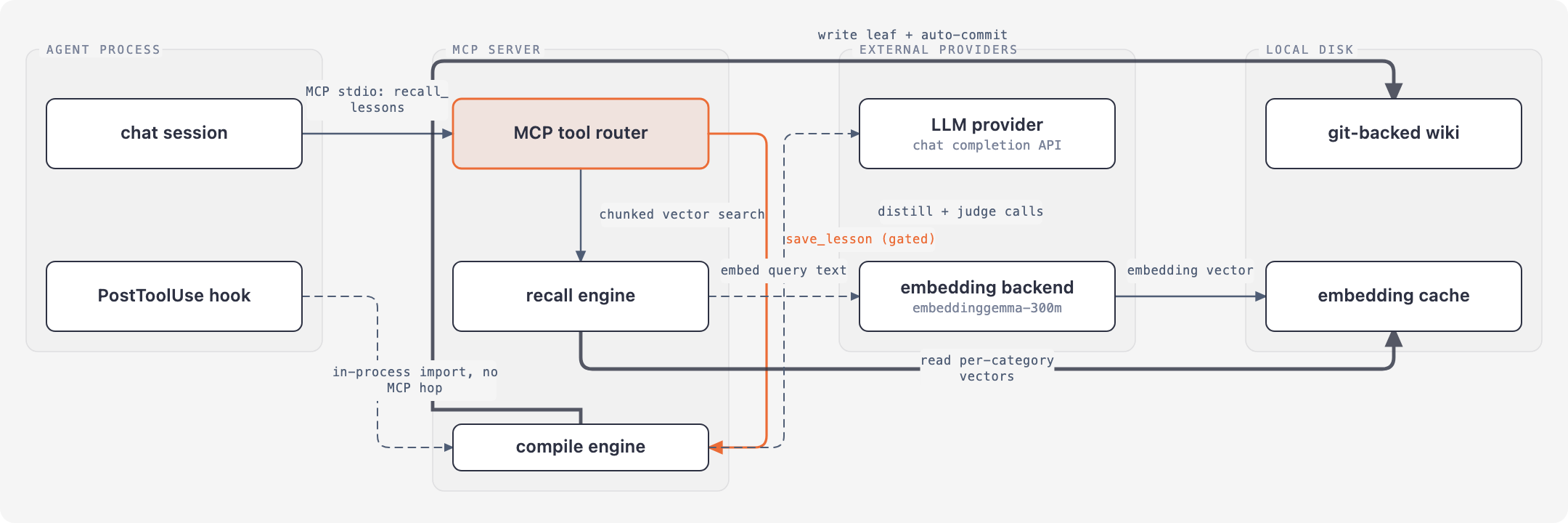
Local, git-versioned memory for AI coding agents. No RAG, no Docker, no external service. Capture, compile, recall over a local LLM wiki with on-device embeddings and an MCP server.
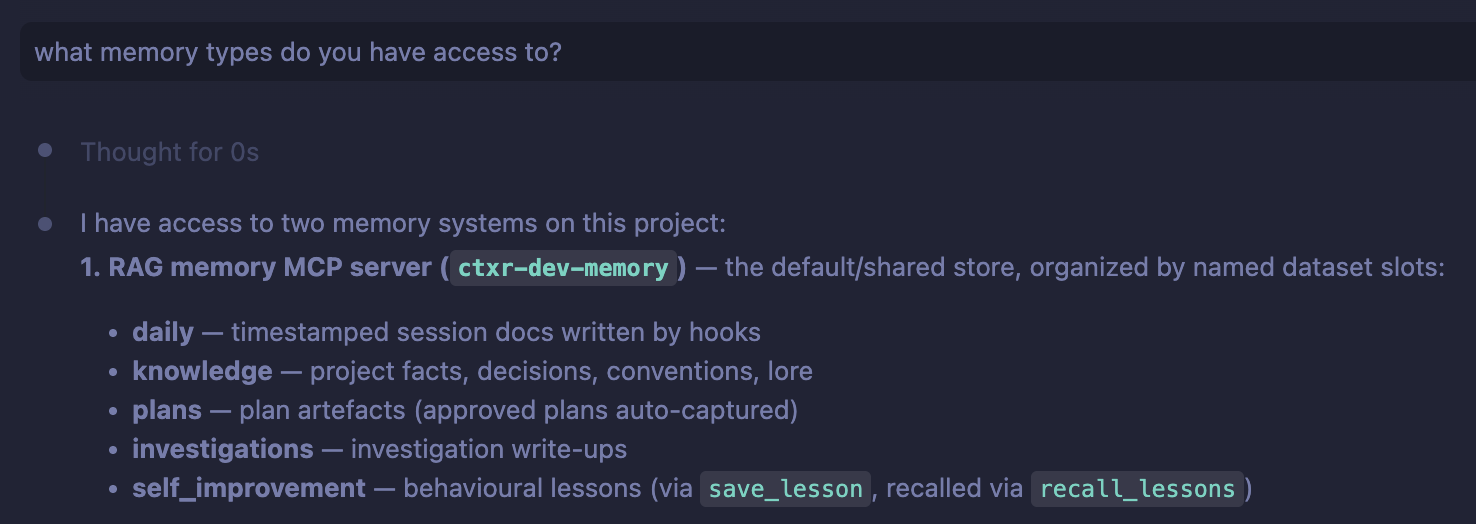
Make agents stop fucking your brain with academic language
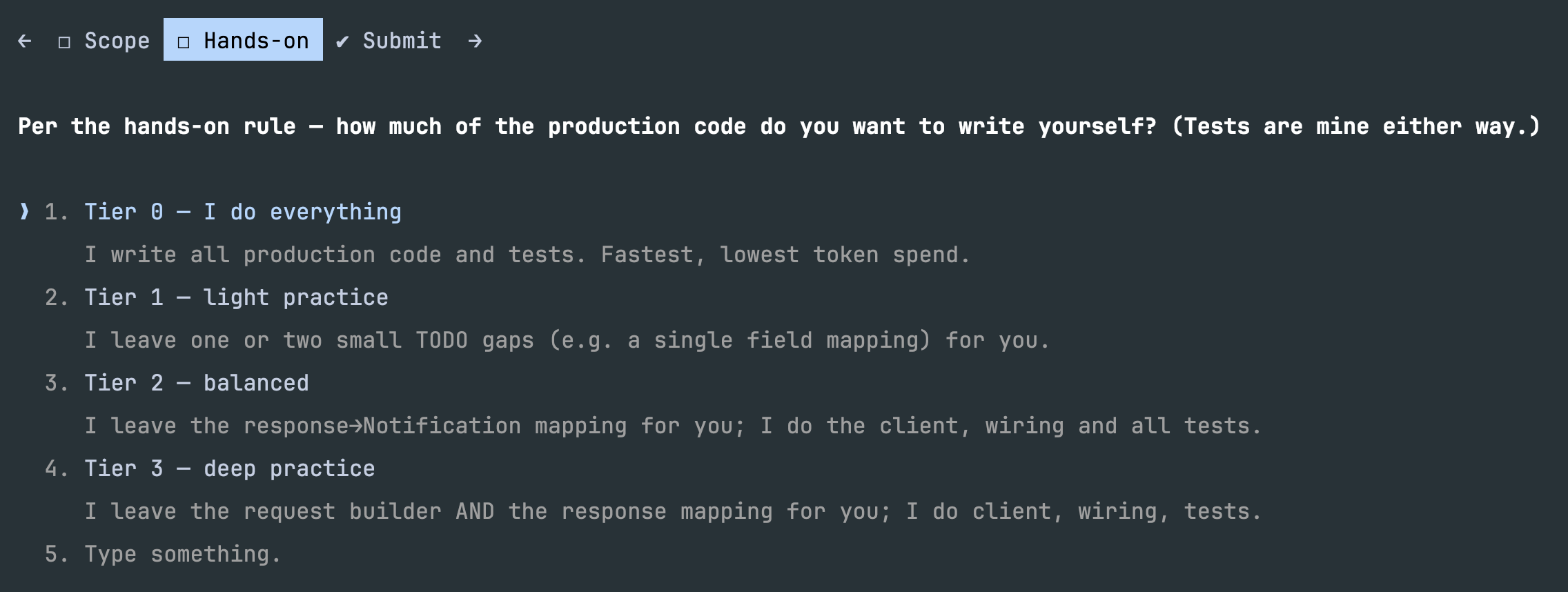
Skill which helps you to not lose your hands on skill during LLM development era
