
sensor.airthings_wave
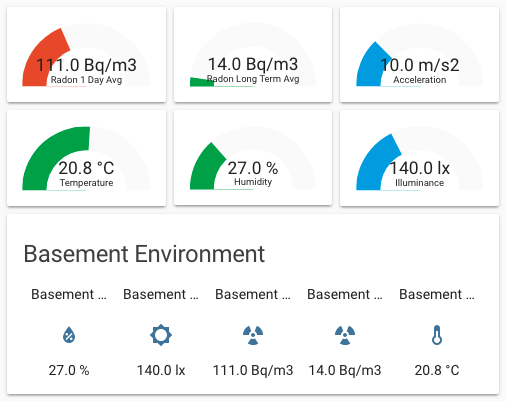
hassio support for Airthings Wave BLE environmental radon sensor.
- 100
- MIT
- 3 y ago
Repo custom-components/sensor.airthings_wave, read from GitHub 23 h ago. custom-components has not joined Take My Repo.
In short
custom-components/sensor.airthings_wave is a public repo on GitHub by custom-components. hassio support for Airthings Wave BLE environmental radon sensor. It declares the MIT license on GitHub. It is written mainly in Python, has 100 stars and last changed on 2023-07-14. Nobody has reviewed it on Take My Repo yet, which says nothing about its quality. Read from GitHub on 2026-11-23.
Similar repos

sensor.airthings_wave
Great news! This HACS component is now deprecated and retired and has been replaced by the official Airthings BLE integration
Please remove this integration and use the official one in its place
A big thank you to everyone who have helped support this integration, and a thank you to @vincegio for porting it into the official Home Assistant repository.
hassio support for Airthings Wave, Airthings Wave Plus, and Airthings Wave Mini BLE environmental sensors.
This component is cloudless and accomplishes this by communicating over bluetooth instead of using Airthings' cloud API.
Much of the code to build this component was inspired by these projects:
The aforementioned radonwave project is especially useful as it describes
many of the BLE characteristics specific to this product and has good
trouble-shooting tips. The script provided is also very useful in determining
the MAC address of your AW device. See here:
https://github.com/marcelm/radonwave/issues/3
Getting started
Download
/custom_components/airthings_wave/
into
<config directory>/custom_components/airthings_wave/
Example configuration.yaml:
# Example configuration.yaml entry
sensor:
  - platform: airthings_wave
    scan_interval: 120
    elevation: 998
    voltage_100: 3.2
    voltage_0: 2.2
Optional Configuration Variables
mac
(string)(Optional) The airthings_wave mac address, if not provided will scan for all airthings devices at startup
scan_interval
(string)(Optional) The interval between polls. Defaults to 300 seconds (5 minutes)
elevation
(float)(Optional) The current elevation in meters. Used to correct the pressure sensor to sea level conditions.
voltage_100
(float)(Optional) The voltage for 100% battery, calculated linearly between voltage_0 and voltage_100 (on supported device), default is 3.2
voltage_0
(float)(Optional) The voltage for 0% battery, calculated linearly between voltage_0 and voltage_100 (on supported device), default is 2.2
Limitations
Users has reported that it is possible to get data without first registering with the official app, so it should be possible to use the sensor with this integration without registering.
The radon level history stored on the Wave itself cannot be accessed with this component. To get around this, it connects regularly to the radon detector.
It might be beneficial to install the latest firmware on the device using the official app first.
Battery level only works for the Airthings wave pluss device.
Known Issues
Not yet able to specify the
monitored_conditionsconfigurationNo translations available yet
Hardware Requirements
An Airthings Wave OR Airthings Wave Plus OR Airthings Wave Mini
A Raspberry Pi 3/4 with built-in Bluetooth OR a Bluetooth adapter that supports Bluetooth Low Energy (BLE). such as this one: https://www.amazon.com/dp/B01N5MGEUS/ref=cm_sw_r_tw_dp_U_x_ObdNCb03P7QZJ
Other Resources
- https://github.com/marcelm/radonwave/issues/1
- https://community.home-assistant.io/t/radoneye-ble-interface/94962
- https://support.airthings.com/hc/en-us/articles/115002910089-How-to-respond-to-your-radon-levels?mobile_site=true
- https://community.home-assistant.io/t/converting-sensor-measurement-units/98807
- http://certi.us/Downloads/Canada_Meas_BW.pdf
Questions
What is sensor.airthings_wave?
custom-components/sensor.airthings_wave is a public repo on GitHub by custom-components. hassio support for Airthings Wave BLE environmental radon sensor.
Is sensor.airthings_wave open source?
It declares the MIT license on GitHub.
Does sensor.airthings_wave run on macOS, Windows or Linux?
Its maker has not tagged a system, so it is unknown here. Its README says what it needs.
How do I install sensor.airthings_wave?
Open "Take it" on its page: Take My Repo writes an install plan for your machine and hands it to your AI agent (Claude Code, Codex or Cursor), which asks you before each step. Take My Repo has not tested it on any machine.