ECC
The agent harness performance optimization system. Skills, instincts, memory, security, and research-first development for Claude Code, Codex, Opencode, Cursor and beyond.
- 308k
- JavaScript
- MIT
- 1 d ago
The agentic pentesting environment that lives on your machine. AI agent teams, visual workflows and your own tools, 100% local.
Repo dbx0/executioner, read from GitHub 1 min ago. dbx0 has not joined Take My Repo.
dbx0/executioner is a public repo on GitHub by dbx0. The agentic pentesting environment that lives on your machine. AI agent teams, visual workflows and your own tools, 100% local. It declares the MIT license on GitHub. It is written mainly in TypeScript, has 150 stars and last changed on 2026-11-18. Nobody has reviewed it on Take My Repo yet, which says nothing about its quality. Read from GitHub on 2026-11-21.

The agentic pentesting environment that lives on your machine.
Hand an assessment to a team of AI agents, give them your tools, and watch targets, findings and evidence land in one place.
There is no cloud service and no account to create.
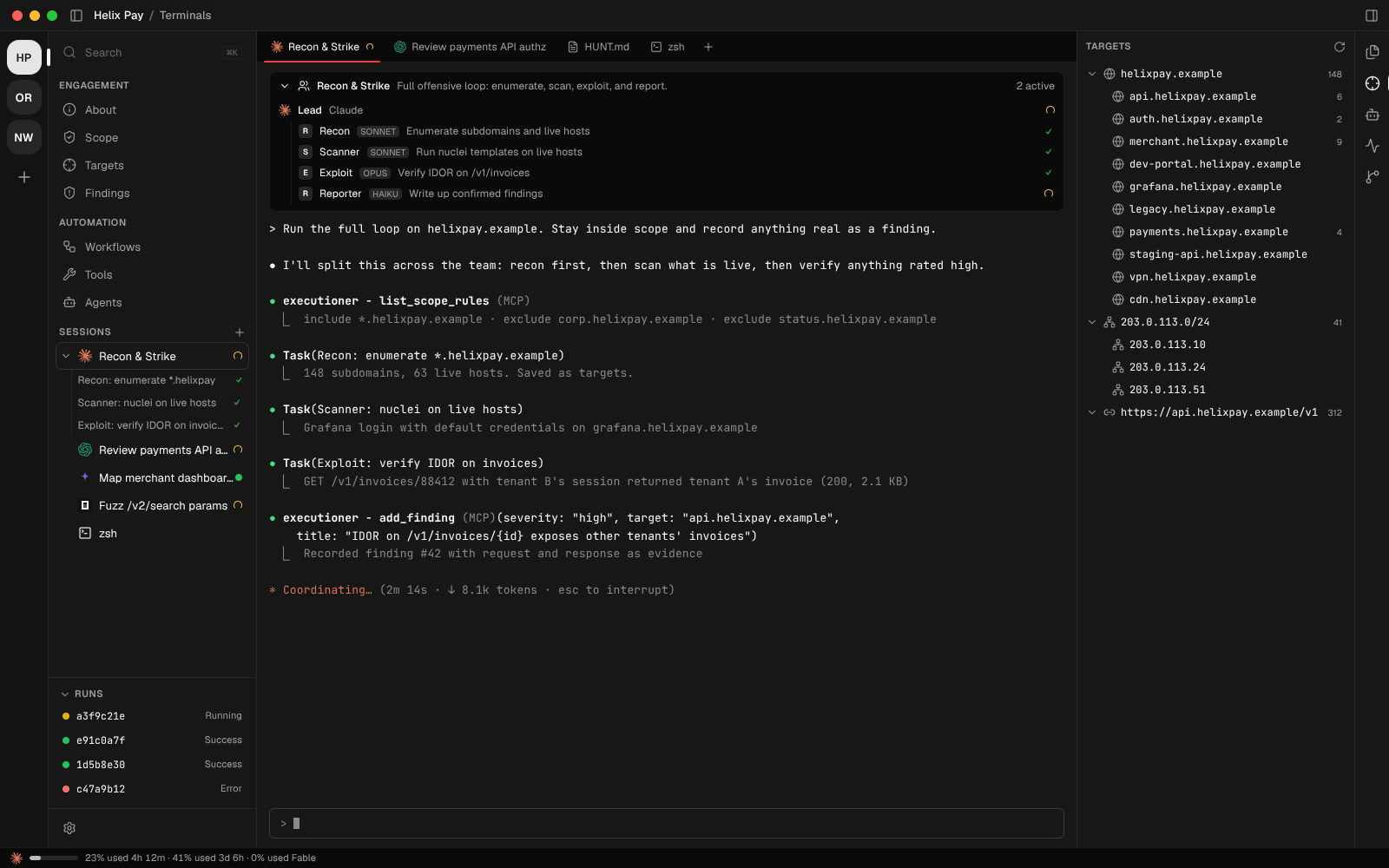
Most of a pentest is recon and taking notes: which hosts are in scope, what ran against them, what came back, which of the 400 lines of scanner output matters, and where the screenshot for finding #12 went. Agents are good at running tools and bad at keeping track of what happened last session.
In Executioner every engagement is a workspace with its own scope, targets, findings, workflows and evidence, and every agent you launch inside it can read and write all of it. You decide what runs, and the agents do the repetitive work.
Launch Claude Code, Codex, Gemini, Cursor, OpenCode or Hermes straight into an engagement. Each one arrives already briefed and already connected to the engagement's scope, targets, findings and workflows, so a recon agent's subdomains are there for the exploit agent five minutes later.
One click starts a whole team. Recon & Strike enumerates, scans, exploits and writes the report, Web AppSec covers the OWASP surface, and Code Audit reviews a codebase. The sidebar shows each sub-agent's status as it works, and you get a notification when one needs your input.
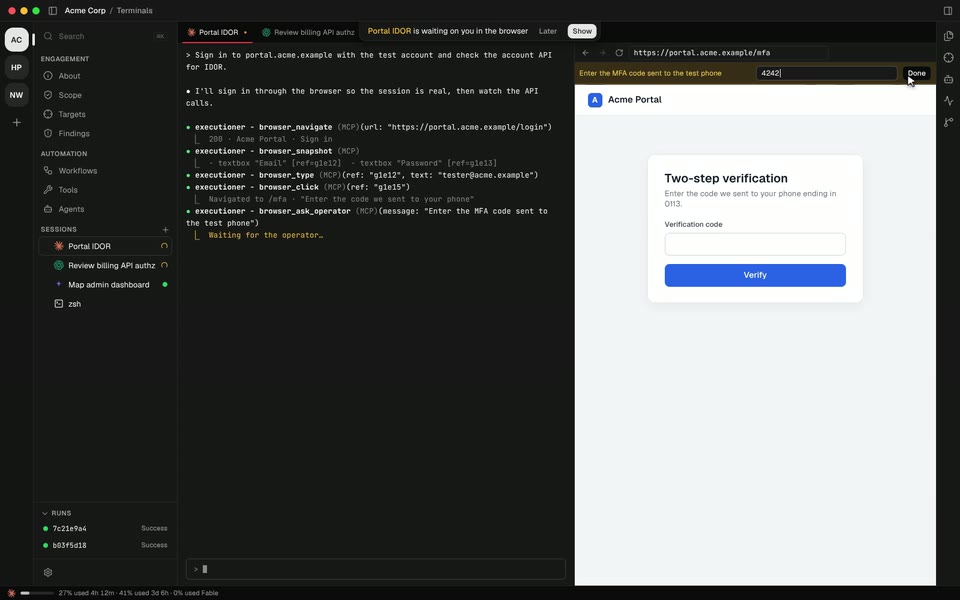
Agents get a real browser inside the engagement. It opens next to the agent's terminal, so you can watch every click and take the page back whenever you want. Each engagement's browser is isolated, with its own cookies and storage.
The agent can read the network traffic with the headers that were actually sent, rewrite requests, work inside iframes, emulate a location, language or user agent, upload files, and save screenshots as evidence. When it hits a CAPTCHA or an MFA code, it asks you in a bar above the page and waits until you're done.
Tell the assistant what you want in plain words: "when a new subdomain shows up, probe it, screenshot it and have Claude look for login pages." It proposes a graph, and once you've reviewed it, one click puts it on the canvas.
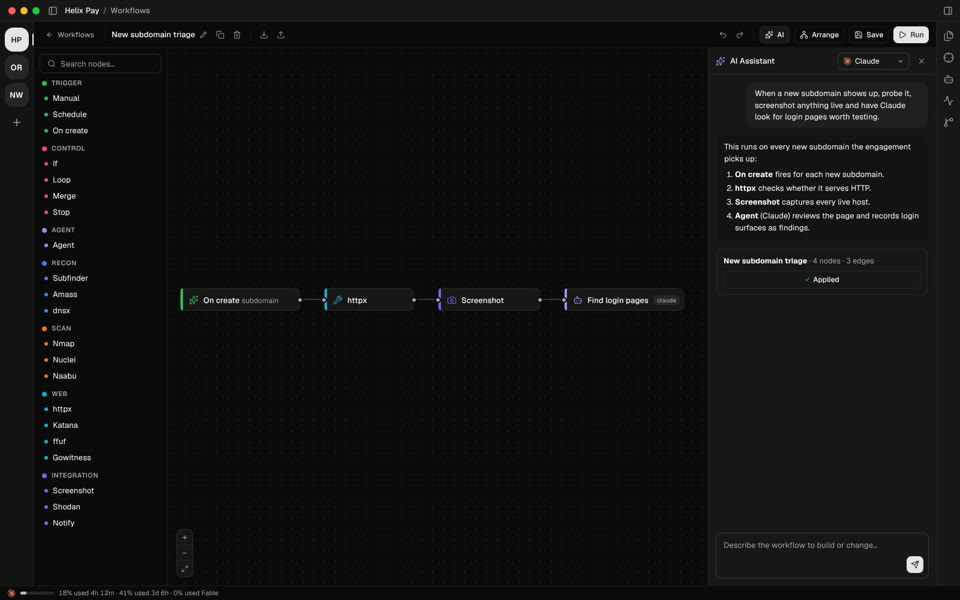
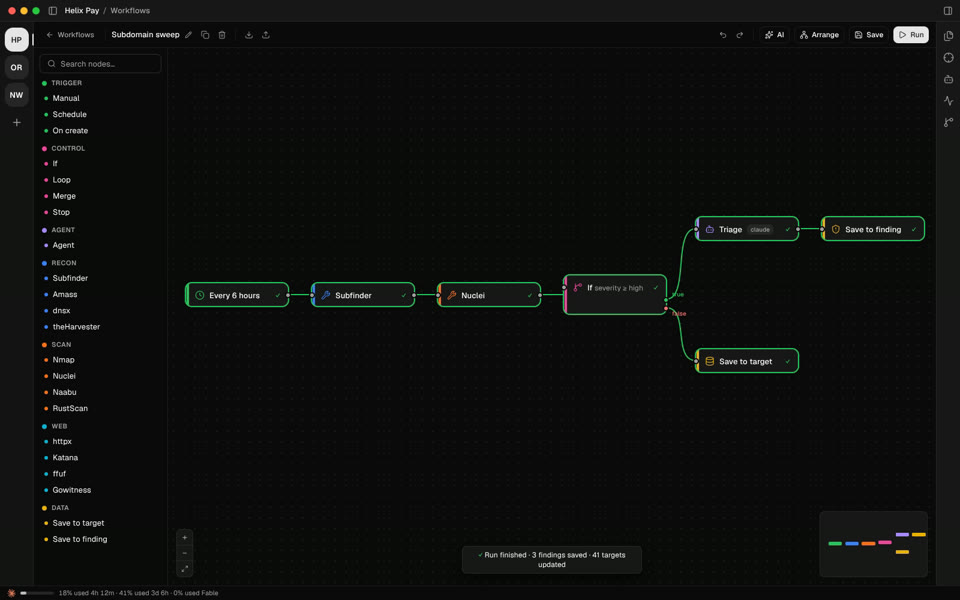
Chain tools, conditions, loops and AI agents on a canvas. Run them by hand, on a schedule, or every time a new target appears. Step through node by node when you want to see exactly what happens, and watch every result flow into targets and findings when you don't.
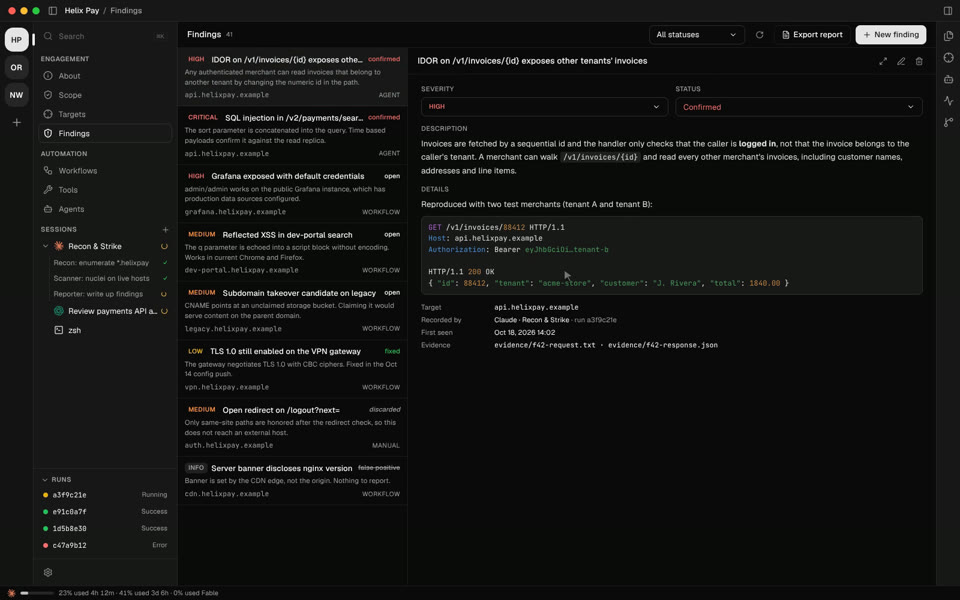
Agents, workflows and you all write to the same findings list. Each one carries severity, status, the target it hit, who recorded it and the raw request and response as evidence. Triage them in place, then export a report you can submit with one click.
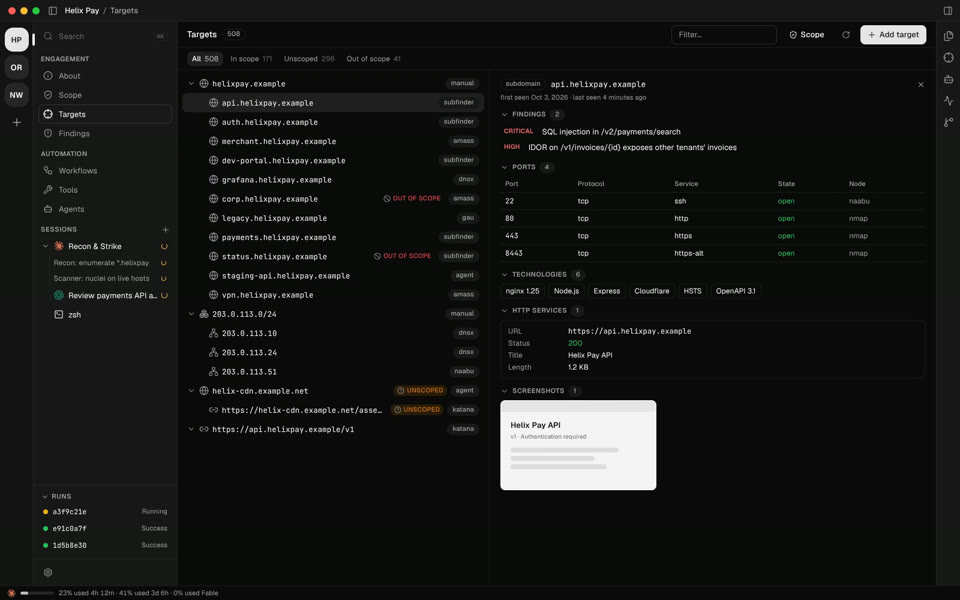
All your assets in one treeDomains, subdomains, IPs, ranges and URLs land in a single tree as tools and agents discover them. Open any target to see its ports, technologies, HTTP services, WHOIS, screenshots and every finding against it. |
 |
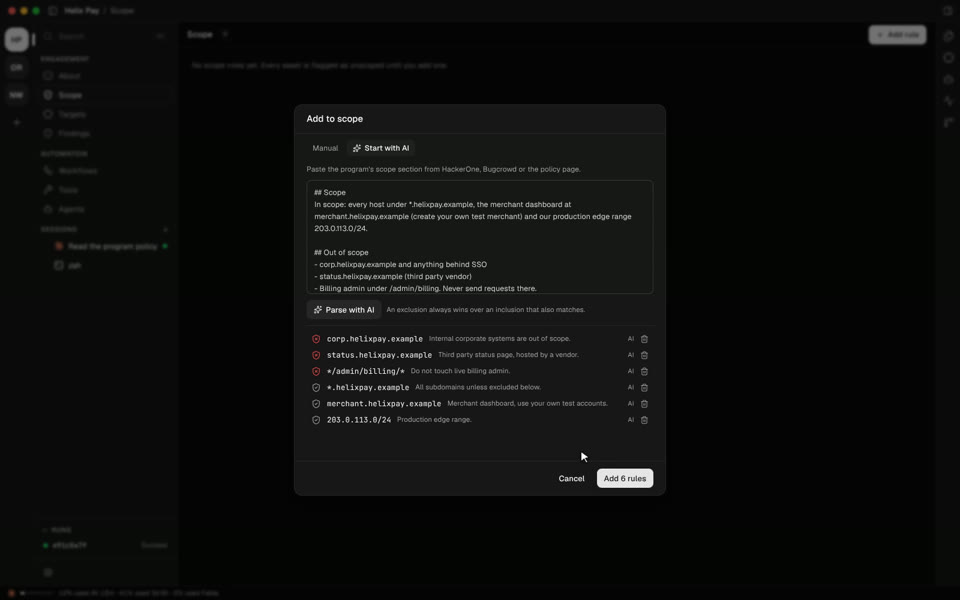
Scope from the program pagePaste the scope section from HackerOne, Bugcrowd or the policy page and let AI turn it into include and exclude rules. Every target is judged against them instantly, and out of scope assets are flagged before anything touches them. |
 |
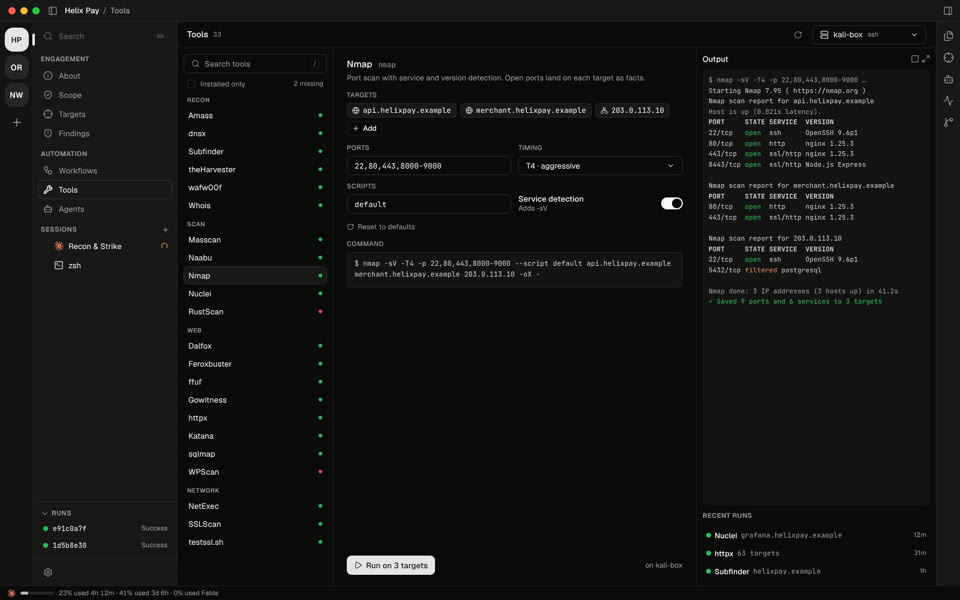
Run tools here or on a remote boxEach of the 33 tools gets a form, so you don't need the man page. Pick targets, set the flags, check the exact command, then run it on this machine, over SSH, or inside a Kali container. The output is parsed into targets. |
 |
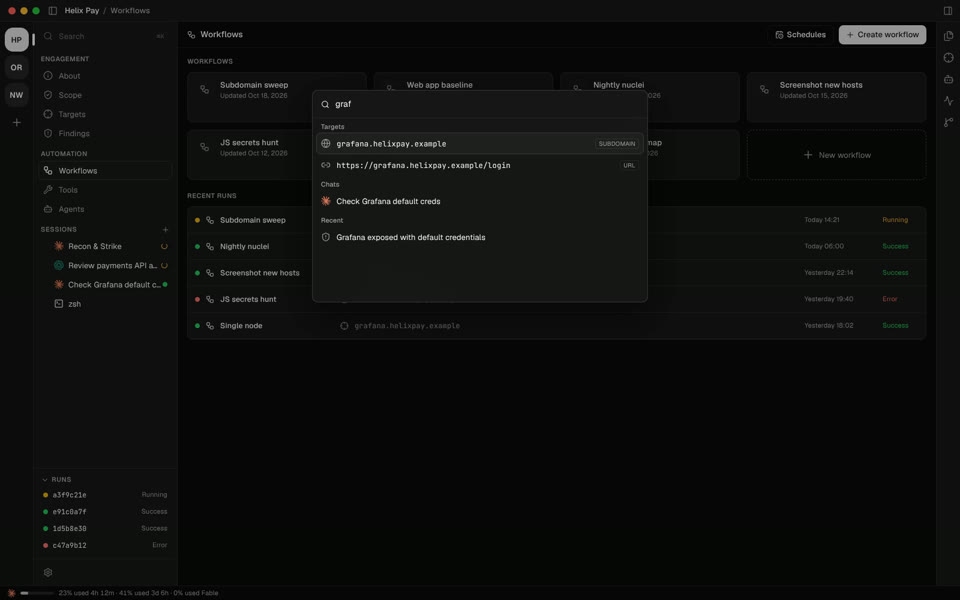
One keystroke from anythingPress ⌘ K to jump to any target, finding, chat or view. Keep a scratchpad floating over everything for the payloads and notes you don't want to lose. |
 |
Executioner has no backend, so client data, credentials and exploit drafts stay on your disk.
An engagement is a folder. Scope, targets, findings, workflows, notes and evidence all live inside it, so you can copy it, back it up, zip it for the client, or put it under version control and review changes in the built-in source control panel.
Executioner drives the agent CLIs you already have installed and logged in. Tools run locally, on a remote box over SSH, or inside a Docker container such as Kali or Parrot. API keys for integrations like Shodan and Censys are stored locally and referenced by name in workflows.
The network traffic comes from two places you control: your tools and the embedded browser talking to your targets, and each agent CLI talking to its own model provider under your account.
 Claude Code |
 Codex |
 Gemini |
 Cursor |
 OpenCode |
 Hermes |
Pick a default during onboarding and switch per session. You can also run Claude agent teams, save agents with your own prompts, and point every agent at a shared folder of skills.
| Recon | Web | Scanning | Network |
|---|---|---|---|
| Amass, dig, dnsx, Subfinder, theHarvester, wafw00f, WHOIS | Dalfox, Feroxbuster, ffuf, GAU, Gobuster, Gowitness, httpx, Katana, Nikto, sqlmap, WhatWeb, WPScan | Masscan, Naabu, Nmap, Nuclei, RustScan | Enum4linux, Hydra, MTR, Nbtscan, NetExec, Searchsploit, SSLScan, testssl.sh, Traceroute |
On the canvas they sit next to triggers (manual, schedule, on new target), logic (if, loop, merge, stop), AI agents, HTTP requests, screenshots, GeoIP, Shodan, Censys, notifications to Discord or Slack, and Python scripts. You can write your own nodes in Settings.
 |
 |
 |
 |
The install script downloads the latest release, checks it against the published checksums and installs it.
Linux and macOS
curl -fsSL https://raw.githubusercontent.com/dbx0/executioner/main/install.sh | bashOn Linux it adds Executioner to your app launcher and puts an executioner command in ~/.local/bin, without sudo. On macOS it installs Executioner.app into Applications.
Windows (PowerShell)
irm https://raw.githubusercontent.com/dbx0/executioner/main/install.ps1 | iex
Run the same command again to update. To remove it, run curl -fsSL https://raw.githubusercontent.com/dbx0/executioner/main/install.sh | bash -s -- --uninstall, or set $env:EXECUTIONER_UNINSTALL='1' before the Windows command.
You can also grab the build for your platform from the latest release:
| Platform | Download |
|---|---|
| macOS (Apple silicon and Intel) | .dmg |
| Windows | -setup.exe |
| Linux | .AppImage or .deb |
Then install at least one agent CLI (Claude Code, Codex, Gemini, Cursor, OpenCode or Hermes) and the tools you plan to run. The onboarding walks you through the rest and tells you which tools are missing.
Executioner is built for authorized security testing: bug bounty programs, pentests with a signed scope, CTFs and your own infrastructure. Only point it at systems you have explicit permission to test, and keep your scope rules up to date. You are responsible for what you run.
You need Node 24 and pnpm 12. mise install in the repo root pins both. On Linux, a C++ toolchain and Python are needed to compile the terminal module.
pnpm install
pnpm -r build
pnpm --filter @exe/desktop dev
Run the checks with pnpm test, pnpm lint and pnpm typecheck.
The README videos and screenshots are rendered from mockups with fictional data.
MIT. See LICENSE.
dbx0/executioner is a public repo on GitHub by dbx0. The agentic pentesting environment that lives on your machine. AI agent teams, visual workflows and your own tools, 100% local.
It declares the MIT license on GitHub.
Its maker tagged it for macOS, Windows and Linux, or as Docker or cross-platform. That is declared by the maker; Take My Repo has not tested it.
Open "Take it" on its page: Take My Repo writes an install plan for your machine and hands it to your AI agent (Claude Code, Codex or Cursor), which asks you before each step. Take My Repo has not tested it on any machine.
Its last change on GitHub was on 2026-11-18. Take My Repo does not judge from that whether it is maintained.
Nobody has reviewed it on Take My Repo yet, which says nothing about its quality.
The agent harness performance optimization system. Skills, instincts, memory, security, and research-first development for Claude Code, Codex, Opencode, Cursor and beyond.
A collection of various awesome lists for hackers, pentesters and security researchers
Open-source AI penetration testing tool to find and fix your app’s vulnerabilities.
Reverse engineer anything with agents, from app behavior down to native binaries.
A list of Free Software network services and web applications which can be hosted on your own servers