
rea
Reverse engineer anything with agents, from app behavior down to native binaries.
- 479k
- TypeScript
- MIT
- 33 min ago
A Library for easy implementation of Serial Bluetooth Classic and Low Energy on Android. 💙
Repo douglasjunior/AndroidBluetoothLibrary, read from GitHub 12 min ago. douglasjunior has not joined Take My Repo.
douglasjunior/AndroidBluetoothLibrary is a public repo on GitHub by douglasjunior. A Library for easy implementation of Serial Bluetooth Classic and Low Energy on Android. 💙. It declares the MIT license on GitHub. It is written mainly in Java, has 233 stars and last changed on 2026-11-01. Nobody has reviewed it on Take My Repo yet, which says nothing about its quality. Read from GitHub on 2026-11-26.
Reverse engineer anything with agents, from app behavior down to native binaries.
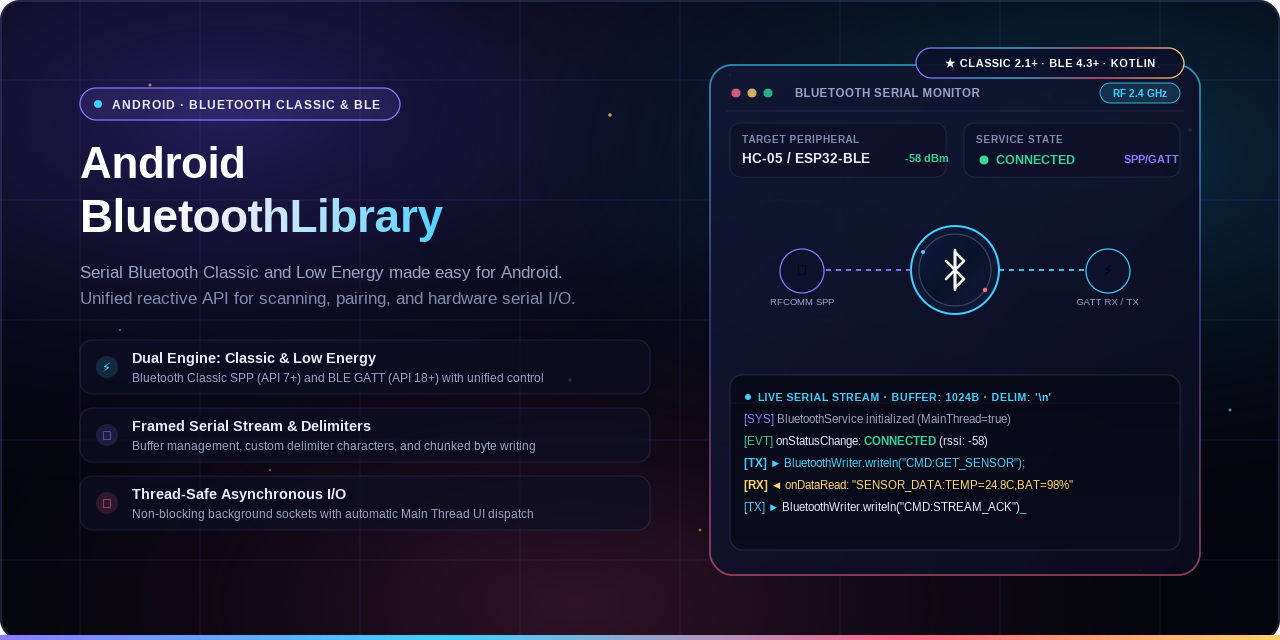
A lightweight, unified library for Serial Bluetooth Classic and Low Energy (BLE) communication on Android. 💙
Android Bluetooth Library provides a simple, robust, and unified solution for Serial Bluetooth Classic (SPP) and Bluetooth Low Energy (BLE GATT) communication on Android. Designed with asynchronous thread-safe I/O, automated delimiter-based packet framing, and seamless background-to-main thread dispatching.


Quick Start · Why · Compatibility · Installation · Configuration · Usage · API Reference · Troubleshooting · Contributing
build.gradle:allprojects {
repositories {
google()
mavenCentral()
maven { url "https://jitpack.io" }
}
}
build.gradle (choose Classic or Low Energy):dependencies {
// For Bluetooth Classic (API 7+)
implementation 'com.github.douglasjunior.AndroidBluetoothLibrary:BluetoothClassicLibrary:0.3.5'
// OR for Bluetooth Low Energy (API 18+)
// implementation 'com.github.douglasjunior.AndroidBluetoothLibrary:BluetoothLowEnergyLibrary:0.3.5'
}
Application class or main activity:BluetoothConfiguration config = new BluetoothConfiguration();
config.context = getApplicationContext();
config.bluetoothServiceClass = BluetoothClassicService.class; // Or BluetoothLeService.class
config.bufferSize = 1024;
config.characterDelimiter = '\n';
config.deviceName = "Your App Name";
config.callListenersInMainThread = true;
config.uuid = UUID.fromString("00001101-0000-1000-8000-00805f9b34fb"); // Standard SPP UUID
BluetoothService.init(config);
BluetoothService service = BluetoothService.getDefaultInstance();
BluetoothWriter writer = new BluetoothWriter(service);
// Send text terminated with the configured delimiter ('\n')
writer.writeln("Hello from Android!");
onDataRead upon reaching a custom delimiter (\n, \r, or custom bytes).onDataRead, onStatusChange, onDataWrite, onDeviceName, onToast) are dispatched directly to Android's UI Main Thread by default.CONNECTION_PRIORITY_HIGH) for fast data transfers.BluetoothClassicLibrary or BluetoothLowEnergyLibrary) with zero heavy external dependencies.| Engine | Target | Minimum Android | Recommended Use Cases |
|---|---|---|---|
Bluetooth Classic (BluetoothClassicLibrary) |
RFCOMM / SPP | Android 2.1 (API 7+) | Arduino HC-05/HC-06, thermal receipt printers, barcode scanners, ELM327 OBD-II |
Bluetooth Low Energy (BluetoothLowEnergyLibrary) |
GATT Client | Android 4.3 (API 18+) | Nordic nRF, ESP32, HM-10, fitness trackers, smart home sensors, low-power IoT |
Add the JitPack repository URL in your root build.gradle file at the end of repositories:
allprojects {
    repositories {
        google()
        mavenCentral()
        maven { url "https://jitpack.io" }
    }
}
[!NOTE] If your project uses Gradle 7+ with
dependencyResolutionManagementinsettings.gradle, add themaven { url "https://jitpack.io" }entry insiderepositoriesModeblock instead.
Add the module dependency in your app module's build.gradle:
dependencies {
    implementation 'com.github.douglasjunior.AndroidBluetoothLibrary:BluetoothClassicLibrary:0.3.5'
}
dependencies {
    implementation 'com.github.douglasjunior.AndroidBluetoothLibrary:BluetoothLowEnergyLibrary:0.3.5'
}
Add the required permissions to your AndroidManifest.xml:
<manifest xmlns:android="http://schemas.android.com/apk/res/android"
    package="your.package.name">

    <!-- Basic Bluetooth permissions -->
    <uses-permission android:name="android.permission.BLUETOOTH" />
    <uses-permission android:name="android.permission.BLUETOOTH_ADMIN" />
    <uses-permission android:name="android.permission.BLUETOOTH_PRIVILEGED" />

    <!-- Required for Bluetooth device scanning (Android 6.0+) -->
    <uses-permission android:name="android.permission.ACCESS_COARSE_LOCATION" />

    <!-- Optional: fine location for high accuracy scanning -->
    <uses-permission android:name="android.permission.ACCESS_FINE_LOCATION" />

</manifest>
[!IMPORTANT] Location Permission for Bluetooth Scanning: Starting with Android 6.0 (API 23), Android requires runtime location permission to detect nearby Bluetooth devices. See Troubleshooting for details.
Initialize the library once in your Application.onCreate() or before using any Bluetooth services.
import com.github.douglasjunior.bluetoothclassiclibrary.BluetoothClassicService;
import com.github.douglasjunior.bluetoothclassiclibrary.BluetoothConfiguration;
import com.github.douglasjunior.bluetoothclassiclibrary.BluetoothService;
import java.util.UUID;

BluetoothConfiguration config = new BluetoothConfiguration();
config.context = getApplicationContext();
config.bluetoothServiceClass = BluetoothClassicService.class;
config.bufferSize = 1024;
config.characterDelimiter = '\n';
config.deviceName = "My Android App";
config.callListenersInMainThread = true;

// Standard Serial Port Profile (SPP) UUID (Required for Classic)
config.uuid = UUID.fromString("00001101-0000-1000-8000-00805f9b34fb");

BluetoothService.init(config);
import android.bluetooth.BluetoothDevice;
import android.bluetooth.BluetoothGatt;
import com.github.douglasjunior.bluetoothclassiclibrary.BluetoothConfiguration;
import com.github.douglasjunior.bluetoothclassiclibrary.BluetoothService;
import com.github.douglasjunior.bluetoothlowenergylibrary.BluetoothLeService;
import java.util.UUID;

BluetoothConfiguration config = new BluetoothConfiguration();
config.context = getApplicationContext();
config.bluetoothServiceClass = BluetoothLeService.class;
config.bufferSize = 1024;
config.characterDelimiter = '\n';
config.deviceName = "My Android App";
config.callListenersInMainThread = true;

// Custom or standard GATT Service & Characteristic UUIDs (Required for BLE)
config.uuidService = UUID.fromString("e7810a71-73ae-499d-8c15-faa9aef0c3f2");
config.uuidCharacteristic = UUID.fromString("bef8d6c9-9c21-4c9e-b632-bd58c1009f9f");

// Transport preference for dual-mode devices
config.transport = BluetoothDevice.TRANSPORT_LE;

// Optional: Filter devices by UUID during scan (set null to scan all BLE devices)
config.uuid = null;

// Optional: Automatically request high throughput priority upon connection
config.connectionPriority = BluetoothGatt.CONNECTION_PRIORITY_HIGH;

BluetoothService.init(config);
val config = BluetoothConfiguration().apply {
    context = applicationContext
    bluetoothServiceClass = BluetoothClassicService::class.java // or BluetoothLeService::class.java
    bufferSize = 1024
    characterDelimiter = '\n'
    deviceName = "My Kotlin App"
    callListenersInMainThread = true
    uuid = UUID.fromString("00001101-0000-1000-8000-00805f9b34fb")
}

BluetoothService.init(config)
Once initialized via BluetoothService.init(config), retrieve the singleton anywhere in your app:
BluetoothService service = BluetoothService.getDefaultInstance();
Register OnBluetoothScanCallback to receive discovery events and start scanning:
service.setOnScanCallback(new BluetoothService.OnBluetoothScanCallback() {
    @Override
    public void onDeviceDiscovered(BluetoothDevice device, int rssi) {
        Log.d("Bluetooth", "Discovered: " + device.getName() + " [" + device.getAddress() + "] RSSI: " + rssi);
    }

    @Override
    public void onStartScan() {
        Log.d("Bluetooth", "Scan started");
    }

    @Override
    public void onStopScan() {
        Log.d("Bluetooth", "Scan finished");
    }
});

// Start scanning (BLE scans run for 10 seconds by default)
service.startScan();

// Stop scanning at any time
// service.stopScan();
Register OnBluetoothEventCallback to monitor connection state changes and incoming data:
service.setOnEventCallback(new BluetoothService.OnBluetoothEventCallback() {
    @Override
    public void onStatusChange(BluetoothStatus status) {
        // Status can be: NONE, CONNECTING, or CONNECTED
        Log.d("Bluetooth", "Status changed: " + status);
    }

    @Override
    public void onDeviceName(String deviceName) {
        Log.d("Bluetooth", "Connected device name: " + deviceName);
    }

    @Override
    public void onToast(String message) {
        Toast.makeText(context, message, Toast.LENGTH_SHORT).show();
    }

    @Override
    public void onDataRead(byte[] buffer, int length) {
        String message = new String(buffer, 0, length);
        Log.d("Bluetooth", "Received: " + message);
    }

    @Override
    public void onDataWrite(byte[] buffer) {
        Log.d("Bluetooth", "Data sent successfully");
    }
});

// Connect to a discovered or paired BluetoothDevice
service.connect(device);

// Disconnect when done
// service.disconnect();
The library provides a handy BluetoothWriter helper to write strings, numbers, characters, or line-delimited messages:
BluetoothWriter writer = new BluetoothWriter(service);

// Write text and automatically append characterDelimiter ('\n')
writer.writeln("CMD:READ_SENSORS");

// Write text without trailing delimiter
writer.write("RAW_DATA");

// Write integer or character
writer.write(42);
writer.write('A');

// Write raw byte array directly via service
service.write(new byte[]{ 0x02, 0x55, 0x03 });
For high-throughput BLE data transfer, request higher connection priority at runtime:
if (Build.VERSION.SDK_INT >= Build.VERSION_CODES.LOLLIPOP) {
    service.requestConnectionPriority(BluetoothGatt.CONNECTION_PRIORITY_HIGH);
}
Explore the full working sample applications in this repository:
Sample (features ESC/POS thermal printing, bitmap streaming, and device selection)SampleKotlin (Kotlin implementation of scanning and communication)BluetoothConfiguration| Property | Type | Description | Default |
|---|---|---|---|
bluetoothServiceClass |
Class<? extends BluetoothService> |
Service implementation class (BluetoothClassicService.class or BluetoothLeService.class). |
Required |
context |
Context |
Android Application context reference. | Required |
deviceName |
String |
Name of your application or device. | null |
bufferSize |
int |
Maximum bytes retained in the read buffer before triggering onDataRead. |
0 |
characterDelimiter |
char |
Delimiter character to frame complete packets. Triggers onDataRead. |
'\0' |
douglasjunior/AndroidBluetoothLibrary is a public repo on GitHub by douglasjunior. A Library for easy implementation of Serial Bluetooth Classic and Low Energy on Android. 💙.
It declares the MIT license on GitHub.
Its maker has not tagged a system, so it is unknown here. Its README says what it needs.
Open "Take it" on its page: Take My Repo writes an install plan for your machine and hands it to your AI agent (Claude Code, Codex or Cursor), which asks you before each step. Take My Repo has not tested it on any machine.
BRVAH:Powerful and flexible RecyclerAdapter
Flutter makes it easy and fast to build beautiful apps for mobile and beyond
f.k.a. Awesome ChatGPT Prompts. Share, discover, and collect prompts from the community. Free and open source — self-host for your organization with complete privacy.
Its last change on GitHub was on 2026-11-01. Take My Repo does not judge from that whether it is maintained.
Nobody has reviewed it on Take My Repo yet, which says nothing about its quality.
Take My Repo cannot say: it does not audit code and has not run AndroidBluetoothLibrary. What is known comes from GitHub. It declares the MIT license on GitHub. Its last change was on 2026-11-01. It has 233 stars, which measure popularity, not safety. Nobody has reviewed it on Take My Repo yet, which says nothing about its quality. Read the source before you run it. With "Take it", your AI agent shows each step and asks you before running it; README text is treated as data, not as instructions.


