three-mesh-bvh
A BVH implementation to speed up raycasting and enable spatial queries against three.js meshes.
- 3.6k
- JavaScript
- MIT
- 16 h ago
Real-time PathTracing with global illumination and progressive rendering, all on top of the Three.js WebGL framework. Click here for Live Demo: https://erichlof.github.io/THREE.js-PathTracing-Renderer/Geometry_Showcase.html
Repo erichlof/THREE.js-PathTracing-Renderer, read from GitHub 11 h ago. erichlof has not joined Take My Repo.
erichlof/THREE.js-PathTracing-Renderer is a public repo on GitHub by erichlof. Real-time PathTracing with global illumination and progressive rendering, all on top of the Three.js WebGL framework. Click here for Live Demo: https://erichlof.github.io/THREE.js-PathTracing-Renderer/Geometry_Showcase.html. It declares the CC0-1.0 license on GitHub. It is written mainly in GLSL, has 2,266 stars and last changed on 2026-11-18. Nobody has reviewed it on Take My Repo yet, which says nothing about its quality. Read from GitHub on 2026-11-24.
A BVH implementation to speed up raycasting and enable spatial queries against three.js meshes.
Real-time PathTracing with global illumination and progressive rendering, all on top of the Three.js WebGL framework.
Desktop: Mouse click anywhere to capture mouse, then the usual Mouse-move and WASD/QZ keys control 1st person camera. Mousewheel to zoom in and out. O and P keys toggle Orthographic and Perspective camera modes. Left/Right arrow keys control camera's aperture size (depth of field blur effect), while Up/Down arrow keys control the Focal point distance from the camera. ESC key to exit and return the mouse pointer.
Mobile: Swipe to rotate 1st person camera. The 4 Large Arrow buttons control camera movement. Horizontal pinch to zoom in and out. Vertical Pinch controls camera's aperture size (depth of field blur effect). The 2 smaller Up/Down Arrow buttons control the Focal point distance from the camera. Orthographic camera mode can be turned on/off through the GUI checkbox.
Geometry Showcase Demo demonstrates some primitive shapes for ray tracing, while showing off the renderer's capabilities - global illumination, true reflections/refractions, bounce lighting, soft shadows, caustics, and near-instant image convergence at 30-60fps, on any device!
Ocean and Sky Demo mixes ray tracing with ray marching and models an enormous calm ocean underneath a realistic physical sky. Now has more photo-realistic procedural clouds!
Billiard Table Demo shows support for loading image textures (i.e. .jpg .png) to be used for materials. The billiard table cloth and two types of wood textures are demonstrated.
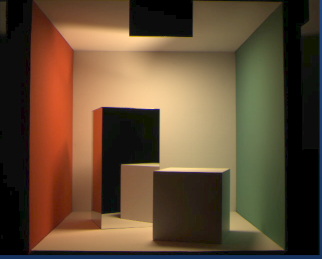
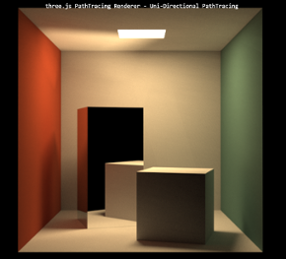
Cornell Box Demo This demo renders the famous old Cornell Box, but at 30-60 FPS - even on mobile!
For comparison, here is a real photograph of the original Cornell Box vs. a rendering with the three.js PathTracer:
Volumetric Rendering Demo renders objects inside a volume of dust/fog/etc.. Notice the cool volumetric caustics from the glass sphere on the left, rendered almost instantly!
Water Rendering Demo Renders photo-realistic water and simulates waves at 30-60 FPS. No triangle meshes are needed, as opposed to other traditional engines/renderers. The Cornell Box is rendered using standard path tracing, while the water surface is achieved through ray marching.
Light Shaft Demo demonstrates the rendering of volumetric light shafts (a.k.a. 'God rays') which occur when light sources are blocked everywhere except for the lit volume (light shaft). To be able to see these lit volumes vs. surrounding shadow volumes, there must be participating media like smoke, fog, atmospheric gases, etc.. This scene contains a thin, blueish fog.
Terrain Demo combines traditional raytracing with raymarching to render stunning outdoor environments in real time! Land is procedurally generated, can be altered with simple parameters. Total number of triangles processed for these worlds: 2! (for screen size quad) :-)
Arctic Circle Demo I was experimenting with my ray marching engine and what types of environments I could get out of it by just altering some parameters. When the scene first opens, it's almost like you're transported to the far north! The time of year for this demo is summer - notice how the sun never quite sets below the horizon.
Planet Demo (W.I.P.) takes raymarching and raytracing to the extreme and renders an entire Earth-like planet with physically-based atmosphere! Still a work in progress, the terrain is procedurely generated. Although the mountains/lakes are too repetitious (W.I.P.), this simulation demonstrates the power of path tracing: you can hover above the planet at high orbit (5000 Km altitude), then drop all the way down and land your camera right on top of a single rock or single lake water wave (1 meter). All planet/atmosphere measurements are to scale. The level of detail possible with raytracing is extraordinary!
BVH Point Light Source Demo Demonstrates the use of a point light to illuminate the famous Stanford Bunny (30,000+ triangles!). Normally a dark scene like this with a very bright small light would be very noisy, but thanks to randomized direct light targeting, the image converges almost instantly!
BVH Spot Light Source Demo A similar scene but this time a bright spotlight in the air is aimed at the Stanford Bunny, making him the star of the scene! The spotlight is made out of dark metal on the outside and a reflective metal on the inside. Notice the light falloff on the checkered floor.
Animated BVH Model Demo not only loads and renders a 15,000+ triangle GLTF model with correct PBR materials (albedo, emmisive, metallicRoughness, and normal maps), but it also translates and rotates the entire model and its BVH structure in real time! Loading and ray tracing bone animations for rigged models is still under investigation, but getting rigid models to move, rotate, and scale arbitrarily was a huge step forward for the pathtracing game engine!
HDRI Environment Demo shows how to load an equi-rectangular HDRI map to use as the scene's surrounding environment. This demo also uses the optimized BVH accelerator to load the famous Stanford Dragon model consisting of 100,000 triangles and renders the scene in real-time! I also added a material and color picker so you can instantly change the dragon's material type (glass, metal, ceramic) as well as its material color without missing a beat! Note: please allow 5-10 seconds to download the large HDR image
BVH Visualizer Demo Lets you peek under the hood of the BVH acceleration structure and see how the various axis-aligned bounding boxes are built all the way from the large surrounding root node box (level 0), to the small leaf node boxes (level 14+), to the individual triangles of the model that are contained within those leaf node boxes. This demo loads the famous Stanford Dragon (100,000 triangles!) and renders it as a purple light source inside yellow glass bounding boxes of its BVH.
GLTF Model Viewer This cool viewer not only loads models in glTF format, but also uses three.js' RGBE.Loader to load an equi-rectangular HDR image as the background and for global lighting. Many thanks to github user n2k3 for his awesome contributions to this viewer! He implemented a slick loading animation as well as a GUI panel that allows you to change the sun angle, sun intensity, sun color, hdr intensity, and hdr exposure.
BVH Model Instancing Demo This demo loads a glTF model, but instead of rendering its triangles as triangles, we replace each triangle with a brand new smaller instance of that model! For instance, the demo opens with the famous Utah Teapot model, containing ~1,000 triangle faces, and each of those faces is replaced with another small teapot with its own 1,000 triangles. So that means 1,000 tris * 1,000 meshes = ~1 Million polygons, each fully path traced in real time in the browser! The heavier Stanford Dragon model has 100,000 triangles - so 100,000 tris * 100,000 meshes = 10 Billion polygons in your browser, even on a cell phone! To add to the craziness, each of the smaller instances has its own unique transform matrix within its small AABB bounding box. That means that we can have thousands of rotated, positioned, and scaled models, all doing their own thing in real time! This is another testament to the power of WebGL2. Definitely pushes the limits of my humble BVH system to the max. ;-)
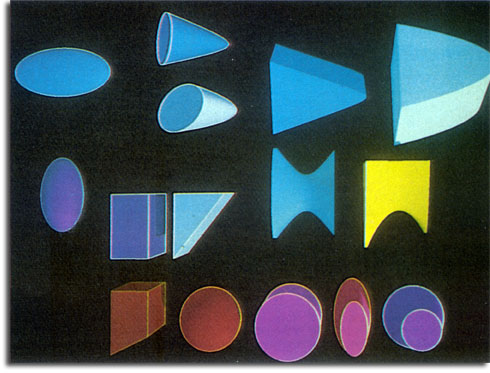
The above image was my inspiration to embark on the years-long (and still ongoing!) journey to implement a complete library of analytically ray-traced mathematical shapes that can be rendered in realtime inside a browser. The image is a computer screen grab from an old cinema magazine article showing how the vintage CG company MAGI made their iconic imagery for the 1982 movie, TRON. I saw that movie in theaters when it came out (I was 9 years old, ha) and at first I thought, since it was a Disney movie, that their artists had hand-drawn all the crazy scenes and sci-fi vehicles. As the end credits rolled though, it said 'computer imagery and animation by MAGI'. Mind blown! At 9 years old in the early 1980's, I hadn't seen anything like that in a movie - I couldn't even comprehend how they made all those cool scenes/vehicles inside of a computer! The film really peaked my interest in computer graphics and nearly 40 years later, I am happy to report that my quest to be able to render all the shapes that MAGI could has been largely successful! For those that are interested in the math, these are all quadric shapes - shapes that can be defined implicitly (i.e., a unit sphere: x2 + y2 + z2 - 1 = 0) and reduced to a quadratic equation in the ray's 't' value, which can be easily solved by a computer to quickly find the roots (t0, t1). Using these mathematical primitives, MAGI was able to construct all the cool vehicles featured in the movie. An interesting side note: they did not use triangles/polygon modeling like the CG industry does today - it was mainly these math shapes with pixel-perfect continuous-looking curves. Also noteworthy is that they used ray tracing to render the final animations. Each frame took 30 minutes to multiple hours. Well I'm happy to say that you won't have to wait that long to see an image now - my shapes render at 30-60 FPS inside your browser, even on mobile! ;-)
Quadric Geometry Demo showing different quadric (mathematical) ray tracing shapes. The 3D Quadric shapes family includes the most familiar mathematical 3D shapes: Spheres(ellipsoids), Cylinders, Cones, and also some shapes that are not as well-known: Paraboloids, Hyperboloids, Hyperbolic Paraboloids, etc.
Quadric Shapes Explorer This demo lets you explore the endless variety of quadric shapes. All quadrics are defined with a set of parameters (usually labeled A through J) that describe the type and look of the shape. I recently came across a little gem of a research paper entitled "Ray Tracing Arbitrary Objects on the GPU" by Wood et al. from back in 2004. In the paper the authors describe an efficient method of storing the quadric shape parameters (A-J) inside a tidy 4x4 matrix, which fits nicely in GPU memory. Any quadric shape imaginable can easily be constructed by adjusting the A-J parameters inside the 4x4 matrix. I implemented their technique for this demo. Taking it a step further, I provided a GUI menu list of standard shape presets (Sphere, Cone, Paraboloid, etc), so you can see how the more well-known shapes' parameters are set. I also turned these A-J quadric shape parameters into handy GUI sliders so you can easily play around with the parameters and watch the path-traced 3D shapes change right before your eyes!
Transforming Quadric Geometry Demo Using the game engine version of the three.js path tracer, this demo shows how to create multiple objects (a bunch of 'THREE.Object3d()'s, each with its own transform) on the JavaScript side when initializing three.js, and then send the objects over to the GPU for realtime pathtracing. The nice thing about having my pathtracer sitting on top of three.js is that I can use its built-in transformations such as Translate, Rotate, and Scale. Since these shapes are all quadrics made from different parameters, I also included clipping parameters so you can have partial shapes and can even animate the cutting process!
erichlof/THREE.js-PathTracing-Renderer is a public repo on GitHub by erichlof. Real-time PathTracing with global illumination and progressive rendering, all on top of the Three.js WebGL framework. Click here for Live Demo: https://erichlof.github.io/THREE.js-PathTracing-Renderer/Geometry_Showcase.html.
It declares the CC0-1.0 license on GitHub.
Main Web Site (Online Books)
The Postgres development platform. Supabase gives you a dedicated Postgres database to build your web, mobile, and AI applications.
real time face swap and one-click video deepfake with only a single image
Its maker tagged it for Windows. That is declared by the maker; Take My Repo has not tested it.
Open "Take it" on its page: Take My Repo writes an install plan for your machine and hands it to your AI agent (Claude Code, Codex or Cursor), which asks you before each step. Take My Repo has not tested it on any machine.
Its last change on GitHub was on 2026-11-18. GitHub counts 46 open issues and pull requests. Take My Repo does not judge from that whether it is maintained.
Nobody has reviewed it on Take My Repo yet, which says nothing about its quality.
Take My Repo cannot say: it does not audit code and has not run THREE.js-PathTracing-Renderer. What is known comes from GitHub. It declares the CC0-1.0 license on GitHub. Its last change was on 2026-11-18. It has 2,266 stars, which measure popularity, not safety. Nobody has reviewed it on Take My Repo yet, which says nothing about its quality. Read the source before you run it. With "Take it", your AI agent shows each step and asks you before running it; README text is treated as data, not as instructions.