ML-For-Beginners
12 weeks, 26 lessons, 52 quizzes, classic Machine Learning for all
- 92k
- Jupyter Notebook
- MIT
- 3 wk ago
The Harmony Python library: a research tool for psychologists to harmonise data and questionnaire items. Open source.
Repo harmonydata/harmony, read from GitHub 16 h ago. harmonydata has not joined Take My Repo.
harmonydata/harmony is a public repo on GitHub by harmonydata. The Harmony Python library: a research tool for psychologists to harmonise data and questionnaire items. Open source. It declares the MIT license on GitHub. It is written mainly in Python, has 67 stars and last changed on 2026-11-23. Nobody has reviewed it on Take My Repo yet, which says nothing about its quality. Read from GitHub on 2026-11-24.
12 weeks, 26 lessons, 52 quizzes, classic Machine Learning for all


You can also join our Discord server! If you found Harmony helpful, you can leave us a review!
Read our guide to contributing to Harmony here or read CONTRIBUTING.md.
You can run the walkthrough Python notebook in Google Colab with a single click:
You can also download an R markdown notebook to run in R Studio:
You can run the walkthrough R notebook in Google Colab with a single click: View the PDF documentation of the R package on CRAN
Check out our examples repository at https://github.com/harmonydata/harmony_examples
Harmony is a tool using AI which allows you to compare items from questionnaires and identify similar content. You can try Harmony at https://harmonydata.ac.uk/app and you can read our blog at https://harmonydata.ac.uk/blog/.
You can contact Harmony team at https://harmonydata.ac.uk/, or Thomas Wood at https://fastdatascience.com/.
Visit: https://harmonydata.ac.uk/app/
You can also visit our blog at https://harmonydata.ac.uk/
Download and install Java if you don't have it already. Download and install Apache Tika and run it on your computer https://tika.apache.org/download.html
java -jar tika-server-standard-2.3.0.jar
You need a Windows, Linux or Mac system with
You can install from PyPI.
pip install harmonydata
Harmony uses spaCy to help with text extraction from PDFs. spaCy models can be downloaded with the following command in Python:
import harmony
harmony.download_models()
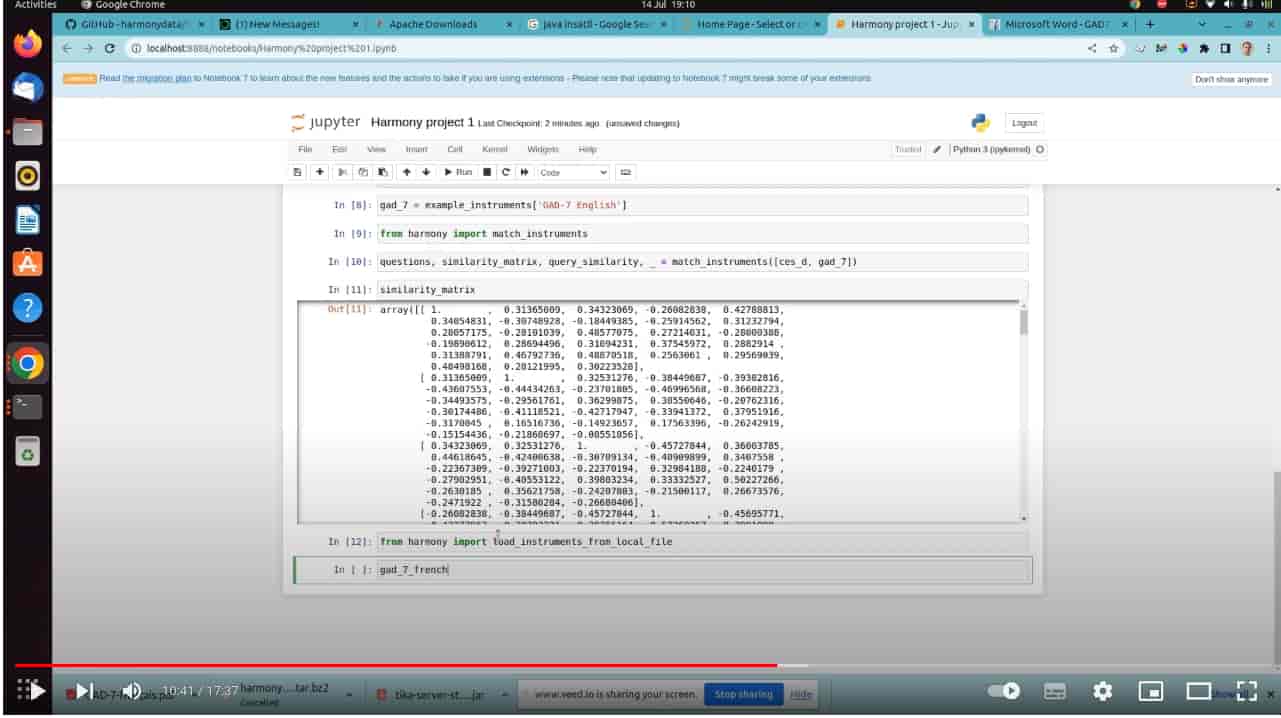
instruments = harmony.example_instruments["CES_D English"], harmony.example_instruments["GAD-7 Portuguese"]
match_response = harmony.match_instruments(instruments)

questions = match_response.questions
similarity = match_response.similarity_with_polarity
harmony.load_instruments_from_local_file("gad-7.pdf")
As an alternative to downloading models, you can set environment variables so that Harmony calls spaCy on a remote server. This is only necessary if you are making a server deployment of Harmony.
HARMONY_DATA_PATH - determines where data files are stored. Defaults to HOME DIRECTORY/harmonyHARMONY_NO_PARSING - set to 1 to import a lightweight variant of Harmony which doesn't support PDF parsing.HARMONY_NO_MATCHING - set to 1 to import a lightweight variant of Harmony which doesn't support matching.You can also create instruments quickly from a list of strings
from harmony import create_instrument_from_list, match_instruments
instrument1 = create_instrument_from_list(["I feel anxious", "I feel nervous"])
instrument2 = create_instrument_from_list(["I feel afraid", "I feel worried"])

match_response = match_instruments([instrument1, instrument2])
If you have a local file, you can load it into a list of Instrument instances:
from harmony import load_instruments_from_local_file
instruments = load_instruments_from_local_file("gad-7.pdf")
Harmony can import questionnaires directly from Google Forms URLs, allowing you to harmonise survey instruments that are hosted on Google Forms.
To use Google Forms integration, you need a Google API key:
export GOOGLE_FORMS_API_KEY="your-api-key-here"
Import questionnaires from Google Forms using the URL or form ID:
from harmony import convert_files_to_instruments
from harmony.schemas.requests.text import RawFile
from harmony.schemas.enums.file_types import FileType

# Create a RawFile with the Google Forms URL
file = RawFile(
    file_name="Customer Satisfaction Survey",
    file_type=FileType.google_forms,
    content="https://docs.google.com/forms/d/e/1FAIpQLSc.../viewform"
)

# Convert to Harmony instruments
instruments = convert_files_to_instruments([file])

# Access the questions
for instrument in instruments:
    print(f"Form: {instrument.instrument_name}")
    for question in instrument.questions:
        print(f"{question.question_no}. {question.question_text}")
        if question.options:
            print(f"   Options: {', '.join(question.options)}")
You can also use the form ID directly instead of the full URL:
file = RawFile(
    file_name="Survey",
    file_type=FileType.google_forms,
    content="1FAIpQLSc_form_id_here"
)
Harmony can extract the following Google Forms question types:
Note: The form must be publicly accessible or shared with the appropriate permissions for the API to access it.
Once you have some instruments, you can match them with each other with a call to match_instruments.
from harmony import match_instruments
match_response = match_instruments(instruments)
match_response.questions is a list of the questions passed to Harmony, in order.match_response.similarity_with_polarity is the similarity matrix returned by Harmony.match_response.query_similarity is the degree of similarity of each item to an optional query passed as argument to match_instruments.Harmony defaults to sentence-transformers/paraphrase-multilingual-MiniLM-L12-v2 (HuggingFace link). However you can use other sentence transformers from HuggingFace by setting the environment HARMONY_SENTENCE_TRANSFORMER_PATH before importing Harmony:
export HARMONY_SENTENCE_TRANSFORMER_PATH=sentence-transformers/distiluse-base-multilingual-cased-v2
Any word vector representation can be used by Harmony. The below example works for OpenAI's text-embedding-ada-002 model as of Apri 2025, provided you have create a paid OpenAI account. However, since LLMs are progressing rapidly, we have chosen not to integrate Harmony directly into the OpenAI client libraries, but instead allow you to pass Harmony any vectorisation function of your choice.
import numpy as np
from harmony import match_instruments_with_function, example_instruments
from openai import OpenAI

client = OpenAI()
model_name = "text-embedding-ada-002"
def convert_texts_to_vector(texts):
    vectors = client.embeddings.create(input = texts, model=model_name).data
    return np.asarray([vectors[i].embedding for i in range(len(vectors))])
instruments = example_instruments["CES_D English"], example_instruments["GAD-7 Portuguese"]
match_response = match_instruments_with_function(instruments, None, convert_texts_to_vector)
Download and install Docker:
Open a Terminal and run
docker run -p 8000:80 harmonydata/harmonyapi
Then go to http://localhost:8000 in your browser to see the API.
You can now install and run the front end locally: https://www.youtube.com/watch?v=1xp3Uh6dptg
Visit: https://github.com/harmonydata/harmonyapi
harmonydata/harmony is a public repo on GitHub by harmonydata. The Harmony Python library: a research tool for psychologists to harmonise data and questionnaire items. Open source.
It declares the MIT license on GitHub.
Its maker tagged it for macOS, Windows and Linux, or as Docker or cross-platform. That is declared by the maker; Take My Repo has not tested it.
Open "Take it" on its page: Take My Repo writes an install plan for your machine and hands it to your AI agent (Claude Code, Codex or Cursor), which asks you before each step. Take My Repo has not tested it on any machine.
🍙 A curated list of my favorite visual novels for Android and Steam Deck
Bring data to life with SVG, Canvas and HTML. :bar_chart::chart_with_upwards_trend::tada:
⛳️ PASS: Salesforce Certified Data Cloud Consultant by learning based on our Questions & Answers (Q&A) Practice Tests Exams.
The 30 Days of Python programming challenge is a step-by-step guide to learn the Python programming language in 30 days. This challenge may take more than 100 days. Follow your own pace. These videos may help too: https://www.youtube.com/channel/UC7PNRuno1rzYPb1xLa4yktw
TASC aids the harmonisation of aspects of GA4GH's various products that would otherwise prevent different products from being used together conveniently.
Its last change on GitHub was on 2026-11-23. GitHub counts 14 open issues and pull requests. Take My Repo does not judge from that whether it is maintained.
Nobody has reviewed it on Take My Repo yet, which says nothing about its quality.
Take My Repo cannot say: it does not audit code and has not run harmony. What is known comes from GitHub. It declares the MIT license on GitHub. Its last change was on 2026-11-23. It has 67 stars, which measure popularity, not safety. Nobody has reviewed it on Take My Repo yet, which says nothing about its quality. Read the source before you run it. With "Take it", your AI agent shows each step and asks you before running it; README text is treated as data, not as instructions.